other · tested june 2026

Best AI Video Background Removers (Tested June 2026)

Creators and editors who film in messy or inconsistent environments can use AI to remove or swap video backgrounds, but quality still depends on edge handling, motion stability, and how naturally replacement scenes blend. This page compares five tested tools on the same three real-world clips.

0
5 tools9 things we checked3 tests75 findings45 screenshots8 recordings12 min read
Our verdictTested June 2026 · 5/5 tools tested hands-on
#1 pick
DescriptNeeds work3.0/5 · 7 checks

Non-destructive background removal and layer-based replacement make this the strongest fit if you want to swap scenes without redoing the cutout.

The rest of the field

#2 Media.io· #3 FlexClip· #4 Bria.ai· #5 Cutout.Pro

The ranking

Scores are the average across every check we scored for that tool. Not every tool was scored on every check — the count is shown.

ToolScorePriceWhere it lands
#1DescriptNeeds work3.0/5
7 checks
Free · $24/moStrong layer-based background replacement, but edge and lighting polish lag
#2Media.ioNeeds work2.6/5
5 checks
Free · from $4.99/moStrong on automatic background removal, weaker on clean edges and realistic composites.
#3FlexClipNeeds work2.6/5
5 checks
Free · $11.99/moReliable automatic subject removal, but edge cleanup and fine-detail handling are the main weaknesses.
#4Bria.aiNeeds work2.6/5
7 checks
Good subject isolation and multi-person separation, but weak edge fidelity.
#5Cutout.ProNeeds work2.5/5
6 checks
Free · ~$5/moSimple automatic background removal with strong subject retention, but edge quality and stability are its weak spots.

What we checked

Every finding below is tied to one of these checks, and to the test that produced it. The number is how many of the 5 tools we recorded findings for.

Background options 5 toolsEdge quality 5 toolsFormat support 5 toolsHair and fine detail 5 toolsMotion handling 4 toolsLighting adaptation 3 toolsOutput resolution 2 toolsTemporal consistency 1 toolsProcessing speed no findings

Processing speed was scored, but we recorded no findings for it — so that score has nothing to show you.

What we tried

The same 3 tests were run on every tool.

Busy urban street walking videoIndoor talking-head videoOregon coast walking video
Read it

Descript

Needs work#1 of 5

Strong layer-based background replacement, but edge and lighting polish lag

Background optionsCapability check5/51 finding

This is a full compositing workflow, not just a single background picker: you can place the cutout over stock backdrops or your own video, image, GIF, or animated-loop layers, then change the backdrop without doing the removal again. That breadth earns the top score.

This is a capability we checked per tool — whether (and how well) it supports this — so it shows a support verdict and what we found, rather than media or an input→output pair.

Worked wellacross all testslink to this finding

Supports a non-destructive, layer-based background-replacement workflow: the cutout can sit over stock-library backdrops or uploaded video, image, GIF, and animated-loop assets, and backgrounds can be swapped without re-running Green Screen.

Edge quality2/53 findings

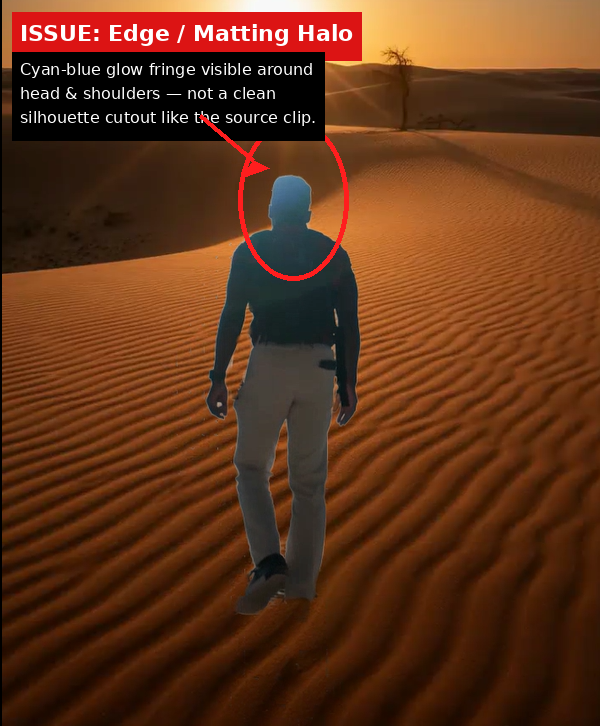
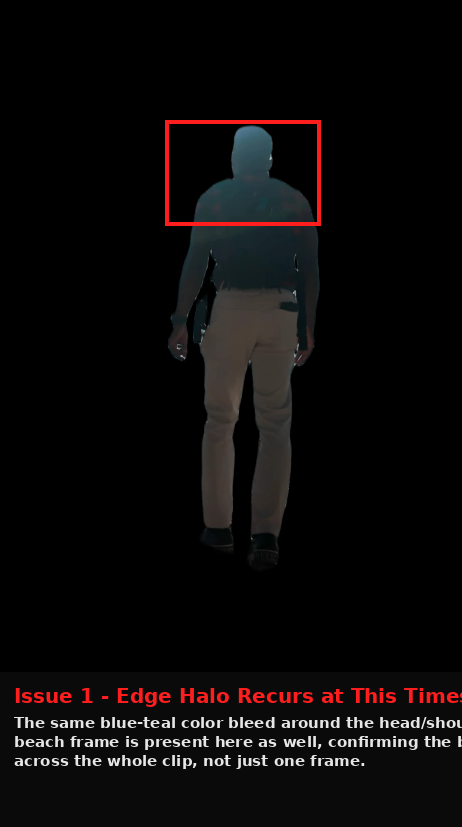
It usually isolates the subject, but the boundary is not consistently clean: one clip picked up a blue halo around the head and shoulders, and another softened the shoulder line into a feathered matte. That points to a recurring edge-matting weakness rather than a one-off blemish.

Struggledacross all testslink to this finding

Edge quality struggled, with visible matting artifacts such as cyan-blue halos and feathered, desaturated matte lines instead of clean, crisp boundaries.

Struggledwhen we tried: Oregon coast walking videolink to this finding

Can leave a visible cyan-blue halo around the head and shoulders instead of a clean silhouette cutout, with the fringe reading as a matting artifact.

Format supportCapability check4/51 finding

MP4 input and MP4 export were both confirmed, and the exported file stayed playable with the edits intact. That's solid format support, but the evidence only proves one common output type rather than a broad menu of input and export formats.

This is a capability we checked per tool — whether (and how well) it supports this — so it shows a support verdict and what we found, rather than media or an input→output pair.

Worked wellacross all testslink to this finding

The report says the tool exports MP4 video, and the hands-on tests were run on MP4 inputs; the completed edited project was exported as an MP4 that remained playable.

Hair and fine detail2/51 finding

Hair is where the cutout starts to look soft: the talking-head test lost flyaway strands and turned the hairline into a blurred halo. Because the problem shows up on the hardest details rather than the broad subject shape, this lands below average but not completely broken.

Struggledwhen we tried: Indoor talking-head videolink to this finding

Can soften hair detail into a blurred halo band, losing fine flyaway strands and producing a mushy edge against the new background.

Motion handling2/51 finding

In the moving street scene, the people stayed in place but lost some of the forward-stride feel. That means the cutout survives motion, yet the sense of movement degrades enough to count as a weak result on this criterion.

Struggledwhen we tried: Busy urban street walking videolink to this finding

Can flatten motion cues in a moving scene, making walking subjects read as more static or posed than the source footage.

Lighting adaptation2/55 findings

Lighting matching is a repeat weakness across all three scenes: the rim light points the wrong way on the beach clip, the talking head stays flat in a colored room, and the alley scene never wraps warm light around the jackets. Because the problem repeats in different setups, this is a systematic failure to blend subject and background lighting.

Failedacross all testslink to this finding

It consistently failed to adapt the subject lighting to the replacement environment, leaving warm rim light, ambient spill, and sunset lighting mismatched or missing.

Struggledwhen we tried: Indoor talking-head videolink to this finding

Can keep the subject lit with flat neutral light even when the replacement room has warm and cool ambient spill, so the face does not match the new environment lighting.

Output resolutionCapability check4/51 finding

The tool clearly supports high-quality export, including 4K on the higher tier, but the output quality depends on plan rather than being uniformly guaranteed. That makes it strong on resolution, just not an unqualified top-tier result.

This is a capability we checked per tool — whether (and how well) it supports this — so it shows a support verdict and what we found, rather than media or an input→output pair.

Worked wellacross all testslink to this finding

The pricing table explicitly lists 4K export on the Creator tier and 1080p watermark-free export on the Hobbyist tier, so export resolution is tier-dependent.

Media.io

Needs work#2 of 5

Strong on automatic background removal, weaker on clean edges and realistic composites.

Background optionsCapability check3/51 finding

The tool clearly does more than basic removal because a scene replacement was successfully produced, but the tested workflow does not prove a wide menu of background styles. It looks like a useful but only partially verified set of options, which fits a middle score.

This is a capability we checked per tool — whether (and how well) it supports this — so it shows a support verdict and what we found, rather than media or an input→output pair.

Mixedacross all testslink to this finding

The tested workflow supports a scene-swap background replacement mode in addition to automatic removal, but blur, solid-color, and transparent-alpha export were not independently verified.

Edge quality2/57 findings

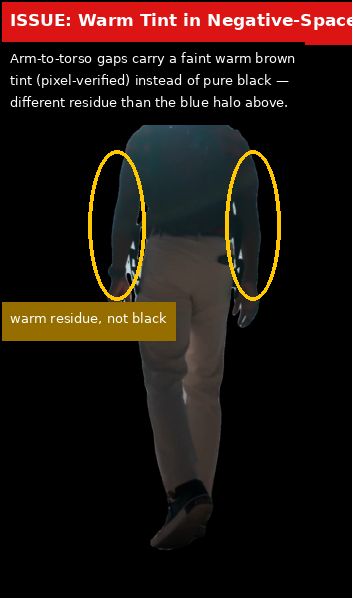
The cutouts keep the subjects recognizable, but the outline treatment is repeatedly soft and contaminated instead of crisp. Halo bleed, warm residue in negative space, and feathered body edges show up across more than one clip, so the tool lands below average on edge cleanliness.

Mixedacross all testslink to this finding

It can fully remove the background and keep the subject’s overall silhouette intact, but edges often soften into low-opacity feathering with a faint warm tint or a blue-white halo instead of a crisp cut.

Struggledwhen we tried: Oregon coast walking videolink to this finding

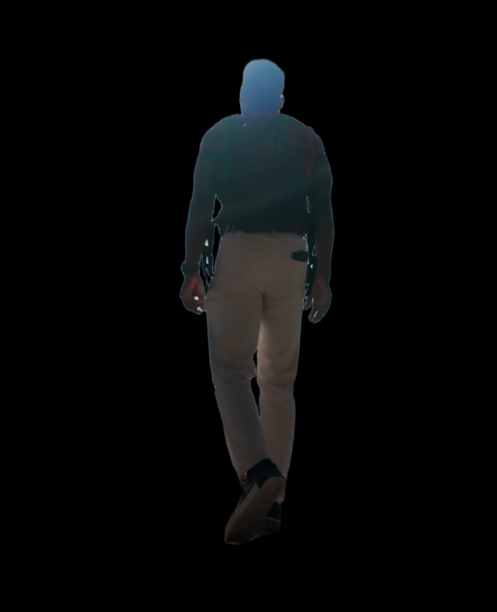
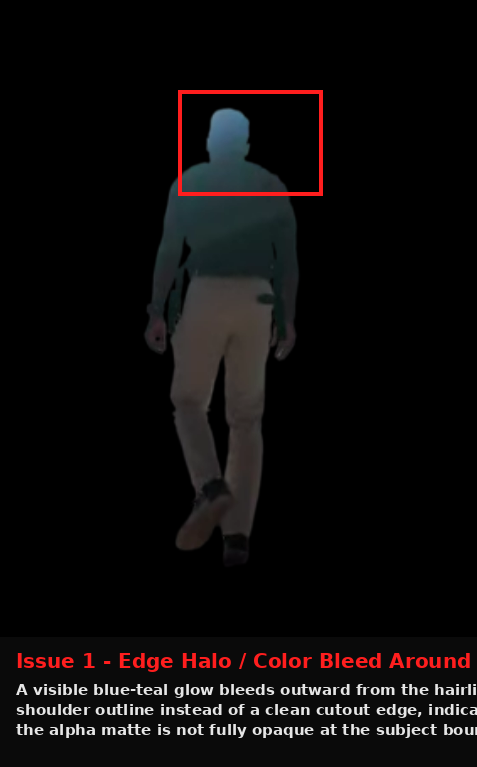
It can preserve a blue-white halo that extends beyond the head outline into the replacement background.

Format supportCapability check4/51 finding

The tested round-trip handled MP4 video cleanly and produced playable outputs every time, so the basic input/output path is solid. I can't give it the top score because other formats and any duration or limit rules were not checked.

This is a capability we checked per tool — whether (and how well) it supports this — so it shows a support verdict and what we found, rather than media or an input→output pair.

Worked wellacross all testslink to this finding

Across the 3 tested clips, the workflow accepted MP4 inputs and exported playable video outputs without breaking the edit; the report did not benchmark duration, watermark, or resolution limits.

Hair and fine detail2/53 findings

The hardest details are where the tool slips: hair comes out hard and slightly jagged, and fur loses its strand texture entirely. That pattern is consistent enough to place it in the struggling range rather than the middle of the pack.

Struggledacross all testslink to this finding

It struggled consistently with hair and fine detail, making hair boundaries look stiff and slightly jagged and blurring fine fur trim into a soft blob.

Struggledwhen we tried: Indoor talking-head videolink to this finding

Against a high-contrast replacement background, the hair boundary can become stiff and slightly jagged rather than blending organically.

Lighting adaptation2/55 findings

The replacement scenes can look plausible at a glance, but the subject usually keeps the original lighting and misses the shadows and contact cues that would make the new scene feel real. That leaves the composite noticeably unintegrated, so this is a weak area.

Failedacross all testslink to this finding

It failed to adapt lighting reliably: subjects could be left floating on a black background without contact shadow or reflection, grounding shadow and contact occlusion could be omitted, and the replacement scene could remain unlit so the face stayed flatly lit from the original shot instead of the darker studio mood.

Struggledwhen we tried: Indoor talking-head videolink to this finding

The tool can place a background element directly behind the subject’s head so it swallows part of the hair silhouette rather than framing it.

FlexClip

Needs work#3 of 5

Reliable automatic subject removal, but edge cleanup and fine-detail handling are the main weaknesses.

Background optionsCapability check3/51 finding

FlexClip advertises several background modes, but because those modes were not independently tested here, the tool earns credit for breadth of options without a higher score for proven real-world quality.

This is a capability we checked per tool — whether (and how well) it supports this — so it shows a support verdict and what we found, rather than media or an input→output pair.

Mixedacross all testslink to this finding

FlexClip documents transparent, color, stock photo, and AI Photo background options, but the report explicitly says these replacement modes were not independently tested, so their compositing quality remains unverified.

Edge quality2/56 findings

The cutouts are usable, but repeated halos, semi-transparency, softened hairlines, and ground-contact smudges show the edges are often visibly imperfect rather than cleanly separated, so this lands in the low range.

Struggledacross all testslink to this finding

Edge quality was consistently weak: the cutouts show recurring halos, smudges, semi-transparency, and soft edges across different subjects and scenes rather than clean boundaries.

Struggledwhen we tried: Busy urban street walking videolink to this finding

A blurred dark smudge persists under both subjects’ feet, showing a recurring ground-contact artifact instead of a clean cut at the shoes.

Format supportCapability check2/51 finding

It does export video, but the directly observed limitation was burned-in captions, and there was no evidence of broad input/output coverage or limit handling, so format support looks functional but narrow.

This is a capability we checked per tool — whether (and how well) it supports this — so it shows a support verdict and what we found, rather than media or an input→output pair.

Failedwhen we tried: Indoor talking-head videolink to this finding

The export flattens captions into the pixels instead of preserving them as a separate editable overlay layer, so post-export subtitle editing is not supported.

Hair and fine detail2/51 finding

Hair and hands both lose crisp structure, and the repeated hairline softness plus blurred fingers show the model smooths over the hardest details instead of resolving them.

Struggledwhen we tried: Indoor talking-head videolink to this finding

A raised hand is reduced to a soft blob with fingers not clearly separated, showing weak handling of fine hand anatomy in a gesture pose.

Motion handling4/54 findings

Walking and multi-person motion stayed tracked, but motion blur did soften a moving leg, so motion handling is strong overall with a visible weakness on fast limbs.

Mixedacross all testslink to this finding

It generally kept subjects locked through walking motion with no drift, limb loss, or bleed between people, but motion blur could soften moving limbs and degrade cutout quality on the mid-stride frame.

Struggledwhen we tried: Oregon coast walking videolink to this finding

The trailing leg’s outline becomes noticeably softer on the mid-stride frame, so motion blur degrades cutout quality on moving limbs.

Bria.ai

Needs work#4 of 5

Good subject isolation and multi-person separation, but weak edge fidelity.

Background optionsCapability check3/51 finding

There is documentation for more than plain removal, but the tested workflow only proved background removal, not the broader replacement modes or export variants, so this stays squarely in the middle.

This is a capability we checked per tool — whether (and how well) it supports this — so it shows a support verdict and what we found, rather than media or an input→output pair.

Mixedacross all testslink to this finding

Bria documents background replacement and generative editing, but this page independently verified only background removal and did not test any replacement mode such as image, video, blur, solid color, or alpha export.

Edge quality2/55 findings

The cutouts repeatedly kept visible halos and feathering instead of clean hard edges, so the result lands in the low range even though the subject shape is mostly preserved.

Struggledacross all testslink to this finding

The cutouts consistently showed soft haloing and residual glow around subject edges, including arms, torso, pant-leg edges, gaps between the arms and torso, and the head and jawline, rather than crisp binary mattes.

Struggledwhen we tried: Indoor talking-head videolink to this finding

The talking-head output keeps a soft blue fringe around the hair and jawline against black, showing persistent edge haloing.

Format supportCapability check4/51 finding

It clearly handled the tested MP4 inputs and returned playable video outputs, but the supported format range and advanced export limits were not actually proven, so this is good rather than perfect.

This is a capability we checked per tool — whether (and how well) it supports this — so it shows a support verdict and what we found, rather than media or an input→output pair.

Worked wellacross all testslink to this finding

The evaluated workflow produced playable video outputs for all three tested clips; the report did not independently verify codec details, alpha-channel support, or other export settings.

Hair and fine detail2/54 findings

Fine-detail preservation is consistently weak: small structures blur, thin lines disappear, and even non-background subject details get stripped away, which pushes this into the struggling range.

Struggledwhen we tried: Busy urban street walking videolink to this finding

The busy-street output softens and thins a faint earbud or phone cord until it is barely visible.

Struggledwhen we tried: Oregon coast walking videolink to this finding

Fine details on the Oregon-coast clip degrade into blobbed fingers and softened backpack-strap edges rather than separated, hard lines.

Motion handling4/53 findings

It held up well on moving and crowded footage, with no clear collapse when the subject walked or when two people occupied different depths, so this is near-strong despite the edge problems elsewhere.

Worked wellacross all testslink to this finding

The tool handled motion well, keeping masks clean on moving subjects in both a cluttered street scene and a coastal walking clip without mask bleed or losing the silhouette.

Worked wellwhen we tried: Busy urban street walking videolink to this finding

On the busy-street clip, the tool cleanly separated two people at different depths in a cluttered scene without merging them or bleeding one mask into the other.

Lighting adaptation2/51 finding

The cutouts do not carry enough grounding cues to look naturally placed in a new scene, so the composited result would read as floating rather than lit and anchored.

Struggledwhen we tried: Busy urban street walking videolink to this finding

The busy-street cutouts drop the subject shadow or footing cue, so both people would appear to float when composited onto a new background.

Output resolutionCapability check1/51 finding

The output does not preserve the source frame correctly and comes back with a mismatched size and rotation, which is a clear failure for resolution fidelity.

This is a capability we checked per tool — whether (and how well) it supports this — so it shows a support verdict and what we found, rather than media or an input→output pair.

Failedwhen we tried: Indoor talking-head videolink to this finding

The talking-head workflow returned a sideways export at 1611×1035 from a 623×745 portrait input, so the output aspect and orientation do not match the source.

Cutout.Pro

Needs work#5 of 5

Simple automatic background removal with strong subject retention, but edge quality and stability are its weak spots.

Background optionsCapability check3/52 findings

The tool appears to support a useful set of replacement modes on paper, but the actual replacement workflow was not checked end to end. That puts it in the middle: better than unsupported, but not strong enough to claim fully verified background options.

This is a capability we checked per tool — whether (and how well) it supports this — so it shows a support verdict and what we found, rather than media or an input→output pair.

Mixedacross all testslink to this finding

The report says the tool documents background replacement with solid colors and uploaded media such as images or videos, but that replacement workflow was not independently tested and transparent-background export remains unverified.

Mixedacross all testslink to this finding

The tool documentation cited in the report includes background replacement with colors and uploaded media, but the page explicitly says the compositing quality and lighting consistency of that workflow were not independently tested.

Edge quality2/55 findings

The cut edges were repeatedly imperfect in two different scenes, with haloing, fringe, and shadow residue showing that the alpha boundary was not being cleaned up reliably. That is stronger than a minor flaw, but not a full breakdown because the main subject still stayed intact.

Struggledacross all testslink to this finding

Edge quality is consistently weak: the tool can leave color bleed and halos, residual shadow smudges, pale fringes, and even a semi-transparent-looking matte instead of a clean opaque cut edge.

Struggledwhen we tried: Busy urban street walking videolink to this finding

The tool can leave residual ground-shadow smudges at the feet, rather than separating the shoe edge cleanly from the pavement.

Format supportCapability check4/52 findings

The tested workflow clearly handled MP4 input and WebM output, and the published format list is broad. It does not reach a perfect score because the wider format claims and the practical limits around preview and export were not fully verified in testing.

This is a capability we checked per tool — whether (and how well) it supports this — so it shows a support verdict and what we found, rather than media or an input→output pair.

Worked wellacross all testslink to this finding

The report lists a free video preview limit of 5 seconds at 360p, while full-export resolution limits were not independently verified.

Worked wellacross all testslink to this finding

Across the three tested clips, the workflow accepted MP4 uploads and produced WebM exports, and the report also lists MP4/PNG/GIF/WebM as output formats.

Hair and fine detail2/53 findings

The hardest small details are frequently simplified away, whether that is a hairline with flyaways or tiny clothing/accessory texture. That pattern shows the tool can keep the main silhouette, but it does not preserve delicate detail well enough for a higher score.

Struggledacross all testslink to this finding

It repeatedly smoothed over fine detail, flattening small garment and accessory textures and suppressing flyaway hair detail rather than preserving natural boundaries.

Struggledwhen we tried: Oregon coast walking videolink to this finding

The tool can collapse small garment and accessory details into a flat blob, losing visible wrist/strap texture and fine shirt detail.

Motion handling2/51 finding

When the scene is moving and visually busy, the tool starts treating background motion as part of the subject instead of separating it cleanly. With one clear failure in the hardest motion test, it earns a weak score, though the subject itself was not lost.

Struggledwhen we tried: Busy urban street walking videolink to this finding

The tool can bake moving background particles into the foreground mask, retaining snow-like speckles as static subject texture in motion-heavy footage.

Temporal consistency2/53 findings

The mask and framing do not stay visually stable from frame to frame, so the subject can appear to shrink or shift even when the motion is modest. Because this instability is repeated and measurable, the score lands in the low range rather than middling.

Struggledacross all testslink to this finding

The crop window was unstable frame to frame, with headroom, side margins, and sleeve edges changing inconsistently, so temporal consistency struggled throughout.

Struggledwhen we tried: Indoor talking-head videolink to this finding

The tool can shift its crop and scale frame to frame, with headroom changing from about 5px to 31px and side margins widening from 9px to 33px on the left and 17px to 45px on the right.

Final Take

Descript is the overall winner here, mainly because it has the strongest background-options score (5.0) and also solid output-resolution and format-support scores (4.0 each). The trade-off is that its polish is not where the scorecard is strongest: edge-quality, motion-handling, hair-and-fine-detail, and lighting-adaptation are all only 2.0, so it looks better suited to broad layer-based background replacement than to demanding cutout fidelity. Across the set, no tool stands out on edge quality or hair/fine detail; those scores are uniformly weak at 2.0 wherever they are present. Lighting adaptation is also thin across the board, with most tools at 2.0 or not scored at all. That means the evidence favors practical background-removal workflows more than high-end compositing precision. If motion handling matters more than background variety, FlexClip and Bria.ai are the better fits, since both score 4.0 on motion-handling. FlexClip is the cleaner choice of the two for general use because Bria.ai’s output-resolution is much lower at 1.0, even though Bria.ai is positioned as good for subject isolation and multi-person separation. FlexClip’s weaknesses remain edge cleanup and fine-detail handling. If you want straightforward automatic background removal and can live with weaker edges, Media.io and Cutout.Pro are the simpler options. Media.io is described as strong on automatic background removal but weak on clean edges and realistic composites. Cutout.Pro is notable for having the only temporal-consistency score in the set, but it is only 2.0 there, so it is not a strong stability standout; its edge, motion, and fine-detail scores are still 2.0. Bottom line: Descript wins overall for background replacement breadth and decent output support, while FlexClip is the main alternative when motion handling matters more, and Cutout.Pro is the most relevant if you specifically want a simple automatic removal workflow with at least some temporal-consistency evidence.

Tested as of June 2026 · Will be re-verified monthly

Similar Tools

The tools we tested for this use case — each card opens its full tested review.

Comments (0)

Please Log in to join the discussion.