
Hera Review: Prompt-Driven Motion Graphics Tested (2026)
Hera AI Review: AI Motion Graphics Generator Tested (2026)
Our take
- You want AI motion graphics generated directly from structured prompts
- Your videos need clear, readable animated typography
- You want motion graphics that reinforce the main message of a video
- You require advanced manual animation control or keyframe editing
Feature scores on this page: 9.0/10 (2 scored features)
Our take
Hera AI delivered the most reliable results among the tools tested for AI-generated motion graphics. In every prompt scenario, the output closely followed the instructions, maintained readable typography, and applied natural motion that reinforced the message of the video. Based on testing, the outputs were usable immediately without requiring additional editing.
In-Depth Review
Our detailed analysis of Hera — features, performance, and real-world testing.
Feature-by-Feature Breakdown
We tested each feature individually. Click any card to see inputs, outputs, and our observations.
Prompt-Driven Motion Graphics GenerationStrong - interprets prompt to create clean motion graphics9/10▾
Feature tested: Prompt-Driven Motion Graphics Generation
Result: Passed (9/10)
Verdict: Strong - interprets prompt to create clean motion graphics
Expected behavior: Hera AI claims to generate motion graphics directly from structured prompts, allowing creators to define visual layout, motion behavior, typography, and pacing in a single instruction.
Test case: Artifact → Video file
Input type: Artifact
Input used: Input artifact (Artifact): Create a high-end cinematic motion graphics data visualization showing a world population growth bar chart from 1950 to 2020, preserving exact chart structure, spacing, labels, grid lines, values, and proportions from the reference image. Use a dark navy-to-black gradient background with a soft vignette and faint horizontal dotted grid lines. Display the title “WORLD POPULATION GROWTH” at the top left in a bold modern sans-serif font, rendered in a metallic gold gradient with a subtle animated light sweep, and place the subtitle “1950 – 2020 (BILLIONS)” beneath it in smaller muted gold text. The Y-axis must range from 0B to 8B, labeled in gold with evenly spaced horizontal guide lines, while the X-axis shows the years 1950, 1960, 1970, 1980, 1990, 2000, 2010, 2020 in clean gold typography. Animate eight vertical bars rising smoothly from the baseline, each with rounded corners, a shiny golden gradient fill, subtle reflections, and soft glow edges, maintaining the exact data values 2.5, 3.0, 3.7, 4.4, 5.3, 6.1, 6.9, 7.8 displayed clearly above each bar in glowing gold numerals. Add gentle easing to all animations, slight parallax depth between background, grid, and bars, and a polished luxury-dashboard aesthetic. End on a stable final frame showing the complete chart with crisp readability, premium gold highlights, and smooth 4K, 60-FPS motion-graphics quality.
Observed output: Output artifact (Video file): Generated Video — Hera AI Output.mp4
Input artifact: Input artifact (Artifact): Create a high-end cinematic motion graphics data visualization showing a world population growth bar chart from 1950 to 2020, preserving exact chart structure, spacing, labels, grid lines, values, and proportions from the reference image. Use a dark navy-to-black gradient background with a soft vignette and faint horizontal dotted grid lines. Display the title “WORLD POPULATION GROWTH” at the top left in a bold modern sans-serif font, rendered in a metallic gold gradient with a subtle animated light sweep, and place the subtitle “1950 – 2020 (BILLIONS)” beneath it in smaller muted gold text. The Y-axis must range from 0B to 8B, labeled in gold with evenly spaced horizontal guide lines, while the X-axis shows the years 1950, 1960, 1970, 1980, 1990, 2000, 2010, 2020 in clean gold typography. Animate eight vertical bars rising smoothly from the baseline, each with rounded corners, a shiny golden gradient fill, subtle reflections, and soft glow edges, maintaining the exact data values 2.5, 3.0, 3.7, 4.4, 5.3, 6.1, 6.9, 7.8 displayed clearly above each bar in glowing gold numerals. Add gentle easing to all animations, slight parallax depth between background, grid, and bars, and a polished luxury-dashboard aesthetic. End on a stable final frame showing the complete chart with crisp readability, premium gold highlights, and smooth 4K, 60-FPS motion-graphics quality.
Output artifact: Output artifact (Video file): Generated Video — Hera AI Output.mp4
What changed: Artifact transformed into Video file
Test case: Artifact → Video file
Input type: Artifact
Input used: Input artifact (Artifact): Create a minimal motion graphic social media handle animation with a transparent background (alpha channel). First, a black rounded capsule shape appears at the center, small in size, then smoothly expands horizontally with soft ease-in-out motion. Once the capsule expansion completes, the Instagram logo fades in and slightly scales up inside the left side of the capsule. Immediately after that, the text “AI Demos” appears inside the capsule using a subtle fade-in or mask reveal (no right-to-left or sliding text transition). The animation should feel clean, modern, flat, and professional, with no bounce, no shake, and no unnecessary effects. Total duration should be 2–3 seconds, optimized for Reels, Shorts, and vlog overlays, with crisp edges and a fully transparent background for easy placement on any video.
Observed output: Output artifact (Video file): Generated Video — Hera AI Social Media.mp4
Input artifact: Input artifact (Artifact): Create a minimal motion graphic social media handle animation with a transparent background (alpha channel). First, a black rounded capsule shape appears at the center, small in size, then smoothly expands horizontally with soft ease-in-out motion. Once the capsule expansion completes, the Instagram logo fades in and slightly scales up inside the left side of the capsule. Immediately after that, the text “AI Demos” appears inside the capsule using a subtle fade-in or mask reveal (no right-to-left or sliding text transition). The animation should feel clean, modern, flat, and professional, with no bounce, no shake, and no unnecessary effects. Total duration should be 2–3 seconds, optimized for Reels, Shorts, and vlog overlays, with crisp edges and a fully transparent background for easy placement on any video.
Output artifact: Output artifact (Video file): Generated Video — Hera AI Social Media.mp4
What changed: Artifact transformed into Video file
Test case: Artifact → Video file
Input type: Artifact
Input used: Input artifact (Artifact): Create a clean search bar motion graphic animation with a transparent background (alpha channel). The animation starts with a small white rounded capsule appearing at the center, which then smoothly expands horizontally using soft ease-in-out motion. After the expansion completes, a minimal search icon appears on the left side inside the capsule with a gentle fade-in. Then, text is typed naturally (typing effect, character by character) inside the capsule reading “best tools to enhance video topics”, with a smooth cursor-like pacing, no sliding or bouncing text. The overall style should be modern, minimal, flat UI, with clean edges, subtle motion, no shadows, and no extra effects. Total duration should be 3–4 seconds, optimized for reels, shorts, and video overlays, exported with a fully transparent background for easy placement on any footage.
Observed output: Output artifact (Video file): Output — Hera AI Search Bar.mp4
Input artifact: Input artifact (Artifact): Create a clean search bar motion graphic animation with a transparent background (alpha channel). The animation starts with a small white rounded capsule appearing at the center, which then smoothly expands horizontally using soft ease-in-out motion. After the expansion completes, a minimal search icon appears on the left side inside the capsule with a gentle fade-in. Then, text is typed naturally (typing effect, character by character) inside the capsule reading “best tools to enhance video topics”, with a smooth cursor-like pacing, no sliding or bouncing text. The overall style should be modern, minimal, flat UI, with clean edges, subtle motion, no shadows, and no extra effects. Total duration should be 3–4 seconds, optimized for reels, shorts, and video overlays, exported with a fully transparent background for easy placement on any footage.
Output artifact: Output artifact (Video file): Output — Hera AI Search Bar.mp4
What changed: Artifact transformed into Video file
Why it matters / Conclusion: Directly generates motion graphics from structured prompts with control over layout, motion, typography, and pacing.
Hera AI claims to generate motion graphics directly from structured prompts, allowing creators to define visual layout, motion behavior, typography, and pacing in a single instruction.
Template SelectionStrong — template system enables fast customization with clean, production-ready motion graphics.9/10▾
Feature tested: Template Selection
Result: Passed (9/10)
Verdict: Strong — template system enables fast customization with clean, production-ready motion graphics.
Expected behavior: Offers 100+ customizable templates that users can select, remix, and refine to accelerate motion graphics creation, streamline ideation, maintain visual consistency across projects, and reduce manual setup time for repetitive design workflows.
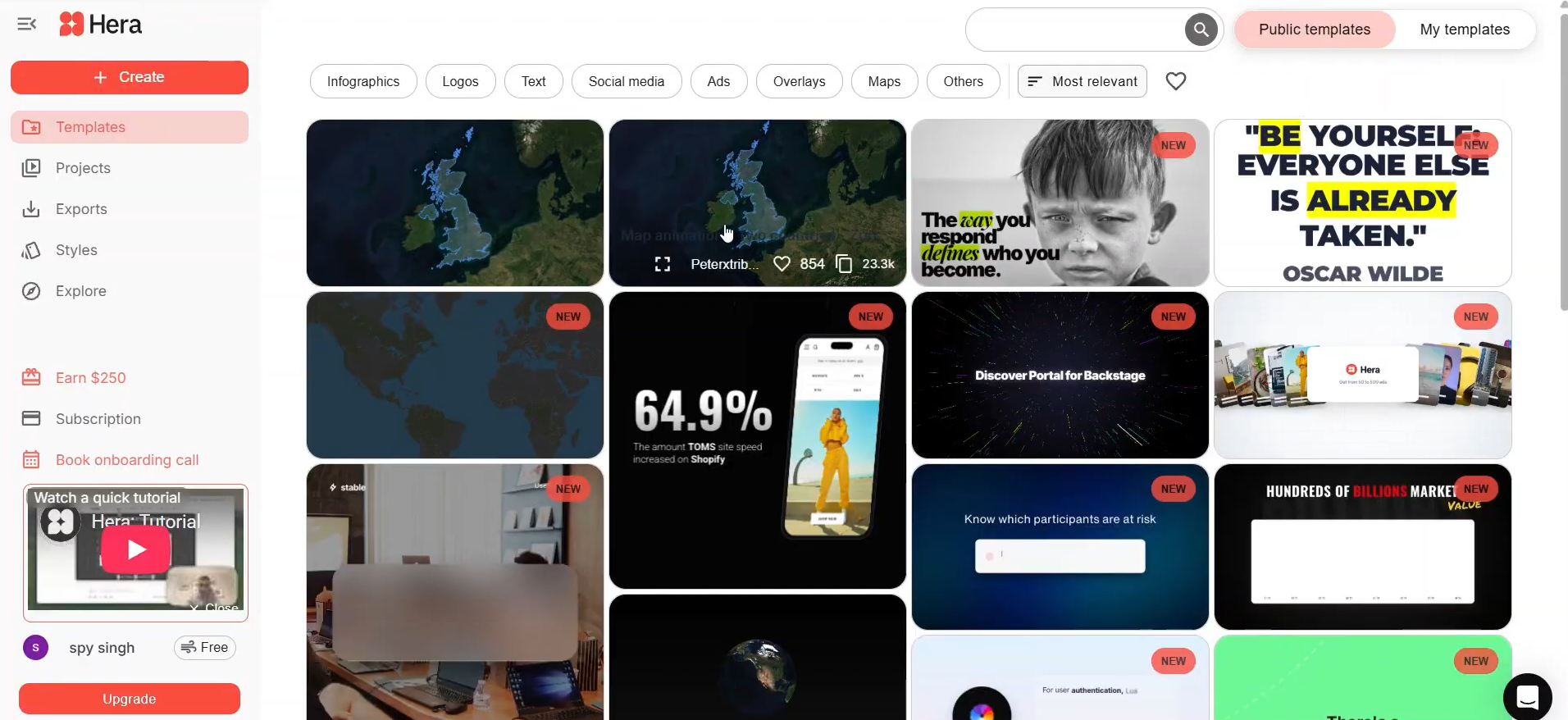
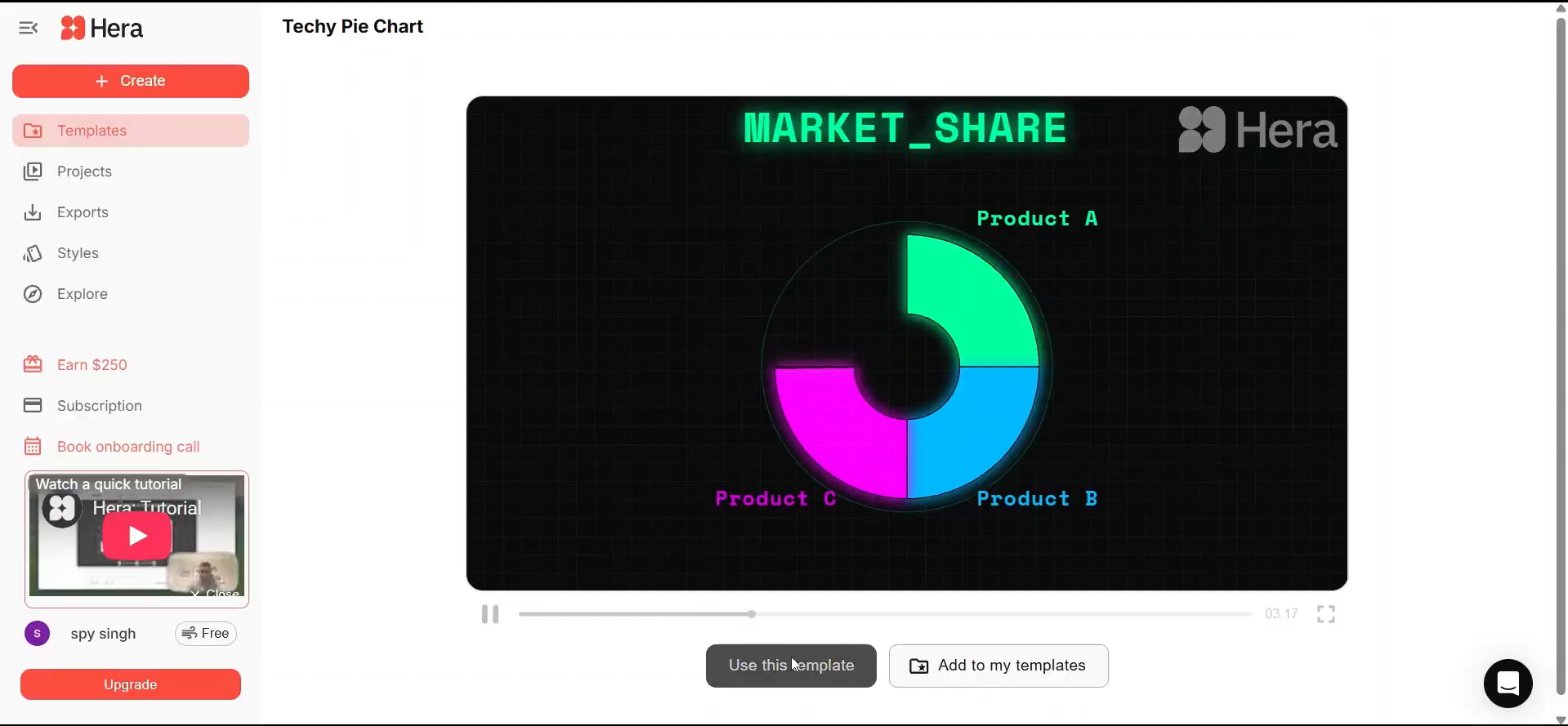
Test case: Image → Image
Input type: Image
Input used: Input artifact (Image): Search for templates — Screenshot 2026-05-02 174824.png
Observed output: Output artifact (Image): Fully customizable template ready for use — Screenshot 2026-05-02 174843.png
Input artifact: Input artifact (Image): Search for templates — Screenshot 2026-05-02 174824.png
Output artifact: Output artifact (Image): Fully customizable template ready for use — Screenshot 2026-05-02 174843.png
What changed: Image transformed into Image
Why it matters / Conclusion: Speeds up creation by combining ready-made templates with flexible AI-driven customization.
Offers 100+ customizable templates that users can select, remix, and refine to accelerate motion graphics creation, streamline ideation, maintain visual consistency across projects, and reduce manual setup time for repetitive design workflows.
Pricing & Access
Plans as of May 2026
Pricing as of May 2026
Is This Right For You?
A side-by-side guide based on our hands-on testing.
Banner Preview
How the embed badge will look on your site

Embed HTML
Copy this code to your website source
Quick Integration Guide
- 1Copy the HTML code block above.
- 2Paste it into your site's HTML or CMS editor.
- 3Banner appears instantly on your page.
- 4Links back to your tool profile here.
Similar Tools
Discover more AI tools like Hera to enhance your workflow.
Comments (0)
Need a custom AI solution for this use case?
If you are looking to build a custom motion graphics generation, template-based video creation, or prompt-driven video tool for your business or internal workflow, email us at contact@futuresmart.ai.
Found something inaccurate or missing? We try to keep our AI research accurate and useful. If you found outdated information, an issue, or have a suggestion, email us at collaborate@aidemos.com.