
Pika Review: Image-to-Cinematic Video Tool Tested (2026)
Fast single-image cinematic clips for portraits and products, but not exact camera choreography or sound.
Strong on simple shots, weaker on strict choreography
- You want a fast 5-second cinematic clip from one image
- Your subject is a portrait, stylized character, or product shot
- You can live without native audio and accept 480p-class output
- You need native sound
Feature scores on this page: 9.0/10 (1 scored feature)
Our take
Pika Labs is quick and often impressive for one-image clips, especially stylized portraits and product shots. It preserves identity and on-image text well in the best cases, but it is silent, capped at 5.03 seconds in this test, and can miss exact camera paths or break down when a foreground subject must stay intact during a close dolly. Best used as a fast visual preview tool, not as a precise final-delivery generator.
In-Depth Review
Our detailed analysis of Pika Labs — features, performance, and real-world testing.
Feature-by-Feature Breakdown
Still-Image to Cinematic Video AnimationStrong facial animation and identity preservation, but the camera can move more than requested on portrait briefs.9/10▾
Feature tested: Still-Image to Cinematic Video Animation
Result: Partial (9/10)
Verdict: Strong facial animation and identity preservation, but the camera can move more than requested on portrait briefs.
Expected behavior: Pika animates still images into short cinematic clips with motion, expressions, camera effects, and environmental detailing. The member cards were exercised on a portrait-style anime human scene, a photographed tiger scene, a busy street scene, a product bottle scene, a group toast scene, and a mix of 2D/3D/realistic inputs.
Test case: Image → Video file
Input type: Image
Input used: Input artifact (Image): Anime-style illustration of a girl peeking over clover leaves in a spring setting. — input-01.jpg
Observed output: Output artifact (Video file): The anime-style girl keeps clean geometry while blinking, lifting her head slightly, and settling into a soft smile; petals drift through the frame and the motion stays smooth and undistorted. — pika-input-01-output.mp4
Input artifact: Input artifact (Image): Anime-style illustration of a girl peeking over clover leaves in a spring setting. — input-01.jpg
Output artifact: Output artifact (Video file): The anime-style girl keeps clean geometry while blinking, lifting her head slightly, and settling into a soft smile; petals drift through the frame and the motion stays smooth and undistorted. — pika-input-01-output.mp4
What changed: Image transformed into Video file
Test case: Image → Video file
Input type: Image
Input used: Input artifact (Image): Realistic portrait of a woman seated at an outdoor café table. — input-04.webp
Observed output: Output artifact (Video file): The café portrait preserves identity, hair, and skin texture, but the clip turns the requested near-static setup into a larger smile reveal with a faster push-in and a quicker pose change than asked for. — pika-input-04-output.mp4
Input artifact: Input artifact (Image): Realistic portrait of a woman seated at an outdoor café table. — input-04.webp
Output artifact: Output artifact (Video file): The café portrait preserves identity, hair, and skin texture, but the clip turns the requested near-static setup into a larger smile reveal with a faster push-in and a quicker pose change than asked for. — pika-input-04-output.mp4
What changed: Image transformed into Video file
Test case: Image → Video file
Input type: Image
Input used: Input artifact (Image): Warm sunset street scene in an old market district with pedestrians, a donkey cart, palm trees, and buildings lining a narrow road. — input-02.png
Observed output: Output artifact (Video file): The market street dolly is coherent in the background and midground, with pedestrians, birds, and palm fronds moving naturally, but the donkey and cart at the center collapse into an indistinct dark mass by the end as the camera gets close. — pika-input-02-output.mp4
Input artifact: Input artifact (Image): Warm sunset street scene in an old market district with pedestrians, a donkey cart, palm trees, and buildings lining a narrow road. — input-02.png
Output artifact: Output artifact (Video file): The market street dolly is coherent in the background and midground, with pedestrians, birds, and palm fronds moving naturally, but the donkey and cart at the center collapse into an indistinct dark mass by the end as the camera gets close. — pika-input-02-output.mp4
What changed: Image transformed into Video file
Test case: Image → Video file
Input type: Image
Input used: Input artifact (Image): Five friends at a dinner table raising wine glasses in a toast. — input-05.webp
Observed output: Output artifact (Video file): The toast keeps hands and glasses physically plausible and each person reacts independently, but the camera starts wide and pushes inward instead of opening tight and drifting outward, ending with two guests cropped out. — pika-input-05-output.mp4
Input artifact: Input artifact (Image): Five friends at a dinner table raising wine glasses in a toast. — input-05.webp
Output artifact: Output artifact (Video file): The toast keeps hands and glasses physically plausible and each person reacts independently, but the camera starts wide and pushes inward instead of opening tight and drifting outward, ending with two guests cropped out. — pika-input-05-output.mp4
What changed: Image transformed into Video file
Test case: Image → Video file
Input type: Image
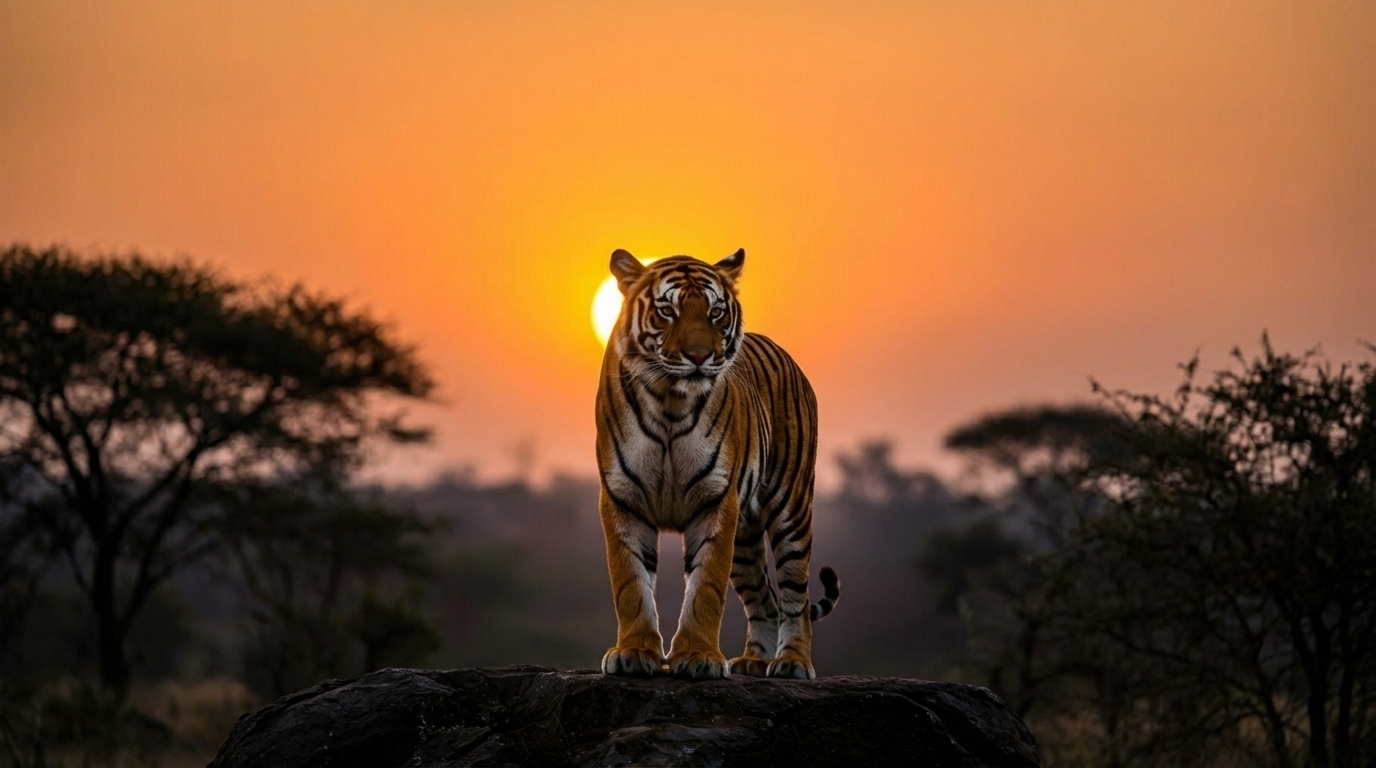
Input used: Input artifact (Image): Realistic photograph of a tiger backlit by a setting sun, standing on a rock. — input-03.jpeg
Observed output: Output artifact (Video file): The tiger transitions smoothly from standing to seated and ends in a roar-like pose with stable anatomy, while the background gains a small unrequested hazy band and the clip remains silent. — pika-input-03-output.mp4
Input artifact: Input artifact (Image): Realistic photograph of a tiger backlit by a setting sun, standing on a rock. — input-03.jpeg
Output artifact: Output artifact (Video file): The tiger transitions smoothly from standing to seated and ends in a roar-like pose with stable anatomy, while the background gains a small unrequested hazy band and the clip remains silent. — pika-input-03-output.mp4
What changed: Image transformed into Video file
Test case: Image → Video file
Input type: Image
Input used: Input artifact (Image): Product-style still life of a perfume bottle labeled Luméa Essence among oranges and splashing liquid. — input-06.webp
Observed output: Output artifact (Video file): The Luméa Essence label stays crisp and centered through motion and a lens flare, the splash settles cleanly, and the bottle remains undistorted, but the rotation is much smaller than requested. — pika-input-06-output.mp4
Input artifact: Input artifact (Image): Product-style still life of a perfume bottle labeled Luméa Essence among oranges and splashing liquid. — input-06.webp
Output artifact: Output artifact (Video file): The Luméa Essence label stays crisp and centered through motion and a lens flare, the splash settles cleanly, and the bottle remains undistorted, but the rotation is much smaller than requested. — pika-input-06-output.mp4
What changed: Image transformed into Video file
Why it matters / Conclusion: Strong facial animation and identity preservation, but the camera can move more than requested on portrait briefs.
Pika animates still images into short cinematic clips with motion, expressions, camera effects, and environmental detailing. The member cards were exercised on a portrait-style anime human scene, a photographed tiger scene, a busy street scene, a product bottle scene, a group toast scene, and a mix of 2D/3D/realistic inputs.





How it scored on the research's own criteria
The 8 evaluation dimensions from our hands-on research on Pika Labs, each judged from recorded runs on 3 test inputs — the same verdicts the ranking page ranks on.
held up partial failed not exercised by this input
| Criterion | Verdict | What the runs showed | Per input | Proof |
|---|---|---|---|---|
| Consistency Across Generations (Repeatability) | Mixed | We only have one take for each image, so there is no repeated run of the same input to compare against. The missing observation is a duplicate generation of the same scenario. | open proof ↗ | |
| Overall Motion Quality & Visual Fidelity | Strong4/5 | The motion is usually polished and physically believable, especially on the anime portrait and tiger clips, but the donkey breakdown in the moving street shot keeps this from a top score. It looks strong overall, with one clear structural failure on a close foreground subject rather than broad motion instability. | open proof ↗ | |
| Preservation of Faces, Objects, Text & Scene Structure | Strong4/5 | Faces and most scene elements stay stable, and even the tiger’s fine structure holds up well, but the donkey collapse shows that not every foreground object is equally safe once the camera moves in. That makes the tool solid on preservation overall, but not flawless enough for a 5. | open proof ↗ | |
| Prompt Accuracy & Cinematic Craft | Mixed3/5 | The tool can follow a simple cinematic beat very well, but once the prompt asks for more exact camera storytelling or multi-beat direction, it starts to drift. The mix of one very faithful clip and two partial misses lands it in the middle rather than the top tier. | open proof ↗ | |
| Audio & Export Readiness | Weak2/5 | It does reliably produce playable downloadable video files, but the complete lack of any native audio across every output is a major miss. Because the criterion asks for both usable audio and export readiness, this is only a partial pass. | open proof ↗ | |
| Controls Available for Iteration | Strong5/5 | The interface gives clear, practical levers for another attempt: model choice, image input, fixed duration, output size, and a visible credit cost. That is enough to steer repeat tries efficiently, even if finer settings were not opened in the capture. | open proof ↗ | |
| Overall Value for Money | Mixed3/5 | At 12 credits for five seconds, the output is affordable enough for quick previews and mood boards, but the silence and watermarking make it less compelling as a finished deliverable. That puts it in the middle: useful value, not exceptional value. | open proof ↗ | |
| Speed: Generation to Downloadable Output | Mixed | No generation timer or countdown was captured, so there is no basis for telling how long it took from submission to a downloadable clip. The missing observation is a visible timing readout during generation. | open proof ↗ |
Verdicts come verbatim from the study's recorded observations, never re-derived at render; a criterion with no recorded run shows Not exercised — this section cannot invent a score.
Pricing & Access
Plans as of April 2026 (Free plan tested)
Pricing checked April 2026. Rechecked quarterly.
Featured in Rankings
Independent rankings where Pika Labs was tested and rated.

Banner Preview
How the embed badge will look on your site

Embed HTML
Copy this code to your website source
Quick Integration Guide
- 1Copy the HTML code block above.
- 2Paste it into your site's HTML or CMS editor.
- 3Banner appears instantly on your page.
- 4Links back to your tool profile here.
Similar Tools
Discover more AI tools like Pika Labs to enhance your workflow.
Comments (0)
Need a custom AI solution for this use case?
If you are looking to build a custom image-to-video generation, cinematic clip creation, or AI video editing workflow for your business or internal workflow, email us at contact@futuresmart.ai.
Found something inaccurate or missing? We try to keep our AI research accurate and useful. If you found outdated information, an issue, or have a suggestion, email us at collaborate@aidemos.com.