
Remotion AI
Prompt-to-diagram animation for process flows, including branching and loop-backs, with MP4 export and editable TypeScript source, though first-pass polish still needs work.
Works on both test prompts, but visual cleanup is still needed
- You want to turn a plain-English process description into an animated diagram quickly.
- You need branching and loop-back flows represented, not just linear pipelines.
- You want MP4 output plus exportable TypeScript source.
- You need perfect icon rendering and connector polish on the first render.
Our take
Remotion AI successfully turned both test prompts into usable animated diagrams: a linear RAG ingestion flow and a branching human-in-the-loop workflow with a feedback loop. The editable TypeScript export remains a strong differentiator, but the repeated placeholder icons, the dim metadata branch, the dangling arrow, and the awkward placement mean the first render still needs cleanup.
In-Depth Review
Our detailed analysis of Remotion AI — features, performance, and real-world testing.
Feature-by-Feature Breakdown
Prompt-Based Animated Diagram GenerationCore capability works, but first-pass polish is uneven.▾
Feature tested: Prompt-Based Animated Diagram Generation
Result: Partial
Verdict: Core capability works, but first-pass polish is uneven.
Expected behavior: Turns a plain-English process prompt into an animated boxes-and-arrows diagram. It was exercised on the linear RAG ingestion pipeline and the human-in-the-loop workflow, producing the requested node order, labels, and branching.
Test case: Text prompt → Video file
Input type: Text prompt
Input used: Input artifact (Text prompt): INPUT 1
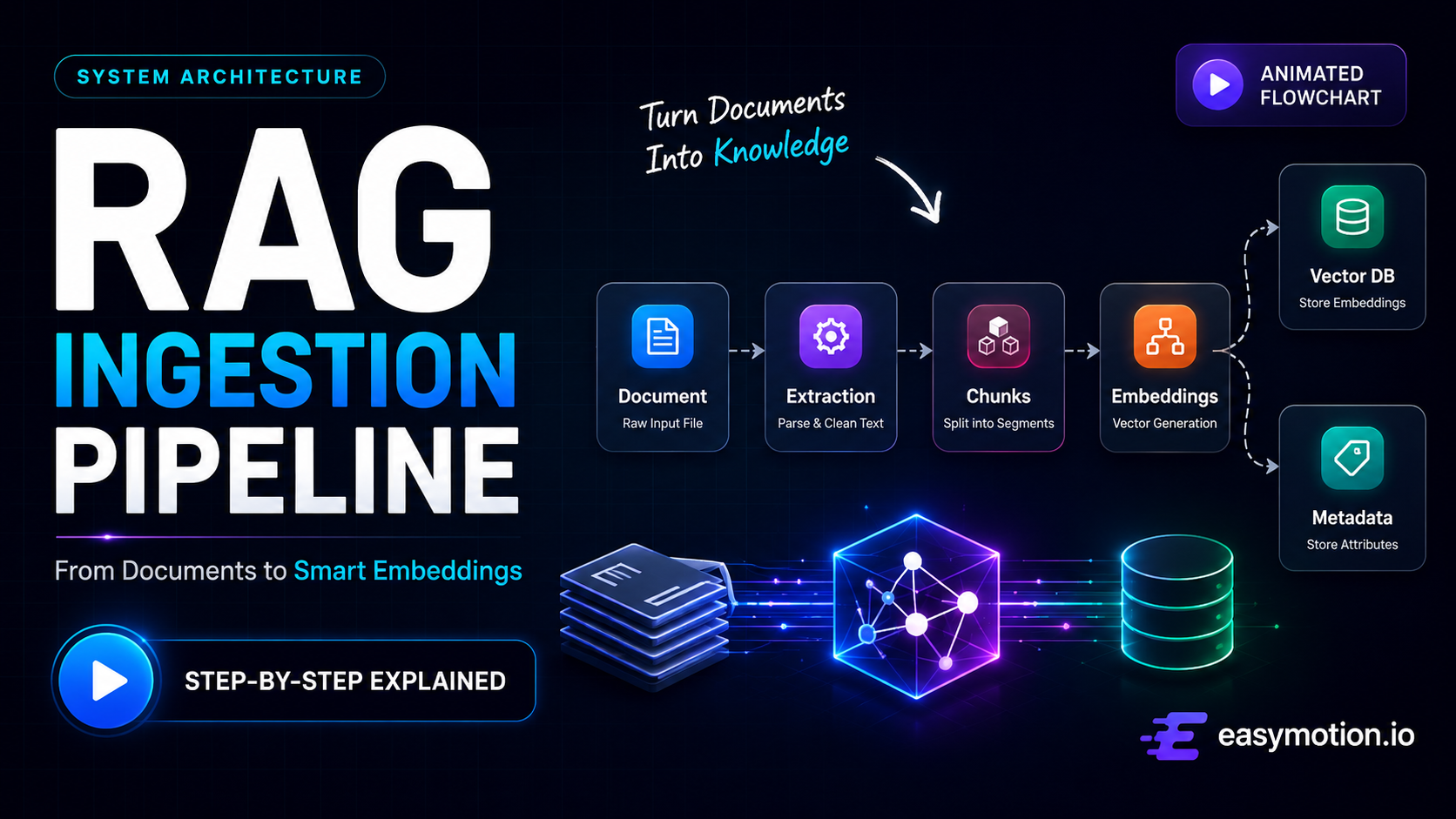
Observed output: Output artifact (Video file): The generated RAG Ingestion Pipeline matched the requested sequence and title, showing Document → Text Extraction → Chunking → Embeddings with a split into Vector DB and Metadata Store. The Vector DB branch was more visually prominent, the Metadata Store path was under-emphasized, and several nodes rendered empty placeholder icon glyphs instead of real icons. — RemotionAI output 1.mp4
Input artifact: Input artifact (Text prompt): INPUT 1
Output artifact: Output artifact (Video file): The generated RAG Ingestion Pipeline matched the requested sequence and title, showing Document → Text Extraction → Chunking → Embeddings with a split into Vector DB and Metadata Store. The Vector DB branch was more visually prominent, the Metadata Store path was under-emphasized, and several nodes rendered empty placeholder icon glyphs instead of real icons. — RemotionAI output 1.mp4
What changed: Text prompt transformed into Video file
Test case: Text prompt → Video file
Input type: Text prompt
Input used: Input artifact (Text prompt): INPUT 2
Observed output: Output artifact (Video file): The generated human-in-the-loop workflow matched the requested logic, showing User Input → AI Generates Answer → Human Review → Decision, with Approved leading to Final Output and Rejected feeding a Feedback Loop back to AI Generates Answer. The same placeholder icon glyph bug appeared again, and the connector from Human Review to the Decision diamond stopped short, leaving the arrow visually unfinished. — RemotionAI output 2.mp4
Input artifact: Input artifact (Text prompt): INPUT 2
Output artifact: Output artifact (Video file): The generated human-in-the-loop workflow matched the requested logic, showing User Input → AI Generates Answer → Human Review → Decision, with Approved leading to Final Output and Rejected feeding a Feedback Loop back to AI Generates Answer. The same placeholder icon glyph bug appeared again, and the connector from Human Review to the Decision diamond stopped short, leaving the arrow visually unfinished. — RemotionAI output 2.mp4
What changed: Text prompt transformed into Video file
Why it matters / Conclusion: The core text-to-diagram job worked on both prompts, but the first pass still needs cleanup because of repeated icon-glyph failures, a dim secondary branch in the RAG diagram, and one unfinished connector in the workflow diagram.
Turns a plain-English process prompt into an animated boxes-and-arrows diagram. It was exercised on the linear RAG ingestion pipeline and the human-in-the-loop workflow, producing the requested node order, labels, and branching.
Sequential Step AnimationThe motion sequencing makes the process easy to follow.▾
Feature tested: Sequential Step Animation
Result: Passed
Verdict: The motion sequencing makes the process easy to follow.
Expected behavior: Reveals nodes in order so viewers follow the process stage by stage instead of seeing a static diagram all at once. The tested RAG pipeline and human-in-the-loop outputs used staged appearance and motion to guide attention through the flow.
Test case: Text prompt → Video file
Input type: Text prompt
Input used: Input artifact (Text prompt): INPUT 1
Observed output: Output artifact (Video file): The RAG pipeline was revealed step by step with distinct stage coloring and motion that made the Document → Text Extraction → Chunking → Embeddings flow easy to follow, even though the metadata branch was dimmer than the Vector DB path. — RemotionAI output 1.mp4
Input artifact: Input artifact (Text prompt): INPUT 1
Output artifact: Output artifact (Video file): The RAG pipeline was revealed step by step with distinct stage coloring and motion that made the Document → Text Extraction → Chunking → Embeddings flow easy to follow, even though the metadata branch was dimmer than the Vector DB path. — RemotionAI output 1.mp4
What changed: Text prompt transformed into Video file
Test case: Text prompt → Video file
Input type: Text prompt
Input used: Input artifact (Text prompt): INPUT 2
Observed output: Output artifact (Video file): The workflow animation preserved the intended order of User Input → AI Generates Answer → Human Review → Decision, and the Approved/Rejected branches remained readable as the diagram progressed. — RemotionAI output 2.mp4
Input artifact: Input artifact (Text prompt): INPUT 2
Output artifact: Output artifact (Video file): The workflow animation preserved the intended order of User Input → AI Generates Answer → Human Review → Decision, and the Approved/Rejected branches remained readable as the diagram progressed. — RemotionAI output 2.mp4
What changed: Text prompt transformed into Video file
Why it matters / Conclusion: The animation sequencing is useful for process explainers because it makes each stage readable in order, not just as a static boxes-and-arrows layout.
Reveals nodes in order so viewers follow the process stage by stage instead of seeing a static diagram all at once. The tested RAG pipeline and human-in-the-loop outputs used staged appearance and motion to guide attention through the flow.
Branch and Loop-Back Flow RenderingBranch logic and loop-back behavior are confirmed, but the visual finish is uneven.▾
Feature tested: Branch and Loop-Back Flow Rendering
Result: Partial
Verdict: Branch logic and loop-back behavior are confirmed, but the visual finish is uneven.
Expected behavior: Renders conditional branches and loop-backs for approve/reject-style workflows. In testing, the rejected path looped back through Feedback Loop to AI Generates Answer while the approved path exited to Final Output.
Test case: Text prompt → Video file
Input type: Text prompt
Input used: Input artifact (Text prompt): INPUT 2
Observed output: Output artifact (Video file): The generated human-in-the-loop workflow matched the requested logic, showing User Input → AI Generates Answer → Human Review → Decision, with Approved leading to Final Output and Rejected feeding a Feedback Loop back to AI Generates Answer. The same placeholder icon glyph bug appeared again, and the connector from Human Review to the Decision diamond stopped short, leaving the arrow visually unfinished. — RemotionAI output 2.mp4
Input artifact: Input artifact (Text prompt): INPUT 2
Output artifact: Output artifact (Video file): The generated human-in-the-loop workflow matched the requested logic, showing User Input → AI Generates Answer → Human Review → Decision, with Approved leading to Final Output and Rejected feeding a Feedback Loop back to AI Generates Answer. The same placeholder icon glyph bug appeared again, and the connector from Human Review to the Decision diamond stopped short, leaving the arrow visually unfinished. — RemotionAI output 2.mp4
What changed: Text prompt transformed into Video file
Why it matters / Conclusion: Branch logic and loop-back behavior are now confirmed, but the connector into Decision and the recurring placeholder icons show that branching flows still need visual polish.
Renders conditional branches and loop-backs for approve/reject-style workflows. In testing, the rejected path looped back through Feedback Loop to AI Generates Answer while the approved path exited to Final Output.
Live Visual EditingUseful for cleanup after the first AI pass.▾
Feature tested: Live Visual Editing
Result: Passed
Verdict: Useful for cleanup after the first AI pass.
Expected behavior: Lets users refine text, colors, timing, and transitions after generation without writing code. It can be used after the initial render or as part of a plain-English re-prompt workflow.
Test case: Text prompt → Text prompt
Input type: Text prompt
Input used: Input artifact (Text prompt): EDITOR STEP
Observed output: Output artifact (Text prompt): Reported capability
Input artifact: Input artifact (Text prompt): EDITOR STEP
Output artifact: Output artifact (Text prompt): Reported capability
What changed: Text prompt transformed into Text prompt
Why it matters / Conclusion: This is the main recovery path when the AI gets the diagram close but the labels, colors, or pacing need cleanup.
Lets users refine text, colors, timing, and transitions after generation without writing code. It can be used after the initial render or as part of a plain-English re-prompt workflow.
Editable TypeScript ExportA strong differentiator for teams that want to own the result.▾
Feature tested: Editable TypeScript Export
Result: Passed
Verdict: A strong differentiator for teams that want to own the result.
Expected behavior: Exports the generated composition as editable TypeScript so teams can version-control and modify it in a Remotion-compatible environment.
Test case: Text prompt → Text prompt
Input type: Text prompt
Input used: Input artifact (Text prompt): EXPORT STEP
Observed output: Output artifact (Text prompt): Reported capability
Input artifact: Input artifact (Text prompt): EXPORT STEP
Output artifact: Output artifact (Text prompt): Reported capability
What changed: Text prompt transformed into Text prompt
Why it matters / Conclusion: A strong differentiator if you want to own and extend the diagram outside the app.
Exports the generated composition as editable TypeScript so teams can version-control and modify it in a Remotion-compatible environment.
Cloud MP4 RenderingMP4 export works, but render timing was not independently measured.▾
Feature tested: Cloud MP4 Rendering
Result: Partial
Verdict: MP4 export works, but render timing was not independently measured.
Expected behavior: Renders the finished animation as a downloadable MP4 from the web app, with support for up to 4K and multiple aspect ratios.
Test case: Text prompt → Video file
Input type: Text prompt
Input used: Input artifact (Text prompt): INPUT 1
Observed output: Output artifact (Video file): The rendered MP4 for the RAG pipeline was downloadable and matched the requested diagram structure, with the correct stage order and a split into Vector DB plus Metadata Store. — RemotionAI output 1.mp4
Input artifact: Input artifact (Text prompt): INPUT 1
Output artifact: Output artifact (Video file): The rendered MP4 for the RAG pipeline was downloadable and matched the requested diagram structure, with the correct stage order and a split into Vector DB plus Metadata Store. — RemotionAI output 1.mp4
What changed: Text prompt transformed into Video file
Test case: Text prompt → Video file
Input type: Text prompt
Input used: Input artifact (Text prompt): INPUT 2
Observed output: Output artifact (Video file): The rendered MP4 for the human-in-the-loop workflow preserved the approve/reject structure and loop-back path, confirming that the app can export the generated diagram as a finished video file. — RemotionAI output 2.mp4
Input artifact: Input artifact (Text prompt): INPUT 2
Output artifact: Output artifact (Video file): The rendered MP4 for the human-in-the-loop workflow preserved the approve/reject structure and loop-back path, confirming that the app can export the generated diagram as a finished video file. — RemotionAI output 2.mp4
What changed: Text prompt transformed into Video file
Why it matters / Conclusion: MP4 export is real and worked on both tests, but the report's render-time line was still a placeholder rather than a measured test result.
Renders the finished animation as a downloadable MP4 from the web app, with support for up to 4K and multiple aspect ratios.
Pricing & access
Freemium web app with paid tiers.
Prices were listed in the report as of June 2026.
Featured in Rankings
Independent rankings where Remotion AI was tested and rated.
Banner Preview
How the embed badge will look on your site

Embed HTML
Copy this code to your website source
Quick Integration Guide
- 1Copy the HTML code block above.
- 2Paste it into your site's HTML or CMS editor.
- 3Banner appears instantly on your page.
- 4Links back to your tool profile here.
Similar Tools
Discover more AI tools like Remotion AI to enhance your workflow.
Comments (0)
Need a custom AI solution for this use case?
If you are looking to build a custom process flow animation, diagram-to-video, or explainer video tool for your business or internal workflow, email us at contact@futuresmart.ai.
Found something inaccurate or missing? We try to keep our AI research accurate and useful. If you found outdated information, an issue, or have a suggestion, email us at collaborate@aidemos.com.