Best AI Tools for Consistent AI Characters Across Scenes and Poses (2026): Tested & Ranked
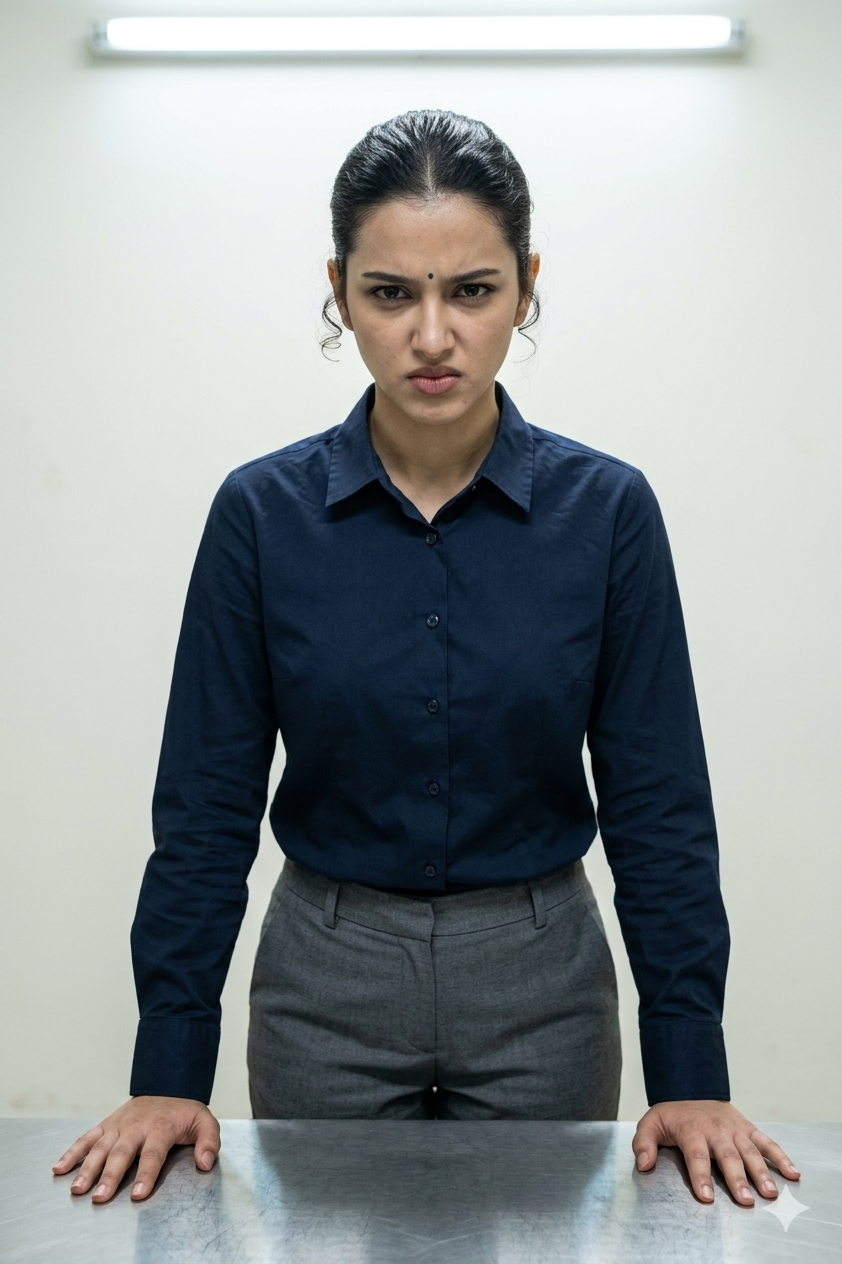
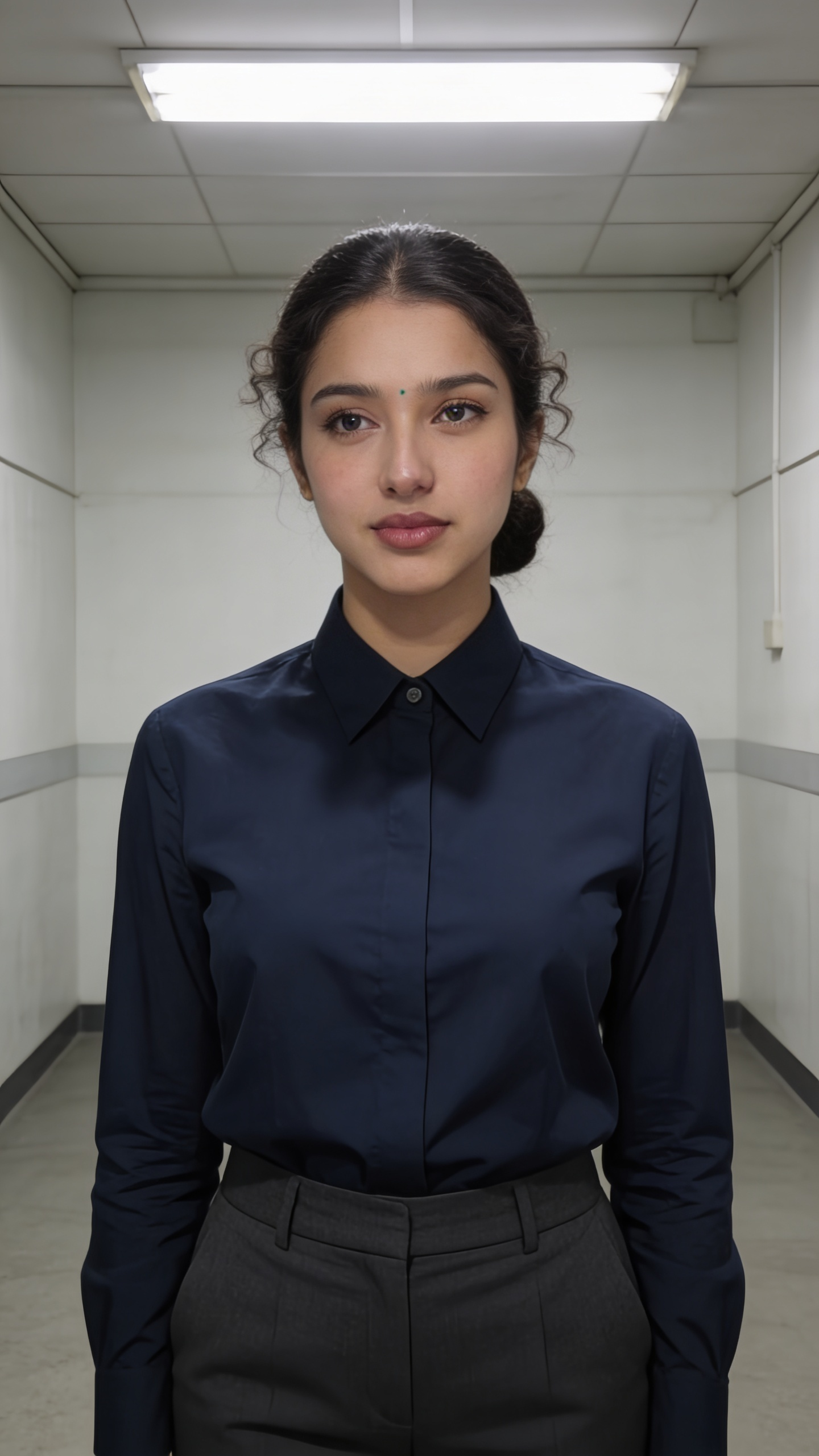
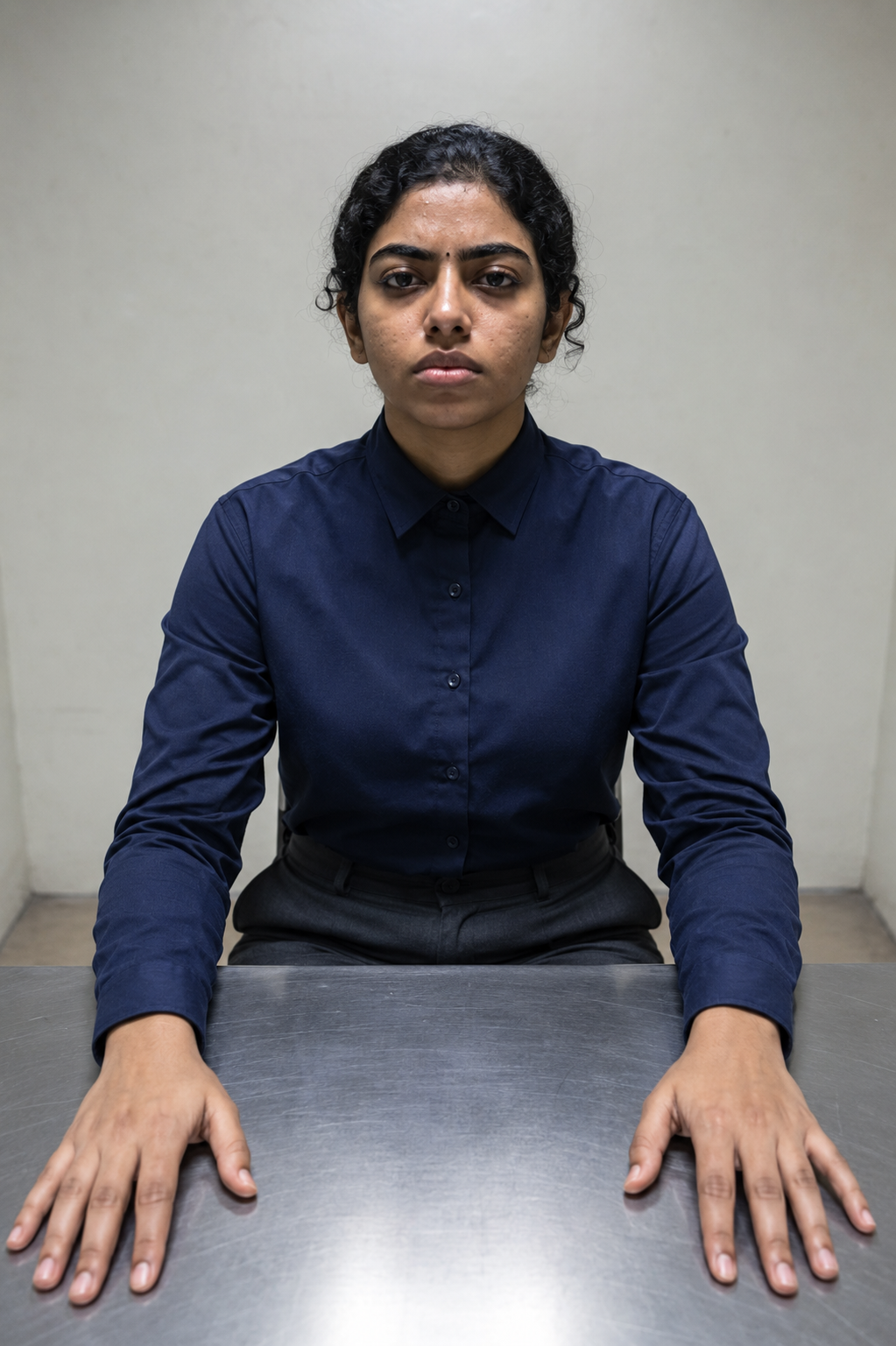
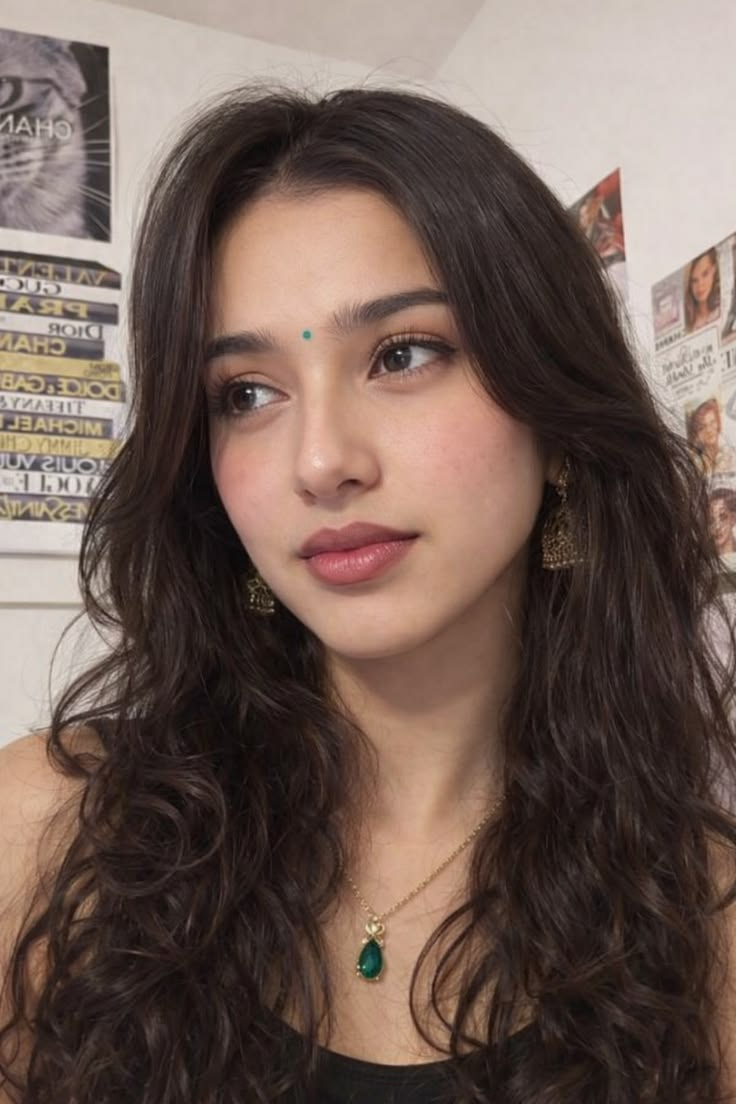
We tested five image tools on the same three reference portraits to see which one keeps a character visually consistent across café, interrogation, market, horse-riding, and rooftop scenes.
Best at holding the hardest angle and action scenes, but it consistently flattened emotional expression into neutral faces.
#2 ChatGPT· #3 Leonardo AI· #4 Gemini· #5 ImagineArt
The ranking
Scores are the average across every check we scored for that tool. Not every tool was scored on every check — the count is shown.
| Tool | Score | Price | Where it lands | ||
|---|---|---|---|---|---|
| #1 | Scenario | Best | 3.8/5 6 checks | Free | Best at preserving identity in difficult angles, but emotionally intense expressions are a hard fail. |
| #2 | ChatGPT | Usable | 3.8/5 5 checks | — | Strongest on frontal and near-frontal scene fidelity, but face lock softens quickly once the pose turns or the scene gets busy. |
| #3 | Leonardo AI | Needs work | 3.2/5 6 checks | 150 credits/day | Strong at scene fidelity, weak at keeping the same face and expression |
| #4 | Gemini | Needs work | 2.8/5 5 checks | — | Strong scene realism, weak face locking |
| #5 | ImagineArt | Needs work | 2.5/5 6 checks | ₹1,213/month | Strong scene rendering, but character consistency softens under pose stress. |
What we checked
Every finding below is tied to one of these checks, and to the test that produced it. The number is how many of the 5 tools we recorded findings for.
What we tried
The same 3 tests were run on every tool.
Best at preserving identity in difficult angles, but emotionally intense expressions are a hard fail.
▸Accessory & detail retention4/51 mixed1 finding
It keeps small style elements and wardrobe details unusually well, but the constant beautification pass softens texture and nudges skin tone lighter, which keeps it just below a perfect score.
It carries jewellery and styling details through better than many tools, but the same outputs are still softened by over-smoothing and some slight lightening of skin tone.
▸Expression accuracy1/52 failed2 findings
It repeatedly drains emotional intensity out of the portrait, returning neutral faces even when the prompt explicitly asks for anger or guarded tension, so this is a clear failure rather than a small miss.
Expression accuracy is a hard ceiling: across two different reference images, intense interrogation prompts still produced flat, neutral-to-unsmiling faces instead of the requested angry/guarded intensity, and the report rates this 4/10.
It cannot render the requested angry/guarded expression here; the output lands on a calm, neutral face with a slight smile instead.
▸Identity preservation4/53 worked well1 mixed1 struggled5 findings
It usually keeps the same person recognizable across close-ups, action, and the side-angle stress test, but the full-body market scene introduces noticeable body drift and the skin is softened enough to stop short of a top score.
It usually preserved the person’s facial identity, including angle and features, but in a full-body crowd scene the body drifted noticeably thinner with a more defined collarbone area.
In a tight close-up, the tool preserves the same person at roughly 90–95% likeness while slightly beautifying the face and softening pores and fine skin texture.
▸Scene compliance4/51 worked well1 finding
The tool is usually very good at getting the setting, wardrobe, and pose right, but the interrogation scenes miss the harsher mood and lighting, so scene control is strong rather than perfect.
The tool follows scene prompts well across the cafe, desert horse-ride, and rooftop setups: lighting and environment are consistently correct, and the report rates prompt/scene adherence at 8/10.
▸Workflow & usability5/51 worked well1 finding
The process is almost frictionless: one upload, a prompt, a couple of settings, and a direct download, so it asks very little from the user.
The workflow is low-friction: upload one reference, enter a prompt, choose ratio and resolution, then generate; outputs download directly, and the report rates workflow/usability at 8.5/10.
▸Free tier practicality5/51 worked well1 finding
The free tier is genuinely usable for comparison work because it gives enough daily generations to test ideas and lets you export results cleanly.
The free tier is practically usable for real testing: it allows 50 credits per day, costs 6 credits per generation, and therefore supports about 8 generations per day without hitting a hard limit; outputs are downloadable without watermarks.
Strongest on frontal and near-frontal scene fidelity, but face lock softens quickly once the pose turns or the scene gets busy.
▸Accessory & detail retention3/51 worked well1 struggled2 findings
Jewelry, bindi, and hair hold up well in the frontal close-up, but color consistency slips enough across scenes that the detail retention feels mixed rather than fully reliable.
Skin-tone consistency drifts across outputs: the fair-skinned reference shows only minor warming, but the darker-skinned reference shifts more noticeably darker.
On frontal close-ups, the tool preserves fine character details very well: the bindi, gold jhumka earrings, and necklace stay near 100% intact, and the hair color and texture remain consistent.
▸Expression accuracy3/51 worked well1 mixed1 failed3 findings
It can hit the mood when the prompt is restrained and frontal, but it drops the intended emotion in the more dynamic scene, so expression control lands in the middle.
It was accurate for a cold, guarded, unsmiling expression in the frontal interrogation setup, but it lost the requested brave/determined emotion and fell back to a soft neutral expression in the action scene.
In the action scene, the requested brave/determined emotion is lost; the tool substitutes a soft neutral expression with no emotional alignment to the prompt.
▸Identity preservation3/53 mixed1 struggled1 failed5 findings
The tool keeps people recognizable when it can hold a front-facing portrait, but the match weakens in angled and busier scenes, so the overall result is mixed rather than consistently strong.
Identity retention is strongest when the face is fully frontal and unobstructed; the frontal interrogation outputs are the best matches, while the non-frontal crowd and near-profile scenes are the weakest.
On a 3/4 interrogation pose, the tool keeps the face broadly aligned with the reference but slightly widens and rounds the face while also darkening skin tone.
▸Scene compliance5/53 worked well3 findings
Across the scenes that were checked, it followed the requested setting, pose, clothing, and props very tightly, with no sign of a scene-setup breakdown.
The tool showed consistent scene compliance, closely following both the near-profile occluded portrait reference and the straightforward frontal prompt.
The tool follows a straightforward frontal prompt very closely, including the navy shirt, hands on the metal table, and plain background.
▸Workflow & usability5/51 worked well1 finding
It takes very little effort to use: upload a reference, send one prompt, and download the result, with no setup friction or iteration burden.
The workflow is low-friction: the tool accepted a fresh reference upload per scene without errors, needed only a single upload plus a single prompt each time, and exported outputs directly from the chat interface.
Strong at scene fidelity, weak at keeping the same face and expression
▸Accessory & detail retention3/51 worked well1 mixed1 failed3 findings
Detail retention is uneven: one output keeps the hair texture close to the reference, while another flattens and simplifies it noticeably. That split result is enough for a mixed score, but not strong enough to call it consistently reliable.
It was inconsistent: one output preserved hair detail well, while another lost the natural curls and turned them into plain, straight, oily-looking hair.
In that same 3/4 interrogation output, the hair texture is not retained: dense natural curls turn into plain, straight, oily-looking hair.
▸Expression accuracy1/53 failed3 findings
Both explicit emotion prompts missed the target in the same direction: the model defaulted to calm, neutral faces instead of tension or suspicion. Because the failure repeats across different references, this looks like a persistent expression limitation rather than a one-off miss.
The model consistently missed the requested angry, guarded interrogation expression, instead producing a calm or neutral face in both portrait references.
The 3/4 interrogation portrait again misses the requested emotion, replacing the explicit angry or guarded expression with a neutral one.
▸Identity preservation2/51 worked well1 mixed2 struggled2 failed6 findings
The face usually drifts toward a polished, beautified look instead of staying anchored to the reference. It only holds up when the pose is favorable, and even then the result is often refined rather than faithful, so overall identity consistency lands in the struggling range.
Across the tested scenes, the tool consistently prioritises polished aesthetics over facial fidelity: heavy beautification and over-smoothing repeatedly weaken identity cues instead of preserving them.
The frontal interrogation portrait still reads as the same character, making it the strongest identity result from this reference, but the face is noticeably refined and smoothed.
▸Scene compliance5/55 worked well5 findings
Across all tested scenes, it reliably obeyed the requested setting, wardrobe, pose, and props. The outputs may vary in realism, but the prompt structure itself is followed so consistently that scene adherence is at the top level.
The tool consistently followed scene details well, keeping the requested settings, styling, and poses aligned, even in the stress test.
The tool can follow a cozy indoor portrait prompt well, keeping the café-like mood, clean lighting and composition, sweater, braid, and hand-on-chin pose aligned with the request.
▸Workflow & usability5/51 worked well1 finding
The tool is very easy to use: the setup is simple, the generation steps are minimal, and downloads are straightforward. There is no sign of extra friction in the basic workflow, so usability is excellent.
The interface is low-friction: it accepts one uploaded reference image per session without errors, and the generation flow is just upload image + prompt + aspect ratio + generation count; outputs are downloadable directly.
▸Free tier practicality3/51 mixed1 finding
The free tier is usable for a quick test pass, but the daily allowance is tight enough that you can run out before doing much comparison. That makes it partly practical rather than freely exploratory.
The free plan is only partially practical for evaluation because it provides 150 credits per day at 40 credits per generation, which works out to about 3 full generations before the daily cap is reached.
Strong scene realism, weak face locking
▸Accessory & detail retention2/51 struggled1 finding
It keeps the big shapes and styling, but the smaller face details get softened again and again, so the likeness loses crispness even when the scene itself looks good.
Across outputs, the tool systematically smooths skin and removes natural facial marks, reducing fine-detail fidelity even when the scene is otherwise strong.
▸Expression accuracy1/51 failed1 finding
The one explicit emotion test misses the target completely, so the tool does not reliably deliver the requested mood.
When the prompt asks for angry and guarded, the tool can instead produce a neutral, emotionless expression, flattening the intended mood.
▸Identity preservation2/52 worked well1 mixed3 failed6 findings
It only keeps the same person when the framing is forgiving; once the scene gets cinematic or the pose becomes harder, the face drifts enough that recognition is unreliable.
It preserved identity in some frontal and three-quarter cases, but broke down in the harder pose and in some action or close-up scenes, where the face drifted or changed enough to read as a different person.
For the 3/4 reference, the model can keep the face shape, skin tone, curly hair texture, eyebrows, and overall structure close enough for easy recognition.
▸Scene compliance4/52 worked well1 struggled3 findings
It follows the requested scene elements well in the cafe and horse shots, and even the tougher rooftop setup is mostly there, but the pose and lighting slip on the stress test.
The tool can follow a cozy cafe prompt accurately, preserving warm lighting, background blur, a cream sweater, a braided hairstyle, and a natural seated pose.
It can reproduce the rooftop, skyline, and outfit, but it misses the requested near-profile orientation and the warm golden-hour lighting.
▸Workflow & usability5/51 worked well1 finding
The process is as simple as it gets: upload a reference, type a prompt, and save the result.
The free Gemini UI is low-friction: one reference image per scene was accepted without errors, the workflow was just upload plus prompt, and outputs were downloadable directly.
Strong scene rendering, but character consistency softens under pose stress.
▸Accessory & detail retention2/51 worked well3 struggled4 findings
It can keep some hair structure, but the default beautifying look wipes out pores, marks, and other small cues too often. One strong hair result helps, yet the broader pattern is still a clear weakness.
Skin smoothing and beautification are applied as a tool-level default across the tested outputs, weakening texture fidelity regardless of scene.
The tool flattens dense curly hair volume and slightly distorts the eyebrows, so finer styling detail is not preserved cleanly.
▸Expression accuracy1/51 failed1 finding
The requested mood never comes through here; the face reads calm instead of energetic or determined. With no sign of the intended emotional lift, this is a clear miss.
The tool misses an explicitly energetic expression request and instead returns a neutral, composed face with little of the intended intensity or determination.
▸Identity preservation3/52 worked well3 mixed1 struggled1 failed7 findings
The face stays recognizable in the better-lit, plainer scenes, but it loses consistency once the pose becomes more dynamic or more hidden. That makes the overall result more than a pass, yet clearly short of stable character lock.
Overall identity preservation is moderate: the tool usually keeps a plausible likeness, but fine facial cues drift and the near-profile stress test breaks badly.
With a full-frontal reference, the tool can stay broadly similar while still shifting fine identity cues; this output remains close overall but changes eye color from black to brown and slightly alters facial proportions.
▸Scene compliance3/51 worked well2 mixed1 struggled4 findings
It handles ordinary lifestyle and room settings well, but gets less exact when the composition depends on stricter pose and lighting control. That puts it in the middle rather than the top tier for prompt following.
It follows the lifestyle-scene prompt well, but the portrait-reference cases only partially match the prompt, with undershot framing and other detail errors.
The tool follows most of the interrogation-room prompt but under-shoots the framing, showing less body than requested.
▸Workflow & usability5/51 worked well1 finding
Getting from upload to a saved image is straightforward, with no heavy setup or extra detours. That makes the tool easy to use even before considering image quality.
The workflow is low-step: upload one reference image, enter a prompt, choose model/ratio/resolution, and generate; outputs are downloadable directly from the interface.
▸Free tier practicality1/51 failed1 finding
A single generation before running out of credits is too little to compare prompts, poses, or revisions. The free tier therefore blocks meaningful testing rather than supporting it.
The free tier is not practical for iterative testing: the report says the plan starts with 100 credits and each generation costs 80 credits, leaving only 1 generation per session before credits are exhausted.
Final Take
#1 Scenario is the overall winner. From the scorecards, it has the strongest practical balance for identity-preservation in difficult angles, with solid scene-compliance, accessory-detail-retention, workflow-usability, and free-tier practicality. The main caveat is severe: expression-accuracy is a hard weakness, so emotionally intense expressions are not its lane. If that matters, the ranking here does not change, but the recommendation does. ChatGPT is the better pick when you care most about frontal or near-frontal scene fidelity; its scene-compliance is the strongest in the set, but its face lock softens once poses turn or scenes get busy, and its identity-preservation is below Scenario. Leonardo AI is useful when scene fidelity matters more than keeping the same face, since its scene-compliance is also top-tier, but identity-preservation and expression-accuracy are weak. Gemini offers strong scene realism, but face locking is weak and accessory retention is also lower. ImagineArt is more of a scene-rendering option than a consistency option: its character consistency softens under pose stress, and its free-tier practicality is low. So the honest routing is: Scenario for difficult angles and consistency; ChatGPT for frontal scene fidelity; Leonardo AI for scene fidelity over face consistency; Gemini for strong realism with weaker face lock; ImagineArt when scene rendering matters more than character consistency and you can tolerate the trade-off.
Similar Tools
The tools we tested for this use case — each card opens its full tested review.