
ChatGPT
Strong for Canvas prompt-to-code drafts, study notes, and realistic reference-image edits
Best for inspectable drafts and structured transformations
- You want browser-native prompt-to-animation drafting with visible code in Canvas.
- You want a workflow that can auto-preview, be edited inline, and then exported for the HTML path without local setup.
- You need portrait or character edits where the face stays frontal or near-frontal and accessories matter.
- You need polished motion graphics or dense system diagrams to look finished without follow-up prompts.
Feature scores on this page: 7.5/10 (1 scored feature)
Our take
ChatGPT is strongest when you want outputs you can inspect and revise immediately: prompt-to-run browser animations in Canvas, structured lecture notes, and reference-based image edits. It also did well at realistic photoshoot-style scenes and front-facing character continuity, especially when the subject stayed unobstructed. The main tradeoff is that denser motion layouts and harder continuity cases can drift or need follow-up prompts, and exact styling or transcript automation is not its strong suit.
In-Depth Review
Our detailed analysis of ChatGPT — features, performance, and real-world testing.
Feature-by-Feature Breakdown
Attached Asset IngestionUseful, but asset rendering is uneven▾
Feature tested: Attached Asset Ingestion
Result: Partial
Verdict: Useful, but asset rendering is uneven
Expected behavior: Accepts uploaded or attached assets such as logos or images inside the prompt workflow so they can be used downstream in generation or editing. The observed evidence showed attachment-aware prompts, though rendering reliability was imperfect in preview.
Test case: Text prompt → Text prompt
Input type: Text prompt
Input used: Input artifact (Text prompt): INPUT
Observed output: Output artifact (Text prompt): OUTPUT
Input artifact: Input artifact (Text prompt): INPUT
Output artifact: Output artifact (Text prompt): OUTPUT
What changed: Text prompt transformed into Text prompt
Test case: Image → Video file
Input type: Image
Input used: Input artifact (Image): Input — pipeline-logo.png
Observed output: Output artifact (Video file): The attached logo did not appear correctly in preview, and the final result still looked cluttered and presentation-like instead of consistently branded. — chatgpt-saas-animation.mp4
Input artifact: Input artifact (Image): Input — pipeline-logo.png
Output artifact: Output artifact (Video file): The attached logo did not appear correctly in preview, and the final result still looked cluttered and presentation-like instead of consistently branded. — chatgpt-saas-animation.mp4
What changed: Image transformed into Video file
Test case: Image → Video file
Input type: Image
Input used: Input artifact (Image): Attached logo asset intended for the PipelineFlow animation. — image.png
Observed output: Output artifact (Video file): The animation handled the lead-flow logic, but the uploaded logo/assets failed to appear correctly in preview, so asset placement was inconsistent. — chatgpt-saas-animation.mp4
Input artifact: Input artifact (Image): Attached logo asset intended for the PipelineFlow animation. — image.png
Output artifact: Output artifact (Video file): The animation handled the lead-flow logic, but the uploaded logo/assets failed to appear correctly in preview, so asset placement was inconsistent. — chatgpt-saas-animation.mp4
What changed: Image transformed into Video file
Test case: Text prompt → Text prompt
Input type: Text prompt
Input used: Input artifact (Text prompt): Input
Observed output: Output artifact (Text prompt): Output
Input artifact: Input artifact (Text prompt): Input
Output artifact: Output artifact (Text prompt): Output
What changed: Text prompt transformed into Text prompt
Why it matters / Conclusion: Helpful for asset-aware prompts, but not dependable enough to assume perfect first-pass rendering.
Accepts uploaded or attached assets such as logos or images inside the prompt workflow so they can be used downstream in generation or editing. The observed evidence showed attachment-aware prompts, though rendering reliability was imperfect in preview.


Reference-Based Image EditingMixed7.5/10▾
Feature tested: Reference-Based Image Editing
Result: Partial (7.5/10)
Verdict: Mixed
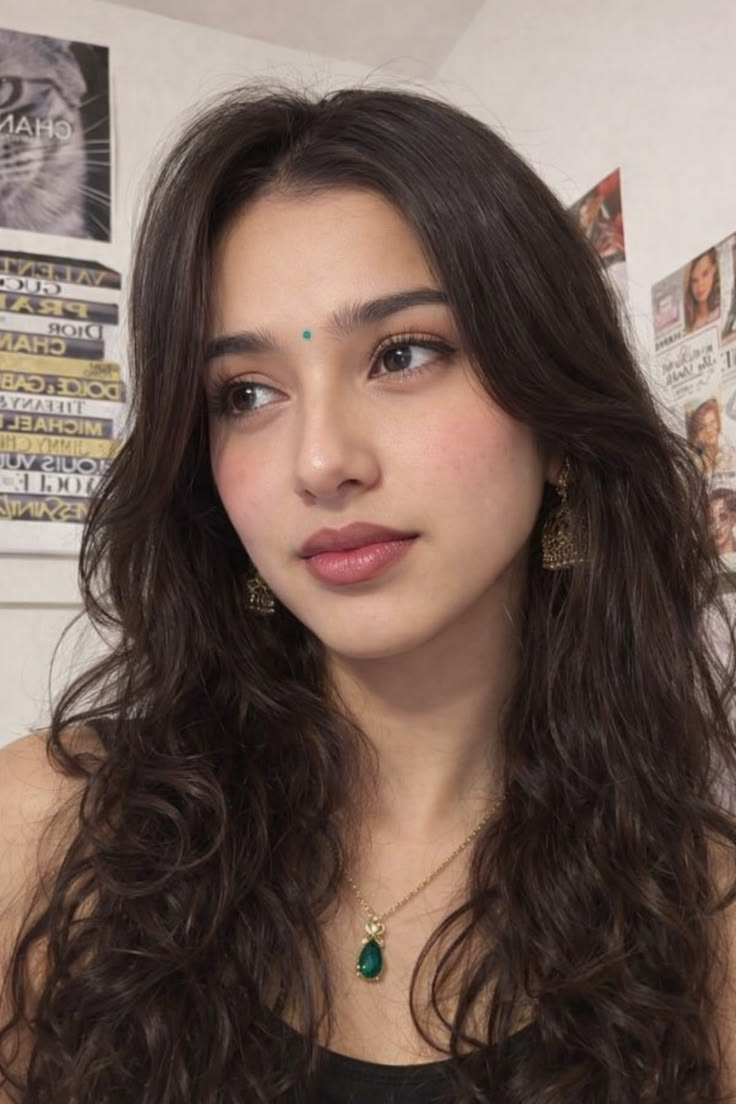
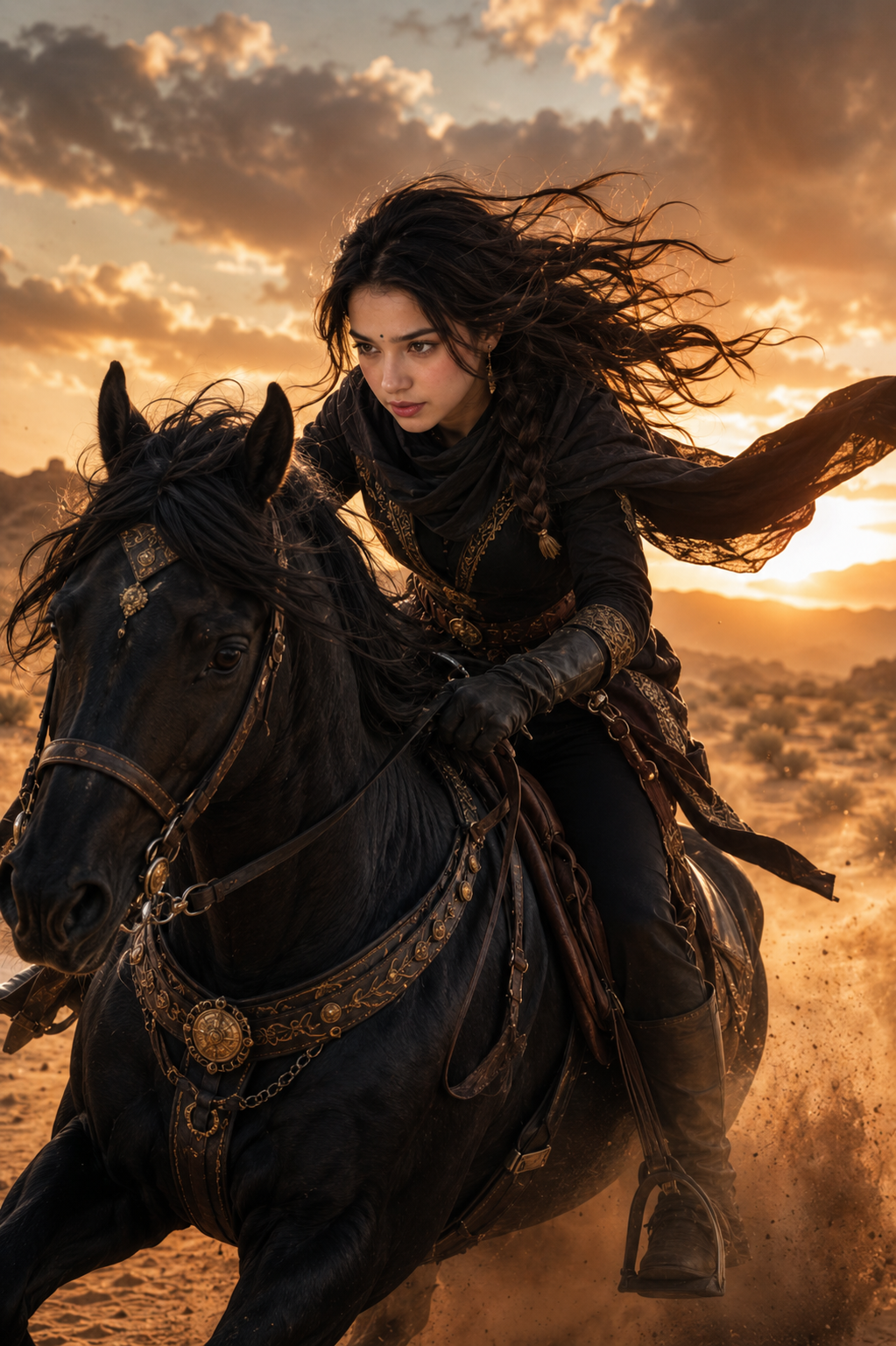
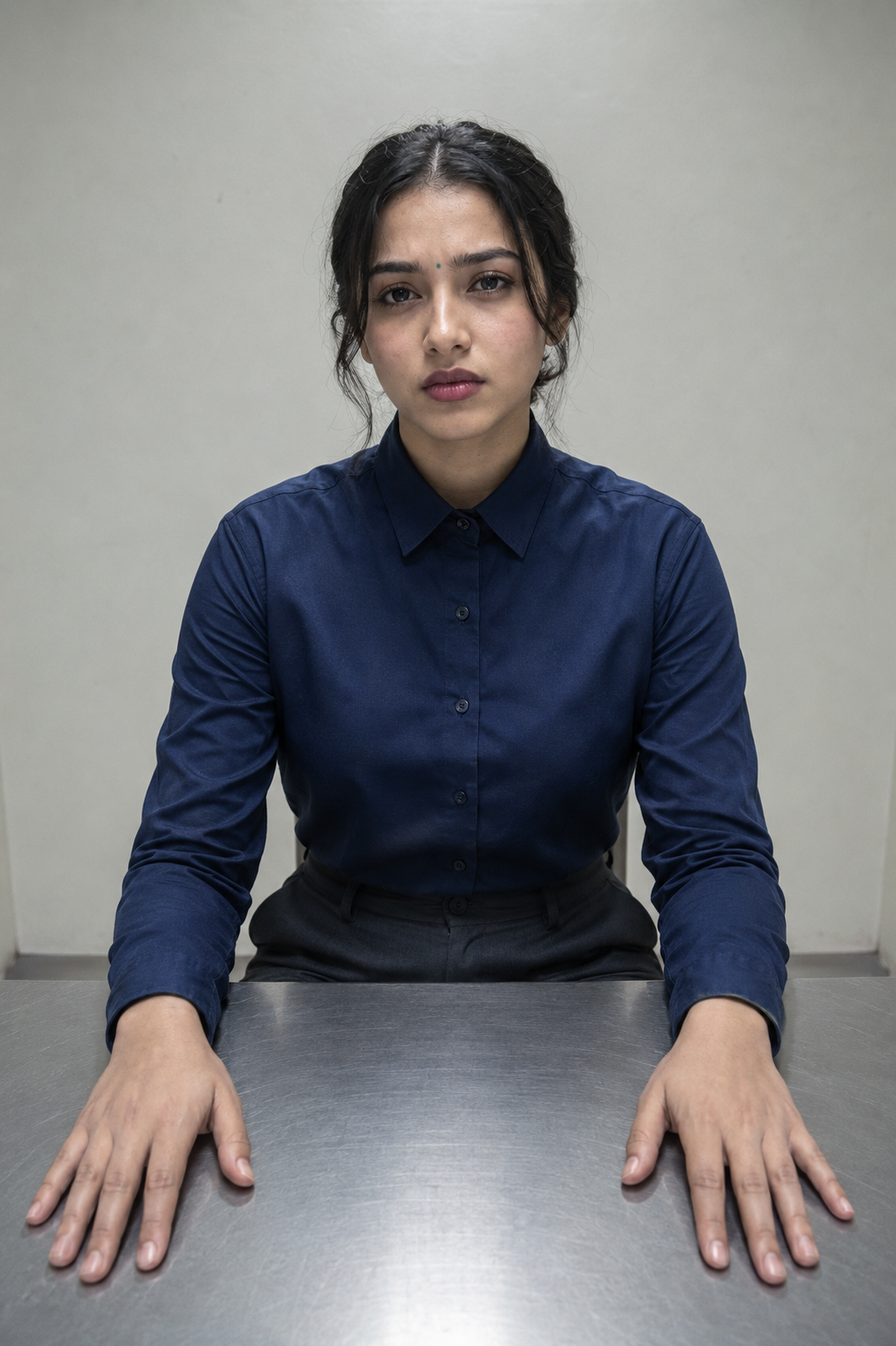
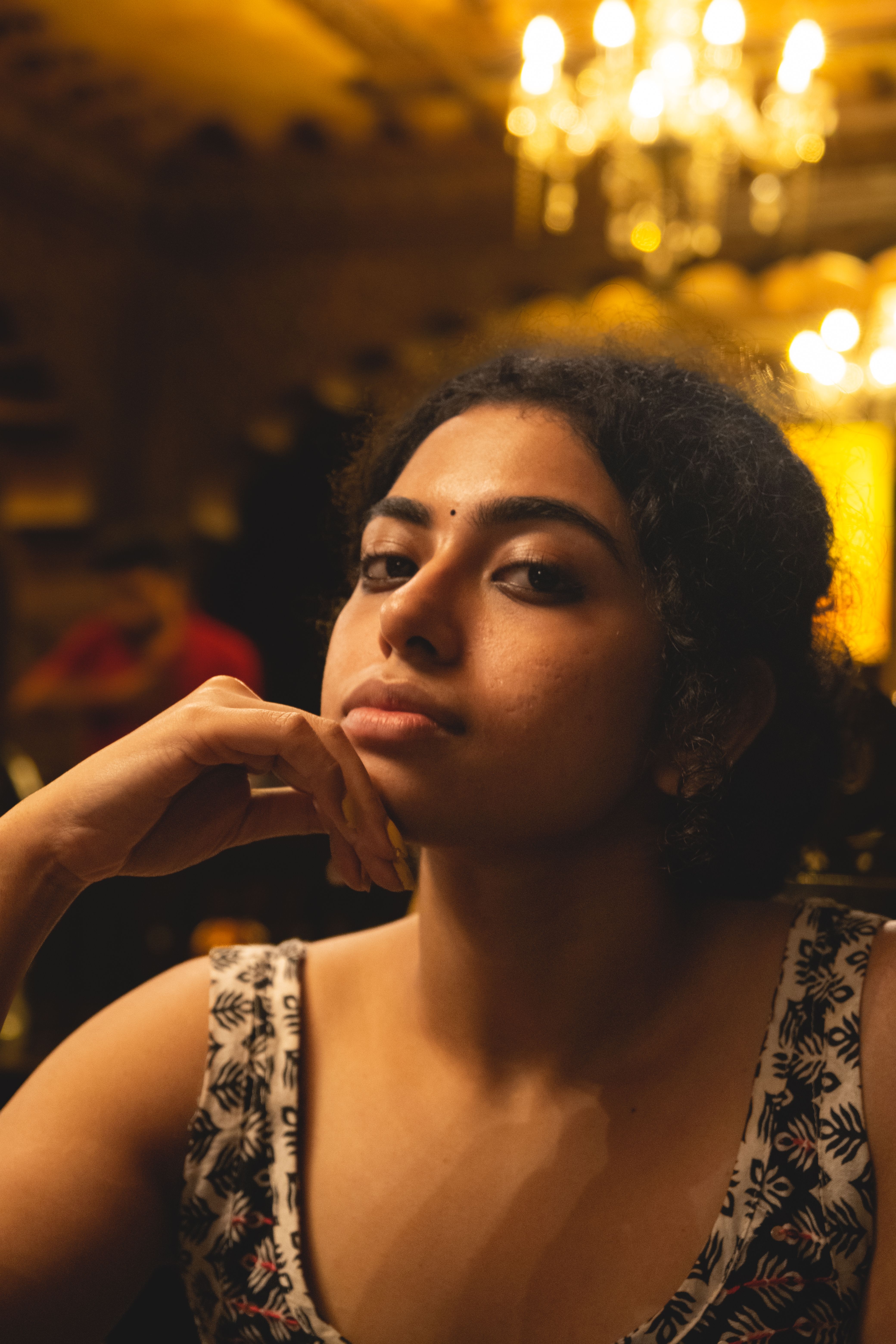
Expected behavior: Edits from a single reference image to generate new scenes, poses, outfits, and activities while trying to keep the same person or subject recognizable. The exercised cases included warm cafe, desert horse-riding, interrogation-room, crowded-market, rooftop, frontal, near-profile, and other action-heavy restagings.
Test case: Image → Image
Input type: Image
Input used: Input artifact (Image): INPUT — input 1.png
Observed output: Output artifact (Image): The warm cafe variation kept the subject recognizable, preserved the bindi, earrings, and necklace, and placed her in sunlight by a window. The face held close to the reference, but the skin texture was softened and the cafe background stayed weak, with little atmosphere. — ChatGPT_input1_warm_cafe.png
Input artifact: Input artifact (Image): INPUT — input 1.png
Output artifact: Output artifact (Image): The warm cafe variation kept the subject recognizable, preserved the bindi, earrings, and necklace, and placed her in sunlight by a window. The face held close to the reference, but the skin texture was softened and the cafe background stayed weak, with little atmosphere. — ChatGPT_input1_warm_cafe.png
What changed: Image transformed into Image
Test case: Image → Image
Input type: Image
Input used: Input artifact (Image): INPUT — input 1.png
Observed output: Output artifact (Image): The desert horse-riding scene followed the requested environment and outfit well, with the character placed convincingly on horseback at sunset. Identity drift increased in the face, and the expression shifted to a soft neutral look instead of the more determined tone implied by the scene. — ChatGPT_input1_horseride.png
Input artifact: Input artifact (Image): INPUT — input 1.png
Output artifact: Output artifact (Image): The desert horse-riding scene followed the requested environment and outfit well, with the character placed convincingly on horseback at sunset. Identity drift increased in the face, and the expression shifted to a soft neutral look instead of the more determined tone implied by the scene. — ChatGPT_input1_horseride.png
What changed: Image transformed into Image
Test case: Image → Image
Input type: Image
Input used: Input artifact (Image): INPUT — input 1.png
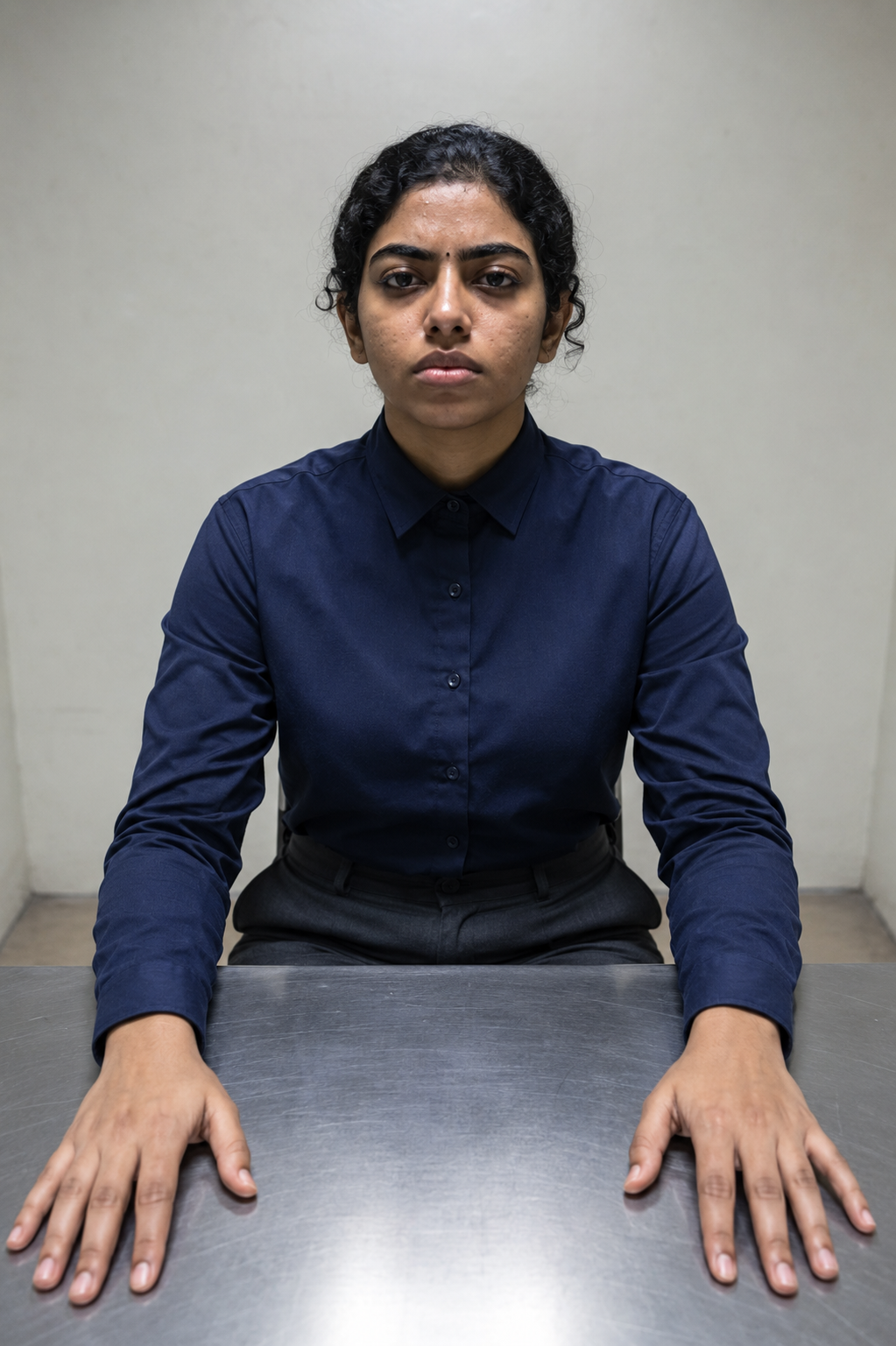
Observed output: Output artifact (Image): The interrogation-room render preserved the frontal face, bindi, strong brows, and cold guarded expression. The only visible changes were mild skin-tone warming and a slightly softer hairstyle, so the identity remained strong. — ChatGPT_input1_interrogation.png
Input artifact: Input artifact (Image): INPUT — input 1.png
Output artifact: Output artifact (Image): The interrogation-room render preserved the frontal face, bindi, strong brows, and cold guarded expression. The only visible changes were mild skin-tone warming and a slightly softer hairstyle, so the identity remained strong. — ChatGPT_input1_interrogation.png
What changed: Image transformed into Image
Test case: Image → Image
Input type: Image
Input used: Input artifact (Image): INPUT — input 2.jpg
Observed output: Output artifact (Image): The second frontal interrogation-room render also held identity well and followed the bare-room prompt structure accurately. The face became a touch darker and slightly rounder, but the overall identity still read clearly. — ChatGPT_input2_interrogation.png
Input artifact: Input artifact (Image): INPUT — input 2.jpg
Output artifact: Output artifact (Image): The second frontal interrogation-room render also held identity well and followed the bare-room prompt structure accurately. The face became a touch darker and slightly rounder, but the overall identity still read clearly. — ChatGPT_input2_interrogation.png
What changed: Image transformed into Image
Test case: Image → Image
Input type: Image
Input used: Input artifact (Image): INPUT — input 2.jpg
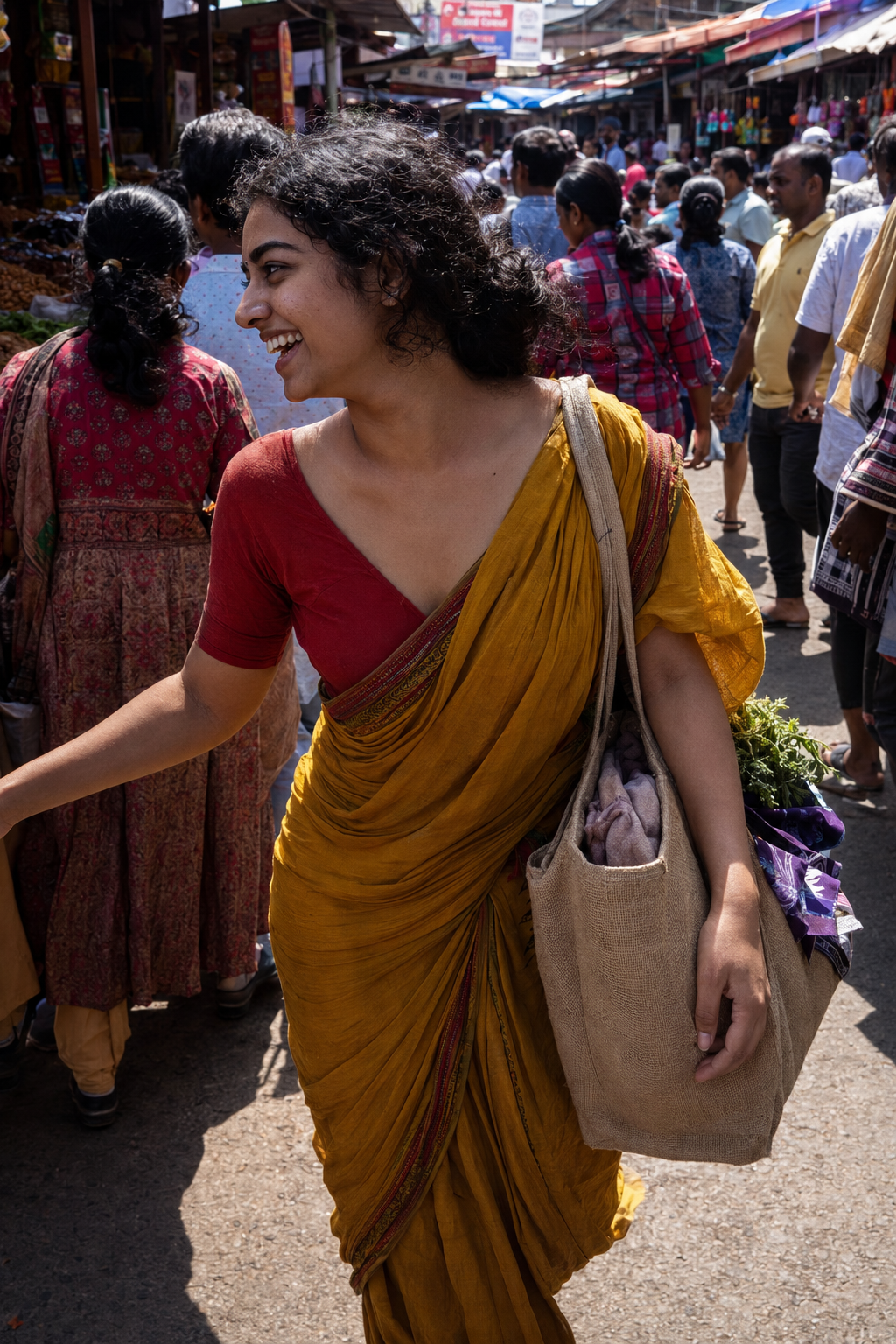
Observed output: Output artifact (Image): The crowded street-market scene rendered the sari, blouse, bag, and market environment convincingly, but the face turned too far to verify identity and the bindi dropped out of view. Skin tone also darkened more noticeably than in the reference. — ChatGPT_input2_market.png
Input artifact: Input artifact (Image): INPUT — input 2.jpg
Output artifact: Output artifact (Image): The crowded street-market scene rendered the sari, blouse, bag, and market environment convincingly, but the face turned too far to verify identity and the bindi dropped out of view. Skin tone also darkened more noticeably than in the reference. — ChatGPT_input2_market.png
What changed: Image transformed into Image
Test case: Image → Image
Input type: Image
Input used: Input artifact (Image): INPUT — input 3.webp
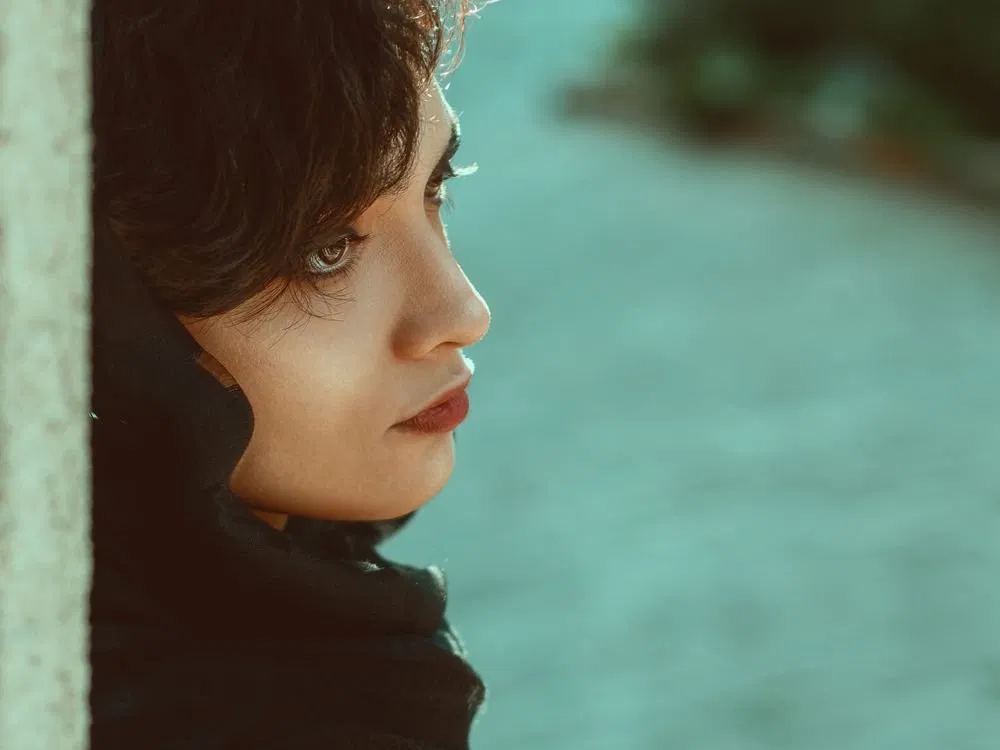
Observed output: Output artifact (Image): The rooftop golden-hour output matched the near-profile pose, full-body framing, rooftop setting, and warm skyline lighting closely. The face stayed recognizable, though the facial features were smoothed and beautified compared with the reference. — ChatGPT Image Jun 9, 2026, 11_44_28 PM.png
Input artifact: Input artifact (Image): INPUT — input 3.webp
Output artifact: Output artifact (Image): The rooftop golden-hour output matched the near-profile pose, full-body framing, rooftop setting, and warm skyline lighting closely. The face stayed recognizable, though the facial features were smoothed and beautified compared with the reference. — ChatGPT Image Jun 9, 2026, 11_44_28 PM.png
What changed: Image transformed into Image
Test case: Image → Image
Input type: Image
Input used: Input artifact (Image): Input — INPUT 1.jpg
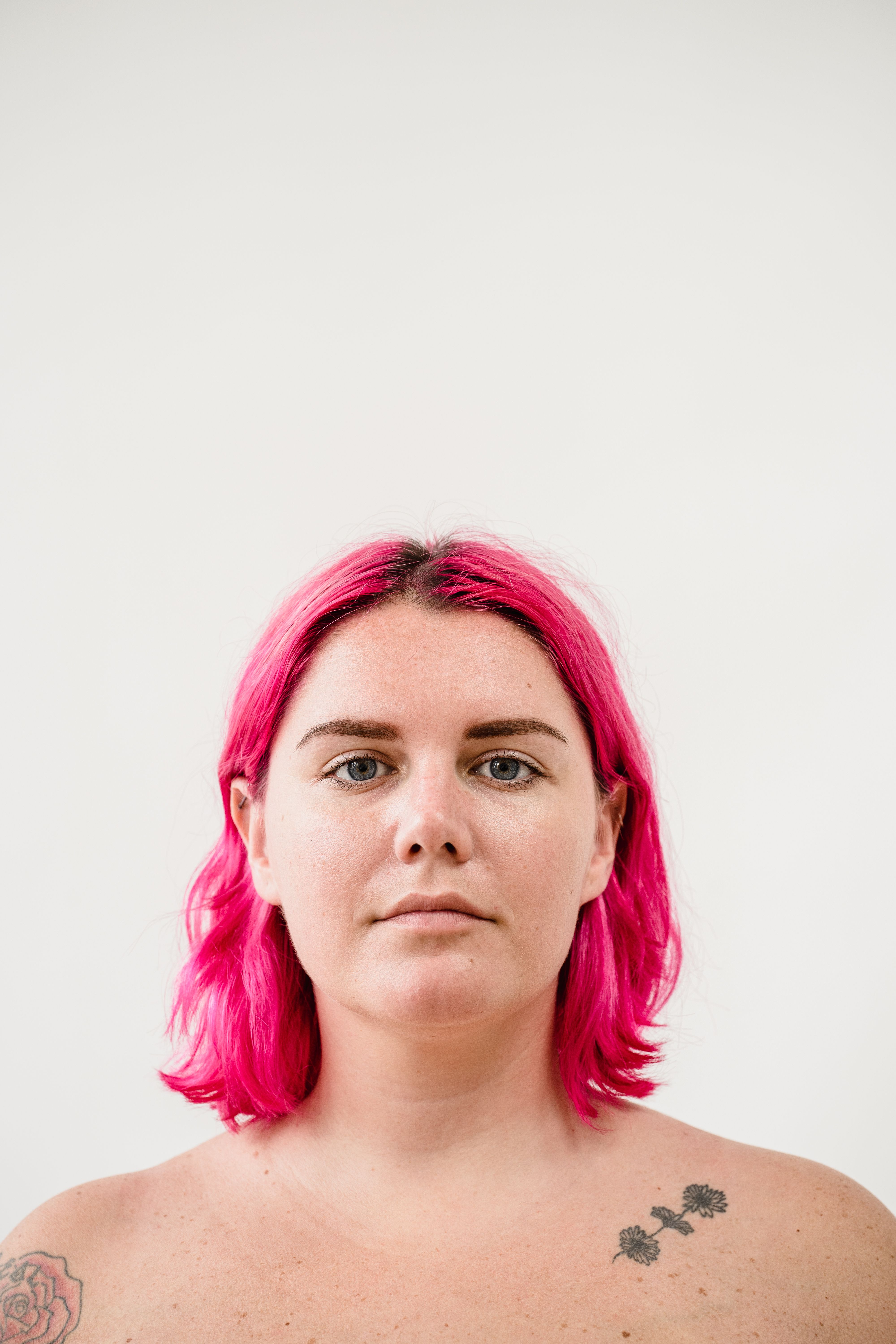
Observed output: Output artifact (Image): Face shape, freckles, and pink hair tone match the reference closely; eyebrow shape and jawline stay consistent. Skin texture looks natural, the hand on the laptop and the hand holding the mug are anatomically correct, and the wooden desk, houseplant, notebooks, and sweater all fit the brief. The output also carried over tattoos on the arm, even though they were not explicitly prompted. — ChatGPT Image Jun 23, 2026, 03_12_40 PM.png
Input artifact: Input artifact (Image): Input — INPUT 1.jpg
Output artifact: Output artifact (Image): Face shape, freckles, and pink hair tone match the reference closely; eyebrow shape and jawline stay consistent. Skin texture looks natural, the hand on the laptop and the hand holding the mug are anatomically correct, and the wooden desk, houseplant, notebooks, and sweater all fit the brief. The output also carried over tattoos on the arm, even though they were not explicitly prompted. — ChatGPT Image Jun 23, 2026, 03_12_40 PM.png
What changed: Image transformed into Image
Test case: Image → Image
Input type: Image
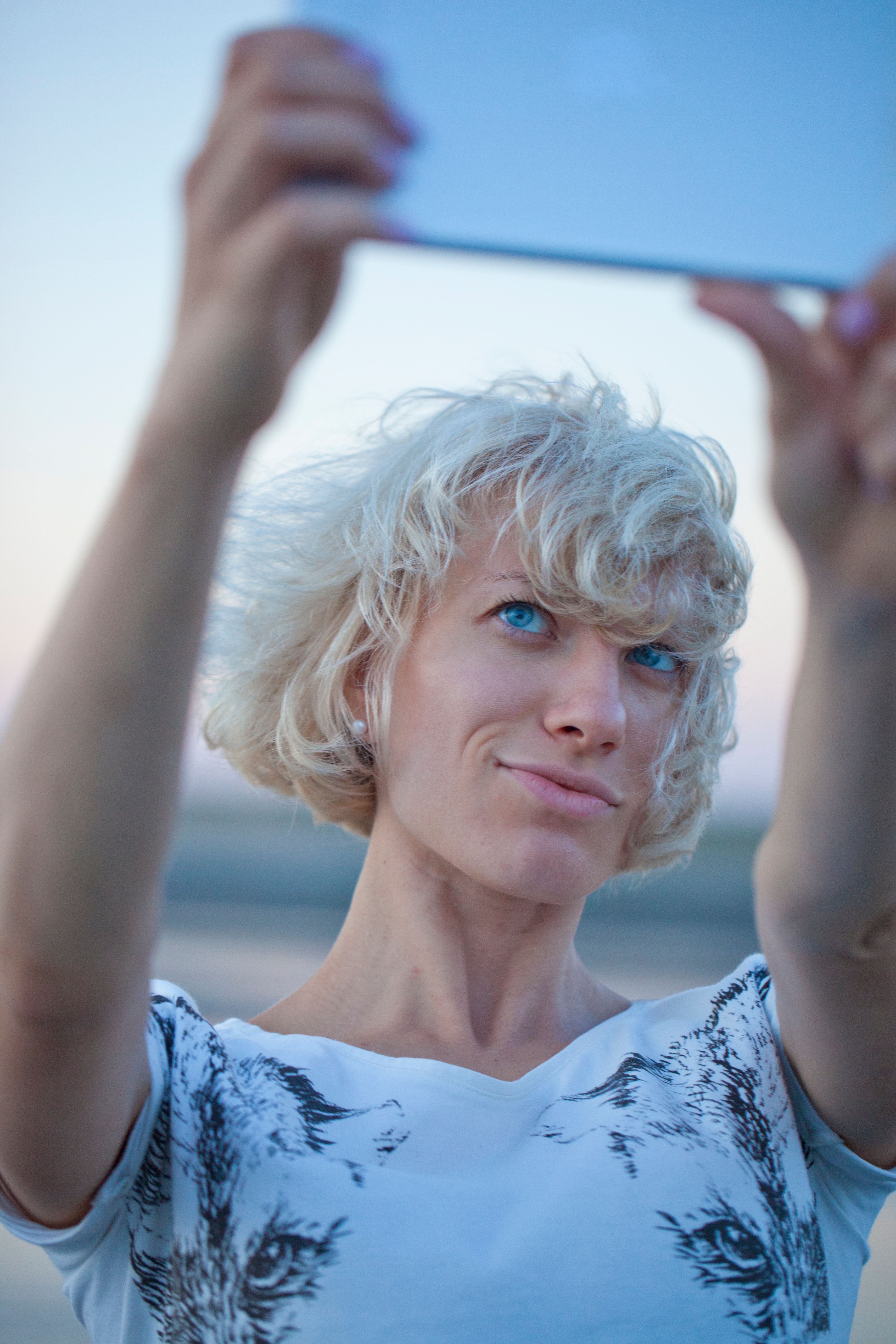
Input used: Input artifact (Image): Input — INPUT 1.jpg
Observed output: Output artifact (Image): Eyes, nose, and lip shape stay close to the reference, with slightly thinner eyebrows and a wrist tattoo that appeared in the output. The tablet pose is natural, skin texture remains realistic, and the blazer, shirt, glass wall, whiteboard, and chair all match the conference-style brief. Hair was left loose instead of the structured pulled-back style requested. — ChatGPT Image Jun 25, 2026, 11_40_58 AM.png
Input artifact: Input artifact (Image): Input — INPUT 1.jpg
Output artifact: Output artifact (Image): Eyes, nose, and lip shape stay close to the reference, with slightly thinner eyebrows and a wrist tattoo that appeared in the output. The tablet pose is natural, skin texture remains realistic, and the blazer, shirt, glass wall, whiteboard, and chair all match the conference-style brief. Hair was left loose instead of the structured pulled-back style requested. — ChatGPT Image Jun 25, 2026, 11_40_58 AM.png
What changed: Image transformed into Image
Test case: Image → Image
Input type: Image
Input used: Input artifact (Image): Input — INPUT 2.jpg
Observed output: Output artifact (Image): Hair color and short wavy texture match well, with pearl earrings visible and facial features staying true to the reference. The crossed-leg pose and bottle grip look natural, skin keeps texture under warm light, and the cozy couch-and-lamp setting matches the product-integration brief. Overall likeness stayed strong with no major identity drift. — ChatGPT Image Jun 25, 2026, 04_00_45 PM.png
Input artifact: Input artifact (Image): Input — INPUT 2.jpg
Output artifact: Output artifact (Image): Hair color and short wavy texture match well, with pearl earrings visible and facial features staying true to the reference. The crossed-leg pose and bottle grip look natural, skin keeps texture under warm light, and the cozy couch-and-lamp setting matches the product-integration brief. Overall likeness stayed strong with no major identity drift. — ChatGPT Image Jun 25, 2026, 04_00_45 PM.png
What changed: Image transformed into Image
Test case: Image → Image
Input type: Image
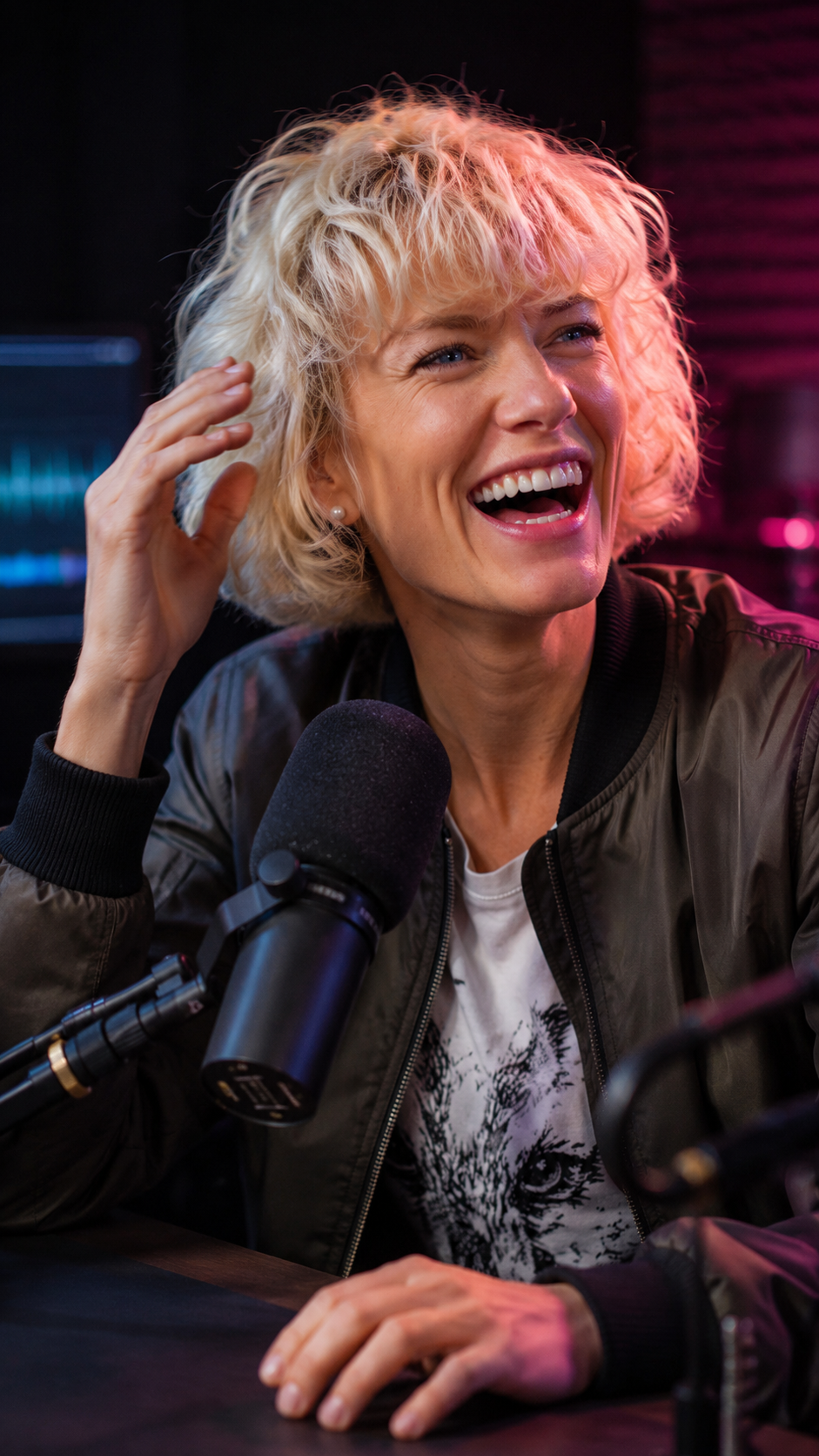
Input used: Input artifact (Image): Input — INPUT 2.jpg
Observed output: Output artifact (Image): Eyes, nose, and pearl stud earrings match the reference well, though the hair looks fuller and longer than the original short bob. Skin texture stays natural, the hand near the hair has clean finger spacing, and the mic setup, jacket, tee, and waveform glow all fit the podcast-thumbnail brief. The expression reads as a genuine laugh and the slight shoulder rotation away from camera is correct. — ChatGPT Image Jun 25, 2026, 04_00_39 PM.png
Input artifact: Input artifact (Image): Input — INPUT 2.jpg
Output artifact: Output artifact (Image): Eyes, nose, and pearl stud earrings match the reference well, though the hair looks fuller and longer than the original short bob. Skin texture stays natural, the hand near the hair has clean finger spacing, and the mic setup, jacket, tee, and waveform glow all fit the podcast-thumbnail brief. The expression reads as a genuine laugh and the slight shoulder rotation away from camera is correct. — ChatGPT Image Jun 25, 2026, 04_00_39 PM.png
What changed: Image transformed into Image
Test case: Image → Image
Input type: Image
Input used: Input artifact (Image): Input — INPUT 3.jpg
Observed output: Output artifact (Image): Freckle density stays close to the original and the low-ponytail style is preserved, but the hair color shifts more auburn and reddish than the darker reference. Skin texture remains natural, the hand on the bag strap looks believable, and the coastal overlook with rooftops and water matches the travel setting. The half-smile and over-the-shoulder pose follow the prompt well. — ChatGPT Image Jun 25, 2026, 04_14_53 PM.png
Input artifact: Input artifact (Image): Input — INPUT 3.jpg
Output artifact: Output artifact (Image): Freckle density stays close to the original and the low-ponytail style is preserved, but the hair color shifts more auburn and reddish than the darker reference. Skin texture remains natural, the hand on the bag strap looks believable, and the coastal overlook with rooftops and water matches the travel setting. The half-smile and over-the-shoulder pose follow the prompt well. — ChatGPT Image Jun 25, 2026, 04_14_53 PM.png
What changed: Image transformed into Image
Test case: Image → Image
Input type: Image
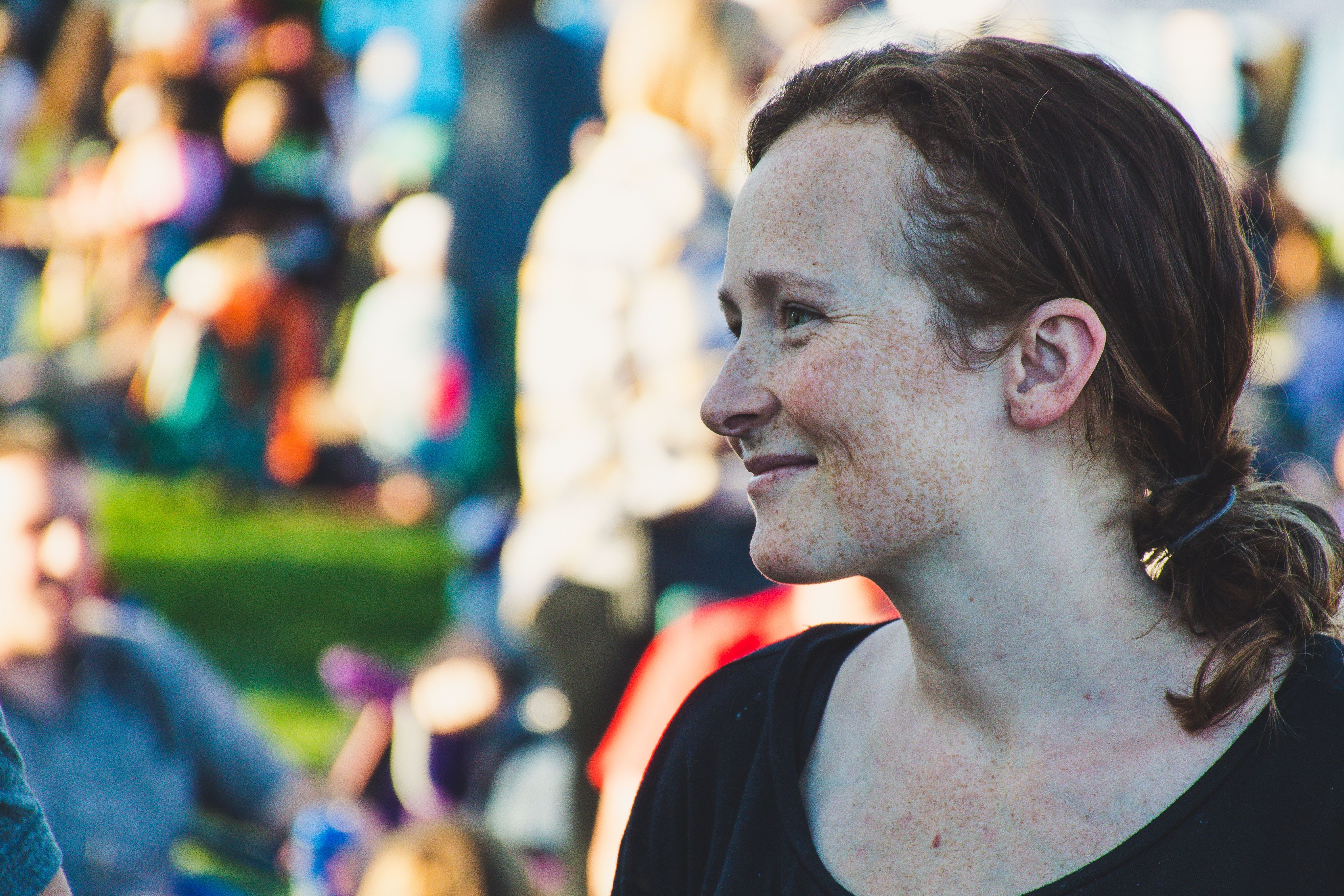
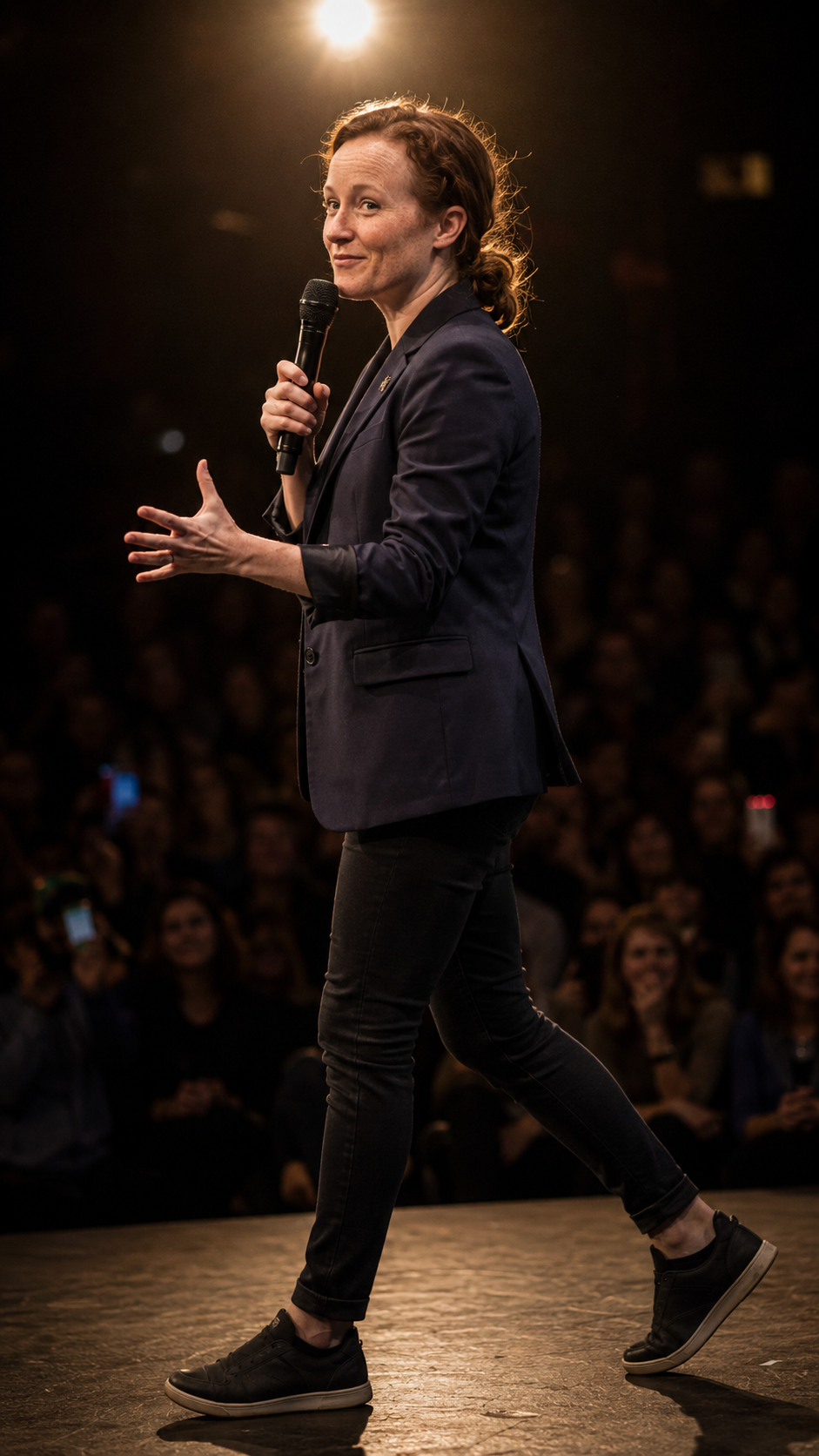
Input used: Input artifact (Image): Input — INPUT 3.jpg
Observed output: Output artifact (Image): Hair remains reddish-brown and warmer than the reference, but the low-bun ponytail style is consistent and freckles are still visible. The spotlighted stage scene is physically convincing, the mic grip and open palm have natural finger spacing, and the blurred audience with phone screens supports the speaking-on-stage brief. The face shape stays consistent despite the warmer hair tone. — ChatGPT Image Jun 25, 2026, 04_25_33 PM.png
Input artifact: Input artifact (Image): Input — INPUT 3.jpg
Output artifact: Output artifact (Image): Hair remains reddish-brown and warmer than the reference, but the low-bun ponytail style is consistent and freckles are still visible. The spotlighted stage scene is physically convincing, the mic grip and open palm have natural finger spacing, and the blurred audience with phone screens supports the speaking-on-stage brief. The face shape stays consistent despite the warmer hair tone. — ChatGPT Image Jun 25, 2026, 04_25_33 PM.png
What changed: Image transformed into Image
Why it matters / Conclusion: Good for quick character variations when the face stays partially or fully visible, but it becomes less dependable as pose angle and scene complexity increase.
Edits from a single reference image to generate new scenes, poses, outfits, and activities while trying to keep the same person or subject recognizable. The exercised cases included warm cafe, desert horse-riding, interrogation-room, crowded-market, rooftop, frontal, near-profile, and other action-heavy restagings.






Prompt-to-Runnable Animation Code Generation▾
Feature tested: Prompt-to-Runnable Animation Code Generation
Result: Partial
Expected behavior: Turns plain-language animation prompts or briefs into runnable browser code such as HTML/CSS/JS, HTML/CSS/JS/GSAP, or Canvas-based drafts. The tested prompts covered search-engine, SaaS lead-flow, French Revolution timeline, RAG, and cloud-storage animations.
Test case: Text prompt → Video file
Input type: Text prompt
Input used: Input artifact (Text prompt): Input
Observed output: Output artifact (Video file): Generated syntactically correct HTML/CSS/JavaScript on the first attempt and covered the search flow correctly, but the first pass was plain, text-heavy, and needed visual cleanup and hierarchy improvements. — chatgpt-search-engine-animation.mp4
Input artifact: Input artifact (Text prompt): Input
Output artifact: Output artifact (Video file): Generated syntactically correct HTML/CSS/JavaScript on the first attempt and covered the search flow correctly, but the first pass was plain, text-heavy, and needed visual cleanup and hierarchy improvements. — chatgpt-search-engine-animation.mp4
What changed: Text prompt transformed into Video file
Test case: Text prompt → Video file
Input type: Text prompt
Input used: Input artifact (Text prompt): Input
Observed output: Output artifact (Video file): Covered the retrieval, threshold, fallback, feedback, and retry loop, but the first output was incomprehensible until several refinement rounds added visual flows, packet motion, and icons. — Screen Recording 2026-05-02 132111.mp4
Input artifact: Input artifact (Text prompt): Input
Output artifact: Output artifact (Video file): Covered the retrieval, threshold, fallback, feedback, and retry loop, but the first output was incomprehensible until several refinement rounds added visual flows, packet motion, and icons. — Screen Recording 2026-05-02 132111.mp4
What changed: Text prompt transformed into Video file
Test case: Text prompt → Video file
Input type: Text prompt
Input used: Input artifact (Text prompt): Input
Observed output: Output artifact (Video file): Produced a self-contained GSAP HTML deliverable that covered chunking, encryption, sync, and conflict handling, but layout still needed manual tweaking for centering, overlap, and connector placement. — Screen Recording 2026-05-02 124631.mp4
Input artifact: Input artifact (Text prompt): Input
Output artifact: Output artifact (Video file): Produced a self-contained GSAP HTML deliverable that covered chunking, encryption, sync, and conflict handling, but layout still needed manual tweaking for centering, overlap, and connector placement. — Screen Recording 2026-05-02 124631.mp4
What changed: Text prompt transformed into Video file
Test case: Text prompt → Video file
Input type: Text prompt
Input used: Input artifact (Text prompt): Input
Observed output: Output artifact (Video file): Generated the full lead-ops sequence with chaos, aggregation, scoring, routing, duplicates, and spam filtering. The logic was recognizable, but the layout became cluttered and presentation-like instead of polished motion graphics. — chatgpt-saas-animation.mp4
Input artifact: Input artifact (Text prompt): Input
Output artifact: Output artifact (Video file): Generated the full lead-ops sequence with chaos, aggregation, scoring, routing, duplicates, and spam filtering. The logic was recognizable, but the layout became cluttered and presentation-like instead of polished motion graphics. — chatgpt-saas-animation.mp4
What changed: Text prompt transformed into Video file
Test case: Text prompt → File
Input type: Text prompt
Input used: Input artifact (Text prompt): Input
Observed output: Output artifact (File): Generated the requested year-by-year chronology and political transitions. The scene was accurate in sequence, but severe text overlap, weak visual hierarchy, and crowded layouts made the result feel more like a static presentation than an animated explainer. — Screen Recording - Made with FlexClip (1
Input artifact: Input artifact (Text prompt): Input
Output artifact: Output artifact (File): Generated the requested year-by-year chronology and political transitions. The scene was accurate in sequence, but severe text overlap, weak visual hierarchy, and crowded layouts made the result feel more like a static presentation than an animated explainer. — Screen Recording - Made with FlexClip (1
What changed: Text prompt transformed into File
Test case: Text prompt → Video file
Input type: Text prompt
Input used: Input artifact (Text prompt): Input
Observed output: Output artifact (Video file): Generated syntactically correct HTML/CSS/JavaScript on the first attempt, covered crawling, indexing, and ranking, and played automatically, but the layout was a plain horizontal flowchart with text overflow and no strong visual hierarchy. — chatgpt-search-engine-animation.mp4
Input artifact: Input artifact (Text prompt): Input
Output artifact: Output artifact (Video file): Generated syntactically correct HTML/CSS/JavaScript on the first attempt, covered crawling, indexing, and ranking, and played automatically, but the layout was a plain horizontal flowchart with text overflow and no strong visual hierarchy. — chatgpt-search-engine-animation.mp4
What changed: Text prompt transformed into Video file
Test case: Text prompt → Video file
Input type: Text prompt
Input used: Input artifact (Text prompt): Input
Observed output: Output artifact (Video file): Mapped the lead-aggregation and dashboard flow correctly and captured the chaotic opening, but the dashboard became cluttered and presentation-like, with weaker motion than requested and logo assets not rendering correctly in preview. — chatgpt-saas-animation.mp4
Input artifact: Input artifact (Text prompt): Input
Output artifact: Output artifact (Video file): Mapped the lead-aggregation and dashboard flow correctly and captured the chaotic opening, but the dashboard became cluttered and presentation-like, with weaker motion than requested and logo assets not rendering correctly in preview. — chatgpt-saas-animation.mp4
What changed: Text prompt transformed into Video file
Test case: Text prompt → Video file
Input type: Text prompt
Input used: Input artifact (Text prompt): Input
Observed output: Output artifact (Video file): Preserved the French Revolution chronology and political transitions, but dense text and overlapping labels made the final result feel more like a static presentation than a cinematic timeline. — chatgpt-historical-animation.webm
Input artifact: Input artifact (Text prompt): Input
Output artifact: Output artifact (Video file): Preserved the French Revolution chronology and political transitions, but dense text and overlapping labels made the final result feel more like a static presentation than a cinematic timeline. — chatgpt-historical-animation.webm
What changed: Text prompt transformed into Video file
Test case: Text prompt → Video file
Input type: Text prompt
Input used: Input artifact (Text prompt): Input
Observed output: Output artifact (Video file): Mapped the lead-aggregation flow correctly and captured the opening chaos sequence, but the final output was cluttered, less fluid than requested, and the logo asset did not render correctly in preview. — chatgpt-saas-animation.mp4
Input artifact: Input artifact (Text prompt): Input
Output artifact: Output artifact (Video file): Mapped the lead-aggregation flow correctly and captured the opening chaos sequence, but the final output was cluttered, less fluid than requested, and the logo asset did not render correctly in preview. — chatgpt-saas-animation.mp4
What changed: Text prompt transformed into Video file
Test case: Text prompt → Video file
Input type: Text prompt
Input used: Input artifact (Text prompt): Input
Observed output: Output artifact (Video file): Kept the French Revolution chronology and transitions intact, but severe text overlap and weak motion design made the timeline hard to follow and reduced the cinematic feel. — chatgpt-historical-animation.webm
Input artifact: Input artifact (Text prompt): Input
Output artifact: Output artifact (Video file): Kept the French Revolution chronology and transitions intact, but severe text overlap and weak motion design made the timeline hard to follow and reduced the cinematic feel. — chatgpt-historical-animation.webm
What changed: Text prompt transformed into Video file
Why it matters / Conclusion: Fast for browser animation prototypes, but the initial result usually needs cleanup.
Turns plain-language animation prompts or briefs into runnable browser code such as HTML/CSS/JS, HTML/CSS/JS/GSAP, or Canvas-based drafts. The tested prompts covered search-engine, SaaS lead-flow, French Revolution timeline, RAG, and cloud-storage animations.
Prompt-to-Runnable Animation Code Generation▾
Feature tested: Prompt-to-Runnable Animation Code Generation
Result: Passed
Expected behavior: ChatGPT can turn plain-language animation briefs into runnable browser code. This was carried forward from the prior published page and was not re-tested in the photoshoot-focused report.
Why it matters / Conclusion: Carried forward from prior research; no contrary evidence in the current report.
ChatGPT can turn plain-language animation briefs into runnable browser code. This was carried forward from the prior published page and was not re-tested in the photoshoot-focused report.
Canvas-Based Code Preview and Inline EditingExcellent preview-and-edit loop, but complex scenes often need several follow-up prompts.▾
Feature tested: Canvas-Based Code Preview and Inline Editing
Result: Partial
Verdict: Excellent preview-and-edit loop, but complex scenes often need several follow-up prompts.
Expected behavior: Generated code appears immediately in Canvas, stays editable inline, and can be refined conversationally. The evidence covered repeated edits such as adding icons, reorganizing spacing, and making dense data flow legible.
Test case: Text prompt → Text prompt
Input type: Text prompt
Input used: Input artifact (Text prompt): Input
Observed output: Output artifact (Text prompt): Output
Input artifact: Input artifact (Text prompt): Input
Output artifact: Output artifact (Text prompt): Output
What changed: Text prompt transformed into Text prompt
Test case: Text prompt → Video file
Input type: Text prompt
Input used: Input artifact (Text prompt): Input
Observed output: Output artifact (Video file): Canvas generated the code immediately, the preview appeared right away, and the editor remained inline-editable. A follow-up prompt was needed to improve the visuals and identify key components more clearly. — chatgpt-search-engine-animation.mp4
Input artifact: Input artifact (Text prompt): Input
Output artifact: Output artifact (Video file): Canvas generated the code immediately, the preview appeared right away, and the editor remained inline-editable. A follow-up prompt was needed to improve the visuals and identify key components more clearly. — chatgpt-search-engine-animation.mp4
What changed: Text prompt transformed into Video file
Test case: Text prompt → Video file
Input type: Text prompt
Input used: Input artifact (Text prompt): Input
Observed output: Output artifact (Video file): Canvas enabled immediate testing and iteration, and the code stayed modular and editable. Even so, the scene still needed more prompting to fix layout clutter and make the motion feel fluid. — chatgpt-saas-animation.mp4
Input artifact: Input artifact (Text prompt): Input
Output artifact: Output artifact (Video file): Canvas enabled immediate testing and iteration, and the code stayed modular and editable. Even so, the scene still needed more prompting to fix layout clutter and make the motion feel fluid. — chatgpt-saas-animation.mp4
What changed: Text prompt transformed into Video file
Test case: Text prompt → File
Input type: Text prompt
Input used: Input artifact (Text prompt): Input
Observed output: Output artifact (File): The preview reflected the generated timeline flow, but the dense layout still needed refinement. This reinforces that Canvas is good for iteration, even when the first pass is crowded. — Screen Recording - Made with FlexClip (1
Input artifact: Input artifact (Text prompt): Input
Output artifact: Output artifact (File): The preview reflected the generated timeline flow, but the dense layout still needed refinement. This reinforces that Canvas is good for iteration, even when the first pass is crowded. — Screen Recording - Made with FlexClip (1
What changed: Text prompt transformed into File
Test case: Text prompt → Video file
Input type: Text prompt
Input used: Input artifact (Text prompt): Input
Observed output: Output artifact (Video file): Canvas preview appeared immediately and the code was editable in place, but the first pass needed extra visual direction because the output was mostly text nodes and a thin flowchart. — chatgpt-search-engine-animation.mp4
Input artifact: Input artifact (Text prompt): Input
Output artifact: Output artifact (Video file): Canvas preview appeared immediately and the code was editable in place, but the first pass needed extra visual direction because the output was mostly text nodes and a thin flowchart. — chatgpt-search-engine-animation.mp4
What changed: Text prompt transformed into Video file
Test case: Text prompt → Video file
Input type: Text prompt
Input used: Input artifact (Text prompt): Input
Observed output: Output artifact (Video file): The first output was incomprehensible until follow-up prompts added visual elements, icons, and animated data packets, showing that Canvas iteration works but can take several passes. — Screen Recording 2026-05-02 132111.mp4
Input artifact: Input artifact (Text prompt): Input
Output artifact: Output artifact (Video file): The first output was incomprehensible until follow-up prompts added visual elements, icons, and animated data packets, showing that Canvas iteration works but can take several passes. — Screen Recording 2026-05-02 132111.mp4
What changed: Text prompt transformed into Video file
Test case: Text prompt → Video file
Input type: Text prompt
Input used: Input artifact (Text prompt): Input
Observed output: Output artifact (Video file): The self-contained GSAP build previewed in Canvas, but the layout still needed centering and overlap fixes before it was clean enough to capture. — Screen Recording 2026-05-02 124631.mp4
Input artifact: Input artifact (Text prompt): Input
Output artifact: Output artifact (Video file): The self-contained GSAP build previewed in Canvas, but the layout still needed centering and overlap fixes before it was clean enough to capture. — Screen Recording 2026-05-02 124631.mp4
What changed: Text prompt transformed into Video file
Why it matters / Conclusion: Canvas is the standout strength: code appears immediately, stays editable, and can be refined conversationally, but complex layouts usually need two or more follow-up prompts before they read clearly.
Generated code appears immediately in Canvas, stays editable inline, and can be refined conversationally. The evidence covered repeated edits such as adding icons, reorganizing spacing, and making dense data flow legible.
Live Canvas Preview and Inline Editing▾
Feature tested: Live Canvas Preview and Inline Editing
Result: Passed
Expected behavior: ChatGPT keeps generated code visible and previewable in-browser, letting users refine output conversationally without local setup. This was preserved from prior research and not newly tested here.
Why it matters / Conclusion: Carried forward from prior research; not re-tested in this report.
ChatGPT keeps generated code visible and previewable in-browser, letting users refine output conversationally without local setup. This was preserved from prior research and not newly tested here.
Interactive Browser Code PrototypingFast prototyping, but cleanup needed▾
Feature tested: Interactive Browser Code Prototyping
Result: Partial
Verdict: Fast prototyping, but cleanup needed
Expected behavior: In Canvas, ChatGPT can turn a plain-language animation brief into runnable browser code, preview it immediately in the page, and keep refining it through inline conversational edits. The cards were exercised on browser animation prototypes rather than final-polish output.
Test case: Text prompt → Text prompt
Input type: Text prompt
Input used: Input artifact (Text prompt): Input
Observed output: Output artifact (Text prompt): Output
Input artifact: Input artifact (Text prompt): Input
Output artifact: Output artifact (Text prompt): Output
What changed: Text prompt transformed into Text prompt
Test case: Text prompt → Text prompt
Input type: Text prompt
Input used: Input artifact (Text prompt): Input
Observed output: Output artifact (Text prompt): Output
Input artifact: Input artifact (Text prompt): Input
Output artifact: Output artifact (Text prompt): Output
What changed: Text prompt transformed into Text prompt
Why it matters / Conclusion: Good for quick browser animation prototypes, not for final-quality motion on the first try.
In Canvas, ChatGPT can turn a plain-language animation brief into runnable browser code, preview it immediately in the page, and keep refining it through inline conversational edits. The cards were exercised on browser animation prototypes rather than final-polish output.
Self-Contained HTML Animation ExportBrowser-friendly export stayed self-contained in prior testing.▾
Feature tested: Self-Contained HTML Animation Export
Result: Passed
Verdict: Browser-friendly export stayed self-contained in prior testing.
Expected behavior: Produces a self-contained HTML file for browser workflows, making the generated animation easy to capture and hand off. The page notes it remained usable even when visual polish needed improvement.
Test case: Text prompt → Text prompt
Input type: Text prompt
Input used: Input artifact (Text prompt): Input
Observed output: Output artifact (Text prompt): Output
Input artifact: Input artifact (Text prompt): Input
Output artifact: Output artifact (Text prompt): Output
What changed: Text prompt transformed into Text prompt
Test case: Text prompt → Text prompt
Input type: Text prompt
Input used: Input artifact (Text prompt): Input
Observed output: Output artifact (Text prompt): Output
Input artifact: Input artifact (Text prompt): Input
Output artifact: Output artifact (Text prompt): Output
What changed: Text prompt transformed into Text prompt
Test case: Text prompt → Text prompt
Input type: Text prompt
Input used: Input artifact (Text prompt): Input
Observed output: Output artifact (Text prompt): Output
Input artifact: Input artifact (Text prompt): Input
Output artifact: Output artifact (Text prompt): Output
What changed: Text prompt transformed into Text prompt
Why it matters / Conclusion: Solid for handing off browser-based animation output without extra packaging.
Produces a self-contained HTML file for browser workflows, making the generated animation easy to capture and hand off. The page notes it remained usable even when visual polish needed improvement.
Canvas-Based Code Preview and IterationVery strong browser-native workflow, though complex scenes can take several follow-up prompts to become readable.▾
Feature tested: Canvas-Based Code Preview and Iteration
Result: Partial
Verdict: Very strong browser-native workflow, though complex scenes can take several follow-up prompts to become readable.
Expected behavior: Keeps generated code visible in Canvas with immediate preview, inline editing, and conversational refinement. The tested flow emphasized fast preview-and-edit cycles, especially when adding icons, reorganizing spacing, and making data flow legible.
Test case: Text prompt → Video file
Input type: Text prompt
Input used: Input artifact (Text prompt): Input
Observed output: Output artifact (Video file): Canvas preview appeared immediately and the code was editable in place, but the first pass needed extra visual direction because the output was mostly text nodes and a thin flowchart. — chatgpt-search-engine-animation.mp4
Input artifact: Input artifact (Text prompt): Input
Output artifact: Output artifact (Video file): Canvas preview appeared immediately and the code was editable in place, but the first pass needed extra visual direction because the output was mostly text nodes and a thin flowchart. — chatgpt-search-engine-animation.mp4
What changed: Text prompt transformed into Video file
Test case: Text prompt → Video file
Input type: Text prompt
Input used: Input artifact (Text prompt): Input
Observed output: Output artifact (Video file): The first output was incomprehensible until follow-up prompts added visual elements, icons, and animated data packets, showing that Canvas iteration works but can take several passes. — Screen Recording 2026-05-02 132111.mp4
Input artifact: Input artifact (Text prompt): Input
Output artifact: Output artifact (Video file): The first output was incomprehensible until follow-up prompts added visual elements, icons, and animated data packets, showing that Canvas iteration works but can take several passes. — Screen Recording 2026-05-02 132111.mp4
What changed: Text prompt transformed into Video file
Test case: Text prompt → Video file
Input type: Text prompt
Input used: Input artifact (Text prompt): Input
Observed output: Output artifact (Video file): The self-contained GSAP build previewed in Canvas, but the layout still needed centering and overlap fixes before it was clean enough to capture. — Screen Recording 2026-05-02 124631.mp4
Input artifact: Input artifact (Text prompt): Input
Output artifact: Output artifact (Video file): The self-contained GSAP build previewed in Canvas, but the layout still needed centering and overlap fixes before it was clean enough to capture. — Screen Recording 2026-05-02 124631.mp4
What changed: Text prompt transformed into Video file
Why it matters / Conclusion: Excellent for fast iteration inside Canvas, but complex layouts usually need at least one or two refinement passes before they read cleanly.
Keeps generated code visible in Canvas with immediate preview, inline editing, and conversational refinement. The tested flow emphasized fast preview-and-edit cycles, especially when adding icons, reorganizing spacing, and making data flow legible.
Featured in Rankings
Independent rankings where ChatGPT was tested and rated.
Banner Preview
How the embed badge will look on your site

Embed HTML
Copy this code to your website source
Quick Integration Guide
- 1Copy the HTML code block above.
- 2Paste it into your site's HTML or CMS editor.
- 3Banner appears instantly on your page.
- 4Links back to your tool profile here.
Similar Tools
Discover more AI tools like ChatGPT to enhance your workflow.
Comments (0)
Need a custom AI solution for this use case?
If you are looking to build a custom AI photoshoot generation, portrait enhancement, or reference-based image workflow for your business or internal workflow, email us at contact@futuresmart.ai.
Found something inaccurate or missing? We try to keep our AI research accurate and useful. If you found outdated information, an issue, or have a suggestion, email us at collaborate@aidemos.com.