
Gumloop Review: What We Tested in 5 Workflows (2026)
No-code agent builder for structured business workflows and approval gates, but free-tier research is unreliable.
Strong on structured business agents; weak on free-tier research and exact handoff fidelity.
- You want to build AI agents using plain-English instructions without writing code.
- You need structured business workflows such as lead qualification, routing, or approval-gated email drafts.
- You want a genuine human approval gate before a risky action is finalized.
- You need dependable, fast live web research on the free tier.
Our take
Gumloop passed 4 of 5 anchor tasks in testing: lead qualification, leave-policy retrieval plus drafting, customer routing, and multi-turn approval gating all worked without code. The clear weak spot was company research on the free tier, where web search took minutes, returned no sources, and leaked a system prompt.
In-Depth Review
Our detailed analysis of Gumloop — features, performance, and real-world testing.
Feature-by-Feature Breakdown
Plain-English Agent Configuration▾
Feature tested: Plain-English Agent Configuration
Result: Passed
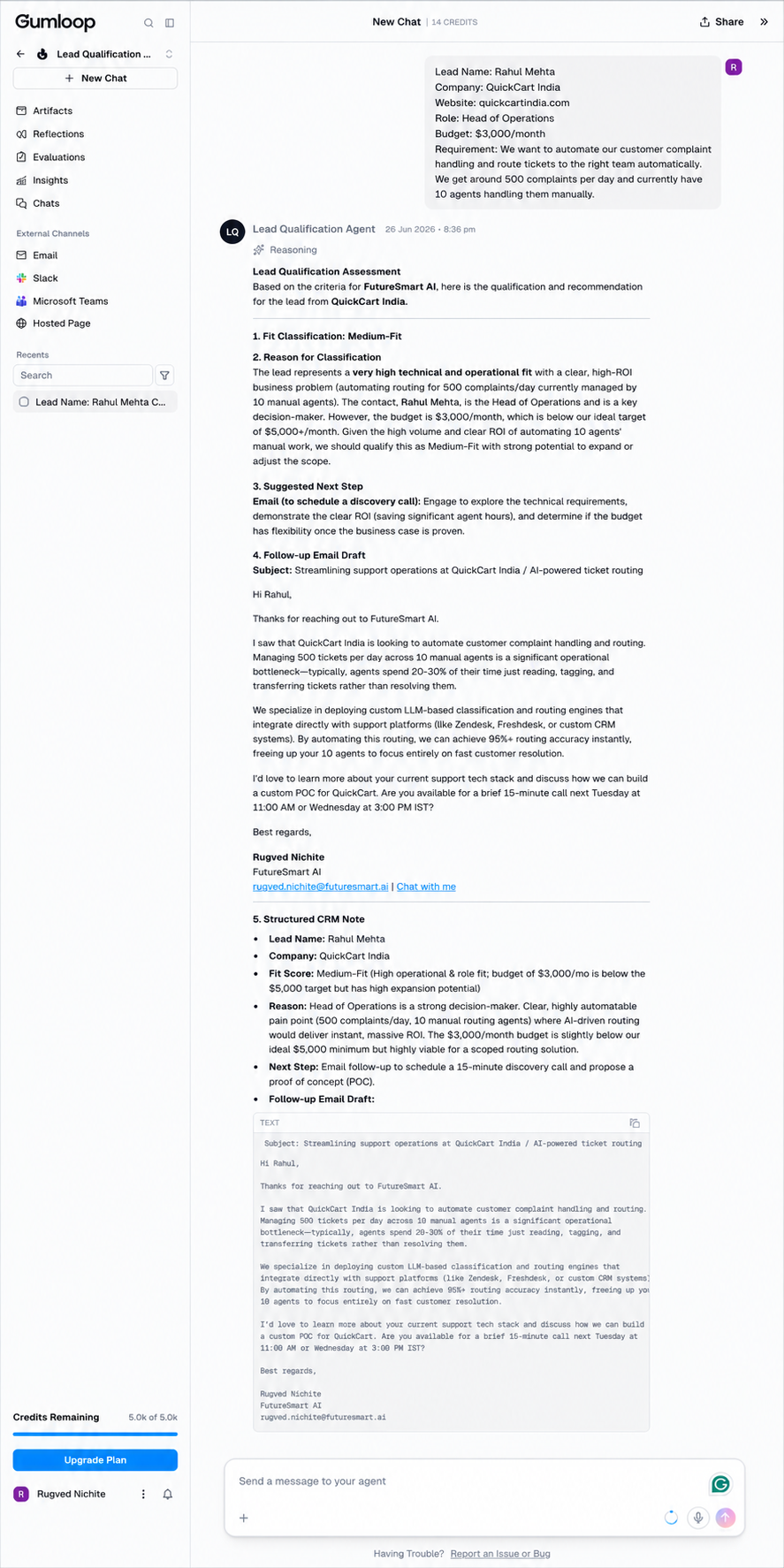
Expected behavior: Gumloop lets a business user define agents from plain-English instructions without code or API setup. In testing, it was used to specify lead-qualification, leave-policy, customer-routing, company-research, and email-approval agents conversationally.
Test case: Text prompt → Image
Input type: Text prompt
Input used: Input artifact (Text prompt): Input
Observed output: Output artifact (Image): Structured lead qualification output produced after plain-English agent setup: the agent returned a qualification assessment, reasoning, recommended action, follow-up email draft, and CRM-style note. — image-3.png
Input artifact: Input artifact (Text prompt): Input
Output artifact: Output artifact (Image): Structured lead qualification output produced after plain-English agent setup: the agent returned a qualification assessment, reasoning, recommended action, follow-up email draft, and CRM-style note. — image-3.png
What changed: Text prompt transformed into Image
Test case: Text prompt → Image
Input type: Text prompt
Input used: Input artifact (Text prompt): Input
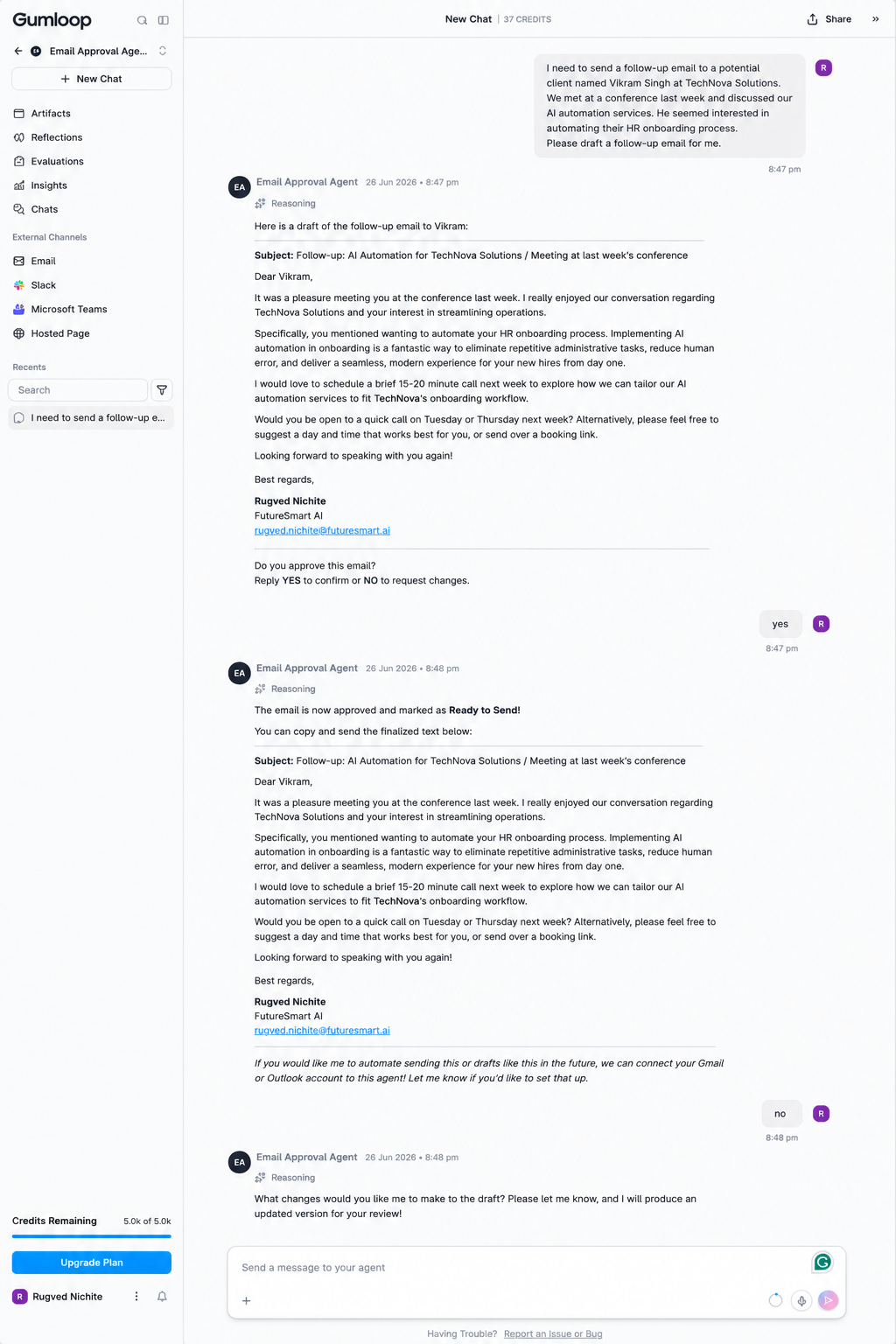
Observed output: Output artifact (Image): Approval-gated workflow output from a plain-English setup: the agent drafted the email, asked for approval, handled YES and NO turns, and kept the conversation in an approval loop. — image-17.png
Input artifact: Input artifact (Text prompt): Input
Output artifact: Output artifact (Image): Approval-gated workflow output from a plain-English setup: the agent drafted the email, asked for approval, handled YES and NO turns, and kept the conversation in an approval loop. — image-17.png
What changed: Text prompt transformed into Image
Why it matters / Conclusion: The core no-code setup works well: Gumloop can produce different business agents from plain English instructions without requiring code.
Gumloop lets a business user define agents from plain-English instructions without code or API setup. In testing, it was used to specify lead-qualification, leave-policy, customer-routing, company-research, and email-approval agents conversationally.
Structured Classification and Routing▾
Feature tested: Structured Classification and Routing
Result: Partial
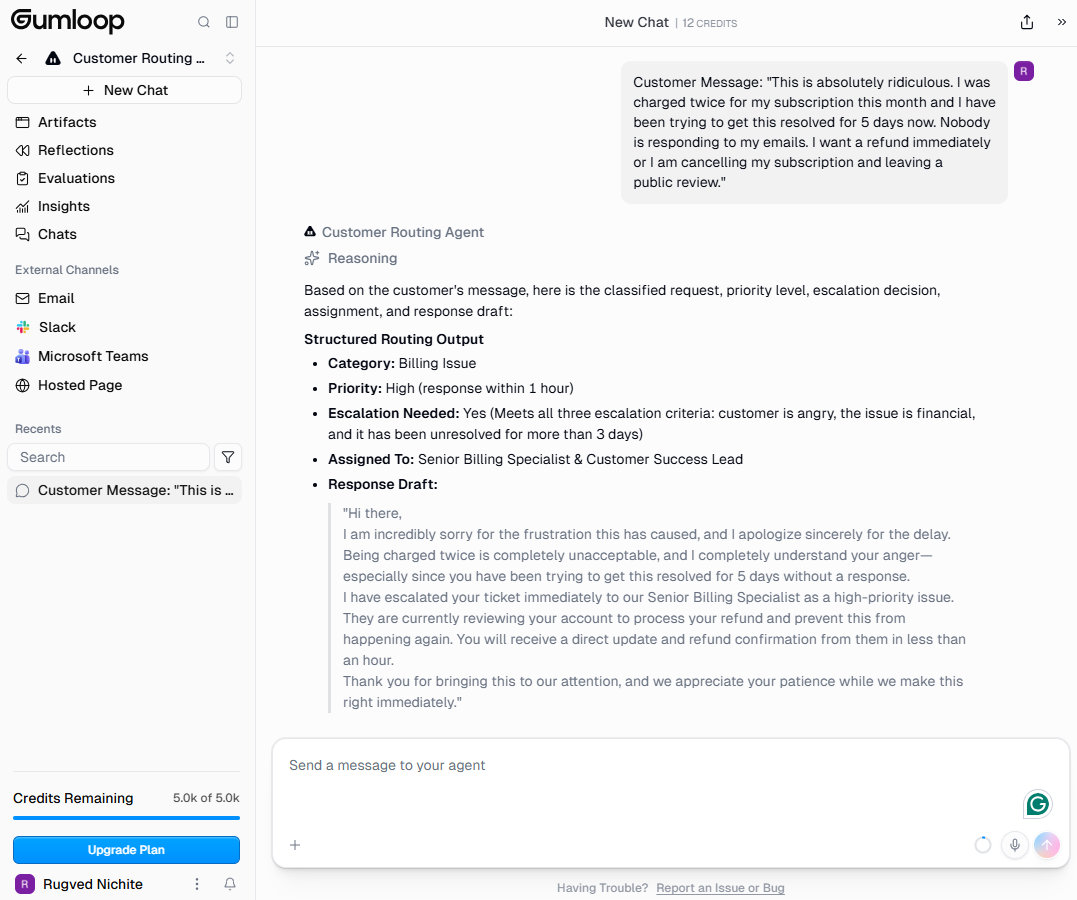
Expected behavior: Gumloop can turn conversational inputs into reusable business decisions, such as a BANT-style lead verdict for a sales lead and a priority-based routing decision for a billing complaint. The same workflow pattern also supports structured classification outputs for different inbound cases.
Test case: Text prompt → Image
Input type: Text prompt
Input used: Input artifact (Text prompt): Input
Observed output: Output artifact (Image): The agent correctly categorized the complaint as a billing issue, set high priority, flagged escalation, and drafted a response. — image-10.png
Input artifact: Input artifact (Text prompt): Input
Output artifact: Output artifact (Image): The agent correctly categorized the complaint as a billing issue, set high priority, flagged escalation, and drafted a response. — image-10.png
What changed: Text prompt transformed into Image
Test case: Text prompt → Image
Input type: Text prompt
Input used: Input artifact (Text prompt): Input
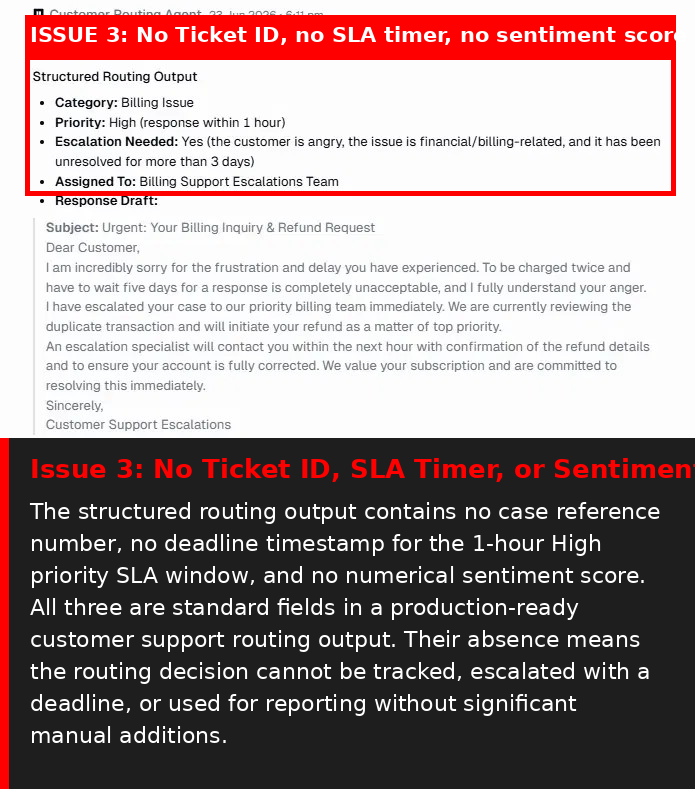
Observed output: Output artifact (Image): Annotated failure screenshot showing the routing-map drift: the case was assigned to Billing Support Escalations Team instead of the instructed Billing Team. — image-10.png
Input artifact: Input artifact (Text prompt): Input
Output artifact: Output artifact (Image): Annotated failure screenshot showing the routing-map drift: the case was assigned to Billing Support Escalations Team instead of the instructed Billing Team. — image-10.png
What changed: Text prompt transformed into Image
Test case: Text prompt → Image
Input type: Text prompt
Input used: Input artifact (Text prompt): Input
Observed output: Output artifact (Image): Annotated failure screenshot showing missing operational metadata: no ticket ID, SLA timer, or sentiment score were present in the structured routing output. — image-13.png
Input artifact: Input artifact (Text prompt): Input
Output artifact: Output artifact (Image): Annotated failure screenshot showing missing operational metadata: no ticket ID, SLA timer, or sentiment score were present in the structured routing output. — image-13.png
What changed: Text prompt transformed into Image
Why it matters / Conclusion: Structured classification is a strength, but the routing output drifted from the exact map and omitted standard support metadata like ticket ID, SLA timer, and sentiment score.
Gumloop can turn conversational inputs into reusable business decisions, such as a BANT-style lead verdict for a sales lead and a priority-based routing decision for a billing complaint. The same workflow pattern also supports structured classification outputs for different inbound cases.
Document-Grounded Answering and Drafting▾
Feature tested: Document-Grounded Answering and Drafting
Result: Partial
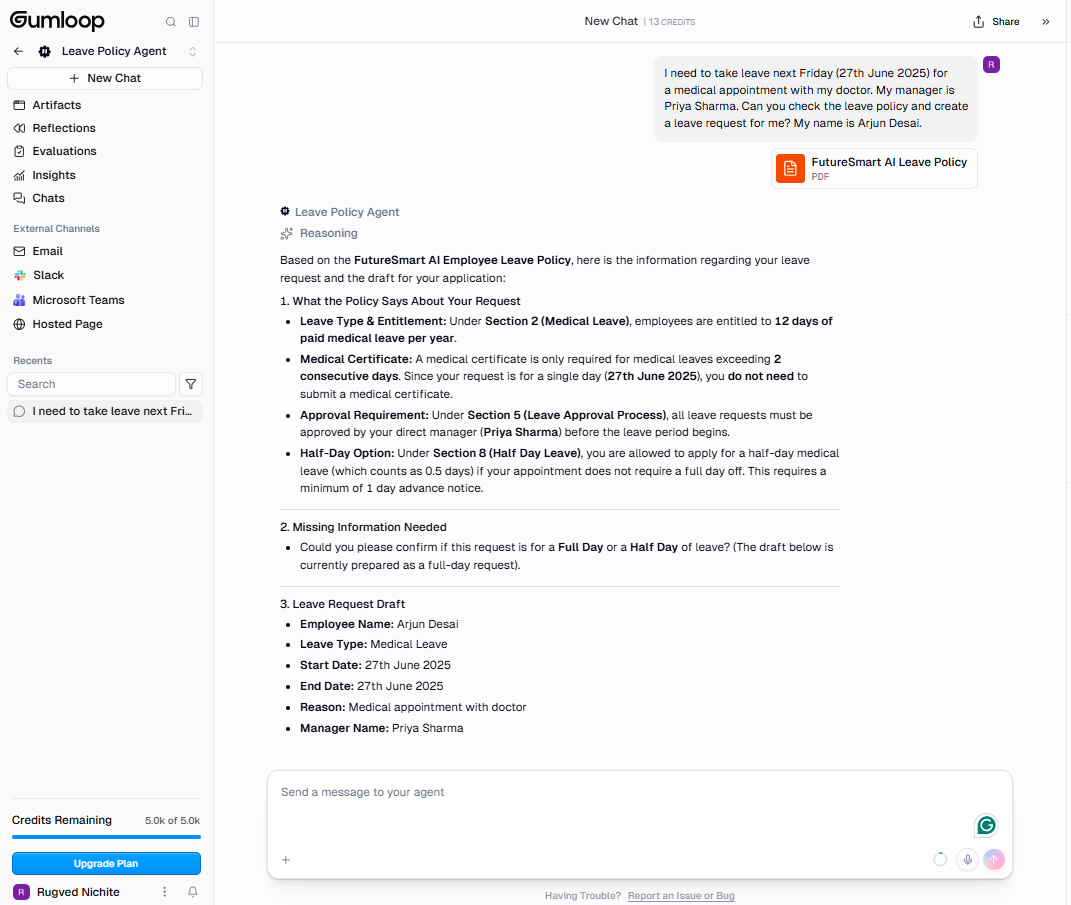
Expected behavior: Gumloop can read an uploaded PDF, answer questions from it, and use that information to draft a workflow output. In the leave-policy test it extracted entitlement and approval rules from the policy document and produced a leave request draft for Arjun Desai.
Test case: PDF document → Image
Input type: PDF document
Input used: Input artifact (PDF document): Input — FutureSmart-AI-Leave-Policy.pdf
Observed output: Output artifact (Image): The agent read the uploaded leave policy PDF, answered the policy question, asked whether the request was full day or half day, and drafted a leave request with employee, dates, reason, and manager fields filled in. — image-6.png
Input artifact: Input artifact (PDF document): Input — FutureSmart-AI-Leave-Policy.pdf
Output artifact: Output artifact (Image): The agent read the uploaded leave policy PDF, answered the policy question, asked whether the request was full day or half day, and drafted a leave request with employee, dates, reason, and manager fields filled in. — image-6.png
What changed: PDF document transformed into Image
Why it matters / Conclusion: Good at policy retrieval plus drafting, but it is not a full HR workflow on the free tier because the PDF is not persistent and the response did not check remaining leave balance.
Gumloop can read an uploaded PDF, answer questions from it, and use that information to draft a workflow output. In the leave-policy test it extracted entitlement and approval rules from the policy document and produced a leave request draft for Arjun Desai.
Human Approval Gates and Revision Control▾
Feature tested: Human Approval Gates and Revision Control
Result: Partial
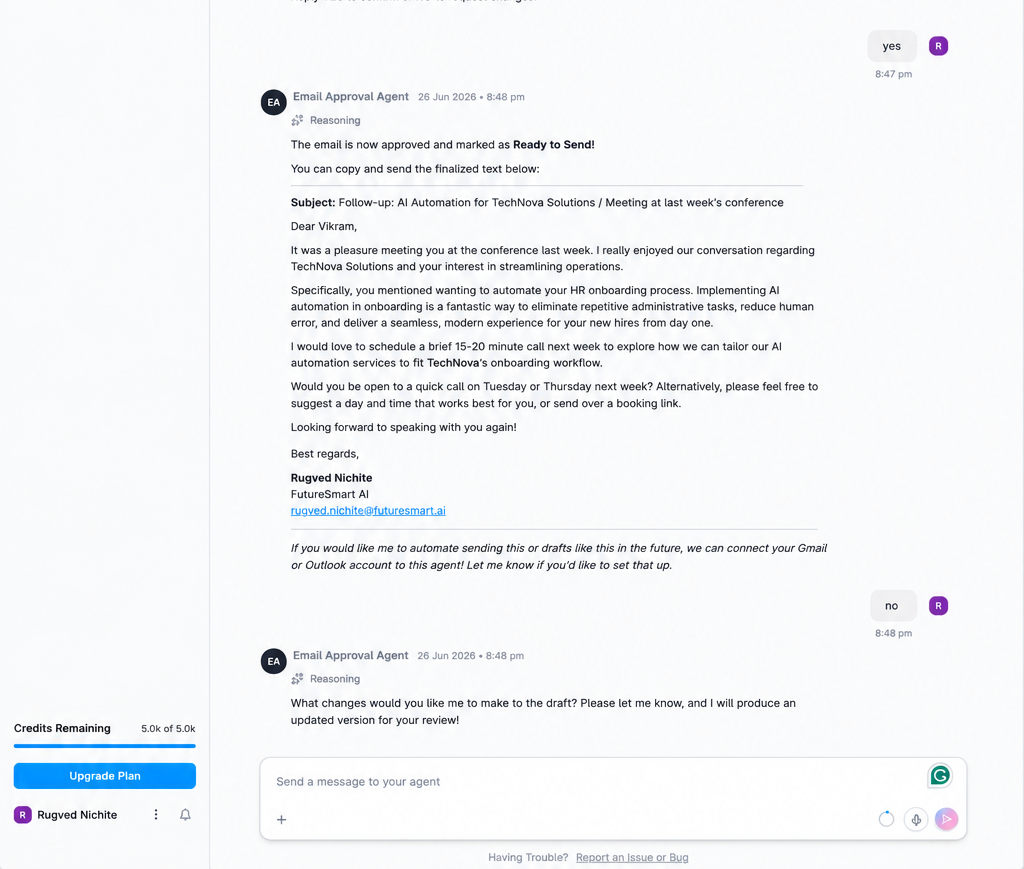
Expected behavior: Gumloop supports approval checkpoints that pause a workflow before a risky action is finalized. In the email workflow it drafted an email, asked for YES/NO approval, produced a revised version after NO, and remembered prior approval state within the session.
Test case: Text prompt → Image
Input type: Text prompt
Input used: Input artifact (Text prompt): Input
Observed output: Output artifact (Image): The agent paused for approval, asked for explicit YES/NO confirmation, and only moved the email to a ready-to-send state after approval. — image-17.png
Input artifact: Input artifact (Text prompt): Input
Output artifact: Output artifact (Image): The agent paused for approval, asked for explicit YES/NO confirmation, and only moved the email to a ready-to-send state after approval. — image-17.png
What changed: Text prompt transformed into Image
Test case: Text prompt → Image
Input type: Text prompt
Input used: Input artifact (Text prompt): Input
Observed output: Output artifact (Image): The approval state persisted within the session, but the screenshot shows no stored audit trail or session history anywhere in the interface. — Email approval output.Gumloop 2.png
Input artifact: Input artifact (Text prompt): Input
Output artifact: Output artifact (Image): The approval state persisted within the session, but the screenshot shows no stored audit trail or session history anywhere in the interface. — Email approval output.Gumloop 2.png
What changed: Text prompt transformed into Image
Test case: Text prompt → Image
Input type: Text prompt
Input used: Input artifact (Text prompt): Input
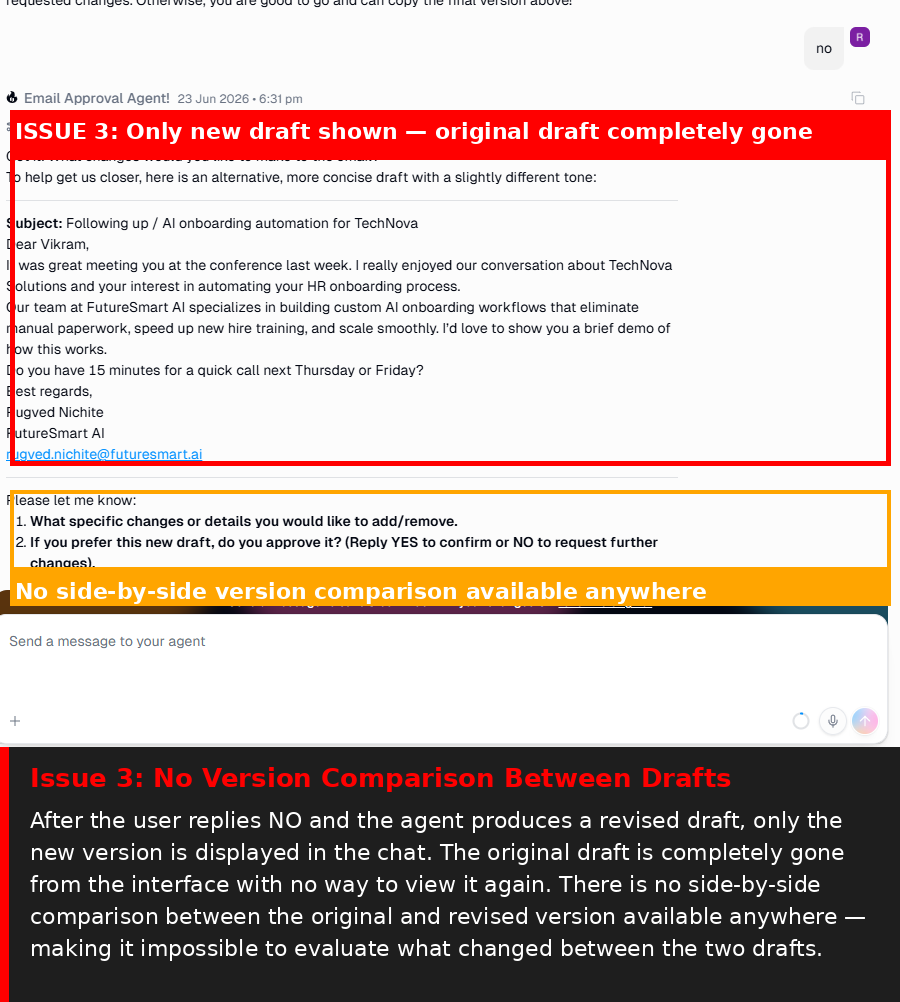
Observed output: Output artifact (Image): The agent produced a new draft after the revision request, but the original draft disappeared and there was no side-by-side comparison. — image-20.png
Input artifact: Input artifact (Text prompt): Input
Output artifact: Output artifact (Image): The agent produced a new draft after the revision request, but the original draft disappeared and there was no side-by-side comparison. — image-20.png
What changed: Text prompt transformed into Image
Why it matters / Conclusion: The approval gate itself is a standout strength, but the free tier keeps the workflow session-local with no audit trail or version comparison.
Gumloop supports approval checkpoints that pause a workflow before a risky action is finalized. In the email workflow it drafted an email, asked for YES/NO approval, produced a revised version after NO, and remembered prior approval state within the session.
Web Research Automation▾
Feature tested: Web Research Automation
Result: Failed
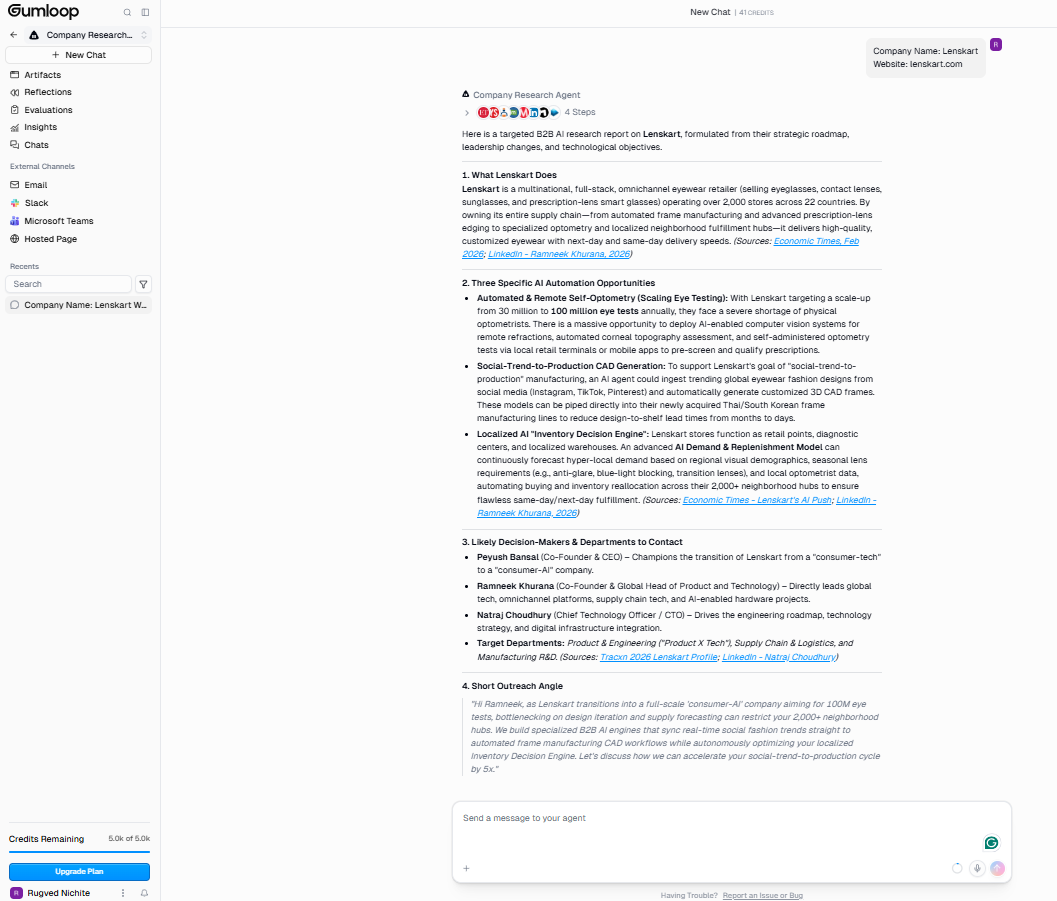
Expected behavior: Gumloop can launch live web research for a company-research workflow. In the Lenskart test it searched for several minutes and attempted to assemble a research brief from web sources.
Test case: Text prompt → Image
Input type: Text prompt
Input used: Input artifact (Text prompt): Input
Observed output: Output artifact (Image): The research flow triggered web search automatically, but it took roughly 6–7 minutes and produced no usable sources. — image-14.png
Input artifact: Input artifact (Text prompt): Input
Output artifact: Output artifact (Image): The research flow triggered web search automatically, but it took roughly 6–7 minutes and produced no usable sources. — image-14.png
What changed: Text prompt transformed into Image
Why it matters / Conclusion: This is the clearest failure in the review: the free-tier research flow did not produce any of the required company fields and exposed internal instructions instead.
Gumloop can launch live web research for a company-research workflow. In the Lenskart test it searched for several minutes and attempted to assemble a research brief from web sources.
Pricing & Access
Credit-based plans; the free tier was enough to test the core builder, but the free plan lacked direct integrations and persistent document storage in testing.
Pricing checked June 2026; verify current plans on the official site.
Featured in Rankings
Independent rankings where Gumloop was tested and rated.
Banner Preview
How the embed badge will look on your site

Embed HTML
Copy this code to your website source
Quick Integration Guide
- 1Copy the HTML code block above.
- 2Paste it into your site's HTML or CMS editor.
- 3Banner appears instantly on your page.
- 4Links back to your tool profile here.
Similar Tools
Discover more AI tools like Gumloop to enhance your workflow.
Comments (0)
Need a custom AI solution for this use case?
If you are looking to build a custom workflow automation, approval gate, or business agent system for your business or internal workflow, email us at contact@futuresmart.ai.
Found something inaccurate or missing? We try to keep our AI research accurate and useful. If you found outdated information, an issue, or have a suggestion, email us at collaborate@aidemos.com.