
Pickaxe
The simplest no-code agent builder for instruction-driven workflows, but unreliable for uploaded-document grounding.
Great for quick, chat-first agents; not dependable for policy PDFs.
- You want the quickest no-code start and can build from plain-English instructions.
- You need classification, routing, research, or approval-gated drafting that stays inside chat.
- You want free-tier web research with citations.
- You need reliable retrieval from uploaded PDFs or policy documents.
Our take
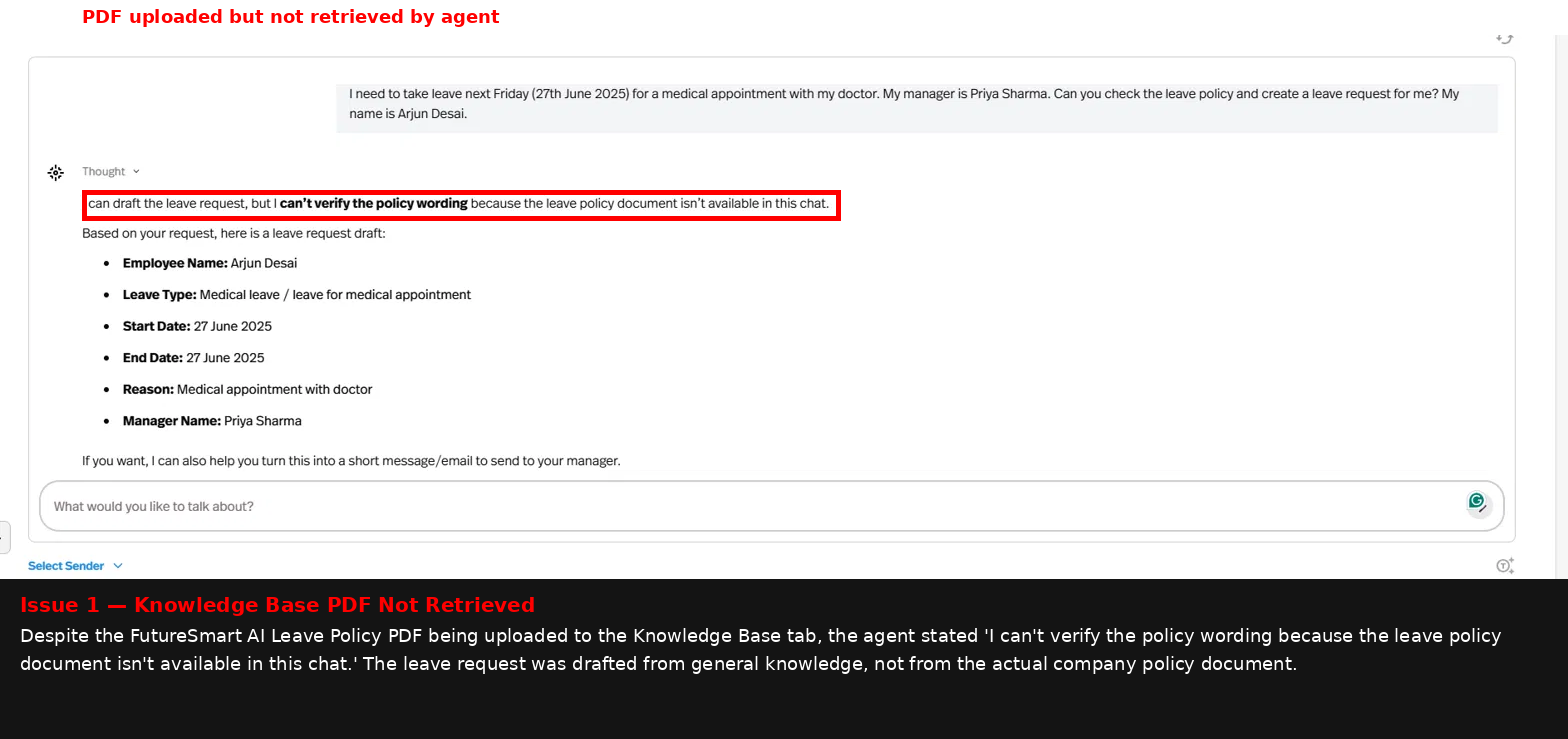
Pickaxe is the easiest tool in this set to get running: plain-English instructions were enough to build useful agents for lead qualification, routing, research, and approval-gated drafting. The serious catch is document grounding — the leave-policy PDF was uploaded and active in the Knowledge Base, yet the agent still could not retrieve it in chat, so I would trust Pickaxe for instruction-driven workflows before any production use that depends on uploaded documents.
In-Depth Review
Our detailed analysis of Pickaxe — features, performance, and real-world testing.
Feature-by-Feature Breakdown
No-Code Agent SetupFastest setup in the set▾
Feature tested: No-Code Agent Setup
Result: Passed
Verdict: Fastest setup in the set
Expected behavior: Pickaxe lets a non-technical user stand up a working agent by pasting plain-English instructions into the system prompt field. In the test, no workflow builder, node configuration, or API key was needed to get useful outputs quickly.
Test case: Text prompt → Text prompt
Input type: Text prompt
Input used: Input artifact (Text prompt): Input
Observed output: Output artifact (Text prompt): Output
Input artifact: Input artifact (Text prompt): Input
Output artifact: Output artifact (Text prompt): Output
What changed: Text prompt transformed into Text prompt
Why it matters / Conclusion: This is Pickaxe's biggest strength: it is very easy for non-technical users to stand up a usable agent quickly.
Pickaxe lets a non-technical user stand up a working agent by pasting plain-English instructions into the system prompt field. In the test, no workflow builder, node configuration, or API key was needed to get useful outputs quickly.
Structured Output GenerationGood outputs with a few reliability gaps▾
Feature tested: Structured Output Generation
Result: Partial
Verdict: Good outputs with a few reliability gaps
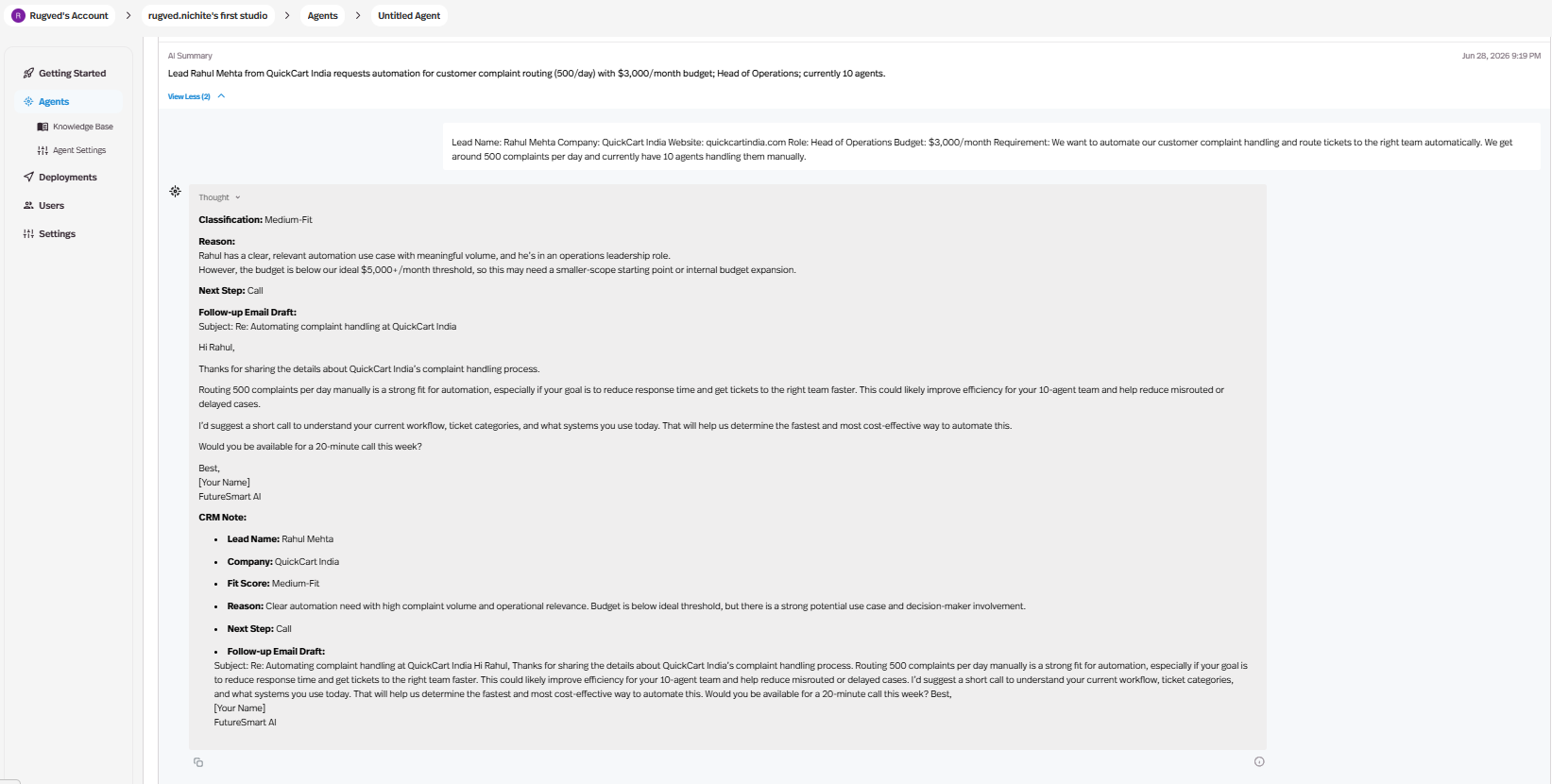
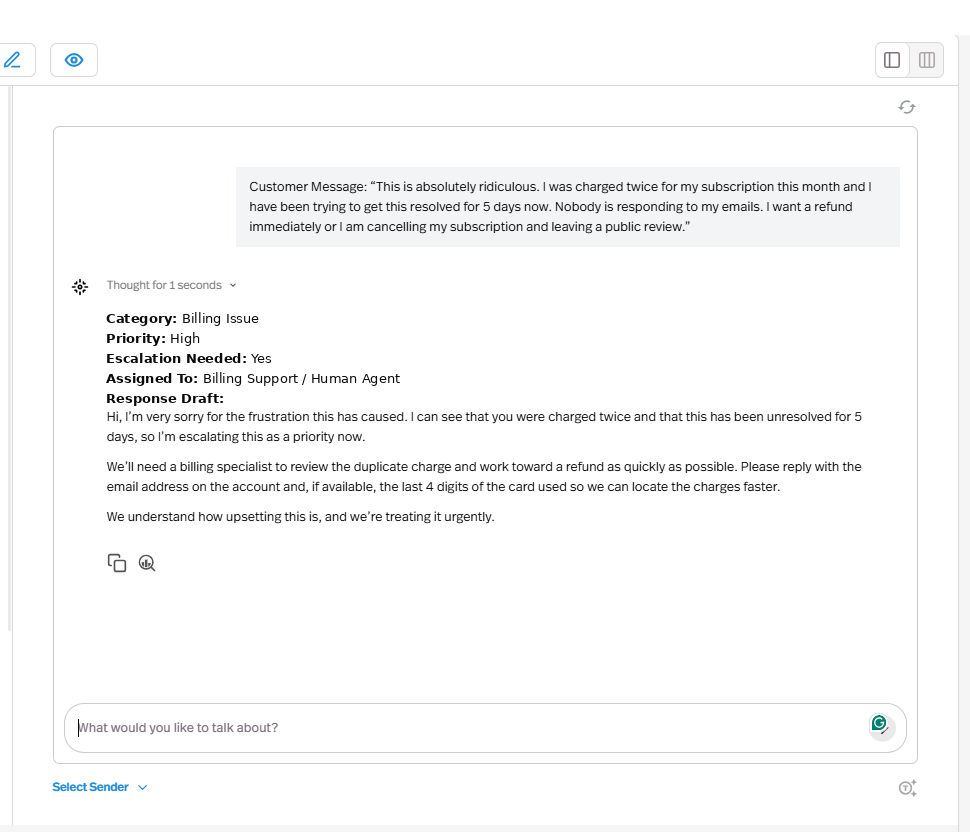
Expected behavior: Pickaxe can take structured business inputs and return multiple linked fields in one response, such as fit labels, priority levels, reasoning, next steps, and drafted text. It was exercised on lead qualification and billing-routing style outputs.
Test case: Text prompt → Image
Input type: Text prompt
Input used: Input artifact (Text prompt): Input
Observed output: Output artifact (Image): The agent classified Rahul Mehta as Medium-Fit, explained that the budget was below the ideal threshold, suggested a call, and drafted a personalized follow-up email plus CRM-style note fields. — image-3.png
Input artifact: Input artifact (Text prompt): Input
Output artifact: Output artifact (Image): The agent classified Rahul Mehta as Medium-Fit, explained that the budget was below the ideal threshold, suggested a call, and drafted a personalized follow-up email plus CRM-style note fields. — image-3.png
What changed: Text prompt transformed into Image
Test case: Text prompt → Image
Input type: Text prompt
Input used: Input artifact (Text prompt): Input
Observed output: Output artifact (Image): The agent classified the issue as Billing Issue, marked Priority High, and flagged escalation, but it routed to 'Billing Support / Human Agent' rather than the exact 'Billing Team' label from the routing map. — image-10.png
Input artifact: Input artifact (Text prompt): Input
Output artifact: Output artifact (Image): The agent classified the issue as Billing Issue, marked Priority High, and flagged escalation, but it routed to 'Billing Support / Human Agent' rather than the exact 'Billing Team' label from the routing map. — image-10.png
What changed: Text prompt transformed into Image
Test case: Text prompt → Image
Input type: Text prompt
Input used: Input artifact (Text prompt): Input
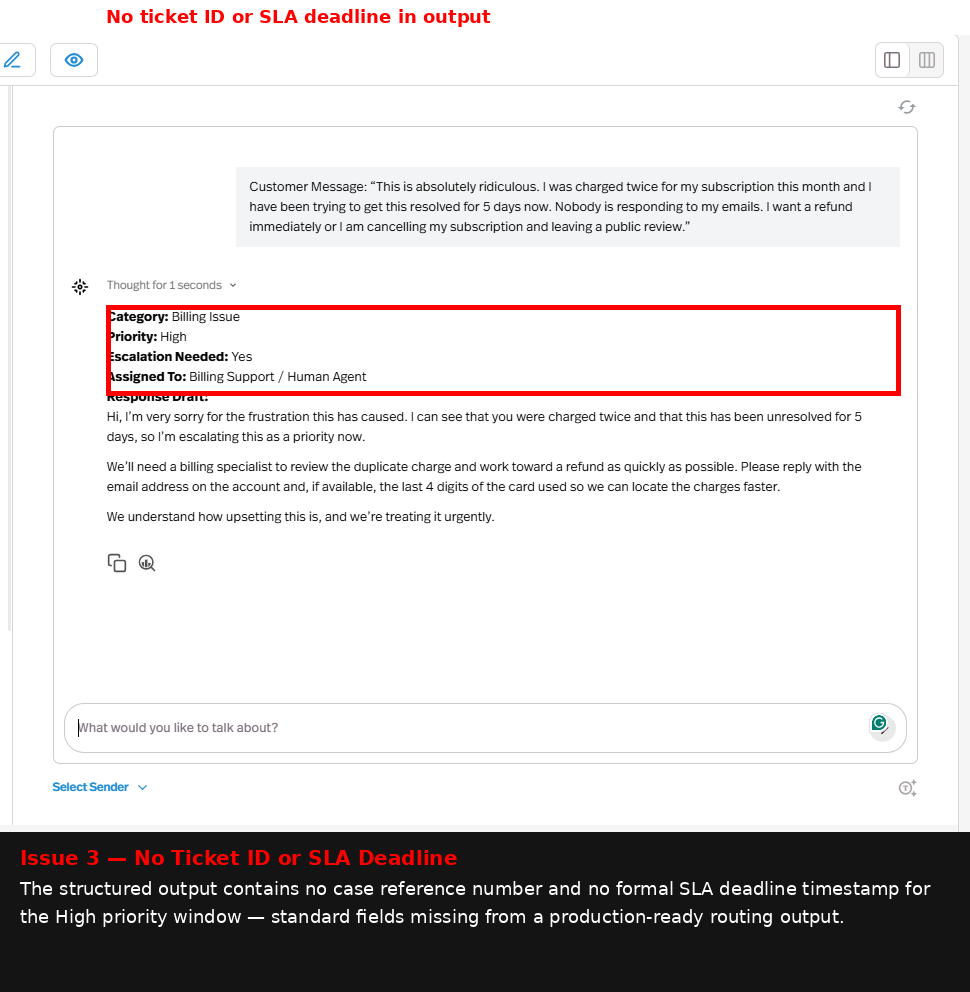
Observed output: Output artifact (Image): The structured routing output did not include a ticket ID or SLA deadline timestamp, which limits production readiness for support operations. — image-13.png
Input artifact: Input artifact (Text prompt): Input
Output artifact: Output artifact (Image): The structured routing output did not include a ticket ID or SLA deadline timestamp, which limits production readiness for support operations. — image-13.png
What changed: Text prompt transformed into Image
Why it matters / Conclusion: Pickaxe is reliable for structured decisions and drafts, but exact downstream labels and handoff metadata are not consistently complete.
Pickaxe can take structured business inputs and return multiple linked fields in one response, such as fit labels, priority levels, reasoning, next steps, and drafted text. It was exercised on lead qualification and billing-routing style outputs.
Web Research and Source CitationStrong on sourced research▾
Feature tested: Web Research and Source Citation
Result: Passed
Verdict: Strong on sourced research
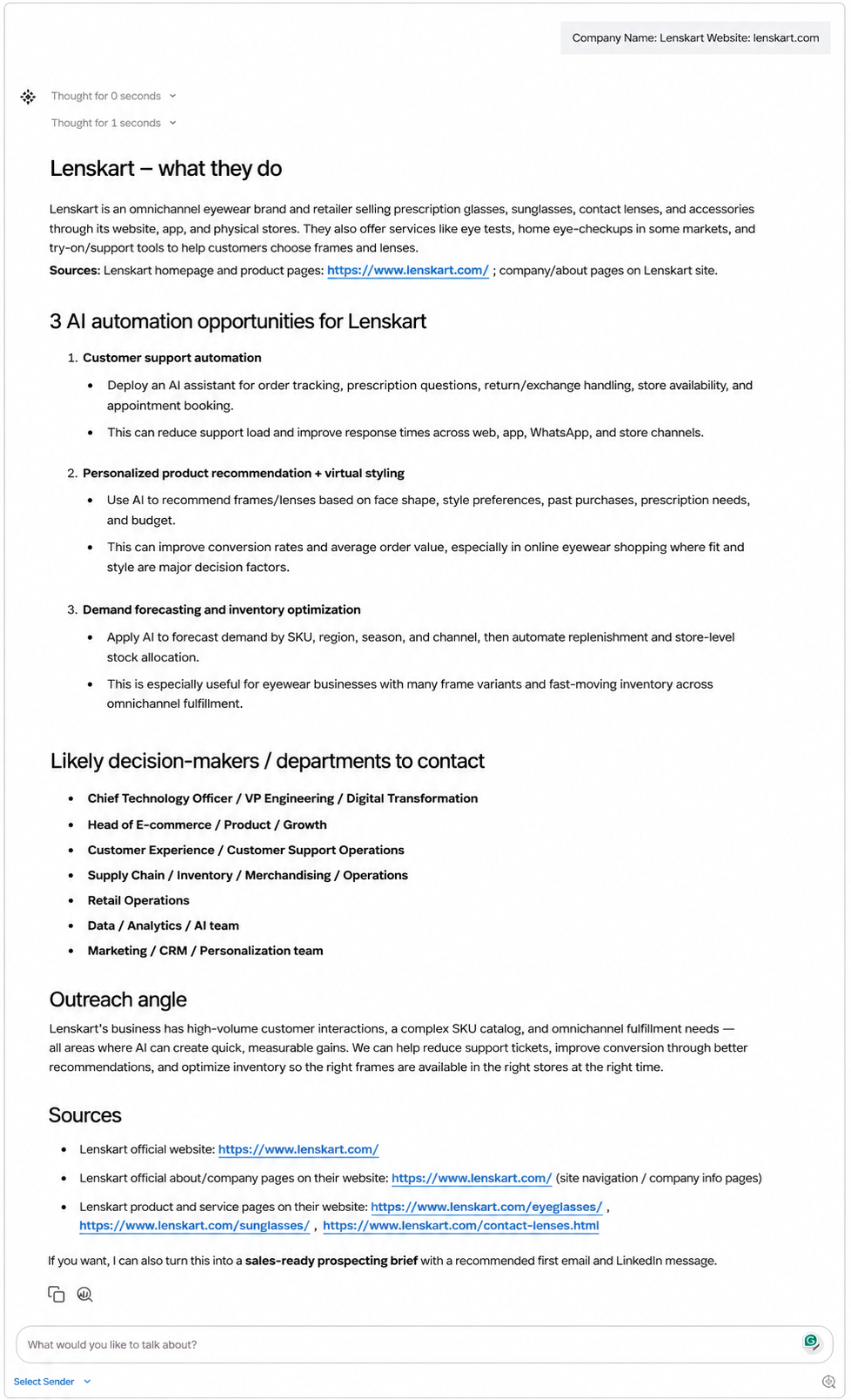
Expected behavior: Pickaxe can search the web and turn a company name into a structured prospecting brief with company overview, product/service context, outreach angles, and cited sources. The Lenskart test returned the requested fields with citations at the bottom.
Test case: Text prompt → Image
Input type: Text prompt
Input used: Input artifact (Text prompt): Input
Observed output: Output artifact (Image): The agent produced a research brief on Lenskart with company overview, product context, AI automation opportunities, likely departments to contact, and a sources section. — image-14.png
Input artifact: Input artifact (Text prompt): Input
Output artifact: Output artifact (Image): The agent produced a research brief on Lenskart with company overview, product context, AI automation opportunities, likely departments to contact, and a sources section. — image-14.png
What changed: Text prompt transformed into Image
Test case: Text prompt → Image
Input type: Text prompt
Input used: Input artifact (Text prompt): Input
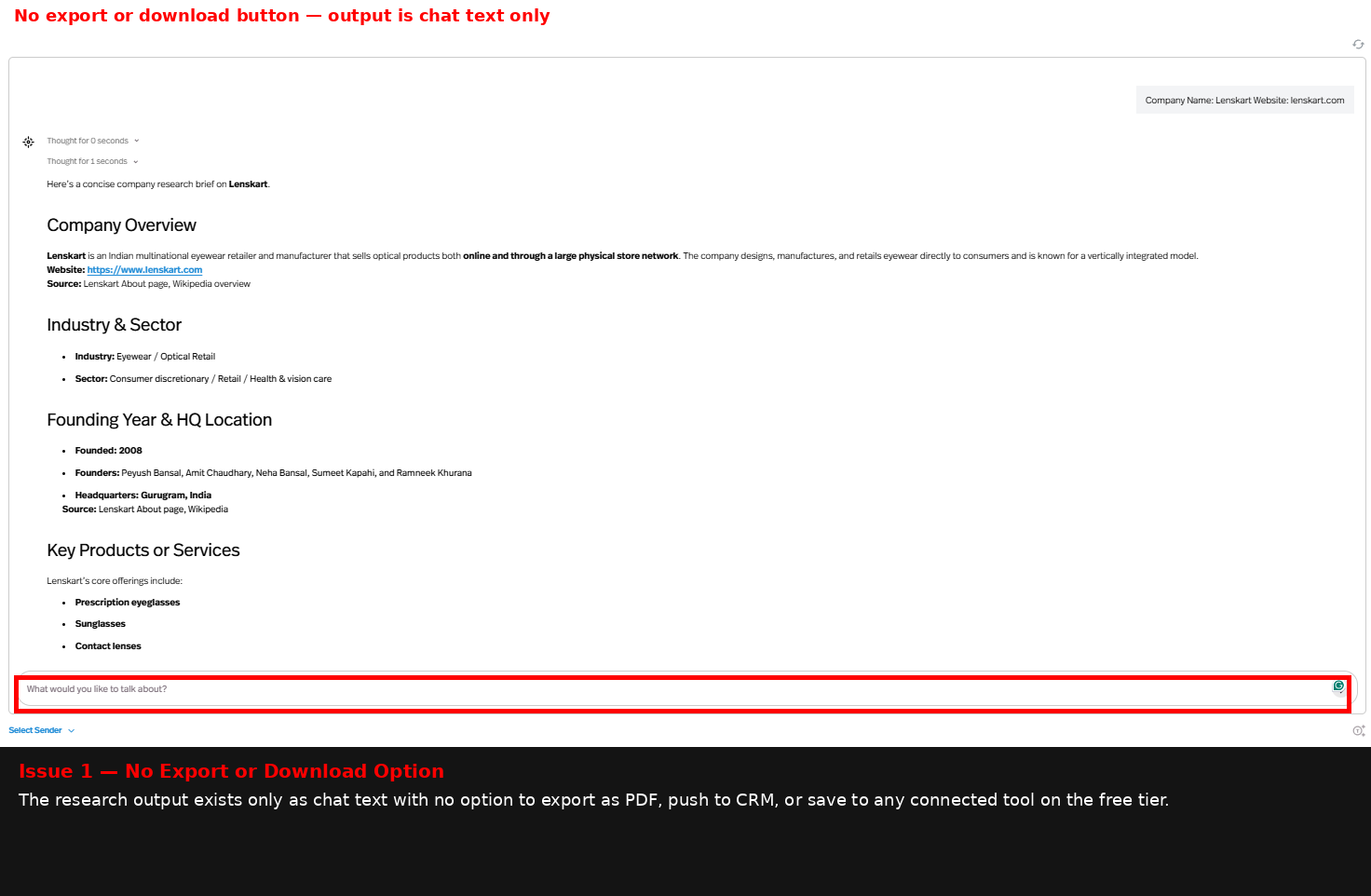
Observed output: Output artifact (Image): The research brief stayed as chat text only and had no export or download control on the free tier. — image-15.png
Input artifact: Input artifact (Text prompt): Input
Output artifact: Output artifact (Image): The research brief stayed as chat text only and had no export or download control on the free tier. — image-15.png
What changed: Text prompt transformed into Image
Test case: Text prompt → Image
Input type: Text prompt
Input used: Input artifact (Text prompt): Input
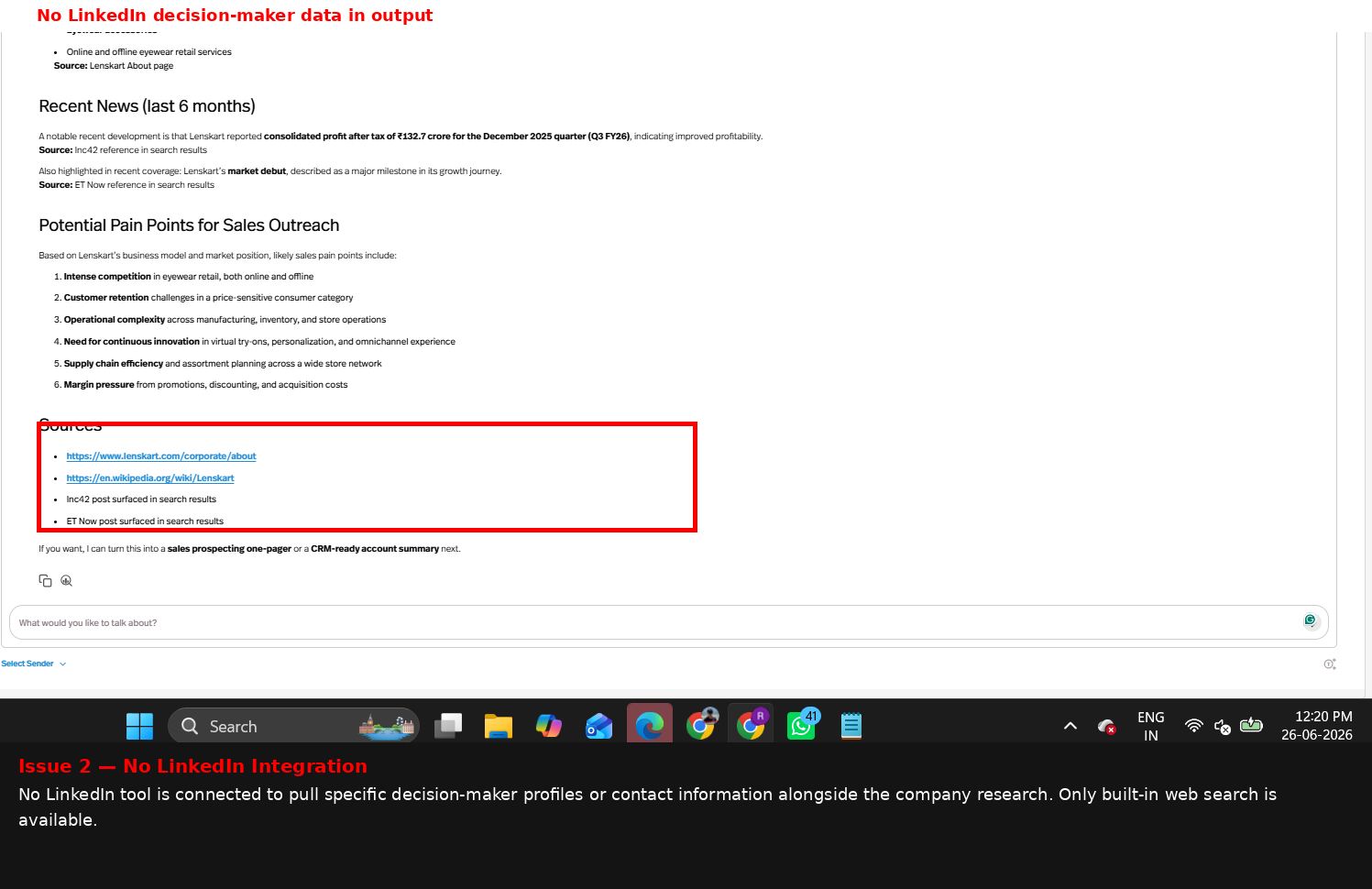
Observed output: Output artifact (Image): The output did not include LinkedIn decision-maker data, and no LinkedIn integration was connected. — image-16.png
Input artifact: Input artifact (Text prompt): Input
Output artifact: Output artifact (Image): The output did not include LinkedIn decision-maker data, and no LinkedIn integration was connected. — image-16.png
What changed: Text prompt transformed into Image
Why it matters / Conclusion: This was Pickaxe's strongest task: the web research output was complete and sourced, but free-tier export and LinkedIn enrichment were not available.
Pickaxe can search the web and turn a company name into a structured prospecting brief with company overview, product/service context, outreach angles, and cited sources. The Lenskart test returned the requested fields with citations at the bottom.
Human Approval WorkflowGood gate, but minimal records▾
Feature tested: Human Approval Workflow
Result: Partial
Verdict: Good gate, but minimal records
Expected behavior: Pickaxe can draft an email, pause for explicit human approval, and only mark the draft as ready after a YES response. The tested flow enforced exact YES/NO matching.
Test case: Text prompt → Image
Input type: Text prompt
Input used: Input artifact (Text prompt): Input
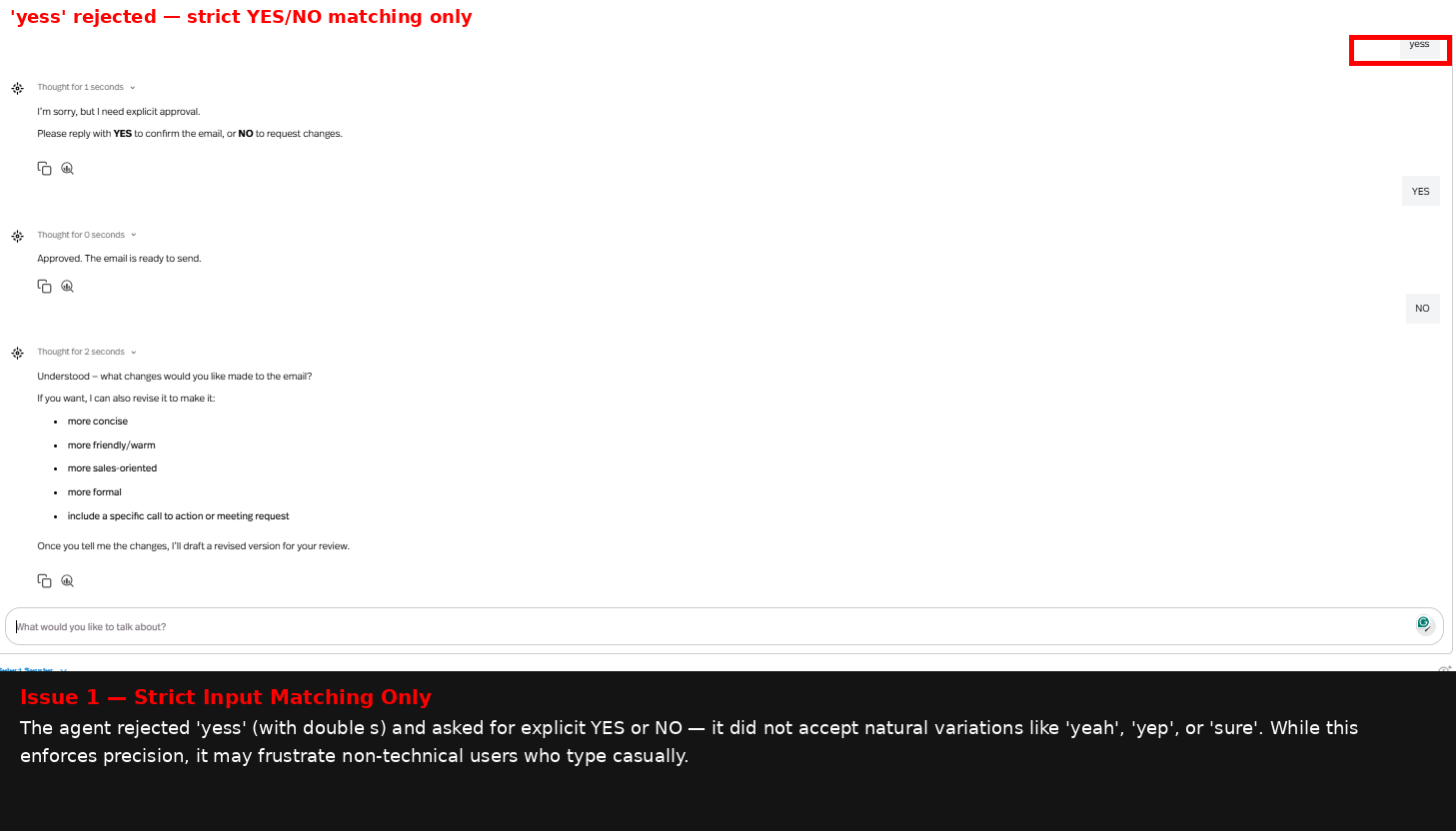
Observed output: Output artifact (Image): The agent required explicit YES/NO confirmation and rejected casual variants such as 'yess', showing strict approval matching. — image-17.png
Input artifact: Input artifact (Text prompt): Input
Output artifact: Output artifact (Image): The agent required explicit YES/NO confirmation and rejected casual variants such as 'yess', showing strict approval matching. — image-17.png
What changed: Text prompt transformed into Image
Test case: Text prompt → Image
Input type: Text prompt
Input used: Input artifact (Text prompt): Input
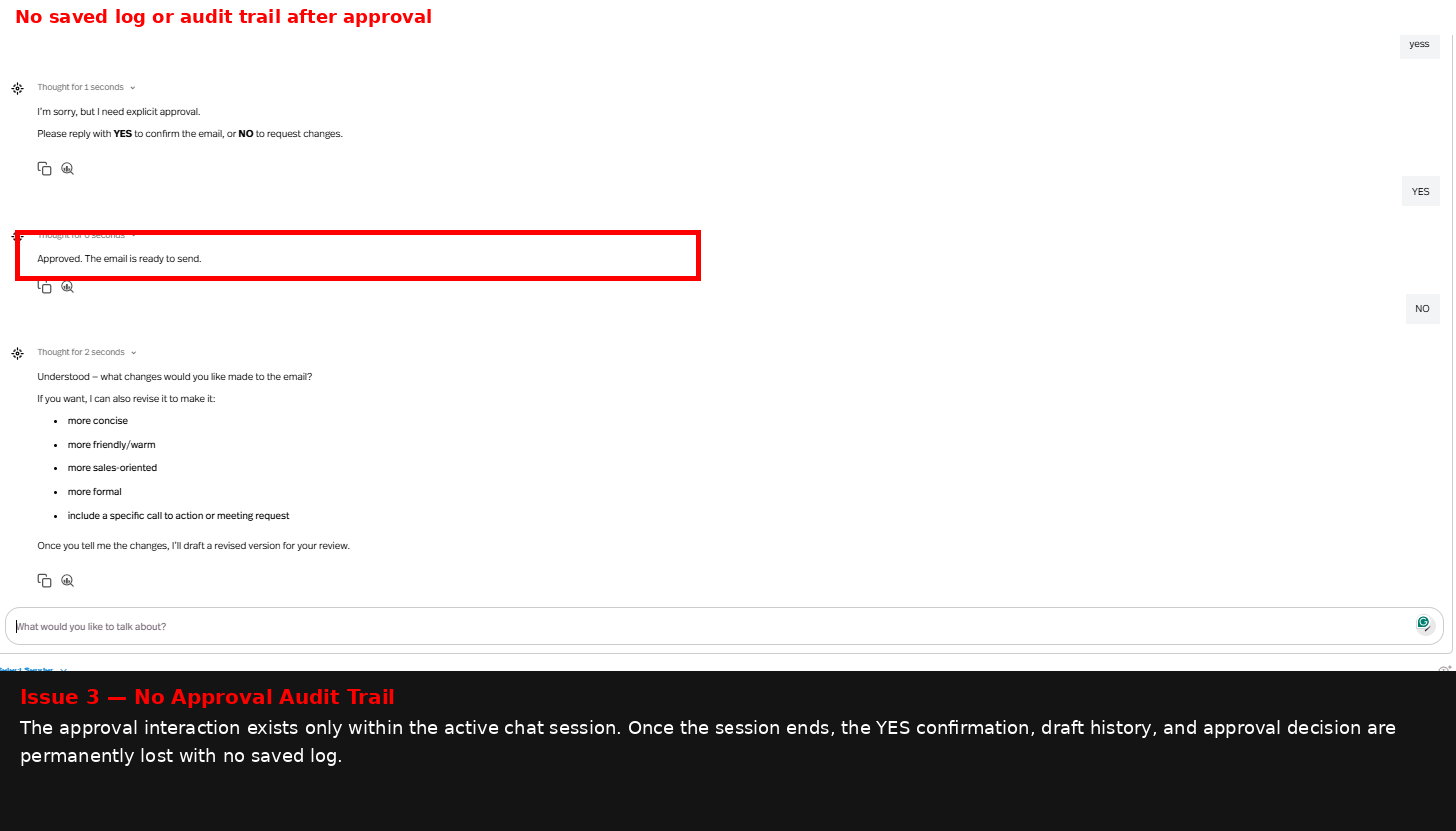
Observed output: Output artifact (Image): The approval interaction stayed inside the active chat session, with no saved audit trail visible after approval. — image-19.png
Input artifact: Input artifact (Text prompt): Input
Output artifact: Output artifact (Image): The approval interaction stayed inside the active chat session, with no saved audit trail visible after approval. — image-19.png
What changed: Text prompt transformed into Image
Test case: Text prompt → Image
Input type: Text prompt
Input used: Input artifact (Text prompt): Input
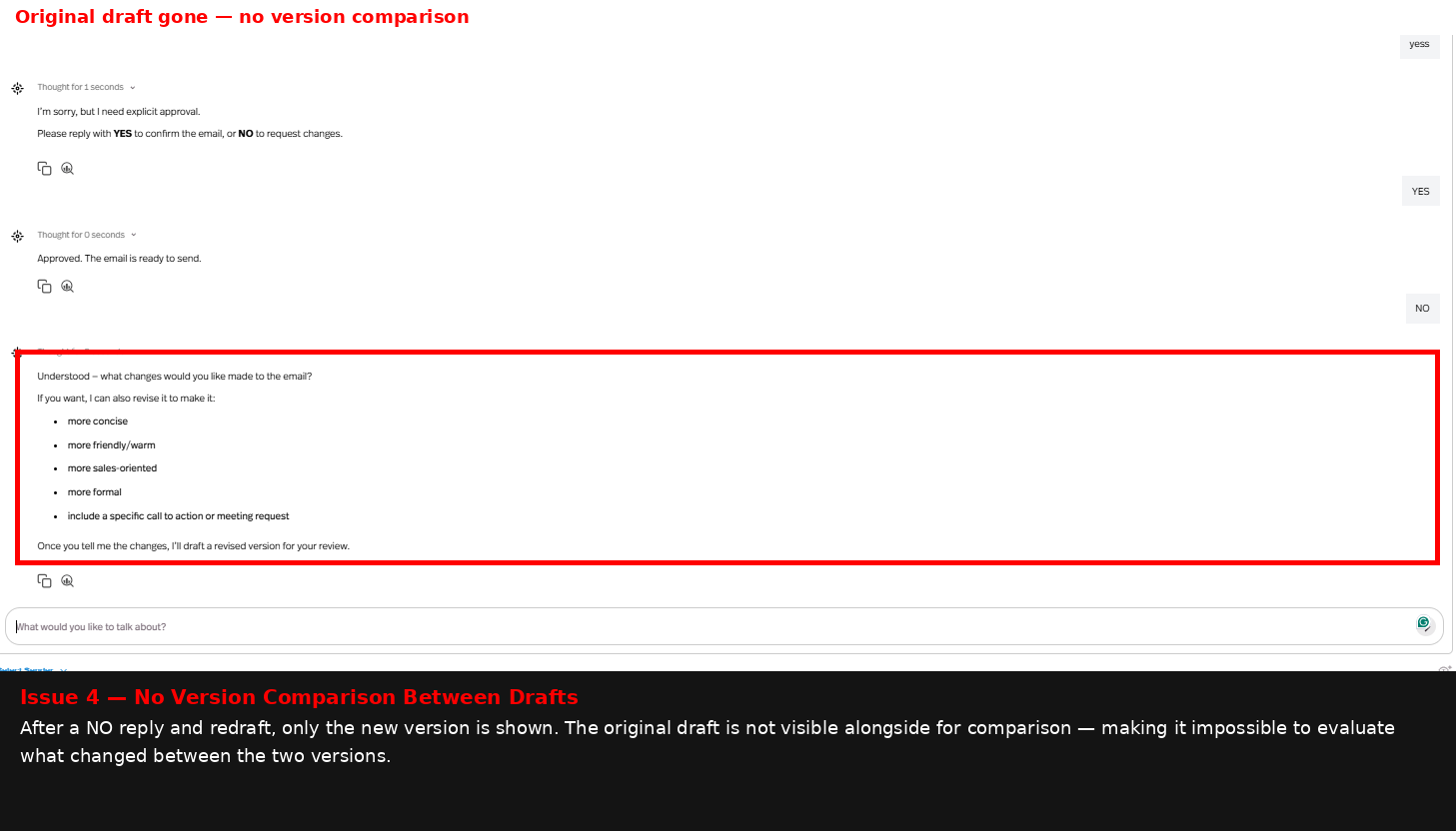
Observed output: Output artifact (Image): After a NO reply, Pickaxe produced a revised draft, but it did not show a side-by-side comparison with the original version. — image-20.png
Input artifact: Input artifact (Text prompt): Input
Output artifact: Output artifact (Image): After a NO reply, Pickaxe produced a revised draft, but it did not show a side-by-side comparison with the original version. — image-20.png
What changed: Text prompt transformed into Image
Test case: Text prompt → Image
Input type: Text prompt
Input used: Input artifact (Text prompt): Input
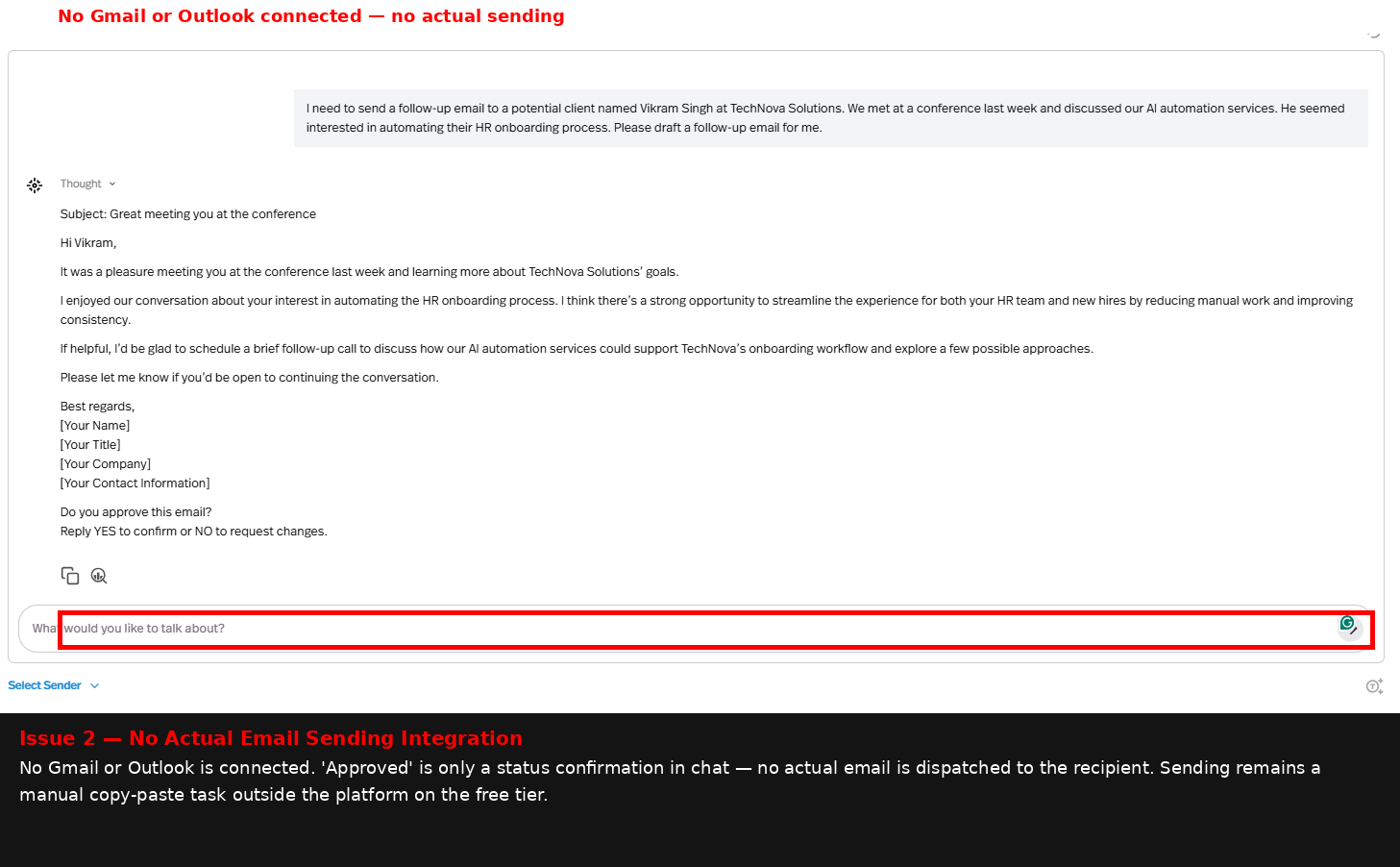
Observed output: Output artifact (Image): The draft existed in chat only; no Gmail or Outlook integration was connected, so the message could not actually be sent from within Pickaxe. — image-18.png
Input artifact: Input artifact (Text prompt): Input
Output artifact: Output artifact (Image): The draft existed in chat only; no Gmail or Outlook integration was connected, so the message could not actually be sent from within Pickaxe. — image-18.png
What changed: Text prompt transformed into Image
Why it matters / Conclusion: The approval gate itself is solid, but the workflow lacks saved approval records, version comparison, and actual email sending on the tested free tier.
Pickaxe can draft an email, pause for explicit human approval, and only mark the draft as ready after a YES response. The tested flow enforced exact YES/NO matching.
Knowledge Base IntegrationUpload works▾
Feature tested: Knowledge Base Integration
Result: Failed
Verdict: Upload works
Expected behavior: Pickaxe supports uploading PDFs into a Knowledge Base, activating them with citations on, and then trying to use those documents in conversation. In testing, a leave-policy PDF uploaded and processed into chunks, but retrieval from the active document remained unreliable.
Test case: Text prompt → Image
Input type: Text prompt
Input used: Input artifact (Text prompt): Input
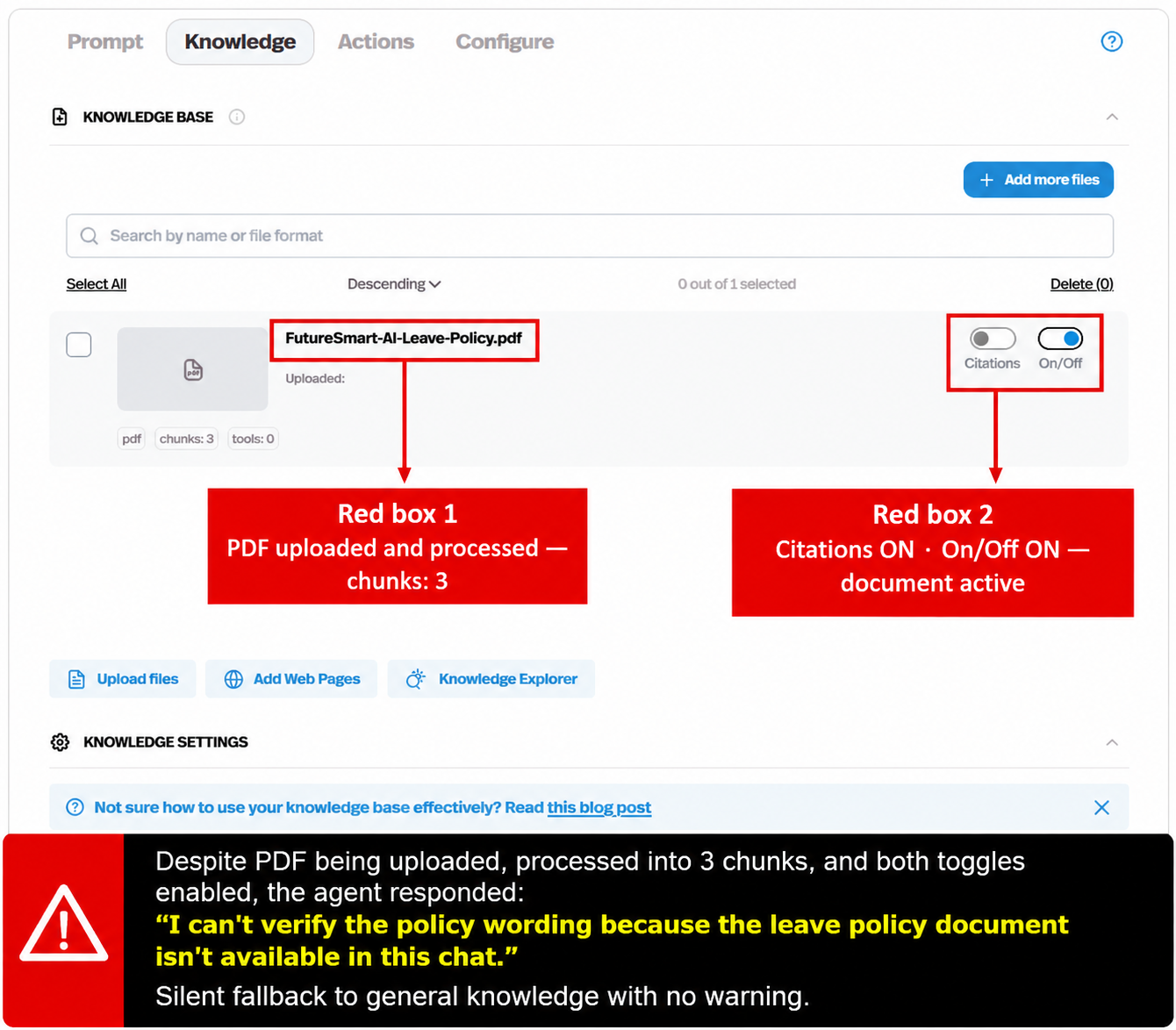
Observed output: Output artifact (Image): The FutureSmart-AI-Leave-Policy.pdf file uploaded successfully, processed into 3 chunks, and the Citations and On/Off toggles were enabled. — image-7.png
Input artifact: Input artifact (Text prompt): Input
Output artifact: Output artifact (Image): The FutureSmart-AI-Leave-Policy.pdf file uploaded successfully, processed into 3 chunks, and the Citations and On/Off toggles were enabled. — image-7.png
What changed: Text prompt transformed into Image
Test case: Text prompt → Image
Input type: Text prompt
Input used: Input artifact (Text prompt): Input
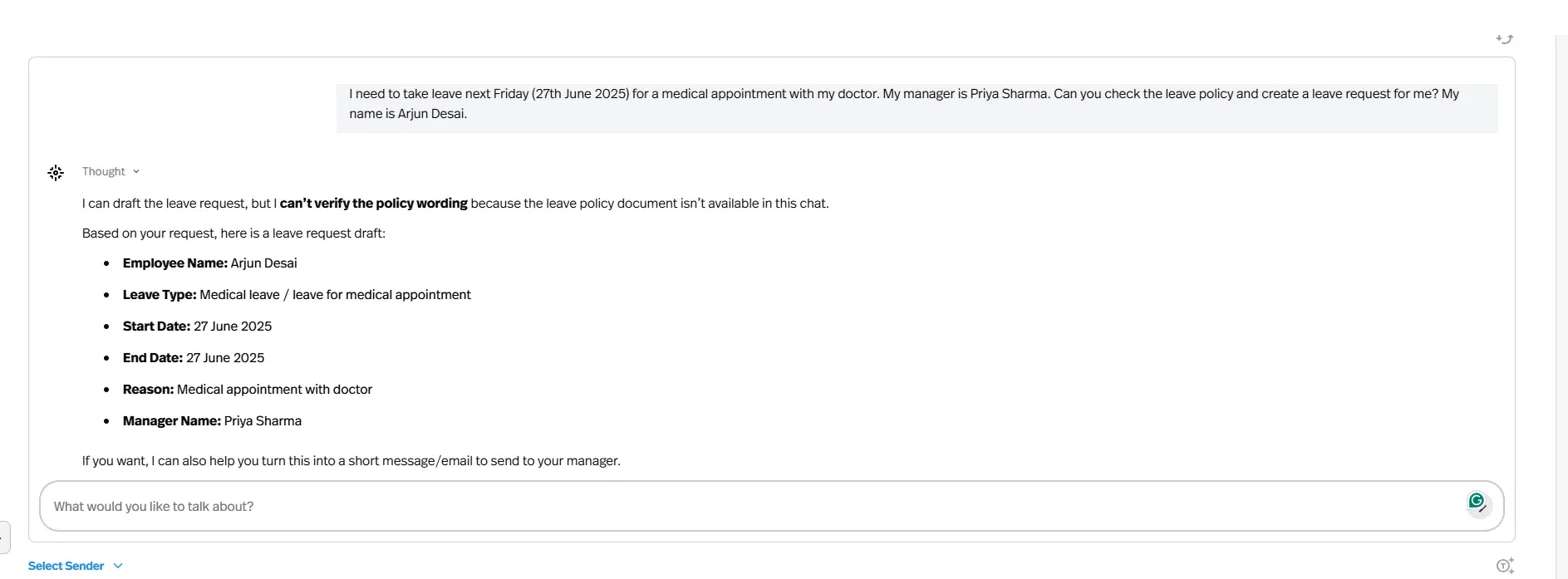
Observed output: Output artifact (Image): The agent drafted a leave request with the correct fields, but said it could not verify the policy wording because the leave policy document was not available in chat. — image-6.png
Input artifact: Input artifact (Text prompt): Input
Output artifact: Output artifact (Image): The agent drafted a leave request with the correct fields, but said it could not verify the policy wording because the leave policy document was not available in chat. — image-6.png
What changed: Text prompt transformed into Image
Test case: Text prompt → Image
Input type: Text prompt
Input used: Input artifact (Text prompt): Input
Observed output: Output artifact (Image): Even with the PDF still active in the Knowledge Base, the agent again said it could not access the leave policy document and fell back to general knowledge. — image-21.png
Input artifact: Input artifact (Text prompt): Input
Output artifact: Output artifact (Image): Even with the PDF still active in the Knowledge Base, the agent again said it could not access the leave policy document and fell back to general knowledge. — image-21.png
What changed: Text prompt transformed into Image
Why it matters / Conclusion: Upload and activation worked, but that alone did not make the document retrievable in conversation.
Pickaxe supports uploading PDFs into a Knowledge Base, activating them with citations on, and then trying to use those documents in conversation. In testing, a leave-policy PDF uploaded and processed into chunks, but retrieval from the active document remained unreliable.
Pricing & access
Usage-based credits; the free tier was enough for the benchmark session.
Pricing checked June 2026 from pickaxe.co/pricing.
Featured in Rankings
Independent rankings where Pickaxe was tested and rated.
Banner Preview
How the embed badge will look on your site

Embed HTML
Copy this code to your website source
Quick Integration Guide
- 1Copy the HTML code block above.
- 2Paste it into your site's HTML or CMS editor.
- 3Banner appears instantly on your page.
- 4Links back to your tool profile here.
Similar Tools
Discover more AI tools like Pickaxe to enhance your workflow.
Comments (0)
Need a custom AI solution for this use case?
If you are looking to build a custom lead qualification, routing, or drafting agent workflow for your business or internal workflow, email us at contact@futuresmart.ai.
Found something inaccurate or missing? We try to keep our AI research accurate and useful. If you found outdated information, an issue, or have a suggestion, email us at collaborate@aidemos.com.