.png&w=256&q=75)
Jupitrr
Jupitrr AI Review: Automated B-Roll Video Generator Tested (2026)
Our take
- You need fast, automated reel generation with minimal effort
- You create daily short-form content (Reels, Shorts, TikTok)
- You want reliable B-roll + captions without manual editing
- You need advanced animations or cinematic editing control
Feature scores on this page: 9.1/10 (5 scored features)
Our take
Jupitrr AI is one of the most reliable tools forfast, automated reel creation with strong B-roll accuracy and clean templates. It prioritizesspeed, stability, and consistency, making it ideal for creators who need ready-to-post videos without manual editing. While it lacks advanced cinematic styling, it fully delivers on the core promise of automated short-form content production.
In-Depth Review
Our detailed analysis of Jupitrr — features, performance, and real-world testing.
Feature-by-Feature Breakdown
We tested each feature individually. Click any card to see inputs, outputs, and our observations.
Smart Trimming & Scene BuildingHigh8.5/10▾
Feature tested: Smart Trimming & Scene Building
Result: Passed (8.5/10)
Verdict: High
Expected behavior: Automatically removes pauses, filler words, and dead air while restructuring content into clean, engaging scenes.
Test case: Video file → Video file
Input type: Video file
Input used: Input artifact (Video file): Input: 2-minute raw talking-head video with pauses, “ums,” and inconsistent pacing — PXL_20251107_130225940~2 (1) (1).mp4
Observed output: Output artifact (Video file): Output: Clean 60-second reel with tight cuts, smooth flow, and B-roll filling gaps — Jupitrr AI - Made with Clipchamp (1).mp4
Input artifact: Input artifact (Video file): Input: 2-minute raw talking-head video with pauses, “ums,” and inconsistent pacing — PXL_20251107_130225940~2 (1) (1).mp4
Output artifact: Output artifact (Video file): Output: Clean 60-second reel with tight cuts, smooth flow, and B-roll filling gaps — Jupitrr AI - Made with Clipchamp (1).mp4
What changed: Video file transformed into Video file
Why it matters / Conclusion: Excellent for improving pacing and turning raw footage into structured short-form content.
Automatically removes pauses, filler words, and dead air while restructuring content into clean, engaging scenes.
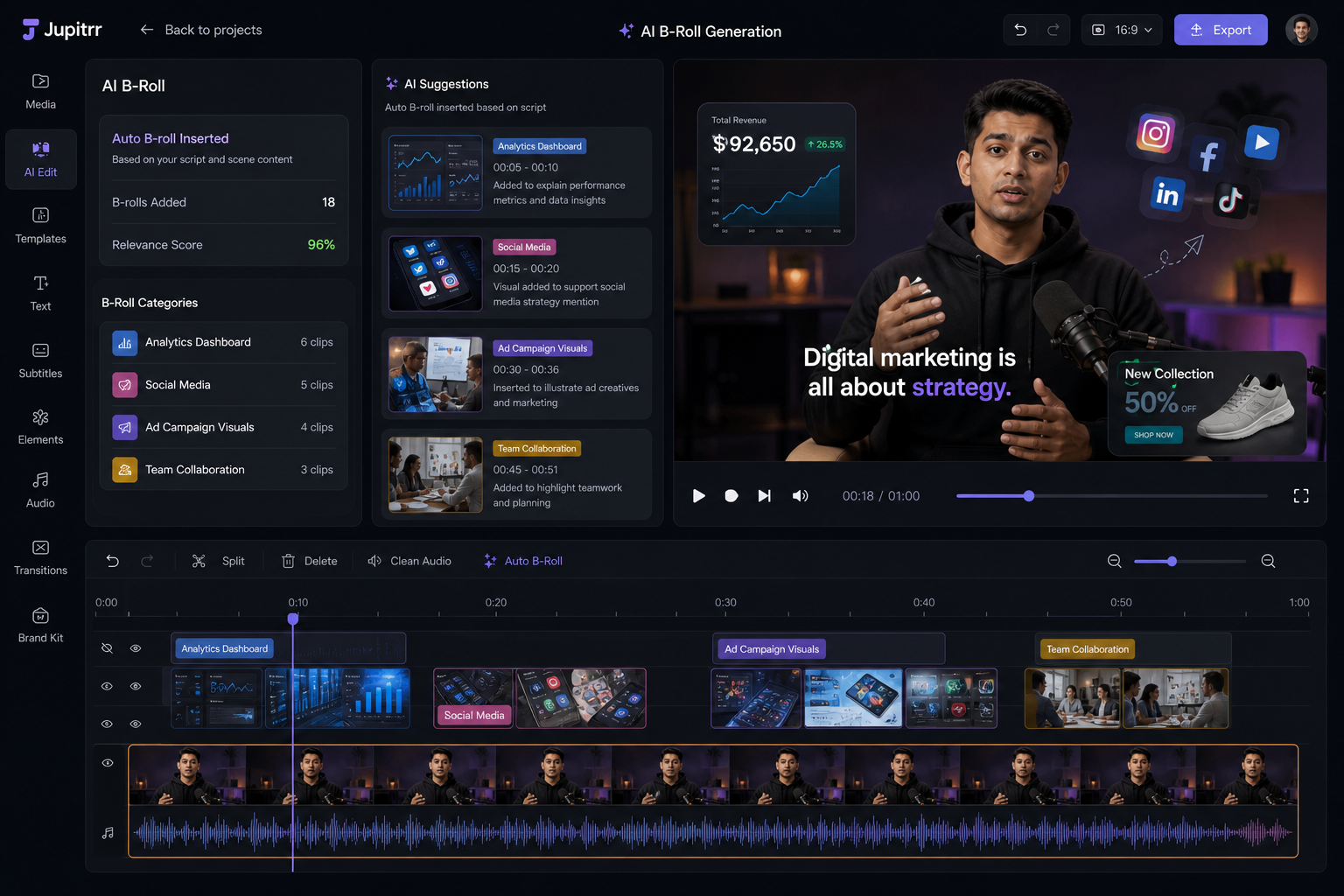
Contextual B-Roll GenerationHigh9.2/10▾
Feature tested: Contextual B-Roll Generation
Result: Passed (9.2/10)
Verdict: High
Expected behavior: Analyzes script or speech to automatically insert relevant visuals aligned with the topic
Test case: Text prompt → Image
Input type: Text prompt
Input used: Input artifact (Text prompt): Input: Script on “Digital Marketing Strategies”
Observed output: Output artifact (Image): Output: Contextual visuals including analytics dashboards, social media clips, and ad creatives placed at correct timestamps — ChatGPT Image May 5, 2026, 05_18_38 PM.png
Input artifact: Input artifact (Text prompt): Input: Script on “Digital Marketing Strategies”
Output artifact: Output artifact (Image): Output: Contextual visuals including analytics dashboards, social media clips, and ad creatives placed at correct timestamps — ChatGPT Image May 5, 2026, 05_18_38 PM.png
What changed: Text prompt transformed into Image
Why it matters / Conclusion: Highly accurate and reliable for most use cases, especially educational and informational content.
Analyzes script or speech to automatically insert relevant visuals aligned with the topic
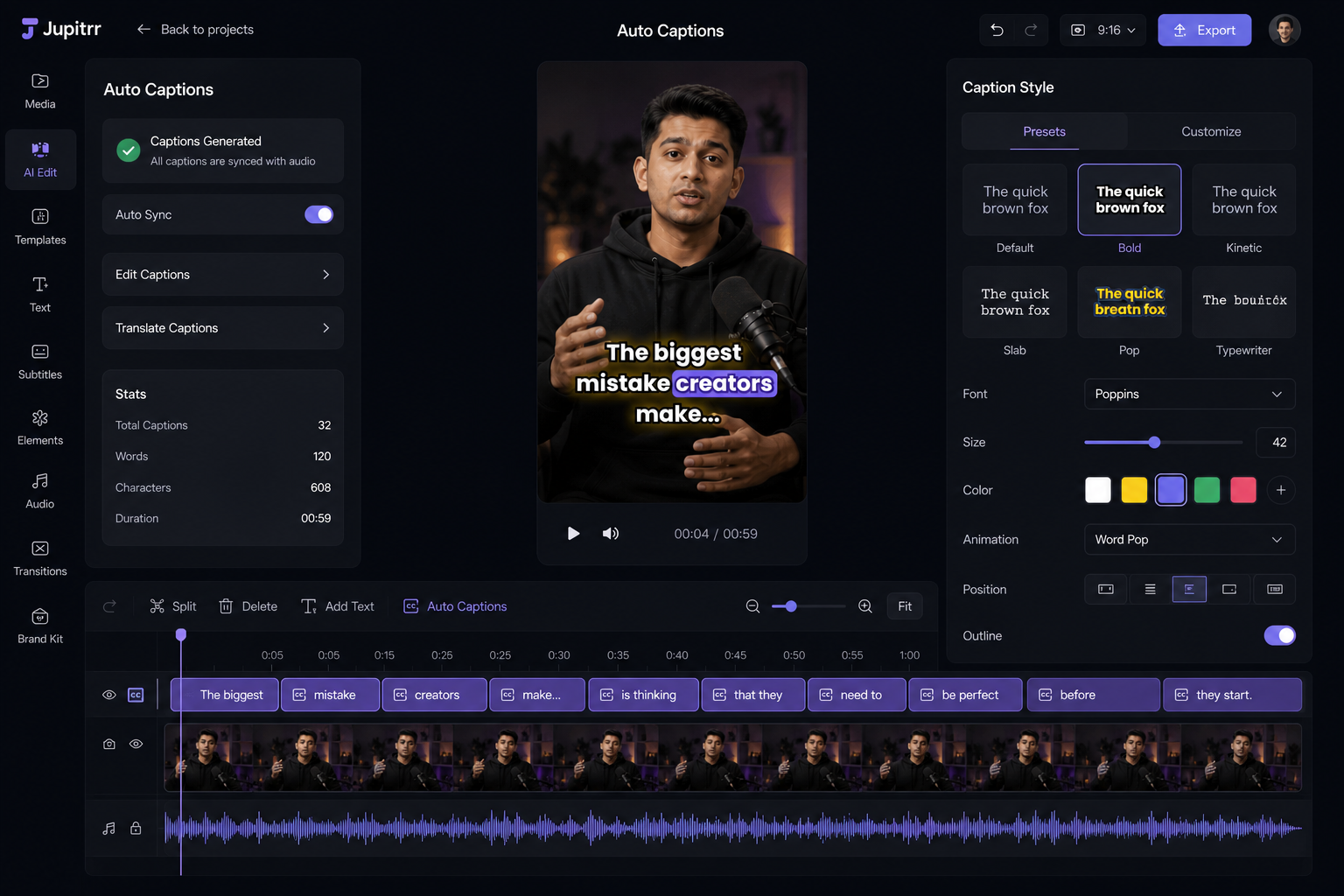
Auto Captions & Text HandlingHigh9/10▾
Feature tested: Auto Captions & Text Handling
Result: Passed (9/10)
Verdict: High
Expected behavior: Generates synchronized captions with clean styling and basic animations.
Test case: Text prompt → Image
Input type: Text prompt
Input used: Input artifact (Text prompt): Input: Multi-sentence speech with varying pace
Observed output: Output artifact (Image): Output: Accurate captions with proper timing, readable fonts, and consistent placement — ChatGPT Image May 5, 2026, 05_23_27 PM.png
Input artifact: Input artifact (Text prompt): Input: Multi-sentence speech with varying pace
Output artifact: Output artifact (Image): Output: Accurate captions with proper timing, readable fonts, and consistent placement — ChatGPT Image May 5, 2026, 05_23_27 PM.png
What changed: Text prompt transformed into Image
Why it matters / Conclusion: Strong caption accuracy and readability, suitable for social media standards.
Generates synchronized captions with clean styling and basic animations.
Template-Based Visual LayoutsHigh9.5/10▾
Feature tested: Template-Based Visual Layouts
Result: Passed (9.5/10)
Verdict: High
Expected behavior: Applies pre-designed templates to maintain consistency across videos.
Test case: Text prompt → Image
Input type: Text prompt
Input used: Input artifact (Text prompt): Input: Raw clip with no visual structure
Observed output: Output artifact (Image): Output: Structured video with consistent layout, spacing, and visual hierarchy — ChatGPT Image May 5, 2026, 05_32_37 PM.png
Input artifact: Input artifact (Text prompt): Input: Raw clip with no visual structure
Output artifact: Output artifact (Image): Output: Structured video with consistent layout, spacing, and visual hierarchy — ChatGPT Image May 5, 2026, 05_32_37 PM.png
What changed: Text prompt transformed into Image
Why it matters / Conclusion: Reliable templates for fast production, but not designed for heavy customization.
Applies pre-designed templates to maintain consistency across videos.

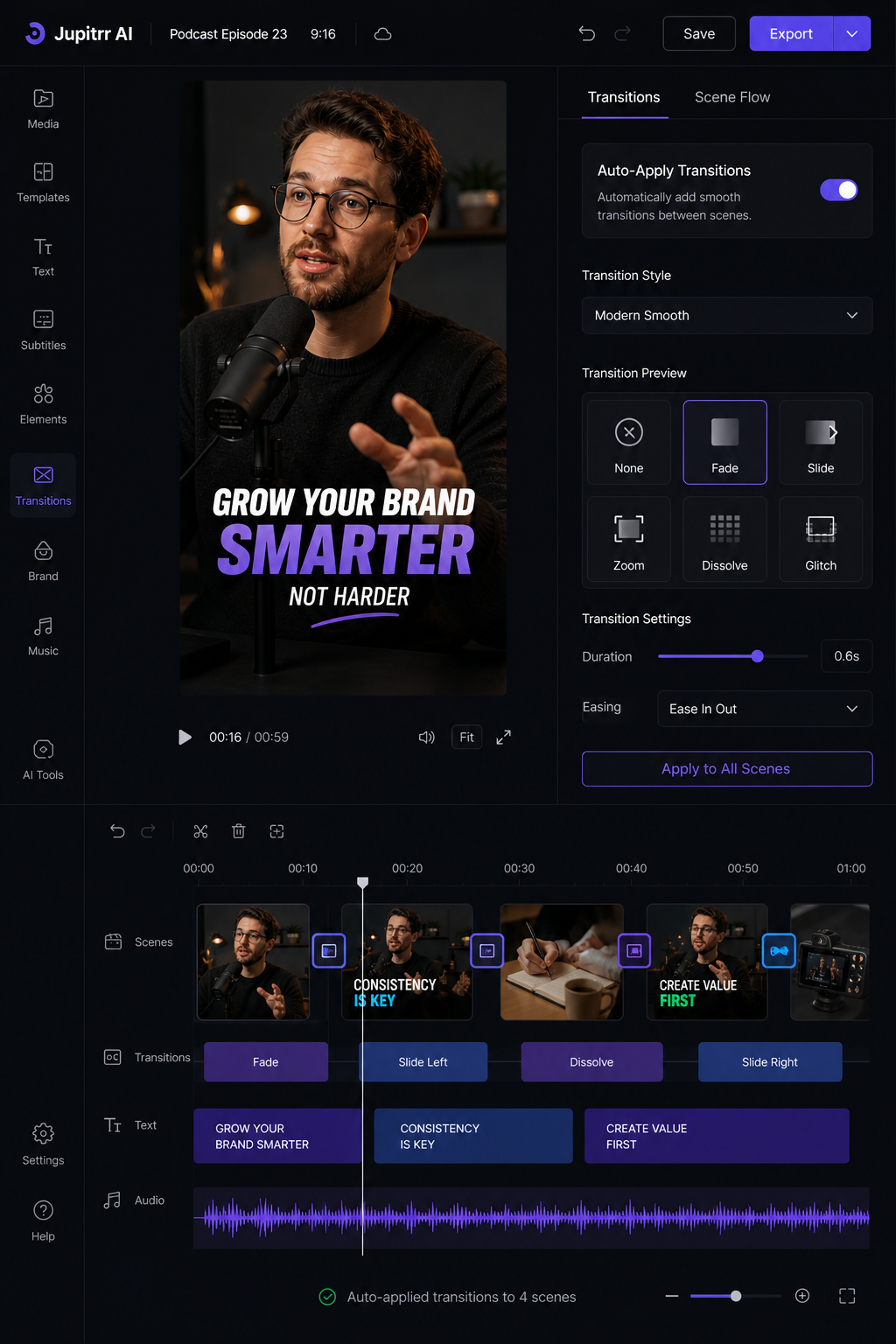
Transitions & Scene FlowHigh9.2/10▾
Feature tested: Transitions & Scene Flow
Result: Passed (9.2/10)
Verdict: High
Expected behavior: Automatically applies transitions to ensure smooth movement between clips and scenes.
Test case: Text prompt → Image
Input type: Text prompt
Input used: Input artifact (Text prompt): Input: Multiple scene cuts with B-roll integration
Observed output: Output artifact (Image): Output: Smooth transitions with no abrupt cuts or jarring switches — ChatGPT Image May 5, 2026, 05_38_57 PM.png
Input artifact: Input artifact (Text prompt): Input: Multiple scene cuts with B-roll integration
Output artifact: Output artifact (Image): Output: Smooth transitions with no abrupt cuts or jarring switches — ChatGPT Image May 5, 2026, 05_38_57 PM.png
What changed: Text prompt transformed into Image
Why it matters / Conclusion: Clean, natural transitions optimized for social media—not cinematic editing.
Automatically applies transitions to ensure smooth movement between clips and scenes.
Pricing & Access
Update Protocol: Pricing checked April 2026. We re-check quarterly. Tested Plan: Free
Pricing checked March 2026. We re-check quarterly.
Is This Right For You?
A side-by-side guide based on our hands-on testing.
Banner Preview
How the embed badge will look on your site

Embed HTML
Copy this code to your website source
Quick Integration Guide
- 1Copy the HTML code block above.
- 2Paste it into your site's HTML or CMS editor.
- 3Banner appears instantly on your page.
- 4Links back to your tool profile here.
Similar Tools
Discover more AI tools like Jupitrr to enhance your workflow.
Comments (0)
Need a custom AI solution for this use case?
If you are looking to build a custom B-roll generation, smart trimming, or captioning workflow for your business or internal workflow, email us at contact@futuresmart.ai.
Found something inaccurate or missing? We try to keep our AI research accurate and useful. If you found outdated information, an issue, or have a suggestion, email us at collaborate@aidemos.com.