
LiteParse
Open-source PDF-to-markdown parsing that works well on native-digital reports, but degrades on scans, tables, and charts.
Strong on clean reports, weak on scans and complex visuals
- You need a self-hosted, open-source PDF-to-markdown parser for native-digital reports.
- You care most about preserving prose, headings, reading order, and table-of-contents structure on clean PDFs.
- You can tolerate image placeholders and some cleanup in tables.
- Your PDFs are mostly scanned or OCR-heavy.
Our take
LiteParse is a strong self-hosted parser for native-digital reports: it keeps prose, headings, reading order, and table-of-contents structure in good shape, and it at least preserves image placeholders instead of silently dropping assets on clean PDFs. The tradeoff is sharp: table structure is brittle, charts and figures are not faithfully reconstructed, and scanned layouts push OCR and image retention into clearly degraded territory.
In-Depth Review
Our detailed analysis of LiteParse — features, performance, and real-world testing.
Feature-by-Feature Breakdown
Text ExtractionStrong on native-digital prose; scanned text becomes noisy on complex layouts.▾
Feature tested: Text Extraction
Result: Partial
Verdict: Strong on native-digital prose; scanned text becomes noisy on complex layouts.
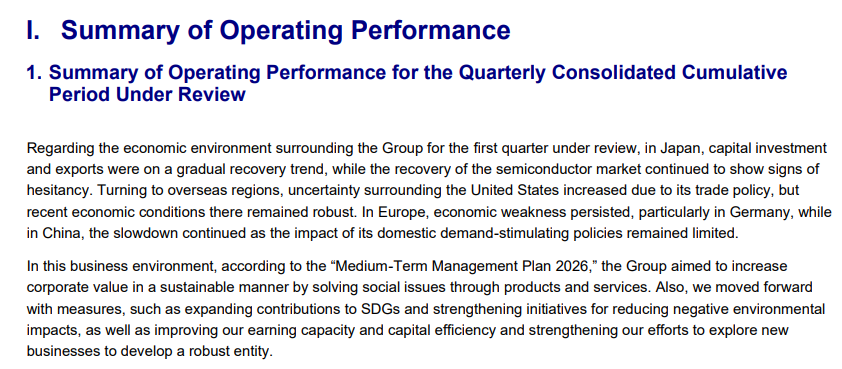
Expected behavior: LiteParse extracts readable prose from native-digital report pages, including long paragraphs, headings, and disclaimer copy, and can also OCR scanned research-paper pages with reduced reliability. The same capability is exercised on both the native reports and the scanned paper snippets, where OCR introduces substitutions, word splitting, and clipped lines.
Test case: Image → Image
Input type: Image
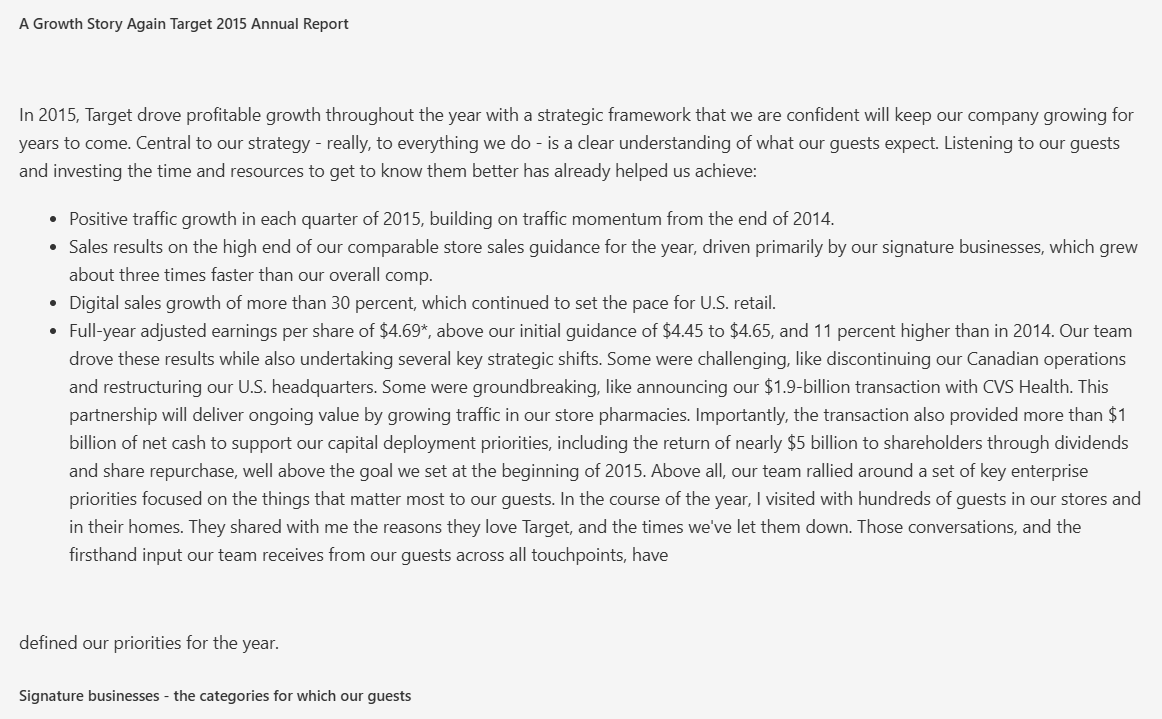
Input used: Input artifact (Image): Input — liteparse_input1_hybridearnings_ceo_letter.png
Observed output: Output artifact (Image): The CEO letter prose is extracted cleanly with the opening narrative and bullet points intact, while the original page styling is dropped. — liteparse_input1_hybridearnings_ceo_letter_parsed_success.png
Input artifact: Input artifact (Image): Input — liteparse_input1_hybridearnings_ceo_letter.png
Output artifact: Output artifact (Image): The CEO letter prose is extracted cleanly with the opening narrative and bullet points intact, while the original page styling is dropped. — liteparse_input1_hybridearnings_ceo_letter_parsed_success.png
What changed: Image transformed into Image
Test case: Image → Image
Input type: Image
Input used: Input artifact (Image): Input — liteparse_input2_financialpdf_disclaimer_text.png
Observed output: Output artifact (Image): The Japanese GAAP disclaimer is extracted cleanly as a single readable paragraph with the translation and rounding note preserved. — liteparse_input2_financialpdf_disclaimer_text_parsed_success.png
Input artifact: Input artifact (Image): Input — liteparse_input2_financialpdf_disclaimer_text.png
Output artifact: Output artifact (Image): The Japanese GAAP disclaimer is extracted cleanly as a single readable paragraph with the translation and rounding note preserved. — liteparse_input2_financialpdf_disclaimer_text_parsed_success.png
What changed: Image transformed into Image
Test case: Image → Image
Input type: Image
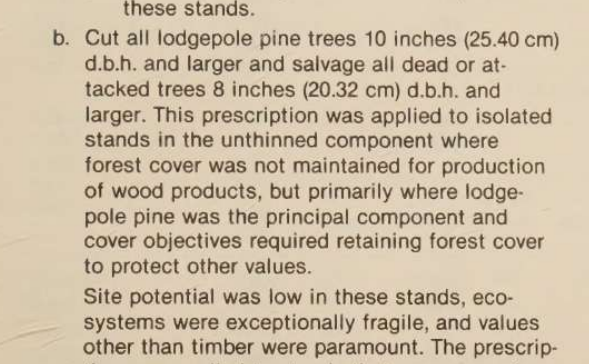
Input used: Input artifact (Image): Input — liteparse_input3_scannedpaper_superscript.png
Observed output: Output artifact (Image): A narrow scanned-paper snippet loses superscript formatting and substitutes characters in the unit expression, showing OCR degradation on scanned text. — liteparse_input3_scannedpaper_superscript_parsed_failure.png
Input artifact: Input artifact (Image): Input — liteparse_input3_scannedpaper_superscript.png
Output artifact: Output artifact (Image): A narrow scanned-paper snippet loses superscript formatting and substitutes characters in the unit expression, showing OCR degradation on scanned text. — liteparse_input3_scannedpaper_superscript_parsed_failure.png
What changed: Image transformed into Image
Test case: Image → Image
Input type: Image
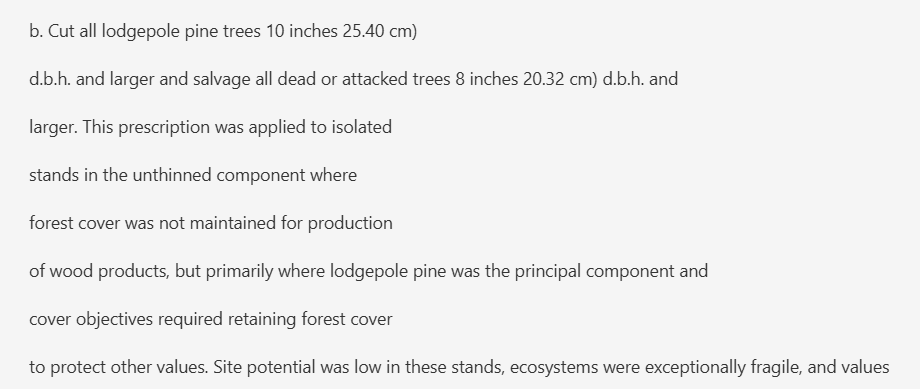
Input used: Input artifact (Image): Input — liteparse_input3_scannedpaper_text_fragment.png
Observed output: Output artifact (Image): A cropped scanned-forest-paper fragment is clipped and OCR-garbled, with word splits and missing phrase boundaries. — liteparse_input3_scannedpaper_text_fragment_parsed_failure.png
Input artifact: Input artifact (Image): Input — liteparse_input3_scannedpaper_text_fragment.png
Output artifact: Output artifact (Image): A cropped scanned-forest-paper fragment is clipped and OCR-garbled, with word splits and missing phrase boundaries. — liteparse_input3_scannedpaper_text_fragment_parsed_failure.png
What changed: Image transformed into Image
Test case: Image → Image
Input type: Image
Input used: Input artifact (Image): Input — liteparse_input1_hybridearnings_liquidity_section.png
Observed output: Output artifact (Image): A dense later-section page is preserved as readable prose with financial figures intact, showing no quality drop later in the 84-page report. — liteparse_input1_hybridearnings_liquidity_section_parsed_success.png
Input artifact: Input artifact (Image): Input — liteparse_input1_hybridearnings_liquidity_section.png
Output artifact: Output artifact (Image): A dense later-section page is preserved as readable prose with financial figures intact, showing no quality drop later in the 84-page report. — liteparse_input1_hybridearnings_liquidity_section_parsed_success.png
What changed: Image transformed into Image
Why it matters / Conclusion: Clean on native PDFs; OCR degrades on complex scans, especially when layout and typography get harder.
LiteParse extracts readable prose from native-digital report pages, including long paragraphs, headings, and disclaimer copy, and can also OCR scanned research-paper pages with reduced reliability. The same capability is exercised on both the native reports and the scanned paper snippets, where OCR introduces substitutions, word splitting, and clipped lines.
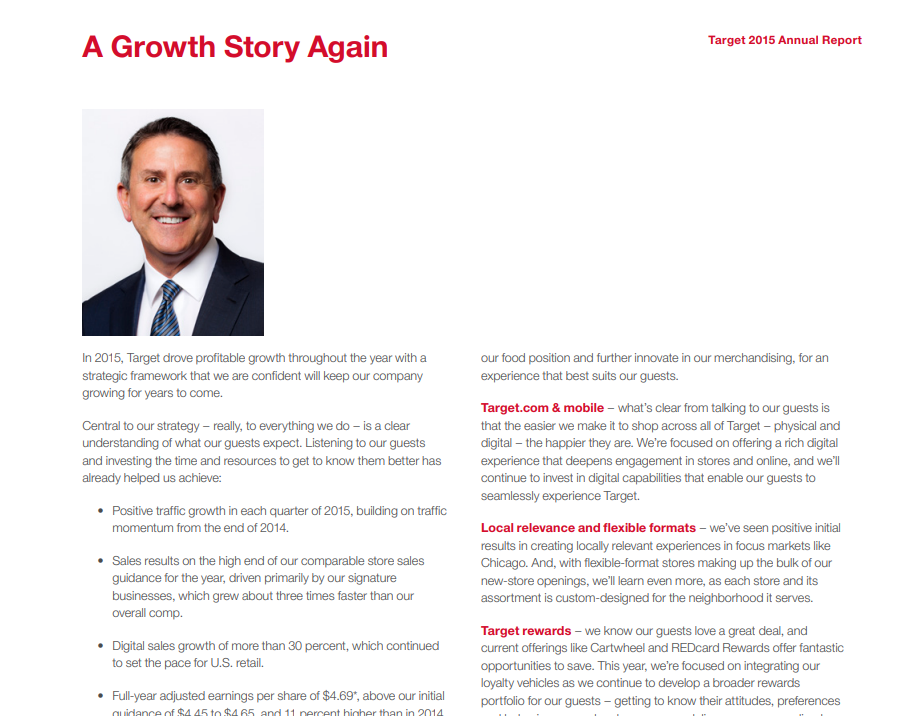
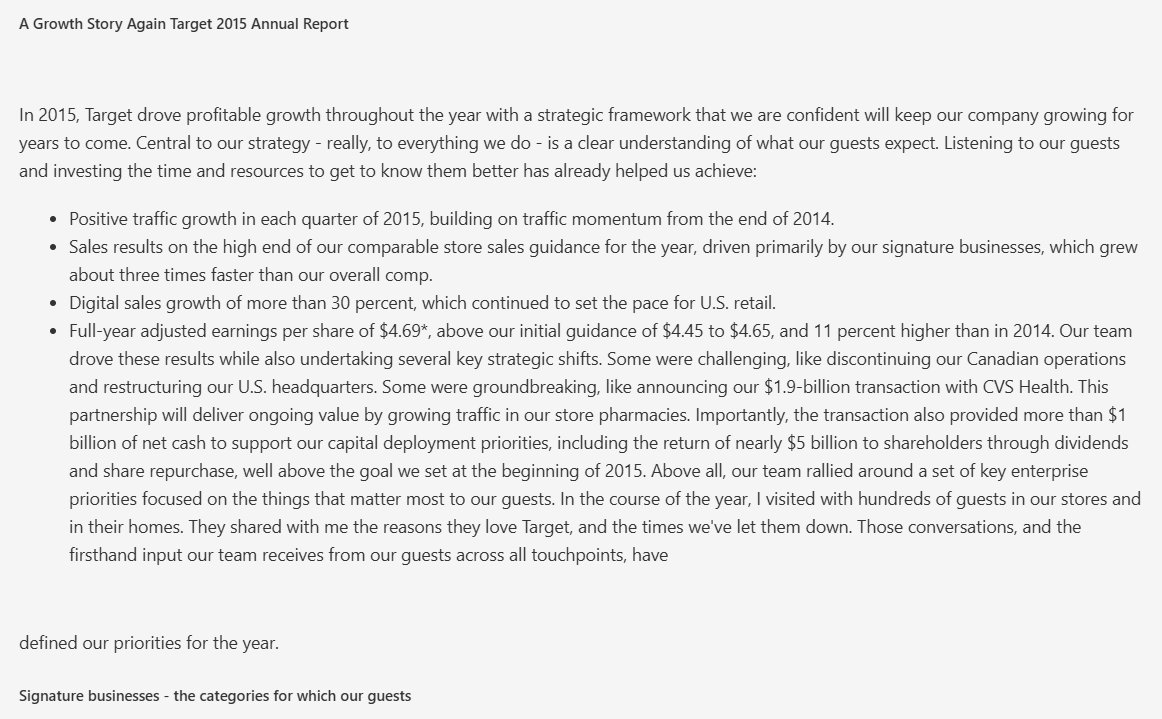
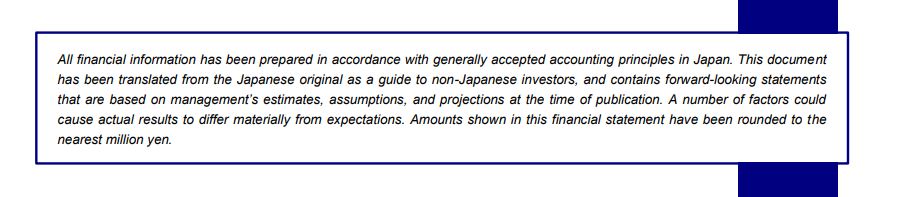

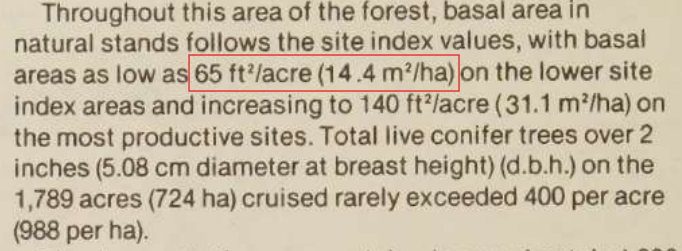

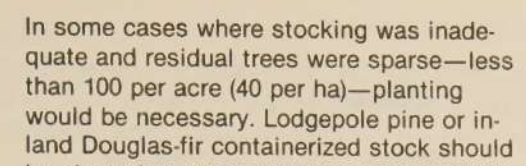

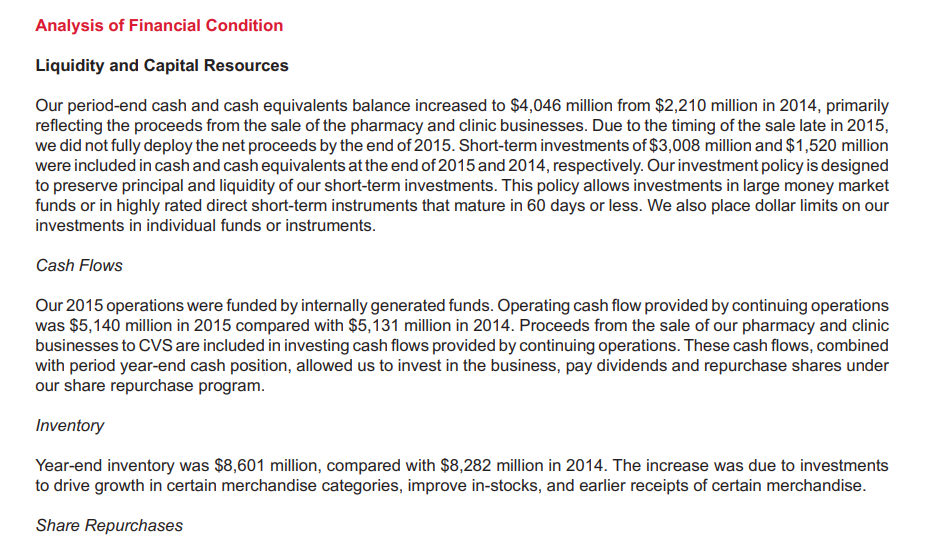
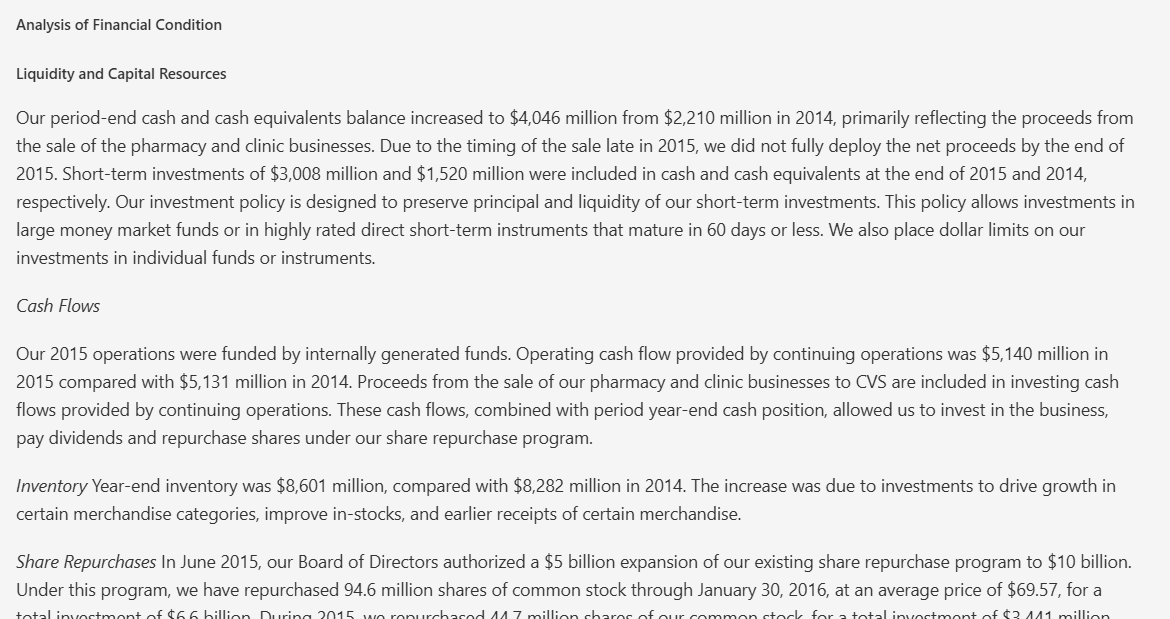
Table Extraction and ReconstructionUsable on some clean tables, but headers, merged rows, and scan-heavy tables are fragile.▾
Feature tested: Table Extraction and Reconstruction
Result: Partial
Verdict: Usable on some clean tables, but headers, merged rows, and scan-heavy tables are fragile.
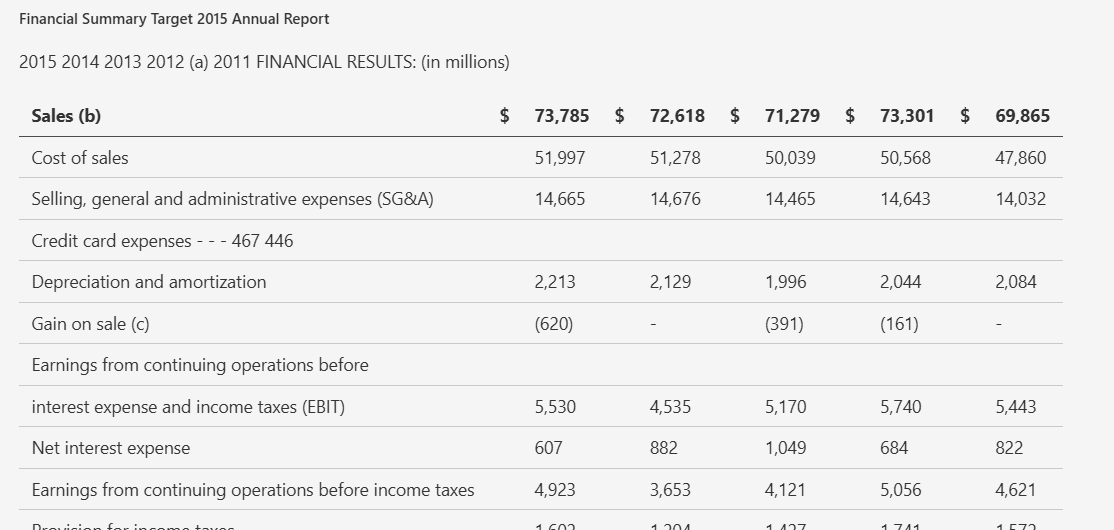
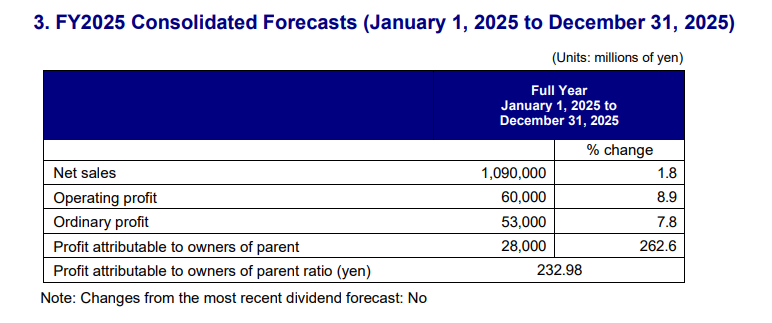
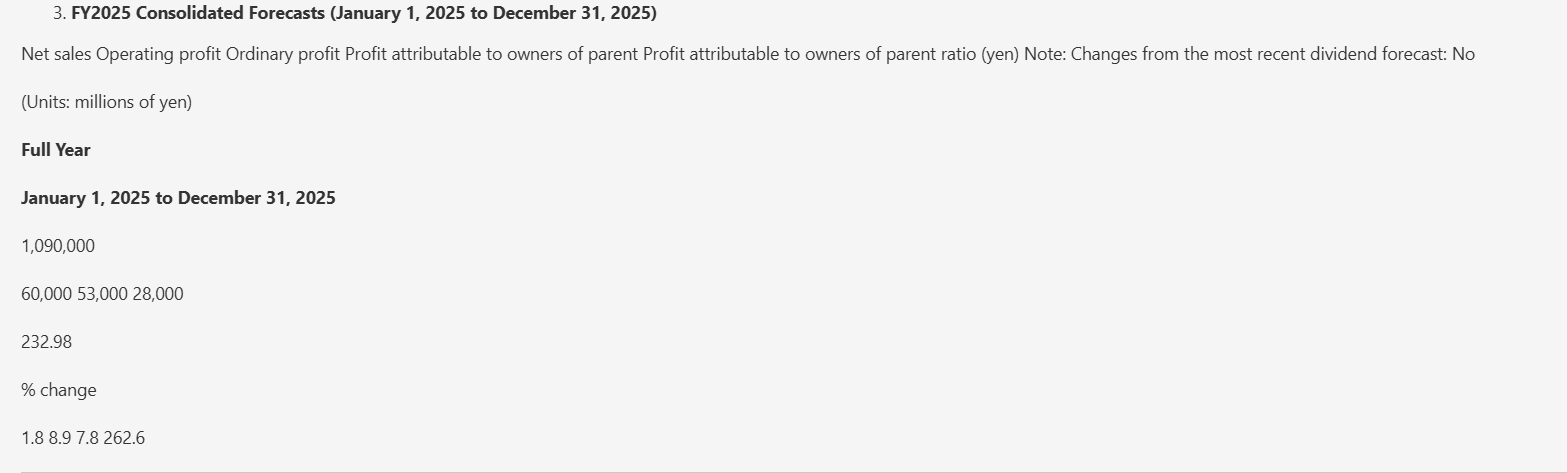
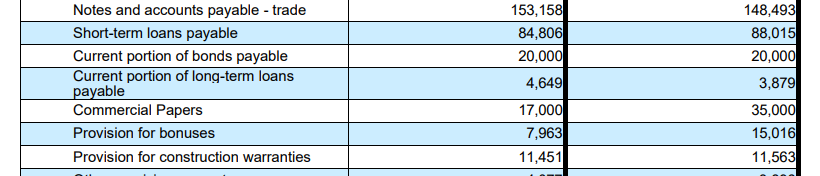
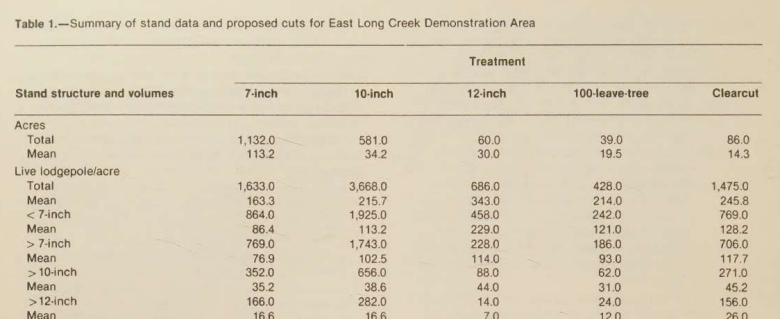
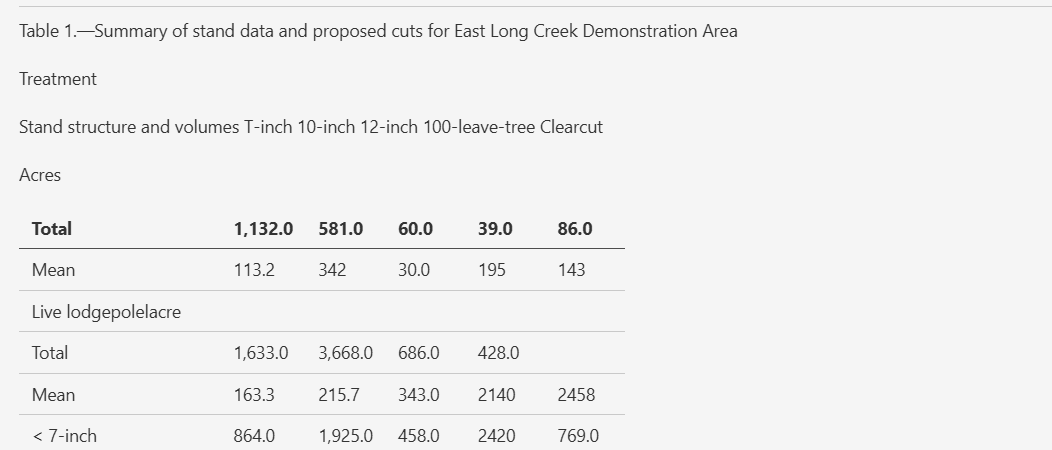
Expected behavior: LiteParse can turn some financial tables into usable markdown, but denser or scanned tables lose header structure, split multi-line labels, and drift out of row/column alignment. The evidence comes from the tested financial tables and scan-based table cases.
Test case: Image → Image
Input type: Image
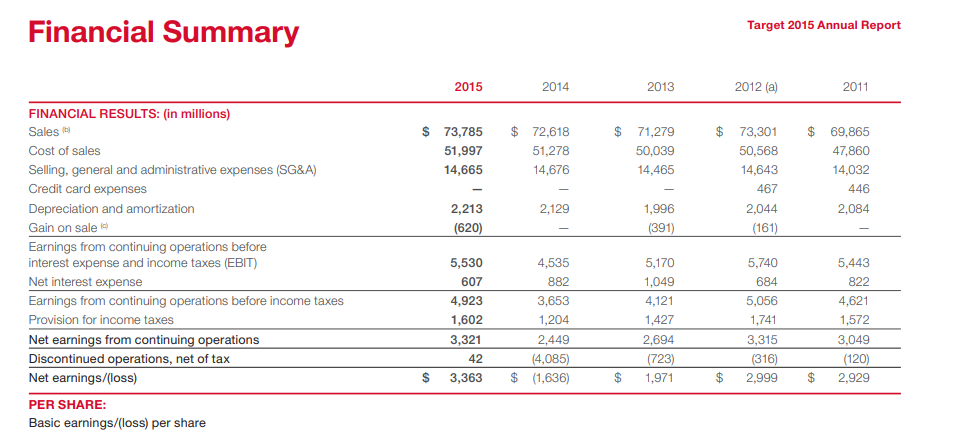
Input used: Input artifact (Image): Input — liteparse_input1_hybridearnings_financial_table.png
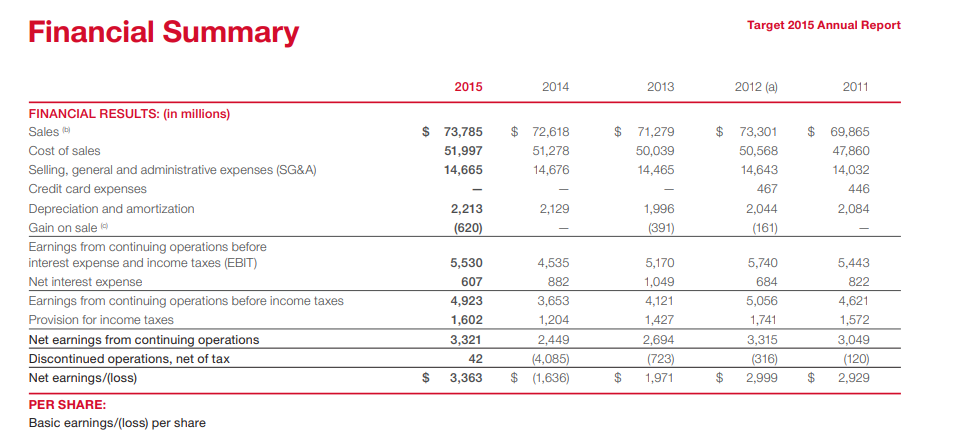
Observed output: Output artifact (Image): The Target financial summary table keeps some values, but the header row is flattened and the row structure is degraded. — liteparse_input1_hybridearnings_financial_table_parsed_failure.png
Input artifact: Input artifact (Image): Input — liteparse_input1_hybridearnings_financial_table.png
Output artifact: Output artifact (Image): The Target financial summary table keeps some values, but the header row is flattened and the row structure is degraded. — liteparse_input1_hybridearnings_financial_table_parsed_failure.png
What changed: Image transformed into Image
Test case: Image → Image
Input type: Image
Input used: Input artifact (Image): Input — liteparse_input2_financialpdf_fy2025_table.png
Observed output: Output artifact (Image): The FY2025 forecasts table is flattened into awkward lines of text, with row and column relationships lost. — liteparse_input2_financialpdf_fy2025_table_parsed_failed.png
Input artifact: Input artifact (Image): Input — liteparse_input2_financialpdf_fy2025_table.png
Output artifact: Output artifact (Image): The FY2025 forecasts table is flattened into awkward lines of text, with row and column relationships lost. — liteparse_input2_financialpdf_fy2025_table_parsed_failed.png
What changed: Image transformed into Image
Test case: Image → Image
Input type: Image
Input used: Input artifact (Image): Input — liteparse_input2_financialpdf_liabilities_table.png
Observed output: Output artifact (Image): A liabilities row is split across multiple lines, showing broken row segmentation in an otherwise numeric table. — liteparse_input2_financialpdf_liabilities_table_parsed_failure.png
Input artifact: Input artifact (Image): Input — liteparse_input2_financialpdf_liabilities_table.png
Output artifact: Output artifact (Image): A liabilities row is split across multiple lines, showing broken row segmentation in an otherwise numeric table. — liteparse_input2_financialpdf_liabilities_table_parsed_failure.png
What changed: Image transformed into Image
Test case: Image → Image
Input type: Image
Input used: Input artifact (Image): Input — liteparse_input3_scannedpaper_table_1.png
Observed output: Output artifact (Image): The scanned Table 1 loses clean column alignment and becomes a fragmented markdown table with misassigned values. — liteparse_input3_scannedpaper_table_1_parsed_failure.png
Input artifact: Input artifact (Image): Input — liteparse_input3_scannedpaper_table_1.png
Output artifact: Output artifact (Image): The scanned Table 1 loses clean column alignment and becomes a fragmented markdown table with misassigned values. — liteparse_input3_scannedpaper_table_1_parsed_failure.png
What changed: Image transformed into Image
Test case: Image → Text/code file
Input type: Image
Input used: Input artifact (Image): Input — liteparse_input2_financialpdf_segment_table.png
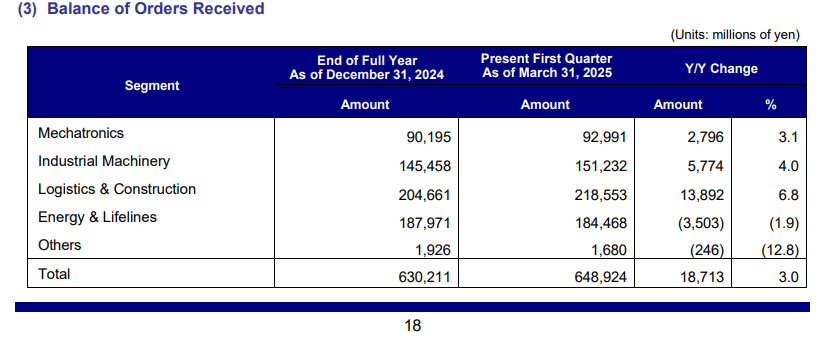
Observed output: Output artifact (Text/code file): The segment orders-received table is readable in markdown and keeps its year-over-year columns, though the report still shows table-fidelity issues elsewhere. — liteparse_input2_financialpdf_output.md
Input artifact: Input artifact (Image): Input — liteparse_input2_financialpdf_segment_table.png
Output artifact: Output artifact (Text/code file): The segment orders-received table is readable in markdown and keeps its year-over-year columns, though the report still shows table-fidelity issues elsewhere. — liteparse_input2_financialpdf_output.md
What changed: Image transformed into Text/code file
Test case: Image → Text/code file
Input type: Image
Input used: Input artifact (Image): Input — liteparse_input3_scannedpaper_table_5.png
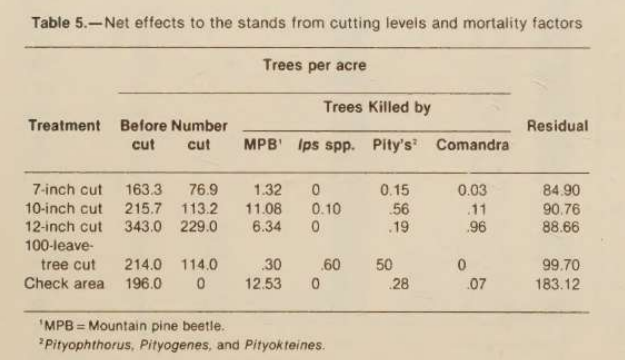
Observed output: Output artifact (Text/code file): This scanned table is the weakest case: row alignment breaks down severely and part of the table is left as plain text. — liteparse_input3_scannedpaper_output.md
Input artifact: Input artifact (Image): Input — liteparse_input3_scannedpaper_table_5.png
Output artifact: Output artifact (Text/code file): This scanned table is the weakest case: row alignment breaks down severely and part of the table is left as plain text. — liteparse_input3_scannedpaper_output.md
What changed: Image transformed into Text/code file
Test case: Image → Image
Input type: Image
Input used: Input artifact (Image): Input — liteparse_input3_scannedpaper_table_6.png
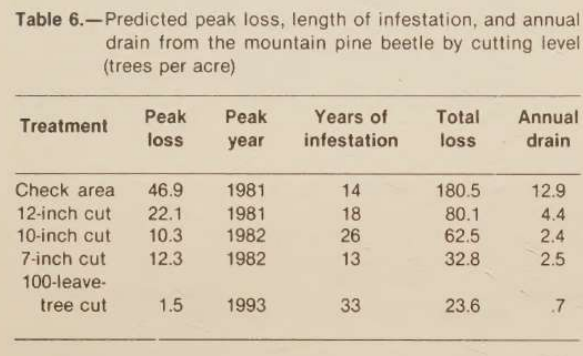
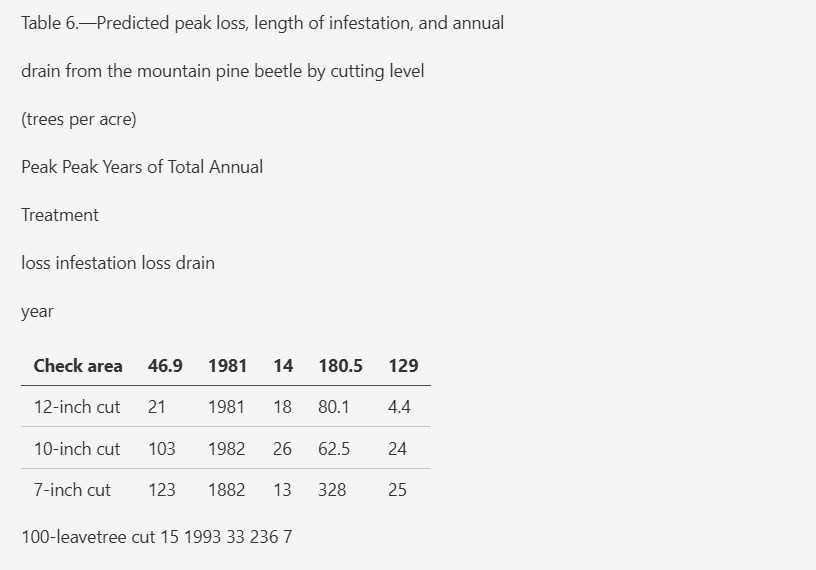
Observed output: Output artifact (Image): The scanned Table 6 drops row structure and leaves the last row outside the table, making the data unreliable. — liteparse_input3_scannedpaper_table_6_parsed_failure.png
Input artifact: Input artifact (Image): Input — liteparse_input3_scannedpaper_table_6.png
Output artifact: Output artifact (Image): The scanned Table 6 drops row structure and leaves the last row outside the table, making the data unreliable. — liteparse_input3_scannedpaper_table_6_parsed_failure.png
What changed: Image transformed into Image
Why it matters / Conclusion: Some cleaner tables are usable, but structural fidelity is inconsistent and scan-based tables are not dependable.
LiteParse can turn some financial tables into usable markdown, but denser or scanned tables lose header structure, split multi-line labels, and drift out of row/column alignment. The evidence comes from the tested financial tables and scan-based table cases.

Document Hierarchy PreservationStrong on native report headings and TOCs; scanned titles and section headers fragment or flatten.▾
Feature tested: Document Hierarchy Preservation
Result: Partial
Verdict: Strong on native report headings and TOCs; scanned titles and section headers fragment or flatten.
Expected behavior: LiteParse preserves markdown hierarchy on native-digital reports, keeping section headers and table-of-contents structure intact. On scanned paper, those same headings can collapse into plain text and lose their structural roles.
Test case: Image → Image
Input type: Image
Input used: Input artifact (Image): Input — liteparse_input1_hybridearnings_item_header.png
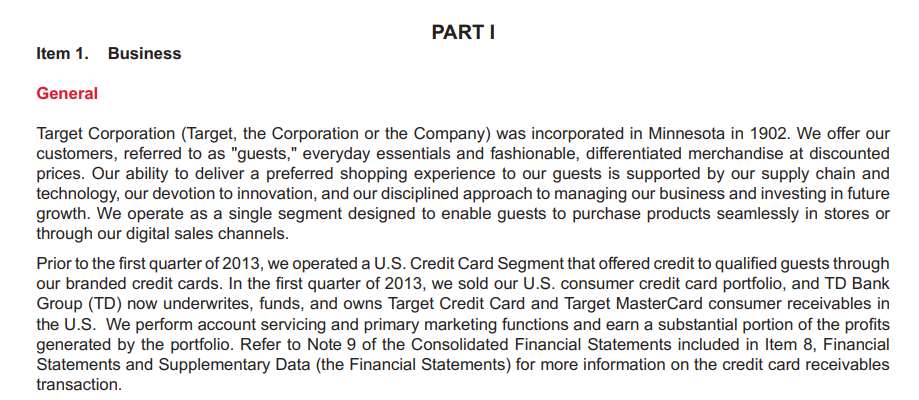
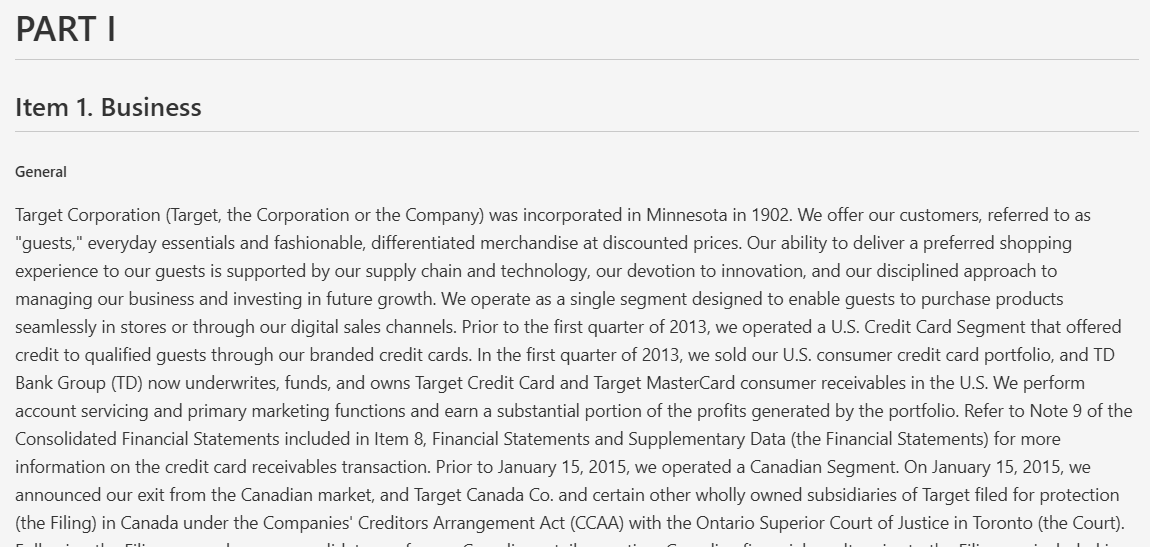
Observed output: Output artifact (Image): The Item 1 page is converted into proper Markdown heading levels, with the section structure preserved in readable form. — liteparse_input1_hybridearnings_item_header_parsed_success.png
Input artifact: Input artifact (Image): Input — liteparse_input1_hybridearnings_item_header.png
Output artifact: Output artifact (Image): The Item 1 page is converted into proper Markdown heading levels, with the section structure preserved in readable form. — liteparse_input1_hybridearnings_item_header_parsed_success.png
What changed: Image transformed into Image
Test case: Image → Image
Input type: Image
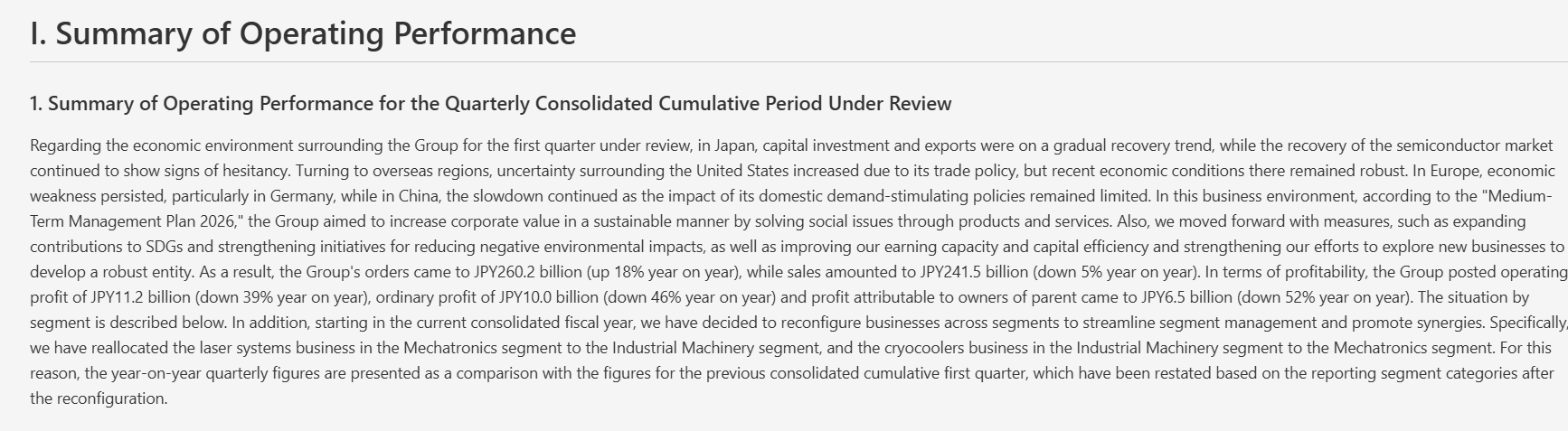
Input used: Input artifact (Image): Input — liteparse_input2_financialpdf_summary_section.png
Observed output: Output artifact (Image): The summary section keeps genuine markdown heading levels, even though the extracted body text is dense and long. — liteparse_input2_financialpdf_summary_section_parsed_failed.png
Input artifact: Input artifact (Image): Input — liteparse_input2_financialpdf_summary_section.png
Output artifact: Output artifact (Image): The summary section keeps genuine markdown heading levels, even though the extracted body text is dense and long. — liteparse_input2_financialpdf_summary_section_parsed_failed.png
What changed: Image transformed into Image
Test case: Image → Image
Input type: Image
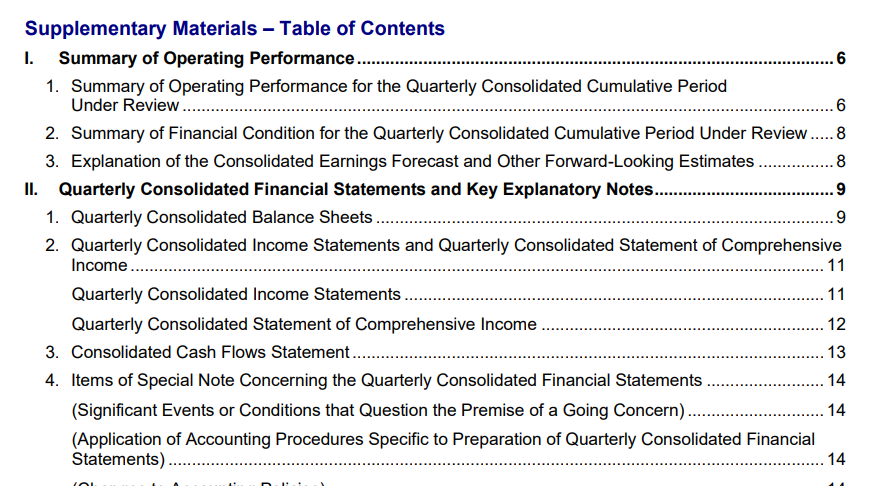
Input used: Input artifact (Image): Table of contents page — liteparse_input2_financialpdf_toc.png
Observed output: Output artifact (Image): The table of contents keeps its hierarchy and dot leaders, even though the output file label is inconsistent. — liteparse_input2_financialpdf_toc_parsed_failed.png
Input artifact: Input artifact (Image): Table of contents page — liteparse_input2_financialpdf_toc.png
Output artifact: Output artifact (Image): The table of contents keeps its hierarchy and dot leaders, even though the output file label is inconsistent. — liteparse_input2_financialpdf_toc_parsed_failed.png
What changed: Image transformed into Image
Test case: Image → Image
Input type: Image
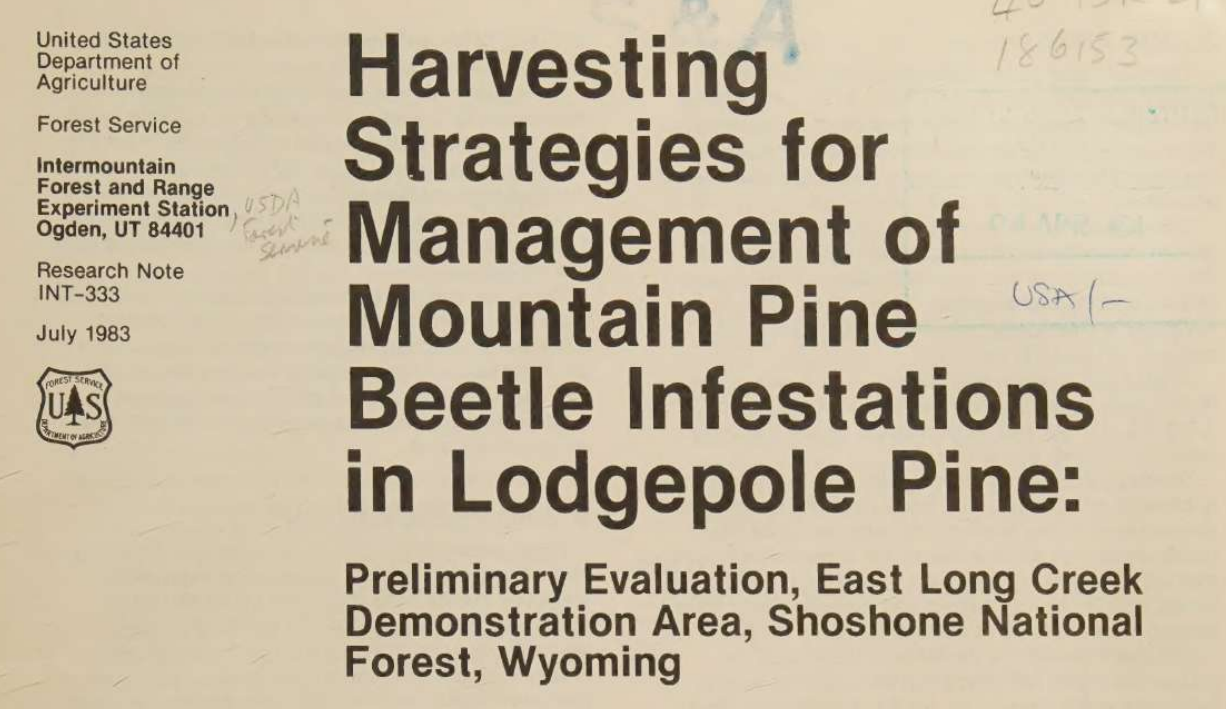
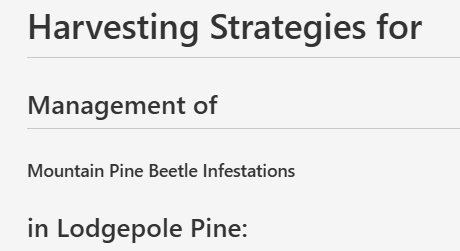
Input used: Input artifact (Image): Scanned paper title page — liteparse_input3_scannedpaper_title.png
Observed output: Output artifact (Image): The scanned title page is fragmented across several heading levels instead of being kept as a single clean title. — liteparse_input3_scannedpaper_title_parsed_failure.png
Input artifact: Input artifact (Image): Scanned paper title page — liteparse_input3_scannedpaper_title.png
Output artifact: Output artifact (Image): The scanned title page is fragmented across several heading levels instead of being kept as a single clean title. — liteparse_input3_scannedpaper_title_parsed_failure.png
What changed: Image transformed into Image
Test case: Image → Image
Input type: Image
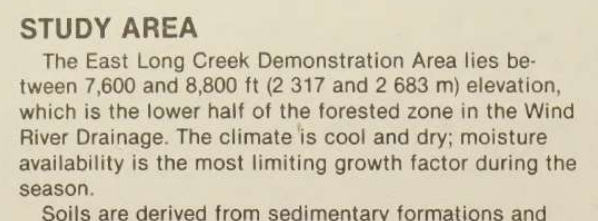
Input used: Input artifact (Image): Input — liteparse_input3_scannedpaper_study_area_header.png
Observed output: Output artifact (Image): The study-area heading is left as plain text instead of a true markdown section header. — liteparse_input3_scannedpaper_study_area_header_parsed_failure.png
Input artifact: Input artifact (Image): Input — liteparse_input3_scannedpaper_study_area_header.png
Output artifact: Output artifact (Image): The study-area heading is left as plain text instead of a true markdown section header. — liteparse_input3_scannedpaper_study_area_header_parsed_failure.png
What changed: Image transformed into Image
Test case: Image → Image
Input type: Image
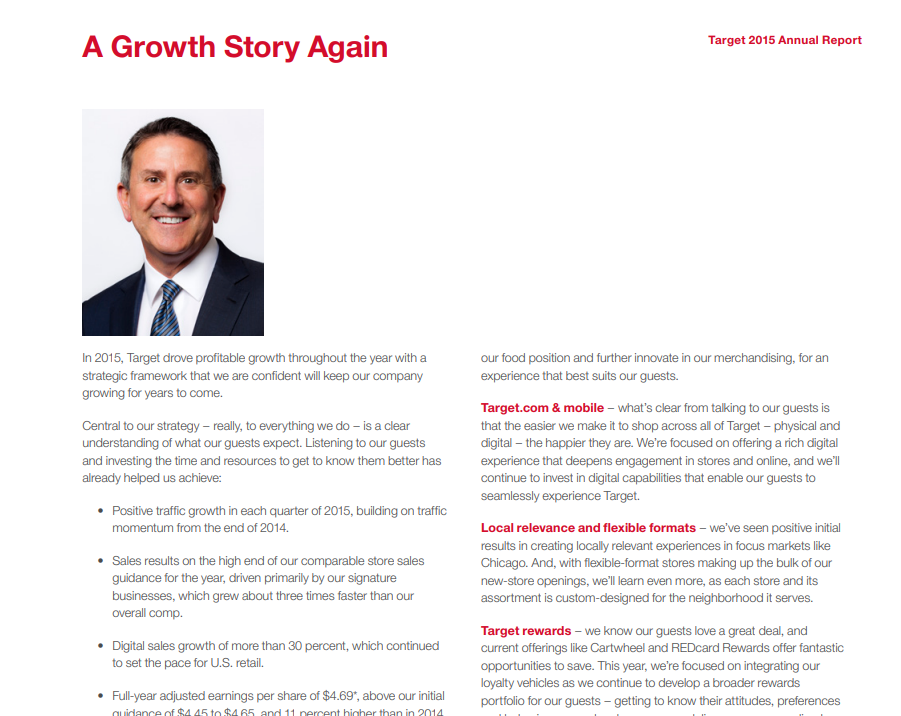
Input used: Input artifact (Image): Input — liteparse_input1_hybridearnings_ceo_letter_reading_order.png
Observed output: Output artifact (Image): The two-column CEO letter is read in the correct logical order, with the left column completed before the right column begins. — liteparse_input1_hybridearnings_ceo_letter_reading_order_parsed_success.png
Input artifact: Input artifact (Image): Input — liteparse_input1_hybridearnings_ceo_letter_reading_order.png
Output artifact: Output artifact (Image): The two-column CEO letter is read in the correct logical order, with the left column completed before the right column begins. — liteparse_input1_hybridearnings_ceo_letter_reading_order_parsed_success.png
What changed: Image transformed into Image
Why it matters / Conclusion: Reliable for headings and TOCs on clean PDFs, but scanned titles and section headers lose their structure.
LiteParse preserves markdown hierarchy on native-digital reports, keeping section headers and table-of-contents structure intact. On scanned paper, those same headings can collapse into plain text and lose their structural roles.


Reading Order PreservationCorrect on clean multi-column and ordered layouts; scan-heavy pages can fragment flow.▾
Feature tested: Reading Order Preservation
Result: Partial
Verdict: Correct on clean multi-column and ordered layouts; scan-heavy pages can fragment flow.
Expected behavior: LiteParse usually keeps logical sequence intact in the CEO letter’s multi-column layout and the report’s ordered table of contents. The scanned paper test shows only partial breakdown, mainly through a fragmented list item that interrupts flow.
Test case: Image → Image
Input type: Image
Input used: Input artifact (Image): Input — liteparse_input1_hybridearnings_ceo_letter_reading_order.png
Observed output: Output artifact (Image): The CEO letter is read column by column in the correct sequence instead of interleaving lines across columns. — liteparse_input1_hybridearnings_ceo_letter_reading_order_parsed_success.png
Input artifact: Input artifact (Image): Input — liteparse_input1_hybridearnings_ceo_letter_reading_order.png
Output artifact: Output artifact (Image): The CEO letter is read column by column in the correct sequence instead of interleaving lines across columns. — liteparse_input1_hybridearnings_ceo_letter_reading_order_parsed_success.png
What changed: Image transformed into Image
Test case: Image → Image
Input type: Image
Input used: Input artifact (Image): Input — liteparse_input2_financialpdf_toc.png
Observed output: Output artifact (Image): The table of contents keeps the right section order and page sequence, even though the formatting is flattened. — liteparse_input2_financialpdf_toc_parsed_failed.png
Input artifact: Input artifact (Image): Input — liteparse_input2_financialpdf_toc.png
Output artifact: Output artifact (Image): The table of contents keeps the right section order and page sequence, even though the formatting is flattened. — liteparse_input2_financialpdf_toc_parsed_failed.png
What changed: Image transformed into Image
Test case: Image → Image
Input type: Image
Input used: Input artifact (Image): Input — liteparse_input3_scannedpaper_pointer.png
Observed output: Output artifact (Image): A scanned list item is broken into fragments, disrupting the natural reading flow of the paragraph. — liteparse_input3_scannedpaper_pointer_parsed_failure.png
Input artifact: Input artifact (Image): Input — liteparse_input3_scannedpaper_pointer.png
Output artifact: Output artifact (Image): A scanned list item is broken into fragments, disrupting the natural reading flow of the paragraph. — liteparse_input3_scannedpaper_pointer_parsed_failure.png
What changed: Image transformed into Image
Why it matters / Conclusion: Good at preserving logical flow in native PDFs, with only partial breakdown on the scan test.
LiteParse usually keeps logical sequence intact in the CEO letter’s multi-column layout and the report’s ordered table of contents. The scanned paper test shows only partial breakdown, mainly through a fragmented list item that interrupts flow.
Embedded Image PreservationNative-page images are kept as placeholders, but scanned visuals can disappear entirely.▾
Feature tested: Embedded Image Preservation
Result: Partial
Verdict: Native-page images are kept as placeholders, but scanned visuals can disappear entirely.
Expected behavior: On native PDFs, LiteParse keeps portraits, signatures, and logos as image placeholders or references. On scanned pages, the visuals can be dropped entirely, showing the same image-retention behavior under weaker source conditions.
Test case: Image → Image
Input type: Image
Input used: Input artifact (Image): Input — liteparse_input1_hybridearnings_ceo_image.png
Observed output: Output artifact (Image): The CEO portrait is retained only as a linked image reference, so the asset is present in the markdown but not actually viewable. — liteparse_input1_hybridearnings_ceo_image_parsed_partial_success.png
Input artifact: Input artifact (Image): Input — liteparse_input1_hybridearnings_ceo_image.png
Output artifact: Output artifact (Image): The CEO portrait is retained only as a linked image reference, so the asset is present in the markdown but not actually viewable. — liteparse_input1_hybridearnings_ceo_image_parsed_partial_success.png
What changed: Image transformed into Image
Test case: Image → Image
Input type: Image
Input used: Input artifact (Image): Input — liteparse_input1_hybridearnings_scanned_signs.png
Observed output: Output artifact (Image): The signature images are not recovered as usable visuals, and the parse only leaves broken image references and fragments. — liteparse_input1_hybridearnings_scanned_signs_parsed_failure.png
Input artifact: Input artifact (Image): Input — liteparse_input1_hybridearnings_scanned_signs.png
Output artifact: Output artifact (Image): The signature images are not recovered as usable visuals, and the parse only leaves broken image references and fragments. — liteparse_input1_hybridearnings_scanned_signs_parsed_failure.png
What changed: Image transformed into Image
Test case: Image → Text prompt
Input type: Image
Input used: Input artifact (Image): Input — liteparse_input3_scannedpaper_usda_logo.png
Observed output: Output artifact (Text prompt): Output
Input artifact: Input artifact (Image): Input — liteparse_input3_scannedpaper_usda_logo.png
Output artifact: Output artifact (Text prompt): Output
What changed: Image transformed into Text prompt
Test case: Image → Text/code file
Input type: Image
Input used: Input artifact (Image): Input — liteparse_input2_financialpdf_logo.png
Observed output: Output artifact (Text/code file): The report logo is preserved as a markdown image placeholder at the top of the file, but there is no accessible image preview. — liteparse_input2_financialpdf_output.md
Input artifact: Input artifact (Image): Input — liteparse_input2_financialpdf_logo.png
Output artifact: Output artifact (Text/code file): The report logo is preserved as a markdown image placeholder at the top of the file, but there is no accessible image preview. — liteparse_input2_financialpdf_output.md
What changed: Image transformed into Text/code file
Why it matters / Conclusion: Native images are technically retained, but scanned visuals are dropped outright.
On native PDFs, LiteParse keeps portraits, signatures, and logos as image placeholders or references. On scanned pages, the visuals can be dropped entirely, showing the same image-retention behavior under weaker source conditions.
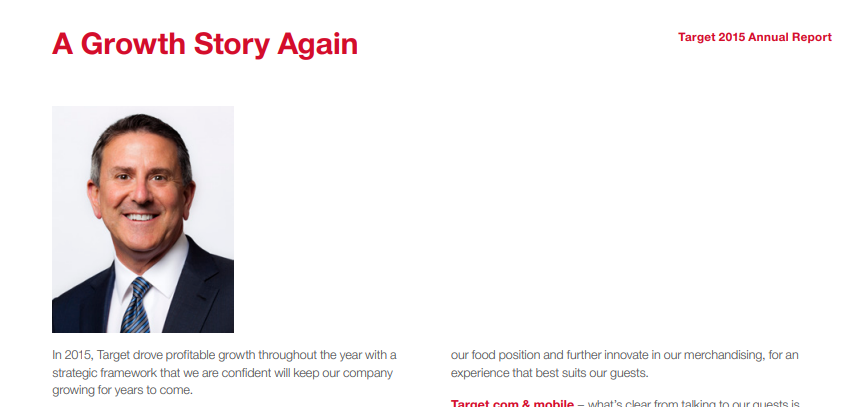


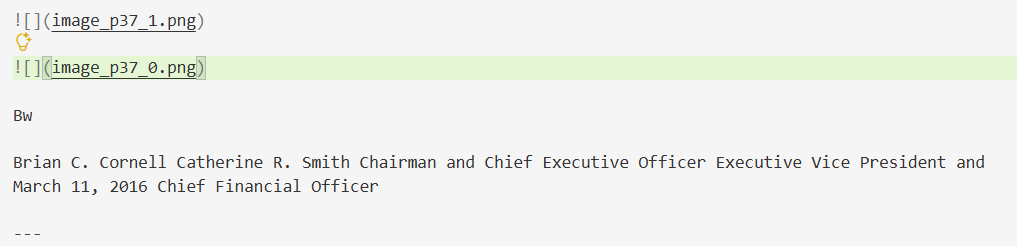

Chart and Figure ReconstructionCharts and figures are not faithfully reconstructed; visual meaning is lost.▾
Feature tested: Chart and Figure Reconstruction
Result: Failed
Verdict: Charts and figures are not faithfully reconstructed; visual meaning is lost.
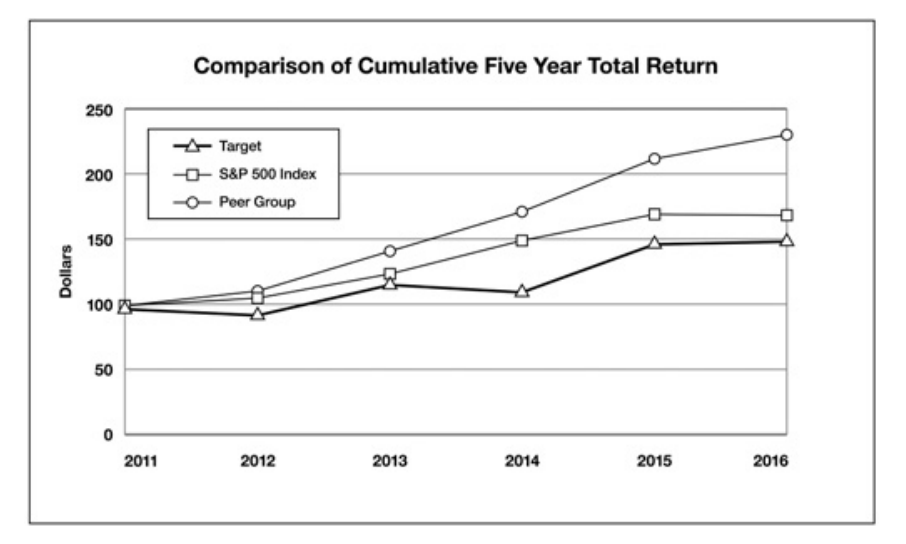
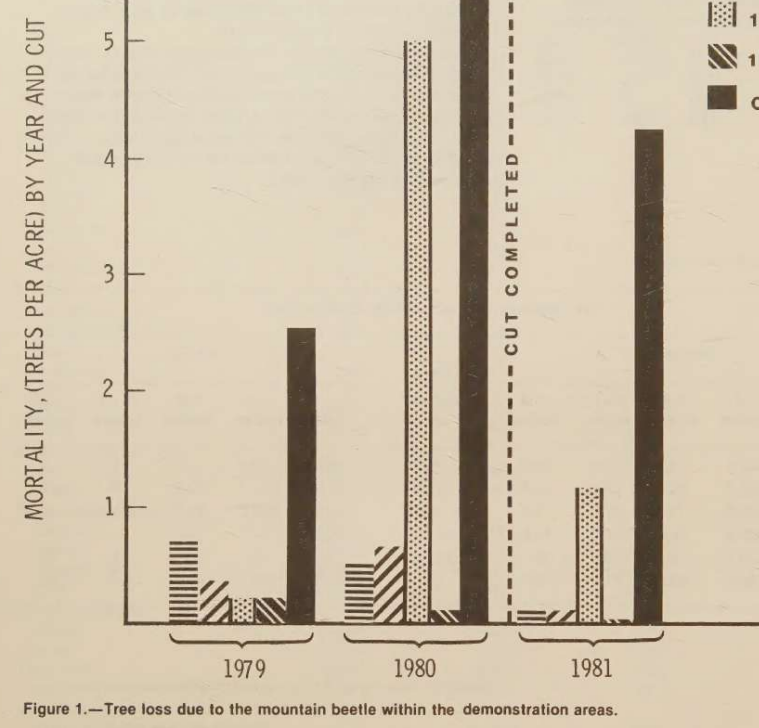
Expected behavior: LiteParse attempts to preserve or reconstruct charts and figures from the tested report pages, but the observed outputs often fall back to placeholders or garbled text. The behavior is shown on both the Target report chart and the scanned research-paper figure.
Test case: Image → Image
Input type: Image
Input used: Input artifact (Image): Five-year total return comparison chart — liteparse_input1_hybridearnings_comparison_chart.png
Observed output: Output artifact (Image): The five-year return chart is replaced by a placeholder, with most chart structure missing. — liteparse_input1_hybridearnings_comparison_chart_parsed_failure.png
Input artifact: Input artifact (Image): Five-year total return comparison chart — liteparse_input1_hybridearnings_comparison_chart.png
Output artifact: Output artifact (Image): The five-year return chart is replaced by a placeholder, with most chart structure missing. — liteparse_input1_hybridearnings_comparison_chart_parsed_failure.png
What changed: Image transformed into Image
Test case: Image → Image
Input type: Image
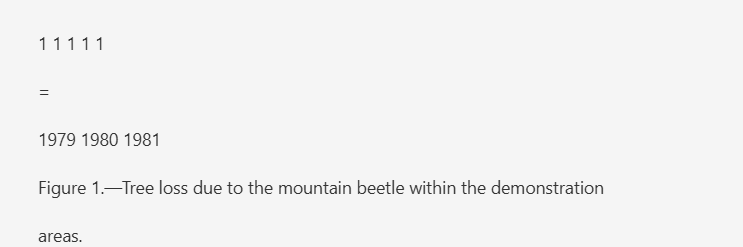
Input used: Input artifact (Image): Scanned mountain-beetle figure — liteparse_input3_scannedpaper_figure_1.png
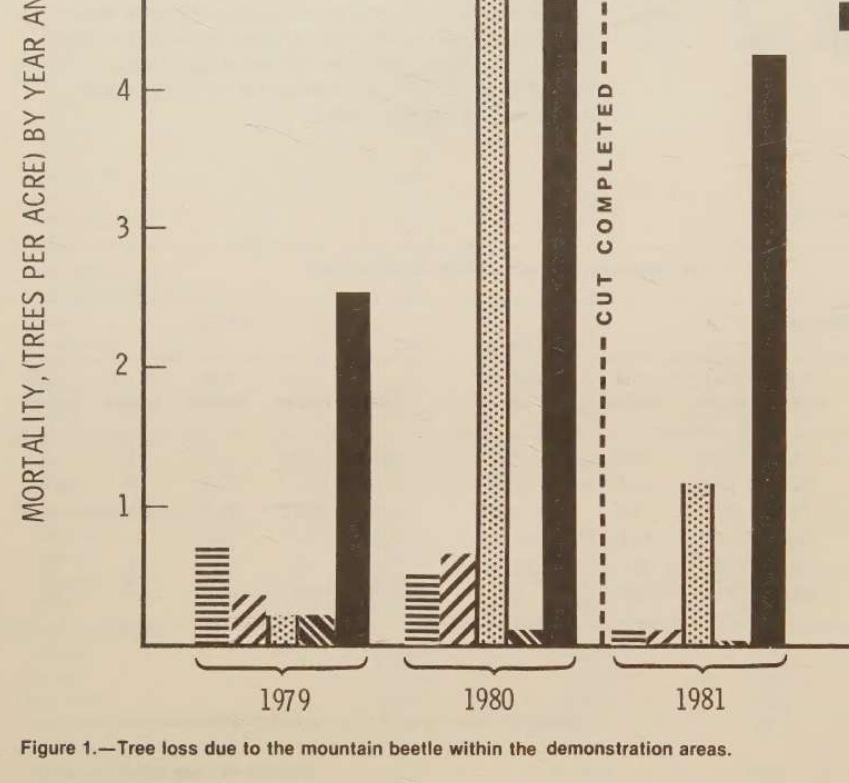
Observed output: Output artifact (Image): The scanned bar chart is reduced to fragmented text and symbols rather than a readable figure. — liteparse_input3_scannedpaper_figure_1_parsed_failure.png
Input artifact: Input artifact (Image): Scanned mountain-beetle figure — liteparse_input3_scannedpaper_figure_1.png
Output artifact: Output artifact (Image): The scanned bar chart is reduced to fragmented text and symbols rather than a readable figure. — liteparse_input3_scannedpaper_figure_1_parsed_failure.png
What changed: Image transformed into Image
Why it matters / Conclusion: Chart/figure reconstruction is one of LiteParse’s weakest areas.
LiteParse attempts to preserve or reconstruct charts and figures from the tested report pages, but the observed outputs often fall back to placeholders or garbled text. The behavior is shown on both the Target report chart and the scanned research-paper figure.
Caption/Figure AssociationCaptions stay attached when the source layout is intact, but become orphaned when visuals vanish on scans.▾
Feature tested: Caption/Figure Association
Result: Partial
Verdict: Captions stay attached when the source layout is intact, but become orphaned when visuals vanish on scans.
Expected behavior: LiteParse keeps captions and nearby explanatory text attached to the right table or figure on native PDFs, and also keeps caption-like text linked to associated visuals when the page structure is intact. When scanned visuals disappear, those associations break and the text becomes detached.
Test case: Image → Image
Input type: Image
Input used: Input artifact (Image): Input — liteparse_input1_hybridearnings_financial_table_caption.png
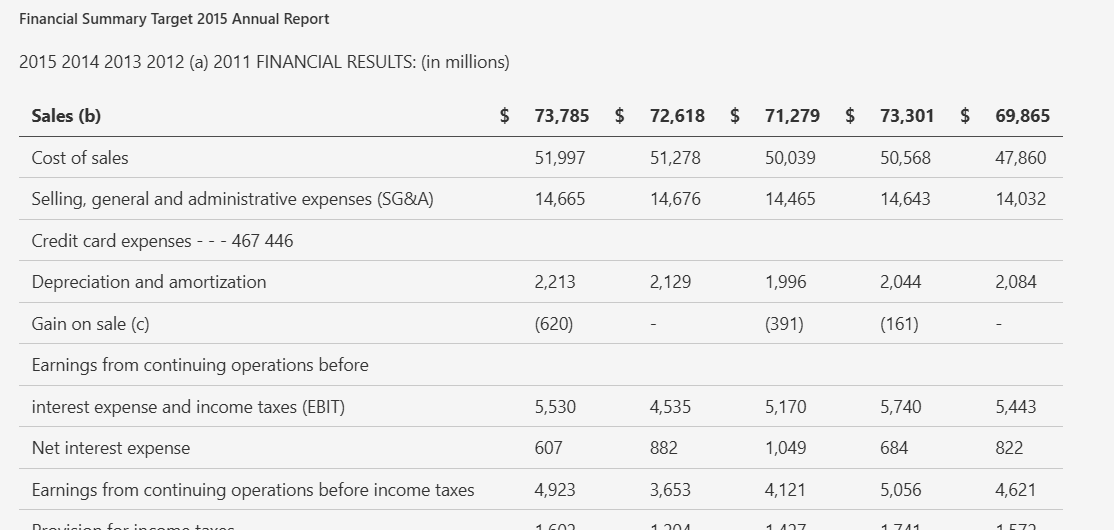
Observed output: Output artifact (Image): The financial summary header stays directly attached to the table, so the caption-to-table association is preserved on the native PDF. — liteparse_input1_hybridearnings_financial_table_caption_parsed_success.png
Input artifact: Input artifact (Image): Input — liteparse_input1_hybridearnings_financial_table_caption.png
Output artifact: Output artifact (Image): The financial summary header stays directly attached to the table, so the caption-to-table association is preserved on the native PDF. — liteparse_input1_hybridearnings_financial_table_caption_parsed_success.png
What changed: Image transformed into Image
Test case: Image → Image
Input type: Image
Input used: Input artifact (Image): Figure 1 caption on the scanned paper — liteparse_input3_scannedpaper_figure_1_caption.png
Observed output: Output artifact (Image): The figure caption survives as text, but the figure itself is missing, so the caption is orphaned. — liteparse_input3_scannedpaper_figure_1_parsed_partial_success.png
Input artifact: Input artifact (Image): Figure 1 caption on the scanned paper — liteparse_input3_scannedpaper_figure_1_caption.png
Output artifact: Output artifact (Image): The figure caption survives as text, but the figure itself is missing, so the caption is orphaned. — liteparse_input3_scannedpaper_figure_1_parsed_partial_success.png
What changed: Image transformed into Image
Why it matters / Conclusion: Works on clean pages, but scan-heavy documents leave captions detached from their visuals.
LiteParse keeps captions and nearby explanatory text attached to the right table or figure on native PDFs, and also keeps caption-like text linked to associated visuals when the page structure is intact. When scanned visuals disappear, those associations break and the text becomes detached.
Long-Document RobustnessQuality stays consistent across document length; source type is the real separator.▾
Feature tested: Long-Document Robustness
Result: Passed
Verdict: Quality stays consistent across document length; source type is the real separator.
Expected behavior: LiteParse maintains a consistent baseline across the 84-page hybrid earnings report, the 18-page financial report, and the 12-page scanned paper. The test results suggest document length itself is not the limiting factor; source quality is.
Test case: PDF document → Text/code file
Input type: PDF document
Input used: Input artifact (PDF document): Input — input1_hybridearnings.pdf
Observed output: Output artifact (Text/code file): The 84-page hybrid earnings report was processed in about 1 minute 21 seconds, with text, headings, and reading order staying strong throughout. — liteparse_input1_hybridearnings_output.md
Input artifact: Input artifact (PDF document): Input — input1_hybridearnings.pdf
Output artifact: Output artifact (Text/code file): The 84-page hybrid earnings report was processed in about 1 minute 21 seconds, with text, headings, and reading order staying strong throughout. — liteparse_input1_hybridearnings_output.md
What changed: PDF document transformed into Text/code file
Test case: PDF document → Text/code file
Input type: PDF document
Input used: Input artifact (PDF document): Input — input2_financialpdf.pdf
Observed output: Output artifact (Text/code file): The 18-page financial report was processed in about 1 minute 2 seconds, with consistent extraction quality across the document. — liteparse_input2_financialpdf_output.md
Input artifact: Input artifact (PDF document): Input — input2_financialpdf.pdf
Output artifact: Output artifact (Text/code file): The 18-page financial report was processed in about 1 minute 2 seconds, with consistent extraction quality across the document. — liteparse_input2_financialpdf_output.md
What changed: PDF document transformed into Text/code file
Test case: PDF document → Text/code file
Input type: PDF document
Input used: Input artifact (PDF document): Input — input3_scannedpaper.pdf
Observed output: Output artifact (Text/code file): The 12-page scanned paper was processed in about 49 seconds, but the same structural weaknesses persisted from start to finish. — liteparse_input3_scannedpaper_output.md
Input artifact: Input artifact (PDF document): Input — input3_scannedpaper.pdf
Output artifact: Output artifact (Text/code file): The 12-page scanned paper was processed in about 49 seconds, but the same structural weaknesses persisted from start to finish. — liteparse_input3_scannedpaper_output.md
What changed: PDF document transformed into Text/code file
Why it matters / Conclusion: Document length itself was not a problem; the source type determined whether output quality stayed strong or fell apart.
LiteParse maintains a consistent baseline across the 84-page hybrid earnings report, the 18-page financial report, and the 12-page scanned paper. The test results suggest document length itself is not the limiting factor; source quality is.
How it scored on the research's own criteria
The 9 evaluation dimensions from our hands-on research on LiteParse, each judged from recorded runs on 3 test inputs — the same verdicts the ranking page ranks on.
held up partial failed not exercised by this input
| Criterion | Verdict | What the runs showed | Per input | Proof |
|---|---|---|---|---|
| Bonus: Unique or Anomalous Behaviors | Weak2/5 | The unusual behavior is real and distinctive, but it is also limited to one scan case and is more of a failure quirk than a strength. That makes it worth noting, but not strongly positive. | open proof ↗ | |
| Caption/Figure Association | Mixed3/5 | It keeps captions attached when the corresponding table is successfully handled, but scanned figures lose that linkage completely. With one strong case and one clear failure, this is a middle score. | open proof ↗ | |
| Chart Reconstruction | Weak1/5 | The tool does not rebuild charts into usable visuals or structured values in either tested case, and the scanned chart is especially broken. One merely partial case plus one outright failure is a clear low score. | open proof ↗ | |
| Document Hierarchy | Strong4/5 | It maps headings correctly on native-digital reports, but the scanned paper shows that the outline logic breaks once OCR gets involved. That makes it strong overall, though not scan-robust enough for a perfect mark. | open proof ↗ | |
| Image Retention | Weak2/5 | The tool sometimes preserves an image marker, but that is only a nominal win because the visual itself is not usable, and scanned images can vanish outright. Since it cannot reliably keep visuals present, this sits low. | open proof ↗ | |
| Long/Complex Document Robustness | Mixed3/5 | The tool is dependable on longer native-digital reports, but its scan performance is uniformly weak, so the length itself does not rescue quality there. That mix of strong and weak inputs points to average robustness rather than top-tier resilience. | open proof ↗ | |
| Reading Order Preservation | Strong4/5 | Reading order is solid on the two digital PDFs and only wobbles on one fragmented scan. Because the failures are isolated rather than pervasive, this is a high but not perfect score. | open proof ↗ | |
| Table Reconstruction | Weak2/5 | Tables are one of the tool’s weakest areas: even on clean financial PDFs, headers and rows break apart, and scanned tables fall apart almost completely. The handful of usable numbers do not overcome the repeated structural failures. | open proof ↗ | |
| Text Preservation | Strong4/5 | It is strong on native-digital text and still readable on scans, but OCR noise shows up once the layout gets harder. That is more than a minor flaw, yet not a collapse, so this lands just below perfect. | open proof ↗ |
Verdicts come verbatim from the study's recorded observations, never re-derived at render; a criterion with no recorded run shows Not exercised — this section cannot invent a score.
Open source
Featured in Rankings
Independent rankings where LiteParse was tested and rated.
Banner Preview
How the embed badge will look on your site

Embed HTML
Copy this code to your website source
Quick Integration Guide
- 1Copy the HTML code block above.
- 2Paste it into your site's HTML or CMS editor.
- 3Banner appears instantly on your page.
- 4Links back to your tool profile here.
Similar Tools
Discover more AI tools like LiteParse to enhance your workflow.
Comments (0)
Need a custom AI solution for this use case?
If you are looking to build a custom PDF parsing, document extraction, or markdown conversion system for your business or internal workflow, email us at contact@futuresmart.ai.
Found something inaccurate or missing? We try to keep our AI research accurate and useful. If you found outdated information, an issue, or have a suggestion, email us at collaborate@aidemos.com.