
MarkItDown
Fast native-PDF text extraction for markdown, but structure, charts, images, and scans are unreliable.
Fast text extraction, weak structural fidelity
- You only need fast plain-text extraction from native-digital PDFs.
- You can tolerate flat headings and inconsistent table parsing.
- You can supply an external OpenAI llm_client for scanned PDFs.
- You need reliable tables, charts, or figure retention.
Our take
MarkItDown is a good fit when you only need quick plain-text extraction from native PDFs. In this benchmark it kept prose intact and processed long files quickly, but tables were inconsistent, headings flattened, charts became unusable strings, images disappeared, and scanned PDFs produced nothing unless an external OpenAI client was configured.
In-Depth Review
Our detailed analysis of MarkItDown — features, performance, and real-world testing.
Feature-by-Feature Breakdown
Native PDF Text ExtractionPreserved▾
Feature tested: Native PDF Text Extraction
Result: Partial
Verdict: Preserved
Expected behavior: Extracts running prose from native-digital PDFs into readable text/Markdown, as exercised on the hybrid earnings report, the 18-page financial report, the Target.com/mobile paragraph, and the Additional Notes section. The evidence shows strong capture of plain prose, including long reports, though document structure can leak through or be flattened.
Test case: Image → Image
Input type: Image
Input used: Input artifact (Image): Source paragraph crop from the Target annual report. — markitdown_input1_hybridearnings_target_paragraph.png
Observed output: Output artifact (Image): The Target.com & mobile paragraph was extracted cleanly, preserving the full sentence across line breaks. — markitdown_input1_hybridearnings_target_para_parsed_success.png
Input artifact: Input artifact (Image): Source paragraph crop from the Target annual report. — markitdown_input1_hybridearnings_target_paragraph.png
Output artifact: Output artifact (Image): The Target.com & mobile paragraph was extracted cleanly, preserving the full sentence across line breaks. — markitdown_input1_hybridearnings_target_para_parsed_success.png
What changed: Image transformed into Image
Test case: Image → Text/code file
Input type: Image
Input used: Input artifact (Image): Additional Notes section from the quarterly financial report. — markitdown_input2_financialpdf_additional_notes.png
Observed output: Output artifact (Text/code file): The Additional Notes text was extracted with high character accuracy, including the disclosure text and share counts. — markitdown-markitdown-input2-financialpdf-output-1b08db40e794.md
Input artifact: Input artifact (Image): Additional Notes section from the quarterly financial report. — markitdown_input2_financialpdf_additional_notes.png
Output artifact: Output artifact (Text/code file): The Additional Notes text was extracted with high character accuracy, including the disclosure text and share counts. — markitdown-markitdown-input2-financialpdf-output-1b08db40e794.md
What changed: Image transformed into Text/code file
Why it matters / Conclusion: Strong for plain prose on native PDFs, including long ones, but it does not preserve document structure.
Extracts running prose from native-digital PDFs into readable text/Markdown, as exercised on the hybrid earnings report, the 18-page financial report, the Target.com/mobile paragraph, and the Additional Notes section. The evidence shows strong capture of plain prose, including long reports, though document structure can leak through or be flattened.


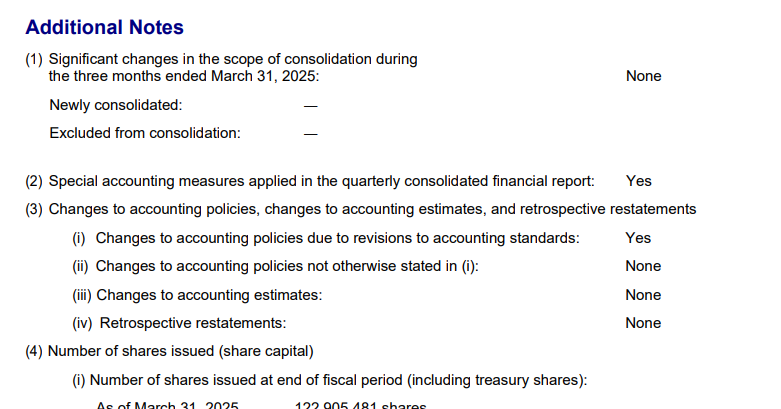
Table ExtractionMixed▾
Feature tested: Table Extraction
Result: Failed
Verdict: Mixed
Expected behavior: Reconstructs tables from PDF pages into structured table form or Markdown/text, using the U.S. Stores properties table and the financial-summary tables in the reports. Simple tables can survive, but denser financial tables flatten, misalign, or lose header-to-value mapping.
Test case: Image → Image
Input type: Image
Input used: Input artifact (Image): Input — markitdown_input1_hybridearnings_financial_table.png
Observed output: Output artifact (Image): The 2015 annual report financial summary was flattened into plain text, losing table structure. — markitdown_input1_hybridearnings_financial_table_parsed_failed.png
Input artifact: Input artifact (Image): Input — markitdown_input1_hybridearnings_financial_table.png
Output artifact: Output artifact (Image): The 2015 annual report financial summary was flattened into plain text, losing table structure. — markitdown_input1_hybridearnings_financial_table_parsed_failed.png
What changed: Image transformed into Image
Test case: Image → Image
Input type: Image
Input used: Input artifact (Image): Input — markitdown_input1_hybridearnings_properties_table.png
Observed output: Output artifact (Image): The U.S. Stores table was extracted cleanly enough to keep the state names, store counts, and square-footage values aligned. — markitdown_input1_hybridearnings_properties_table_parsed_success.png
Input artifact: Input artifact (Image): Input — markitdown_input1_hybridearnings_properties_table.png
Output artifact: Output artifact (Image): The U.S. Stores table was extracted cleanly enough to keep the state names, store counts, and square-footage values aligned. — markitdown_input1_hybridearnings_properties_table_parsed_success.png
What changed: Image transformed into Image
Test case: Image → Text/code file
Input type: Image
Input used: Input artifact (Image): Input — markitdown_input2_financialpdf_business_results_table.png
Observed output: Output artifact (Text/code file): The quarterly business results table was compressed into a single line, so row and column structure were not preserved. — markitdown-markitdown-input2-financialpdf-output-1b08db40e794.md
Input artifact: Input artifact (Image): Input — markitdown_input2_financialpdf_business_results_table.png
Output artifact: Output artifact (Text/code file): The quarterly business results table was compressed into a single line, so row and column structure were not preserved. — markitdown-markitdown-input2-financialpdf-output-1b08db40e794.md
What changed: Image transformed into Text/code file
Test case: Image → Image
Input type: Image
Input used: Input artifact (Image): Input — markitdown_input2_financialpdf_segment_table.png
Observed output: Output artifact (Image): The segment sales and profit table was left as plain text, making column mapping unpredictable. — markitdown_input2_financialpdf_segment_table_parsed_failed.png
Input artifact: Input artifact (Image): Input — markitdown_input2_financialpdf_segment_table.png
Output artifact: Output artifact (Image): The segment sales and profit table was left as plain text, making column mapping unpredictable. — markitdown_input2_financialpdf_segment_table_parsed_failed.png
What changed: Image transformed into Image
Test case: PDF document → Text/code file
Input type: PDF document
Input used: Input artifact (PDF document): Input — input2_financialpdf.pdf
Observed output: Output artifact (Text/code file): The business results and segment tables were left as plain text in places, while the financial position table became a malformed Markdown table with empty columns and misaligned headers. — markitdown_input2_financialpdf_output.md
Input artifact: Input artifact (PDF document): Input — input2_financialpdf.pdf
Output artifact: Output artifact (Text/code file): The business results and segment tables were left as plain text in places, while the financial position table became a malformed Markdown table with empty columns and misaligned headers. — markitdown_input2_financialpdf_output.md
What changed: PDF document transformed into Text/code file
Why it matters / Conclusion: Selective table parsing is the main weakness here: simple tables can survive, but dense financial tables are unreliable.
Reconstructs tables from PDF pages into structured table form or Markdown/text, using the U.S. Stores properties table and the financial-summary tables in the reports. Simple tables can survive, but denser financial tables flatten, misalign, or lose header-to-value mapping.
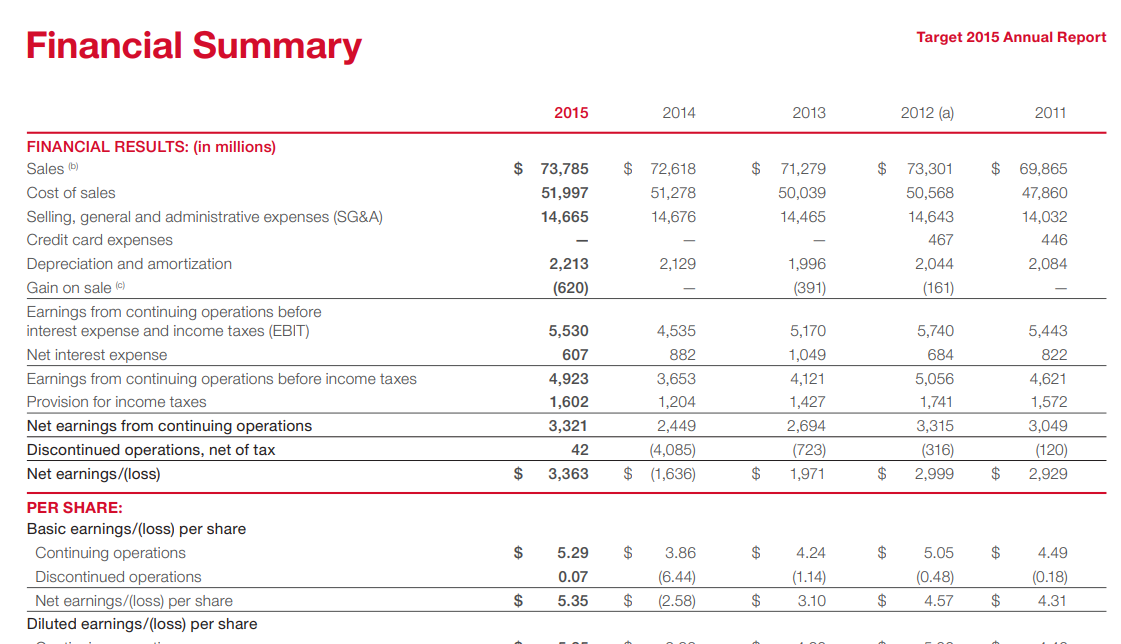
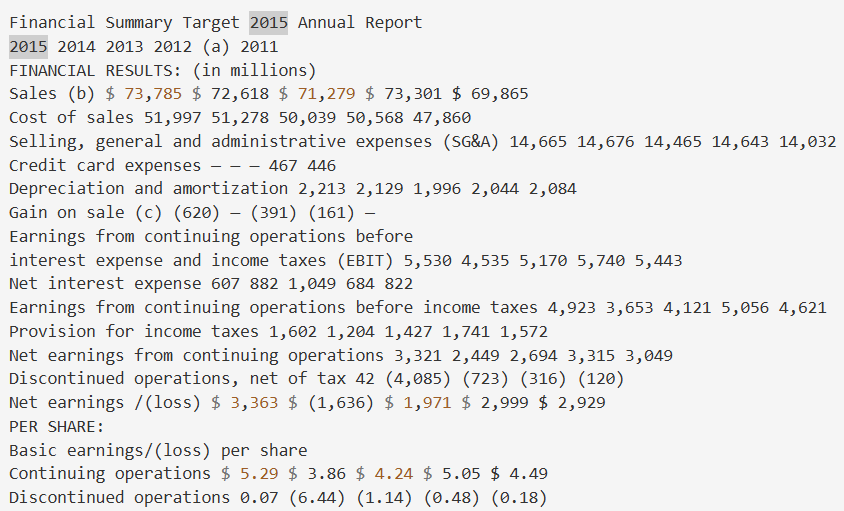
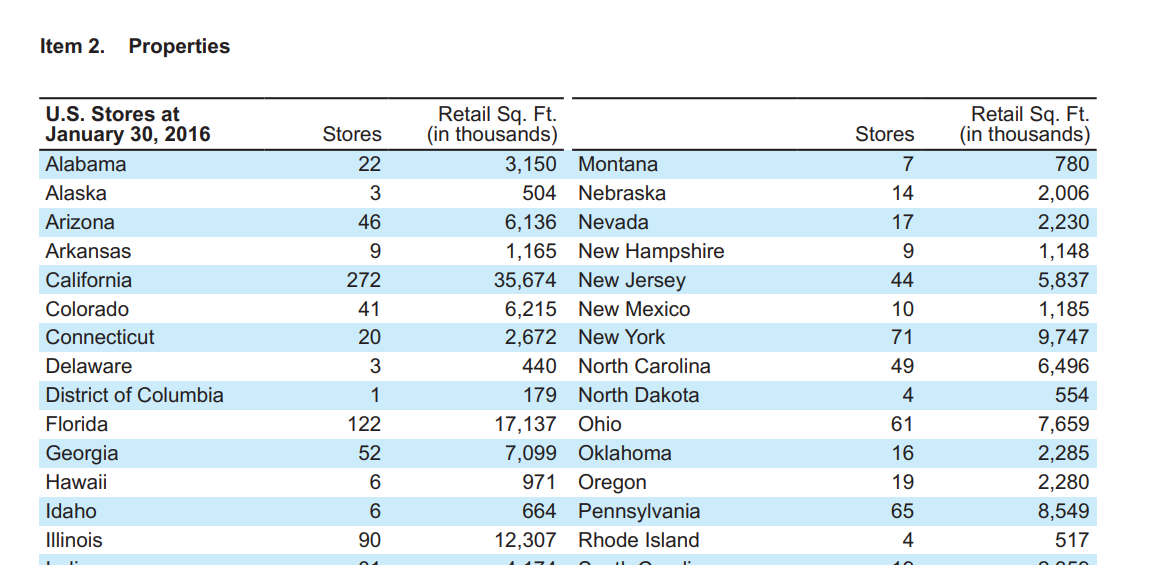
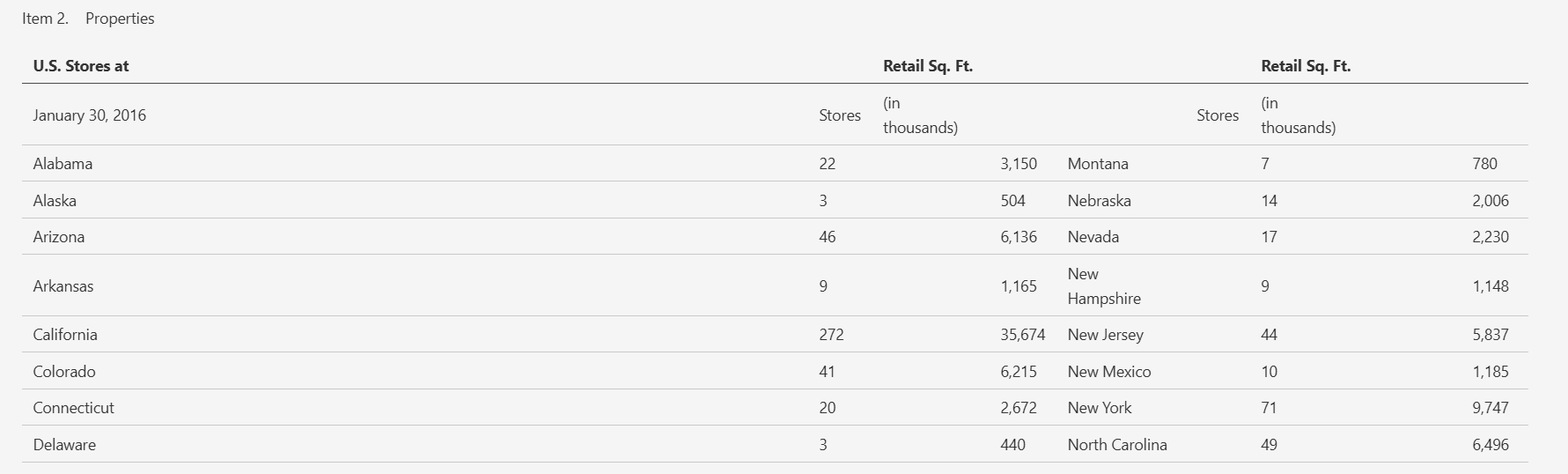
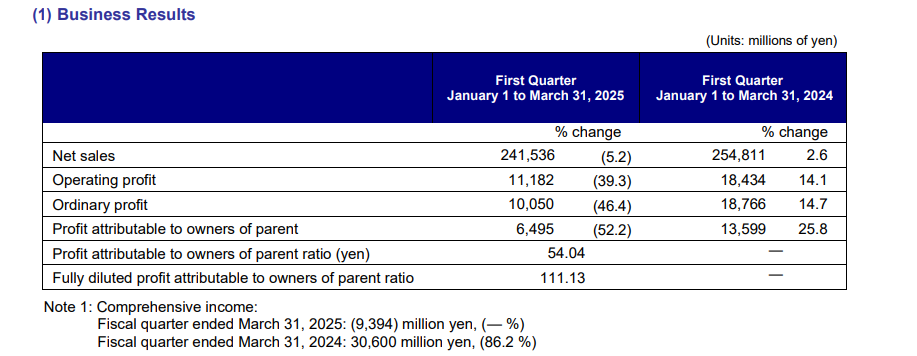
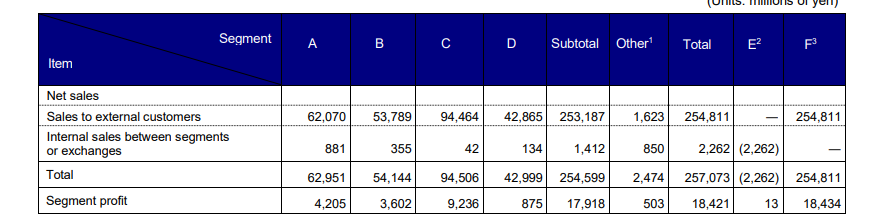

Chart ExtractionFailed▾
Feature tested: Chart Extraction
Result: Failed
Verdict: Failed
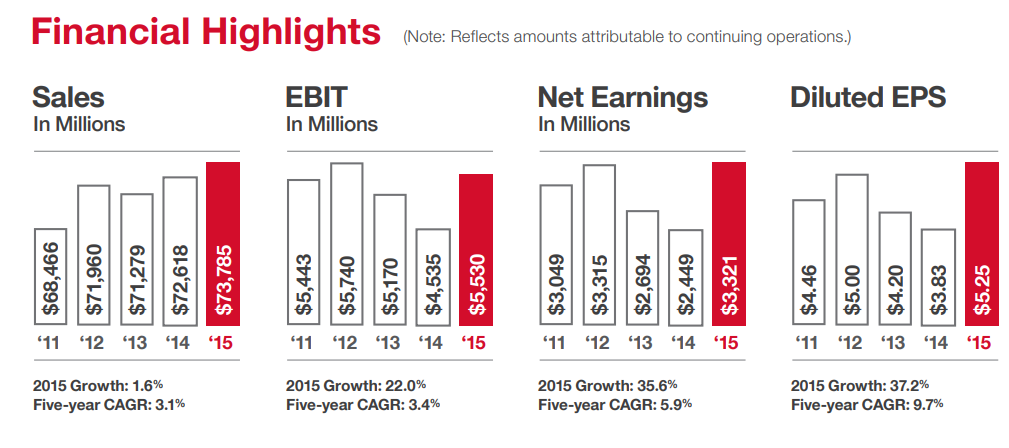
Expected behavior: Processes embedded charts from PDFs into structured data or chart-preserving output, as tested on the financial highlights chart and the hybrid earnings report. The evidence shows labels and values often become jumbled or reduced, so the recovered chart data is unreliable.
Test case: Image → Image
Input type: Image
Input used: Input artifact (Image): Input — markitdown_input1_hybridearnings_financial_charts.png
Observed output: Output artifact (Image): The chart values were extracted as reversed, jumbled numeric strings, which makes the financial highlights unusable as chart data. — markitdown_input1_hybridearnings_financial_charts_parsed_failure.png
Input artifact: Input artifact (Image): Input — markitdown_input1_hybridearnings_financial_charts.png
Output artifact: Output artifact (Image): The chart values were extracted as reversed, jumbled numeric strings, which makes the financial highlights unusable as chart data. — markitdown_input1_hybridearnings_financial_charts_parsed_failure.png
What changed: Image transformed into Image
Why it matters / Conclusion: Charts were not recoverable in this benchmark; the output is unusable as structured financial data.
Processes embedded charts from PDFs into structured data or chart-preserving output, as tested on the financial highlights chart and the hybrid earnings report. The evidence shows labels and values often become jumbled or reduced, so the recovered chart data is unreliable.

Document Hierarchy PreservationFailed▾
Feature tested: Document Hierarchy Preservation
Result: Failed
Verdict: Failed
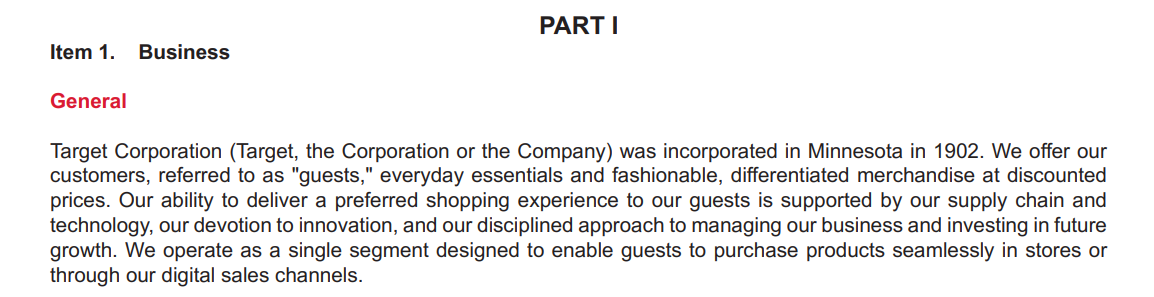
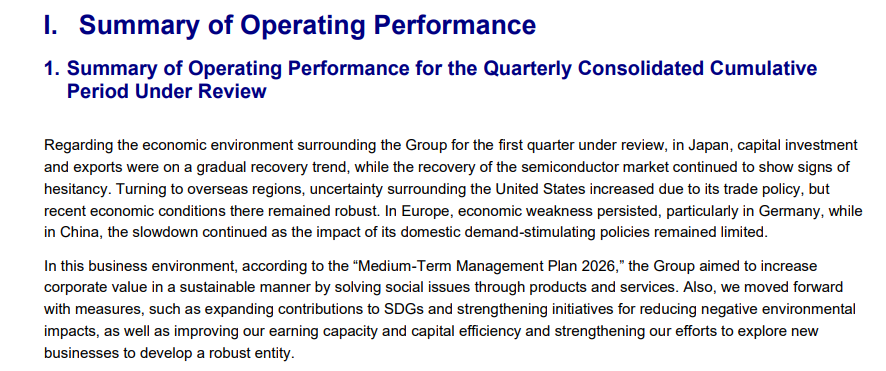
Expected behavior: Attempts to carry section structure into Markdown by preserving headings and outline levels, as tested on 'PART I / Item 1. Business' and 'I. Summary of Operating Performance.' In the observed PDFs, the hierarchy collapsed into body text instead of staying as headings.
Test case: Image → Image
Input type: Image
Input used: Input artifact (Image): Input — markitdown_input1_hybridearnings_item_1_header.png
Observed output: Output artifact (Image): The 'PART I / Item 1. Business' section appeared as flat text with no Markdown heading markers. — markitdown_input1_hybridearnings_item_1_parsed_failed.png
Input artifact: Input artifact (Image): Input — markitdown_input1_hybridearnings_item_1_header.png
Output artifact: Output artifact (Image): The 'PART I / Item 1. Business' section appeared as flat text with no Markdown heading markers. — markitdown_input1_hybridearnings_item_1_parsed_failed.png
What changed: Image transformed into Image
Test case: Image → Text/code file
Input type: Image
Input used: Input artifact (Image): Input — markitdown_input2_financialpdf_summary_section.png
Observed output: Output artifact (Text/code file): The 'I. Summary of Operating Performance' section was flattened into body text, so the document hierarchy was not preserved. — markitdown-markitdown-input2-financialpdf-output-1b08db40e794.md
Input artifact: Input artifact (Image): Input — markitdown_input2_financialpdf_summary_section.png
Output artifact: Output artifact (Text/code file): The 'I. Summary of Operating Performance' section was flattened into body text, so the document hierarchy was not preserved. — markitdown-markitdown-input2-financialpdf-output-1b08db40e794.md
What changed: Image transformed into Text/code file
Why it matters / Conclusion: The document outline is lost entirely; this is not a heading-preserving Markdown converter in the tested setup.
Attempts to carry section structure into Markdown by preserving headings and outline levels, as tested on 'PART I / Item 1. Business' and 'I. Summary of Operating Performance.' In the observed PDFs, the hierarchy collapsed into body text instead of staying as headings.

Reading Sequence PreservationMixed▾
Feature tested: Reading Sequence Preservation
Result: Partial
Verdict: Mixed
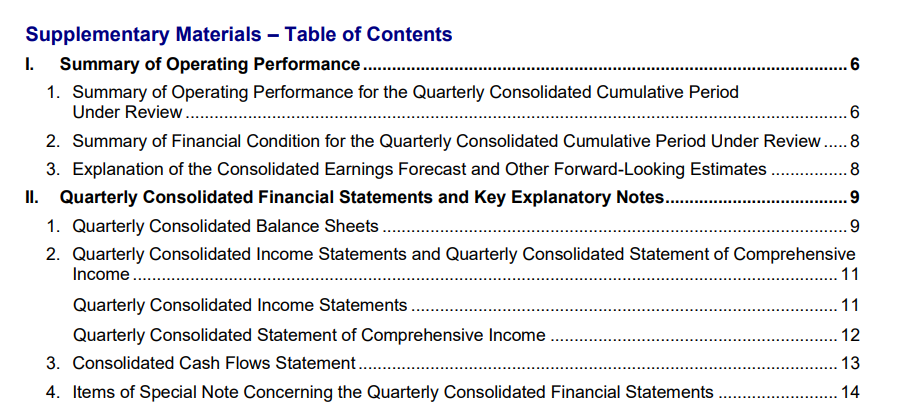
Expected behavior: Keeps page content in logical order on straightforward layouts, as seen in the table of contents, but can merge content into a jumbled block on the two-column welcome page and directors list. This is the tool’s page-level reading-flow behavior rather than content extraction itself.
Test case: Image → Image
Input type: Image
Input used: Input artifact (Image): Two-column welcome message page from the Target annual report. — markitdown_input1_hybridearnings_welcome_message.png
Observed output: Output artifact (Image): The left and right columns were merged into a single jumbled table-like block, breaking reading order. — markitdown_input1_hybridearnings_welcome_message_parsed_failed.png
Input artifact: Input artifact (Image): Two-column welcome message page from the Target annual report. — markitdown_input1_hybridearnings_welcome_message.png
Output artifact: Output artifact (Image): The left and right columns were merged into a single jumbled table-like block, breaking reading order. — markitdown_input1_hybridearnings_welcome_message_parsed_failed.png
What changed: Image transformed into Image
Test case: Image → Image
Input type: Image
Input used: Input artifact (Image): Table of contents page from the quarterly financial report. — markitdown_input2_financialpdf_toc.png
Observed output: Output artifact (Image): The section sequence stayed in the right order even though the hierarchy and dot-leader formatting were flattened. — markitdown_input2_financialpdf_toc_parsed_failed.png
Input artifact: Input artifact (Image): Table of contents page from the quarterly financial report. — markitdown_input2_financialpdf_toc.png
Output artifact: Output artifact (Image): The section sequence stayed in the right order even though the hierarchy and dot-leader formatting were flattened. — markitdown_input2_financialpdf_toc_parsed_failed.png
What changed: Image transformed into Image
Why it matters / Conclusion: It can keep sequence on straightforward pages, but two-column layouts are where reading order falls apart.
Keeps page content in logical order on straightforward layouts, as seen in the table of contents, but can merge content into a jumbled block on the two-column welcome page and directors list. This is the tool’s page-level reading-flow behavior rather than content extraction itself.



Embedded Image PreservationFailed▾
Feature tested: Embedded Image Preservation
Result: Failed
Verdict: Failed
Expected behavior: Retains embedded non-text visuals such as logos, graphics, cover art, and other image assets during conversion. In the tested native-PDF workflow, the Target annual report cover logo and other graphics were omitted rather than preserved in place.
Test case: Image → Image
Input type: Image
Input used: Input artifact (Image): Input — markitdown_input1_hybridearnings_logo.png
Observed output: Output artifact (Image): The cover graphic and Target bullseye logo collapsed to plain title text, with no image placeholder preserved. — markitdown_input1_hybridearnings_logo_parsed_failed.png
Input artifact: Input artifact (Image): Input — markitdown_input1_hybridearnings_logo.png
Output artifact: Output artifact (Image): The cover graphic and Target bullseye logo collapsed to plain title text, with no image placeholder preserved. — markitdown_input1_hybridearnings_logo_parsed_failed.png
What changed: Image transformed into Image
Test case: Image → Image
Input type: Image
Input used: Input artifact (Image): Input — markitdown_input1_hybridearnings_welcome_message.png
Observed output: Output artifact (Image): The page retained text only and dropped the surrounding visual context, matching the report's omission of embedded graphics. — markitdown_input1_hybridearnings_welcome_message_parsed_failed.png
Input artifact: Input artifact (Image): Input — markitdown_input1_hybridearnings_welcome_message.png
Output artifact: Output artifact (Image): The page retained text only and dropped the surrounding visual context, matching the report's omission of embedded graphics. — markitdown_input1_hybridearnings_welcome_message_parsed_failed.png
What changed: Image transformed into Image
Test case: Image → Text/code file
Input type: Image
Input used: Input artifact (Image): Input — markitdown-markitdown-input1-hybridearnings-logo-66f284f61dfa.png
Observed output: Output artifact (Text/code file): The Target bullseye cover graphic, logo, and signature assets were omitted entirely and no placeholders were emitted. — markitdown_input1_hybridearnings_output.md
Input artifact: Input artifact (Image): Input — markitdown-markitdown-input1-hybridearnings-logo-66f284f61dfa.png
Output artifact: Output artifact (Text/code file): The Target bullseye cover graphic, logo, and signature assets were omitted entirely and no placeholders were emitted. — markitdown_input1_hybridearnings_output.md
What changed: Image transformed into Text/code file
Why it matters / Conclusion: Images, logos, and scanned visuals were omitted in the tested native-PDF workflow.
Retains embedded non-text visuals such as logos, graphics, cover art, and other image assets during conversion. In the tested native-PDF workflow, the Target annual report cover logo and other graphics were omitted rather than preserved in place.


Scanned PDF OCR ConversionFailed▾
Feature tested: Scanned PDF OCR Conversion
Result: Failed
Verdict: Failed
Expected behavior: Converts scanned PDFs by routing them through OCR via an external OpenAI llm_client/API. In the tested setup, a scanned research paper produced no Markdown output because OCR was skipped, showing that the workflow depends on that external OCR path.
Test case: PDF document → Text prompt
Input type: PDF document
Input used: Input artifact (PDF document): Scanned research paper PDF used as the OCR test. — input3_scannedpaper.pdf
Observed output: Output artifact (Text prompt): The scanned PDF did not convert in the standalone open-source workflow.
Input artifact: Input artifact (PDF document): Scanned research paper PDF used as the OCR test. — input3_scannedpaper.pdf
Output artifact: Output artifact (Text prompt): The scanned PDF did not convert in the standalone open-source workflow.
What changed: PDF document transformed into Text prompt
Why it matters / Conclusion: Without an external llm_client/OpenAI integration, scanned PDFs do not produce usable output.
Converts scanned PDFs by routing them through OCR via an external OpenAI llm_client/API. In the tested setup, a scanned research paper produced no Markdown output because OCR was skipped, showing that the workflow depends on that external OCR path.
Long-Document ProcessingStrong▾
Feature tested: Long-Document Processing
Result: Passed
Verdict: Strong
Expected behavior: Completes long native PDFs without crashing, as shown by the 84-page hybrid earnings report and the 18-page quarterly financial report. Runtime stayed stable even when output quality varied, indicating the tool can process large documents reliably.
Test case: PDF document → Text prompt
Input type: PDF document
Input used: Input artifact (PDF document): 84-page hybrid earnings report. — input1_hybridearnings.pdf
Observed output: Output artifact (Text prompt): The long native PDF completed successfully and quickly, despite degraded structural output.
Input artifact: Input artifact (PDF document): 84-page hybrid earnings report. — input1_hybridearnings.pdf
Output artifact: Output artifact (Text prompt): The long native PDF completed successfully and quickly, despite degraded structural output.
What changed: PDF document transformed into Text prompt
Test case: PDF document → Text prompt
Input type: PDF document
Input used: Input artifact (PDF document): 18-page table-heavy financial report. — input2_financialpdf.pdf
Observed output: Output artifact (Text prompt): The shorter native PDF also completed cleanly and quickly.
Input artifact: Input artifact (PDF document): 18-page table-heavy financial report. — input2_financialpdf.pdf
Output artifact: Output artifact (Text prompt): The shorter native PDF also completed cleanly and quickly.
What changed: PDF document transformed into Text prompt
Why it matters / Conclusion: Runtime is dependable on native PDFs; the limiting factor is output quality, not completion.
Completes long native PDFs without crashing, as shown by the 84-page hybrid earnings report and the 18-page quarterly financial report. Runtime stayed stable even when output quality varied, indicating the tool can process large documents reliably.
How it scored on the research's own criteria
The 9 evaluation dimensions from our hands-on research on MarkItDown, each judged from recorded runs on 3 test inputs — the same verdicts the ranking page ranks on.
held up partial failed not exercised by this input
| Criterion | Verdict | What the runs showed | Per input | Proof |
|---|---|---|---|---|
| Bonus: Unique or Anomalous Behaviors | Strong4/5 | A notable pattern is that it behaves inconsistently on tables and quietly falls back to non-OCR conversion on scanned PDFs, which makes its limitations unusually easy to miss. | open proof ↗ | |
| Caption/Figure Association | Weak1/5 | The chart labels and the data they refer to are split apart, so the figure-caption relationship is lost at the moment it matters. | open proof ↗ | |
| Chart Reconstruction | Weak1/5 | On the only chart-heavy input, the plotted values were turned into unusable strings instead of a usable chart readout, so this is a core failure rather than a partial miss. | open proof ↗ | |
| Document Hierarchy | Weak1/5 | Across both digital reports, section titles stay as plain body text, so the outline never becomes real document structure. | open proof ↗ | |
| Image Retention | Weak1/5 | Where images are present, they disappear completely instead of being kept in place or even marked as missing. | open proof ↗ | |
| Long/Complex Document Robustness | Mixed3/5 | It can run through long files quickly, but one long report still shows the same structural decay end to end, so the experience is stable only when the document is simpler. | open proof ↗ | |
| Reading Order Preservation | Mixed3/5 | It can keep a simple contents page in sequence, but it falls apart on a true multi-column layout, so the reading flow is only partly dependable. | open proof ↗ | |
| Table Reconstruction | Weak2/5 | It can sometimes recover a simple table, but the harder financial tables break badly enough that the overall table handling is closer to poor than merely uneven. | open proof ↗ | |
| Text Preservation | Mixed3/5 | It handles native-digital prose well, but the scanned paper gets nothing because OCR is skipped, so text capture is reliable only on the easier inputs. | open proof ↗ |
Verdicts come verbatim from the study's recorded observations, never re-derived at render; a criterion with no recorded run shows Not exercised — this section cannot invent a score.
Pricing
Free - $0 - Open Source
Featured in Rankings
Independent rankings where MarkItDown was tested and rated.
Banner Preview
How the embed badge will look on your site

Embed HTML
Copy this code to your website source
Quick Integration Guide
- 1Copy the HTML code block above.
- 2Paste it into your site's HTML or CMS editor.
- 3Banner appears instantly on your page.
- 4Links back to your tool profile here.
Similar Tools
Discover more AI tools like MarkItDown to enhance your workflow.
Comments (0)
Need a custom AI solution for this use case?
If you are looking to build a custom PDF-to-markdown extraction, document parsing, or text extraction system for your business or internal workflow, email us at contact@futuresmart.ai.
Found something inaccurate or missing? We try to keep our AI research accurate and useful. If you found outdated information, an issue, or have a suggestion, email us at collaborate@aidemos.com.