
Luma AI Review: Dream Machine Image-to-Video Tested (2026)
Luma AI Dream Machine Review: Cinematic Image-to-Video Tested (2026)
Our take
- You want highest-quality cinematic outputs
- You value multiple output variations
- You need realistic AI motion and visuals
- You need precise duration control
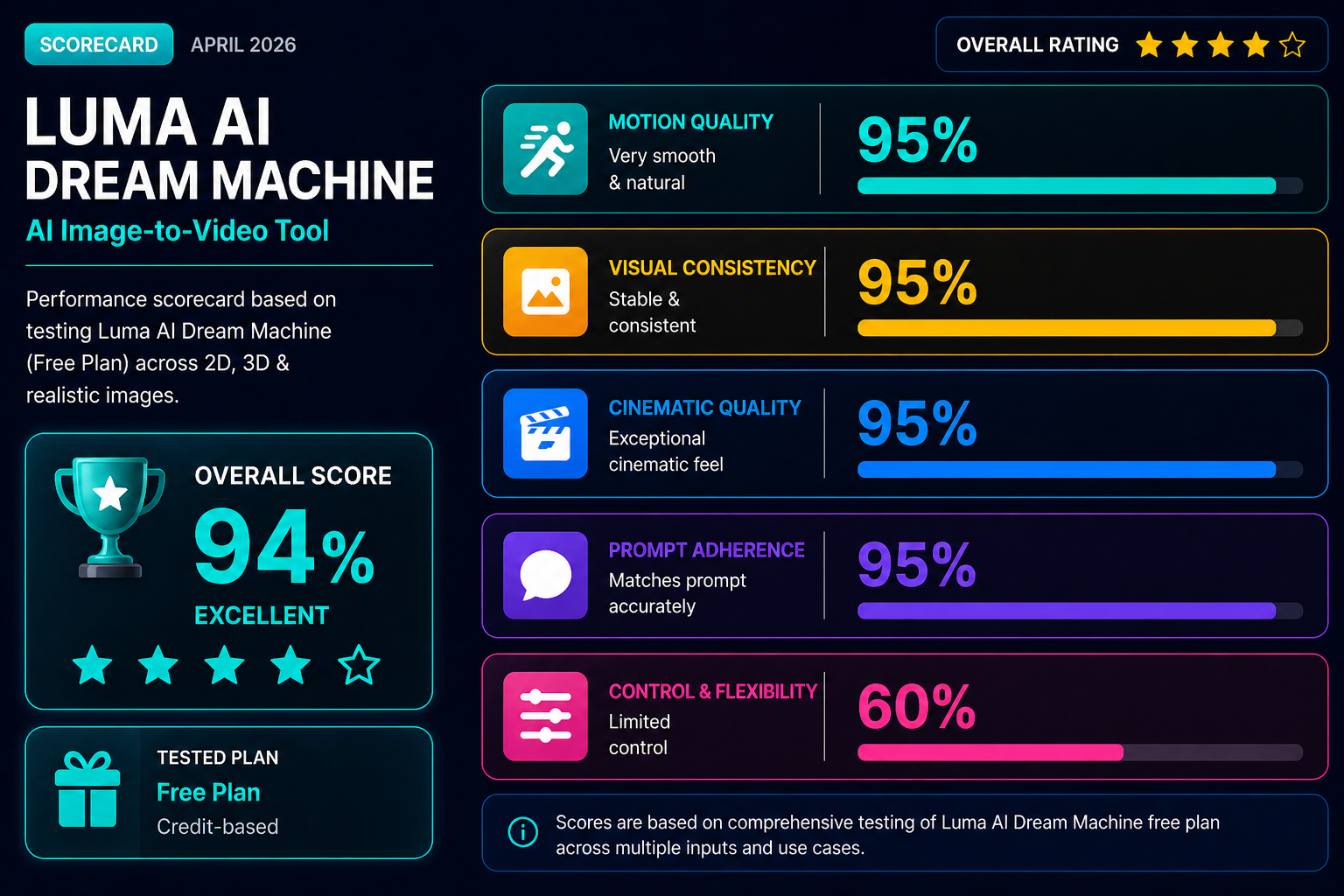
Feature scores on this page: 8.9/10 (4 scored features)
Our take
Luma AI Dream Machine delivered the strongest cinematic image-to-video performance during testing. Its biggest advantage is generating multiple output versions with different motion quality, duration, and sound variations, allowing users to select the best final result. Motion realism, environmental detailing, and character consistency were consistently among the best tested, though manual control options remain limited.
In-Depth Review
Our detailed analysis of Luma AI — features, performance, and real-world testing.
Feature-by-Feature Breakdown
We tested each feature individually. Click any card to see inputs, outputs, and our observations.
2D Image-to-Cinematic VideoExcellent — highly cinematic motion with strong consistency9/10▾
Feature tested: 2D Image-to-Cinematic Video
Result: Passed (9/10)
Verdict: Excellent — highly cinematic motion with strong consistency
Expected behavior: Transforms 2D artwork into cinematic animated clips with smooth motion, environmental effects, and strong visual enhancement.
Test case: Text prompt → Video file
Input type: Text prompt
Input used: Input artifact (Text prompt): Studio Ghibli-style anime illustration
Observed output: Output artifact (Video file): Multiple cinematic animated versions generated — Cinematic_Camera_Scene_A_young_woman_with_brown_hair_wearing_a_blue_KIaBH2Bj.mp4
Input artifact: Input artifact (Text prompt): Studio Ghibli-style anime illustration
Output artifact: Output artifact (Video file): Multiple cinematic animated versions generated — Cinematic_Camera_Scene_A_young_woman_with_brown_hair_wearing_a_blue_KIaBH2Bj.mp4
What changed: Text prompt transformed into Video file
Why it matters / Conclusion: The clip holds up through most of the runtime — but watch the camera movement closely and notice what it does to the overall stability of the scene.
Transforms 2D artwork into cinematic animated clips with smooth motion, environmental effects, and strong visual enhancement.
3D Scene AnimationStrong — best-in-class cinematic scene realism8.5/10▾
Feature tested: 3D Scene Animation
Result: Passed (8.5/10)
Verdict: Strong — best-in-class cinematic scene realism
Expected behavior: Animates complex 3D scenes with cinematic camera movement, realistic environmental motion, and smooth crowd interaction.
Test case: Text prompt → Video file
Input type: Text prompt
Input used: Input artifact (Text prompt): Cinematic 3D marketplace scene
Observed output: Output artifact (Video file): Cinematic 3D motion sequence generated — Golden_Hour_Street_In_a_painterly_style_a_bustling_marketplace_FEwf8ppY.mp4
Input artifact: Input artifact (Text prompt): Cinematic 3D marketplace scene
Output artifact: Output artifact (Video file): Cinematic 3D motion sequence generated — Golden_Hour_Street_In_a_painterly_style_a_bustling_marketplace_FEwf8ppY.mp4
What changed: Text prompt transformed into Video file
Why it matters / Conclusion: The animation quality is strong enough to question whether it's AI-generated — but while everything else holds, find the donkey in the frame and watch specifically how it moves.
Animates complex 3D scenes with cinematic camera movement, realistic environmental motion, and smooth crowd interaction.
Realistic Image AnimationExcellent — highly lifelike cinematic realism9/10▾
Feature tested: Realistic Image Animation
Result: Passed (9/10)
Verdict: Excellent — highly lifelike cinematic realism
Expected behavior: Transforms realistic images into lifelike cinematic videos with natural motion, environmental interaction, and strong visual consistency.
Test case: Text prompt → Video file
Input type: Text prompt
Input used: Input artifact (Text prompt): Realistic tiger wildlife image
Observed output: Output artifact (Video file): Realistic wildlife cinematic clip generated — Tiger_Cinematic_Shot_In_a_wildlife_photography_style_a_tiger_stands_5vS1raJf.mp4
Input artifact: Input artifact (Text prompt): Realistic tiger wildlife image
Output artifact: Output artifact (Video file): Realistic wildlife cinematic clip generated — Tiger_Cinematic_Shot_In_a_wildlife_photography_style_a_tiger_stands_5vS1raJf.mp4
What changed: Text prompt transformed into Video file
Why it matters / Conclusion: The motion consistency and camera work feel genuinely non-AI throughout — then watch what happens to the sky at the 3-second mark.
Transforms realistic images into lifelike cinematic videos with natural motion, environmental interaction, and strong visual consistency.
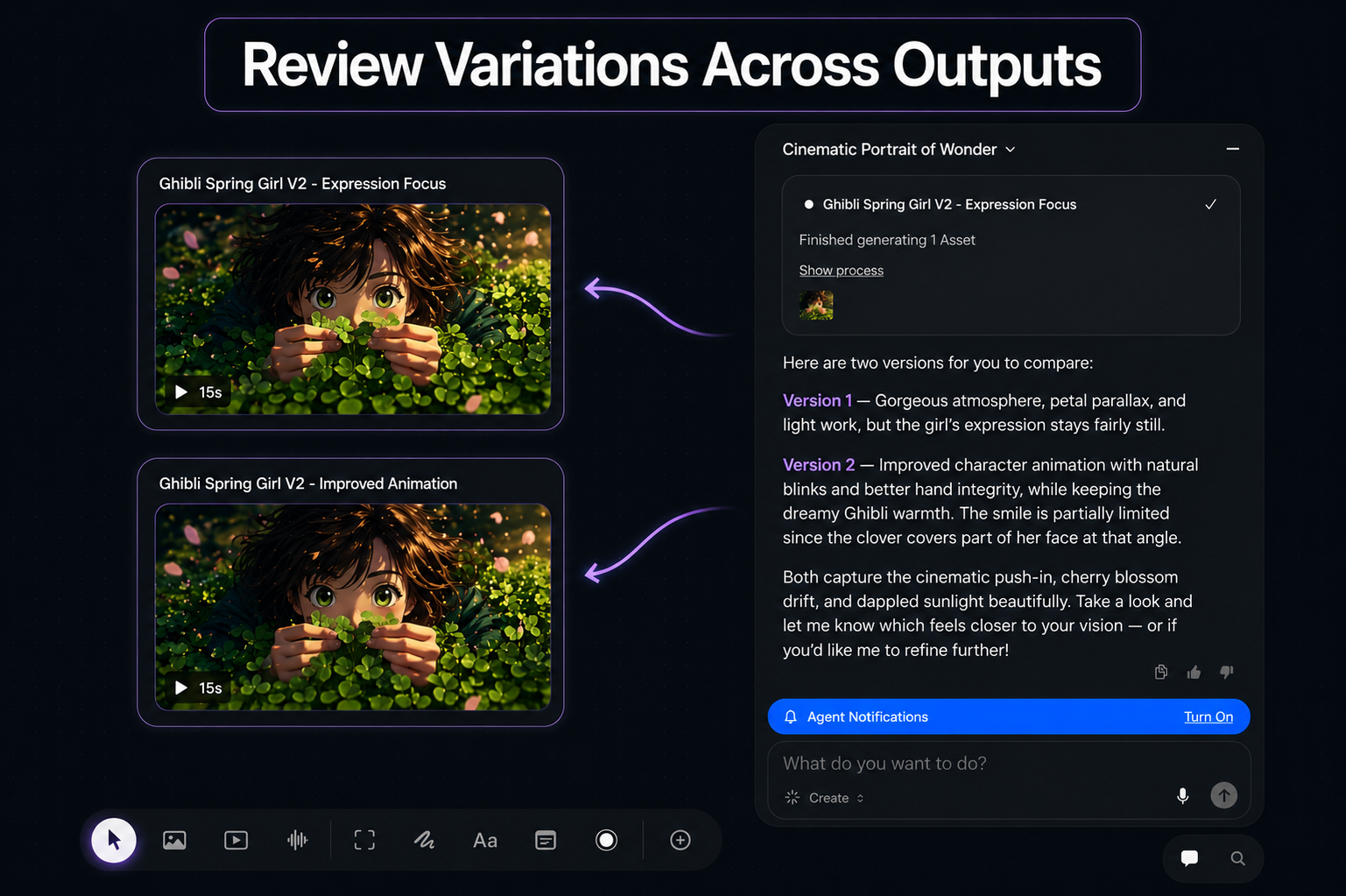
Multi-Version Output & SoundUnique — improves success rate significantly9/10▾
Feature tested: Multi-Version Output & Sound
Result: Passed (9/10)
Verdict: Unique — improves success rate significantly
Expected behavior: Automatically generates multiple output variations with differences in duration, motion style, and sound.
Test case: Image → Image
Input type: Image
Input used: Input artifact (Image): Single image input with cinematic prompt — image-136.png
Observed output: Output artifact (Image): Multiple cinematic versions generated — ChatGPT Image May 7, 2026, 09_32_01 PM.png
Input artifact: Input artifact (Image): Single image input with cinematic prompt — image-136.png
Output artifact: Output artifact (Image): Multiple cinematic versions generated — ChatGPT Image May 7, 2026, 09_32_01 PM.png
What changed: Image transformed into Image
Why it matters / Conclusion: Multiple output versions dramatically improve the chance of getting a high-quality cinematic result.
Automatically generates multiple output variations with differences in duration, motion style, and sound.
Pricing & Access
Pricing checked April 2026. Tested on the free credit-based version.
Pricing checked April 2026. Rechecked quarterly.
Is This Right For You?
A side-by-side guide based on our hands-on testing.
Featured in Rankings
Independent rankings where Luma AI was tested and rated.
Banner Preview
How the embed badge will look on your site

Embed HTML
Copy this code to your website source
Quick Integration Guide
- 1Copy the HTML code block above.
- 2Paste it into your site's HTML or CMS editor.
- 3Banner appears instantly on your page.
- 4Links back to your tool profile here.
Similar Tools
Discover more AI tools like Luma AI to enhance your workflow.
Comments (0)
Need a custom AI solution for this use case?
If you are looking to build a custom image-to-video, scene animation, or video generation workflow for your business or internal workflow, email us at contact@futuresmart.ai.
Found something inaccurate or missing? We try to keep our AI research accurate and useful. If you found outdated information, an issue, or have a suggestion, email us at collaborate@aidemos.com.