OpenAI
Batch speech-to-text with word timestamps, but a strict upload cap and weak multilingual performance make it a mixed fit for hard audio.
Useful for simple batch transcription, but not a hard-audio default
- You need a simple hosted batch STT API with word-level timestamps.
- Your audio files are under 25 MB.
- Your inputs are mostly English or jargon-heavy narration rather than heavily code-switched speech.
- You need speaker diarization or confidence scores.
Feature scores on this page: 26.1/100 (1 scored feature)
Our take
Whisper-1 returned usable transcripts on the jargon-heavy and bilingual samples, with word-level timestamps and predictable list pricing. But this benchmark also found a hard 25 MB upload cap, no speaker labels or confidence fields, and weak Spanish recall on the code-switched clip, so it is a mixed fit for real-world multilingual or meeting-style audio.
In-Depth Review
Our detailed analysis of OpenAI — features, performance, and real-world testing.
Feature-by-Feature Breakdown
Batch Audio Transcription▾
Feature tested: Batch Audio Transcription
Result: Passed
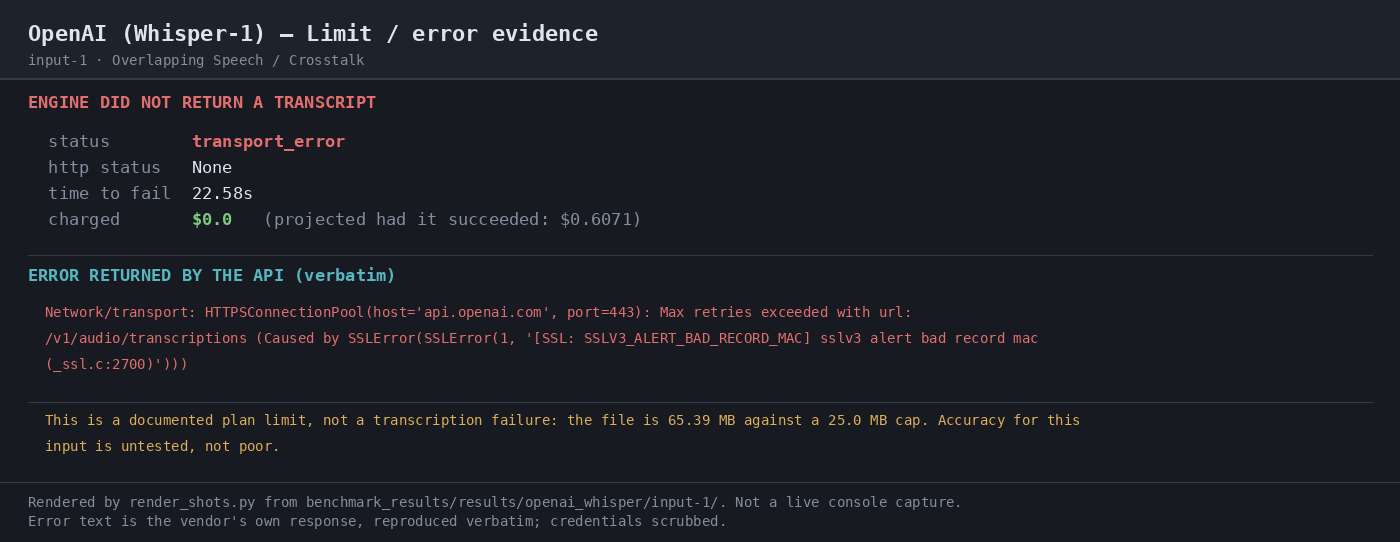
Expected behavior: Transcribes uploaded audio files through a single multipart POST to `/v1/audio/transcriptions`, returning text output when the file is within the upload limit. It was exercised on the 8.58 MB medical-jargon clip and the 22.19 MB bilingual clip, with the 65.39 MB crosstalk file rejected by HTTP 413.
Test case: Audio file → Image
Input type: Audio file
Input used: Input artifact (Audio file): Input 1: Overlapping Speech / Crosstalk — 35:43 multi-speaker audio, 65.39 MB, used to test overlap and diarization. — crosstalk.wav
Observed output: Output artifact (Image): RESULT — 05-limit-evidence-3.png
Input artifact: Input artifact (Audio file): Input 1: Overlapping Speech / Crosstalk — 35:43 multi-speaker audio, 65.39 MB, used to test overlap and diarization. — crosstalk.wav
Output artifact: Output artifact (Image): RESULT — 05-limit-evidence-3.png
What changed: Audio file transformed into Image
Test case: Audio file → Text/code file
Input type: Audio file
Input used: Input artifact (Audio file): Input 2: Medical Jargon — 18:44 Gray's Anatomy narration, 8.58 MB, dense with technical terms. — medical_terms.mp3
Observed output: Output artifact (Text/code file): Successful transcript payload for the medical-jargon clip; the run scored 5.17% WER and returned 2,663 words. — raw-response.json
Input artifact: Input artifact (Audio file): Input 2: Medical Jargon — 18:44 Gray's Anatomy narration, 8.58 MB, dense with technical terms. — medical_terms.mp3
Output artifact: Output artifact (Text/code file): Successful transcript payload for the medical-jargon clip; the run scored 5.17% WER and returned 2,663 words. — raw-response.json
What changed: Audio file transformed into Text/code file
Test case: Audio file → Text/code file
Input type: Audio file
Input used: Input artifact (Audio file): Input 3: Bilingual Code-Switching — 32:18 Spanish-English conversation, 22.19 MB, mostly English. — mix_language.mp3
Observed output: Output artifact (Text/code file): Successful transcript payload for the bilingual clip; the run scored 26.12% WER and returned 5,702 words. — raw-response-3.json
Input artifact: Input artifact (Audio file): Input 3: Bilingual Code-Switching — 32:18 Spanish-English conversation, 22.19 MB, mostly English. — mix_language.mp3
Output artifact: Output artifact (Text/code file): Successful transcript payload for the bilingual clip; the run scored 26.12% WER and returned 5,702 words. — raw-response-3.json
What changed: Audio file transformed into Text/code file
Why it matters / Conclusion: Works as a simple hosted batch transcription endpoint, but the 25 MB ceiling is strict and blocks larger real-world audio.
Transcribes uploaded audio files through a single multipart POST to `/v1/audio/transcriptions`, returning text output when the file is within the upload limit. It was exercised on the 8.58 MB medical-jargon clip and the 22.19 MB bilingual clip, with the 65.39 MB crosstalk file rejected by HTTP 413.
Word-Level Timestamps▾
Feature tested: Word-Level Timestamps
Result: Passed
Expected behavior: Produces verbose JSON transcription output with per-word timing when `response_format=verbose_json` and `timestamp_granularities[]=word` are enabled. It was exercised on the medical-jargon clip and the bilingual clip, yielding timed token outputs.
Test case: Audio file → Text/code file
Input type: Audio file
Input used: Input artifact (Audio file): Input 2: Medical Jargon — same request with word timestamps enabled. — medical_terms.mp3
Observed output: Output artifact (Text/code file): Verbose JSON response showing a `words` array with start/end times for the medical-jargon clip. — raw-response.json
Input artifact: Input artifact (Audio file): Input 2: Medical Jargon — same request with word timestamps enabled. — medical_terms.mp3
Output artifact: Output artifact (Text/code file): Verbose JSON response showing a `words` array with start/end times for the medical-jargon clip. — raw-response.json
What changed: Audio file transformed into Text/code file
Test case: Audio file → Text/code file
Input type: Audio file
Input used: Input artifact (Audio file): Input 3: Bilingual Code-Switching — same request with word timestamps enabled. — mix_language.mp3
Observed output: Output artifact (Text/code file): Verbose JSON response showing a `words` array with start/end times for the bilingual clip. — raw-response-3.json
Input artifact: Input artifact (Audio file): Input 3: Bilingual Code-Switching — same request with word timestamps enabled. — mix_language.mp3
Output artifact: Output artifact (Text/code file): Verbose JSON response showing a `words` array with start/end times for the bilingual clip. — raw-response-3.json
What changed: Audio file transformed into Text/code file
Why it matters / Conclusion: Good for captions and search alignment, but the response still lacks confidence values and speaker labels.
Produces verbose JSON transcription output with per-word timing when `response_format=verbose_json` and `timestamp_granularities[]=word` are enabled. It was exercised on the medical-jargon clip and the bilingual clip, yielding timed token outputs.
Code-Switching TranscriptionMixed results26.12/100▾
Feature tested: Code-Switching Transcription
Result: Partial (26.12/100)
Verdict: Mixed results
Expected behavior: Transcribes mixed-language speech, including Spanish-English audio, into a single transcript. It was exercised on the bilingual sample, which transcribed successfully but showed uneven Spanish recall.
Test case: Audio file → Text/code file
Input type: Audio file
Input used: Input artifact (Audio file): Input 3: Bilingual Code-Switching — 32:18 Spanish-English conversation; the benchmark notes the clip is about 95.5% English, so this is a weak balanced multilingual stress case. — mix_language.mp3
Observed output: Output artifact (Text/code file): Returned a mostly English transcript; the detail view shows a dropped Spanish token and the benchmark scored 26.12% WER with 46.2% Spanish token recall. — raw-response-3.json
Input artifact: Input artifact (Audio file): Input 3: Bilingual Code-Switching — 32:18 Spanish-English conversation; the benchmark notes the clip is about 95.5% English, so this is a weak balanced multilingual stress case. — mix_language.mp3
Output artifact: Output artifact (Text/code file): Returned a mostly English transcript; the detail view shows a dropped Spanish token and the benchmark scored 26.12% WER with 46.2% Spanish token recall. — raw-response-3.json
What changed: Audio file transformed into Text/code file
Why it matters / Conclusion: Use with caution for multilingual or code-switched speech; this benchmark does not support treating it as strong balanced multilingual transcription.
Transcribes mixed-language speech, including Spanish-English audio, into a single transcript. It was exercised on the bilingual sample, which transcribed successfully but showed uneven Spanish recall.
How it scored on the research's own criteria
The 3 evaluation dimensions from our hands-on research on OpenAI, each judged from recorded runs on 3 test inputs — the same verdicts the ranking page ranks on.
held up partial failed not exercised by this input
| Criterion | Verdict | What the runs showed | Per input | Proof |
|---|---|---|---|---|
| Output quality | Mixed3/5 | It is accurate on the medical narration, with only a small miss in a mostly clean transcript, but it falls apart on the Spanish-English conversation and never got a chance to prove accuracy on the refused meeting file. That leaves output quality in the middle overall: solid on one input, weak on another, and untested on the third. | open proof ↗ | |
| Automation level | Strong4/5 | The workflow runs end to end without manual steps whenever the file is accepted, and the API response comes back inline. The only real break is that an oversize upload stops at the vendor error instead of producing a transcript, so the automation is strong but not flawless. | — | |
| Input handling | Mixed3/5 | It handles normal sub-cap files quickly and at low cost, but the oversized meeting file was refused outright. That makes the overall picture mixed: good on accepted audio, blocked by the upload limit on large input. | — |
Verdicts come verbatim from the study's recorded observations, never re-derived at render; a criterion with no recorded run shows Not exercised — this section cannot invent a score.
Transcription pricing
Vendor-published list prices for OpenAI speech-to-text models.
No free tier or published volume discount is shown on the API pricing page. Batch API is not priced separately for transcription.
Banner Preview
How the embed badge will look on your site

Embed HTML
Copy this code to your website source
Quick Integration Guide
- 1Copy the HTML code block above.
- 2Paste it into your site's HTML or CMS editor.
- 3Banner appears instantly on your page.
- 4Links back to your tool profile here.
Similar Tools
Discover more AI tools like OpenAI to enhance your workflow.
Comments (0)
Need a custom AI solution for this use case?
If you are looking to build a custom speech-to-text, audio transcription, or word timestamping system for your business or internal workflow, email us at contact@futuresmart.ai.
Found something inaccurate or missing? We try to keep our AI research accurate and useful. If you found outdated information, an issue, or have a suggestion, email us at collaborate@aidemos.com.