
Vidyo.ai
Strong default animated captions and 9:16 reframing, but the free workflow is watermarked and tightly locked down.
Polished defaults, but heavy free-tier limits
- You want a fast default path from 16:9 talking-head footage to animated 9:16 captions.
- You want emoji-assisted caption styling with minimal manual setup.
- You need reliable pause handling during reflective or conversational gaps.
- You need custom fonts, exact hex colors, or raw SRT export without paying.
Our take
Vidyo.ai is a strong default caption engine for short-form video: it auto-crops to 9:16, keeps fast speech readable, injects emojis, and stays stable through pauses. The tradeoff is a tightly restricted free workflow: exports are watermarked, custom fonts and exact hex colors are blocked, and raw SRT export is paywalled, so it works best when speed matters more than brand control.
In-Depth Review
Our detailed analysis of Vidyo.ai — features, performance, and real-world testing.
Feature-by-Feature Breakdown
Automatic Short-Form Video Captioning and Reframing▾
Feature tested: Automatic Short-Form Video Captioning and Reframing
Result: Passed
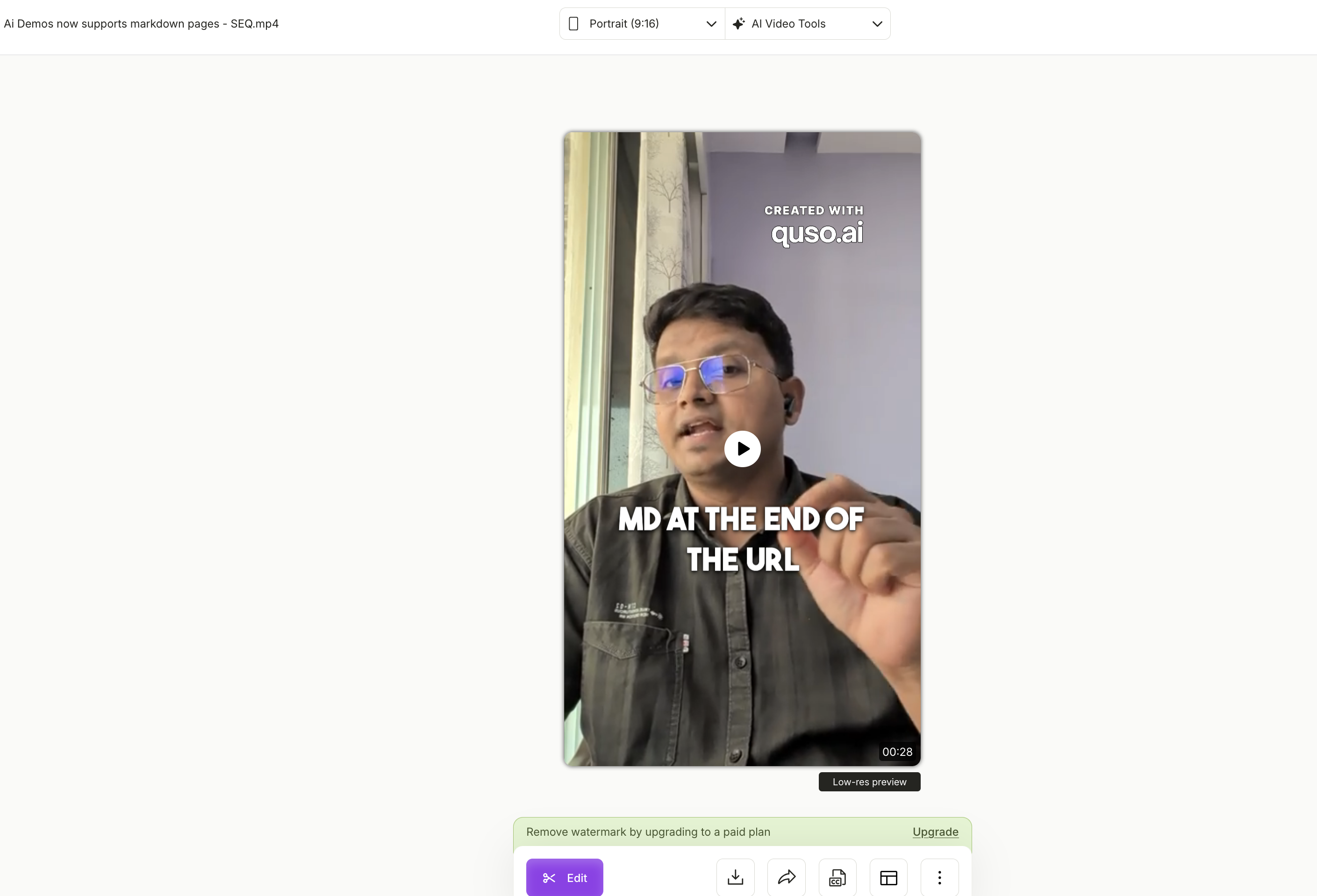
Expected behavior: Vidyo.ai can turn source talking-head clips into vertical 9:16 short-form output while keeping the speaker centered with face tracking and adding preset or burned-in animated captions. The member cards exercised this on a horizontal markdown-heavy clip, a technical talking-head clip, and other short-form test clips.
Test case: Text prompt → Image
Input type: Text prompt
Input used: Input artifact (Text prompt): Input
Observed output: Output artifact (Image): The tool auto-cropped the source into a 9:16 portrait preview, kept the speaker centered with face tracking, applied the bouncy trending-shorts caption style, and exported a watermarked MP4; the transcript still handled technical syntax imprecisely, including the .md reference. — dot-md_error.png
Input artifact: Input artifact (Text prompt): Input
Output artifact: Output artifact (Image): The tool auto-cropped the source into a 9:16 portrait preview, kept the speaker centered with face tracking, applied the bouncy trending-shorts caption style, and exported a watermarked MP4; the transcript still handled technical syntax imprecisely, including the .md reference. — dot-md_error.png
What changed: Text prompt transformed into Image
Why it matters / Conclusion: Best for fast, polished defaults and auto-reframing; less reliable when exact technical formatting matters, and free exports are watermarked.
Vidyo.ai can turn source talking-head clips into vertical 9:16 short-form output while keeping the speaker centered with face tracking and adding preset or burned-in animated captions. The member cards exercised this on a horizontal markdown-heavy clip, a technical talking-head clip, and other short-form test clips.
Emoji-Assisted Subtitle Styling▾
Feature tested: Emoji-Assisted Subtitle Styling
Result: Partial
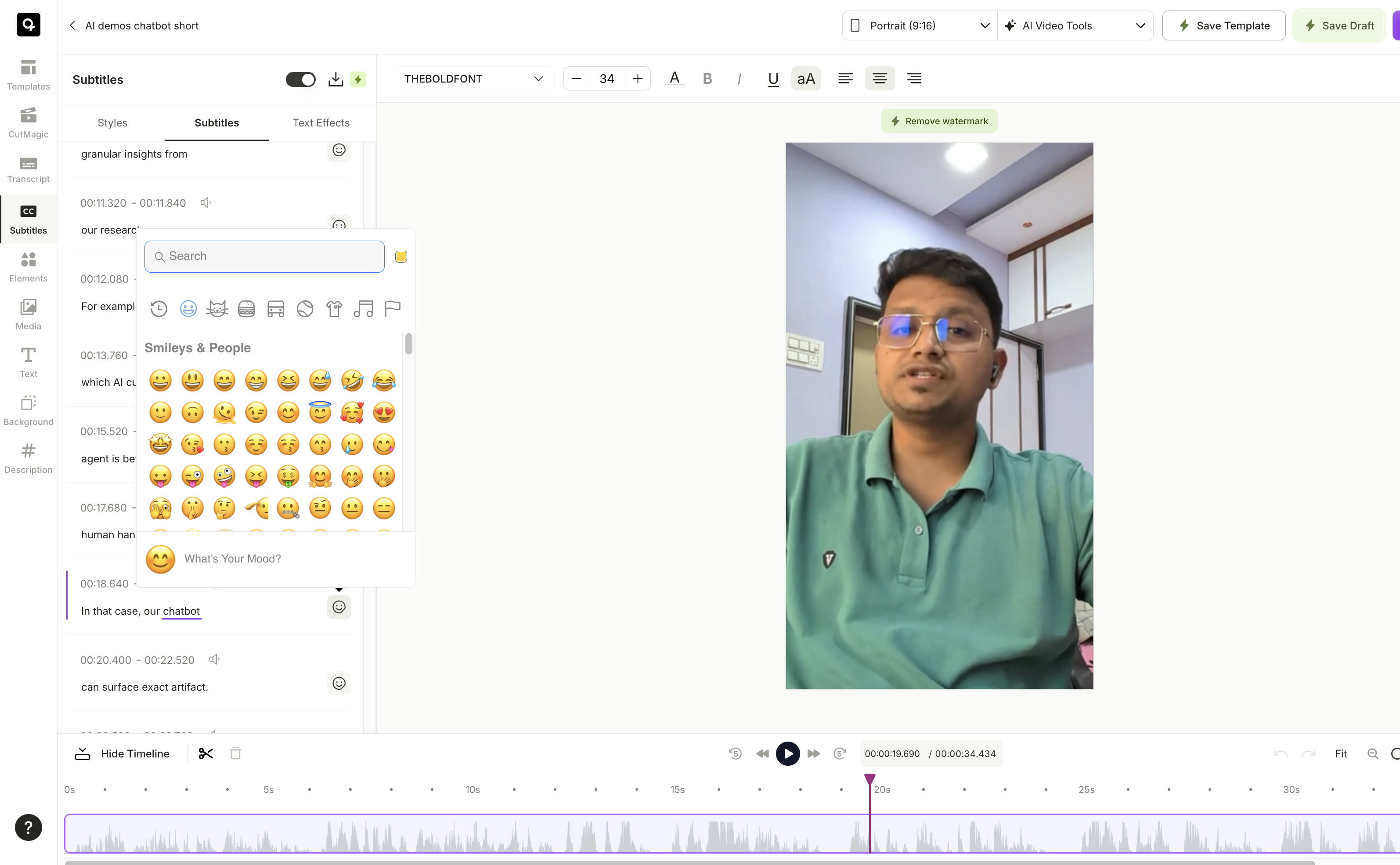
Expected behavior: The editor can enrich captions with emojis automatically or inline based on the dialogue’s semantic context. The tested rapid tech-dialogue clips showed emoji insertion working natively, though the suggestions could be generic or repetitive.
Test case: Text prompt → Image
Input type: Text prompt
Input used: Input artifact (Text prompt): Input
Observed output: Output artifact (Image): The subtitle editor exposed the emoji picker inside the caption workspace, and the report observed that auto-emojis were injected natively on semantic cues; the weakness was that abstract lines could fall back to generic or repetitive icons. — emoji-injection.png
Input artifact: Input artifact (Text prompt): Input
Output artifact: Output artifact (Image): The subtitle editor exposed the emoji picker inside the caption workspace, and the report observed that auto-emojis were injected natively on semantic cues; the weakness was that abstract lines could fall back to generic or repetitive icons. — emoji-injection.png
What changed: Text prompt transformed into Image
Why it matters / Conclusion: Useful as a quick style boost, but the emoji suggestions are not nuanced enough to trust blindly on dense or abstract dialogue.
The editor can enrich captions with emojis automatically or inline based on the dialogue’s semantic context. The tested rapid tech-dialogue clips showed emoji insertion working natively, though the suggestions could be generic or repetitive.
Pause-Aware Caption Timing▾
Feature tested: Pause-Aware Caption Timing
Result: Passed
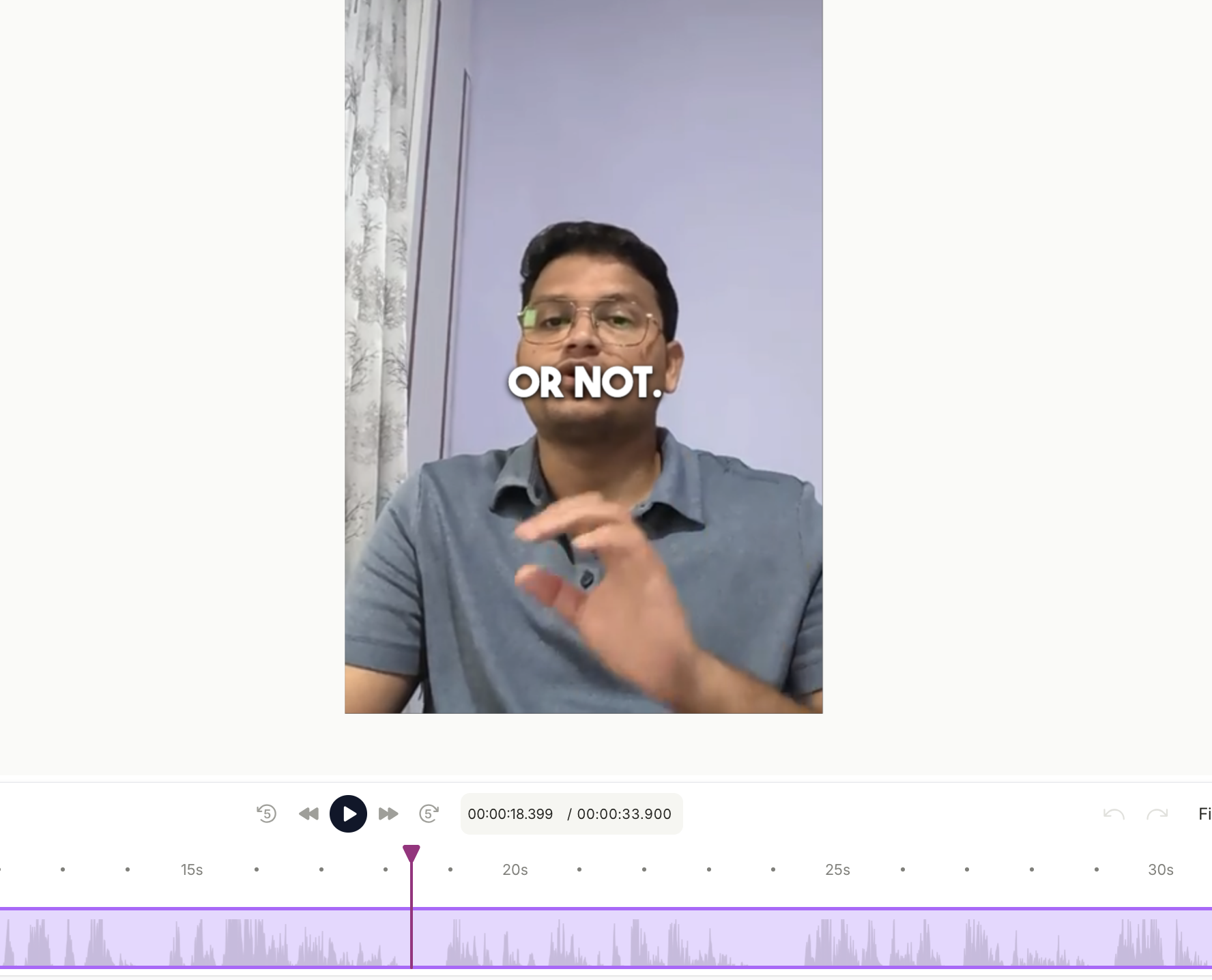
Expected behavior: Vidyo.ai keeps subtitle overlays stable through silence gaps and conversational pauses instead of flashing empty boxes. In the tested narrative clips, captions suspended cleanly during breathing spaces and resumed when speech restarted.
Test case: Text prompt → Image
Input type: Text prompt
Input used: Input artifact (Text prompt): Input
Observed output: Output artifact (Image): The timeline kept the caption overlay stable through the pause instead of flashing empty boxes, and the waveform view showed the speech gap being tracked cleanly around the 18-second mark. — audio_gap.png
Input artifact: Input artifact (Text prompt): Input
Output artifact: Output artifact (Image): The timeline kept the caption overlay stable through the pause instead of flashing empty boxes, and the waveform view showed the speech gap being tracked cleanly around the 18-second mark. — audio_gap.png
What changed: Text prompt transformed into Image
Why it matters / Conclusion: Pause handling was excellent, but the free tier does not give you much control over the caption exit behavior around those pauses.
Vidyo.ai keeps subtitle overlays stable through silence gaps and conversational pauses instead of flashing empty boxes. In the tested narrative clips, captions suspended cleanly during breathing spaces and resumed when speech restarted.
Branding and Subtitle Export Controls▾
Feature tested: Branding and Subtitle Export Controls
Result: Failed
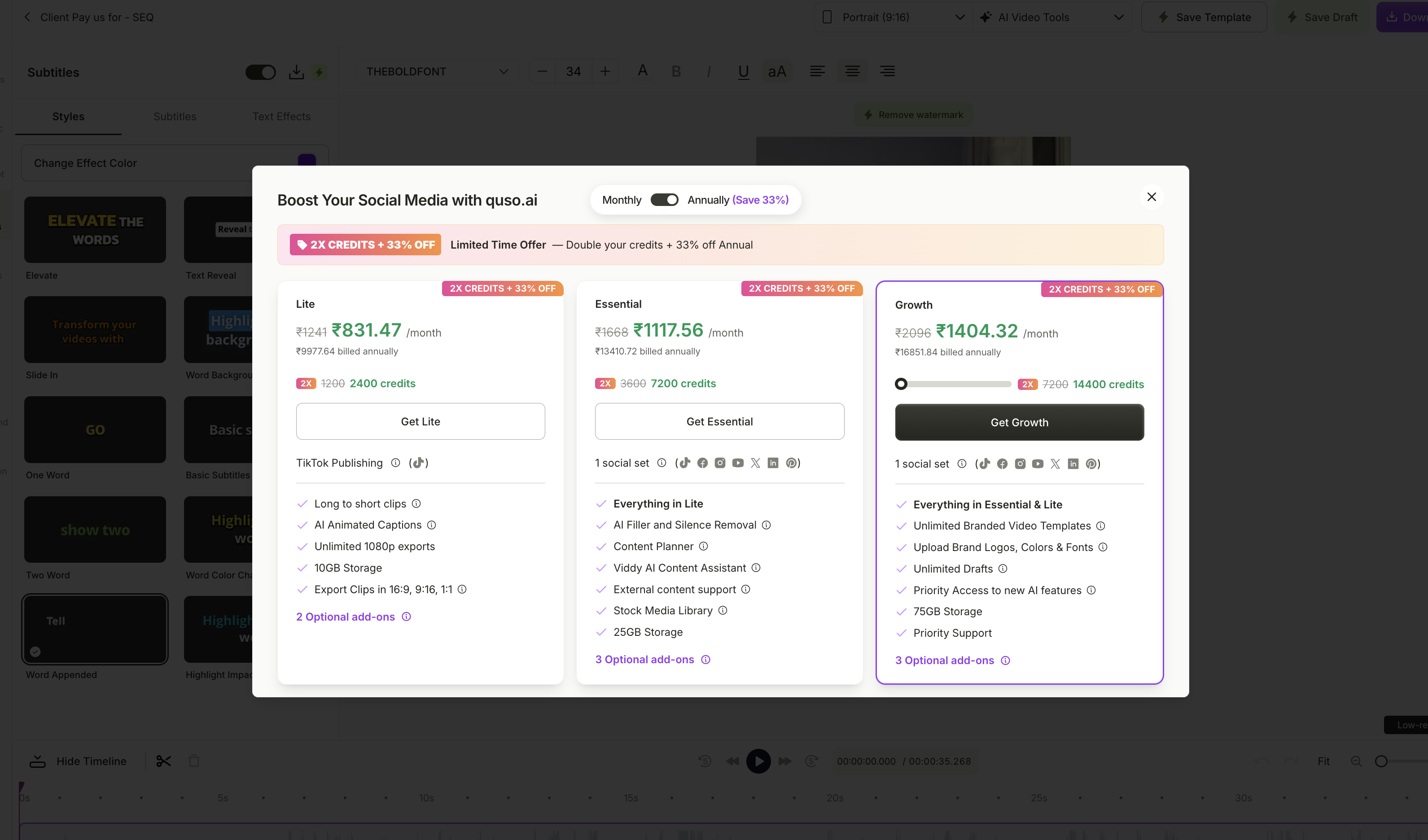
Expected behavior: The product exposes brand and delivery controls such as custom fonts, exact hex colors, subtitle downloads, and other export-format options, with some actions gated by plan level. The tested free tier blocked custom font uploads, raw SRT export, and some batching/scaling controls.
Test case: Text prompt → Image
Input type: Text prompt
Input used: Input artifact (Text prompt): Input
Observed output: Output artifact (Image): The testing tier surfaced a paywall modal and blocked the customization/export controls: custom fonts, exact hex colors, and raw .srt export were unavailable, while the free workflow remained a watermarked MP4 preview path. — paywall.png
Input artifact: Input artifact (Text prompt): Input
Output artifact: Output artifact (Image): The testing tier surfaced a paywall modal and blocked the customization/export controls: custom fonts, exact hex colors, and raw .srt export were unavailable, while the free workflow remained a watermarked MP4 preview path. — paywall.png
What changed: Text prompt transformed into Image
Why it matters / Conclusion: The paid stack unlocks the brand and export controls, but the free workflow is too locked down for serious client-facing customization.
The product exposes brand and delivery controls such as custom fonts, exact hex colors, subtitle downloads, and other export-format options, with some actions gated by plan level. The tested free tier blocked custom font uploads, raw SRT export, and some batching/scaling controls.
Plans and limits observed in testing
The report documented a free tier plus three paid tiers, with no-watermark exports, brand kits, and higher limits moving up the stack.
The report noted that annual billing typically offers savings, but only the monthly prices were explicitly listed.
Featured in Rankings
Independent rankings where Vidyo.ai was tested and rated.
Banner Preview
How the embed badge will look on your site

Embed HTML
Copy this code to your website source
Quick Integration Guide
- 1Copy the HTML code block above.
- 2Paste it into your site's HTML or CMS editor.
- 3Banner appears instantly on your page.
- 4Links back to your tool profile here.
Similar Tools
Discover more AI tools like Vidyo.ai to enhance your workflow.
Comments (0)
Need a custom AI solution for this use case?
If you are looking to build a custom short-form video repurposing, auto-captioning, or 9:16 reframing workflow for your business or internal workflow, email us at contact@futuresmart.ai.
Found something inaccurate or missing? We try to keep our AI research accurate and useful. If you found outdated information, an issue, or have a suggestion, email us at collaborate@aidemos.com.