Best AI Tools for Outreach Prospecting and Personalized Cold Email
We tested five AI outreach platforms on the same prospecting workflow: company search, people search, employee discovery, contact validation, browser-based enrichment, AI-assisted prospect discovery, API readiness, and AI email generation using shared business context.
How We Tested
The research compared Apollo, Hunter, Snov.io, Saleshandy, and Clay on the same outreach workflow wherever each product allowed it. Testing used real companies and real prospects, kept outputs unchanged, and checked whether each tool could move from company discovery to contact identification, contact validation, browser-based research, AI-assisted prospecting, and AI email drafting with minimal manual work. The team reused the same prospects, companies, LinkedIn pages, websites, and standardized outreach context across tools where possible, and independently reviewed questionable company affiliations, workforce freshness, and contact signals when the returned records looked uncertain. A dedicated hard-to-find prospect scenario was intentionally excluded because the ground-truth email would have been hard to verify.
The Ranking
5 toolstested head-to-head on the same input. Each card shows the verdict and per-criterion scores. Click "Full breakdown" for the artifact-level evidence.
Scores are inferred by AI from the researcher's hands-on observations and ranked by their aggregate.
Apollo delivered the most complete single-platform workflow across company discovery, contact research, browser enrichment, automation readiness, and email generation, with moderate data-freshness caveats.
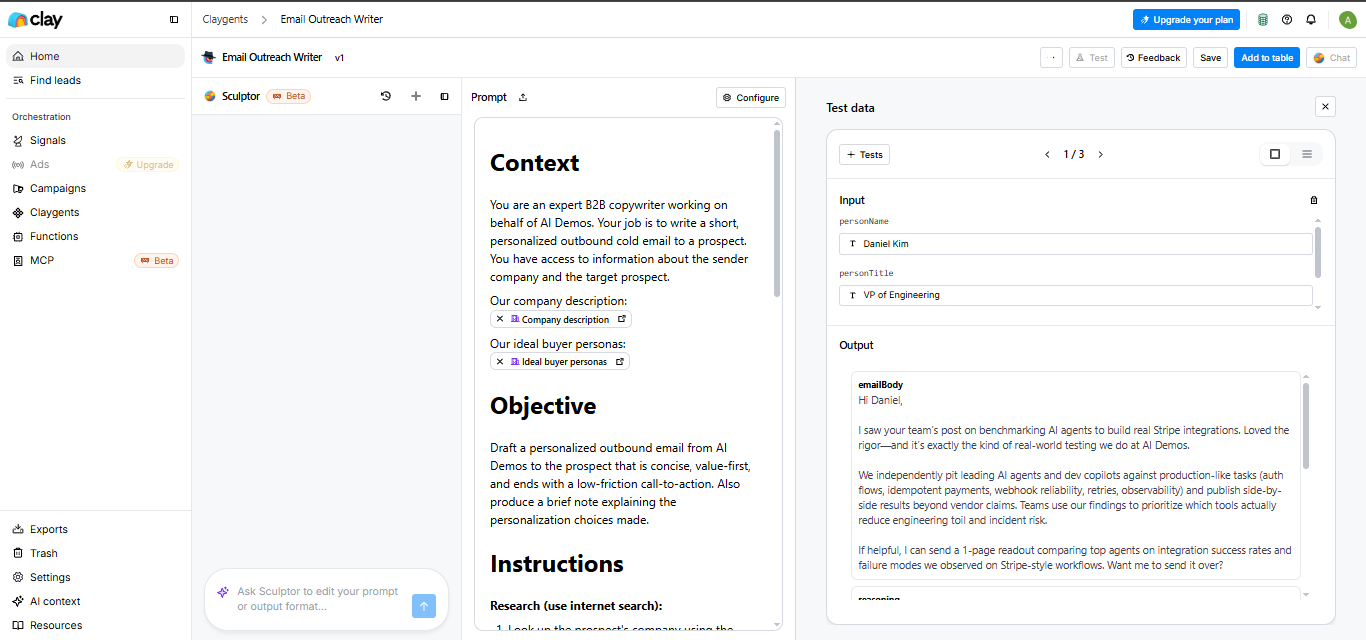
Clay required more setup and had a weak extension, but it stood out for workflow orchestration, enrichment, and the strongest personalized email writing in the test.
Hunter was strongest when the job was finding, verifying, and processing contact data at scale, but prospect coverage and LinkedIn workflows were less consistent.
Snov.io handled standard prospecting well and offered broad automation coverage, but workforce freshness, complex AI search precision, and personalization depth were only moderate.
Saleshandy combined prospecting, sequencing, and automation well, but it lagged on extension-based enrichment, narrow AI prospecting, and deep personalization.

Full breakdown
Every claim below is a recorded finding from our own testing — the score, the note, and the screenshots behind it. Nothing is summarised from memory.
Additional context and Tone were scored, but we recorded no findings for them — so those scores have nothing to show you.
Apollo
Best#1 of 5Strong general prospecting platform with especially good Chrome extension and API support, but weaker workforce freshness and mixed email generation.
How it scored
AI-Assisted Prospect Discovery3/5API & Automation Readiness5/5Chrome Extension Workflow5/5Company Coverage & Employee Freshness2/5Company Search5/5Email Writing3/5People Search4/5Company information4/5Ease of Use4/5Employee Discovery & Contact Information4/5Relevance3/5Ability to locate email4/5Confidence indicators4/5Job information4/5Supporting prospect information3/5Template dependency4/5AI Email Writing4/5Personalization quality3/5▸AI-Assisted Prospect Discovery3/52 mixed2 findings
The AI assistant translated the prompt into search filters and a broad company set, but the output still needed refinement to match intent tightly.
Apollo can translate a natural-language prospecting request into structured search filters, but the output can remain broad; this run generated 4 filters and still returned 7,134 company results rather than a tightly scoped list of 10.
Apollo's AI assistant can translate a natural-language prospecting request into search filters; in the sample it generated 11 filters and returned 7,134 companies, but the result set was still broad enough to need refinement.
▸API & Automation Readiness5/52 worked well2 findings
Apollo provides APIs for prospect search and contact enrichment, making automated workflows feasible.
Apollo exposes automation-ready APIs for prospect search and contact enrichment; the API portal explicitly lists Search API and Enrichment API and says they cover over 220 million contacts across 30 million companies.
Apollo provides automation-ready APIs for both search and enrichment; the portal advertises an Enrichment API plus a Search API for over 220 million contacts at over 30 million companies, enabling programmatic prospecting outside the UI.
▸Chrome Extension Workflow5/54 worked well4 findings
Apollo worked well in the browser extension, enriching both LinkedIn profiles and company websites directly on-page.
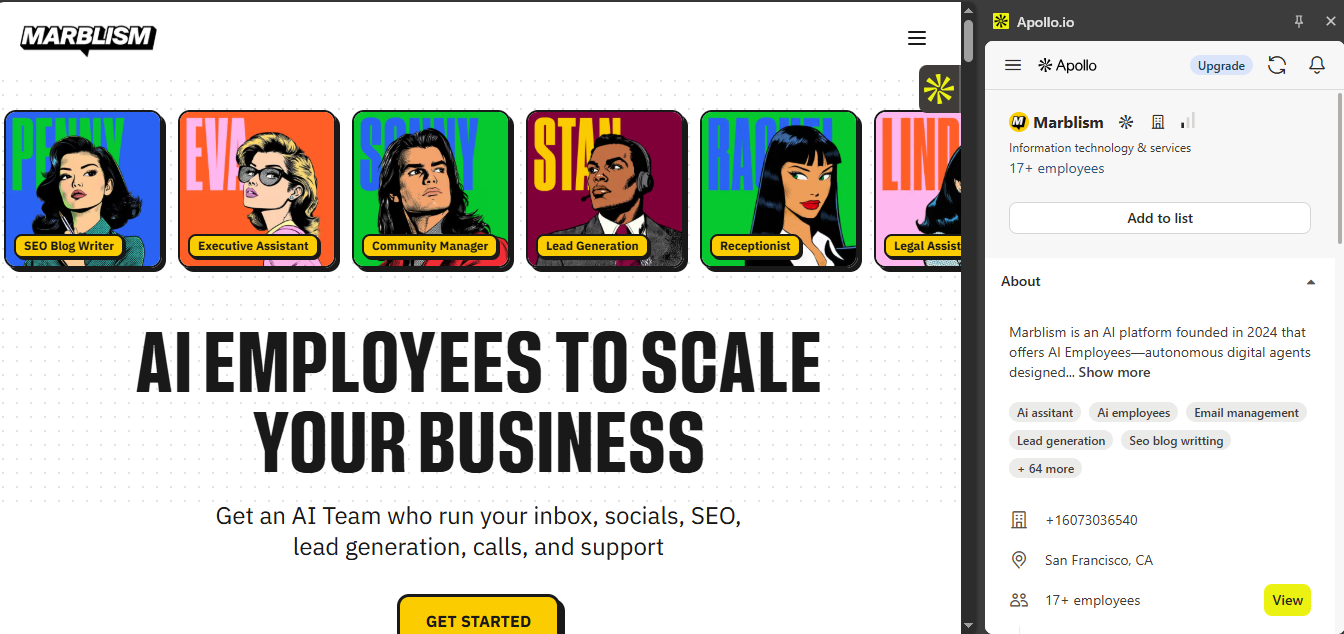
Apollo's Chrome Extension can identify a company from a website and generate an enrichment card in-page; on marblism.com it surfaced Marblism, 17+ employees, San Francisco, CA, and +16073036540.
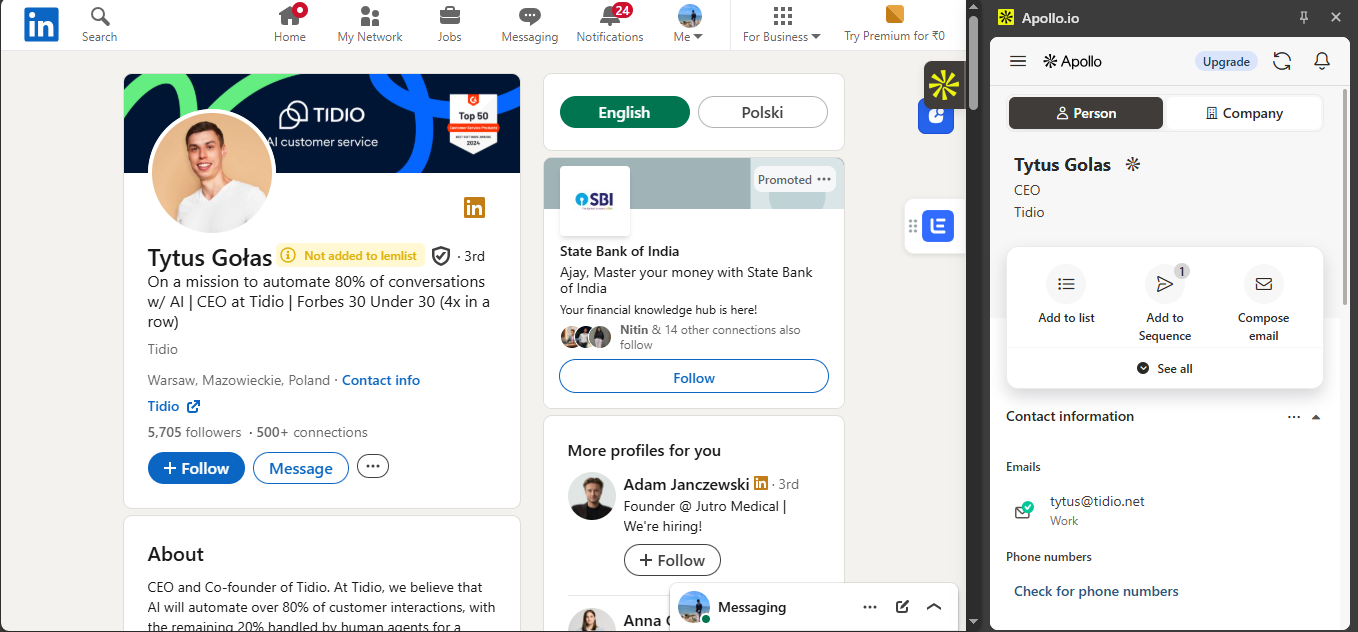
Apollo's Chrome Extension can surface prospect data directly on LinkedIn; on Tytus Gołas it showed the person card, CEO at Tidio, and work email tytus@tidio.net.
▸Company Coverage & Employee Freshness2/51 worked well2 mixed3 findings
Apollo returned employees for the company, but the list did not fully reflect the current workforce and showed signs of staleness.
Apollo can surface a sizeable employee list, but the returned workforce may be incomplete or stale; for FutureSmart AI it surfaced 24 employee records while validation found missing team members and others potentially no longer associated with the company.
Apollo can surface an employee record that matches public workforce evidence; in the Chapple example it lists Ann Chapple, and her LinkedIn profile shows Ann at Chapple.
▸Company Search5/52 worked well2 findings
Apollo successfully identified the searched company and returned a matching profile that could seed further research.
Apollo can identify a company from a search query and return a matching company profile; searching "vespa.ai" produced 1 result.
Apollo can turn a company/domain query into a single matching company result that seeds downstream prospecting; in this run it returned 1 match for Vespa.ai.
▸Email Writing3/51 worked well2 mixed3 findings
Apollo can generate outreach emails in multiple modes, but template issues and limited prospect-specific personalization reduce quality.
Apollo's assisted personalization mode produces the most contextual outreach copy and incorporates research signals, but the personalization is still strongest at the company level and remains limited by the prospect data Apollo can access.
Apollo's prompt-based email generation can follow user instructions and business context more closely than template mode, producing more customized outreach copy.
▸People Search4/52 worked well2 findings
Apollo could locate a known prospect and surface extra context like a LinkedIn link, but the result still benefited from manual validation.
Apollo can find a named prospect and return a validated contact record; searching "Tytus Golas" produced 1 result with title CEO, company Tidio, and work email tytus@tidio.net.
Apollo can locate a known person in people search and surface enough validation context to confirm the match, including the prospect name, title, company, and a LinkedIn reference.
▸Company information4/53 worked well3 findings
Apollo returns company profiles and enrichment data that give solid company-level context for research.
Apollo surfaced a list of 24 employee records for FutureSmart AI and exposed company-level metadata such as phone number, founding year, industry, and keywords.
Apollo resolved a named-company search to 1 matching company record for Vespa.ai, showing it can identify the intended company and return a starting point for firmographic research.
▸Ease of Use4/52 worked well2 findings
Search, browser extension, and AI-assisted workflows make prospecting relatively straightforward and low-friction.
Apollo's API quickstart exposes separate Search and Enrichment APIs for automated prospect discovery and enrichment, with documented scale of over 220 million contacts and over 30 million companies.
The website workflow is low-friction: the extension identifies the company directly on the page and presents enrichment in a sidebar, so users do not need to switch into a separate search flow.
▸Employee Discovery & Contact Information4/51 worked well1 mixed2 findings
Apollo surfaced employee records and distinguished verified vs. unverified contacts, making the data usable but not uniformly reliable.
Apollo can surface a company's employee list and contact data for outreach; the FutureSmart AI company view showed 24 employee records and a phone number (+91 91866 50329).
Apollo surfaces employee/contact records and labels record confidence, including lower-confidence entries that require manual review before outreach.
▸Relevance3/52 mixed2 findings
Generated outreach is context-aware, but the report shows that the match to the exact prospecting intent is not always tight.
The AI assistant converts a niche prompt into 4 search filters and a broad result set of 7,134 companies, which shows good query translation but still requires manual narrowing to reach the requested 10 prospects.
Apollo can surface a contact that initially looks relevant to a target company, but the match needs follow-up validation because supporting profile review can change that assessment.
▸Ability to locate email4/51 worked well1 finding
Apollo can surface professional contact records and distinguish verified from unverified entries, indicating strong email-finding capability.
Apollo returned a usable work email, tytus@tidio.net, for the intended prospect through the LinkedIn/browser extension workflow.
▸Confidence indicators4/51 mixed1 finding
The tool explicitly differentiates verified and lower-confidence contact records, giving useful reliability signals.
Apollo distinguishes contact records by verification state; at least one surfaced contact is shown in a lower-confidence category rather than as a fully verified record, so reliability is signaled but still uneven across contacts.
▸Job information4/52 worked well2 findings
The platform surfaces role and prospect-related employment details directly in people search and enrichment views.
The employee discovery view exposes role titles at scale, including AI Content Research Intern, Gen AI QA Intern, Gen AI Intern, and Frontend Engineer.
The prospect card surfaces the person's role as CEO alongside the contact record, giving users job-level context before outreach.
▸Supporting prospect information3/51 worked well1 finding
It provides helpful context like LinkedIn links and profile details, but the report notes that validation is still needed in some cases.
The extension combines the person's name, company (Tidio), and LinkedIn-page context in one view, which helps confirm the match before contacting.
▸Template dependency4/51 worked well1 finding
Template mode closely mirrors the source template and can leave unresolved variables, showing notable template reliance.
The template-based writer closely mirrors the original template and can leave at least one unsupported variable unresolved, indicating strong dependence on the fixed template structure.
▸AI Email Writing4/52 worked well1 struggled3 findings
Apollo could generate outreach emails in multiple modes, but template output could leave unresolved variables and prospect-specific personalization was limited.
Apollo's prompt-based email writer can follow user instructions and business context more closely than template mode, producing more customized outreach copy.
Apollo's template-based email writer can preserve the source template too literally and leave variables unresolved, so the draft needs validation before use.
▸Personalization quality3/51 worked well1 mixed2 findings
Prompt and assisted modes improve contextuality, but the report says prospect-specific personalization remains limited.
Prompt mode adapts more to the supplied instructions and business context than the template mode, producing more customized outreach text.
Assisted personalization is the most contextual mode, but its strongest signals are still company-level; prospect-specific insight remains limited to what Apollo can already access.
Clay
Usable#2 of 5Strong all-in-one prospecting and enrichment workflow, but weak LinkedIn extension support and only partial API readiness
How it scored
AI-Assisted Prospect Discovery4/5API & Automation Readiness3/5Chrome Extension Workflow1/5Company Coverage & Employee Freshness3/5Company Search4/5Email Writing4/5People Search4/5Company information4/5Ease of Use3/5Employee Discovery & Contact Information4/5Relevance4/5Ability to locate email4/5Confidence indicators4/5Job information4/5Supporting prospect information4/5▸AI-Assisted Prospect Discovery4/51 worked well1 mixed2 findings
Clay's AI assistant translated natural-language prospecting prompts into structured searches, though results still needed review and refinement.
The AI prospecting agent can combine company research, ICP evaluation, and contact discovery in one workflow, returning structured output with a recommended contact and fit reasoning.
Natural-language prompts can be converted into structured company-search filters automatically, but the generated searches can still be very broad, with 10-result previews shown from 909,208 and 930,164 matches, so users may need to refine the criteria.
▸API & Automation Readiness3/51 mixed1 finding
Clay offers webhooks, HTTP actions, and tools like Zapier/Make, but not a traditional broad API; direct People/Company APIs are limited to Enterprise.
Clay does not offer a traditional public API for prospecting and enrichment; automation is instead exposed through webhooks, HTTP API actions, and Make/Zapier, with People and Company APIs limited to Enterprise customers.
▸Chrome Extension Workflow1/51 mixed1 failed2 findings
Clay did not support enrichment on LinkedIn profile pages and only extracted limited data from company websites.
On a company website, the extension can detect and extract webpage data, but in this test it did not surface company information, employee details, or contact data.
The Chrome extension is not available on LinkedIn profile pages, so it cannot enrich or research a prospect directly inside LinkedIn.
▸Company Coverage & Employee Freshness3/51 mixed1 finding
Clay returned a useful workforce view, but the report notes some coverage differences versus external validation.
The surfaced workforce spans multiple roles and departments and showed 21 results, but the report notes external validation found some coverage differences, so completeness and freshness are only partial.
▸Company Search4/51 worked well1 finding
Clay could identify a company from a domain/query and return a usable company record with filters and context for follow-up research.
From a single domain query, the company search returned 1 matching company record and surfaced seed firmographics such as primary industry, company size, company type, location, country, and LinkedIn URL.
▸Email Writing4/51 worked well1 finding
Clay generated outreach emails using prospect and company context, with supporting reasoning and personalization signals to review.
The email writer can generate outreach drafts from workflow context and includes supporting fields and reasoning alongside the message, making the personalization traceable.
▸People Search4/51 worked well1 struggled2 findings
Clay surfaced employee records with names, titles, locations, and LinkedIn links, but contact details were not shown directly in search results.
The people search can return 1 matching prospect record with name, company, job title, location, and LinkedIn URL, which is enough to validate a known contact.
People search does not expose email or phone directly in the result table; contact data requires a separate enrichment step before outreach.
▸Company information4/51 worked well1 failed2 findings
Returned matching company records and useful company-level details for research.
Clay can detect webpage data on a live company website, but it may fail to turn that into usable enrichment; on this page it produced only a generic autodetected list of 6 items and did not surface company, employee, or contact data.
Clay can identify a named company from a domain search and return a single matching company record with firmographic context; in this case it surfaced 1 result with description, primary industry, size (51-200 employees), company type (privately held), location, country, and LinkedIn URL.
▸Ease of Use3/51 failed1 finding
Workflows were usable but often required extra enrichment steps and were not supported on LinkedIn profiles.
Clay's Chrome extension does not work on LinkedIn profile pages, so users cannot research a prospect in place; on the tested profile it returned a warning that the extension is not available on LinkedIn.
▸Employee Discovery & Contact Information4/51 worked well1 finding
Clay could enrich employee records with contact-related information and validation signals suitable for outreach.
The enrichment flow can resolve employee contacts and verify them, surfacing email plus validation signals such as status=valid, a 'confidently found and verified' message, MX/provider data, and credits consumed.
▸Relevance4/51 failed1 finding
Searches and generated emails generally matched the provided company, prospect, and outreach context.
Clay's AI assistant can convert a natural-language prospecting request into a structured company search, but the returned list can be badly off-target for narrow niches; on this prompt, the 10 results were dominated by large generic enterprises rather than AI customer-support-automation startups.
▸Ability to locate email4/51 worked well1 finding
Could surface contact details through enrichment, but not directly in the initial search results.
Clay can find and return a work email for a selected employee and charge 1 credit for the lookup; the record shown is shreyas.dhaware@futuresmart.ai.
▸Confidence indicators4/51 worked well1 finding
Provided supporting validation data and multiple signals for reviewing a contact record.
Clay exposes multiple email-confidence signals alongside the contact, including a 'Status valid' label, the message 'Email was confidently found and verified,' MX provider details, and gateway/MX checks.
▸Job information4/51 worked well1 finding
Surfaced names, titles, locations, and profile links in people search results.
Clay's people search can surface a matched prospect record tied to a company and include basic job details; the result shown lists Tytus Gołas at Tidio with the title CEO and a location in Warsaw, Mazowieckie, Poland.
▸Supporting prospect information4/51 worked well1 finding
Included useful company, job, and profile context to vet prospects before outreach.
Clay returns enough prospect context in its employee discovery results to vet contacts before outreach; the table shown contains 21 FutureSmart AI people with names, titles, locations, and LinkedIn URLs.
Hunter
Usable#3 of 5Strongest as an API-friendly email finder and company enrichment tool, with weaker LinkedIn extension support and AI prospecting.
How it scored
AI-Assisted Prospect Discovery2/5API & Automation Readiness5/5Chrome Extension Workflow2/5Company Coverage & Employee Freshness3/5Company Search4/5Email Writing4/5People Search3/5Company information4/5Ease of Use4/5Employee Discovery & Contact Information4/5Relevance4/5Ability to locate email4/5Confidence indicators4/5Job information4/5▸AI-Assisted Prospect Discovery2/52 mixed2 findings
The AI assistant produced results, but they were overly broad and included irrelevant organization categories beyond the prompt.
Hunter’s AI assistant can convert a natural-language prospecting prompt into search results, but it may over-broaden the output; in this example the request for 10 AI startups also returned companies from unrelated categories such as Research Services and Higher Education.
Hunter’s AI assistant can translate a natural-language prospecting request into search results, but it may over-broaden the output: the generated results exceeded the requested 10 companies and included unrelated categories such as Research Services and Higher Education.
▸API & Automation Readiness5/53 worked well3 findings
Hunter exposes dedicated APIs for company discovery, domain search, and email finding with API-key-based requests for automation.
Hunter exposes automation-friendly APIs for core prospecting workflows, including company discovery, domain search, and email finding, with generated requests tied to the user’s API key for direct integration into external systems.
Hunter provides ready-to-use APIs for key prospecting workflows, including company discovery, domain search, and email finding, with generated requests tied to the user’s API key for automation and integration.
▸Chrome Extension Workflow2/52 worked well2 failed4 findings
The extension worked on company websites, but LinkedIn profile enrichment was not supported and redirected users to Email Finder.
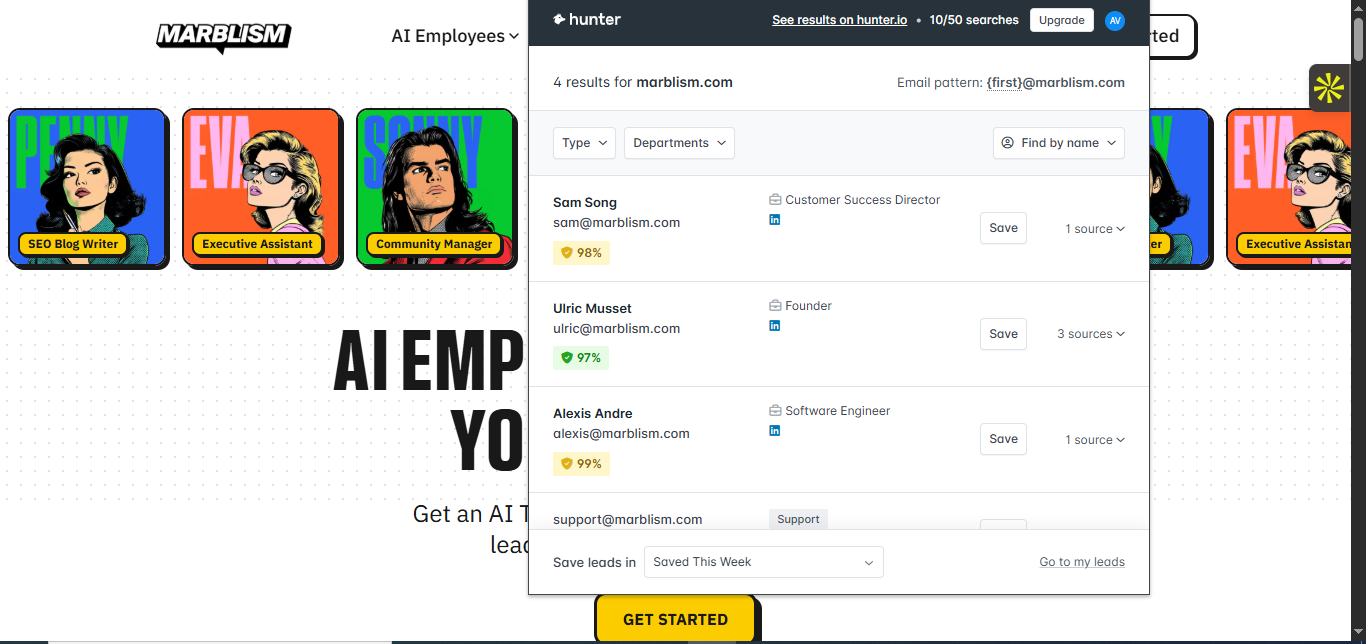
Hunter’s Chrome Extension can recognize a company directly from a website and surface contacts in place: on marblism.com it returned 4 results and exposed people, decision-makers, and generic contacts with names, roles, emails, confidence scores, and the company email pattern.
Hunter’s Chrome Extension does not surface prospect data directly on LinkedIn profiles in this workflow; instead, it redirects the user to the Email Finder workflow.
▸Company Coverage & Employee Freshness3/53 mixed1 failed4 findings
Employee coverage is uneven across companies, with some profiles showing contacts and others showing little or no workforce data.
Hunter can surface a small employee roster for a company, but the freshness/verification quality is uneven: the FutureSmart AI results included 3 people and at least 1 record marked Invalid, so the surfaced workforce is not uniformly fresh or verified.
Hunter can also return no workforce data at all for a company, leaving nothing to validate; for tidio.com it showed no email addresses and no employee results.
▸Company Search4/51 worked well1 failed2 findings
Hunter matched company records from search/domain queries and surfaced associated contacts for follow-up research.
Hunter can identify a company from a domain/company query and return a seedable company profile with downstream prospect results: the Vespa.ai search showed 1 company match and 11 total results, split into People (7), Decision makers (1), and Generic (4).
A domain-based company search can return no matches for the target company, leaving the user with zero email-address results for the queried domain even though the company context is still shown in the side panel.
▸Email Writing4/51 mixed1 finding
The AI Writing Assistant generated relevant outreach emails, though the outputs were somewhat similar and needed refinement.
Hunter’s AI Writing Assistant can generate outreach emails that stay relevant to the provided audience and value proposition, but the two example outputs were highly similar in structure and personalization despite being created for different scenarios.
▸People Search3/52 worked well2 failed4 findings
One prospect lookup returned a usable contact record, but another known prospect search returned no contact information.
Hunter can fail to resolve a known person into a usable contact record: this lookup returned no email address for the prospect and explicitly stated there was not enough data for the domain.
Hunter can locate a known prospect and return enough validation detail for outreach, including the person’s name, role, inferred email address, and a 98% confidence/verification signal.
▸Company information4/51 worked well1 finding
Hunter returned company records, company profiles, employee listings, and email patterns, though coverage varied across organizations.
A named-company search can resolve a target company and expose downstream prospecting context; searching vespa.ai returned 1 matching company record and 11 total results, including 7 people, 1 decision maker, and 4 generic contacts.
▸Ease of Use4/51 worked well1 failed2 findings
Company search, people search, bulk workflows, and a Chrome extension made prospecting fairly straightforward, but some workflows required fallback or manual refinement.
The LinkedIn extension does not complete contact discovery in place; it replaces the profile view with a prompt to use Email Finder, adding an extra workflow step instead of returning a contact inline.
The platform supports separate bulk Domain Search, Email Finder, and Email Verification workflows, and the bulk verification flow returns both summary-level and record-level results from CSV uploads.
▸Employee Discovery & Contact Information4/52 worked well1 mixed3 findings
Hunter surfaced employee records and contact details with validity indicators, supporting outreach preparation.
Hunter’s contact coverage is workflow-dependent: direct Email Finder and the company employee listing can return different contacts for the same organization instead of a consistent record set.
Hunter can surface employee records associated with a company and include outreach-ready contact details; this company lookup produced 3 email results for FutureSmart AI, including a named employee with an email address and verification indicator.
▸Relevance4/51 struggled1 finding
Generated emails stayed aligned with the selected audience and value proposition, though the AI assistant sometimes missed the full intent of more specific prompts.
The AI prospecting assistant can drift outside the requested niche; for a request for 10 AI startups in customer support automation it returned 11 results and included unrelated categories such as Research Services and Higher Education.
▸Ability to locate email4/52 worked well1 failed3 findings
Hunter usually found professional email addresses and supported bulk verification, but some searches returned no contact info and LinkedIn lookup was not directly supported.
The email-finding workflow can return a hard no-result state when coverage is missing; for tidio.com it found 0 email addresses and said it did not have enough data related to the domain at that time.
Browser-based enrichment can return a usable email list directly from a company website; the marblism.com lookup showed 4 results and surfaced contact email addresses in the extension without leaving the page.
▸Confidence indicators4/52 worked well2 findings
The tool showed validity indicators, confidence scores, and bulk verification results, though one observed validity status did not fully match the validation outcome.
The website-enrichment flow attaches verification cues next to returned contacts, including a visible green confidence/verification badge beside the email address.
The contact card includes a concrete verification signal, showing a 98% badge and 1 source for the returned email.
▸Job information4/52 worked well2 findings
The enrichment output surfaced job roles and titles in several workflows, including website-based discovery and employee listings.
The result includes the person’s role, Software Tester, so users can validate the contact before outreach.
The website-enrichment flow includes job titles alongside contacts; one returned result is labeled Founder, showing that the tool surfaces role data with the email.
▸Template dependency2/51 worked well1 finding
The writing outputs appeared fairly template-driven, with noticeable similarity between emails created for different scenarios.
The AI Writing Assistant reuses a highly similar email structure across different inputs, showing noticeable template dependence rather than deeply customized drafts.
▸AI Email Writing4/51 mixed1 finding
The writing assistant generated relevant outreach emails, but the drafts were fairly similar and needed refinement for targeting.
Hunter’s AI Writing Assistant can generate outreach emails from campaign context, but the outputs can be repetitive: two emails were relevant to their inputs yet used highly similar structure and personalization.
Snov.io
Usable#4 of 5Strong API-backed prospecting and browser enrichment, but uneven contact coverage and freshness.
How it scored
AI-Assisted Prospect Discovery3/5API & Automation Readiness5/5Chrome Extension Workflow4/5Company Coverage & Employee Freshness2/5Company Search4/5Email Writing3/5People Search3/5Company information4/5Ease of Use4/5Employee Discovery & Contact Information4/5Relevance3/5▸AI-Assisted Prospect Discovery3/51 mixed1 finding
The AI assistant translated the prompt into searches and returned companies/prospects, but some results were not tightly matched to the request.
The AI assistant can turn a free-text prospecting prompt into structured filters and return a large prospect set (~120,000 results), but many results are only loosely aligned with the requested niche.
▸API & Automation Readiness5/51 worked well1 finding
Provided a comprehensive REST API plus webhook support for automated search, enrichment, verification, and integrations.
Provides a broad REST API plus webhooks for automating email discovery, domain-based search, company enrichment, contact enrichment, prospect management, and email verification outside the UI.
▸Chrome Extension Workflow4/52 worked well1 mixed3 findings
The extension worked on LinkedIn and company sites, detecting profiles and adding prospects directly from the browser.
The browser extension can detect a LinkedIn profile and let the user save the prospect directly to a list without leaving LinkedIn.
The browser extension can detect a company website and return 8 associated employee records, including names, job titles, and add-to-list actions, without leaving the page.
▸Company Coverage & Employee Freshness2/51 mixed1 finding
Returned employee lists, but validation found stale entries and missing current team members, indicating incomplete coverage.
Employee lists are not reliably fresh: validation found surfaced people who were no longer at the company and omitted several current team members, so the workforce view is incomplete.
▸Company Search4/51 worked well1 finding
Identified companies successfully and returned matching firmographic profiles, though filtering was more limited than top competitors.
Returns a single matching company record from a company-name search and exposes enough firmographic context—location, industry, employee count, and size—to seed downstream prospecting.
▸Email Writing3/51 mixed1 finding
Generated outreach emails from context, but the output stayed largely similar across recipients with limited personalization.
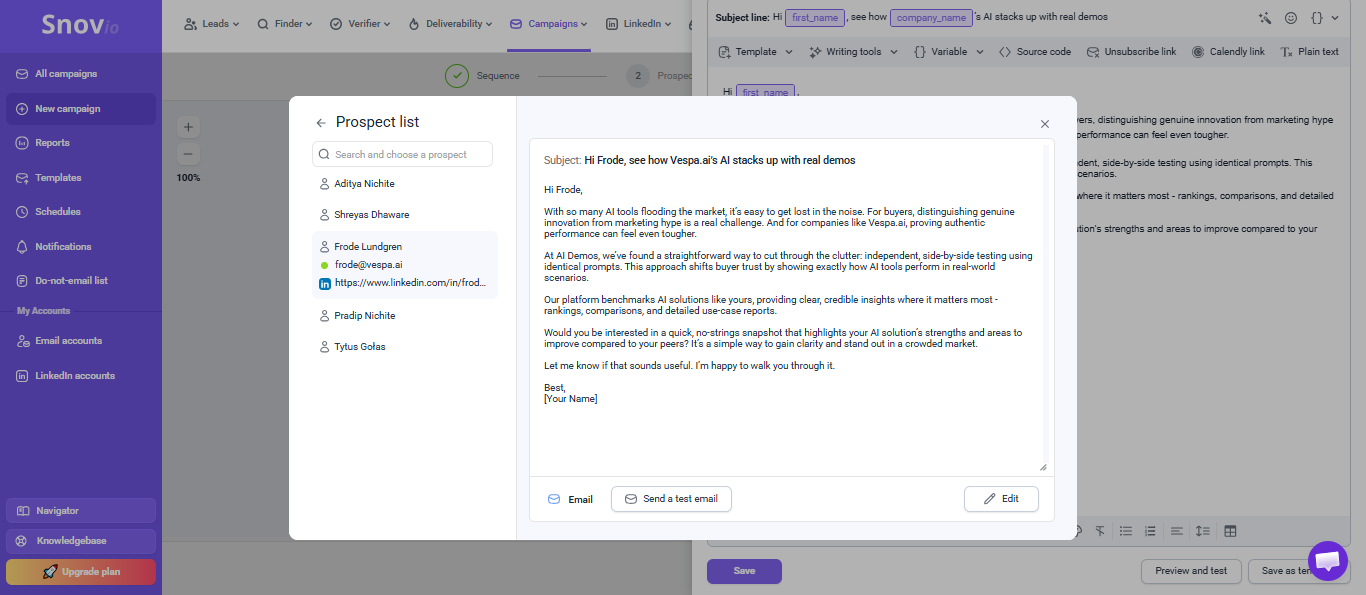
AI email generation can produce prospect-specific drafts, but the outputs remain largely templated across recipients, with only limited changes to the recipient/company details.
▸People Search3/51 worked well1 failed2 findings
Could locate a prospect and show validation details, but coverage gaps meant some known people, like Tytus Gołas, were missing.
Can also fail completely on a fully specified person query, returning 0 matches and no usable prospect record for a known individual.
Can locate a specific prospect and return validating context such as company affiliation, job title, location, and email, which is sufficient to confirm a match before outreach.
▸Company information4/52 worked well2 findings
Company search produced useful firmographic details like location, industry, employee count, and company size.
Can return a single named-company match and expose firmographic fields such as location, industry, employee count, and company size from the company record.
Can surface a sizable company employee list — 20 prospects in this case — and attach useful metadata such as job titles, contact details, and LinkedIn links.
▸Ease of Use4/52 worked well2 findings
Company search, people search, browser extension, and AI-assisted workflows were straightforward and low-friction to use.
Can detect a LinkedIn profile in-browser and let the user save the prospect to a list without leaving LinkedIn.
Can detect a company while browsing its website and let the user work from an in-page extension that returns 8 associated records and supports adding prospects directly to a list.
▸Employee Discovery & Contact Information4/51 worked well1 finding
Surfaced employee records with usable contact information, but one validation showed a discrepancy versus the platform record.
Surfaces employee records with outreach-ready contact data: the company page shows 20 prospects and exposes names, roles, LinkedIn links, and some direct email addresses.
▸Relevance3/51 mixed1 struggled1 failed3 findings
The generated outreach was directionally relevant, but some AI search results and email outputs did not closely match the requested context.
Can translate a natural-language prospecting prompt into search criteria and return a very large result set (~120,000), but the returned companies are only loosely aligned to the requested niche.
Can return workforce data that is not fully current, because the report says some surfaced people no longer worked there and several current team members were missing.
▸Supporting prospect information4/51 worked well1 finding
Returned prospect context such as company affiliation, job title, and location was usually enough to check a match before outreach.
Can return a single prospect record with enough validation context — name, role, location, and company — to sanity-check the match before outreach.
▸Template dependency4/51 struggled1 finding
The email output relied heavily on a repeated structure with only limited prospect-specific variation.
Relies on a largely fixed outreach template, because two generated emails shared the same structure and core messaging with only limited prospect-specific edits.
▸Personalization quality2/51 mixed1 finding
The AI email generator mentioned the recipient and company, but the messages stayed largely the same across different prospects.
Can swap in recipient- and company-specific details, but the generated email body still keeps the same overall structure, messaging, and value proposition across different prospects.
Saleshandy
Usable#5 of 5Best for API-driven outreach and validated contact lookup; weaker for extension-based prospecting and AI-led discovery.
How it scored
AI-Assisted Prospect Discovery2/5API & Automation Readiness5/5Chrome Extension Workflow1/5Company Coverage & Employee Freshness2/5Company Search4/5Email Writing3/5People Search3/5▸AI-Assisted Prospect Discovery2/51 mixed1 failed2 findings
The AI assistant struggled with the requested prospecting task and tended to broaden or over-expand searches rather than produce targeted lists.
Saleshandy's AI assistant can reject an overly narrow natural-language prospecting request and ask the user to broaden the search instead of producing a targeted list.
When given a simpler topical query, Saleshandy's AI assistant can translate the request into structured search filters, but it may over-expand the scope and return far more results than requested; one run showed 1,974 companies.
▸API & Automation Readiness5/51 worked well1 finding
The platform exposes broad APIs plus REST/CLI/MCP options for automating prospecting, enrichment, outreach, and reporting workflows.
Saleshandy exposes APIs plus CLI and MCP-based integration options that can automate prospect management, outreach execution, reporting, and lead enrichment outside the UI.
▸Chrome Extension Workflow1/52 failed2 findings
The Chrome extension did not support meaningful LinkedIn or website enrichment and was focused more on call workflows.
Saleshandy's Chrome extension does not provide direct prospect discovery or contact enrichment from LinkedIn profile pages.
Saleshandy's Chrome extension is oriented to click-to-call and call management rather than website-based company enrichment or prospect discovery while browsing a company site.
▸Company Coverage & Employee Freshness2/51 mixed1 finding
Returned a useful employee list, but some records were stale and several current employees were missing.
Saleshandy can surface broad employee coverage for a company, returning 27 FutureSmart AI employee records across multiple roles and departments, but the dataset is not fully fresh because validation found former employees and missing current team members.
▸Company Search4/51 worked well1 finding
Successfully identified a searched company and returned a usable company profile with firmographic details and filters.
Saleshandy can identify a company from a search query and return a usable company profile with firmographic context, including industry, location, founding year, company type, and B2B status.
▸Email Writing3/51 worked well1 finding
Generated relevant outreach emails with basic personalization, but the writing stayed fairly generic and template-driven.
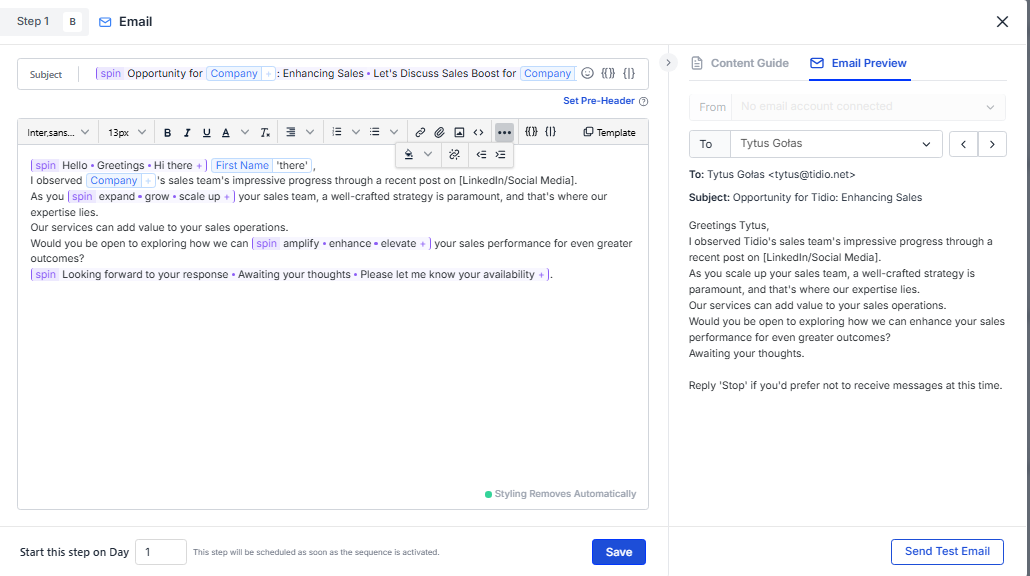
Saleshandy's AI Sequence can generate outreach emails from supplied company context and insert personalization variables such as prospect and company names, although the outputs stay structurally similar across variants.
▸People Search3/52 worked well1 failed3 findings
Could find people records, but the target prospect was not always returned from name search, so validation was inconsistent.
Saleshandy can return a validated prospect record with job title, company, and contact access; in this case it surfaced a matched Aditya Nichite record at FutureSmart AI with a work email and phone access path.
Saleshandy can also locate a prospect when given a LinkedIn profile URL, surfacing the correct individual and a work email in a single matched result.
Final Take
Apollo is the safest default if you want one platform that can find companies, identify contacts, enrich prospects in-browser, support automation, and draft outreach without forcing you into separate systems. Choose Clay if your priority is custom enrichment workflows, agent-like prospect qualification, and the deepest personalized email generation, and you are willing to accept more setup. Hunter is a strong pick for teams centered on email discovery, verification, and bulk operations. Snov.io is a solid balanced option with strong API coverage but more moderate precision and freshness. Saleshandy is serviceable for sequencing-led outbound teams, especially when LinkedIn URL lookup fits the workflow, but it offers lighter enrichment and weaker research tooling than the top-ranked options.