AI Database Agents
Version 1No published result

A self-checking AI data agent for live database Q&A, follow-ups, and charts on request.
Strong on trust, weaker on presentation
camelAI reliably answers live PostgreSQL questions, keeps follow-up context, and refuses unsupported historical comparisons instead of guessing. For this use case, though, charts are request-driven rather than automatic, and the generated SQL is buried inside a JavaScript work trace instead of being shown and explained in a dedicated panel.
Explore camelAI in our public benchmarks.
No published result
Our detailed analysis of camelAI — features, performance, and real-world testing.
Feature tested: Plain-English Live Database Q&A
Result: Passed
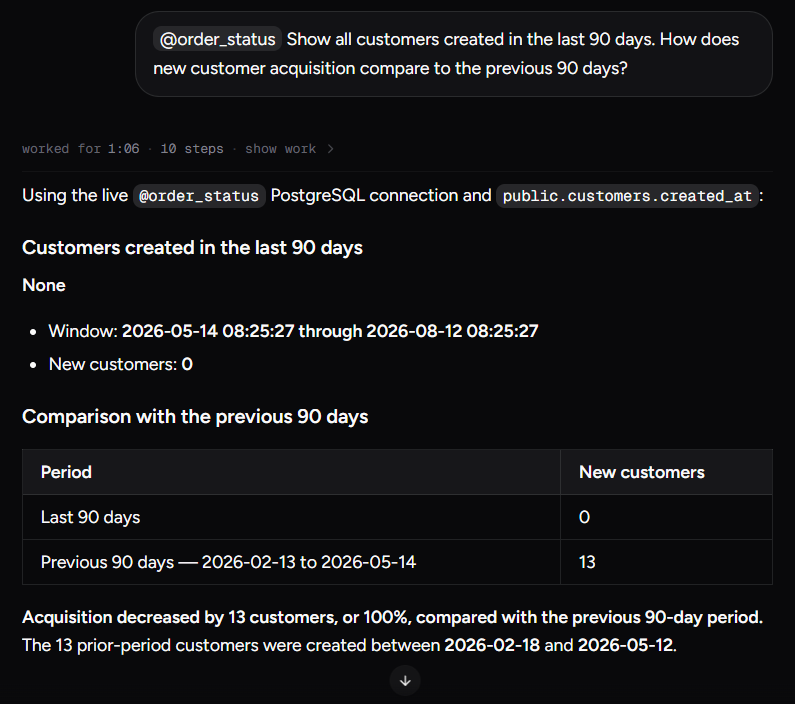
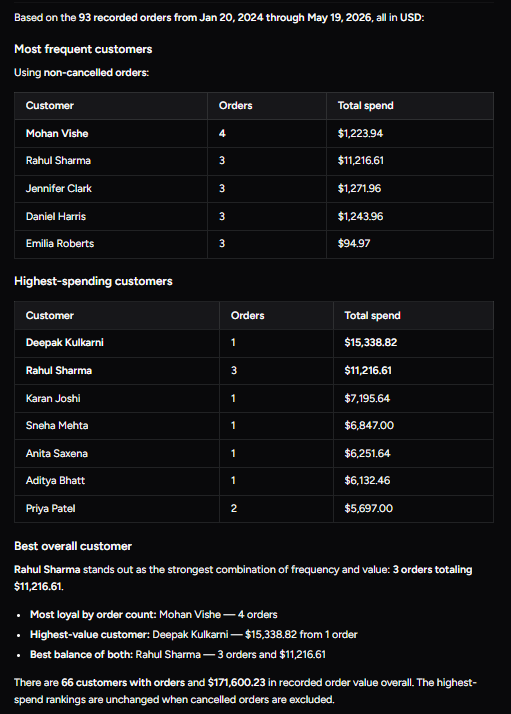
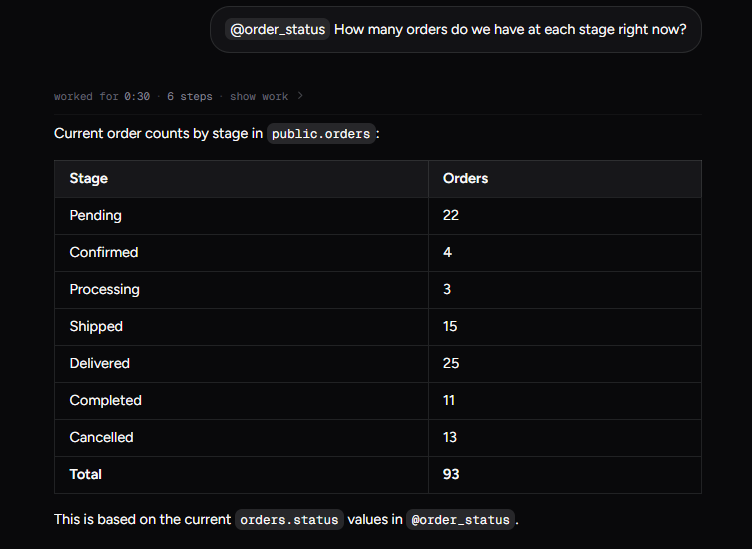
Expected behavior: Answers plain-English questions against the connected live PostgreSQL database and returns readable tables or direct summaries. It was exercised on new-customer acquisition, best-customer rankings, and current order-stage counts.
Test case: Text prompt → Image
Input type: Text prompt
Input used: Input artifact (Text prompt): Input
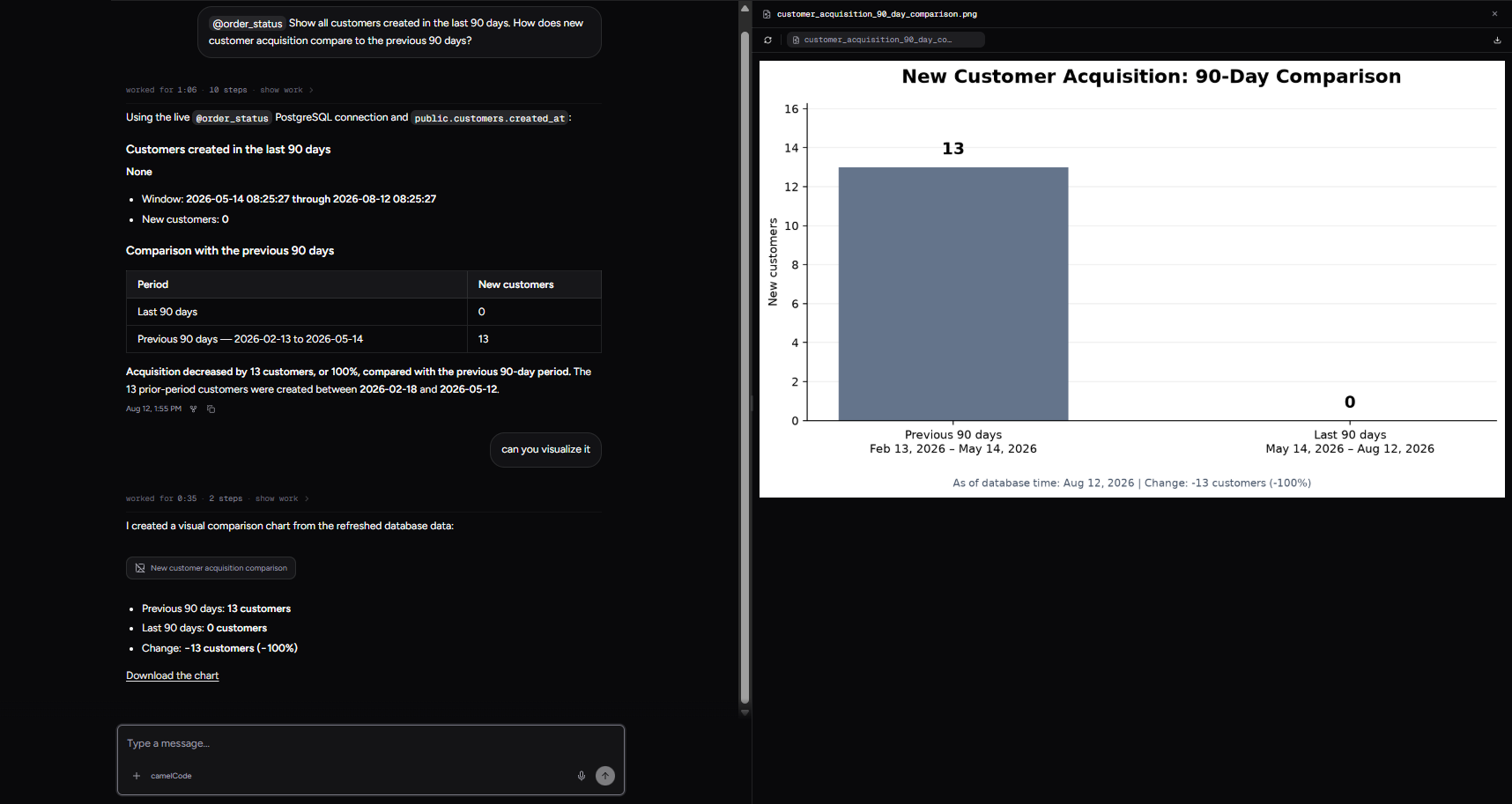
Observed output: Output artifact (Image): Answered the 90-day acquisition query with 0 new customers in the last 90 days versus 13 in the previous 90 days. — input1-answer-text-0-vs-13.png
Input artifact: Input artifact (Text prompt): Input
Output artifact: Output artifact (Image): Answered the 90-day acquisition query with 0 new customers in the last 90 days versus 13 in the previous 90 days. — input1-answer-text-0-vs-13.png
What changed: Text prompt transformed into Image
Test case: Text prompt → Image
Input type: Text prompt
Input used: Input artifact (Text prompt): Input
Observed output: Output artifact (Image): Returned separate frequency and spend rankings and named Rahul Sharma as the strongest balance of order count and spend. — input2-main-two-ranking-tables-and-best-overall.png
Input artifact: Input artifact (Text prompt): Input
Output artifact: Output artifact (Image): Returned separate frequency and spend rankings and named Rahul Sharma as the strongest balance of order count and spend. — input2-main-two-ranking-tables-and-best-overall.png
What changed: Text prompt transformed into Image
Test case: Text prompt → Image
Input type: Text prompt
Input used: Input artifact (Text prompt): Input
Observed output: Output artifact (Image): Summarized the current order pipeline as 93 orders across seven stages. — input3-main-stage-breakdown-table.png
Input artifact: Input artifact (Text prompt): Input
Output artifact: Output artifact (Image): Summarized the current order pipeline as 93 orders across seven stages. — input3-main-stage-breakdown-table.png
What changed: Text prompt transformed into Image
Why it matters / Conclusion: Strong at answering the actual database question with a clean table or summary, but the output stays terse and factual.
Answers plain-English questions against the connected live PostgreSQL database and returns readable tables or direct summaries. It was exercised on new-customer acquisition, best-customer rankings, and current order-stage counts.
Feature tested: Conversational Follow-up Handling
Result: Passed
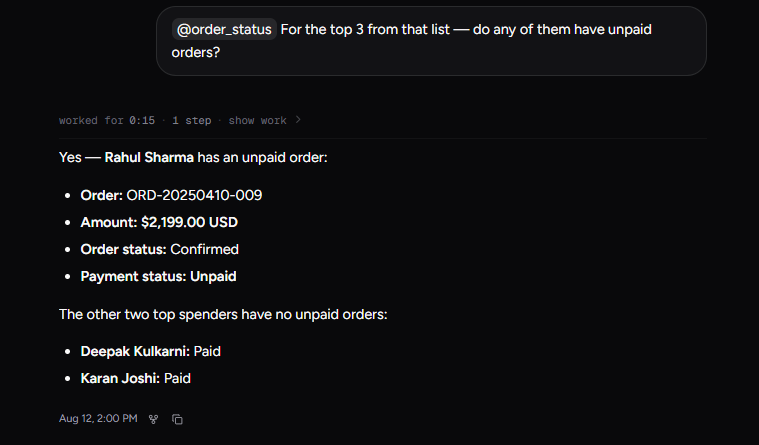
Expected behavior: Keeps later questions anchored to earlier results so follow-ups reuse the prior scope instead of starting over. It was tested across the best-customers chain and the order-pipeline chain.
Test case: Text prompt → Image
Input type: Text prompt
Input used: Input artifact (Text prompt): Input
Observed output: Output artifact (Image): Scoped the unpaid-order check to the top three highest-spending customers and found Rahul Sharma had one unpaid order. — input2-followup1-unpaid-orders-answer.png
Input artifact: Input artifact (Text prompt): Input
Output artifact: Output artifact (Image): Scoped the unpaid-order check to the top three highest-spending customers and found Rahul Sharma had one unpaid order. — input2-followup1-unpaid-orders-answer.png
What changed: Text prompt transformed into Image
Test case: Text prompt → Image
Input type: Text prompt
Input used: Input artifact (Text prompt): Input
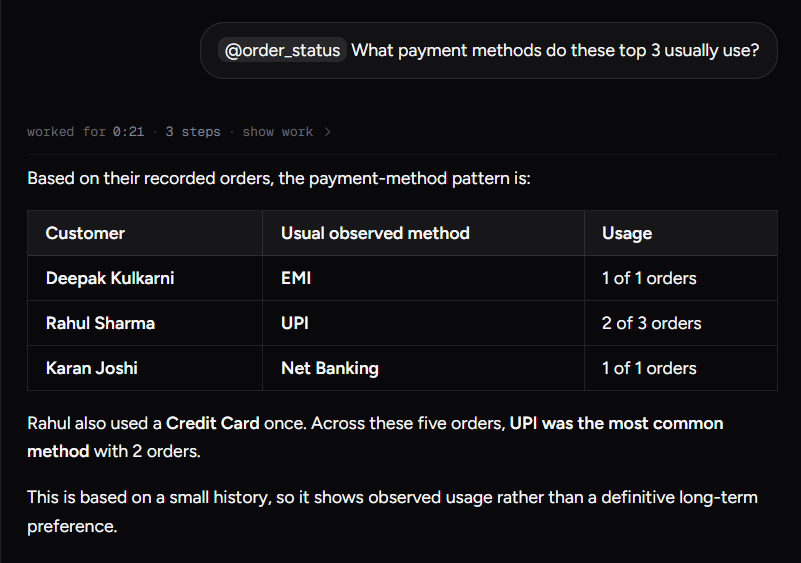
Observed output: Output artifact (Image): Kept the same top-three context and summarized the observed payment-method pattern, while noting the small sample size. — input2-followup2-payment-methods-table.png
Input artifact: Input artifact (Text prompt): Input
Output artifact: Output artifact (Image): Kept the same top-three context and summarized the observed payment-method pattern, while noting the small sample size. — input2-followup2-payment-methods-table.png
What changed: Text prompt transformed into Image
Test case: Text prompt → Image
Input type: Text prompt
Input used: Input artifact (Text prompt): Input
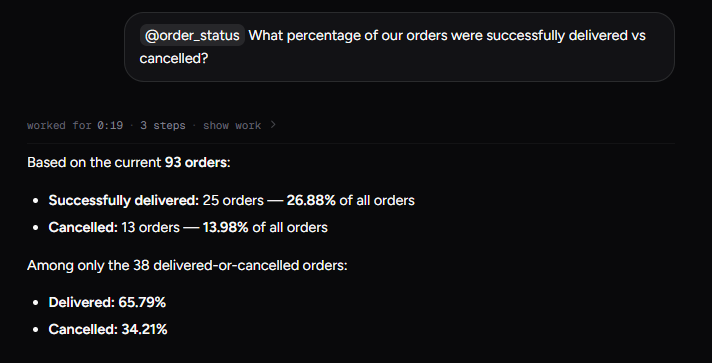
Observed output: Output artifact (Image): Computed the delivered-vs-cancelled percentage split from the current orders. — input3-followup1-delivered-vs-cancelled-percentages.png
Input artifact: Input artifact (Text prompt): Input
Output artifact: Output artifact (Image): Computed the delivered-vs-cancelled percentage split from the current orders. — input3-followup1-delivered-vs-cancelled-percentages.png
What changed: Text prompt transformed into Image
Test case: Text prompt → Image
Input type: Text prompt
Input used: Input artifact (Text prompt): Input
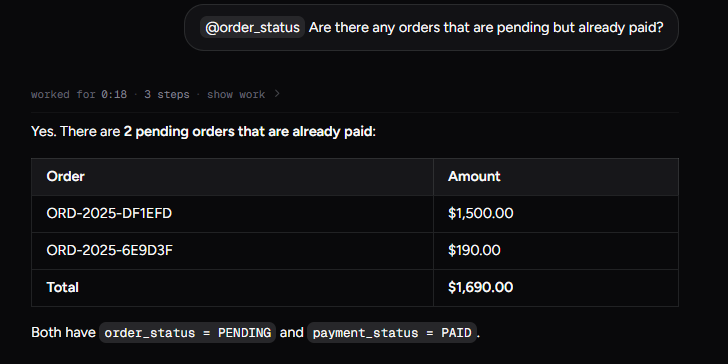
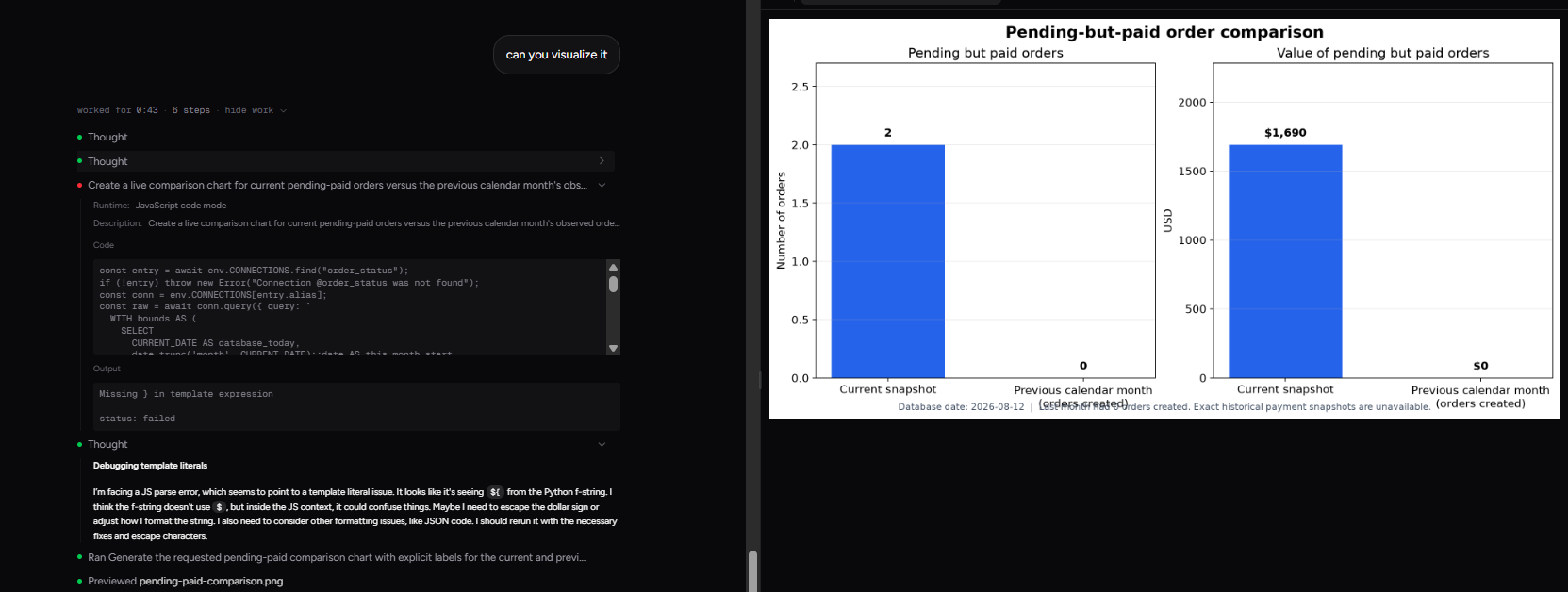
Observed output: Output artifact (Image): Found two pending-but-paid orders and totaled them at $1,690. — input3-followup2-pending-but-paid-table.png
Input artifact: Input artifact (Text prompt): Input
Output artifact: Output artifact (Image): Found two pending-but-paid orders and totaled them at $1,690. — input3-followup2-pending-but-paid-table.png
What changed: Text prompt transformed into Image
Why it matters / Conclusion: Very solid conversational continuity: each follow-up stayed tied to the previous result set and produced the right scoped answer.
Keeps later questions anchored to earlier results so follow-ups reuse the prior scope instead of starting over. It was tested across the best-customers chain and the order-pipeline chain.
Feature tested: On-Demand Chart Generation
Result: Passed
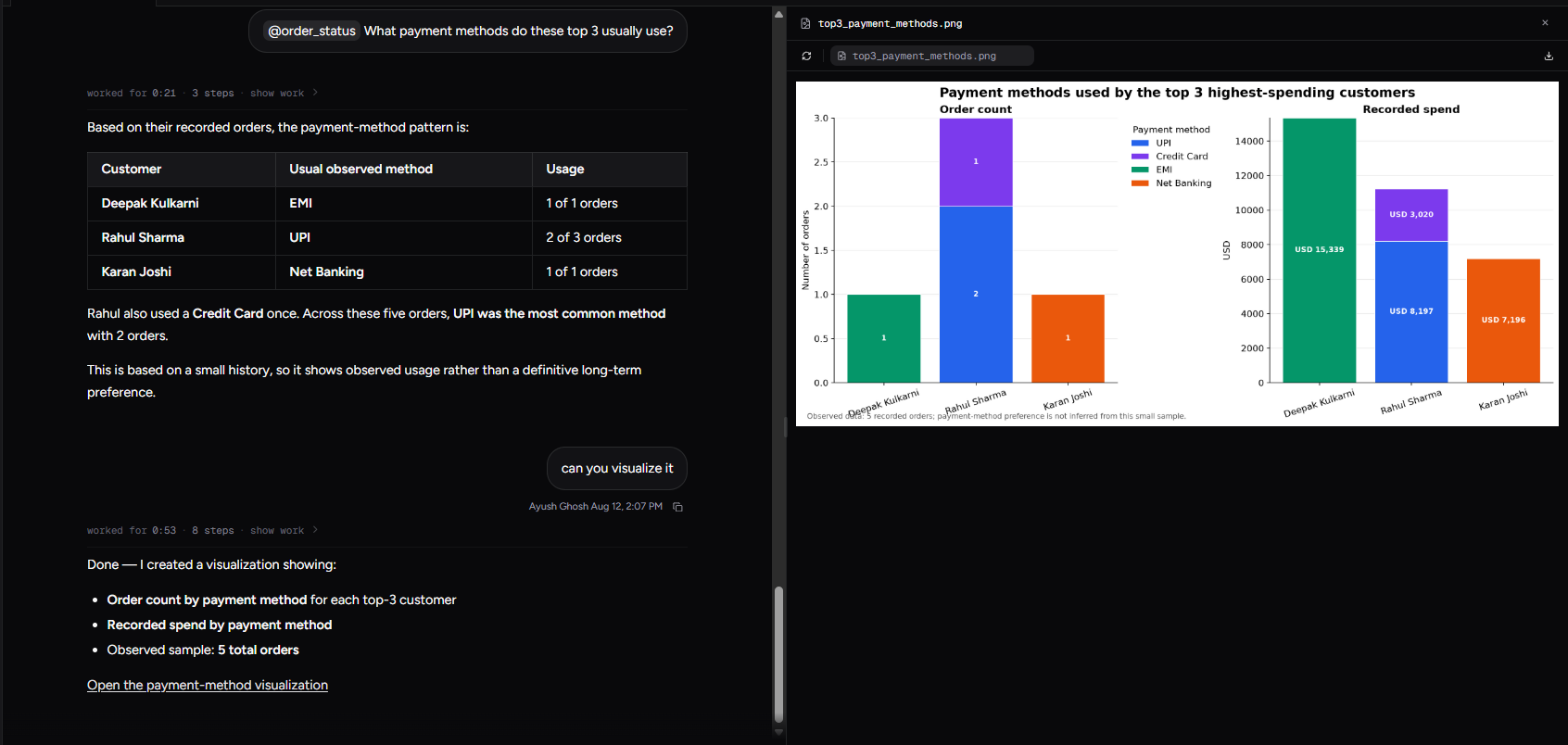
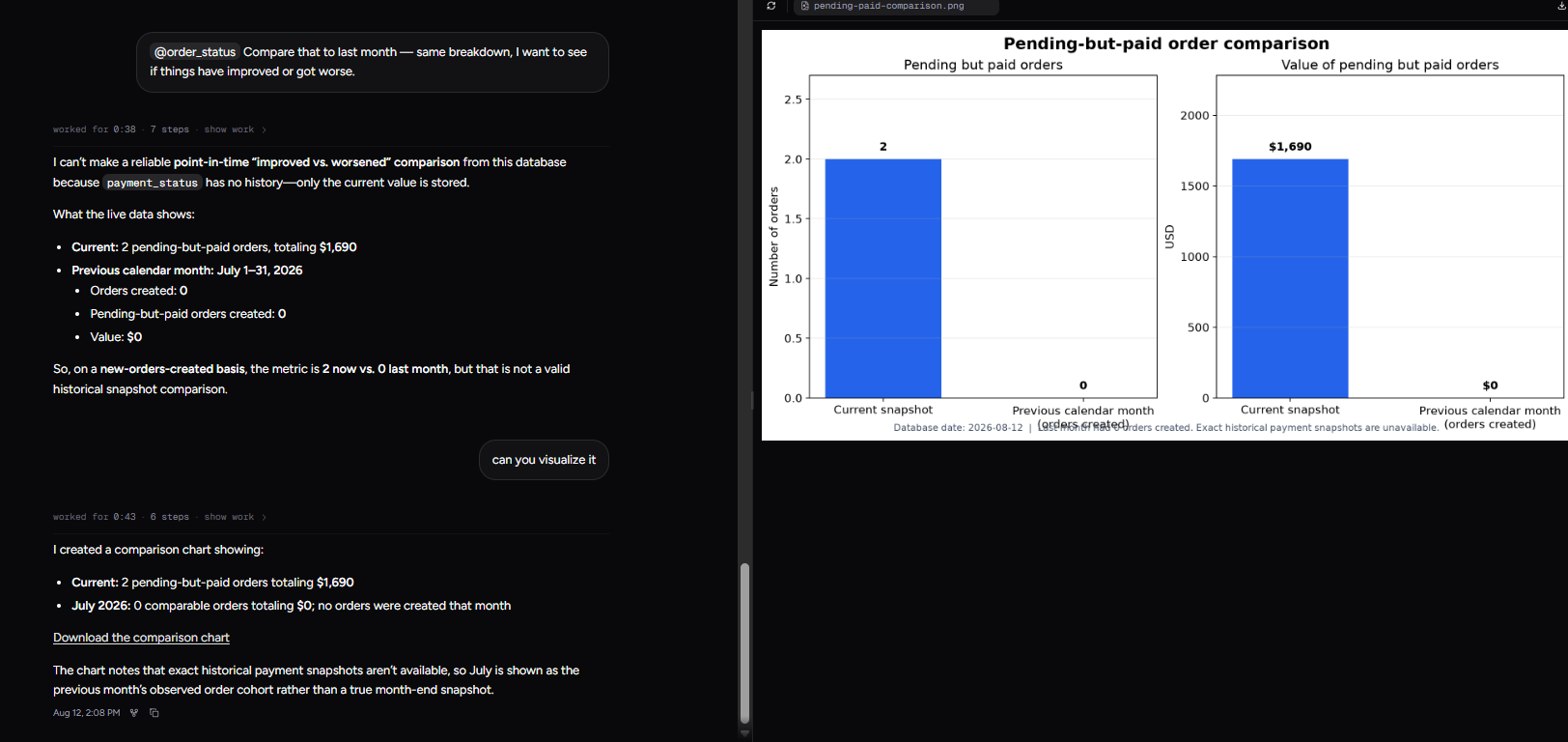
Expected behavior: Turns a completed answer into a downloadable visualization when the user explicitly asks for one. It was tested on a 90-day customer comparison, a dual-panel payment-method chart, and a current-vs-previous pending-paid comparison.
Test case: Text prompt → Image
Input type: Text prompt
Input used: Input artifact (Text prompt): Input
Observed output: Output artifact (Image): Created a bar chart comparing 13 prior-90-day customers to 0 in the last 90 days. — input1-visualization-png-bar-chart.png
Input artifact: Input artifact (Text prompt): Input
Output artifact: Output artifact (Image): Created a bar chart comparing 13 prior-90-day customers to 0 in the last 90 days. — input1-visualization-png-bar-chart.png
What changed: Text prompt transformed into Image
Test case: Text prompt → Image
Input type: Text prompt
Input used: Input artifact (Text prompt): Input
Observed output: Output artifact (Image): Created a dual-panel chart showing payment-method counts and spend for the top three customers. — input2-followup2-visualization-png-dual-panel.png
Input artifact: Input artifact (Text prompt): Input
Output artifact: Output artifact (Image): Created a dual-panel chart showing payment-method counts and spend for the top three customers. — input2-followup2-visualization-png-dual-panel.png
What changed: Text prompt transformed into Image
Test case: Text prompt → Image
Input type: Text prompt
Input used: Input artifact (Text prompt): Input
Observed output: Output artifact (Image): Created a side-by-side comparison chart for current versus previous-month pending-but-paid orders. — input3-followup3-visualization-png-current-vs-previous.png
Input artifact: Input artifact (Text prompt): Input
Output artifact: Output artifact (Image): Created a side-by-side comparison chart for current versus previous-month pending-but-paid orders. — input3-followup3-visualization-png-current-vs-previous.png
What changed: Text prompt transformed into Image
Why it matters / Conclusion: The charting itself is good, but it is request-driven: no chart appears until the user explicitly asks for one.
Turns a completed answer into a downloadable visualization when the user explicitly asks for one. It was tested on a 90-day customer comparison, a dual-panel payment-method chart, and a current-vs-previous pending-paid comparison.
Feature tested: Schema Validation and Safe Refusal
Result: Passed
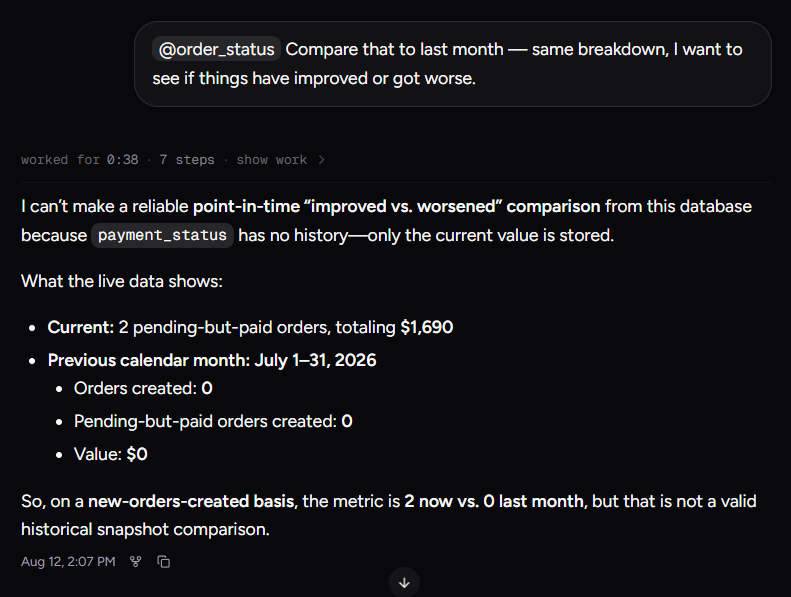
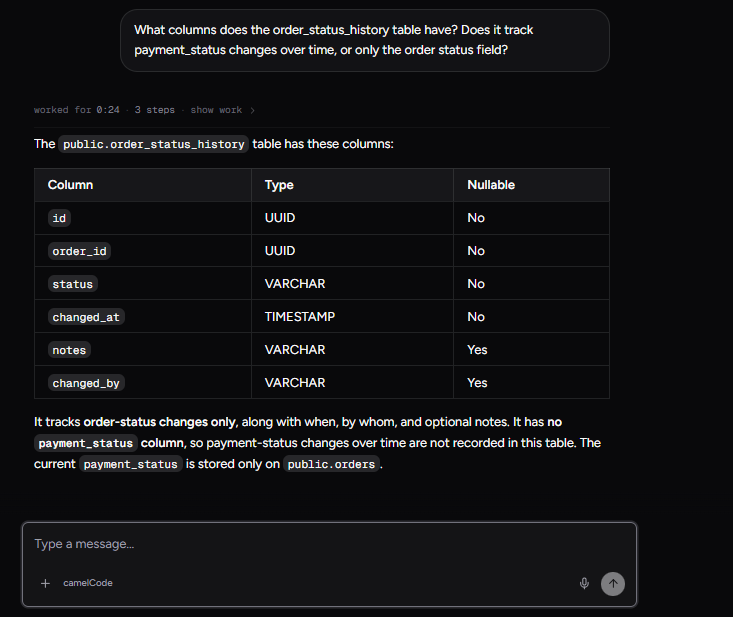
Expected behavior: Checks the underlying schema before answering and refuses to fabricate comparisons the database cannot support. It also recovered from a JavaScript parse error by debugging and rerunning the task.
Test case: Text prompt → Image
Input type: Text prompt
Input used: Input artifact (Text prompt): Input
Observed output: Output artifact (Image): Refused to make a reliable point-in-time comparison because payment_status has no history and only the current value is stored. — input3-followup3-refusal-and-caveated-answer.png
Input artifact: Input artifact (Text prompt): Input
Output artifact: Output artifact (Image): Refused to make a reliable point-in-time comparison because payment_status has no history and only the current value is stored. — input3-followup3-refusal-and-caveated-answer.png
What changed: Text prompt transformed into Image
Test case: Text prompt → Image
Input type: Text prompt
Input used: Input artifact (Text prompt): Input
Observed output: Output artifact (Image): Listed the columns in order_status_history and confirmed that it tracks order-status changes only, not payment_status history. — input3-schema-check-order-status-history-columns.png
Input artifact: Input artifact (Text prompt): Input
Output artifact: Output artifact (Image): Listed the columns in order_status_history and confirmed that it tracks order-status changes only, not payment_status history. — input3-schema-check-order-status-history-columns.png
What changed: Text prompt transformed into Image
Test case: Text prompt → Image
Input type: Text prompt
Input used: Input artifact (Text prompt): Input
Observed output: Output artifact (Image): Hit a JavaScript parse error, diagnosed the template-literal issue, and reran the visualization successfully. — image-1786777101484.png
Input artifact: Input artifact (Text prompt): Input
Output artifact: Output artifact (Image): Hit a JavaScript parse error, diagnosed the template-literal issue, and reran the visualization successfully. — image-1786777101484.png
What changed: Text prompt transformed into Image
Why it matters / Conclusion: This is the tool's strongest trust behavior: it validates the schema, declines unsupported comparisons, and can self-correct when the code runner fails.
Checks the underlying schema before answering and refuses to fabricate comparisons the database cannot support. It also recovered from a JavaScript parse error by debugging and rerunning the task.
Feature tested: Inspectable Execution Trace
Result: Passed
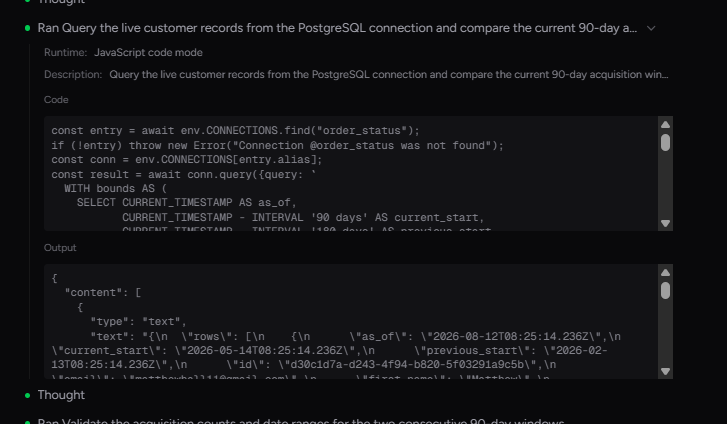
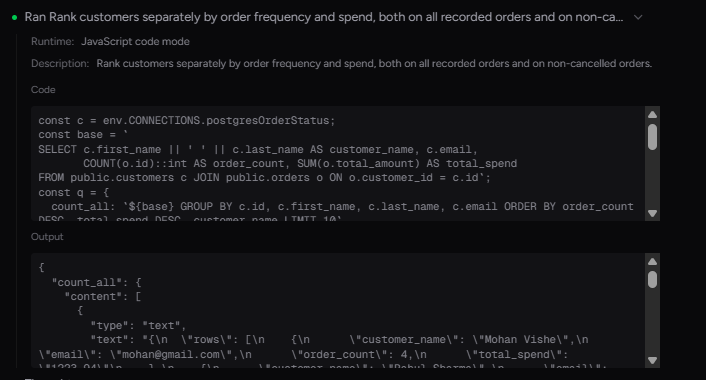
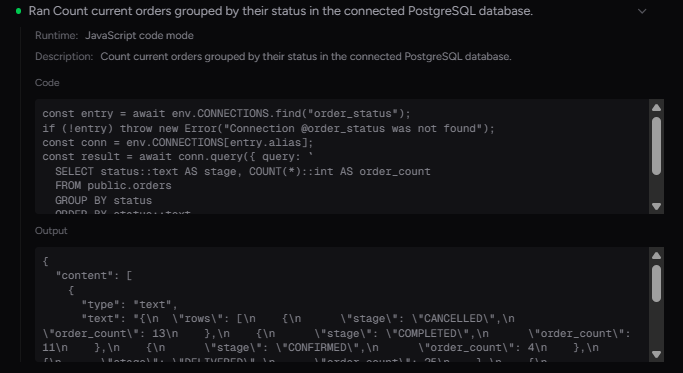
Expected behavior: Exposes the agent's working steps, including schema inspection and the generated query path, under a show-work view. The trace was visible, though the SQL was embedded inside JavaScript rather than shown in a dedicated SQL panel.
Test case: Text prompt → Image
Input type: Text prompt
Input used: Input artifact (Text prompt): Input
Observed output: Output artifact (Image): Show-work trace for schema inspection and SQL generation on the acquisition query. — input1-show-work-schema-and-sql-steps.png
Input artifact: Input artifact (Text prompt): Input
Output artifact: Output artifact (Image): Show-work trace for schema inspection and SQL generation on the acquisition query. — input1-show-work-schema-and-sql-steps.png
What changed: Text prompt transformed into Image
Test case: Text prompt → Image
Input type: Text prompt
Input used: Input artifact (Text prompt): Input
Observed output: Output artifact (Image): Show-work trace for schema inspection and ranking-query generation. — input2-main-show-work-schema-and-ranking-sql.png
Input artifact: Input artifact (Text prompt): Input
Output artifact: Output artifact (Image): Show-work trace for schema inspection and ranking-query generation. — input2-main-show-work-schema-and-ranking-sql.png
What changed: Text prompt transformed into Image
Test case: Text prompt → Image
Input type: Text prompt
Input used: Input artifact (Text prompt): Input
Observed output: Output artifact (Image): Show-work trace for the status-grouping query against the live orders table. — input3-main-show-work-groupby-sql.png
Input artifact: Input artifact (Text prompt): Input
Output artifact: Output artifact (Image): Show-work trace for the status-grouping query against the live orders table. — input3-main-show-work-groupby-sql.png
What changed: Text prompt transformed into Image
Why it matters / Conclusion: Useful for auditability, but not ideal for non-technical users because the SQL is buried inside code-mode output.
Exposes the agent's working steps, including schema inspection and the generated query path, under a show-work view. The trace was visible, though the SQL was embedded inside JavaScript rather than shown in a dedicated SQL panel.
Observed on the pricing and billing screens.
Testing completed successfully on the Free plan with no API key supplied, even though the pricing page says Free has no model credits / bring your own API key. The reason for that gap was not established.
How the embed badge will look on your site

Copy this code to your website source
Discover more AI tools like camelAI to enhance your workflow.
If you are looking to build a custom database Q&A, follow-up analysis, or chart generation assistant for your business or internal workflow, email us at contact@futuresmart.ai.
Found something inaccurate or missing? We try to keep our AI research accurate and useful. If you found outdated information, an issue, or have a suggestion, email us at collaborate@aidemos.com.