
Dolphin (ByteDance)
Self-hosted PDF-to-Markdown that preserves most text and tables, but drops charts and struggles with repeated images.
Strong baseline for text and tables, but not for figures
- You want a free, self-hosted PDF-to-Markdown baseline that usually preserves prose, headings, tables, captions, and reading order.
- Your PDFs are mostly text-heavy or table-heavy, and you can tolerate some manual cleanup for charts and repeated images.
- You care more about data values and document structure than about faithfully recovering chart graphics.
- You need chart data or figure content preserved in markdown; every chart tested was reduced to a placeholder.
Our take
Dolphin-1.5 is a solid lightweight self-hosted baseline for PDF-to-Markdown when the job is mostly prose, headings, and routine tables. It handled the scanned paper well at the OCR level and kept reading order/captions intact, but it consistently dropped chart content and behaved inconsistently around repeated images, signatures, and some complex table structures.
In-Depth Review
Our detailed analysis of Dolphin (ByteDance) — features, performance, and real-world testing.
Feature-by-Feature Breakdown
Embedded Visual Element RetentionOmitted▾
Feature tested: Embedded Visual Element Retention
Result: Failed
Verdict: Omitted
Expected behavior: Dolphin preserves embedded non-text elements from chart-heavy pages in hybrid earnings reports and scanned research papers, plus report-signature pages with images, logos, and handwritten signatures, often leaving them as Figure placeholders while keeping nearby captions and annotations in sequence. The sampled cases show that chart content itself is not reconstructed from data.
Test case: Image → Image
Input type: Image
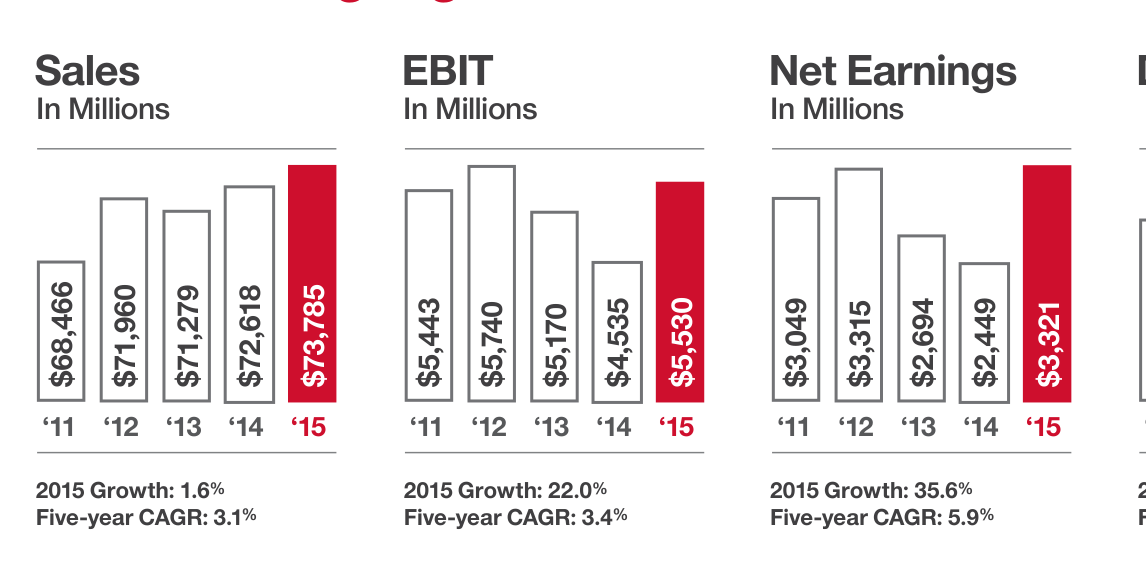
Input used: Input artifact (Image): Financial highlights page with vector bar and donut charts. — dolphin_input1_hybridearnings_financialhighlights_charts_source.png
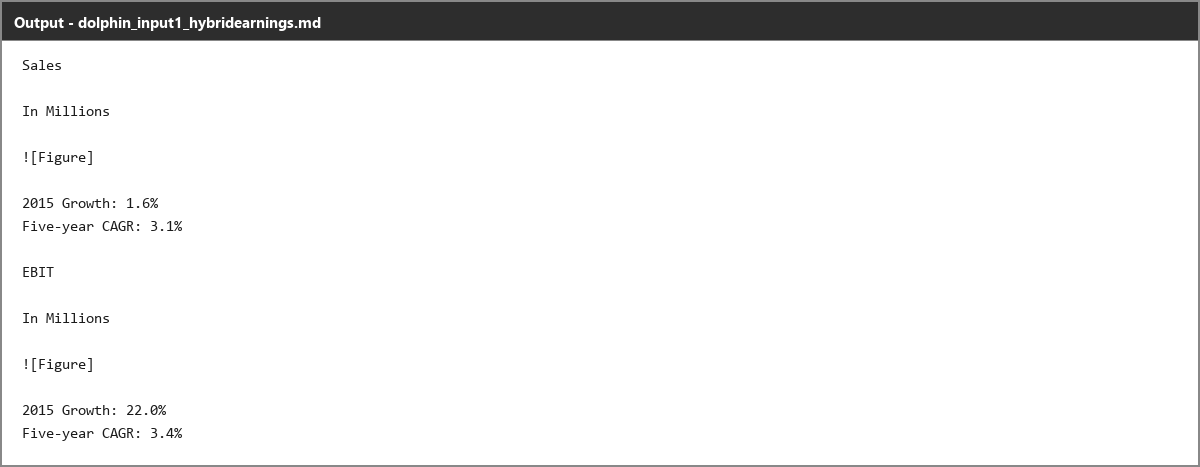
Observed output: Output artifact (Image): All nine charts are reduced to plain figure placeholders; the surrounding growth and CAGR text survives, but the chart data itself is gone. — dolphin_input1_hybridearnings_financialhighlights_charts_omitted_failed.png
Input artifact: Input artifact (Image): Financial highlights page with vector bar and donut charts. — dolphin_input1_hybridearnings_financialhighlights_charts_source.png
Output artifact: Output artifact (Image): All nine charts are reduced to plain figure placeholders; the surrounding growth and CAGR text survives, but the chart data itself is gone. — dolphin_input1_hybridearnings_financialhighlights_charts_omitted_failed.png
What changed: Image transformed into Image
Test case: Image → Image
Input type: Image
Input used: Input artifact (Image): Grouped bar chart from the scanned research paper. — dolphin_input3_scannedpaper_figure1_source.png
Observed output: Output artifact (Image): The chart is replaced with a placeholder and only its caption remains; no axis or series data is recovered. — dolphin_input3_scannedpaper_figure1_omitted_failed.png
Input artifact: Input artifact (Image): Grouped bar chart from the scanned research paper. — dolphin_input3_scannedpaper_figure1_source.png
Output artifact: Output artifact (Image): The chart is replaced with a placeholder and only its caption remains; no axis or series data is recovered. — dolphin_input3_scannedpaper_figure1_omitted_failed.png
What changed: Image transformed into Image
Test case: Image → Image
Input type: Image
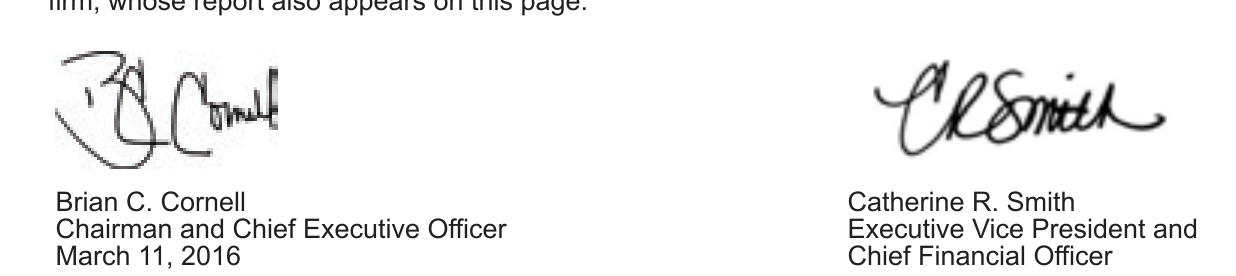
Input used: Input artifact (Image): Report of Management signatures from the hybrid earnings report. — dolphin_input1_hybridearnings_reportofmgmt_signatures_source.png
Observed output: Output artifact (Image): The handwritten signatures are replaced by clean figure placeholders, and the names, titles, and date remain attached beneath them. — dolphin_input1_hybridearnings_reportofmgmt_signatures_parsed_success.png
Input artifact: Input artifact (Image): Report of Management signatures from the hybrid earnings report. — dolphin_input1_hybridearnings_reportofmgmt_signatures_source.png
Output artifact: Output artifact (Image): The handwritten signatures are replaced by clean figure placeholders, and the names, titles, and date remain attached beneath them. — dolphin_input1_hybridearnings_reportofmgmt_signatures_parsed_success.png
What changed: Image transformed into Image
Test case: Image → Image
Input type: Image
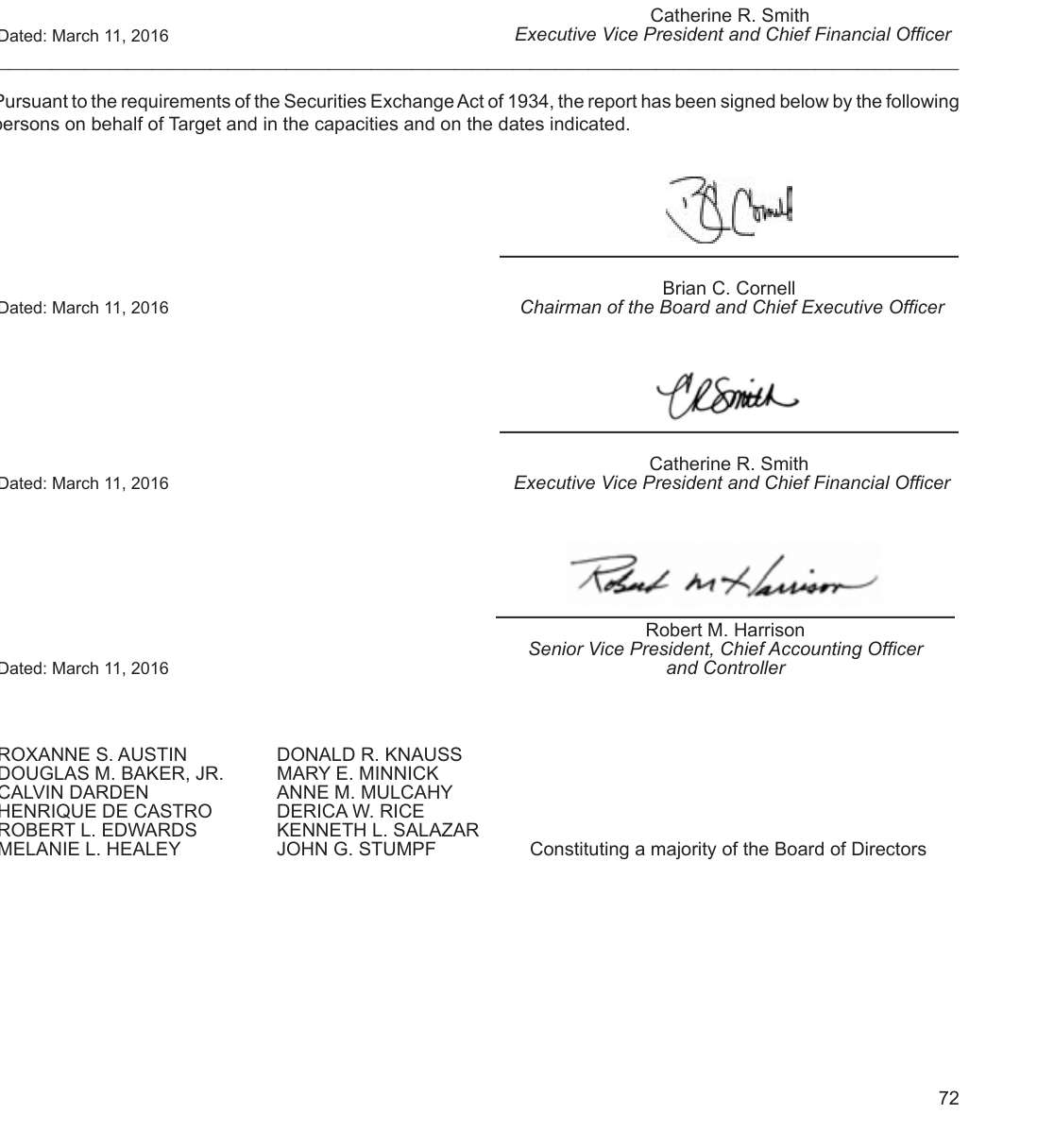
Input used: Input artifact (Image): Formal signatures page from the hybrid earnings report. — dolphin_input1_hybridearnings_signatures_source.png
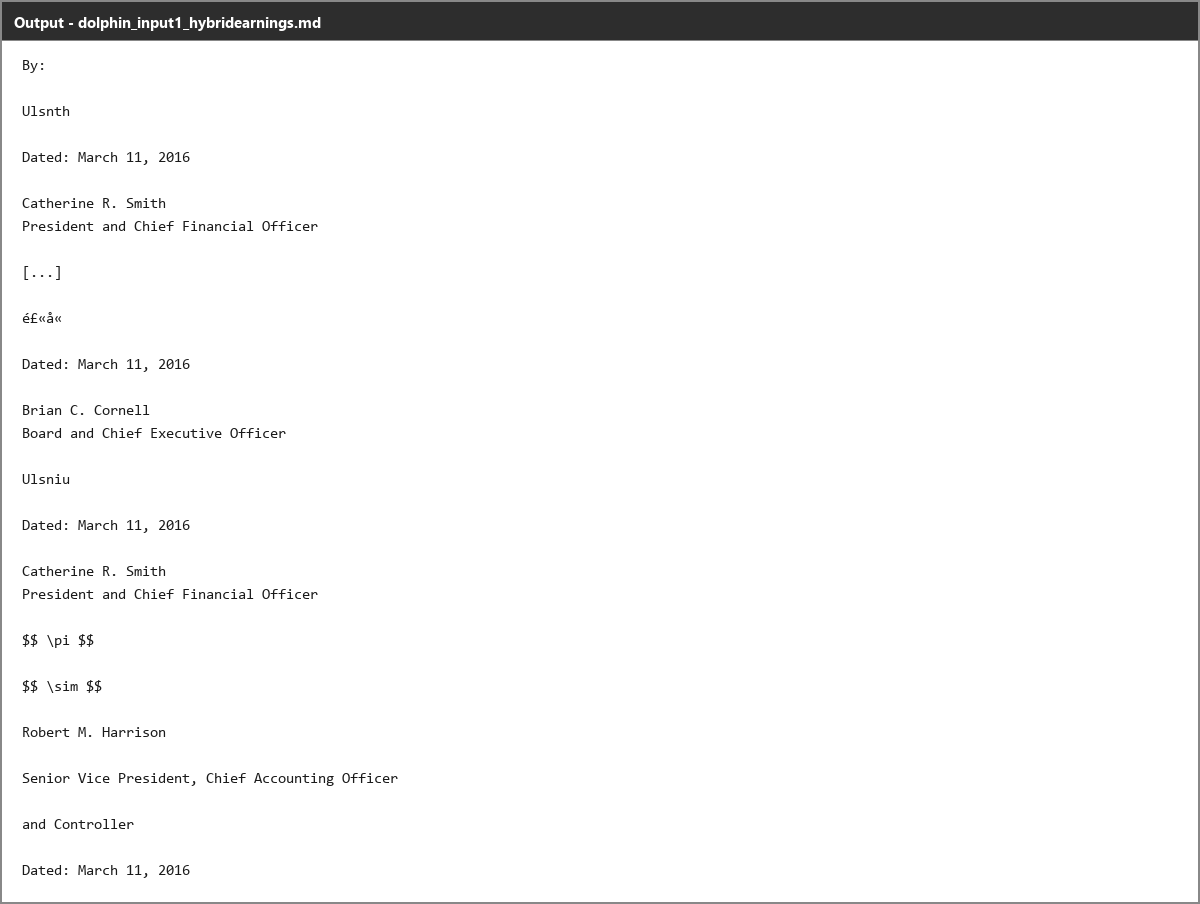
Observed output: Output artifact (Image): The same signature type is not preserved consistently here; the signatures become nonsense strings, CJK-like characters, or fake LaTeX formulas instead of placeholders. — dolphin_input1_hybridearnings_signatures_omitted_failed.png
Input artifact: Input artifact (Image): Formal signatures page from the hybrid earnings report. — dolphin_input1_hybridearnings_signatures_source.png
Output artifact: Output artifact (Image): The same signature type is not preserved consistently here; the signatures become nonsense strings, CJK-like characters, or fake LaTeX formulas instead of placeholders. — dolphin_input1_hybridearnings_signatures_omitted_failed.png
What changed: Image transformed into Image
Test case: Image → Image
Input type: Image
Input used: Input artifact (Image): The same recurring logo on another content page. — dolphin_input2_financialpdf_header_p8_source.png
Observed output: Output artifact (Image): The identical logo is retained here as a Figure placeholder. — dolphin_input2_financialpdf_header_p8_parsed_success.png
Input artifact: Input artifact (Image): The same recurring logo on another content page. — dolphin_input2_financialpdf_header_p8_source.png
Output artifact: Output artifact (Image): The identical logo is retained here as a Figure placeholder. — dolphin_input2_financialpdf_header_p8_parsed_success.png
What changed: Image transformed into Image
Test case: Image → Image
Input type: Image
Input used: Input artifact (Image): Shield logo region on the scanned research paper title page. — dolphin_input3_scannedpaper_titlepage_source.png
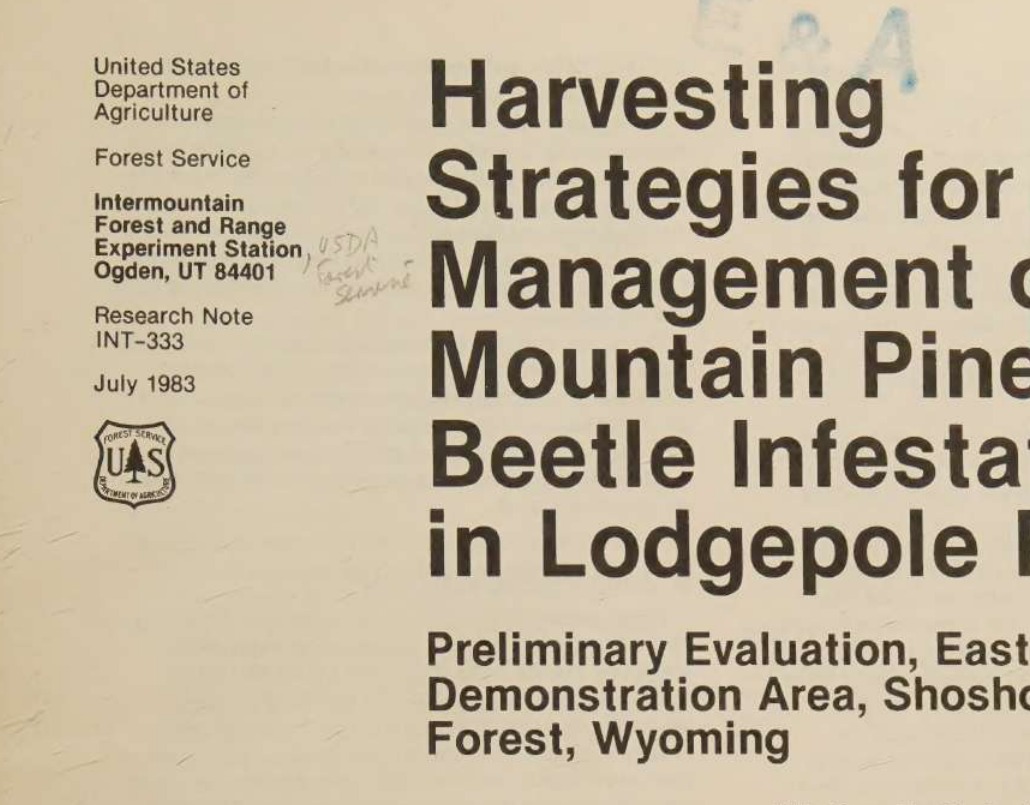
Observed output: Output artifact (Image): The shield is retained as figure placeholders, but the single image region is split into two placeholders. — dolphin_input3_scannedpaper_titlepage_parsed_partial_success.png
Input artifact: Input artifact (Image): Shield logo region on the scanned research paper title page. — dolphin_input3_scannedpaper_titlepage_source.png
Output artifact: Output artifact (Image): The shield is retained as figure placeholders, but the single image region is split into two placeholders. — dolphin_input3_scannedpaper_titlepage_parsed_partial_success.png
What changed: Image transformed into Image
Why it matters / Conclusion: Not safe for chart data extraction; nearby captions and annotations can survive, but the chart itself does not.
Dolphin preserves embedded non-text elements from chart-heavy pages in hybrid earnings reports and scanned research papers, plus report-signature pages with images, logos, and handwritten signatures, often leaving them as Figure placeholders while keeping nearby captions and annotations in sequence. The sampled cases show that chart content itself is not reconstructed from data.





OCR and Text ExtractionMostly accurate, with recurring glyph errors▾
Feature tested: OCR and Text Extraction
Result: Partial
Verdict: Mostly accurate, with recurring glyph errors
Expected behavior: Dolphin extracts body text from native and scanned PDFs, including a two-column title page, but the sampled cases include misreads on special characters, checkbox glyphs, dash substitution, and repeated header text.
Test case: Image → Image
Input type: Image
Input used: Input artifact (Image): SEC filing checkbox line asking whether the registrant is a well-known seasoned issuer. — dolphin_input1_hybridearnings_checkbox1_source.png
Observed output: Output artifact (Image): Both checkbox prompts remain unfilled in the output, and the checked/unchecked state collapses to an indistinguishable character. — dolphin_input1_hybridearnings_checkbox1_parsed_failure.png
Input artifact: Input artifact (Image): SEC filing checkbox line asking whether the registrant is a well-known seasoned issuer. — dolphin_input1_hybridearnings_checkbox1_source.png
Output artifact: Output artifact (Image): Both checkbox prompts remain unfilled in the output, and the checked/unchecked state collapses to an indistinguishable character. — dolphin_input1_hybridearnings_checkbox1_parsed_failure.png
What changed: Image transformed into Image
Test case: Image → Image
Input type: Image
Input used: Input artifact (Image): Right-hand crop of the split shareholder-letter sentence on the hybrid earnings report. — dolphin_input1_hybridearnings_readingorder_rightstart_source.png
Observed output: Output artifact (Image): Apostrophes in contractions are mangled and split across spurious line breaks, turning normal prose into broken fragments. — dolphin_input1_hybridearnings_apostrophe_parsed_failure.png
Input artifact: Input artifact (Image): Right-hand crop of the split shareholder-letter sentence on the hybrid earnings report. — dolphin_input1_hybridearnings_readingorder_rightstart_source.png
Output artifact: Output artifact (Image): Apostrophes in contractions are mangled and split across spurious line breaks, turning normal prose into broken fragments. — dolphin_input1_hybridearnings_apostrophe_parsed_failure.png
What changed: Image transformed into Image
Test case: Image → Image
Input type: Image
Input used: Input artifact (Image): Running header from the financial report page. — dolphin_input2_financialpdf_header_p14_source.png
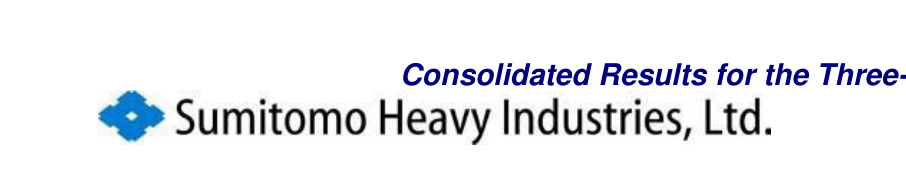
Observed output: Output artifact (Image): The running header substitutes 'Downloaded' for 'Consolidated', and dash placeholders elsewhere in the document are rendered as mojibake characters. — dolphin_input2_financialpdf_header_p14_parsed_failure.png
Input artifact: Input artifact (Image): Running header from the financial report page. — dolphin_input2_financialpdf_header_p14_source.png
Output artifact: Output artifact (Image): The running header substitutes 'Downloaded' for 'Consolidated', and dash placeholders elsewhere in the document are rendered as mojibake characters. — dolphin_input2_financialpdf_header_p14_parsed_failure.png
What changed: Image transformed into Image
Test case: Image → Image
Input type: Image
Input used: Input artifact (Image): Dense scanned table cell from the research paper. — dolphin_input3_scannedpaper_ipsspp_source.png
Observed output: Output artifact (Image): The scanned table misreads italicized 'Ips spp.' as 'Jps spp.', showing that OCR is strong overall but still makes localized errors in dense type. — dolphin_input3_scannedpaper_ipsspp_parsed_failure.png
Input artifact: Input artifact (Image): Dense scanned table cell from the research paper. — dolphin_input3_scannedpaper_ipsspp_source.png
Output artifact: Output artifact (Image): The scanned table misreads italicized 'Ips spp.' as 'Jps spp.', showing that OCR is strong overall but still makes localized errors in dense type. — dolphin_input3_scannedpaper_ipsspp_parsed_failure.png
What changed: Image transformed into Image
Why it matters / Conclusion: Good prose OCR overall, but special characters and some repeated header text need review.
Dolphin extracts body text from native and scanned PDFs, including a two-column title page, but the sampled cases include misreads on special characters, checkbox glyphs, dash substitution, and repeated header text.



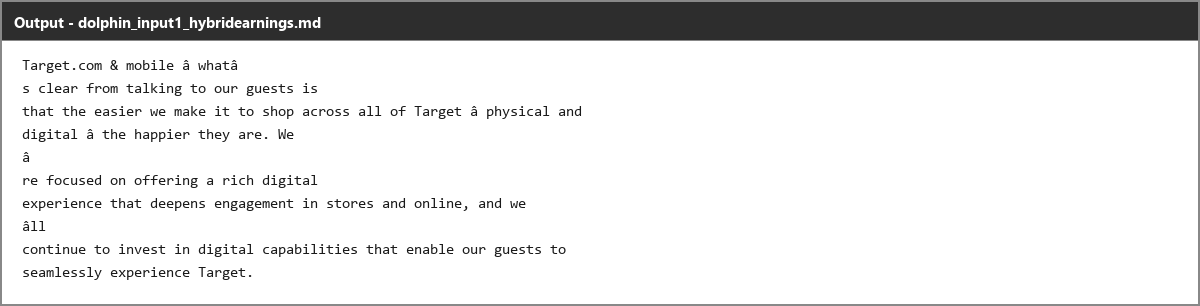




Table ReconstructionMixed▾
Feature tested: Table Reconstruction
Result: Partial
Verdict: Mixed
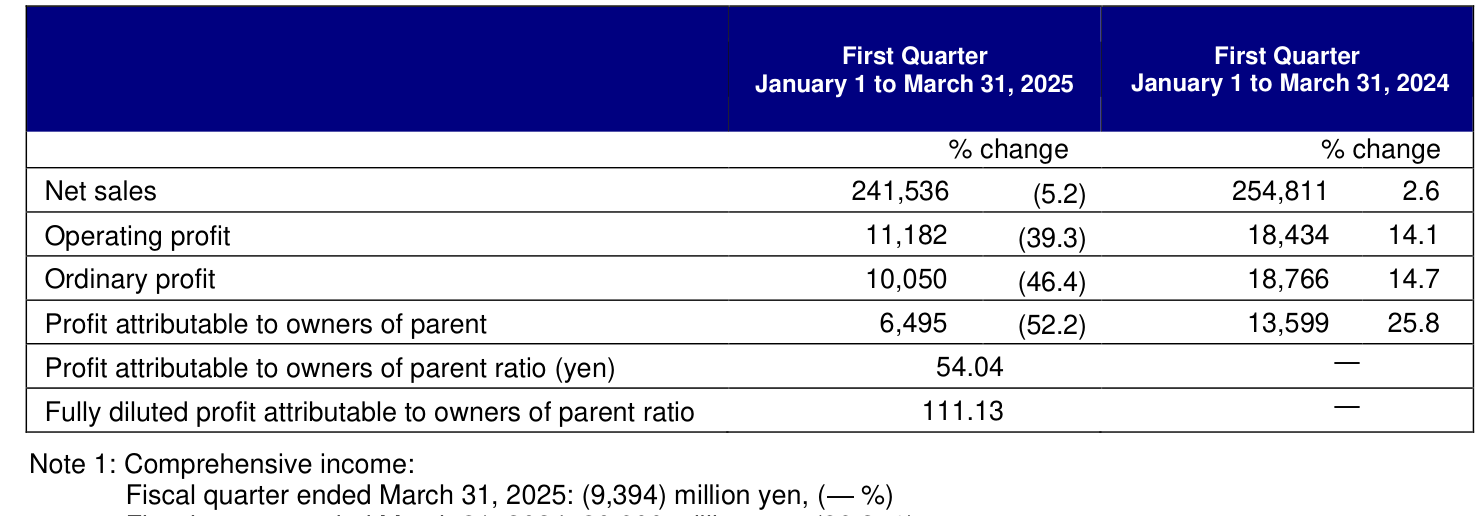
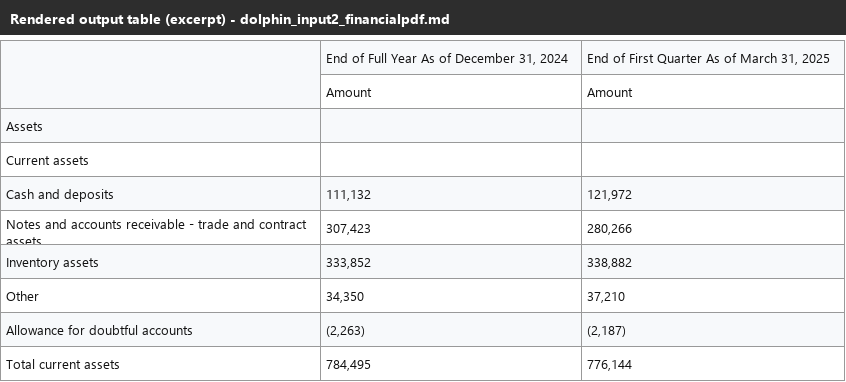
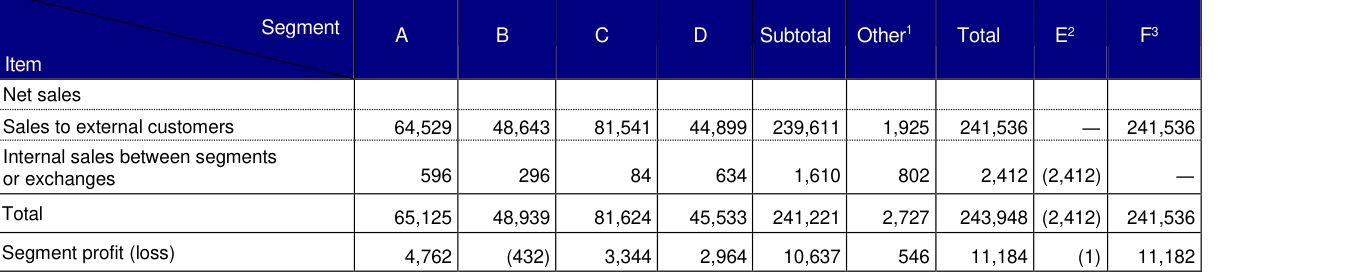
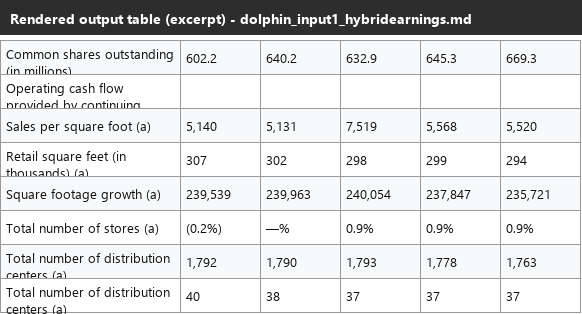
Expected behavior: Dolphin reconstructs tables from financial and research PDF layouts, including balance-sheet and business-results tables with merged headers and page-spanning splits, while the harder samples expose problems with wrapped labels and deeply nested row groups.
Test case: Image → Image
Input type: Image
Input used: Input artifact (Image): Business results table from the Sumitomo Heavy Industries report. — dolphin_input2_financialpdf_businessresults_table_source.png
Observed output: Output artifact (Image): The business results table is reconstructed with the merged header structure preserved and the numeric values intact. — dolphin_input2_financialpdf_businessresults_table_parsed_success.png
Input artifact: Input artifact (Image): Business results table from the Sumitomo Heavy Industries report. — dolphin_input2_financialpdf_businessresults_table_source.png
Output artifact: Output artifact (Image): The business results table is reconstructed with the merged header structure preserved and the numeric values intact. — dolphin_input2_financialpdf_businessresults_table_parsed_success.png
What changed: Image transformed into Image
Test case: Image → Image
Input type: Image
Input used: Input artifact (Image): Quarterly consolidated balance sheet excerpt. — dolphin_input2_financialpdf_balancesheet_table_source.png
Observed output: Output artifact (Image): The balance-sheet excerpt is reproduced with the current-assets rows and values preserved in a readable table. — dolphin_input2_financialpdf_balancesheet_table_parsed_success.png
Input artifact: Input artifact (Image): Quarterly consolidated balance sheet excerpt. — dolphin_input2_financialpdf_balancesheet_table_source.png
Output artifact: Output artifact (Image): The balance-sheet excerpt is reproduced with the current-assets rows and values preserved in a readable table. — dolphin_input2_financialpdf_balancesheet_table_parsed_success.png
What changed: Image transformed into Image
Test case: Image → Image
Input type: Image
Input used: Input artifact (Image): Segment table with a diagonal-split corner header. — dolphin_input2_financialpdf_segmenttable_source.png
Observed output: Output artifact (Image): The table values are mostly preserved, but the diagonal-split header labels are flattened into a single cell, losing the two-axis distinction. — dolphin_input2_financialpdf_segmenttable_parsed_partial_success.png
Input artifact: Input artifact (Image): Segment table with a diagonal-split corner header. — dolphin_input2_financialpdf_segmenttable_source.png
Output artifact: Output artifact (Image): The table values are mostly preserved, but the diagonal-split header labels are flattened into a single cell, losing the two-axis distinction. — dolphin_input2_financialpdf_segmenttable_parsed_partial_success.png
What changed: Image transformed into Image
Test case: Image → Image
Input type: Image
Input used: Input artifact (Image): OTHER section of the hybrid earnings financial summary table. — dolphin_input1_hybridearnings_financialsummary_other_source.png
Observed output: Output artifact (Image): A wrapped row label loses its own values and shifts the following rows upward, attaching real numbers to the wrong metric names. — dolphin_input1_hybridearnings_financialsummary_other_parsed_failure.png
Input artifact: Input artifact (Image): OTHER section of the hybrid earnings financial summary table. — dolphin_input1_hybridearnings_financialsummary_other_source.png
Output artifact: Output artifact (Image): A wrapped row label loses its own values and shifts the following rows upward, attaching real numbers to the wrong metric names. — dolphin_input1_hybridearnings_financialsummary_other_parsed_failure.png
What changed: Image transformed into Image
Test case: Image → Image
Input type: Image
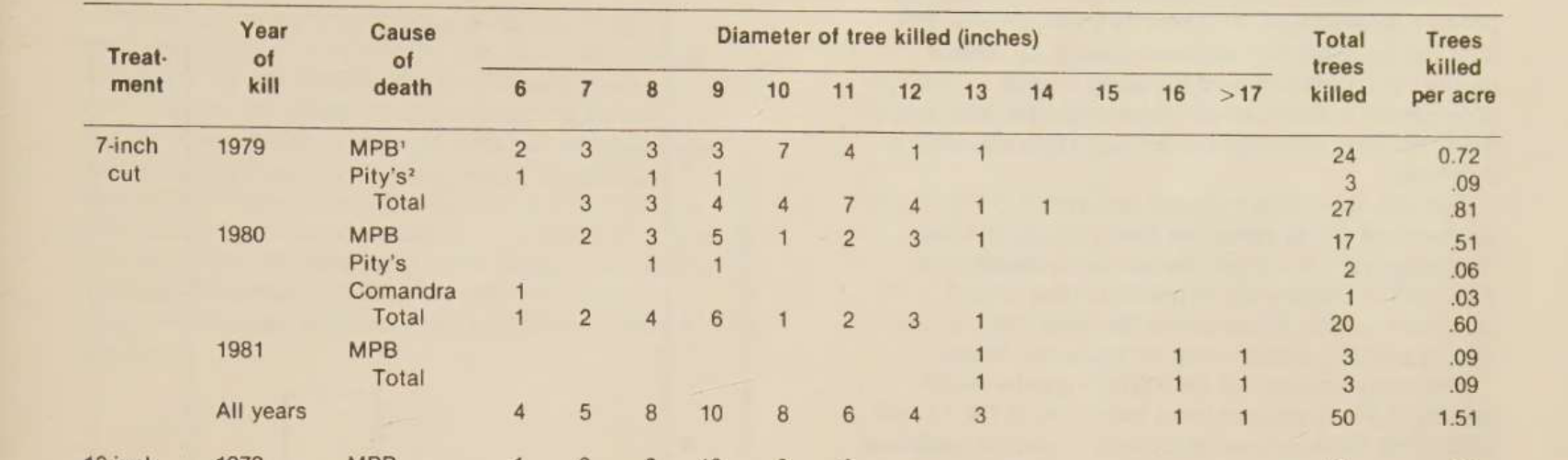
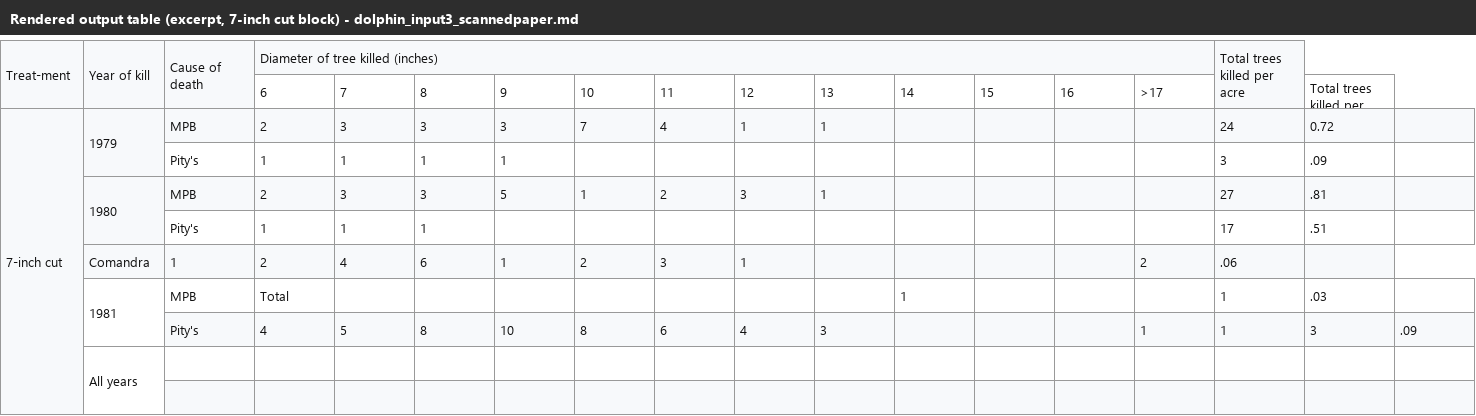
Input used: Input artifact (Image): The most complex nested table block in the scanned research paper. — dolphin_input3_scannedpaper_table4_7inchcut_source.png
Observed output: Output artifact (Image): The complex table breaks by row-group depth and also corrupts some values, not just the layout. — dolphin_input3_scannedpaper_table4_7inchcut_parsed_failure.png
Input artifact: Input artifact (Image): The most complex nested table block in the scanned research paper. — dolphin_input3_scannedpaper_table4_7inchcut_source.png
Output artifact: Output artifact (Image): The complex table breaks by row-group depth and also corrupts some values, not just the layout. — dolphin_input3_scannedpaper_table4_7inchcut_parsed_failure.png
What changed: Image transformed into Image
Test case: Image → Image
Input type: Image
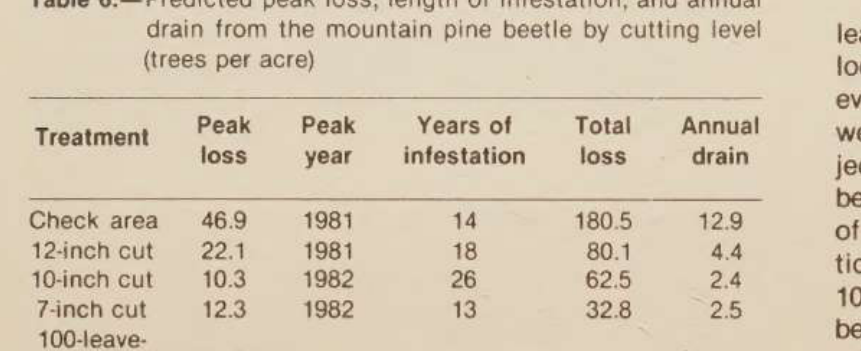
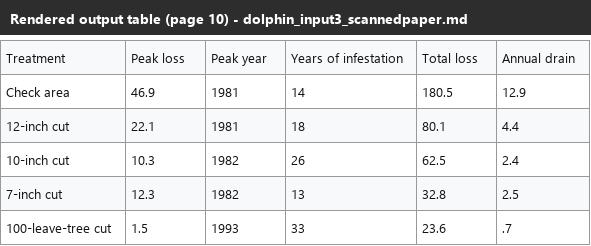
Input used: Input artifact (Image): A simpler flat table from later in the scanned paper. — dolphin_input3_scannedpaper_table6_source.png
Observed output: Output artifact (Image): The simpler table reconstructs correctly with every checked value intact. — dolphin_input3_scannedpaper_table6_parsed_success.png
Input artifact: Input artifact (Image): A simpler flat table from later in the scanned paper. — dolphin_input3_scannedpaper_table6_source.png
Output artifact: Output artifact (Image): The simpler table reconstructs correctly with every checked value intact. — dolphin_input3_scannedpaper_table6_parsed_success.png
What changed: Image transformed into Image
Why it matters / Conclusion: Strong on routine tables; fragile on wrapped labels and deeply nested layouts.
Dolphin reconstructs tables from financial and research PDF layouts, including balance-sheet and business-results tables with merged headers and page-spanning splits, while the harder samples expose problems with wrapped labels and deeply nested row groups.




Reading Order PreservationPreserved▾
Feature tested: Reading Order Preservation
Result: Passed
Verdict: Preserved
Expected behavior: Dolphin preserves logical content sequence in sampled two-column pages and page-boundary table splits, keeping nearby paragraphs and sections in the intended order.
Test case: Image → Image
Input type: Image
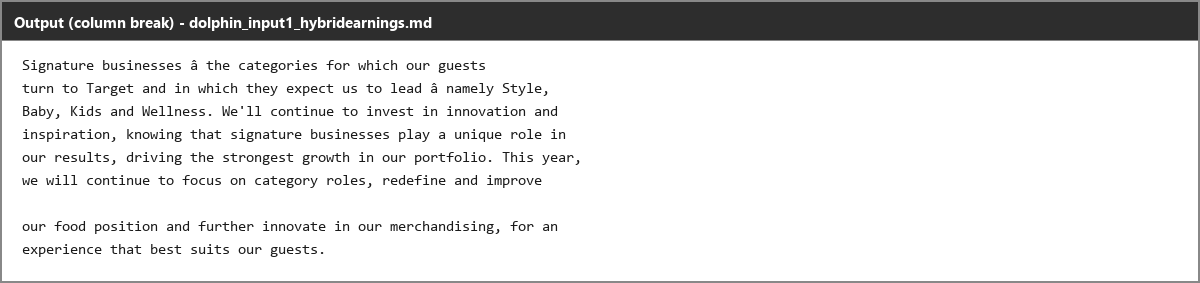
Input used: Input artifact (Image): Two source crops from a split paragraph on a two-column page: the left-column end and the right-column start. — dolphin_input1_hybridearnings_readingorder_leftend_source.png
Observed output: Output artifact (Image): The split paragraph is reconstructed as one continuous sentence with the column break preserved and no leakage from surrounding paragraphs. — dolphin_input1_hybridearnings_readingorder_parsed_success.png
Input artifact: Input artifact (Image): Two source crops from a split paragraph on a two-column page: the left-column end and the right-column start. — dolphin_input1_hybridearnings_readingorder_leftend_source.png
Output artifact: Output artifact (Image): The split paragraph is reconstructed as one continuous sentence with the column break preserved and no leakage from surrounding paragraphs. — dolphin_input1_hybridearnings_readingorder_parsed_success.png
What changed: Image transformed into Image
Test case: Image → Image
Input type: Image
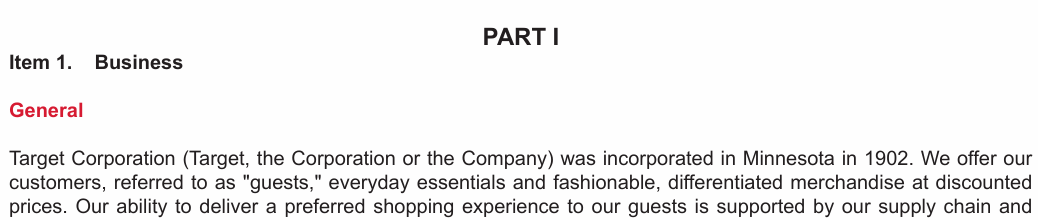
Input used: Input artifact (Image): Item 1. Business and General heading sample from the hybrid earnings report. — dolphin_input1_hybridearnings_docheadings_item1_source.png
Observed output: Output artifact (Image): Both lines are extracted as headings, but they are normalized to the same heading tier rather than reflecting finer structure. — dolphin_input1_hybridearnings_docheadings_item1_parsed_partial_success.png
Input artifact: Input artifact (Image): Item 1. Business and General heading sample from the hybrid earnings report. — dolphin_input1_hybridearnings_docheadings_item1_source.png
Output artifact: Output artifact (Image): Both lines are extracted as headings, but they are normalized to the same heading tier rather than reflecting finer structure. — dolphin_input1_hybridearnings_docheadings_item1_parsed_partial_success.png
What changed: Image transformed into Image
Test case: Image → Image
Input type: Image
Input used: Input artifact (Image): Item 1A. Risk Factors heading sample from the hybrid earnings report. — dolphin_input1_hybridearnings_docheadings_item1a_source.png
Observed output: Output artifact (Image): The parent heading and subheading are both emitted at the same level, flattening the intended heading relationship. — dolphin_input1_hybridearnings_docheadings_item1a_parsed_failure.png
Input artifact: Input artifact (Image): Item 1A. Risk Factors heading sample from the hybrid earnings report. — dolphin_input1_hybridearnings_docheadings_item1a_source.png
Output artifact: Output artifact (Image): The parent heading and subheading are both emitted at the same level, flattening the intended heading relationship. — dolphin_input1_hybridearnings_docheadings_item1a_parsed_failure.png
What changed: Image transformed into Image
Test case: Image → Image
Input type: Image
Input used: Input artifact (Image): Item 2. Properties heading sample from the hybrid earnings report. — dolphin_input1_hybridearnings_docheadings_item2_source.png
Observed output: Output artifact (Image): The section title is left as plain text rather than being marked as a heading. — dolphin_input1_hybridearnings_docheadings_item2_parsed_failure.png
Input artifact: Input artifact (Image): Item 2. Properties heading sample from the hybrid earnings report. — dolphin_input1_hybridearnings_docheadings_item2_source.png
Output artifact: Output artifact (Image): The section title is left as plain text rather than being marked as a heading. — dolphin_input1_hybridearnings_docheadings_item2_parsed_failure.png
What changed: Image transformed into Image
Test case: Image → Image
Input type: Image
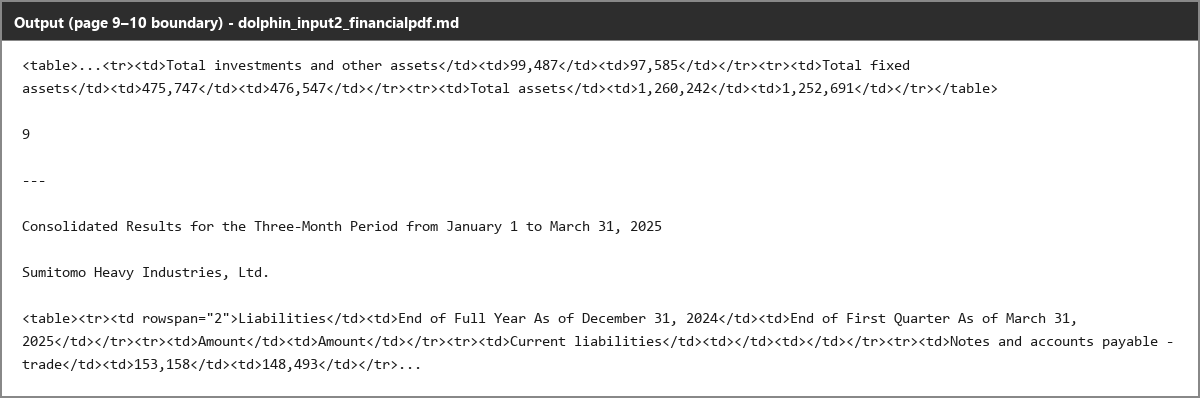
Input used: Input artifact (Image): Two halves of the quarterly balance sheet split by the source page boundary: the Assets section ending on page 9 and the Liabilities section beginning on page 10. — dolphin_input2_financialpdf_pagebreak_assetsend_source.png
Observed output: Output artifact (Image): The Assets half closes, the page-10 running header appears in between, and the Liabilities half opens in the correct order. — dolphin_input2_financialpdf_pagebreak_parsed_success.png
Input artifact: Input artifact (Image): Two halves of the quarterly balance sheet split by the source page boundary: the Assets section ending on page 9 and the Liabilities section beginning on page 10. — dolphin_input2_financialpdf_pagebreak_assetsend_source.png
Output artifact: Output artifact (Image): The Assets half closes, the page-10 running header appears in between, and the Liabilities half opens in the correct order. — dolphin_input2_financialpdf_pagebreak_parsed_success.png
What changed: Image transformed into Image
Why it matters / Conclusion: Sequencing held up in all sampled cases.
Dolphin preserves logical content sequence in sampled two-column pages and page-boundary table splits, keeping nearby paragraphs and sections in the intended order.







Document Hierarchy DetectionInconsistent▾
Feature tested: Document Hierarchy Detection
Result: Partial
Verdict: Inconsistent
Expected behavior: Dolphin emits markdown heading structure for section titles in the hybrid report, but the sampled headings are not always assigned consistent levels or any level at all.
Test case: Image → Image
Input type: Image
Input used: Input artifact (Image): Item 1. Business and General heading block in the hybrid earnings report. — dolphin_input1_hybridearnings_docheadings_item1_source.png
Observed output: Output artifact (Image): Item 1. Business and General are converted to heading markup, but the snippet truncates after the opening paragraph. — dolphin_input1_hybridearnings_docheadings_item1_parsed_partial_success.png
Input artifact: Input artifact (Image): Item 1. Business and General heading block in the hybrid earnings report. — dolphin_input1_hybridearnings_docheadings_item1_source.png
Output artifact: Output artifact (Image): Item 1. Business and General are converted to heading markup, but the snippet truncates after the opening paragraph. — dolphin_input1_hybridearnings_docheadings_item1_parsed_partial_success.png
What changed: Image transformed into Image
Test case: Image → Image
Input type: Image
Input used: Input artifact (Image): Item 1A. Risk Factors and its subheading in the hybrid earnings report. — dolphin_input1_hybridearnings_docheadings_item1a_source.png
Observed output: Output artifact (Image): Item 1A. Risk Factors and Competitive and Reputational Risks are both emitted at the same heading level, flattening the parent/child structure. — dolphin_input1_hybridearnings_docheadings_item1a_parsed_failure.png
Input artifact: Input artifact (Image): Item 1A. Risk Factors and its subheading in the hybrid earnings report. — dolphin_input1_hybridearnings_docheadings_item1a_source.png
Output artifact: Output artifact (Image): Item 1A. Risk Factors and Competitive and Reputational Risks are both emitted at the same heading level, flattening the parent/child structure. — dolphin_input1_hybridearnings_docheadings_item1a_parsed_failure.png
What changed: Image transformed into Image
Test case: Image → Image
Input type: Image
Input used: Input artifact (Image): Item 2. Properties heading and table lead-in. — dolphin_input1_hybridearnings_docheadings_item2_source.png
Observed output: Output artifact (Image): Item 2. Properties is not given heading markup at all and appears as plain text before the table. — dolphin_input1_hybridearnings_docheadings_item2_parsed_failure.png
Input artifact: Input artifact (Image): Item 2. Properties heading and table lead-in. — dolphin_input1_hybridearnings_docheadings_item2_source.png
Output artifact: Output artifact (Image): Item 2. Properties is not given heading markup at all and appears as plain text before the table. — dolphin_input1_hybridearnings_docheadings_item2_parsed_failure.png
What changed: Image transformed into Image
Test case: Image → Image
Input type: Image
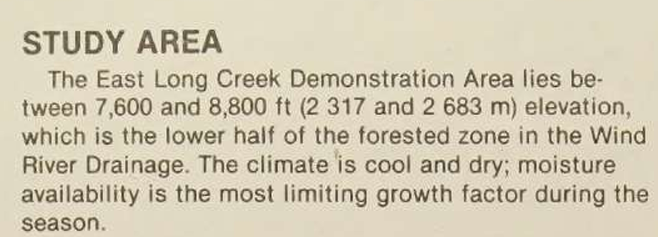
Input used: Input artifact (Image): STUDY AREA heading in the scanned research paper. — dolphin_input3_scannedpaper_heading_studyarea_source.png
Observed output: Output artifact (Image): STUDY AREA is emitted at the expected markdown heading level. — dolphin_input3_scannedpaper_heading_studyarea_parsed_success.png
Input artifact: Input artifact (Image): STUDY AREA heading in the scanned research paper. — dolphin_input3_scannedpaper_heading_studyarea_source.png
Output artifact: Output artifact (Image): STUDY AREA is emitted at the expected markdown heading level. — dolphin_input3_scannedpaper_heading_studyarea_parsed_success.png
What changed: Image transformed into Image
Test case: Image → Image
Input type: Image
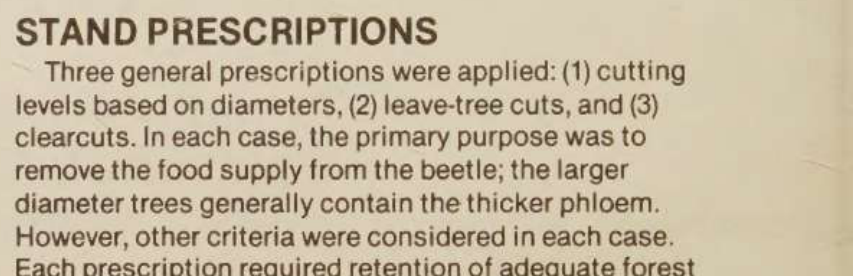
Input used: Input artifact (Image): STAND PRESCRIPTIONS heading in the scanned research paper. — dolphin_input3_scannedpaper_heading_standprescriptions_source.png
Observed output: Output artifact (Image): STAND PRESCRIPTIONS is emitted at the same markdown heading level as STUDY AREA. — dolphin_input3_scannedpaper_heading_standprescriptions_parsed_success.png
Input artifact: Input artifact (Image): STAND PRESCRIPTIONS heading in the scanned research paper. — dolphin_input3_scannedpaper_heading_standprescriptions_source.png
Output artifact: Output artifact (Image): STAND PRESCRIPTIONS is emitted at the same markdown heading level as STUDY AREA. — dolphin_input3_scannedpaper_heading_standprescriptions_parsed_success.png
What changed: Image transformed into Image
Why it matters / Conclusion: Usable, but heading levels are not reliable in the mixed-layout filing.
Dolphin emits markdown heading structure for section titles in the hybrid report, but the sampled headings are not always assigned consistent levels or any level at all.


Caption and Footnote AssociationPreserved▾
Feature tested: Caption and Footnote Association
Result: Passed
Verdict: Preserved
Expected behavior: Dolphin keeps captions, titles, dates, and table notes attached to the correct figure or table in the sampled documents, even when the parent image or table is degraded.
Test case: Image → Image
Input type: Image
Input used: Input artifact (Image): Signature/photo block caption on the shareholder-letter page. — dolphin_input1_hybridearnings_ceocaption_source.png
Observed output: Output artifact (Image): Brian Cornell, Chairman and CEO stays correctly attached directly beneath the Figure placeholder. — dolphin_input1_hybridearnings_ceocaption_parsed_success.png
Input artifact: Input artifact (Image): Signature/photo block caption on the shareholder-letter page. — dolphin_input1_hybridearnings_ceocaption_source.png
Output artifact: Output artifact (Image): Brian Cornell, Chairman and CEO stays correctly attached directly beneath the Figure placeholder. — dolphin_input1_hybridearnings_ceocaption_parsed_success.png
What changed: Image transformed into Image
Test case: Image → Image
Input type: Image
Input used: Input artifact (Image): Figure 1 chart and its caption in the scanned paper. — dolphin_input3_scannedpaper_figure1_source.png
Observed output: Output artifact (Image): The chart data is omitted, but the Figure 1 caption remains correctly attached immediately after the placeholder. — dolphin_input3_scannedpaper_figure1_omitted_failed.png
Input artifact: Input artifact (Image): Figure 1 chart and its caption in the scanned paper. — dolphin_input3_scannedpaper_figure1_source.png
Output artifact: Output artifact (Image): The chart data is omitted, but the Figure 1 caption remains correctly attached immediately after the placeholder. — dolphin_input3_scannedpaper_figure1_omitted_failed.png
What changed: Image transformed into Image
Why it matters / Conclusion: Association stayed intact in the checked samples.
Dolphin keeps captions, titles, dates, and table notes attached to the correct figure or table in the sampled documents, even when the parent image or table is degraded.


How it scored on the research's own criteria
The 9 evaluation dimensions from our hands-on research on Dolphin (ByteDance), each judged from recorded runs on 3 test inputs — the same verdicts the ranking page ranks on.
held up partial failed not exercised by this input
| Criterion | Verdict | What the runs showed | Per input | Proof |
|---|---|---|---|---|
| Caption/Figure Association | Strong5/5 | Captions and notes stay where they belong, even when the figure or table itself is weak. That makes the surrounding structure easy to follow and keeps the right labels tied to the right content. | open proof ↗ | |
| Chart Reconstruction | Weak1/5 | When charts are present, Dolphin drops the chart data entirely and leaves only a figure placeholder plus nearby text. The one financial report without charts does not offset those two complete failures, so chart recovery is effectively absent. | open proof ↗ | |
| Document Hierarchy | Strong4/5 | Heading markup is usually sensible, and the scanned paper keeps its section titles cleanly aligned. But the annual report shows the same visual heading style split across different levels, with one heading even losing heading markup entirely, so the hierarchy is dependable but not fully consistent. | open proof ↗ | |
| Image Retention | Weak2/5 | Images are handled unevenly: signatures can be turned into invented text or fake math, a repeating logo is sometimes kept and sometimes dropped, and even a retained scan-page logo gets over-segmented. That is more than a minor miss, but not a total loss on every image. | open proof ↗ | |
| Long/Complex Document Robustness | Strong4/5 | The shorter documents are steady from start to finish, and the longest one completes too. The only real stress-point is the single densest page in the annual report, where the output runs into a long repetition burst before recovering, so robustness is good but not flawless. | open proof ↗ | |
| Reading Order Preservation | Strong5/5 | Across columns and page breaks, the content stays in the right sequence. Even where the layout is tricky, Dolphin keeps the reading order coherent rather than scrambling sections together. | open proof ↗ | |
| Table Reconstruction | Mixed3/5 | Simple tables usually come through with the right numbers, but more demanding layouts expose real structural problems: wrapped labels can shift whole rows, diagonal headers can collapse distinct axis labels, and the densest scanned table breaks down in both layout and values. That is clearly mixed rather than either strong or broken. | open proof ↗ | |
| Text Preservation | Mixed3/5 | Most prose survives, but the tool keeps making small, meaningful mistakes: selection boxes lose their checked state, contractions break apart, a repeated header word is wrong, dash characters turn into garble, and one dense table has an isolated letter error. That is better than broken OCR, but not clean enough for a top score. | open proof ↗ | |
| Bonus: Unique or Anomalous Behaviors | Strong5/5 | Dolphin has several distinctive quirks worth flagging: the same dash substitution appears across documents, signatures can turn into invented content, and the hardest page can trigger a runaway repetition loop. Those are unusual enough to be a clear yes for this category. | — |
Verdicts come verbatim from the study's recorded observations, never re-derived at render; a criterion with no recorded run shows Not exercised — this section cannot invent a score.
Free to self-host
MIT-licensed Dolphin-1.5; the report says it is free to self-host.
The evaluation also notes a newer Dolphin-v2 exists, but it was not the version tested here.
Banner Preview
How the embed badge will look on your site

Embed HTML
Copy this code to your website source
Quick Integration Guide
- 1Copy the HTML code block above.
- 2Paste it into your site's HTML or CMS editor.
- 3Banner appears instantly on your page.
- 4Links back to your tool profile here.
Similar Tools
Discover more AI tools like Dolphin (ByteDance) to enhance your workflow.
Comments (0)
Need a custom AI solution for this use case?
If you are looking to build a custom PDF-to-Markdown conversion, document parsing, or structured extraction system for your business or internal workflow, email us at contact@futuresmart.ai.
Found something inaccurate or missing? We try to keep our AI research accurate and useful. If you found outdated information, an issue, or have a suggestion, email us at collaborate@aidemos.com.