-3.png&w=256&q=75)
Teal Review: Resume Builder Tested with Raw Input (2026)
Teal AI Review: AI Resume Builder Tested with Raw Input (2026)
Our take
- You are applying to a specific role and can import the job description before generation begins — the ATS results above show what that workflow produces at its best
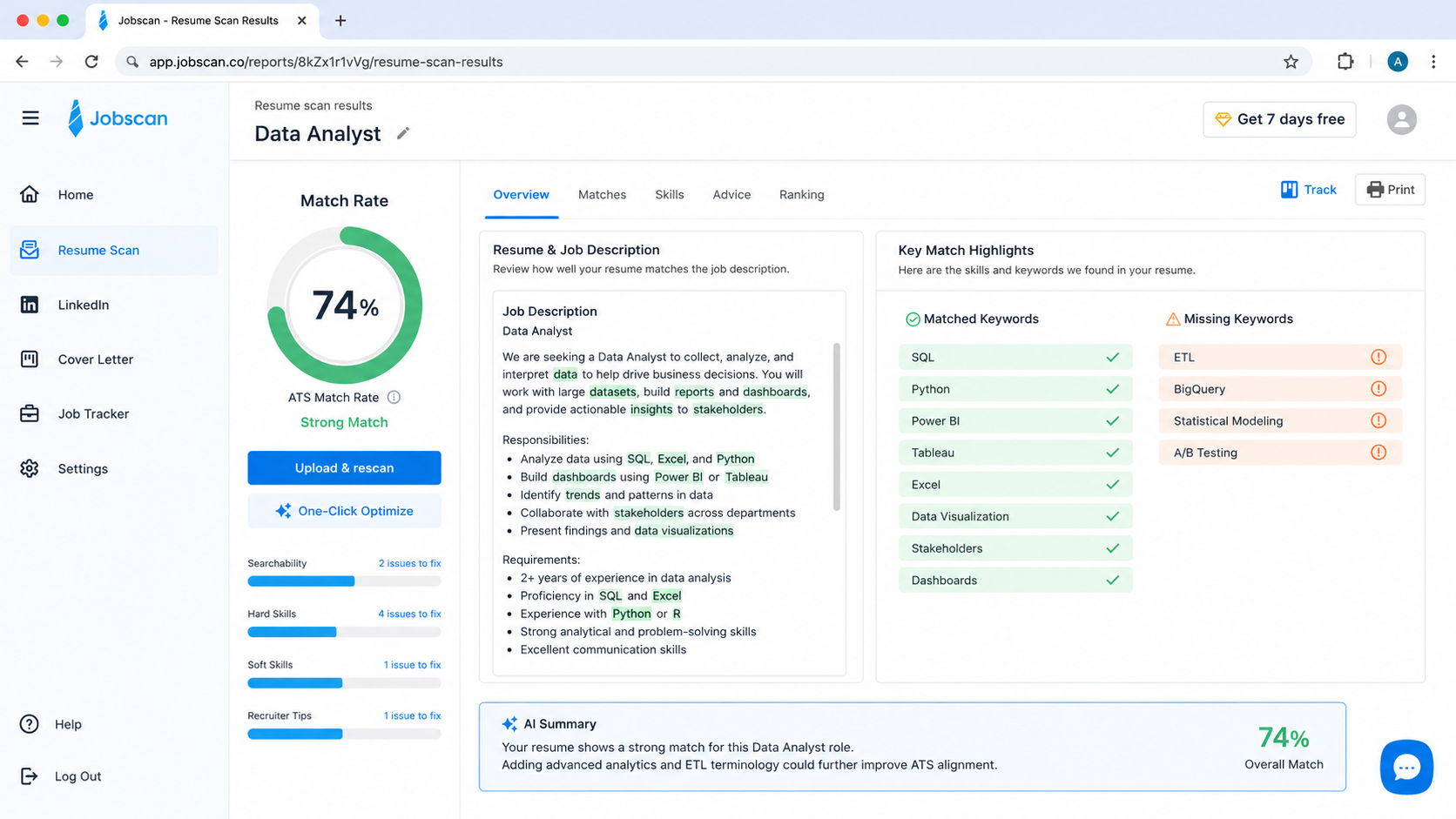
- You need the strongest free-tier ATS performance available in this cycle — the Jobscan screenshot above shows the result
- You are a Data Analyst or similarly keyword-dense profile where Teal's generation approach performs closer to its ceiling — the Data Analyst output PDF above shows the starting point
- You need achievement-oriented, quantified bullets without substantial rewriting — the output PDFs above show what is generated without editing
Feature scores on this page: 6.1/10 (5 scored features)
Our take
Teal is the most job-search-integrated resume tool tested this cycle, and that integration is both its clearest advantage and the source of its most visible tradeoffs. The keyword matching is real — the Jobscan results below are satisfactory — but content quality is uneven in ways the score alone doesn't capture. The formatting is functional rather than distinctive. The ATS story is genuinely good. The bullet quality story is more complicated, and it is in the PDFs below.
In-Depth Review
Our detailed analysis of Teal — features, performance, and real-world testing.
Feature-by-Feature Breakdown
We tested each feature individually. Click any card to see inputs, outputs, and our observations.
Content QualityMedium - prioritises keyword retention over meaningful achievement reframing5/10▾
Feature tested: Content Quality
Result: Partial (5/10)
Verdict: Medium - prioritises keyword retention over meaningful achievement reframing
Expected behavior: For a Data Analyst profile with SQL, Python, and Power BI experience across two roles, Teal's output leaned heavily on the structure of the input rather than reframing it. Bullets that included metrics in the input retained those metrics; bullets that didn't were largely left as task statements with minimal AI elaboration.
Test case: PDF document → PDF document
Input type: PDF document
Input used: Input artifact (PDF document): Input — Financial Data Analyst-Resume Input Data (1).pdf
Observed output: Output artifact (PDF document): Output — Untitled Resume (3)-2.pdf
Input artifact: Input artifact (PDF document): Input — Financial Data Analyst-Resume Input Data (1).pdf
Output artifact: Output artifact (PDF document): Output — Untitled Resume (3)-2.pdf
What changed: PDF document transformed into PDF document
Why it matters / Conclusion: Keyword coverage was strong; achievement framing was not. Those two things don't always move together in this tool.
For a Data Analyst profile with SQL, Python, and Power BI experience across two roles, Teal's output leaned heavily on the structure of the input rather than reframing it. Bullets that included metrics in the input retained those metrics; bullets that didn't were largely left as task statements with minimal AI elaboration.
ATS OptimisationStrong-aggressive keyword alignment, even when the underlying bullet quality remains average8/10▾
Feature tested: ATS Optimisation
Result: Passed (8/10)
Verdict: Strong-aggressive keyword alignment, even when the underlying bullet quality remains average
Expected behavior: Optimizes and uses ATS friendly formatting with keyword alignment
Test case: PDF document → Image
Input type: PDF document
Input used: Input artifact (PDF document): Input — Untitled Resume (3)-2.pdf
Observed output: Output artifact (Image): Output — ChatGPT Image May 16, 2026, 05_00_55 PM.png
Input artifact: Input artifact (PDF document): Input — Untitled Resume (3)-2.pdf
Output artifact: Output artifact (Image): Output — ChatGPT Image May 16, 2026, 05_00_55 PM.png
What changed: PDF document transformed into Image
Why it matters / Conclusion: ATS is where Teal earns its score. The Jobscan results for both profiles are below. This is the tool's strongest individual feature and the clearest reason to choose it over alternatives at the free tier.
Optimizes and uses ATS friendly formatting with keyword alignment
Input HandlingMedium - performs best with structured, role-specific input6/10▾
Feature tested: Input Handling
Result: Passed (6/10)
Verdict: Medium - performs best with structured, role-specific input
Expected behavior: Teal's intake flow is built around job description import first, candidate details second — a sequencing decision that reinforces keyword alignment but reduces flexibility for users who don't have a specific posting in hand. The interface screenshot below shows the full intake flow as presented during testing. Unstructured input is accepted but the tool performs noticeably better when content is organised before entry.
Test case: PDF document → PDF document
Input type: PDF document
Input used: Input artifact (PDF document): Input — Unstructured_Input.pdf
Observed output: Output artifact (PDF document): Output — Untitled Resume (2).pdf
Input artifact: Input artifact (PDF document): Input — Unstructured_Input.pdf
Output artifact: Output artifact (PDF document): Output — Untitled Resume (2).pdf
What changed: PDF document transformed into PDF document
Why it matters / Conclusion: Job-description-first sequencing is an asset if you're applying to a specific role and a friction point if you're building a general-purpose document.
Teal's intake flow is built around job description import first, candidate details second — a sequencing decision that reinforces keyword alignment but reduces flexibility for users who don't have a specific posting in hand. The interface screenshot below shows the full intake flow as presented during testing. Unstructured input is accepted but the tool performs noticeably better when content is organised before entry.
Editing BurdenMedium - reduces ATS effort more than editing effort5.5/10▾
Feature tested: Editing Burden
Result: Passed (5.5/10)
Verdict: Medium - reduces ATS effort more than editing effort
Expected behavior: We estimated 35–50% total editing effort across both profiles — somewhat lower than Earn Better AI on the Data Analyst profile, roughly comparable on the Full Stack Developer output. The annotated PDF below marks every bullet we would rewrite before submitting. The keyword density is there; the achievement framing frequently isn't, and closing that gap is where the editing time goes.
Why it matters / Conclusion: Strong ATS performance does not mean lower editing burden on content quality
We estimated 35–50% total editing effort across both profiles — somewhat lower than Earn Better AI on the Data Analyst profile, roughly comparable on the Full Stack Developer output. The annotated PDF below marks every bullet we would rewrite before submitting. The keyword density is there; the achievement framing frequently isn't, and closing that gap is where the editing time goes.
FormattingMedium- ATS-safe and readable6/10▾
Feature tested: Formatting
Result: Passed (6/10)
Verdict: Medium- ATS-safe and readable
Expected behavior: Clean and functional. The layout is more utilitarian than the highest-scoring tools in this cycle — readable font hierarchy, adequate white space, no visible corruption on PDF export. One issue noted: the template options on the free tier are limited, and the default output is distinguishable from a human-designed resume at a glance. The Data Analyst export is cleaner than the Full Stack Developer output, where uneven content distribution created visual imbalance in the lower half of page one. Both PDFs are below.
Test case: Video file → PDF document
Input type: Video file
Input used: Input artifact (Video file): Input — Screen Recording 2026-04-10 162058.mp4
Observed output: Output artifact (PDF document): Output — Untitled Resume (3)-2.pdf
Input artifact: Input artifact (Video file): Input — Screen Recording 2026-04-10 162058.mp4
Output artifact: Output artifact (PDF document): Output — Untitled Resume (3)-2.pdf
What changed: Video file transformed into PDF document
Why it matters / Conclusion: Formatting passes the ATS import test and the readability test
Clean and functional. The layout is more utilitarian than the highest-scoring tools in this cycle — readable font hierarchy, adequate white space, no visible corruption on PDF export. One issue noted: the template options on the free tier are limited, and the default output is distinguishable from a human-designed resume at a glance. The Data Analyst export is cleaner than the Full Stack Developer output, where uneven content distribution created visual imbalance in the lower half of page one. Both PDFs are below.
Pricing & Access
Plans as of May 2026. Tested on the free plan
Pricing checked as of May 2026. We re-check quarterly.
Is This Right For You?
A side-by-side guide based on our hands-on testing.
Banner Preview
How the embed badge will look on your site

Embed HTML
Copy this code to your website source
Quick Integration Guide
- 1Copy the HTML code block above.
- 2Paste it into your site's HTML or CMS editor.
- 3Banner appears instantly on your page.
- 4Links back to your tool profile here.
Similar Tools
Discover more AI tools like Teal to enhance your workflow.
Comments (0)
Need a custom AI solution for this use case?
If you are looking to build a custom resume builder, ATS optimization, or resume writing assistant for your business or internal workflow, email us at contact@futuresmart.ai.
Found something inaccurate or missing? We try to keep our AI research accurate and useful. If you found outdated information, an issue, or have a suggestion, email us at collaborate@aidemos.com.