
Vizard
Fast transcript-led repurposing with synced captions and B-roll, but polished branded exports cost extra
Strong as a clip repurposer, not a fully autonomous editor
- You want to convert speech-heavy recordings into multiple short clips quickly.
- You are okay reviewing clip boundaries, captions, and pacing before publishing.
- You want contextual B-roll on talking-head footage and a transcript-style editor for cleanup.
- You need a fully publish-ready edit with no manual pass.
Our take
Vizard.ai is strongest when you want to turn speech-heavy footage into short clips quickly, clean them up in a transcript-style editor, and keep captions locked to the audio. It also adds contextual B-roll on talking-head footage and gives you source controls for generating, uploading, or searching B-roll. The tradeoff is that highlight boundaries, caption wording, silence cleanup, and other finishing touches still need review, while polished branding options and higher-end exports sit behind paid tiers.
In-Depth Review
Our detailed analysis of Vizard — features, performance, and real-world testing.
Feature-by-Feature Breakdown
Automatic Highlight-Based Clip GenerationWorking, but not fully autonomous.▾
Feature tested: Automatic Highlight-Based Clip Generation
Result: Partial
Verdict: Working, but not fully autonomous.
Expected behavior: Vizard turns long speech-led recordings into multiple short clips by identifying highlight moments automatically. The benchmark exercised this on both the talking-head input and the low-quality audio/lighting input.
Test case: Video file → Video file
Input type: Video file
Input used: Input artifact (Video file): Input 1: Talking Head with Dead Air — raw vertical talking-head recording with intentional pauses, filler words, and repeated phrases. — Input 1 - Talking Head with Dead Air.mp4
Observed output: Output artifact (Video file): Vizard turned the talking-head upload into short vertical clips with reduced dead air, but the highlight start and end points still needed manual review before publishing. — Vizard Output 1 - Talking Head with Dead Air.mp4
Input artifact: Input artifact (Video file): Input 1: Talking Head with Dead Air — raw vertical talking-head recording with intentional pauses, filler words, and repeated phrases. — Input 1 - Talking Head with Dead Air.mp4
Output artifact: Output artifact (Video file): Vizard turned the talking-head upload into short vertical clips with reduced dead air, but the highlight start and end points still needed manual review before publishing. — Vizard Output 1 - Talking Head with Dead Air.mp4
What changed: Video file transformed into Video file
Test case: Text prompt → Video file
Input type: Text prompt
Input used: Input artifact (Text prompt): INPUT
Observed output: Output artifact (Video file): Vizard also generated usable short clips from the tougher webcam-style input, but the AI edits still required boundary review and trimming. — Vizard Output 2 - Low-Quality Audio & Lighting.mp4
Input artifact: Input artifact (Text prompt): INPUT
Output artifact: Output artifact (Video file): Vizard also generated usable short clips from the tougher webcam-style input, but the AI edits still required boundary review and trimming. — Vizard Output 2 - Low-Quality Audio & Lighting.mp4
What changed: Text prompt transformed into Video file
Why it matters / Conclusion: A strong first-pass repurposing engine for speech-heavy footage, but the clips are still review-heavy.
Vizard turns long speech-led recordings into multiple short clips by identifying highlight moments automatically. The benchmark exercised this on both the talking-head input and the low-quality audio/lighting input.
Contextual B-roll Insertion with Source ControlWorks on the talking-head input; source choice is user-controlled.▾
Feature tested: Contextual B-roll Insertion with Source Control
Result: Partial
Verdict: Works on the talking-head input; source choice is user-controlled.
Expected behavior: On the talking-head benchmark, Vizard inserted topical B-roll that matched the spoken topic. The editor also exposed source controls for generating B-roll, uploading assets, and searching stock footage so users could choose where inserts come from.
Test case: Video file → Image
Input type: Video file
Input used: Input artifact (Video file): Input 1: Talking-head narration mentioning AWS or Google Cloud and deployment. — Input 1 - Talking Head with Dead Air.mp4
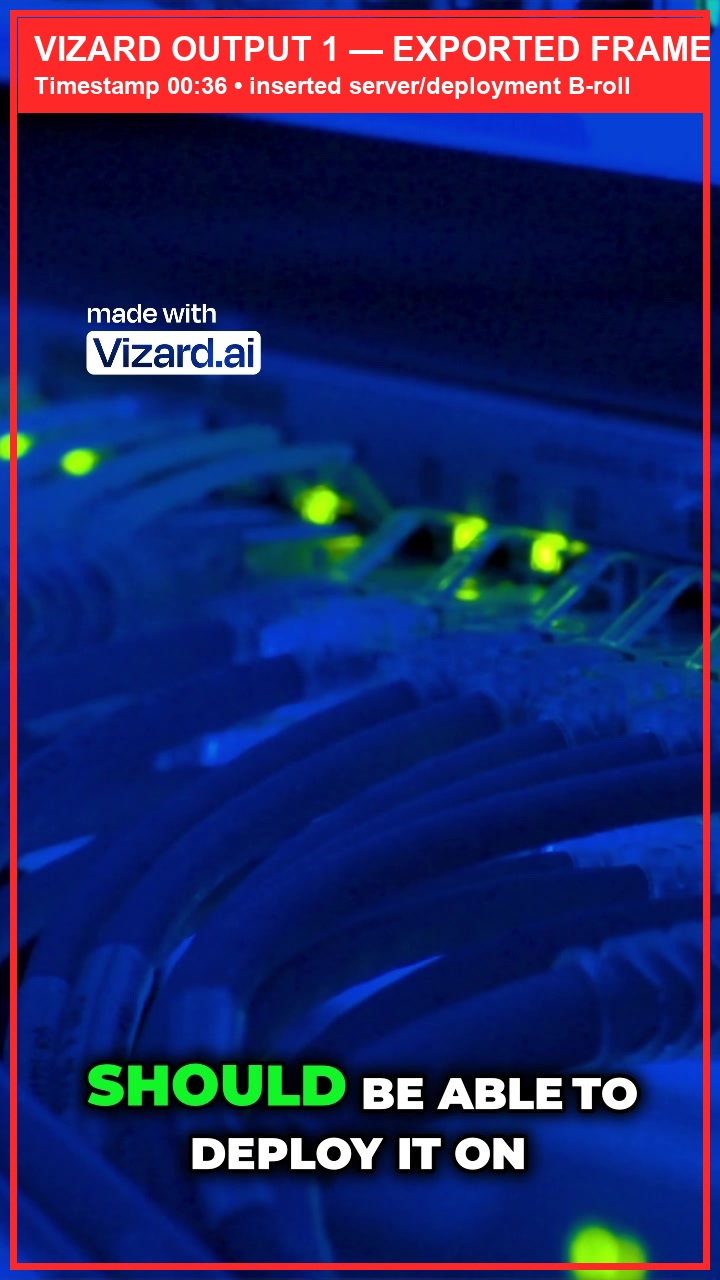
Observed output: Output artifact (Image): Timestamp 00:36 shows inserted server/deployment B-roll under the deployment narration, with the Vizard watermark still visible in the exported frame. — Vizard-output1-broll-overlay-00m36s.jpg
Input artifact: Input artifact (Video file): Input 1: Talking-head narration mentioning AWS or Google Cloud and deployment. — Input 1 - Talking Head with Dead Air.mp4
Output artifact: Output artifact (Image): Timestamp 00:36 shows inserted server/deployment B-roll under the deployment narration, with the Vizard watermark still visible in the exported frame. — Vizard-output1-broll-overlay-00m36s.jpg
What changed: Video file transformed into Image
Test case: Text prompt → Video file
Input type: Text prompt
Input used: Input artifact (Text prompt): INPUT
Observed output: Output artifact (Video file): The exported screen-recording clip stays on the original browser footage and never switches to B-roll, so the insertion feature did not trigger on this input. — Vizard Output 2 - Low-Quality Audio & Lighting.mp4
Input artifact: Input artifact (Text prompt): INPUT
Output artifact: Output artifact (Video file): The exported screen-recording clip stays on the original browser footage and never switches to B-roll, so the insertion feature did not trigger on this input. — Vizard Output 2 - Low-Quality Audio & Lighting.mp4
What changed: Text prompt transformed into Video file
Test case: Text prompt → Image
Input type: Text prompt
Input used: Input artifact (Text prompt): INPUT
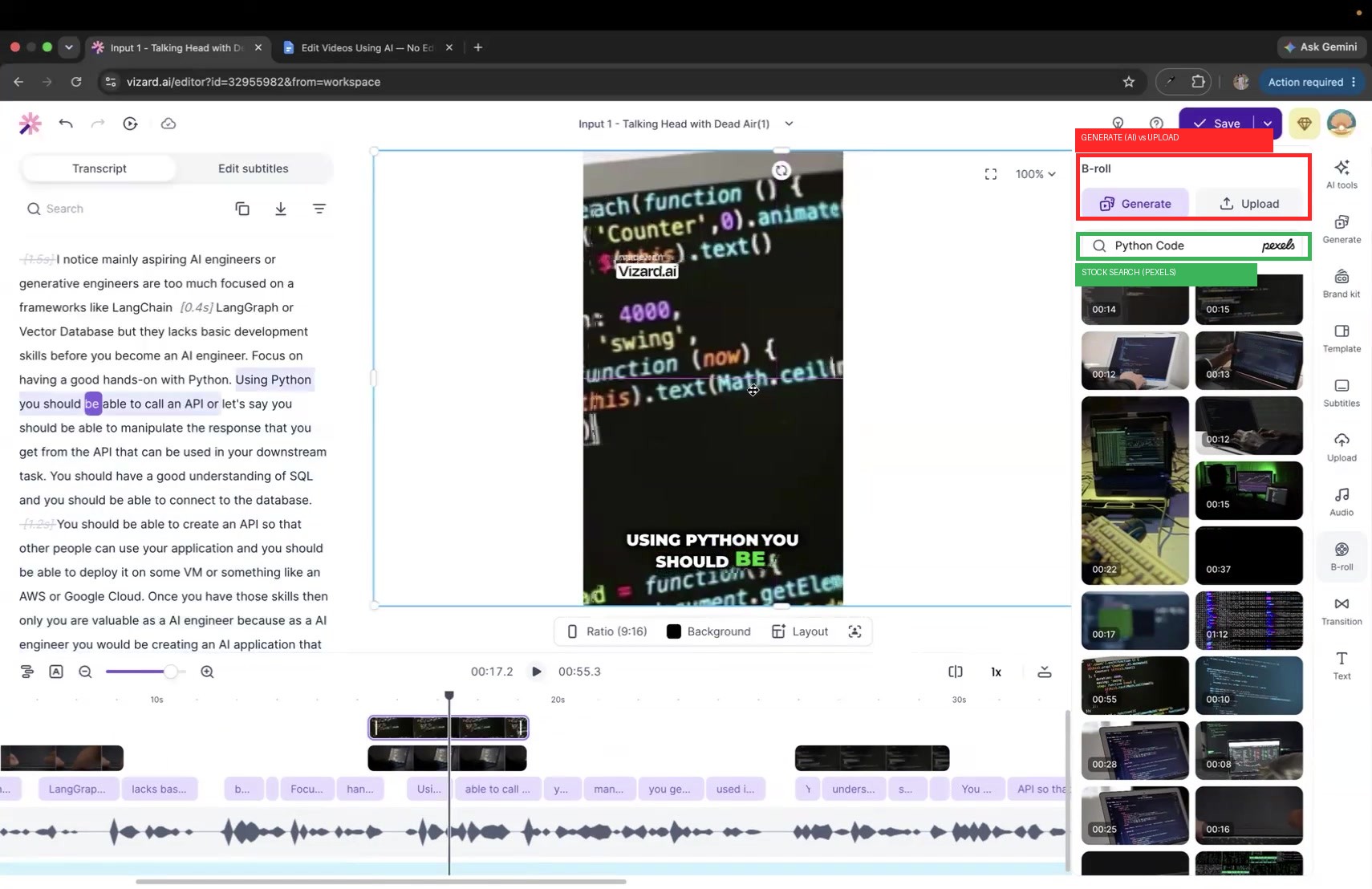
Observed output: Output artifact (Image): The B-roll side panel exposes Generate, Upload, and a live Pexels search field, so source selection is explicit rather than automatic only. — Vizard-broll-source-control-panel-evidence.jpg
Input artifact: Input artifact (Text prompt): INPUT
Output artifact: Output artifact (Image): The B-roll side panel exposes Generate, Upload, and a live Pexels search field, so source selection is explicit rather than automatic only. — Vizard-broll-source-control-panel-evidence.jpg
What changed: Text prompt transformed into Image
Test case: Text prompt → Image
Input type: Text prompt
Input used: Input artifact (Text prompt): INPUT
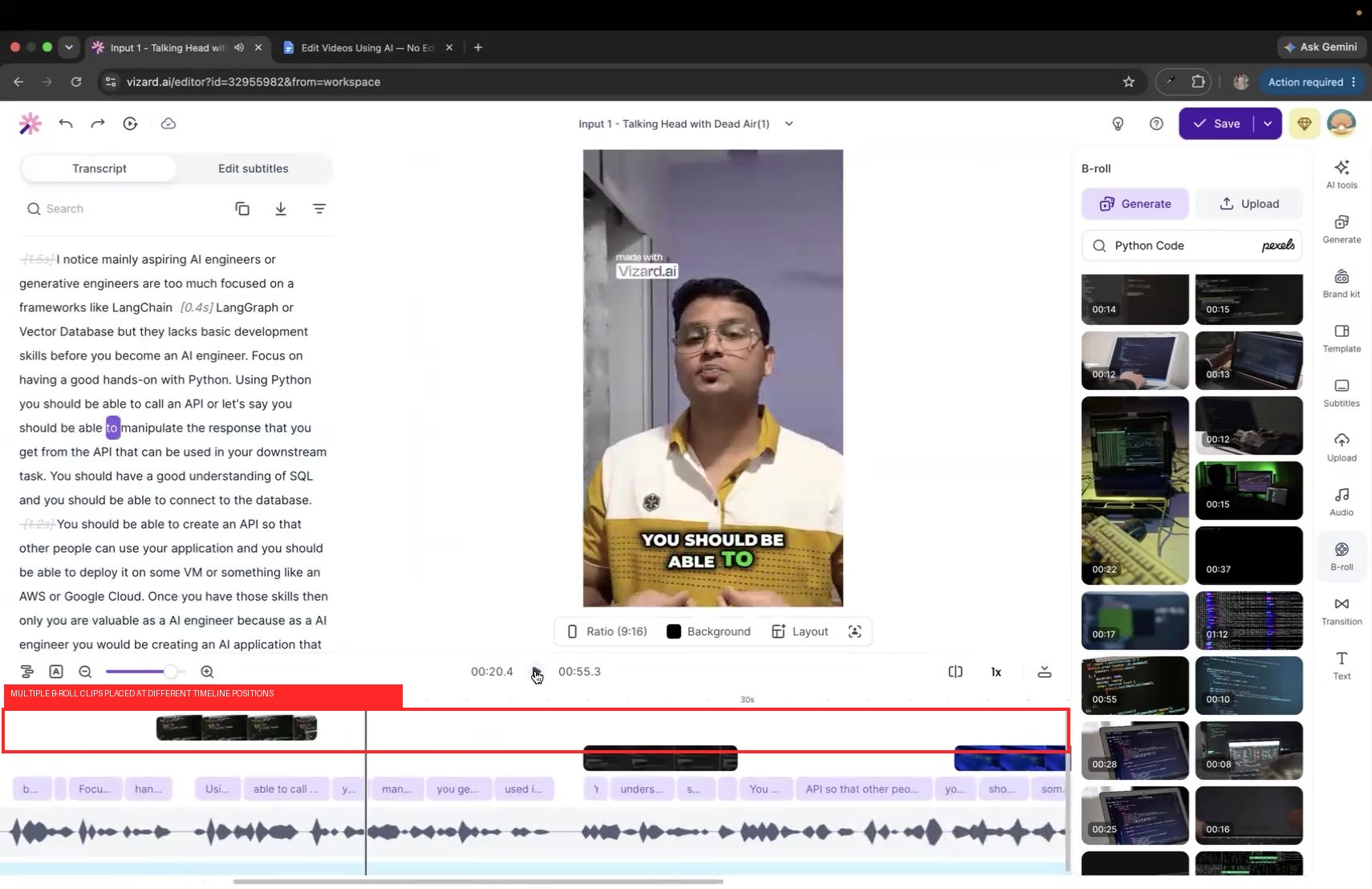
Observed output: Output artifact (Image): Multiple B-roll clips are positioned at different timestamps on the timeline, confirming manual placement control. — Vizard-broll-timeline-placement-evidence.jpg
Input artifact: Input artifact (Text prompt): INPUT
Output artifact: Output artifact (Image): Multiple B-roll clips are positioned at different timestamps on the timeline, confirming manual placement control. — Vizard-broll-timeline-placement-evidence.jpg
What changed: Text prompt transformed into Image
Why it matters / Conclusion: Strong B-roll feature for talking-head repurposing, with real source controls, but it did not generalize to the screen-recording case.
On the talking-head benchmark, Vizard inserted topical B-roll that matched the spoken topic. The editor also exposed source controls for generating B-roll, uploading assets, and searching stock footage so users could choose where inserts come from.
Export and Branding ControlsExports are reliable, but free-plan branding remains▾
Feature tested: Export and Branding Controls
Result: Failed
Verdict: Exports are reliable, but free-plan branding remains
Expected behavior: Vizard exports finished video and applies tier-based branding limits such as watermarks, resolution caps, custom font restrictions, color-mapping limits, storage limits, and brand-kit slots for logos and styles. The tested free-tier output was useful for previews but not fully brand-compliant.
Test case: Video file → Video file
Input type: Video file
Input used: Input artifact (Video file): Raw talking-head project exported after editing. — Input 1 - Talking Head with Dead Air.mp4
Observed output: Output artifact (Video file): The finished export is a short vertical video with a Vizard watermark visible, showing that the tested output is not watermark-free on the free tier. — Vizard Output 1 - Talking Head with Dead Air.mp4
Input artifact: Input artifact (Video file): Raw talking-head project exported after editing. — Input 1 - Talking Head with Dead Air.mp4
Output artifact: Output artifact (Video file): The finished export is a short vertical video with a Vizard watermark visible, showing that the tested output is not watermark-free on the free tier. — Vizard Output 1 - Talking Head with Dead Air.mp4
What changed: Video file transformed into Video file
Test case: Text prompt → Video file
Input type: Text prompt
Input used: Input artifact (Text prompt): INPUT
Observed output: Output artifact (Video file): The second edited clip also exported successfully, with the same visible Vizard watermark in the finished output. — Vizard Output 2 - Low-Quality Audio & Lighting.mp4
Input artifact: Input artifact (Text prompt): INPUT
Output artifact: Output artifact (Video file): The second edited clip also exported successfully, with the same visible Vizard watermark in the finished output. — Vizard Output 2 - Low-Quality Audio & Lighting.mp4
What changed: Text prompt transformed into Video file
Test case: Video file → Image
Input type: Video file
Input used: Input artifact (Video file): Free-tier export test on a technical clip. — Ai Demos now supports markdown pages - SEQ.mp4
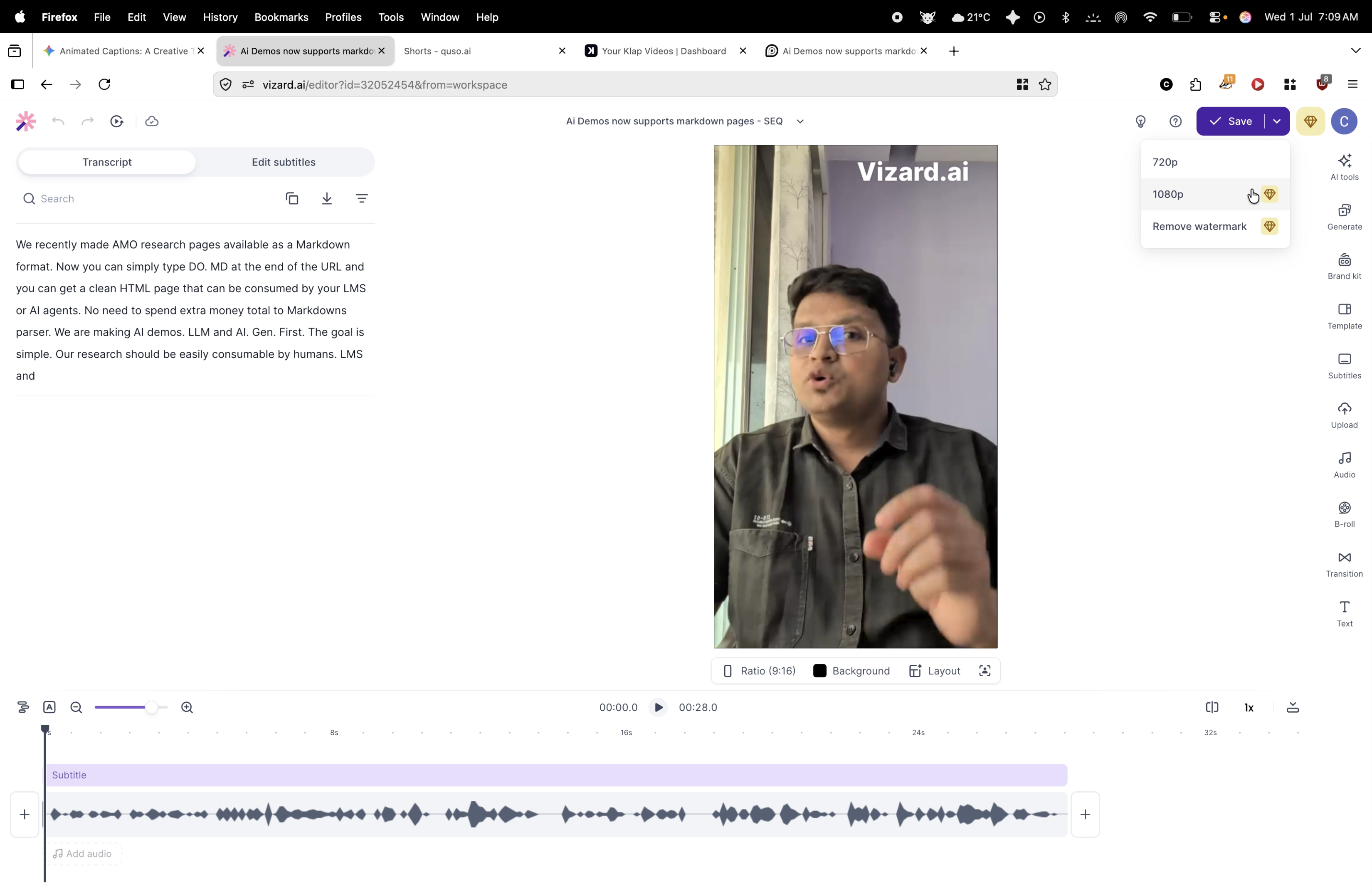
Observed output: Output artifact (Image): The free-tier export menu showed 720p as the active ceiling and 1080p as an upgrade option; the report also said exports were watermarked and stored for only three days. — 720p_limitation.png
Input artifact: Input artifact (Video file): Free-tier export test on a technical clip. — Ai Demos now supports markdown pages - SEQ.mp4
Output artifact: Output artifact (Image): The free-tier export menu showed 720p as the active ceiling and 1080p as an upgrade option; the report also said exports were watermarked and stored for only three days. — 720p_limitation.png
What changed: Video file transformed into Image
Test case: Video file → Image
Input type: Video file
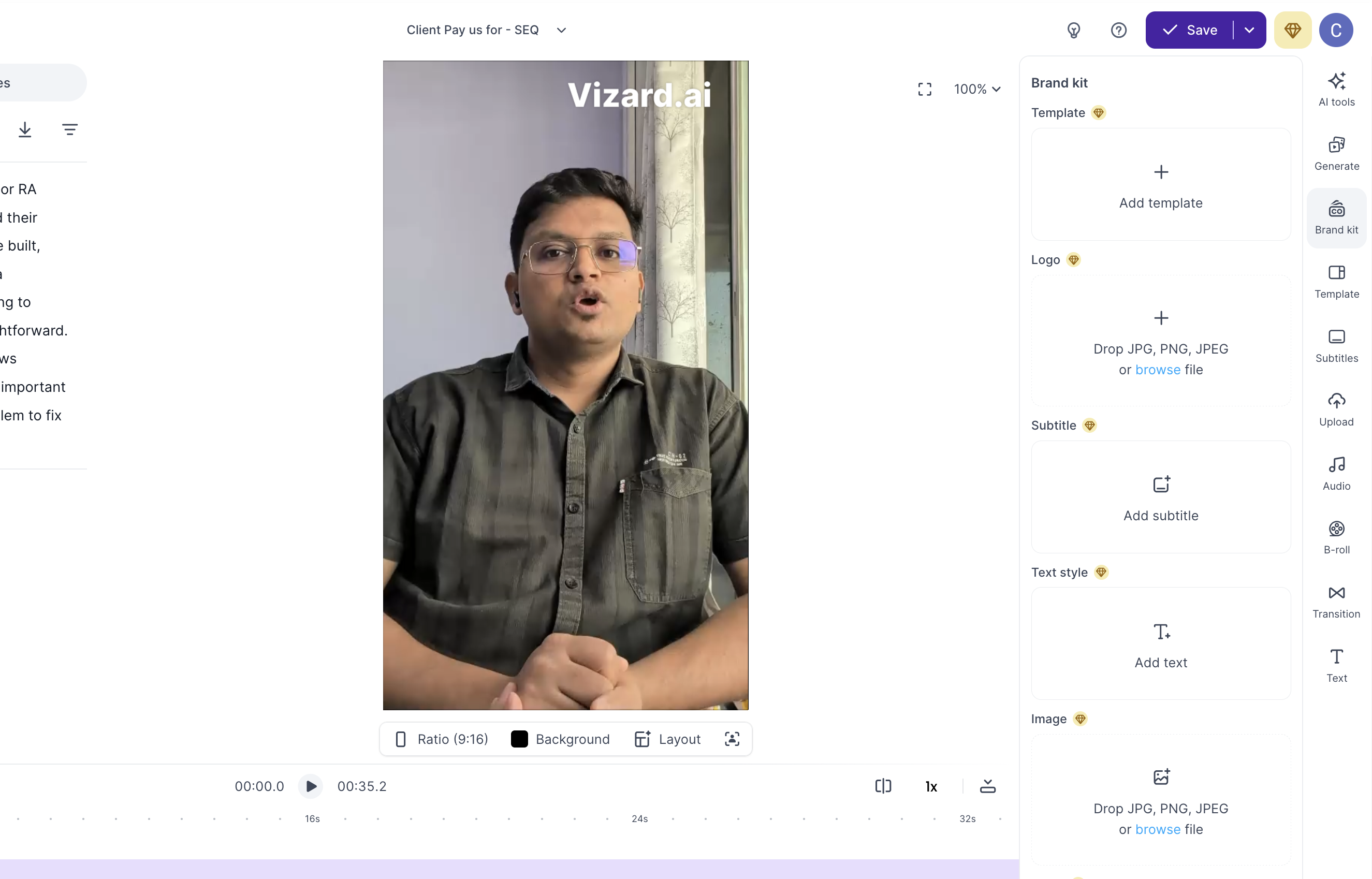
Input used: Input artifact (Video file): Branding and export-flexibility test on a business-oriented clip. — Client Pay us for - SEQ.mp4
Observed output: Output artifact (Image): The brand kit panel exposed template, logo, subtitle, text style, and image slots, but custom fonts, hexadecimal colors, and raw SRT downloads were locked behind paid tiers. — output-4.png
Input artifact: Input artifact (Video file): Branding and export-flexibility test on a business-oriented clip. — Client Pay us for - SEQ.mp4
Output artifact: Output artifact (Image): The brand kit panel exposed template, logo, subtitle, text style, and image slots, but custom fonts, hexadecimal colors, and raw SRT downloads were locked behind paid tiers. — output-4.png
What changed: Video file transformed into Image
Why it matters / Conclusion: Exports are straightforward, but the free tier is branded.
Vizard exports finished video and applies tier-based branding limits such as watermarks, resolution caps, custom font restrictions, color-mapping limits, storage limits, and brand-kit slots for logos and styles. The tested free-tier output was useful for previews but not fully brand-compliant.
Transcript/Timeline Clip Refinement and Layout EditingWorking▾
Feature tested: Transcript/Timeline Clip Refinement and Layout Editing
Result: Partial
Verdict: Working
Expected behavior: After AI processing, the transcript, preview, and timeline stay editable so users can tighten highlight boundaries and change presentation without starting over. The editor also exposes ratio, background, layout, presets, settings, and apply-to-all controls for quick visual adjustments.
Test case: Video file → Video file
Input type: Video file
Input used: Input artifact (Video file): INPUT — Input 1 - Talking Head with Dead Air.mp4
Observed output: Output artifact (Video file): The edit view exposed animated subtitle presets and controls like Ratio 9:16, Background, Layout, Save, Presets, and Settings, showing that formatting can be adjusted during refinement. — Vizard Output 1 - Talking Head with Dead Air.mp4
Input artifact: Input artifact (Video file): INPUT — Input 1 - Talking Head with Dead Air.mp4
Output artifact: Output artifact (Video file): The edit view exposed animated subtitle presets and controls like Ratio 9:16, Background, Layout, Save, Presets, and Settings, showing that formatting can be adjusted during refinement. — Vizard Output 1 - Talking Head with Dead Air.mp4
What changed: Video file transformed into Video file
Test case: Text prompt → Image
Input type: Text prompt
Input used: Input artifact (Text prompt): Talking Head with Dead Air
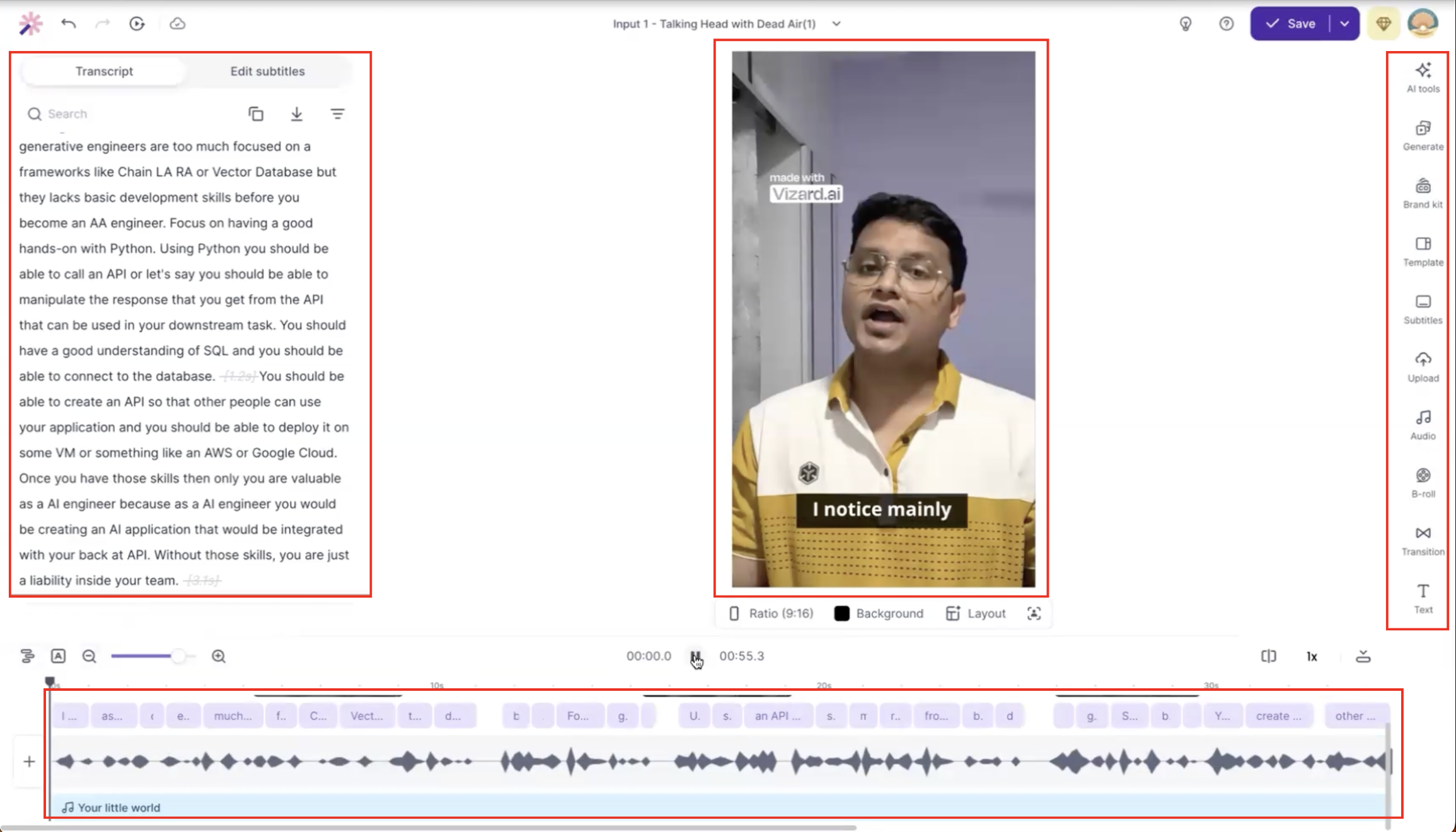
Observed output: Output artifact (Image): The transcript, preview, toolbar, and waveform are open for review, showing that Vizard expects the user to check and refine AI-selected highlights rather than trust them blindly. — Vizard-input1-failure-1-ai-highlight-selection-required-manual-review.png
Input artifact: Input artifact (Text prompt): Talking Head with Dead Air
Output artifact: Output artifact (Image): The transcript, preview, toolbar, and waveform are open for review, showing that Vizard expects the user to check and refine AI-selected highlights rather than trust them blindly. — Vizard-input1-failure-1-ai-highlight-selection-required-manual-review.png
What changed: Text prompt transformed into Image
Test case: Text prompt → Image
Input type: Text prompt
Input used: Input artifact (Text prompt): Low-Quality Audio & Lighting
Observed output: Output artifact (Image): The low-quality audio project shows the same review surface around the AI highlight region, indicating that clip boundaries also needed manual attention on the second input. — Vizard_Input2_Failure1_AI_Highlight_Boundaries.png
Input artifact: Input artifact (Text prompt): Low-Quality Audio & Lighting
Output artifact: Output artifact (Image): The low-quality audio project shows the same review surface around the AI highlight region, indicating that clip boundaries also needed manual attention on the second input. — Vizard_Input2_Failure1_AI_Highlight_Boundaries.png
What changed: Text prompt transformed into Image
Why it matters / Conclusion: Good browser-side correction surface, but the workflow is still review-heavy rather than fully autonomous.
After AI processing, the transcript, preview, and timeline stay editable so users can tighten highlight boundaries and change presentation without starting over. The editor also exposes ratio, background, layout, presets, settings, and apply-to-all controls for quick visual adjustments.
Silence Removal and Pacing CleanupUseful for dead-air cleanup, but not a full audio pass▾
Feature tested: Silence Removal and Pacing Cleanup
Result: Partial
Verdict: Useful for dead-air cleanup, but not a full audio pass
Expected behavior: The tool trims pauses and dead-air moments to tighten the flow of a talk track. Across both inputs, it made the pacing cleaner, though some gaps still needed manual review and it did not replace audio review.
Test case: Video file → Video file
Input type: Video file
Input used: Input artifact (Video file): Input 1: Talking Head with Dead Air — raw video with intentional pauses and filler words. — Input 1 - Talking Head with Dead Air.mp4
Observed output: Output artifact (Video file): Dead air was trimmed enough to improve pacing in the exported clip, but the result still benefited from a human review pass. — Vizard Output 1 - Talking Head with Dead Air.mp4
Input artifact: Input artifact (Video file): Input 1: Talking Head with Dead Air — raw video with intentional pauses and filler words. — Input 1 - Talking Head with Dead Air.mp4
Output artifact: Output artifact (Video file): Dead air was trimmed enough to improve pacing in the exported clip, but the result still benefited from a human review pass. — Vizard Output 1 - Talking Head with Dead Air.mp4
What changed: Video file transformed into Video file
Test case: Text prompt → Video file
Input type: Text prompt
Input used: Input artifact (Text prompt): INPUT
Observed output: Output artifact (Video file): Several short pauses remained after silence removal, showing that Vizard reduced dead air but did not fully eliminate all gaps. — Vizard Output 2 - Low-Quality Audio & Lighting.mp4
Input artifact: Input artifact (Text prompt): INPUT
Output artifact: Output artifact (Video file): Several short pauses remained after silence removal, showing that Vizard reduced dead air but did not fully eliminate all gaps. — Vizard Output 2 - Low-Quality Audio & Lighting.mp4
What changed: Text prompt transformed into Video file
Why it matters / Conclusion: Helpful pacing cleanup, but it does not replace audio review.
The tool trims pauses and dead-air moments to tighten the flow of a talk track. Across both inputs, it made the pacing cleaner, though some gaps still needed manual review and it did not replace audio review.
Caption Generation, Transcript Editing, and StylingFast and usable, but technical wording needs proofreading▾
Feature tested: Caption Generation, Transcript Editing, and Styling
Result: Partial
Verdict: Fast and usable, but technical wording needs proofreading
Expected behavior: Vizard generates synchronized captions and lets users edit the transcript directly. In the tested outputs, captions were generally usable, but technical terms and specific wording needed manual correction, and subtitle presets/styling controls were available in the editor.
Test case: Video file → Image
Input type: Video file
Input used: Input artifact (Video file): Transcript cleanup test on a technical clip. — Ai Demos now supports markdown pages - SEQ.mp4
Observed output: Output artifact (Image): The tool generated a transcript-led editing workspace immediately after processing, making fast deletions and caption cleanup practical. — output-1.png
Input artifact: Input artifact (Video file): Transcript cleanup test on a technical clip. — Ai Demos now supports markdown pages - SEQ.mp4
Output artifact: Output artifact (Image): The tool generated a transcript-led editing workspace immediately after processing, making fast deletions and caption cleanup practical. — output-1.png
What changed: Video file transformed into Image
Test case: Video file → Image
Input type: Video file
Input used: Input artifact (Video file): Transcript editing test on a pause-heavy narrative clip. — Workflow vs AI Agent - SEQ Copy 01.mp4
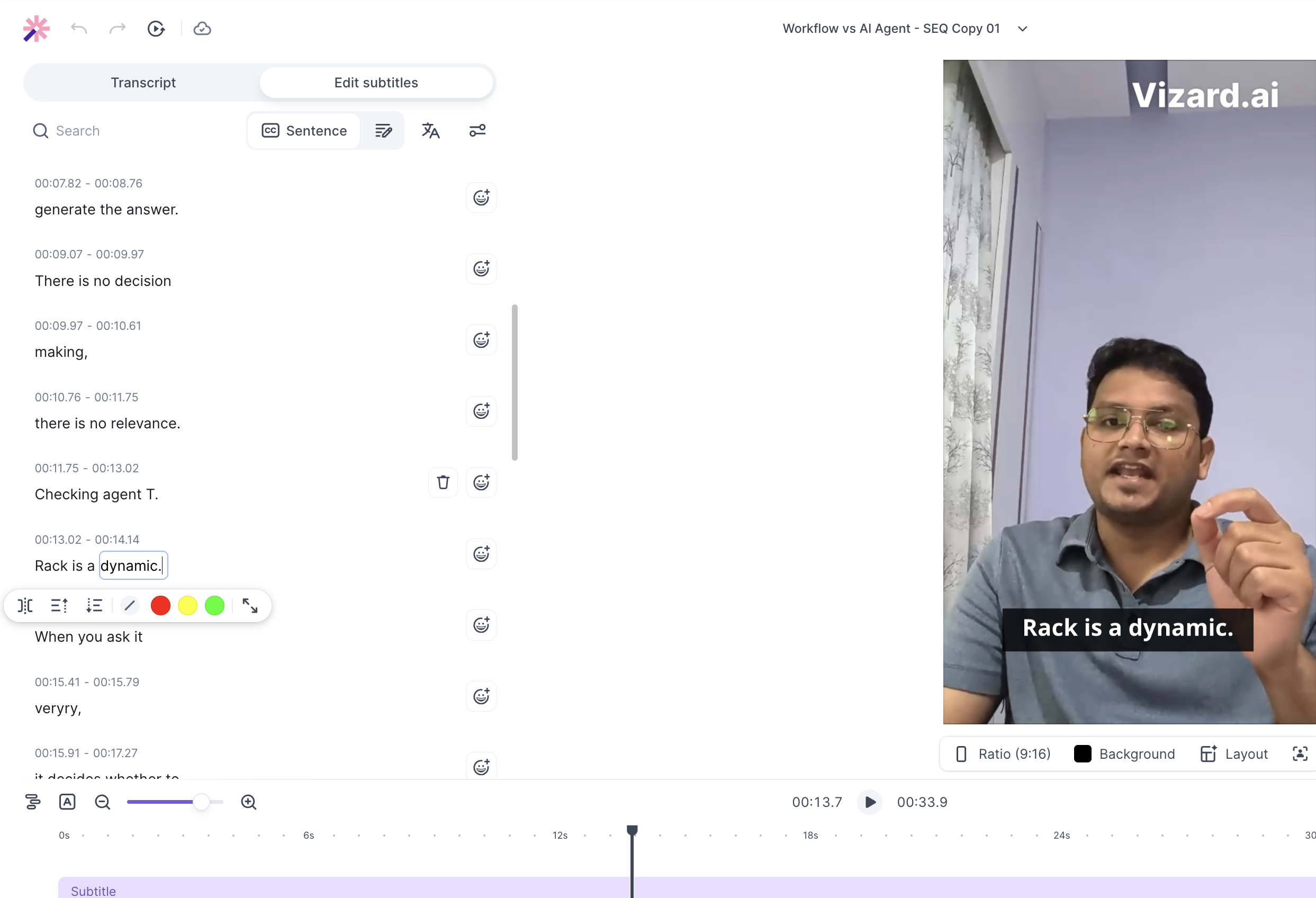
Observed output: Output artifact (Image): The transcript remained editable in a clean, word-processor-style layout, but the report said it lacks advanced timeline manipulation for exact disappear timing. — output-3.png
Input artifact: Input artifact (Video file): Transcript editing test on a pause-heavy narrative clip. — Workflow vs AI Agent - SEQ Copy 01.mp4
Output artifact: Output artifact (Image): The transcript remained editable in a clean, word-processor-style layout, but the report said it lacks advanced timeline manipulation for exact disappear timing. — output-3.png
What changed: Video file transformed into Image
Test case: Text prompt → Image
Input type: Text prompt
Input used: Input artifact (Text prompt): INPUT
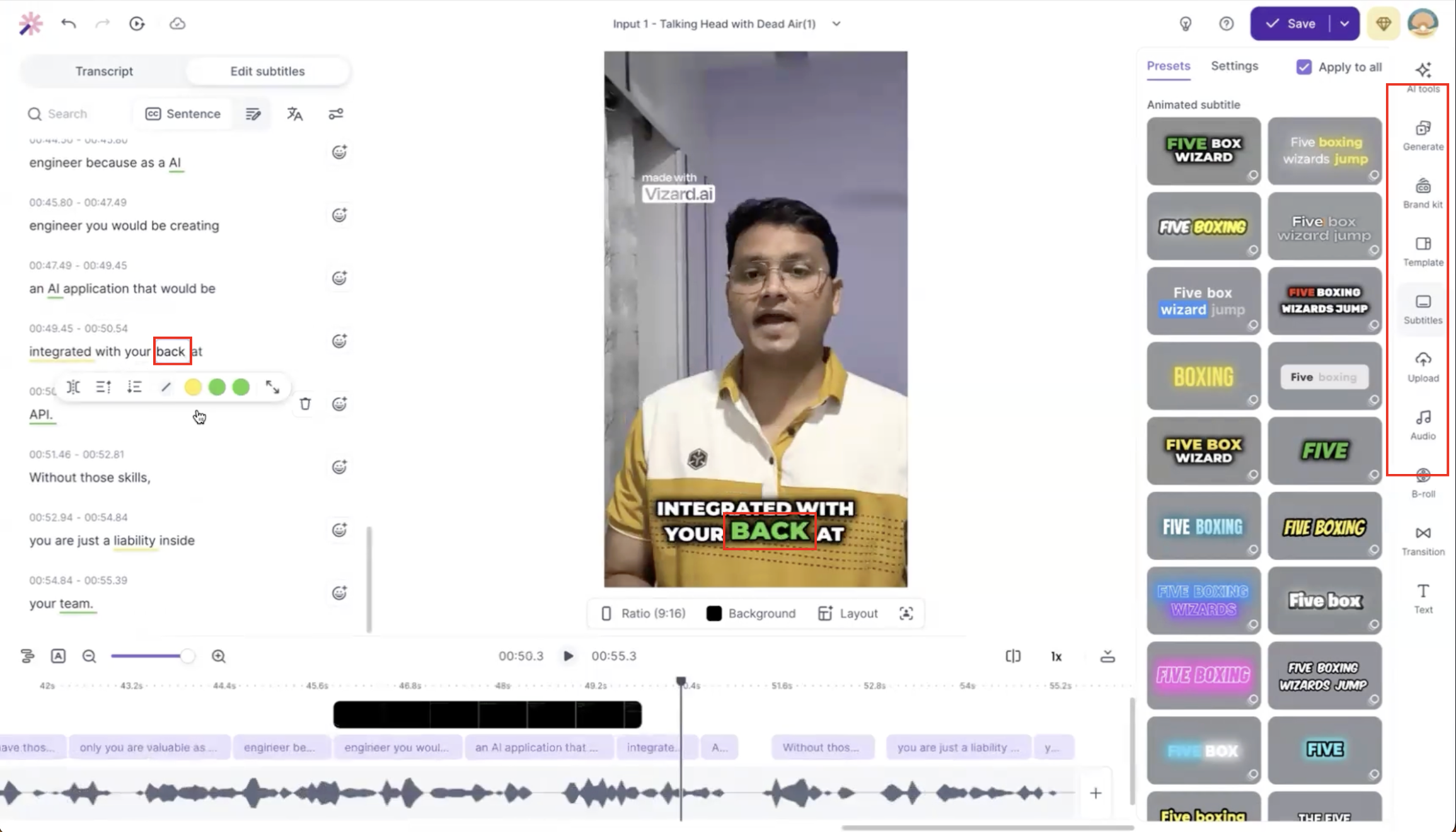
Observed output: Output artifact (Image): The transcript and burned-in subtitle disagree on the phrase 'integrated with your back at,' showing that caption accuracy still needed manual correction on this input. — Vizard-input1-failure-2-caption-accuracy-required-manual-correction-1-2.png
Input artifact: Input artifact (Text prompt): INPUT
Output artifact: Output artifact (Image): The transcript and burned-in subtitle disagree on the phrase 'integrated with your back at,' showing that caption accuracy still needed manual correction on this input. — Vizard-input1-failure-2-caption-accuracy-required-manual-correction-1-2.png
What changed: Text prompt transformed into Image
Test case: Text prompt → Image
Input type: Text prompt
Input used: Input artifact (Text prompt): INPUT
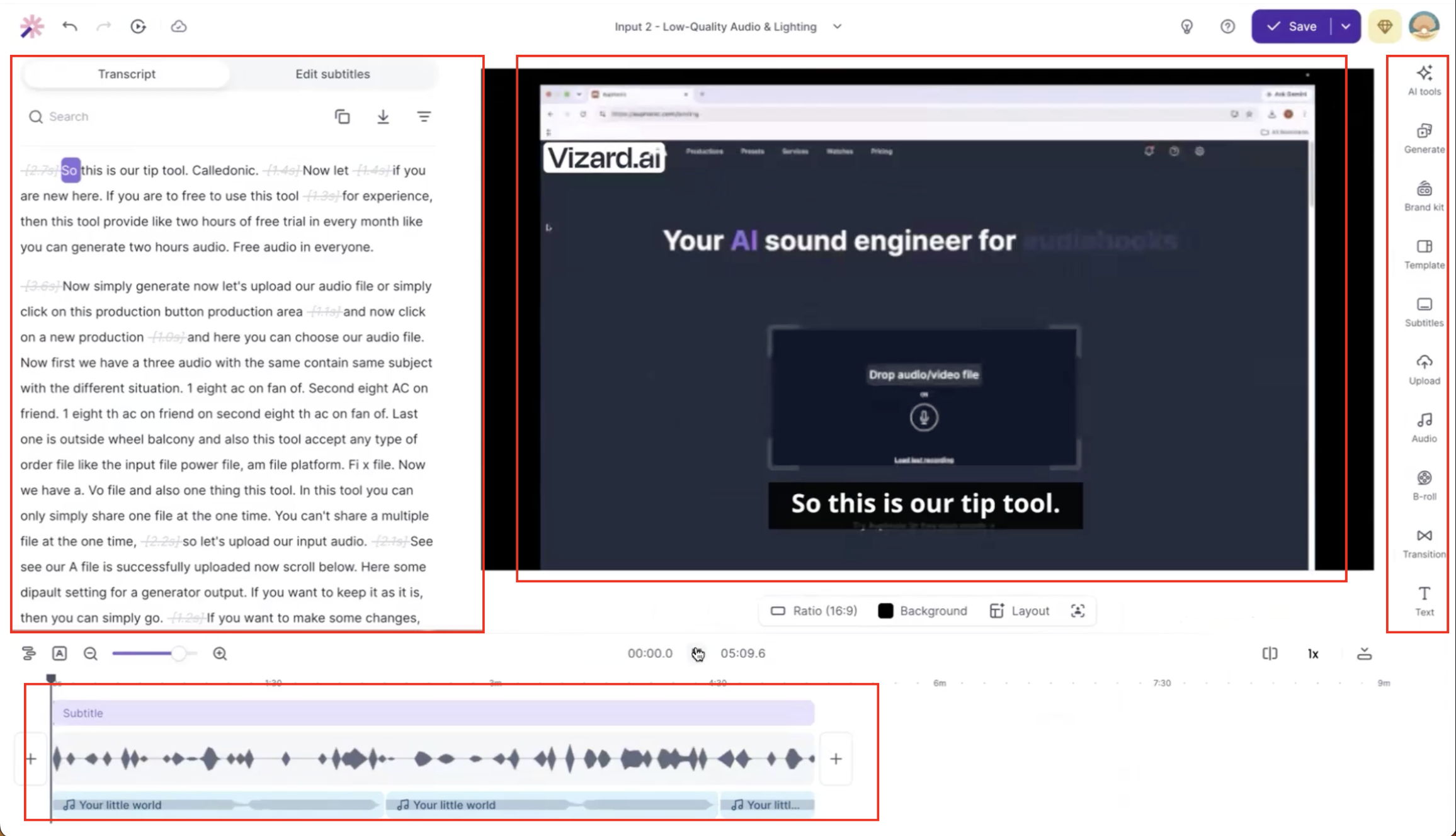
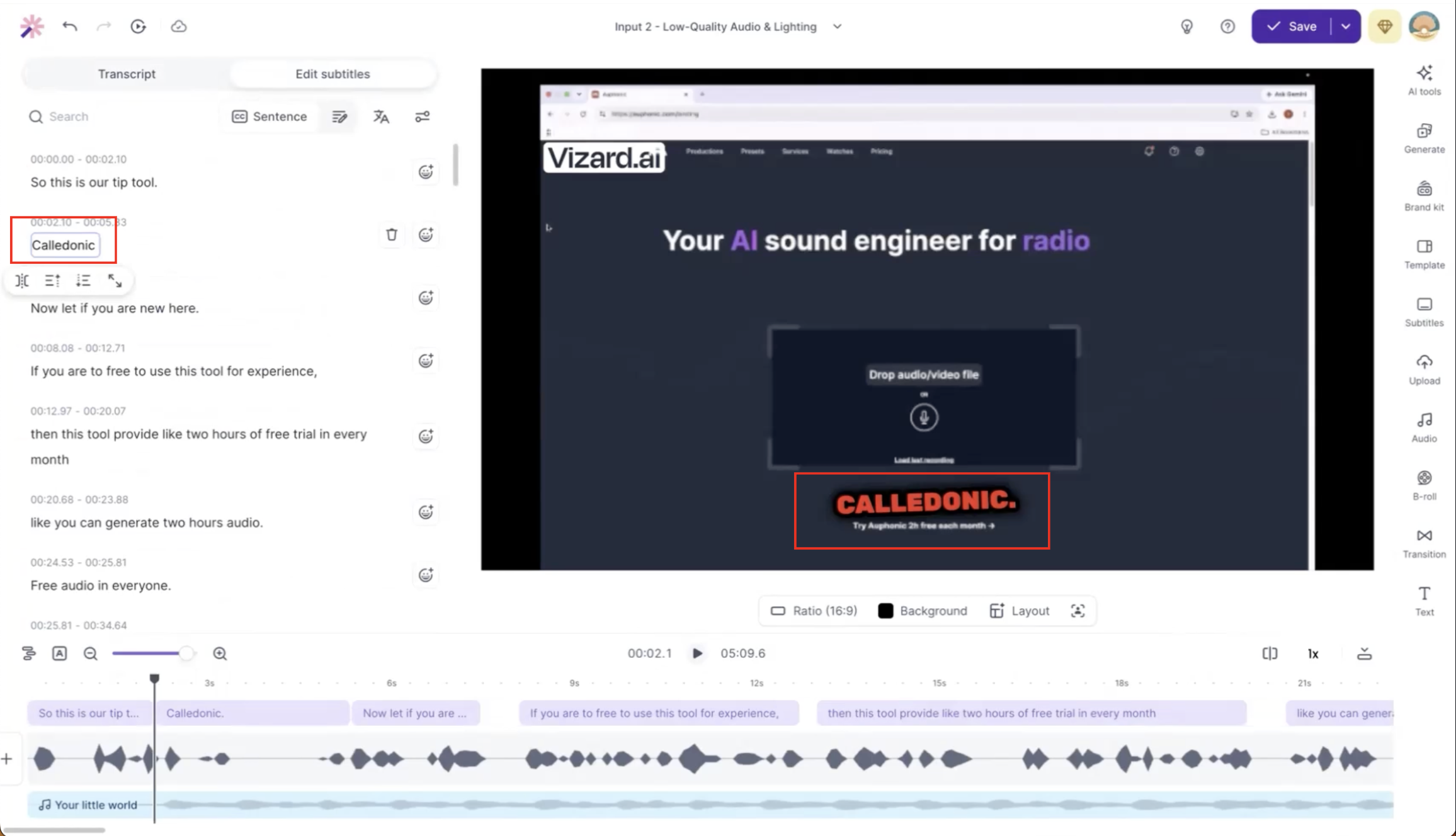
Observed output: Output artifact (Image): The screenshot captures a caption correction for 'Caledonic.', confirming that technical terminology needed proofreading on the second input. — Vizard_Input2_Failure2_Caption_Correction.png
Input artifact: Input artifact (Text prompt): INPUT
Output artifact: Output artifact (Image): The screenshot captures a caption correction for 'Caledonic.', confirming that technical terminology needed proofreading on the second input. — Vizard_Input2_Failure2_Caption_Correction.png
What changed: Text prompt transformed into Image
Why it matters / Conclusion: Good caption drafts, but proper nouns and technical phrases still need review.
Vizard generates synchronized captions and lets users edit the transcript directly. In the tested outputs, captions were generally usable, but technical terms and specific wording needed manual correction, and subtitle presets/styling controls were available in the editor.
Automatic Transcription, Captioning, and Transcript EditingSynced captions, with some word-level corrections needed.▾
Feature tested: Automatic Transcription, Captioning, and Transcript Editing
Result: Partial
Verdict: Synced captions, with some word-level corrections needed.
Expected behavior: Vizard turns uploaded clips into timed captions and editable transcripts while keeping words aligned to speech and pauses. The cards cover rapid-delivery speech, pause-heavy narration, and jargon-heavy speech where timing stayed strong but specific words and technical terms still needed review.
Test case: Video file → Video file
Input type: Video file
Input used: Input artifact (Video file): Input — Input 1 - Talking Head with Dead Air.mp4
Observed output: Output artifact (Video file): Vizard generated synchronized captions for the talking-head clip, but some technical terms and word-level errors needed manual correction in the transcript editor. — Vizard Output 1 - Talking Head with Dead Air.mp4
Input artifact: Input artifact (Video file): Input — Input 1 - Talking Head with Dead Air.mp4
Output artifact: Output artifact (Video file): Vizard generated synchronized captions for the talking-head clip, but some technical terms and word-level errors needed manual correction in the transcript editor. — Vizard Output 1 - Talking Head with Dead Air.mp4
What changed: Video file transformed into Video file
Test case: Video file → Video file
Input type: Video file
Input used: Input artifact (Video file): Input — Input 2 - Low-Quality Audio & Lighting.mp4
Observed output: Output artifact (Video file): Vizard generated synchronized captions for the low-quality recording with good overall accuracy, but software names and technical terminology still required edits. — Vizard Output 2 - Low-Quality Audio & Lighting.mp4
Input artifact: Input artifact (Video file): Input — Input 2 - Low-Quality Audio & Lighting.mp4
Output artifact: Output artifact (Video file): Vizard generated synchronized captions for the low-quality recording with good overall accuracy, but software names and technical terminology still required edits. — Vizard Output 2 - Low-Quality Audio & Lighting.mp4
What changed: Video file transformed into Video file
Test case: Video file → Image
Input type: Video file
Input used: Input artifact (Video file): Technical markdown demo used to test transcription and sync. — Ai Demos now supports markdown pages - SEQ.mp4
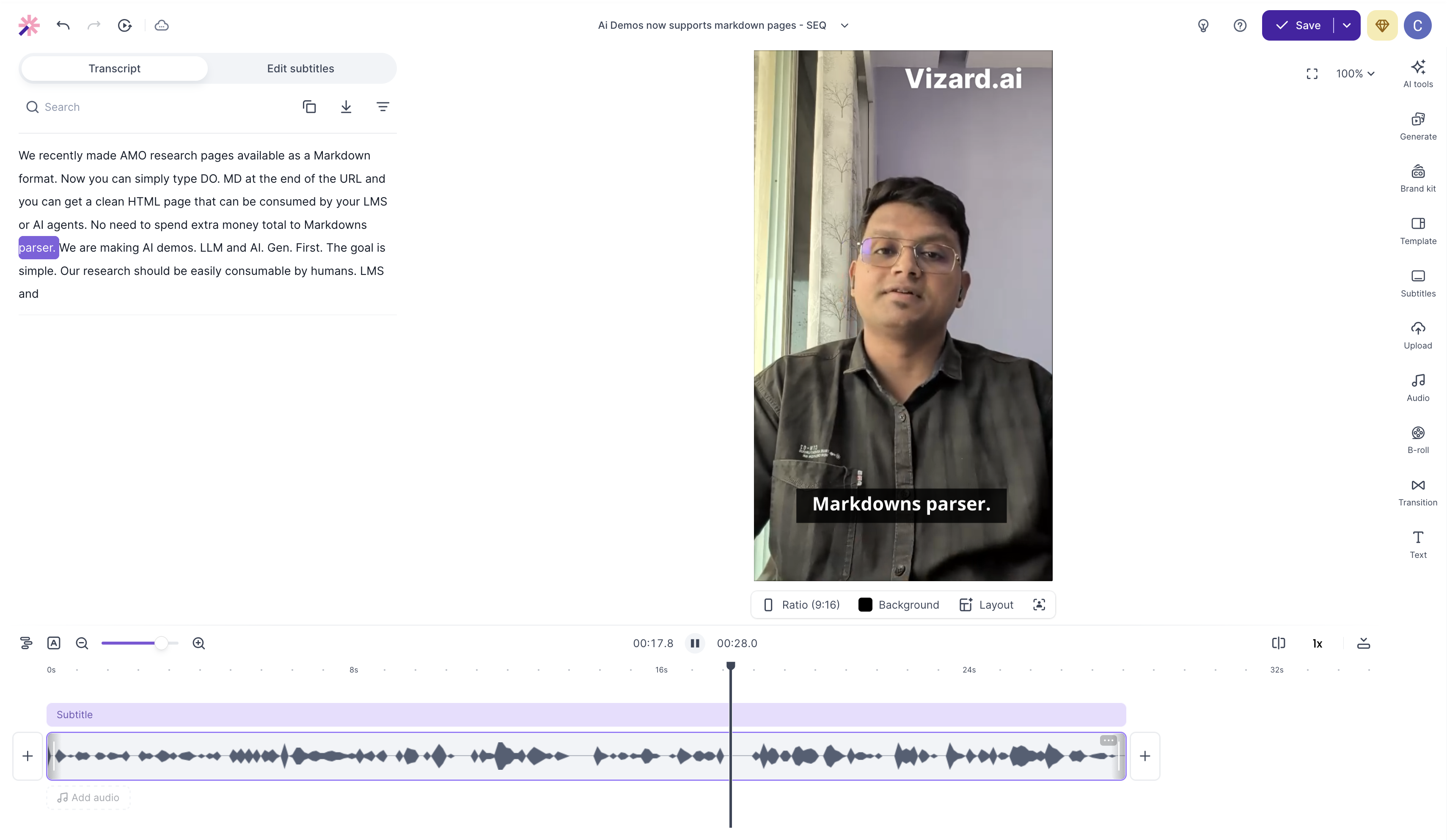
Observed output: Output artifact (Image): The engine parsed the clip quickly into an editable transcript, but it mistranscribed the technical phrase "html to markdown parser" with broken casing and syntax, and the on-video subtitle read "Markdowns parser." — output-1.png
Input artifact: Input artifact (Video file): Technical markdown demo used to test transcription and sync. — Ai Demos now supports markdown pages - SEQ.mp4
Output artifact: Output artifact (Image): The engine parsed the clip quickly into an editable transcript, but it mistranscribed the technical phrase "html to markdown parser" with broken casing and syntax, and the on-video subtitle read "Markdowns parser." — output-1.png
What changed: Video file transformed into Image
Test case: Video file → Image
Input type: Video file
Input used: Input artifact (Video file): Pause-heavy narrative clip used to test silence detection and continuity. — Workflow vs AI Agent - SEQ Copy 01.mp4
Observed output: Output artifact (Image): Silence detection stayed accurate and the caption overlay did not flash or vanish during pauses, preserving continuity across the narrative break. — output-3.png
Input artifact: Input artifact (Video file): Pause-heavy narrative clip used to test silence detection and continuity. — Workflow vs AI Agent - SEQ Copy 01.mp4
Output artifact: Output artifact (Image): Silence detection stayed accurate and the caption overlay did not flash or vanish during pauses, preserving continuity across the narrative break. — output-3.png
What changed: Video file transformed into Image
Test case: Video file → Image
Input type: Video file
Input used: Input artifact (Video file): Rapid speech clip used to test phonetic mapping and sync stability. — AI demos chatbot short.mp4
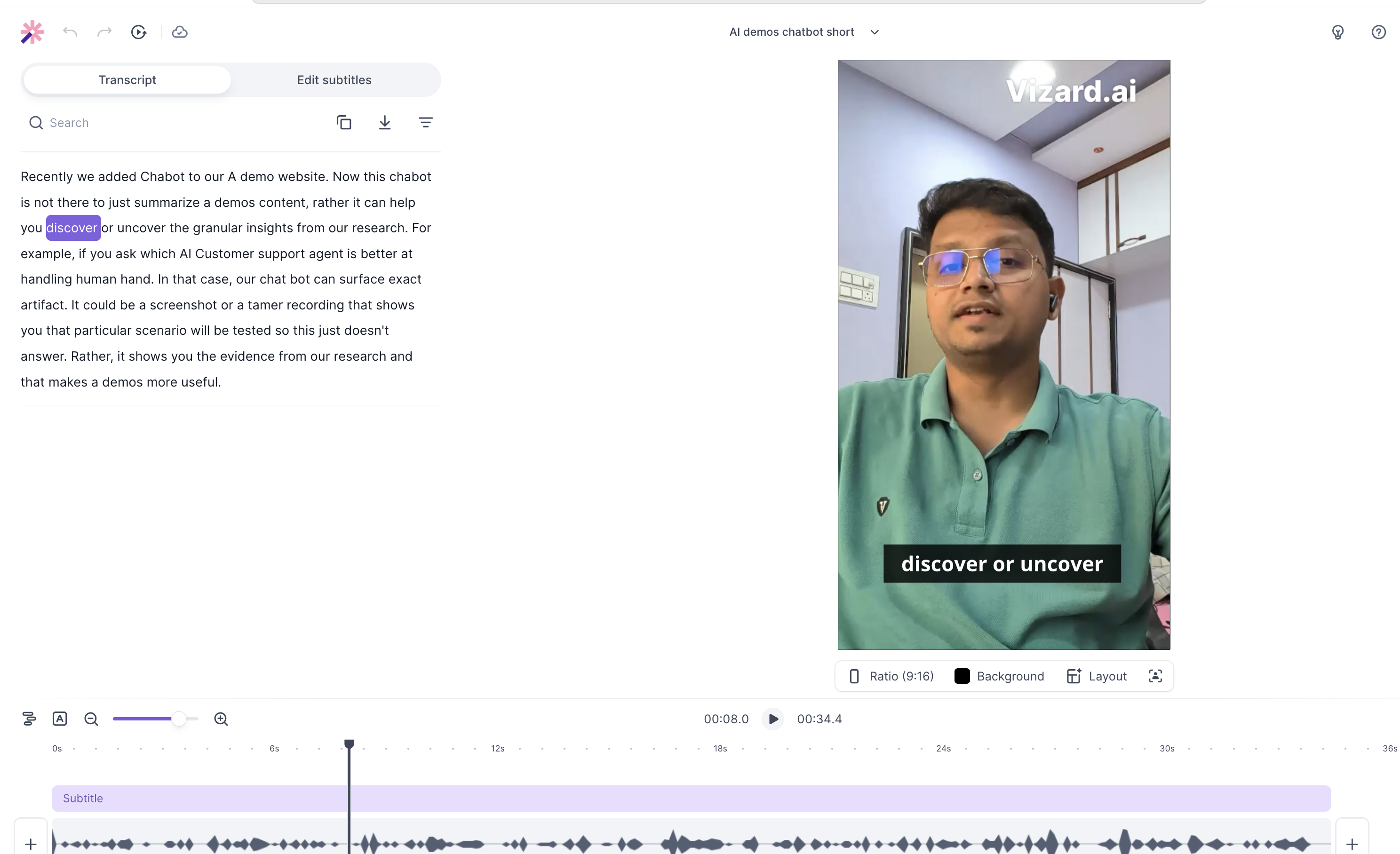
Observed output: Output artifact (Image): Audio-visual synchronization stayed locked on the rapid feed, and the kinetic text remained fluid, but the report noted that the predefined styles and emoji treatment felt generic rather than highly contextual. — Output-2.png
Input artifact: Input artifact (Video file): Rapid speech clip used to test phonetic mapping and sync stability. — AI demos chatbot short.mp4
Output artifact: Output artifact (Image): Audio-visual synchronization stayed locked on the rapid feed, and the kinetic text remained fluid, but the report noted that the predefined styles and emoji treatment felt generic rather than highly contextual. — Output-2.png
What changed: Video file transformed into Image
Why it matters / Conclusion: Useful transcript editor, but captions are not reliable enough to publish without checking.
Vizard turns uploaded clips into timed captions and editable transcripts while keeping words aligned to speech and pauses. The cards cover rapid-delivery speech, pause-heavy narration, and jargon-heavy speech where timing stayed strong but specific words and technical terms still needed review.
Caption Styling and Emoji OverlaysWorks for basic animated captions, but the style range is generic.▾
Feature tested: Caption Styling and Emoji Overlays
Result: Partial
Verdict: Works for basic animated captions, but the style range is generic.
Expected behavior: Vizard.ai applies built-in caption templates and burned-in animated subtitle styling, and it can automatically place emoji overlays on vertical video. The tested presets animated smoothly, but the style options were mostly preset-driven.
Test case: Video file → Image
Input type: Video file
Input used: Input artifact (Video file): Rapid clip used to test kinetic styling and auto-emoji placement. — AI demos chatbot short.mp4
Observed output: Output artifact (Image): output — output-1.png
Input artifact: Input artifact (Video file): Rapid clip used to test kinetic styling and auto-emoji placement. — AI demos chatbot short.mp4
Output artifact: Output artifact (Image): output — output-1.png
What changed: Video file transformed into Image
Why it matters / Conclusion: Animated, yes; distinctive or brand-forward, not on the tested free tier.
Vizard.ai applies built-in caption templates and burned-in animated subtitle styling, and it can automatically place emoji overlays on vertical video. The tested presets animated smoothly, but the style options were mostly preset-driven.
Automatic Transcription and Caption SyncStrong timing, but technical vocabulary still needs manual correction.▾
Feature tested: Automatic Transcription and Caption Sync
Result: Partial
Verdict: Strong timing, but technical vocabulary still needs manual correction.
Expected behavior: Vizard.ai turns uploaded clips into timed captions and editable transcripts while keeping words aligned to speech and pauses, including rapid-delivery and pause-heavy narration. The tested clips also covered jargon-heavy speech, where sync stayed strong even when technical terms needed cleanup.
Test case: Video file → Image
Input type: Video file
Input used: Input artifact (Video file): Technical markdown demo used to test transcription and sync. — Ai Demos now supports markdown pages - SEQ.mp4
Observed output: Output artifact (Image): The engine parsed the clip quickly into an editable transcript, but it mistranscribed the technical phrase "html to markdown parser" with broken casing and syntax, and the on-video subtitle read "Markdowns parser." — output-1.png
Input artifact: Input artifact (Video file): Technical markdown demo used to test transcription and sync. — Ai Demos now supports markdown pages - SEQ.mp4
Output artifact: Output artifact (Image): The engine parsed the clip quickly into an editable transcript, but it mistranscribed the technical phrase "html to markdown parser" with broken casing and syntax, and the on-video subtitle read "Markdowns parser." — output-1.png
What changed: Video file transformed into Image
Test case: Video file → Image
Input type: Video file
Input used: Input artifact (Video file): Rapid speech clip used to test phonetic mapping and sync stability. — AI demos chatbot short.mp4
Observed output: Output artifact (Image): Audio-visual synchronization stayed locked on the rapid feed, and the kinetic text remained fluid, but the report noted that the predefined styles and emoji treatment felt generic rather than highly contextual. — Output-2.png
Input artifact: Input artifact (Video file): Rapid speech clip used to test phonetic mapping and sync stability. — AI demos chatbot short.mp4
Output artifact: Output artifact (Image): Audio-visual synchronization stayed locked on the rapid feed, and the kinetic text remained fluid, but the report noted that the predefined styles and emoji treatment felt generic rather than highly contextual. — Output-2.png
What changed: Video file transformed into Image
Test case: Video file → Image
Input type: Video file
Input used: Input artifact (Video file): Pause-heavy narrative clip used to test silence detection and continuity. — Workflow vs AI Agent - SEQ Copy 01.mp4
Observed output: Output artifact (Image): Silence detection stayed accurate and the caption overlay did not flash or vanish during pauses, preserving continuity across the narrative break. — output-3.png
Input artifact: Input artifact (Video file): Pause-heavy narrative clip used to test silence detection and continuity. — Workflow vs AI Agent - SEQ Copy 01.mp4
Output artifact: Output artifact (Image): Silence detection stayed accurate and the caption overlay did not flash or vanish during pauses, preserving continuity across the narrative break. — output-3.png
What changed: Video file transformed into Image
Why it matters / Conclusion: Reliable timing on the tested clips, but jargon-heavy phrases still need review.
Vizard.ai turns uploaded clips into timed captions and editable transcripts while keeping words aligned to speech and pauses, including rapid-delivery and pause-heavy narration. The tested clips also covered jargon-heavy speech, where sync stayed strong even when technical terms needed cleanup.
Verified July 2026 pricing
Free-plan benchmark with paid tiers that add no-watermark and higher-resolution exports.
1 credit = 1 minute of video on paid plans. The benchmark used the Free plan.
Featured in Rankings
Independent rankings where Vizard was tested and rated.
Banner Preview
How the embed badge will look on your site

Embed HTML
Copy this code to your website source
Quick Integration Guide
- 1Copy the HTML code block above.
- 2Paste it into your site's HTML or CMS editor.
- 3Banner appears instantly on your page.
- 4Links back to your tool profile here.
Similar Tools
Discover more AI tools like Vizard to enhance your workflow.
Comments (0)
Need a custom AI solution for this use case?
If you are looking to build a custom video repurposing, captioning, or B-roll generation workflow for your business or internal workflow, email us at contact@futuresmart.ai.
Found something inaccurate or missing? We try to keep our AI research accurate and useful. If you found outdated information, an issue, or have a suggestion, email us at collaborate@aidemos.com.