Generate Code-Based Animation Videos from Text Prompts Using AI
Developers building explainers, flowcharts, and data visualizations need animated videos that fit naturally into a code-first workflow — version-controlled, inspectable, and reproducible. We tested five AI tools that claim to generate animation code from text prompts and render it to video. One delivers the complete workflow with zero external setup.
What to Expect
What We Tested
We tested 5 tools that claim end-to-end or pipeline-supported animation code generation, using three identical prompts varying in specificity, complexity, and technical path.
The Best Way to Do It
Our Recommendation — Use Replit Animation. It generates downloadable MP4 videos directly in-platform with no external render pipeline, zero environment setup, and the fastest iteration loop from prompt to final video.
Here's exactly how to do it, step by step — tested April 2026.
Step by Step Guide
Paste Your Prompt
Open replit.com, paste your animation description directly into the agent chat.

Choose Animation Feature
Click the "Animation" option from the template selector shown below the prompt field.

Generate Video with Agent
Click the blue arrow to start generation. The agent creates complete React code and preview updates in real-time — see the sub-agent that handles the animation sequence.

Refine the code
Describe what's missing in the chat — agent updates base code instantly. Or manually edit the code in the editor yourself as shown. Preview refreshes as you make changes.
.png&w=3840&q=75)
Export to MP4
Click "Export" in the top menu to render the mp4 format. Chose your desired quality and click render.

What You'll Actually Get
Real outputs from Replit Animation across different input complexity levels.
Search Engine Animation
SaaS Animation
Historical Animation
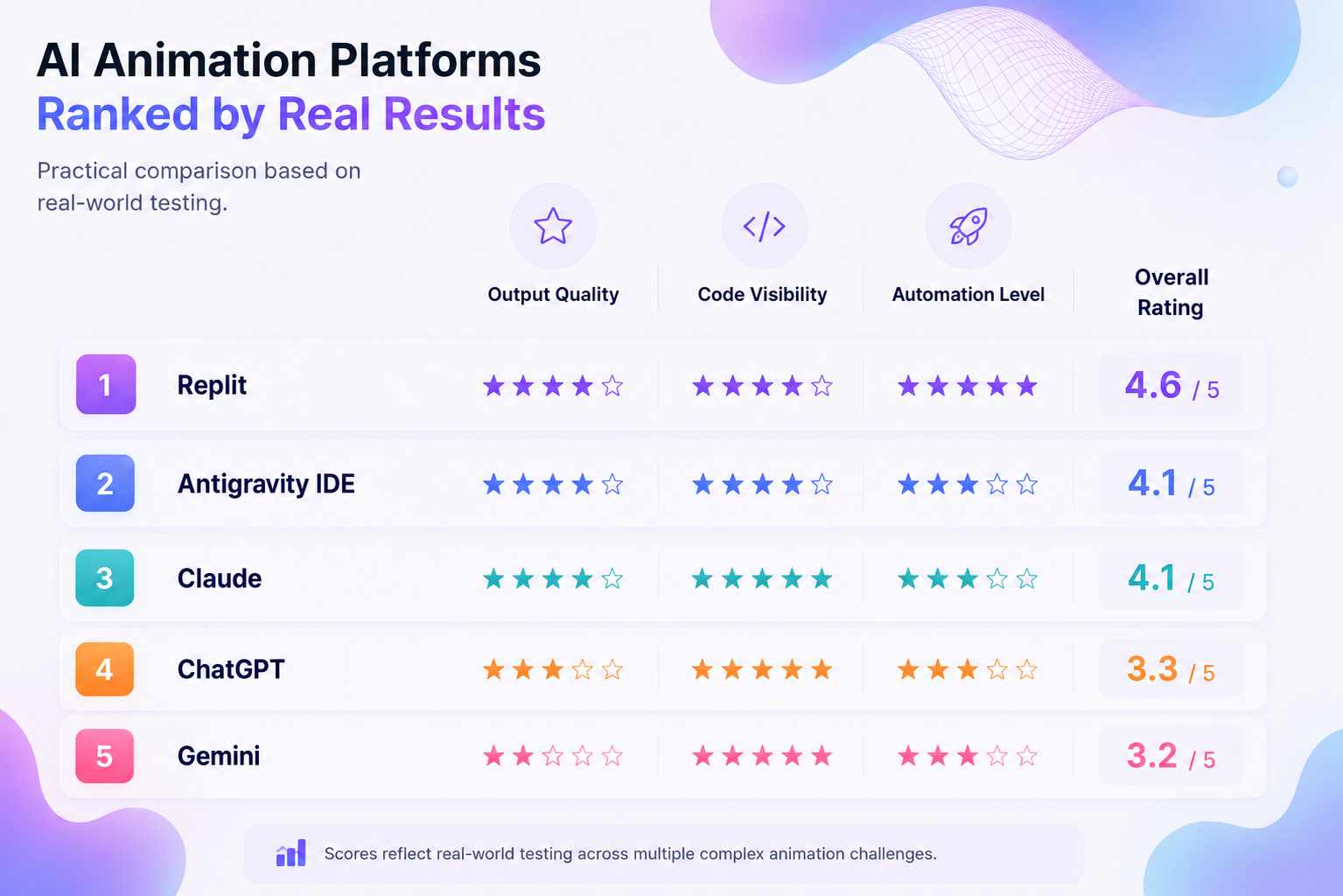
Comparison of Tools
Edge case branches sometimes missed initially
Visual polish decreases on very complex systems
Timing adjustments are conversational, not visual
Manual code edits require framework knowledge
Frequently Asked Questions
Do these tools generate real code or just video output?▾
Most modern AI animation tools generate real, editable code instead of only exporting video files. Depending on the platform, the output may use React, GSAP, HTML/CSS/JavaScript, p5.js, or similar frameworks.
Which tool required the least manual setup?▾
Replit Animation had the simplest workflow in testing because it combined code generation, preview, iteration, and MP4 export inside a single interface without requiring local setup or external rendering tools.
Are these tools good enough for technical explainers?▾
Yes, especially for workflow explainers, architecture diagrams, system overviews, and educational animations. Simpler sequential concepts produce stronger results, while very dense multi-system workflows may still require refinement.
Can I edit the generated animations manually?▾
Yes. The generated projects remain fully editable, so developers can adjust layouts, timing, transitions, styling, and animation logic directly in the code.
Do I need animation experience to use these tools?▾
Not necessarily for basic generation and iteration, but modifying the generated code directly still benefits from familiarity with frameworks like React, Remotion, or JavaScript animation libraries.
Need a custom AI solution for this use case?
If you are looking to build a custom text-to-animation video generator, animation code generation, or explainer video workflow for your business or internal workflow, email us at contact@futuresmart.ai.
Found something inaccurate or missing? We try to keep our AI research accurate and useful. If you found outdated information, an issue, or have a suggestion, email us at collaborate@aidemos.com.