
Datalab
Schema-paste extraction for bank statements and invoices, with cited JSON output and fast-mode recovery when schemas get large.
Strong structure, but bank-statement transactions need review
- You want to paste a JSON schema and get nested JSON back without writing code.
- You need extracted values to carry page and table citations for audit and review.
- You can review bank-statement rows before downstream use, especially when the document is dense.
- You need exact bank-statement row boundaries or transaction IDs without manual cleanup.
Our take
Datalab handled schema-guided extraction well: both PDFs came back as nested JSON, and the citations made the results easy to audit. The invoice path looked clean, with eight line items and summary totals extracted in a review-friendly structure. The bank-statement path was much rougher: rows were merged, transaction IDs stayed null, the count was inflated, and some rows were misclassified or misdated. Balanced mode also hit a schema-size error, but Fast mode recovered successfully, so the workflow is usable if a human can validate the financial rows before downstream use.
In-Depth Review
Our detailed analysis of Datalab — features, performance, and real-world testing.
Feature-by-Feature Breakdown
Schema-Guided Nested ExtractionStrong overall, with cleaner invoice output than bank-statement rows.▾
Feature tested: Schema-Guided Nested Extraction
Result: Passed
Verdict: Strong overall, with cleaner invoice output than bank-statement rows.
Expected behavior: Datalab can take a pasted JSON schema and extract business PDFs into nested structured output. The bank statement run reconstructed metadata, account, branch, balances, transactions, summary, and disclaimers, and the same schema-shaped approach was used on the invoice.
Test case: PDF document → Text/code file
Input type: PDF document
Input used: Input artifact (PDF document): Input — Bank Statement PDF.pdf
Observed output: Output artifact (Text/code file): Nested JSON for statement metadata, account, branch, balances, transactions, summary, and disclaimers was produced from the bank statement. — datalab-bank-statement-output.json
Input artifact: Input artifact (PDF document): Input — Bank Statement PDF.pdf
Output artifact: Output artifact (Text/code file): Nested JSON for statement metadata, account, branch, balances, transactions, summary, and disclaimers was produced from the bank statement. — datalab-bank-statement-output.json
What changed: PDF document transformed into Text/code file
Test case: PDF document → Text/code file
Input type: PDF document
Input used: Input artifact (PDF document): Input — Invoice PDF.pdf
Observed output: Output artifact (Text/code file): Nested JSON for invoice_metadata, advertiser, station, account_details, billing sections, line_items, and summary was produced from the invoice. — datalab-invoice-output.json
Input artifact: Input artifact (PDF document): Input — Invoice PDF.pdf
Output artifact: Output artifact (Text/code file): Nested JSON for invoice_metadata, advertiser, station, account_details, billing sections, line_items, and summary was produced from the invoice. — datalab-invoice-output.json
What changed: PDF document transformed into Text/code file
Why it matters / Conclusion: Good schema adherence across both documents, but the bank statement still needed transaction-level cleanup before downstream use.
Datalab can take a pasted JSON schema and extract business PDFs into nested structured output. The bank statement run reconstructed metadata, account, branch, balances, transactions, summary, and disclaimers, and the same schema-shaped approach was used on the invoice.
Field Citations and ProvenanceA clear strength for audit and review workflows.▾
Feature tested: Field Citations and Provenance
Result: Passed
Verdict: A clear strength for audit and review workflows.
Expected behavior: Datalab can attach extracted values back to source locations such as pages, tables, and text spans. In the bank statement and invoice runs, citations were present on metadata, account, transaction, line-item, totals, and disclaimer fields.
Test case: PDF document → Image
Input type: PDF document
Input used: Input artifact (PDF document): Input — Bank Statement PDF.pdf
Observed output: Output artifact (Image): Citation paths are shown on extracted bank-statement values, including source page and text references. — datalab-bank-statement-extracted-citation.png
Input artifact: Input artifact (PDF document): Input — Bank Statement PDF.pdf
Output artifact: Output artifact (Image): Citation paths are shown on extracted bank-statement values, including source page and text references. — datalab-bank-statement-extracted-citation.png
What changed: PDF document transformed into Image
Test case: PDF document → Image
Input type: PDF document
Input used: Input artifact (PDF document): Input — Invoice PDF.pdf
Observed output: Output artifact (Image): Invoice metadata is shown with citations back to /page/0/Table/8 and /page/1/Table/8. — datalab-invoice-metadat.png
Input artifact: Input artifact (PDF document): Input — Invoice PDF.pdf
Output artifact: Output artifact (Image): Invoice metadata is shown with citations back to /page/0/Table/8 and /page/1/Table/8. — datalab-invoice-metadat.png
What changed: PDF document transformed into Image
Why it matters / Conclusion: Traceability is one of Datalab's strongest capabilities, but provenance does not fix extraction mistakes on messy transaction rows.
Datalab can attach extracted values back to source locations such as pages, tables, and text spans. In the bank statement and invoice runs, citations were present on metadata, account, transaction, line-item, totals, and disclaimer fields.

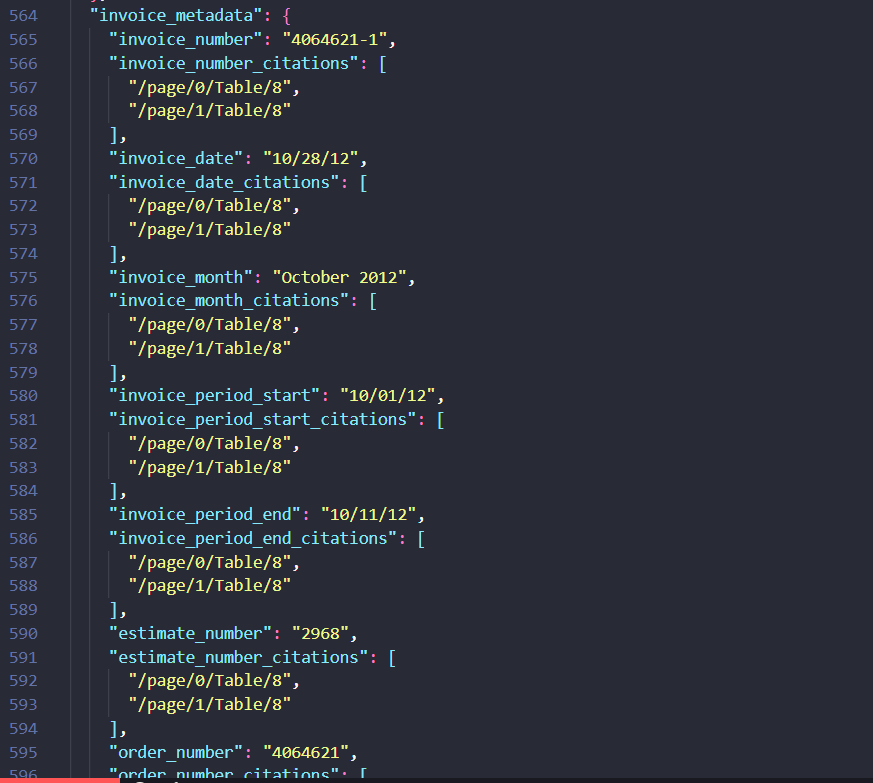
Table and Transaction Row ReconstructionExcellent on invoice rows; inconsistent on bank-statement transactions.▾
Feature tested: Table and Transaction Row Reconstruction
Result: Passed
Verdict: Excellent on invoice rows; inconsistent on bank-statement transactions.
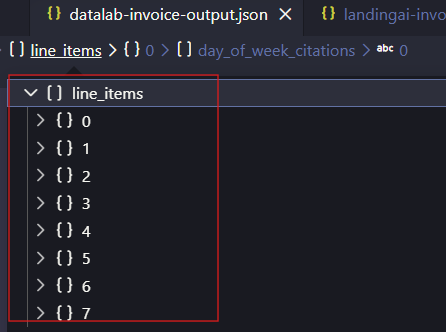
Expected behavior: Datalab can turn tables and repeating transaction rows into structured arrays. The invoice produced eight clean line items, while the bank statement showed mixed row segmentation quality on several transaction entries.
Test case: Image → Image
Input type: Image
Input used: Input artifact (Image): Input — bank-statement-21-jun-transactions.png
Observed output: Output artifact (Image): The 21 Jun statement rows were collapsed into one long UPI/merchant description, showing merged transaction boundaries. — datalab-bank-statement-21-jun-extracted-transactions.png
Input artifact: Input artifact (Image): Input — bank-statement-21-jun-transactions.png
Output artifact: Output artifact (Image): The 21 Jun statement rows were collapsed into one long UPI/merchant description, showing merged transaction boundaries. — datalab-bank-statement-21-jun-extracted-transactions.png
What changed: Image transformed into Image
Test case: Image → Image
Input type: Image
Input used: Input artifact (Image): Input — bank-statement-18-june-transaction-id.png
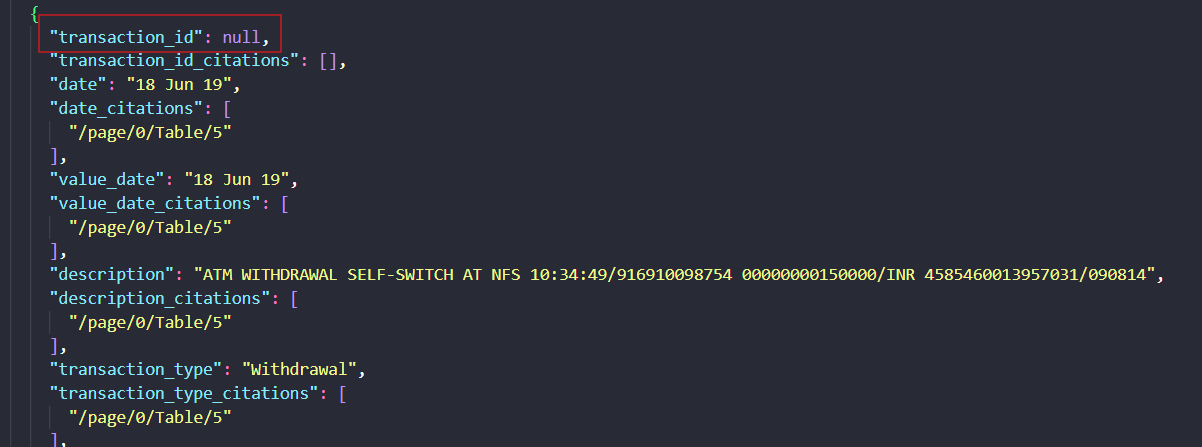
Observed output: Output artifact (Image): The 18 Jun ATM withdrawal kept the embedded reference number in the description but returned transaction_id as null. — datalab-bank-statement-extracted-18-jun-transaction-id.png
Input artifact: Input artifact (Image): Input — bank-statement-18-june-transaction-id.png
Output artifact: Output artifact (Image): The 18 Jun ATM withdrawal kept the embedded reference number in the description but returned transaction_id as null. — datalab-bank-statement-extracted-18-jun-transaction-id.png
What changed: Image transformed into Image
Test case: Image → Image
Input type: Image
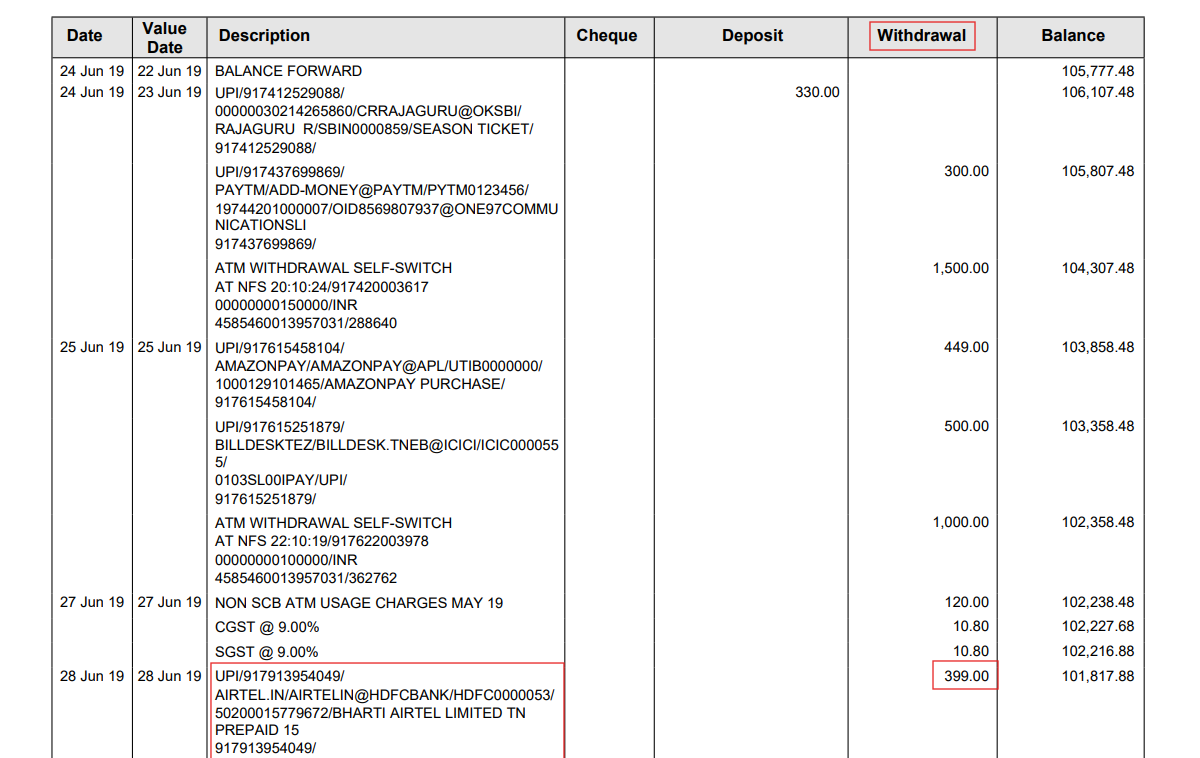
Input used: Input artifact (Image): Input — bank-statement-28-jun-transaction.png
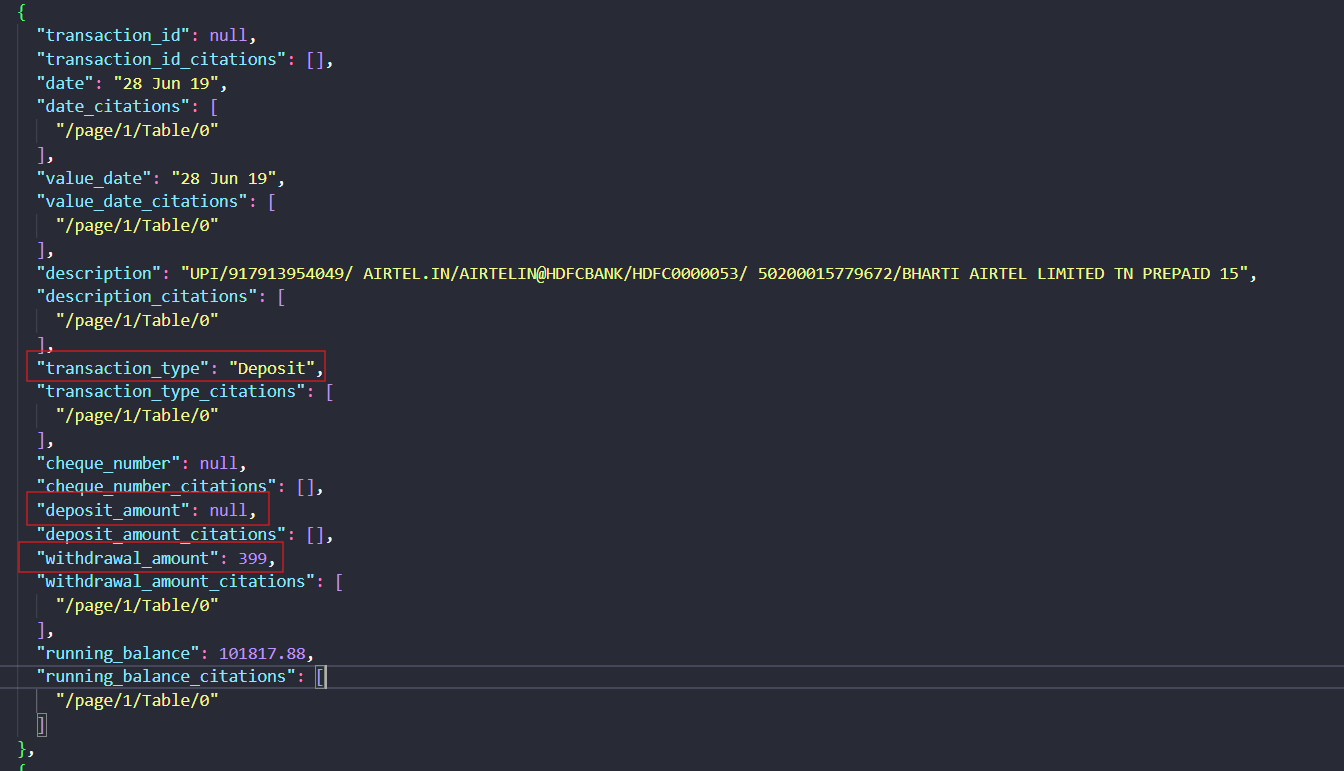
Observed output: Output artifact (Image): The 28 Jun row was classified as Deposit even though the row contained a 399 withdrawal, which is a classification error. — datalab-bank-statement-extracted-28-jun-transaction.png
Input artifact: Input artifact (Image): Input — bank-statement-28-jun-transaction.png
Output artifact: Output artifact (Image): The 28 Jun row was classified as Deposit even though the row contained a 399 withdrawal, which is a classification error. — datalab-bank-statement-extracted-28-jun-transaction.png
What changed: Image transformed into Image
Test case: PDF document → Image
Input type: PDF document
Input used: Input artifact (PDF document): Input — Bank Statement PDF.pdf
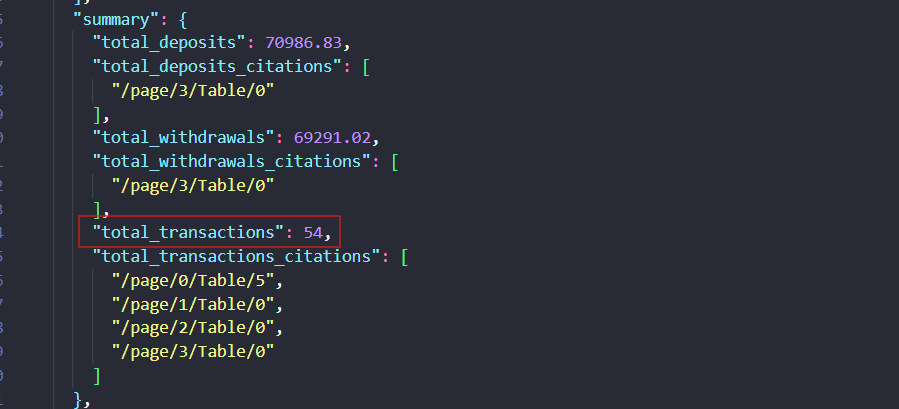
Observed output: Output artifact (Image): The extracted summary reported 54 total transactions, which exceeded the expected count and confirmed over-segmentation or duplicated rows. — datalab-bank-statement-transaction-count.png
Input artifact: Input artifact (PDF document): Input — Bank Statement PDF.pdf
Output artifact: Output artifact (Image): The extracted summary reported 54 total transactions, which exceeded the expected count and confirmed over-segmentation or duplicated rows. — datalab-bank-statement-transaction-count.png
What changed: PDF document transformed into Image
Test case: PDF document → Image
Input type: PDF document
Input used: Input artifact (PDF document): Input — Invoice PDF.pdf
Observed output: Output artifact (Image): The invoice line_items array expanded to eight entries, showing clean row separation in the output tree. — datalab-invoice-line-items.png
Input artifact: Input artifact (PDF document): Input — Invoice PDF.pdf
Output artifact: Output artifact (Image): The invoice line_items array expanded to eight entries, showing clean row separation in the output tree. — datalab-invoice-line-items.png
What changed: PDF document transformed into Image
Why it matters / Conclusion: Invoice rows were reconstructed cleanly, but bank-statement segmentation was not reliable enough to trust without review.
Datalab can turn tables and repeating transaction rows into structured arrays. The invoice produced eight clean line items, while the bank statement showed mixed row segmentation quality on several transaction entries.



How it scored on the research's own criteria
The 5 evaluation dimensions from our hands-on research on Datalab, each judged from recorded runs on 2 test inputs — the same verdicts the ranking page ranks on.
held up partial failed not exercised by this input
| Criterion | Verdict | What the runs showed | Per input | Proof |
|---|---|---|---|---|
| Extraction Accuracy | Mixed | No run checked raw field correctness directly on either document, so we can't tell whether the dates, amounts, names, and other values were right well enough to score this. | — | |
| Schema Adherence | Strong5/5 | Both documents stayed inside the requested object tree, with the right section names and nesting instead of flattened OCR text. That is a full pass on structure, not just a partial one. | open proof ↗ | |
| Semantic Field Enrichment | Mixed3/5 | The invoice side shows strong derived-field handling, but the bank side leaves key derived transaction fields blank or wrong. So it can enrich some document types well, yet it is not consistent across the set. | open proof ↗ | |
| Structural Clean Output | Mixed3/5 | The output was still usable JSON, but the top-level ordering drifted from the schema instead of staying neatly arranged. That is a minor structure issue rather than a broken export. | open proof ↗ | |
| Table & Record Completeness | Mixed3/5 | The invoice table was rebuilt cleanly, but the bank statement counted too many transactions and treated some continuations as extra rows. That makes the overall picture genuinely mixed. | open proof ↗ |
Verdicts come verbatim from the study's recorded observations, never re-derived at render; a criterion with no recorded run shows Not exercised — this section cannot invent a score.
Reported plans
Pricing was stated in the task report; no plan limits or quotas were verified in this test.
Featured in Rankings
Independent rankings where Datalab was tested and rated.
Banner Preview
How the embed badge will look on your site

Embed HTML
Copy this code to your website source
Quick Integration Guide
- 1Copy the HTML code block above.
- 2Paste it into your site's HTML or CMS editor.
- 3Banner appears instantly on your page.
- 4Links back to your tool profile here.
Similar Tools
Discover more AI tools like Datalab to enhance your workflow.
Comments (0)
Need a custom AI solution for this use case?
If you are looking to build a custom document extraction, invoice parsing, or bank statement extraction system for your business or internal workflow, email us at contact@futuresmart.ai.
Found something inaccurate or missing? We try to keep our AI research accurate and useful. If you found outdated information, an issue, or have a suggestion, email us at collaborate@aidemos.com.