
Reducto
Hosted PDF-to-Markdown plus schema extraction with citations; strong on invoices, mixed on tables and bank statements.
Our take
- You want a hosted API to turn complex PDFs into markdown or structured JSON without running a local parser.
- You need nested JSON from invoices or bank statements instead of flat OCR text.
- You need row-preserving extraction for repeating records such as invoice line items or bank transactions.
- You need every heading turned into reliable markdown headings for downstream chunking.
Our take
Reducto is strongest as a hosted PDF-to-markdown converter and schema-driven extractor: it preserved text from scanned pages, kept charts/logos/images usable when image return was enabled, and produced structured JSON with citations and confidence metadata. It was especially solid on the invoice PDF, where it reconstructed the nested schema and kept all eight line items, but table reconstruction, heading markup, signatures, and some bank-statement fields still needed review. The practical fit is a workflow where you want usable conversion and auditability, not fully hands-off reconciliation or perfectly formatted markdown on every page.
In-Depth Review
Our detailed analysis of Reducto — features, performance, and real-world testing.
Feature-by-Feature Breakdown
PDF-to-Markdown ConversionReliable for complete PDF-to-markdown conversion across native and scanned documents.▾
Feature tested: PDF-to-Markdown Conversion
Result: Partial
Verdict: Reliable for complete PDF-to-markdown conversion across native and scanned documents.
Expected behavior: Reducto converts long hybrid, table-heavy, and scanned PDFs into continuous markdown without skipping pages. The evidence spans an 84-page annual report, an 18-page quarterly report, and a 12-page scanned research paper, with continuous page markers and mostly intact body text.
Test case: PDF document → Text/code file
Input type: PDF document
Input used: Input artifact (PDF document): Source — Target-2015-Annual-Report.pdf
Observed output: Output artifact (Text/code file): 84-page report converted with no skipped pages; the long market-value and shares-outstanding sentence stayed exact. — reducto_input1_hybridearnings_output.md
Input artifact: Input artifact (PDF document): Source — Target-2015-Annual-Report.pdf
Output artifact: Output artifact (Text/code file): 84-page report converted with no skipped pages; the long market-value and shares-outstanding sentence stayed exact. — reducto_input1_hybridearnings_output.md
What changed: PDF document transformed into Text/code file
Test case: PDF document → Text/code file
Input type: PDF document
Input used: Input artifact (PDF document): 18-page Sumitomo Heavy Industries quarterly financial report; dense tables and repeated logo header, no charts. — Sumitomo Financial PDF.pdf
Observed output: Output artifact (Text/code file): Full-document markdown output for the 18-page financial report; all 18 pages converted. — reducto_input2_financialpdf_output.md
Input artifact: Input artifact (PDF document): 18-page Sumitomo Heavy Industries quarterly financial report; dense tables and repeated logo header, no charts. — Sumitomo Financial PDF.pdf
Output artifact: Output artifact (Text/code file): Full-document markdown output for the 18-page financial report; all 18 pages converted. — reducto_input2_financialpdf_output.md
What changed: PDF document transformed into Text/code file
Test case: PDF document → Text/code file
Input type: PDF document
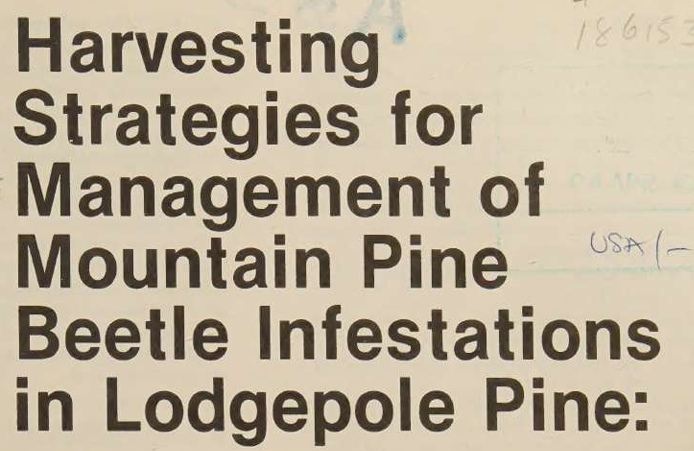
Input used: Input artifact (PDF document): 12-page scanned USDA Forest Service research paper with aged paper, handwritten annotations, multi-column layout, charts, and dense tables. — Scanned Research PDF.pdf
Observed output: Output artifact (Text/code file): Full-document markdown output for the scanned research paper; all 12 pages converted, including the final back-cover page. — reducto_input3_scannedpaper_output.md
Input artifact: Input artifact (PDF document): 12-page scanned USDA Forest Service research paper with aged paper, handwritten annotations, multi-column layout, charts, and dense tables. — Scanned Research PDF.pdf
Output artifact: Output artifact (Text/code file): Full-document markdown output for the scanned research paper; all 12 pages converted, including the final back-cover page. — reducto_input3_scannedpaper_output.md
What changed: PDF document transformed into Text/code file
Test case: Image → Image
Input type: Image
Input used: Input artifact (Image): 10-K cover heading block showing the FORM 10-K title and annual-report checkbox area. — reducto_input1_form10k_heading_source.png
Observed output: Output artifact (Image): The text is flattened without heading markup, so the prominent cover heading is not surfaced as markdown structure. — reducto_input1_form10k_heading_omitted_failed.png
Input artifact: Input artifact (Image): 10-K cover heading block showing the FORM 10-K title and annual-report checkbox area. — reducto_input1_form10k_heading_source.png
Output artifact: Output artifact (Image): The text is flattened without heading markup, so the prominent cover heading is not surfaced as markdown structure. — reducto_input1_form10k_heading_omitted_failed.png
What changed: Image transformed into Image
Test case: Image → Image
Input type: Image
Input used: Input artifact (Image): Quarterly-results section heading area from the Sumitomo Heavy Industries report. — reducto_input2_heading_source.png
Observed output: Output artifact (Image): The section text comes through as plain paragraph text, with no heading markup anywhere in the document. — reducto_input2_heading_parsed_failure.png
Input artifact: Input artifact (Image): Quarterly-results section heading area from the Sumitomo Heavy Industries report. — reducto_input2_heading_source.png
Output artifact: Output artifact (Image): The section text comes through as plain paragraph text, with no heading markup anywhere in the document. — reducto_input2_heading_parsed_failure.png
What changed: Image transformed into Image
Test case: Image → Image
Input type: Image
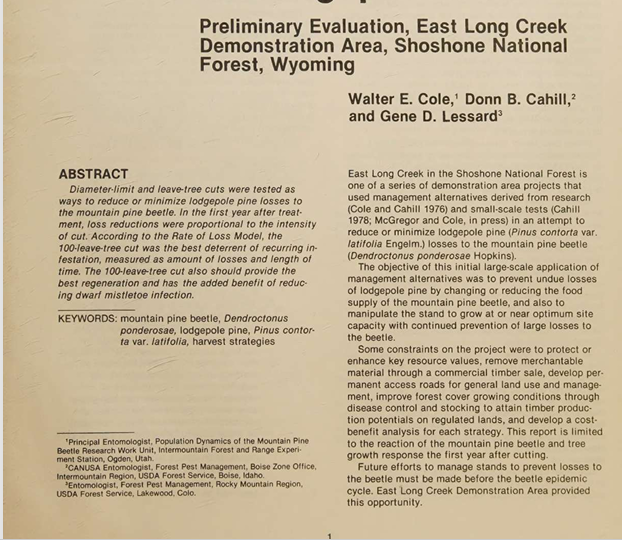
Input used: Input artifact (Image): Page 1 byline in the scanned research paper, positioned visually above the two-column split. — reducto_input3_byline_source.png
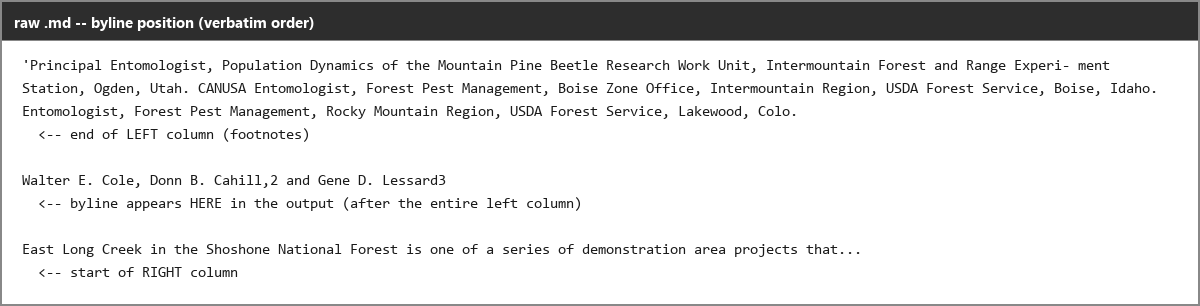
Observed output: Output artifact (Image): The byline is placed after the left column instead of where it belongs above the split, showing a reading-order error for a cross-column element. — reducto_input3_byline_parsed_failure.png
Input artifact: Input artifact (Image): Page 1 byline in the scanned research paper, positioned visually above the two-column split. — reducto_input3_byline_source.png
Output artifact: Output artifact (Image): The byline is placed after the left column instead of where it belongs above the split, showing a reading-order error for a cross-column element. — reducto_input3_byline_parsed_failure.png
What changed: Image transformed into Image
Test case: Image → Image
Input type: Image
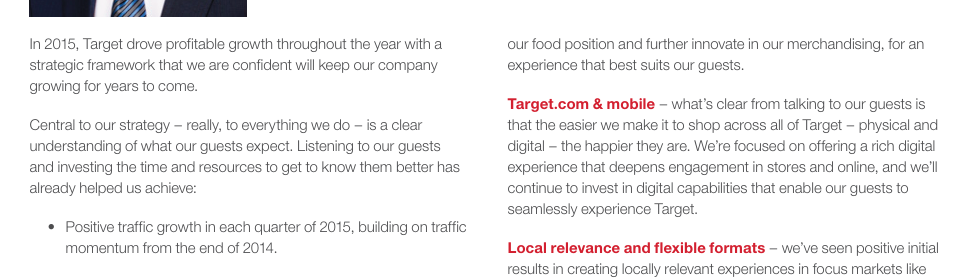
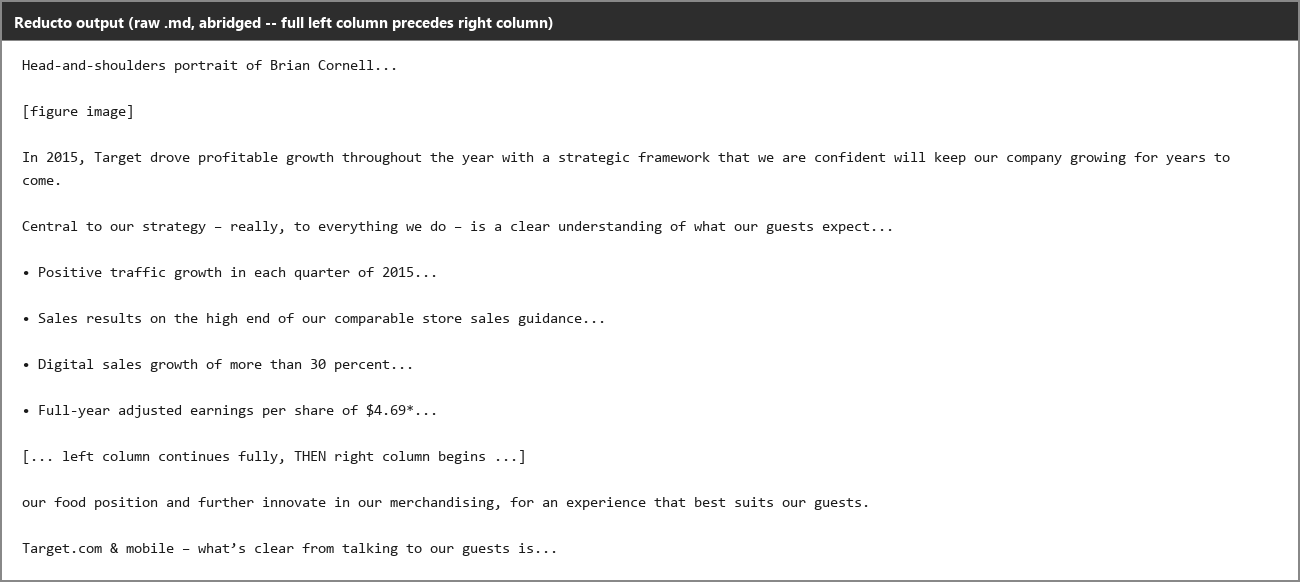
Input used: Input artifact (Image): Two-column document source — reducto_input1_twocolumn_source.png
Observed output: Output artifact (Image): Reducto read the left column fully before the right column began, preserving order in a hard two-column layout without interleaving. — reducto_input1_twocolumn_parsed_success.png
Input artifact: Input artifact (Image): Two-column document source — reducto_input1_twocolumn_source.png
Output artifact: Output artifact (Image): Reducto read the left column fully before the right column began, preserving order in a hard two-column layout without interleaving. — reducto_input1_twocolumn_parsed_success.png
What changed: Image transformed into Image
Why it matters / Conclusion: Strong on document-level completeness and text fidelity; the remaining issues are page-footer glitches and missing heading markup, not missing body content.
Reducto converts long hybrid, table-heavy, and scanned PDFs into continuous markdown without skipping pages. The evidence spans an 84-page annual report, an 18-page quarterly report, and a 12-page scanned research paper, with continuous page markers and mostly intact body text.

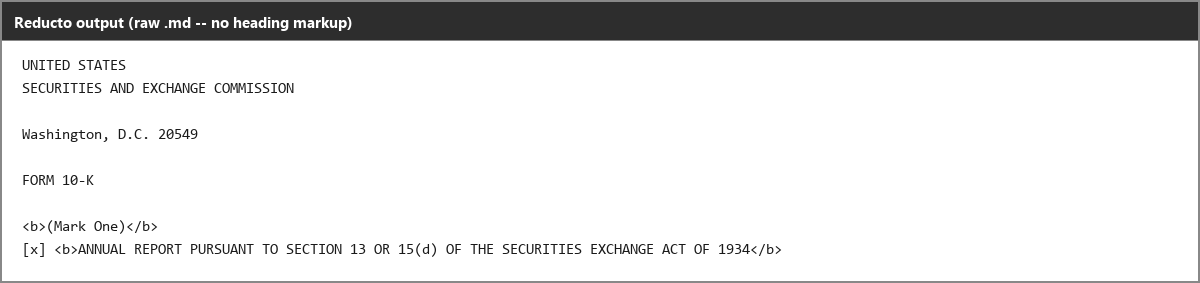


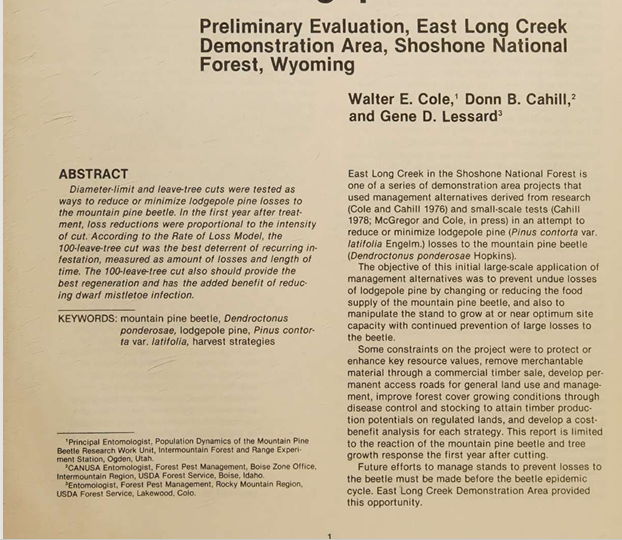
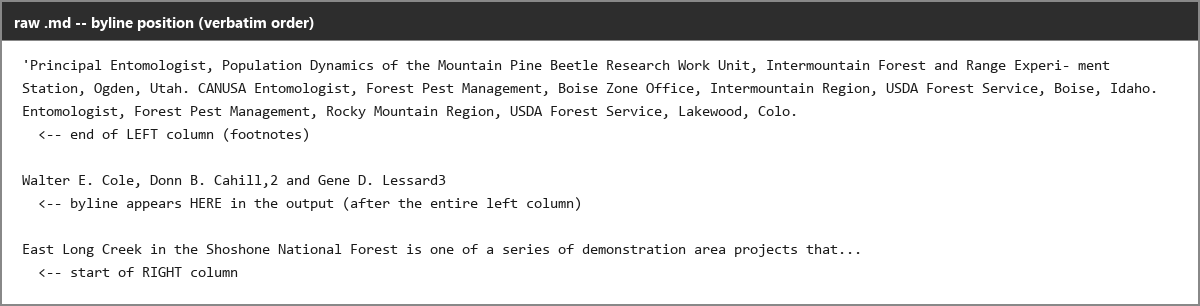
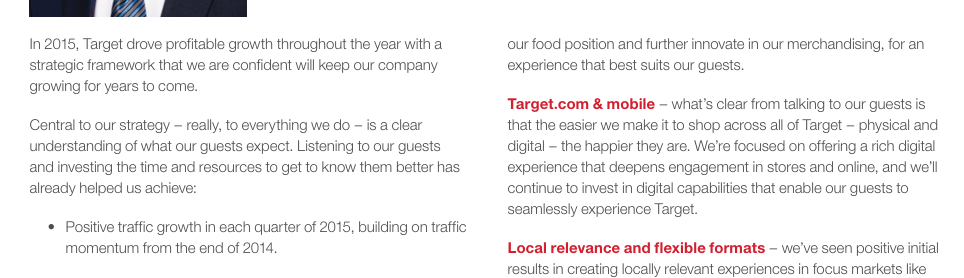
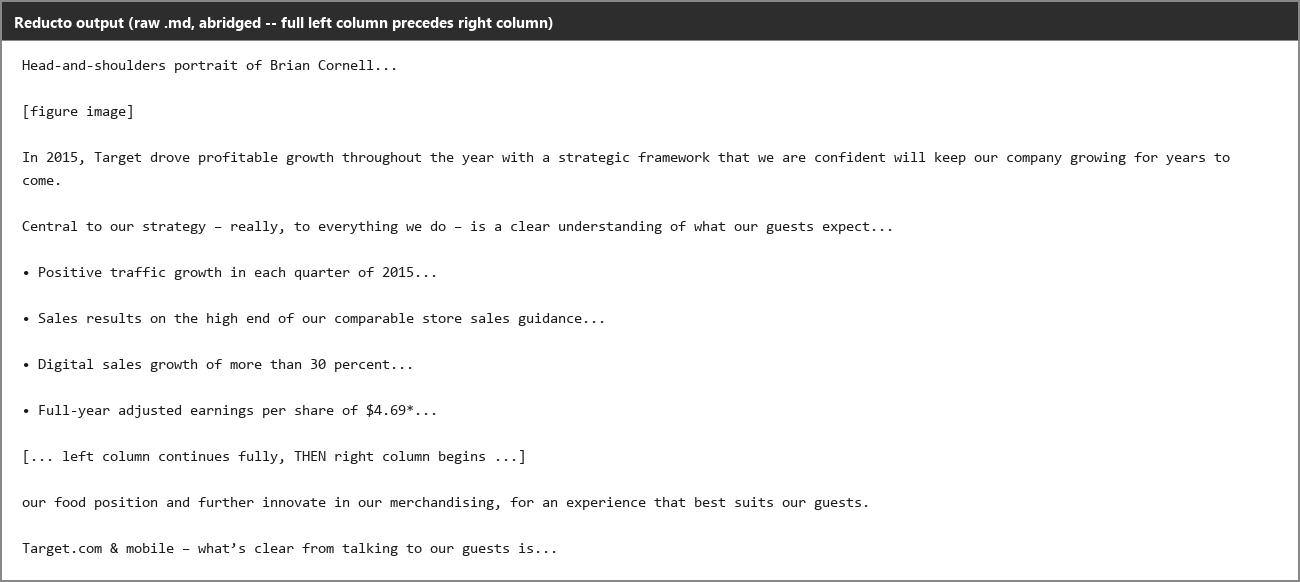
Table ReconstructionGood on the right kind of table, but not safe to trust blindly on every layout.▾
Feature tested: Table Reconstruction
Result: Partial
Verdict: Good on the right kind of table, but not safe to trust blindly on every layout.
Expected behavior: Reducto rebuilds dense PDF tables into readable markdown or structured table output, including nested headers, multi-row headers, and row-paired blocks. The tested inputs included financial tables, balance sheets, segment tables, and scanned-paper tables, with some edge cases misfiring on ambiguous layouts.
Test case: Image → Image
Input type: Image
Input used: Input artifact (Image): Properties table source — reducto_input1_properties_table_source.png
Observed output: Output artifact (Image): The state rows, store counts, and retail square footage were rendered in a clean grid, and the total row was preserved. — reducto_input1_properties_table_parsed_success.png
Input artifact: Input artifact (Image): Properties table source — reducto_input1_properties_table_source.png
Output artifact: Output artifact (Image): The state rows, store counts, and retail square footage were rendered in a clean grid, and the total row was preserved. — reducto_input1_properties_table_parsed_success.png
What changed: Image transformed into Image
Test case: Image → Image
Input type: Image
Input used: Input artifact (Image): False table source — reducto_input1_falsetable_source.png
Observed output: Output artifact (Image): Reducto forced two unrelated lists into row pairs, creating a table whose cells do not correspond to the source layout. — reducto_input1_falsetable_parsed_failure.png
Input artifact: Input artifact (Image): False table source — reducto_input1_falsetable_source.png
Output artifact: Output artifact (Image): Reducto forced two unrelated lists into row pairs, creating a table whose cells do not correspond to the source layout. — reducto_input1_falsetable_parsed_failure.png
What changed: Image transformed into Image
Test case: Image → Image
Input type: Image
Input used: Input artifact (Image): Quarterly results table source — reducto_input2_brokentable_source.png
Observed output: Output artifact (Image): The 2024 value and percentage change were merged into the same cell, and the 2025 header was duplicated, so the table came out structurally wrong. — reducto_input2_brokentable_parsed_failure.png
Input artifact: Input artifact (Image): Quarterly results table source — reducto_input2_brokentable_source.png
Output artifact: Output artifact (Image): The 2024 value and percentage change were merged into the same cell, and the 2025 header was duplicated, so the table came out structurally wrong. — reducto_input2_brokentable_parsed_failure.png
What changed: Image transformed into Image
Test case: Image → Image
Input type: Image
Input used: Input artifact (Image): Balance sheet source — reducto_input2_balancesheet_source.png
Observed output: Output artifact (Image): The Assets > Current assets hierarchy was preserved and the key line items and totals stayed readable. — reducto_input2_balancesheet_parsed_success.png
Input artifact: Input artifact (Image): Balance sheet source — reducto_input2_balancesheet_source.png
Output artifact: Output artifact (Image): The Assets > Current assets hierarchy was preserved and the key line items and totals stayed readable. — reducto_input2_balancesheet_parsed_success.png
What changed: Image transformed into Image
Test case: Image → Image
Input type: Image
Input used: Input artifact (Image): Scanned research table source — reducto_input3_table1_source.png
Observed output: Output artifact (Image): Most of the table was recovered, but bare zeros were dropped, one numeric cell picked up stray digits, and one section-header row was broadcast across all columns. — reducto_input3_table1_parsed_partial_success.png
Input artifact: Input artifact (Image): Scanned research table source — reducto_input3_table1_source.png
Output artifact: Output artifact (Image): Most of the table was recovered, but bare zeros were dropped, one numeric cell picked up stray digits, and one section-header row was broadcast across all columns. — reducto_input3_table1_parsed_partial_success.png
What changed: Image transformed into Image
Test case: Image → Image
Input type: Image
Input used: Input artifact (Image): Dense scanned table source — reducto_input3_table4_source.png
Observed output: Output artifact (Image): The dense 10-inch-cut block was badly corrupted, with collapsed structure, misread values, and garbled markdown output. — reducto_input3_table4_parsed_failure.png
Input artifact: Input artifact (Image): Dense scanned table source — reducto_input3_table4_source.png
Output artifact: Output artifact (Image): The dense 10-inch-cut block was badly corrupted, with collapsed structure, misread values, and garbled markdown output. — reducto_input3_table4_parsed_failure.png
What changed: Image transformed into Image
Test case: Image → Image
Input type: Image
Input used: Input artifact (Image): Segment table source — reducto_input2_segmenttable_source.png
Observed output: Output artifact (Image): All 9 columns were aligned correctly, and the net sales, internal sales, total, and segment profit rows were preserved cleanly. — reducto_input2_segmenttable_parsed_success.png
Input artifact: Input artifact (Image): Segment table source — reducto_input2_segmenttable_source.png
Output artifact: Output artifact (Image): All 9 columns were aligned correctly, and the net sales, internal sales, total, and segment profit rows were preserved cleanly. — reducto_input2_segmenttable_parsed_success.png
What changed: Image transformed into Image
Test case: Image → Image
Input type: Image
Input used: Input artifact (Image): Nested table source — reducto_input1_nestedtable_source.png
Observed output: Output artifact (Image): Most values survived, but the repeated year headers and simplified nesting show that the renderer flattens complex header structures. — reducto_input1_nestedtable_parsed_partial_success.png
Input artifact: Input artifact (Image): Nested table source — reducto_input1_nestedtable_source.png
Output artifact: Output artifact (Image): Most values survived, but the repeated year headers and simplified nesting show that the renderer flattens complex header structures. — reducto_input1_nestedtable_parsed_partial_success.png
What changed: Image transformed into Image
Why it matters / Conclusion: Table reconstruction is useful but inconsistent: exact on some dense tables, wrong on others, and unpredictable enough that edge cases need review.
Reducto rebuilds dense PDF tables into readable markdown or structured table output, including nested headers, multi-row headers, and row-paired blocks. The tested inputs included financial tables, balance sheets, segment tables, and scanned-paper tables, with some edge cases misfiring on ambiguous layouts.
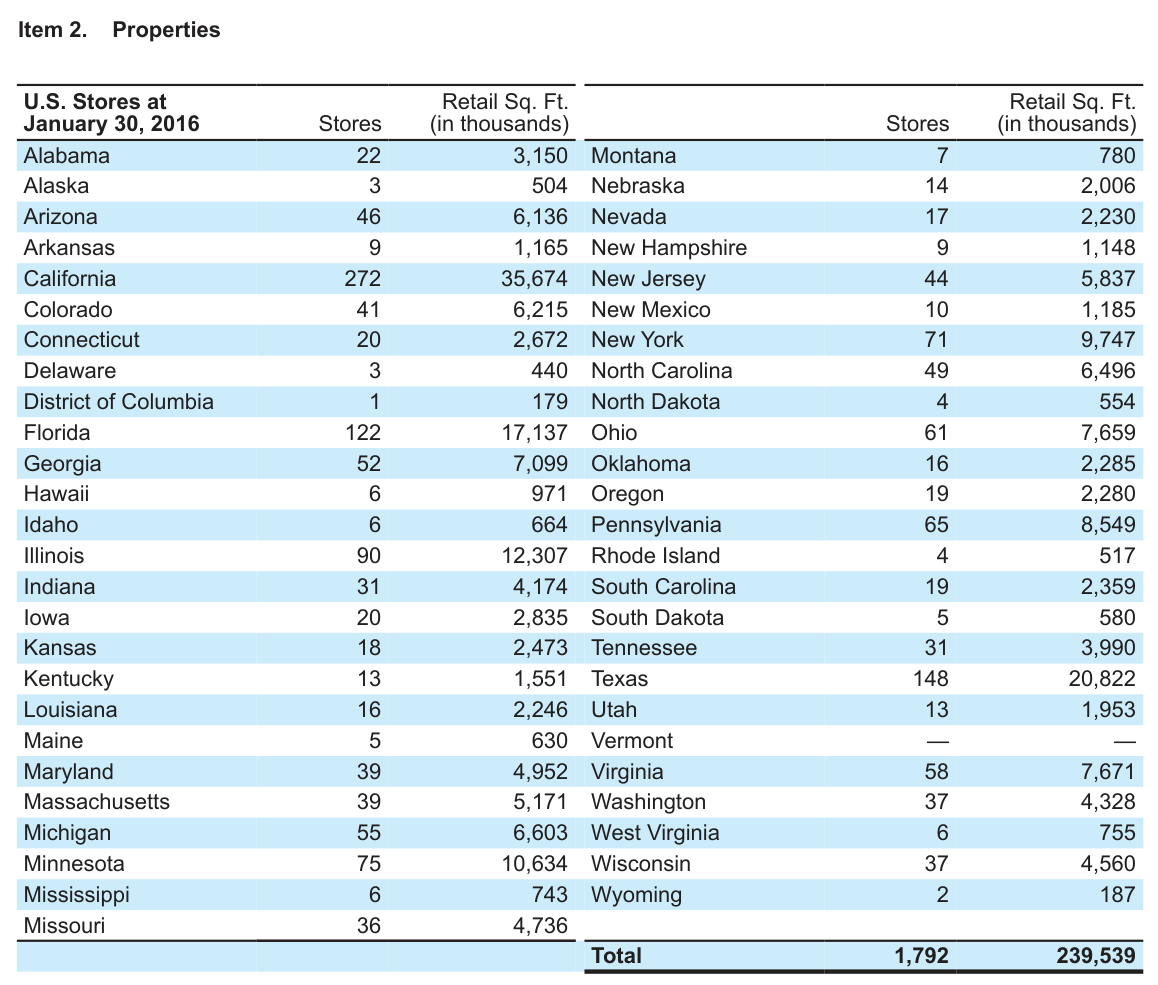
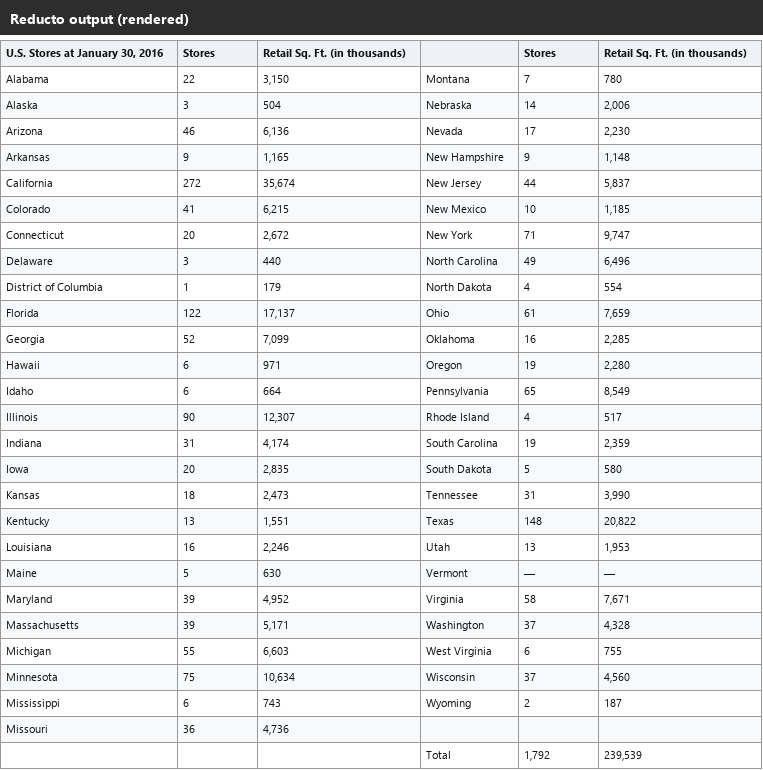
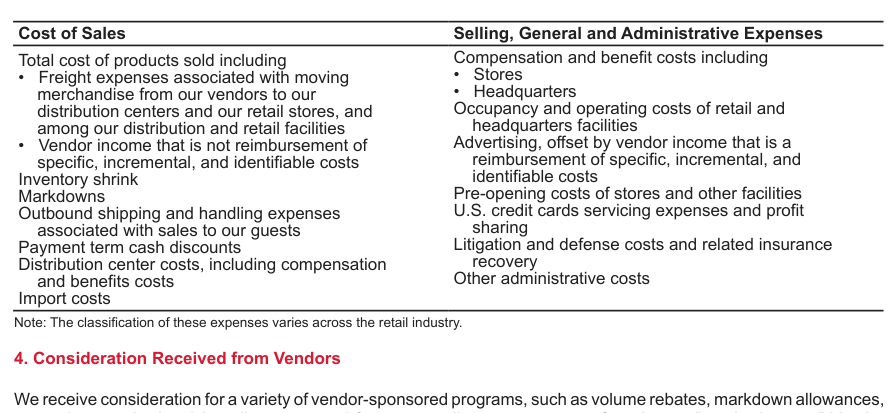
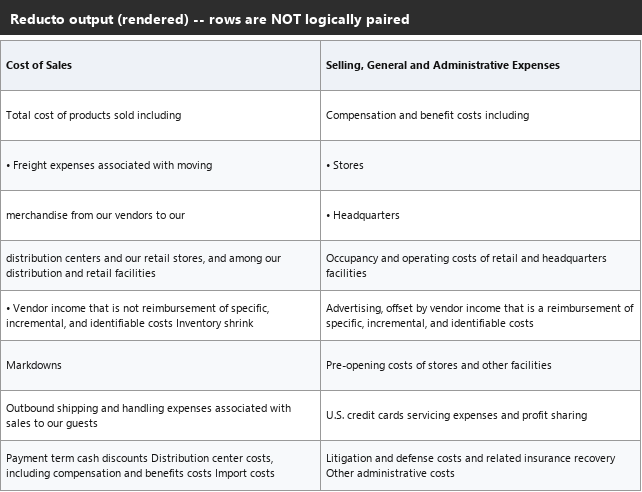
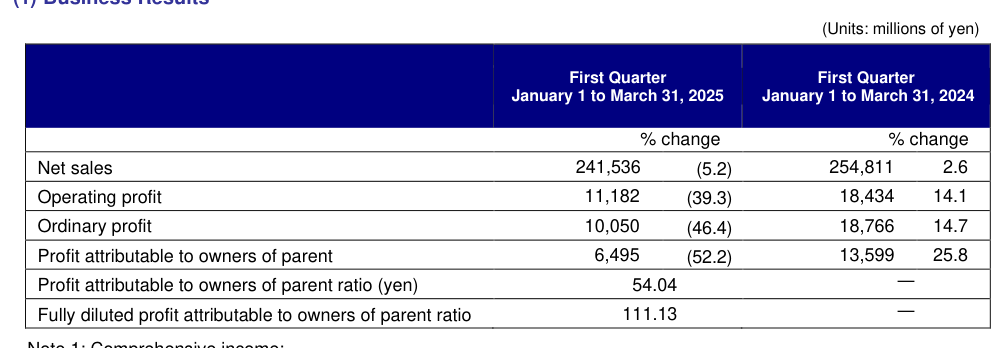
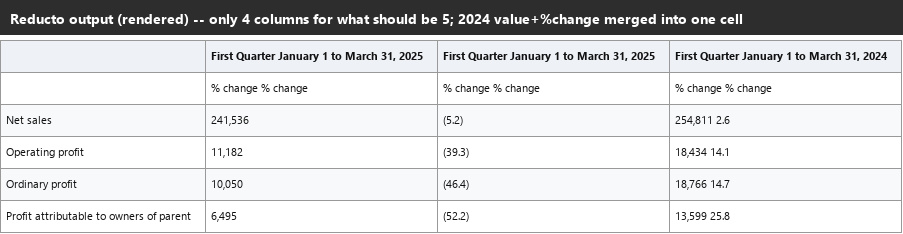
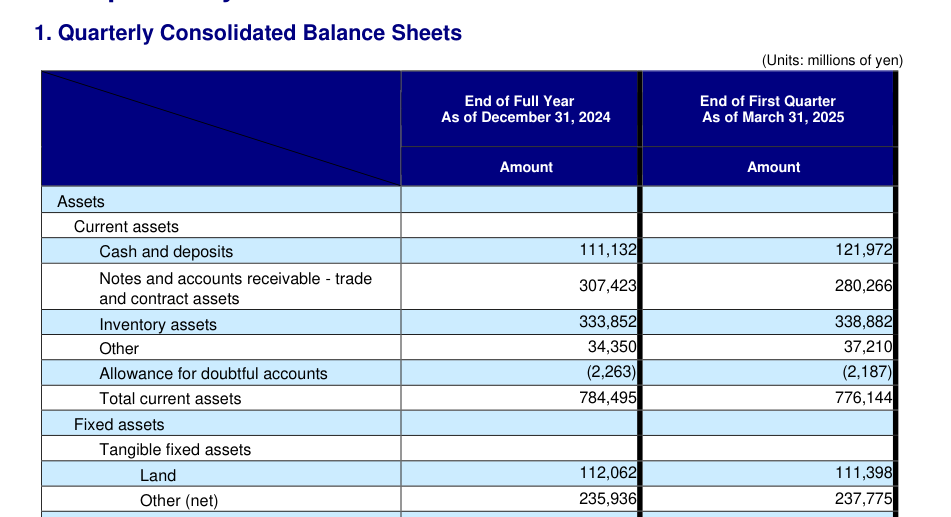
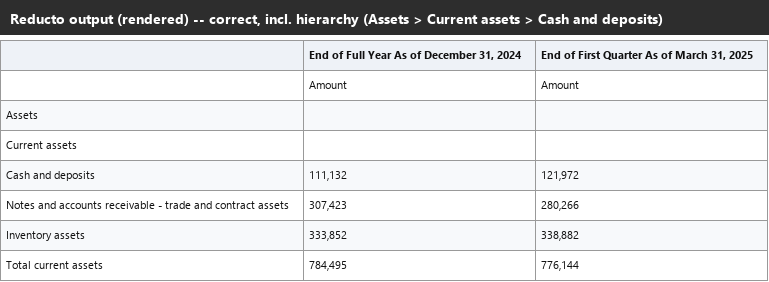
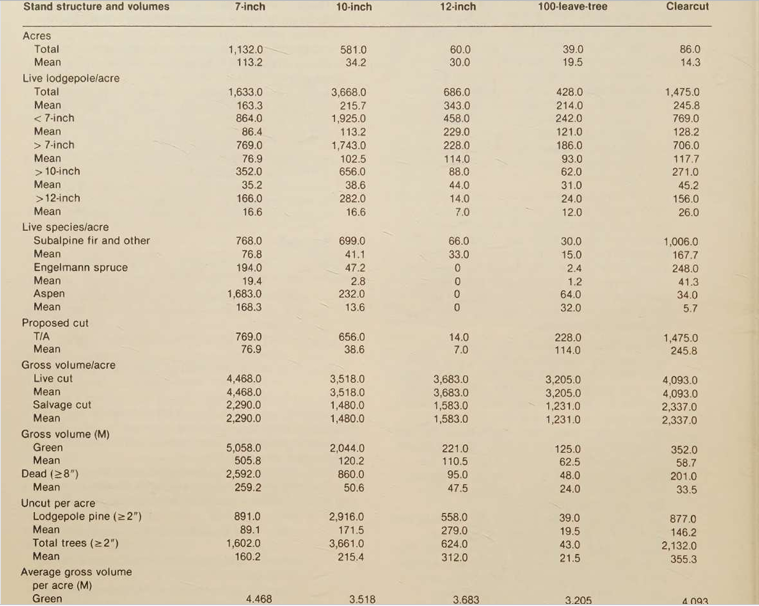
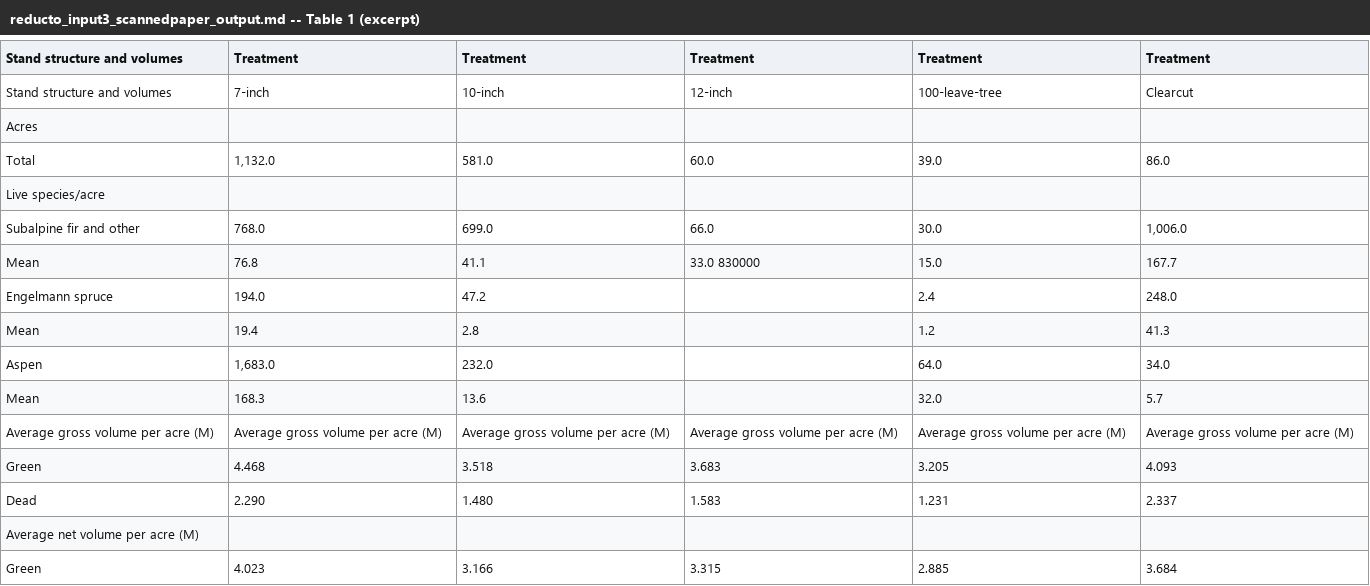
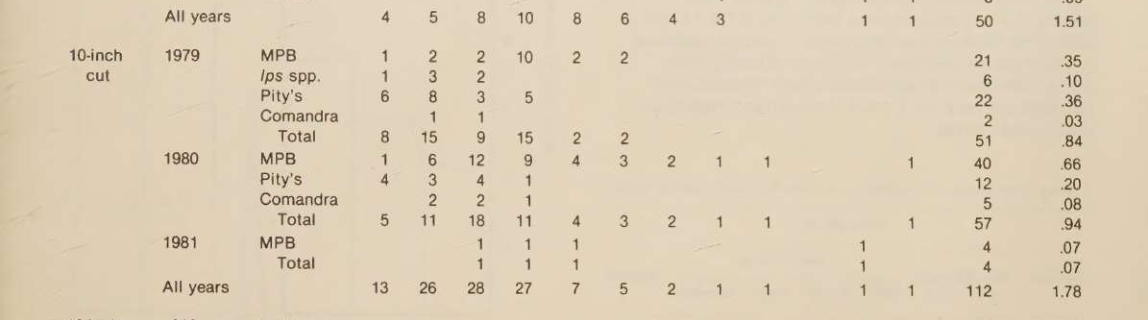
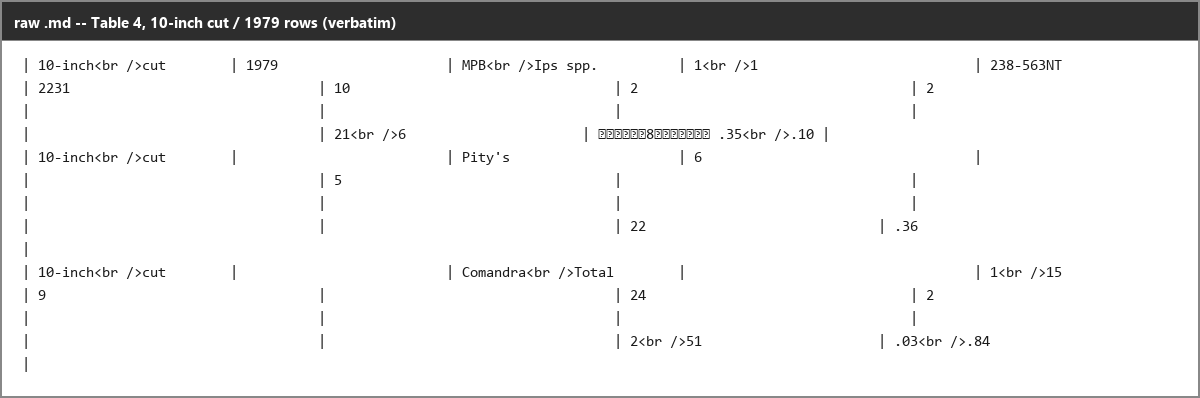
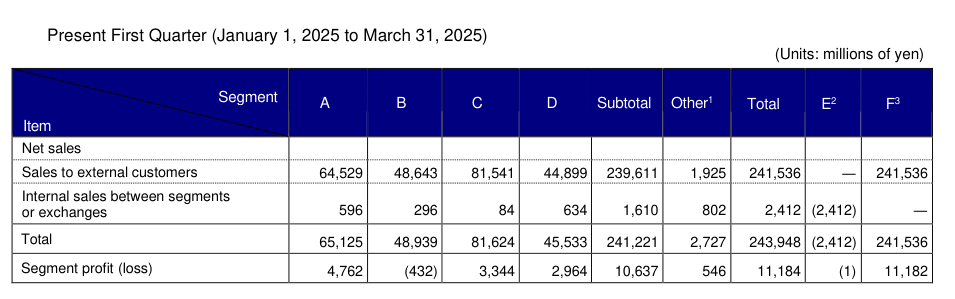
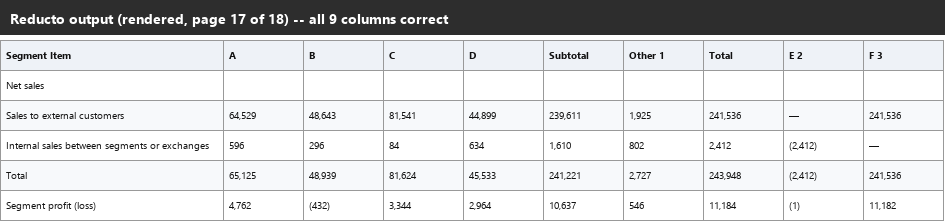
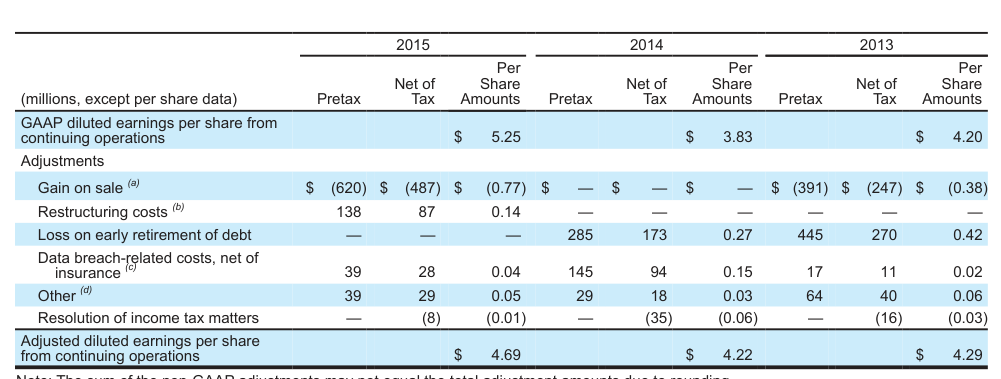
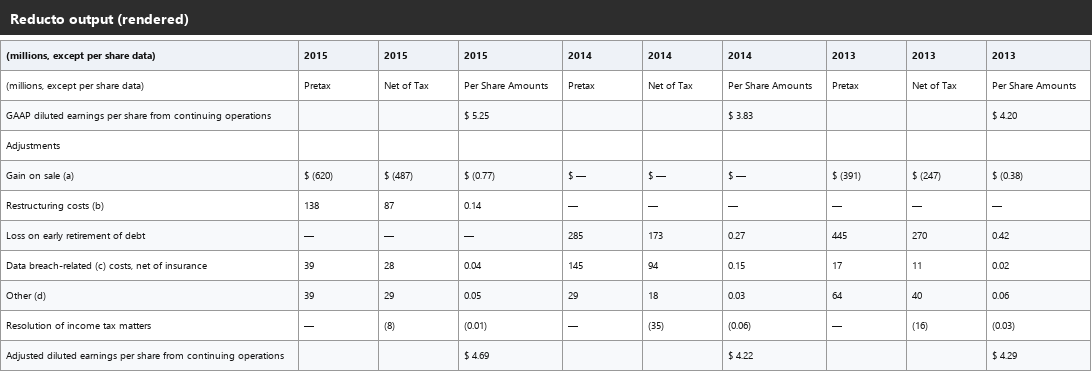
Image and Figure RetentionKeeps figures and images in the workflow, with charts often captioned from the pixels.▾
Feature tested: Image and Figure Retention
Result: Partial
Verdict: Keeps figures and images in the workflow, with charts often captioned from the pixels.
Expected behavior: With image retention enabled, Reducto keeps photos, logos, portraits, and other embedded figures as images instead of dropping them. The tested outputs included chart crops, logo crops, and a portrait, with handwritten signatures as the main edge case.
Test case: Image → Image
Input type: Image
Input used: Input artifact (Image): Signature crop — reducto_input1_signature_source.png
Observed output: Output artifact (Image): The handwritten signature itself is not preserved as an image; only the typed name and title survive. — reducto_input1_signature_omitted_failed.png
Input artifact: Input artifact (Image): Signature crop — reducto_input1_signature_source.png
Output artifact: Output artifact (Image): The handwritten signature itself is not preserved as an image; only the typed name and title survive. — reducto_input1_signature_omitted_failed.png
What changed: Image transformed into Image
Why it matters / Conclusion: Good for retaining photos, logos, and charts, but signature marks are not kept as images and chart captions are still not a replacement for structured chart data.
With image retention enabled, Reducto keeps photos, logos, portraits, and other embedded figures as images instead of dropping them. The tested outputs included chart crops, logo crops, and a portrait, with handwritten signatures as the main edge case.


Reading Order and Heading Hierarchy PreservationLinear flow is solid, but heading markup is spotty.▾
Feature tested: Reading Order and Heading Hierarchy Preservation
Result: Failed
Verdict: Linear flow is solid, but heading markup is spotty.
Expected behavior: Reducto linearizes multi-column pages in human reading order and sometimes surfaces headings as markdown structure. The evidence includes a two-column page, a hybrid report, a quarterly report, and a scanned paper where heading hierarchy was inconsistent.
Test case: Image → Image
Input type: Image
Input used: Input artifact (Image): Source — reducto_input1_twocolumn_source.png
Observed output: Output artifact (Image): The left column was read to completion before the right-column continuation appeared, so the linear reading order stayed intact. — reducto_input1_twocolumn_parsed_success.png
Input artifact: Input artifact (Image): Source — reducto_input1_twocolumn_source.png
Output artifact: Output artifact (Image): The left column was read to completion before the right-column continuation appeared, so the linear reading order stayed intact. — reducto_input1_twocolumn_parsed_success.png
What changed: Image transformed into Image
Test case: Image → Image
Input type: Image
Input used: Input artifact (Image): Form 10-K heading source — reducto_input1_form10k_heading_source.png
Observed output: Output artifact (Image): The title and checkbox text came through as plain lines, but the heading markup itself was omitted. — reducto_input1_form10k_heading_omitted_failed.png
Input artifact: Input artifact (Image): Form 10-K heading source — reducto_input1_form10k_heading_source.png
Output artifact: Output artifact (Image): The title and checkbox text came through as plain lines, but the heading markup itself was omitted. — reducto_input1_form10k_heading_omitted_failed.png
What changed: Image transformed into Image
Test case: Image → Image
Input type: Image
Input used: Input artifact (Image): Quarterly report heading source — reducto_input2_heading_source.png
Observed output: Output artifact (Image): No heading markup was emitted at all, even though the source clearly shows a report title and subsection label. — reducto_input2_heading_parsed_failure.png
Input artifact: Input artifact (Image): Quarterly report heading source — reducto_input2_heading_source.png
Output artifact: Output artifact (Image): No heading markup was emitted at all, even though the source clearly shows a report title and subsection label. — reducto_input2_heading_parsed_failure.png
What changed: Image transformed into Image
Test case: Image → Image
Input type: Image
Input used: Input artifact (Image): Source — reducto_input3_byline_source.png
Observed output: Output artifact (Image): The byline was pushed after the left column instead of staying above the two-column split, so cross-column reading order was off for that element. — reducto_input3_byline_parsed_failure.png
Input artifact: Input artifact (Image): Source — reducto_input3_byline_source.png
Output artifact: Output artifact (Image): The byline was pushed after the left column instead of staying above the two-column split, so cross-column reading order was off for that element. — reducto_input3_byline_parsed_failure.png
What changed: Image transformed into Image
Test case: Image → Image
Input type: Image
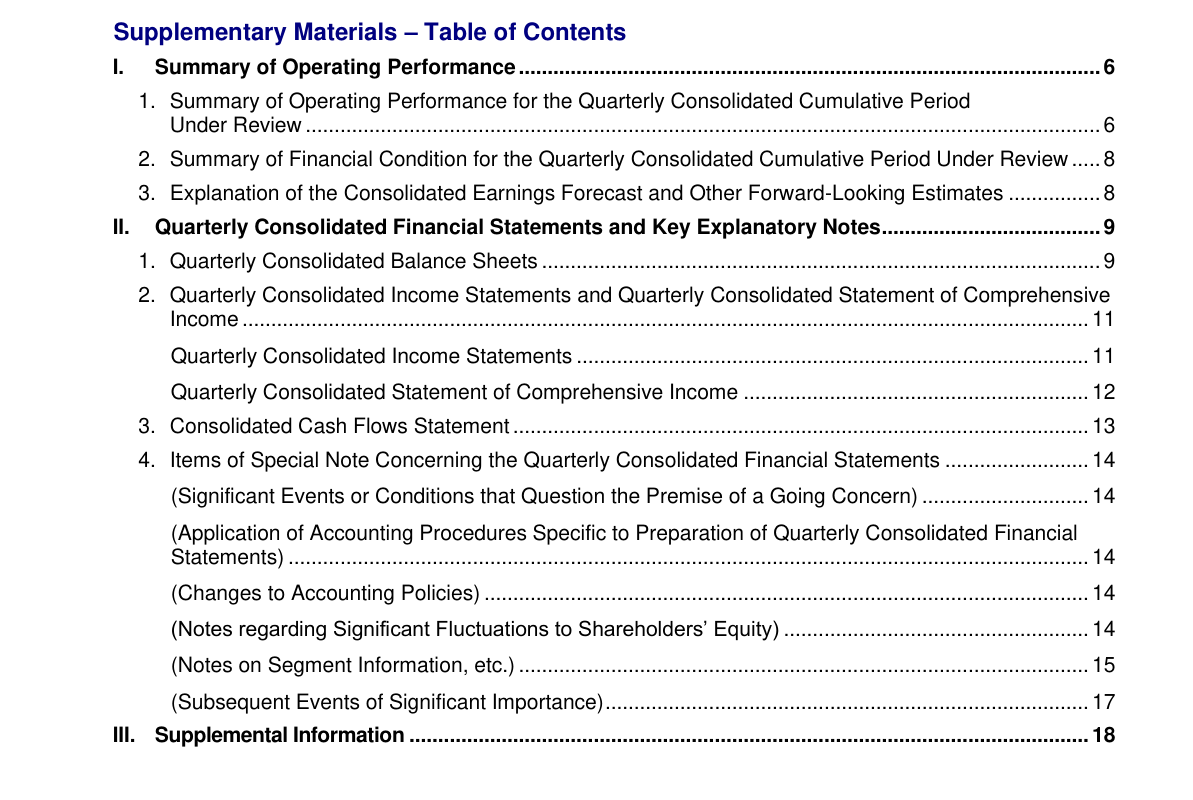
Input used: Input artifact (Image): Quarterly report TOC source — reducto_input2_mdclean_toc_source.png
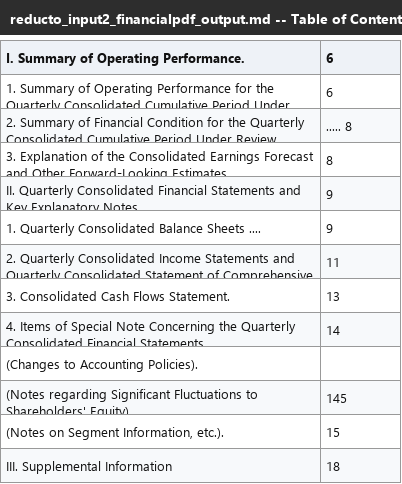
Observed output: Output artifact (Image): The table of contents itself reconstructed as a valid table, but the listed section hierarchy did not turn into heading syntax at the destination pages. — reducto_input2_mdclean_toc_output.png
Input artifact: Input artifact (Image): Quarterly report TOC source — reducto_input2_mdclean_toc_source.png
Output artifact: Output artifact (Image): The table of contents itself reconstructed as a valid table, but the listed section hierarchy did not turn into heading syntax at the destination pages. — reducto_input2_mdclean_toc_output.png
What changed: Image transformed into Image
Test case: Image → Image
Input type: Image
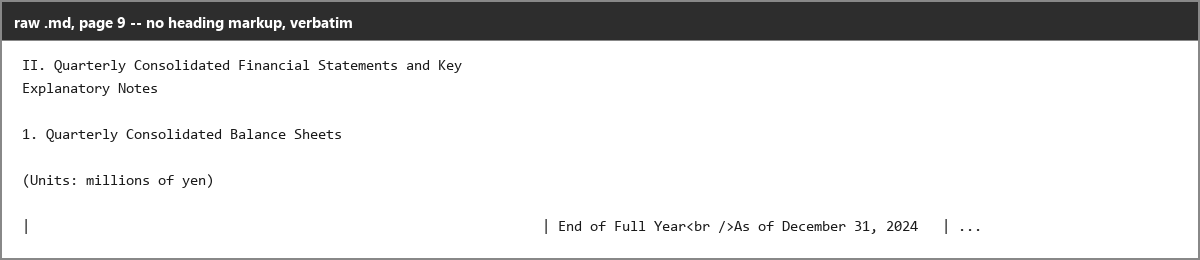
Input used: Input artifact (Image): Quarterly report heading destination source — reducto_input2_mdclean_heading_source.png
Observed output: Output artifact (Image): The destination section title stayed as plain text instead of becoming a markdown heading. — reducto_input2_mdclean_heading_output.png
Input artifact: Input artifact (Image): Quarterly report heading destination source — reducto_input2_mdclean_heading_source.png
Output artifact: Output artifact (Image): The destination section title stayed as plain text instead of becoming a markdown heading. — reducto_input2_mdclean_heading_output.png
What changed: Image transformed into Image
Why it matters / Conclusion: The text flows in the right order, but heading hierarchy is too inconsistent to trust for downstream chunking without fallback logic.
Reducto linearizes multi-column pages in human reading order and sometimes surfaces headings as markdown structure. The evidence includes a two-column page, a hybrid report, a quarterly report, and a scanned paper where heading hierarchy was inconsistent.

Block and Granular Confidence ScoringUseful uncertainty signal, but not consistently calibrated across documents.▾
Feature tested: Block and Granular Confidence Scoring
Result: Partial
Verdict: Useful uncertainty signal, but not consistently calibrated across documents.
Expected behavior: Reducto emits confidence and uncertainty signals at the block or content level so reviewers can spot likely OCR, footer, and table defects. The tested reports showed those signals catching some real problems while missing others or being overconfident.
Test case: Image → Image
Input type: Image
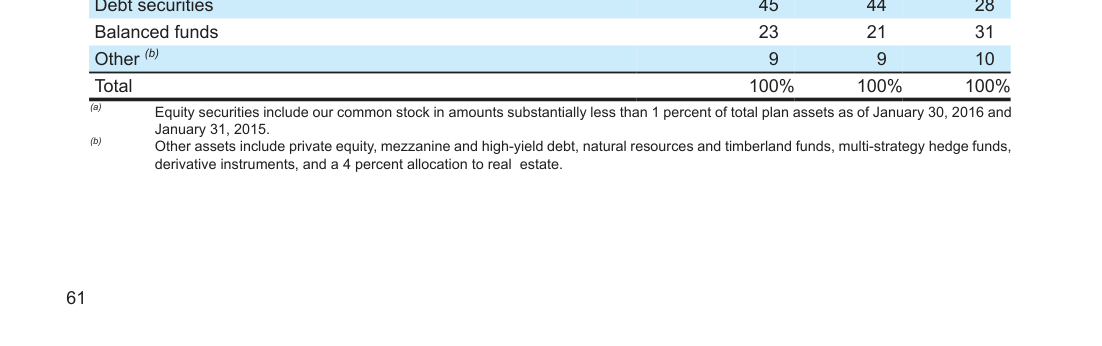
Input used: Input artifact (Image): Footer defect source — reducto_input1_footer66_wide_source.png
Observed output: Output artifact (Image): The footer corruption was correctly marked low confidence, showing the signal does catch recurring page-metadata errors. — reducto_input1_footer66_wide_parsed_failure.png
Input artifact: Input artifact (Image): Footer defect source — reducto_input1_footer66_wide_source.png
Output artifact: Output artifact (Image): The footer corruption was correctly marked low confidence, showing the signal does catch recurring page-metadata errors. — reducto_input1_footer66_wide_parsed_failure.png
What changed: Image transformed into Image
Test case: Image → Image
Input type: Image
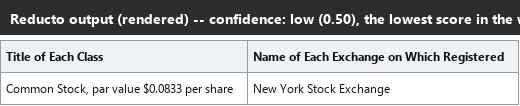
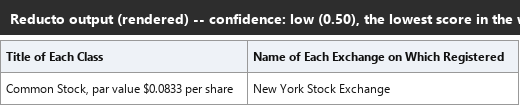
Input used: Input artifact (Image): Source — reducto_input1_transparency_source.png
Observed output: Output artifact (Image): The small securities table was reconstructed correctly, yet it received the document's lowest confidence score, so this was a false alarm. — reducto_input1_transparency_falsealarm_parsed_success.png
Input artifact: Input artifact (Image): Source — reducto_input1_transparency_source.png
Output artifact: Output artifact (Image): The small securities table was reconstructed correctly, yet it received the document's lowest confidence score, so this was a false alarm. — reducto_input1_transparency_falsealarm_parsed_success.png
What changed: Image transformed into Image
Test case: Image → Image
Input type: Image
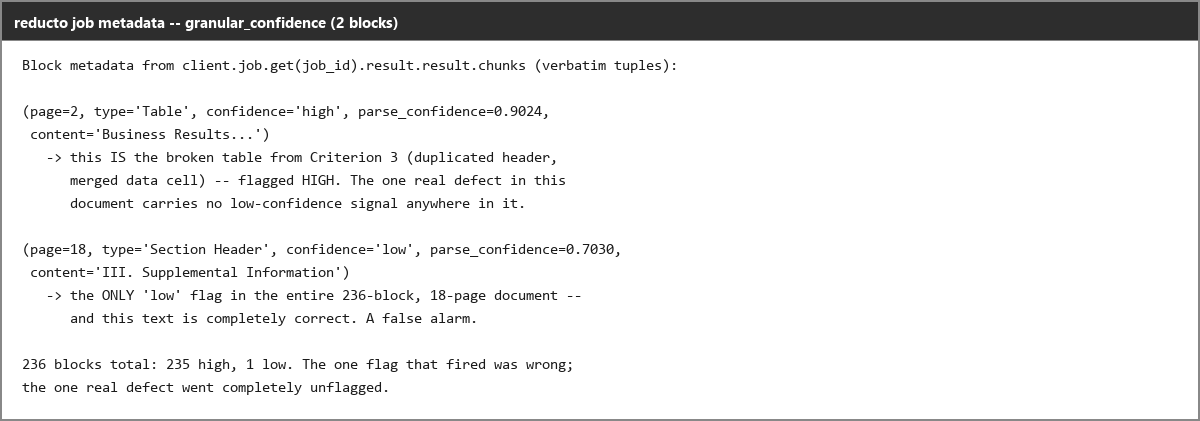
Input used: Input artifact (Image): Quarterly report broken table source — reducto_input2_brokentable_source.png
Observed output: Output artifact (Image): The confidence summary shows one low flag that is actually a false alarm, while the broken Business Results table is left entirely high-confidence. — reducto_input2_transparency_output.png
Input artifact: Input artifact (Image): Quarterly report broken table source — reducto_input2_brokentable_source.png
Output artifact: Output artifact (Image): The confidence summary shows one low flag that is actually a false alarm, while the broken Business Results table is left entirely high-confidence. — reducto_input2_transparency_output.png
What changed: Image transformed into Image
Why it matters / Conclusion: A real review aid, but not calibrated well enough to replace checking the content itself.
Reducto emits confidence and uncertainty signals at the block or content level so reviewers can spot likely OCR, footer, and table defects. The tested reports showed those signals catching some real problems while missing others or being overconfident.


Extraction Provenance and Confidence MetadataHelpful but inconsistent▾
Feature tested: Extraction Provenance and Confidence Metadata
Result: Partial
Verdict: Helpful but inconsistent
Expected behavior: Reducto attaches audit-trail metadata to extracted values, including source-location citations, bounding boxes, and field-level confidence artifacts. The invoice and bank-statement outputs exposed these review signals directly on extracted fields.
Test case: Image → Image
Input type: Image
Input used: Input artifact (Image): Footer source — reducto_input1_footer66_wide_source.png
Observed output: Output artifact (Image): The footer corruption is present, and this block is flagged low confidence with a numeric parse-confidence score. — reducto_input1_footer66_wide_parsed_failure.png
Input artifact: Input artifact (Image): Footer source — reducto_input1_footer66_wide_source.png
Output artifact: Output artifact (Image): The footer corruption is present, and this block is flagged low confidence with a numeric parse-confidence score. — reducto_input1_footer66_wide_parsed_failure.png
What changed: Image transformed into Image
Test case: Image → Image
Input type: Image
Input used: Input artifact (Image): Correct securities table — reducto_input1_transparency_source.png
Observed output: Output artifact (Image): The table is reconstructed correctly, but the block still receives the document's lowest confidence score, so this is a false alarm. — reducto_input1_transparency_falsealarm_parsed_success.png
Input artifact: Input artifact (Image): Correct securities table — reducto_input1_transparency_source.png
Output artifact: Output artifact (Image): The table is reconstructed correctly, but the block still receives the document's lowest confidence score, so this is a false alarm. — reducto_input1_transparency_falsealarm_parsed_success.png
What changed: Image transformed into Image
Test case: Image → Image
Input type: Image
Input used: Input artifact (Image): Scanned-paper confidence annotation — reducto_input3_titlehallucination_source.png
Observed output: Output artifact (Image): The confidence display correctly distinguishes genuinely uncertain blocks from higher-confidence ones, but it still misses the hallucinated title word in the scanned paper. — reducto_input3_titlehallucination_parsed_failure.png
Input artifact: Input artifact (Image): Scanned-paper confidence annotation — reducto_input3_titlehallucination_source.png
Output artifact: Output artifact (Image): The confidence display correctly distinguishes genuinely uncertain blocks from higher-confidence ones, but it still misses the hallucinated title word in the scanned paper. — reducto_input3_titlehallucination_parsed_failure.png
What changed: Image transformed into Image
Why it matters / Conclusion: This is a real QA signal, not decorative metadata, but calibration is uneven enough that it should support review rather than replace it.
Reducto attaches audit-trail metadata to extracted values, including source-location citations, bounding boxes, and field-level confidence artifacts. The invoice and bank-statement outputs exposed these review signals directly on extracted fields.


Structured Data ExtractionA strong fallback for tables and charts, with one important mis-source risk.▾
Feature tested: Structured Data Extraction
Result: Partial
Verdict: A strong fallback for tables and charts, with one important mis-source risk.
Expected behavior: Reducto extracts structured data from documents into JSON-like or schema-shaped outputs instead of plain text. The tested cases include the separate extract endpoint, schema-guided nested JSON for business documents, chart and table values, invoice line items, and bank-statement transactions.
Test case: Image → Image
Input type: Image
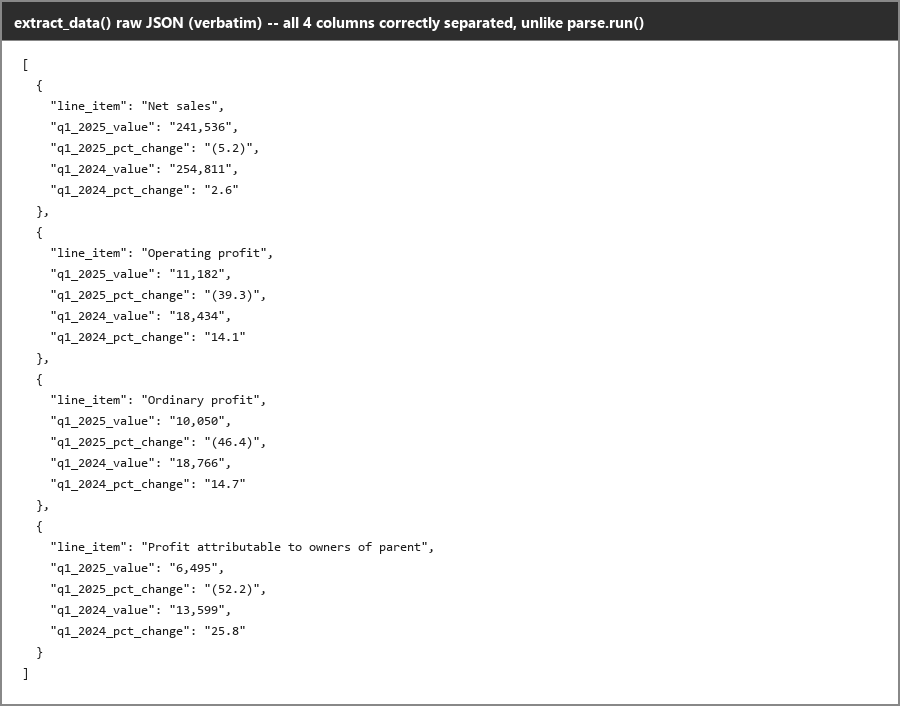
Input used: Input artifact (Image): Broken table source — reducto_input2_brokentable_source.png
Observed output: Output artifact (Image): `extract.run()` cleanly separates the business-results table into the correct fields and fixes the merged-cell problem from the default parse pipeline. — reducto_input2_extractdata_raw.png
Input artifact: Input artifact (Image): Broken table source — reducto_input2_brokentable_source.png
Output artifact: Output artifact (Image): `extract.run()` cleanly separates the business-results table into the correct fields and fixes the merged-cell problem from the default parse pipeline. — reducto_input2_extractdata_raw.png
What changed: Image transformed into Image
Test case: Image → Image
Input type: Image
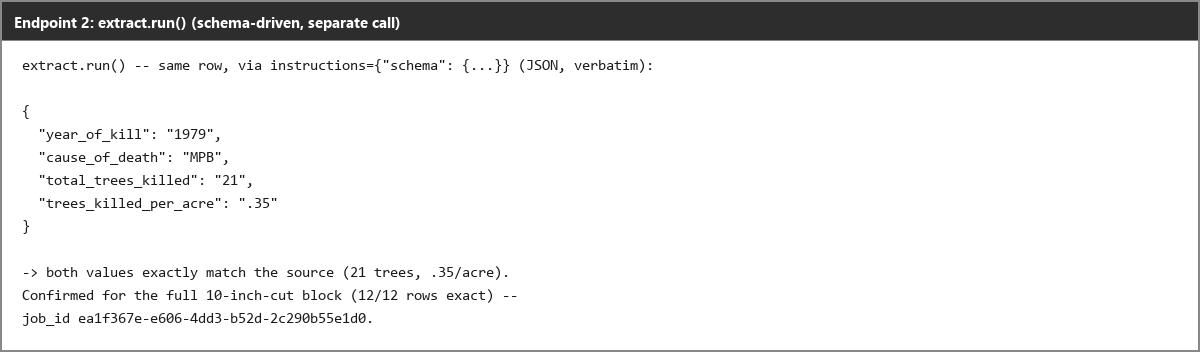
Input used: Input artifact (Image): Corrupted scanned-table source — reducto_input3_extractdata_source.png
Observed output: Output artifact (Image): On the scanned-paper table, the structured extraction endpoint recovers the corrupted rows correctly and resolves the glyph-injection problem from the parse output. — reducto_input3_extractdata_after.png
Input artifact: Input artifact (Image): Corrupted scanned-table source — reducto_input3_extractdata_source.png
Output artifact: Output artifact (Image): On the scanned-paper table, the structured extraction endpoint recovers the corrupted rows correctly and resolves the glyph-injection problem from the parse output. — reducto_input3_extractdata_after.png
What changed: Image transformed into Image
Test case: Image → Image
Input type: Image
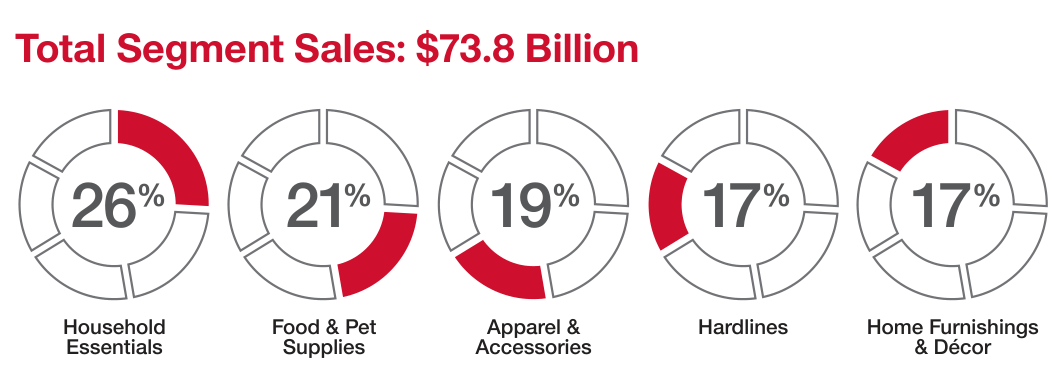
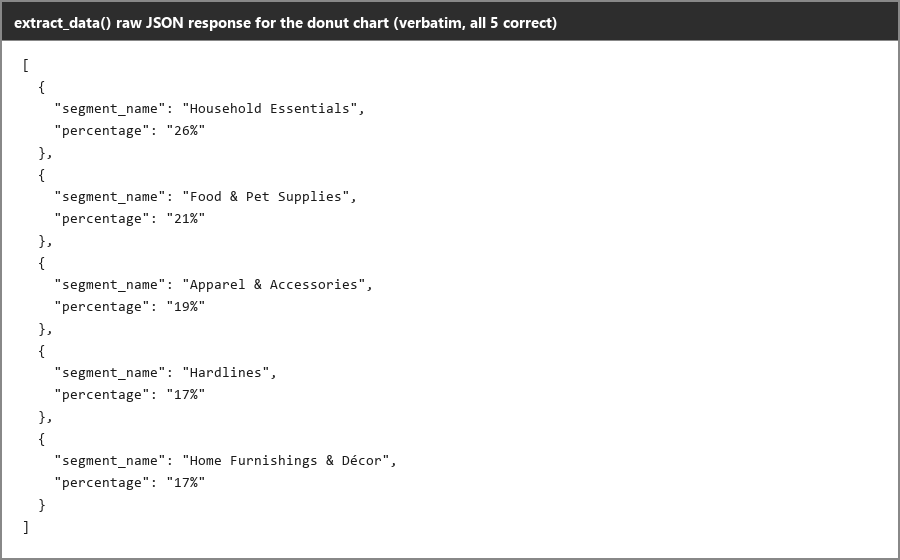
Input used: Input artifact (Image): Donut chart source — reducto_input1_chart_donut_source.png
Observed output: Output artifact (Image): `extract.run()` returns all five donut-chart segments correctly as structured JSON values. — reducto_input1_extractdata_donut_raw.png
Input artifact: Input artifact (Image): Donut chart source — reducto_input1_chart_donut_source.png
Output artifact: Output artifact (Image): `extract.run()` returns all five donut-chart segments correctly as structured JSON values. — reducto_input1_extractdata_donut_raw.png
What changed: Image transformed into Image
Test case: Image → Image
Input type: Image
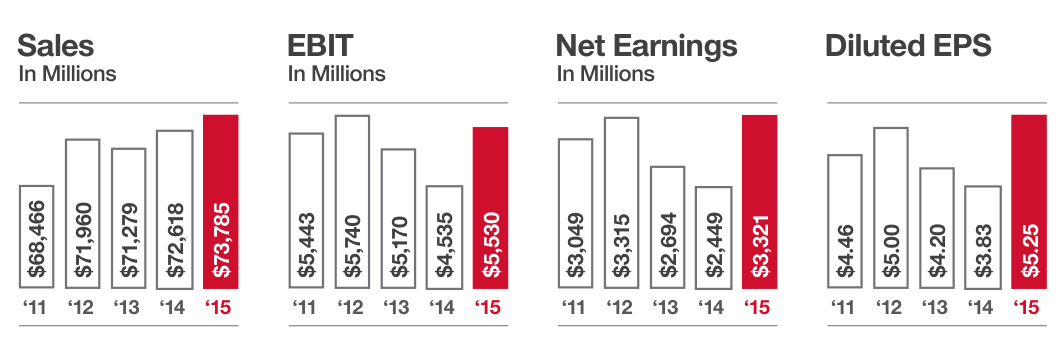
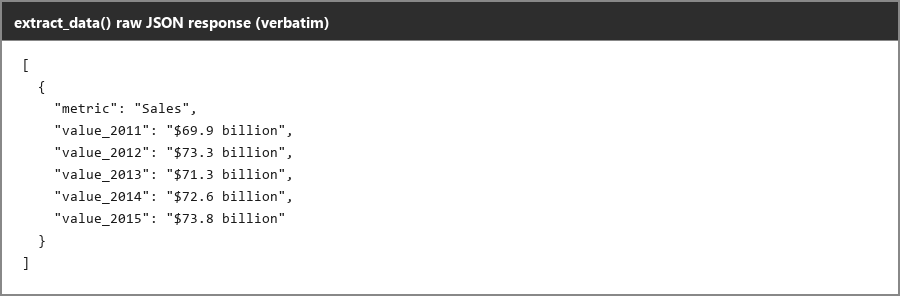
Input used: Input artifact (Image): Bar chart source — reducto_input1_chart_bar_source.png
Observed output: Output artifact (Image): `extract.run()` returns the bar-chart values as JSON, but the 2011 and 2012 values were silently taken from a different table on another page. — reducto_input1_extractdata_barchart_raw.png
Input artifact: Input artifact (Image): Bar chart source — reducto_input1_chart_bar_source.png
Output artifact: Output artifact (Image): `extract.run()` returns the bar-chart values as JSON, but the 2011 and 2012 values were silently taken from a different table on another page. — reducto_input1_extractdata_barchart_raw.png
What changed: Image transformed into Image
Test case: Image → Image
Input type: Image
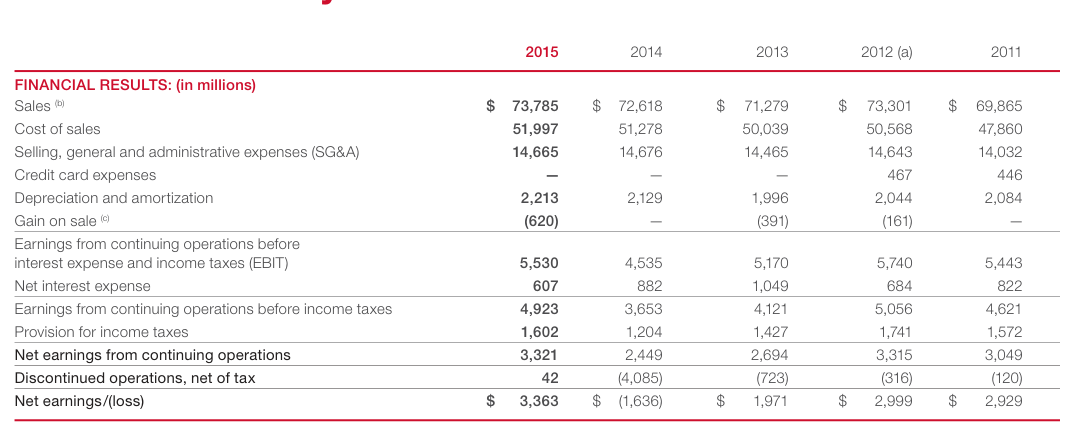
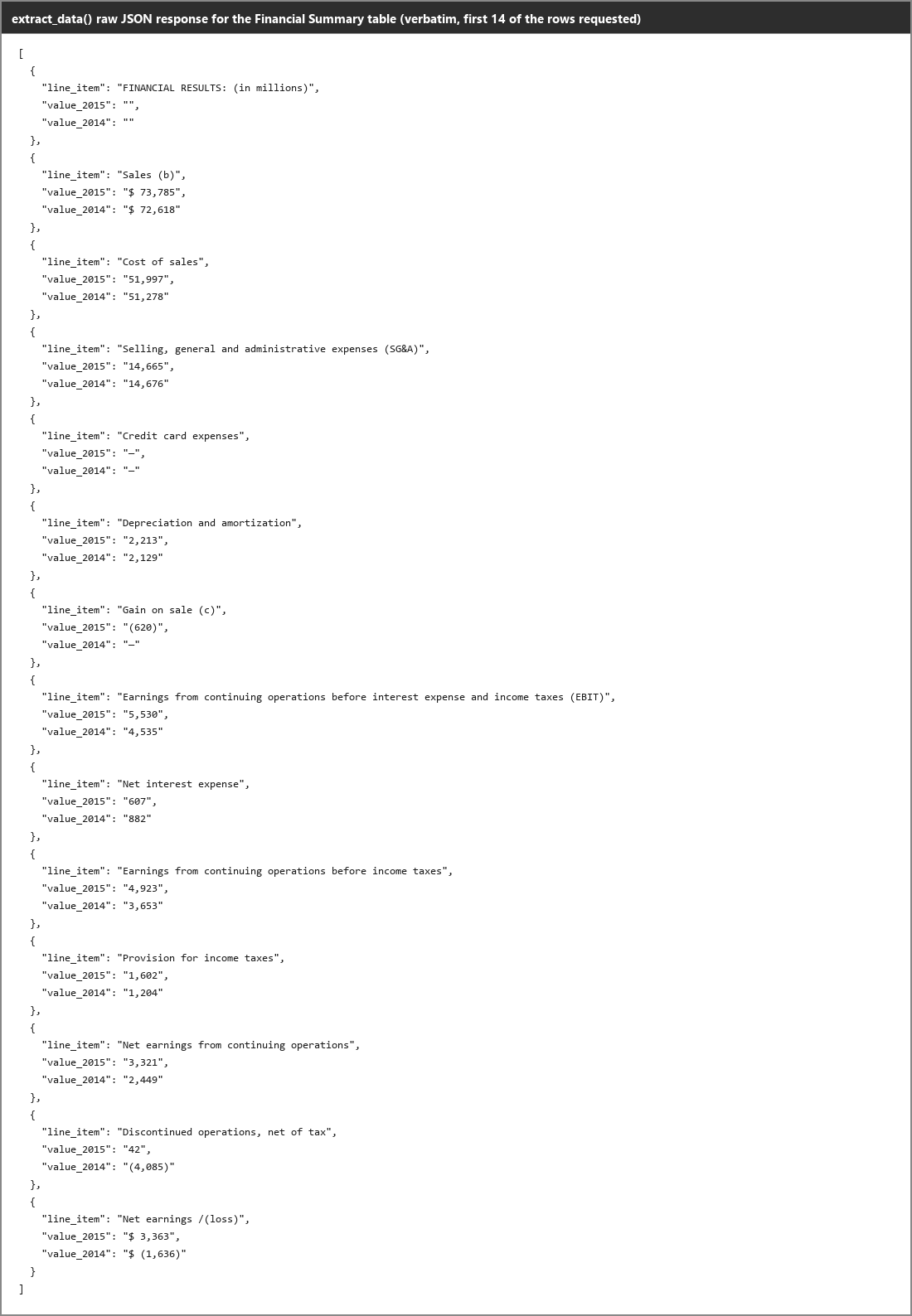
Input used: Input artifact (Image): Table source — reducto_input1_extractdata_table_source.png
Observed output: Output artifact (Image): `extract.run()` returns the financial-summary table as raw JSON with the requested rows and values separated cleanly. — reducto_input1_extractdata_table_raw.png
Input artifact: Input artifact (Image): Table source — reducto_input1_extractdata_table_source.png
Output artifact: Output artifact (Image): `extract.run()` returns the financial-summary table as raw JSON with the requested rows and values separated cleanly. — reducto_input1_extractdata_table_raw.png
What changed: Image transformed into Image
Test case: PDF document → Text/code file
Input type: PDF document
Input used: Input artifact (PDF document): INPUT — Bank Statement PDF.pdf
Observed output: Output artifact (Text/code file): The bank-statement run returned nested JSON with metadata, account-holder, branch, and statement-period fields, but the transaction layer still required reconciliation because counts and row fields were inconsistent. — reducto-bank-statement-output.json
Input artifact: Input artifact (PDF document): INPUT — Bank Statement PDF.pdf
Output artifact: Output artifact (Text/code file): The bank-statement run returned nested JSON with metadata, account-holder, branch, and statement-period fields, but the transaction layer still required reconciliation because counts and row fields were inconsistent. — reducto-bank-statement-output.json
What changed: PDF document transformed into Text/code file
Why it matters / Conclusion: Very useful as a fallback for structured data extraction, but it still needs guardrails when similar data exists elsewhere in the same document.
Reducto extracts structured data from documents into JSON-like or schema-shaped outputs instead of plain text. The tested cases include the separate extract endpoint, schema-guided nested JSON for business documents, chart and table values, invoice line items, and bank-statement transactions.

How it scored on the research's own criteria
The 7 evaluation dimensions from our hands-on research on Reducto, each judged from recorded runs on 3 test inputs — the same verdicts the ranking page ranks on.
held up partial failed not exercised by this input
| Criterion | Verdict | What the runs showed | Per input | Proof |
|---|---|---|---|---|
| Advanced Features (Bonus) | Strong4/5Reviewer flagged — not independently verified | It does have the bonus tools the rubric asks for, and they often help a lot, but the warnings are not consistently trustworthy and one extraction path can still drift to the wrong source.UNSUPPORTED_OBSERVATION — The observation claims `client.extract.run()` “can correctly recover a financial-summary table as structured JSON with all requested values exact,” but the raw JSON contradicts the source on at least two values: the source table shows Sales (b) as `$73,785` while the output shows `"$73,735"`, and the source shows the SG&A 2014 value as `14,676` while the output shows `"14,675"`. The claimed exact | open proof ↗ | |
| Complex Document Handling | Mixed3/5 | It can finish long or dense documents, but quality slips in different ways under pressure, and the scanned paper shows a hard failure on the most complex table. | open proof ↗ | |
| Markdown Quality | Strong4/5 | Two of the three documents stay clean and usable, and only the hybrid report leaks awkward tags, so the markdown is good overall even if not perfectly polished everywhere. | open proof ↗ | |
| Reading Order & Structure | Weak2/5 | It usually reads the text in the right order, but it loses document structure badly: headings mostly disappear, and one scanned page puts a byline in the wrong place. | open proof ↗ | |
| Table Preservation | Mixed3/5 | It can rebuild the right tables cleanly, but it also makes real structural mistakes on several others, so table handling is genuinely mixed rather than reliably strong. | open proof ↗ | |
| Text & OCR Completeness | Strong4/5 | It keeps essentially all readable content across the three tests, but the scan shows one clear OCR slip in a title, so this is better than average rather than flawless. | open proof ↗ | |
| Visual Content Retention | Strong5/5 | Across all three inputs, photos, logos, and charts are actually kept as visual elements, so this is a clear strength with no observed misses in the tested cases. | open proof ↗ |
Verdicts come verbatim from the study's recorded observations, never re-derived at render; a criterion with no recorded run shows Not exercised — this section cannot invent a score.
Banner Preview
How the embed badge will look on your site

Embed HTML
Copy this code to your website source
Quick Integration Guide
- 1Copy the HTML code block above.
- 2Paste it into your site's HTML or CMS editor.
- 3Banner appears instantly on your page.
- 4Links back to your tool profile here.
Similar Tools
Discover more AI tools like Reducto to enhance your workflow.
Comments (0)
Need a custom AI solution for this use case?
If you are looking to build a custom PDF-to-markdown conversion, document parsing, or structured data extraction workflow for your business or internal workflow, email us at contact@futuresmart.ai.
Found something inaccurate or missing? We try to keep our AI research accurate and useful. If you found outdated information, an issue, or have a suggestion, email us at collaborate@aidemos.com.