
Extend AI Review: Finance PDF JSON Extraction (2026)
Schema-driven extraction for finance PDFs that reconstructs nested JSON well, but still needs review for ordering, IDs, and a few scalar values.
Strong extraction, but not yet hands-off
- You need to extract nested metadata, summaries, and row arrays from invoices or bank statements into JSON.
- You want a reviewable extraction flow with confidence metadata before export.
- You can tolerate a cleanup pass for reordered sections, null transaction IDs, or label-text leakage.
- You need guaranteed `transaction_id` extraction on bank-statement rows.
Our take
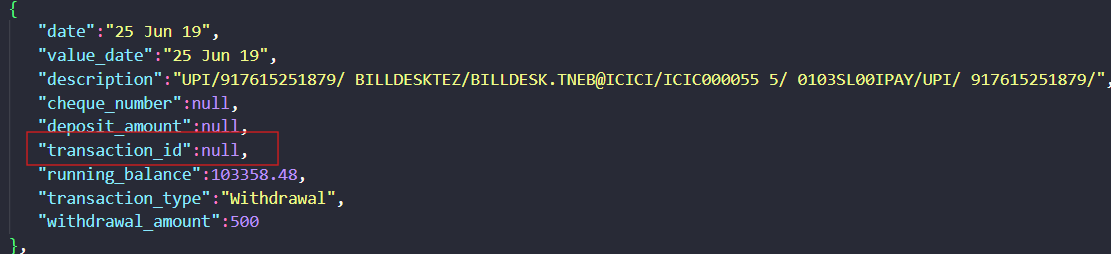
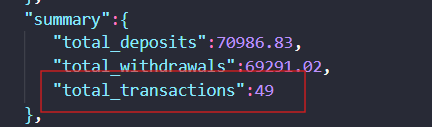
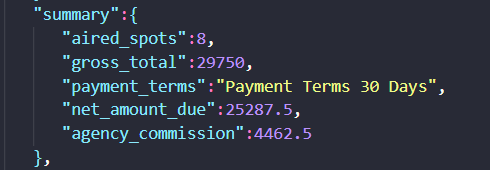
Extend AI did a good job turning the tested bank statement and invoice PDFs into reviewable structured JSON, including nested objects, row arrays, totals, and confidence metadata. The practical caveats are clear: some top-level sections were reordered, bank-row `transaction_id` values stayed null, the bank summary reported 49 transactions instead of the reviewer’s expected 40, and the invoice `payment_terms` field leaked label text (`Payment Terms 30 Days`).
In-Depth Review
Our detailed analysis of Extend AI — features, performance, and real-world testing.
Feature-by-Feature Breakdown
Schema-Filled Document Extraction▾
Feature tested: Schema-Filled Document Extraction
Result: Partial
Expected behavior: Populates nested document objects from user-defined JSON schemas applied to finance PDFs. In the bank statement and invoice runs, it reconstructed statement metadata, account and branch data, rewards, balances, invoice metadata, advertiser and station fields, and line-item structures.
Test case: PDF document → Image
Input type: PDF document
Input used: Input artifact (PDF document): Bank statement PDF — Bank Statement PDF.pdf
Observed output: Output artifact (Image): The bank-statement output reconstructed branch, account, and rewards sections in JSON. — extend-ai-bank-statement-extracted-details.png
Input artifact: Input artifact (PDF document): Bank statement PDF — Bank Statement PDF.pdf
Output artifact: Output artifact (Image): The bank-statement output reconstructed branch, account, and rewards sections in JSON. — extend-ai-bank-statement-extracted-details.png
What changed: PDF document transformed into Image
Test case: PDF document → Image
Input type: PDF document
Input used: Input artifact (PDF document): Bank statement PDF — Bank Statement PDF.pdf
Observed output: Output artifact (Image): The bank-statement output also reconstructed document-level summary, balances, and metadata fields. — extend-ai-document-level-bank-statement.png
Input artifact: Input artifact (PDF document): Bank statement PDF — Bank Statement PDF.pdf
Output artifact: Output artifact (Image): The bank-statement output also reconstructed document-level summary, balances, and metadata fields. — extend-ai-document-level-bank-statement.png
What changed: PDF document transformed into Image
Test case: PDF document → Image
Input type: PDF document
Input used: Input artifact (PDF document): Invoice PDF — Invoice PDF.pdf
Observed output: Output artifact (Image): The invoice output populated invoice_metadata with dates and order identifiers. — extend-invoice-metadata.png
Input artifact: Input artifact (PDF document): Invoice PDF — Invoice PDF.pdf
Output artifact: Output artifact (Image): The invoice output populated invoice_metadata with dates and order identifiers. — extend-invoice-metadata.png
What changed: PDF document transformed into Image
Test case: PDF document → Image
Input type: PDF document
Input used: Input artifact (PDF document): Invoice PDF — Invoice PDF.pdf
Observed output: Output artifact (Image): The invoice output reconstructed station, summary, advertiser, and the start of the line_items array under the requested schema. — extend-ai-schema-order-invoice.png
Input artifact: Input artifact (PDF document): Invoice PDF — Invoice PDF.pdf
Output artifact: Output artifact (Image): The invoice output reconstructed station, summary, advertiser, and the start of the line_items array under the requested schema. — extend-ai-schema-order-invoice.png
What changed: PDF document transformed into Image
Why it matters / Conclusion: Very strong at filling nested document schemas, but the extracted output did not always preserve the input schema order exactly.
Populates nested document objects from user-defined JSON schemas applied to finance PDFs. In the bank statement and invoice runs, it reconstructed statement metadata, account and branch data, rewards, balances, invoice metadata, advertiser and station fields, and line-item structures.
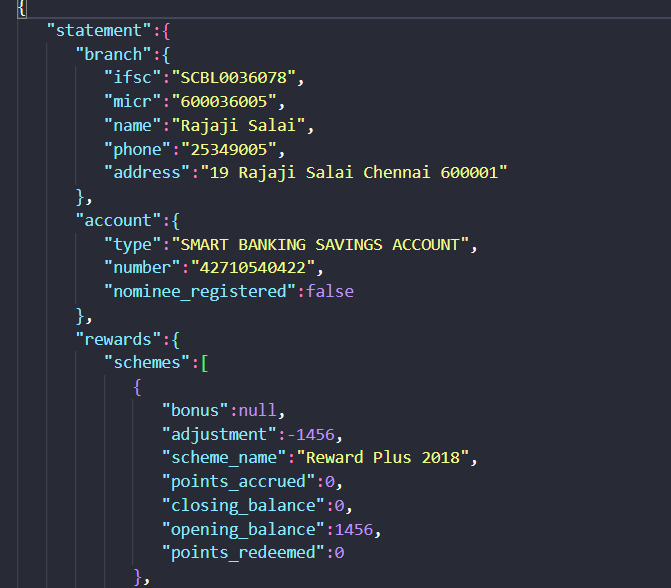
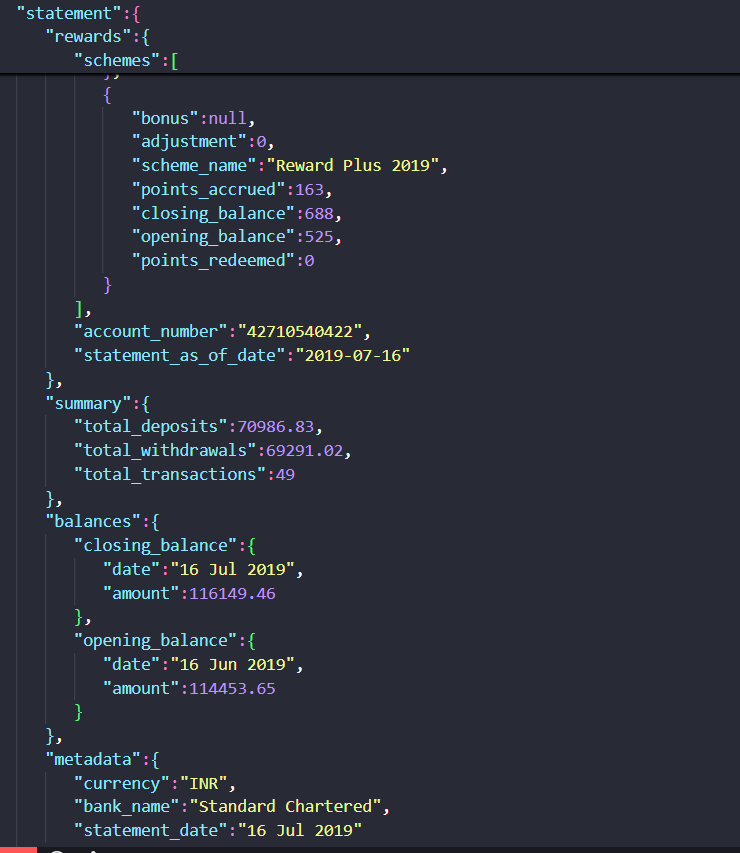
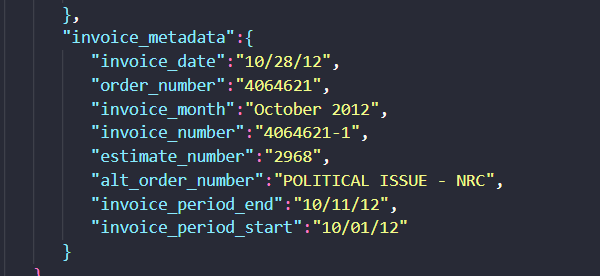
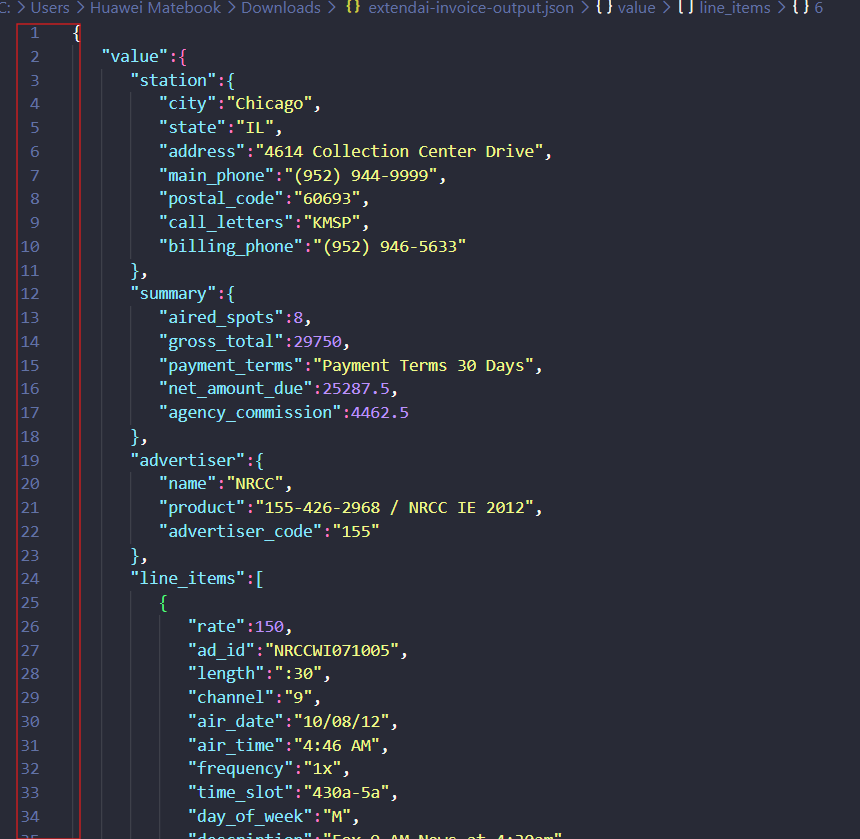
Table Extraction▾
Feature tested: Table Extraction
Result: Partial
Expected behavior: Extracts repeating table records as discrete rows from PDFs, including financial and research tables. It kept bank-statement transactions separate, returned invoice line items with line numbers, airtimes, rates, and flight-period data, and was also tested on harder tables with grouped headers, multirow structure, and vertical annotations.
Test case: PDF document → Image
Input type: PDF document
Input used: Input artifact (PDF document): Bank statement PDF — Bank Statement PDF.pdf
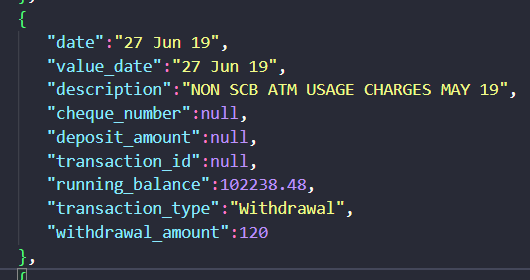
Observed output: Output artifact (Image): A single bank transaction was extracted as a discrete row with date, description, running balance, transaction_type, and amount fields. — extend-ai-extracted-transaction-item.png
Input artifact: Input artifact (PDF document): Bank statement PDF — Bank Statement PDF.pdf
Output artifact: Output artifact (Image): A single bank transaction was extracted as a discrete row with date, description, running balance, transaction_type, and amount fields. — extend-ai-extracted-transaction-item.png
What changed: PDF document transformed into Image
Test case: PDF document → Image
Input type: PDF document
Input used: Input artifact (PDF document): Invoice PDF — Invoice PDF.pdf
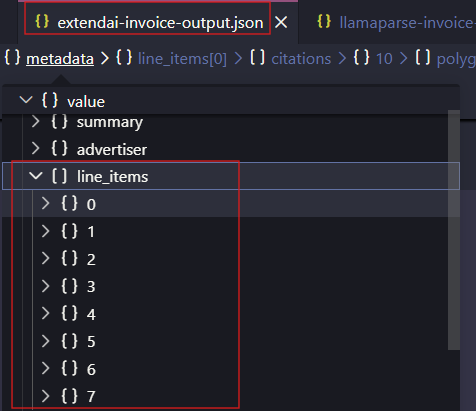
Observed output: Output artifact (Image): The invoice output exposed a line_items array expanded with items 0 through 7, confirming eight discrete line items. — extendai-extracted-invoice-line-items.png
Input artifact: Input artifact (PDF document): Invoice PDF — Invoice PDF.pdf
Output artifact: Output artifact (Image): The invoice output exposed a line_items array expanded with items 0 through 7, confirming eight discrete line items. — extendai-extracted-invoice-line-items.png
What changed: PDF document transformed into Image
Test case: PDF document → Image
Input type: PDF document
Input used: Input artifact (PDF document): Invoice PDF — Invoice PDF.pdf
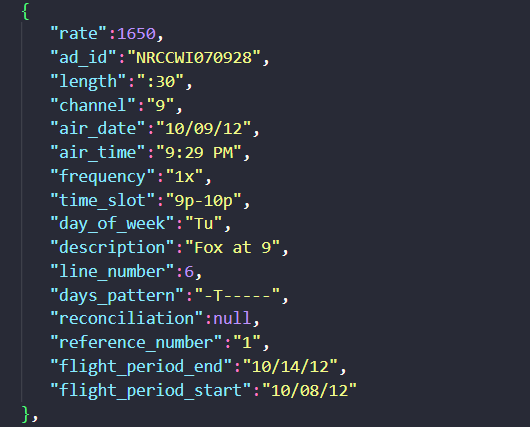
Observed output: Output artifact (Image): Line item 6 preserved rate, ad_id, air_time, time_slot, day_of_week, and flight-period fields. — extend-ai-invoice-line-item-6.png
Input artifact: Input artifact (PDF document): Invoice PDF — Invoice PDF.pdf
Output artifact: Output artifact (Image): Line item 6 preserved rate, ad_id, air_time, time_slot, day_of_week, and flight-period fields. — extend-ai-invoice-line-item-6.png
What changed: PDF document transformed into Image
Test case: Image → Image
Input type: Image
Input used: Input artifact (Image): Target 2015 Annual Report financial summary table with year columns from 2015 to 2011. — landing-ai-target-annual-report-financial-summary-table-2.png
Observed output: Output artifact (Image): For the Target financial summary, Extend AI preserved the year columns, row labels, and most numeric values in a clean tabular layout. This is a strong example — extend-ai-target-annual-report-parsed-financial-table.png
Input artifact: Input artifact (Image): Target 2015 Annual Report financial summary table with year columns from 2015 to 2011. — landing-ai-target-annual-report-financial-summary-table-2.png
Output artifact: Output artifact (Image): For the Target financial summary, Extend AI preserved the year columns, row labels, and most numeric values in a clean tabular layout. This is a strong example — extend-ai-target-annual-report-parsed-financial-table.png
What changed: Image transformed into Image
Test case: Image → Image
Input type: Image
Input used: Input artifact (Image): Orders Received table with grouped time-period headers and year-over-year change columns. — landing-ai-segment-results-table-2025-first-quarter.png
Observed output: Output artifact (Image): In the 'Orders Received' table, Extend AI retained the segment rows, the previous-versus-present quarter grouping, and the Y/Y change columns. The parsed result — extend-ai-parsed-orders-received-table.png
Input artifact: Input artifact (Image): Orders Received table with grouped time-period headers and year-over-year change columns. — landing-ai-segment-results-table-2025-first-quarter.png
Output artifact: Output artifact (Image): In the 'Orders Received' table, Extend AI retained the segment rows, the previous-versus-present quarter grouping, and the Y/Y change columns. The parsed result — extend-ai-parsed-orders-received-table.png
What changed: Image transformed into Image
Test case: Image → Image
Input type: Image
Input used: Input artifact (Image): Segment results table with compound header cells across A, B, C, D, Subtotal, Other1, Total, E2, and F3. — extend-ai-financial-segment-reporting-table.png
Observed output: Output artifact (Image): This harder segment table stayed broadly tabular, but Extend AI did not cleanly split compound header roles. The output preserved the numbers and row labels, ye — extend-ai-parsed-segment-reporting-table.png
Input artifact: Input artifact (Image): Segment results table with compound header cells across A, B, C, D, Subtotal, Other1, Total, E2, and F3. — extend-ai-financial-segment-reporting-table.png
Output artifact: Output artifact (Image): This harder segment table stayed broadly tabular, but Extend AI did not cleanly split compound header roles. The output preserved the numbers and row labels, ye — extend-ai-parsed-segment-reporting-table.png
What changed: Image transformed into Image
Test case: Image → Image
Input type: Image
Input used: Input artifact (Image): Scanned 'Stand structure before and after cutting' table with before-cut and after-cut column groups. — extend-ai-scanned-stand-structure-table.png
Observed output: Output artifact (Image): On the scanned stand-structure table, Extend AI preserved treatment rows, diameter-class columns, and before/after groupings well enough for the table to remain — extend-ai-parsed-stand-structure-table.png
Input artifact: Input artifact (Image): Scanned 'Stand structure before and after cutting' table with before-cut and after-cut column groups. — extend-ai-scanned-stand-structure-table.png
Output artifact: Output artifact (Image): On the scanned stand-structure table, Extend AI preserved treatment rows, diameter-class columns, and before/after groupings well enough for the table to remain — extend-ai-parsed-stand-structure-table.png
What changed: Image transformed into Image
Test case: Image → Image
Input type: Image
Input used: Input artifact (Image): Scanned table with multirow year groupings and treatment rows for tree mortality. — extend-ai-scanned-table-tree-mortality-multirow.png
Observed output: Output artifact (Image): For the multirow scanned mortality table, header-level relationships were not fully preserved. The output split or displaced structural cues such as the '12-inc — extend-ai-parsed-tree-mortality-multirow-table.png
Input artifact: Input artifact (Image): Scanned table with multirow year groupings and treatment rows for tree mortality. — extend-ai-scanned-table-tree-mortality-multirow.png
Output artifact: Output artifact (Image): For the multirow scanned mortality table, header-level relationships were not fully preserved. The output split or displaced structural cues such as the '12-inc — extend-ai-parsed-tree-mortality-multirow-table.png
What changed: Image transformed into Image
Test case: Image → Image
Input type: Image
Input used: Input artifact (Image): Scanned table with yearly columns and a vertically printed 'cut completed' note between the 1980 and 1981 columns. — extend-ai-scanned-table-mountain-pine-beetle-mortality.png
Observed output: Output artifact (Image): Extend AI rebuilt the main rows and year columns of this scanned table, but it failed on the vertical 'cut completed' annotation placed between columns. That no — extend-ai-parsed-table-text-between-columns.png
Input artifact: Input artifact (Image): Scanned table with yearly columns and a vertically printed 'cut completed' note between the 1980 and 1981 columns. — extend-ai-scanned-table-mountain-pine-beetle-mortality.png
Output artifact: Output artifact (Image): Extend AI rebuilt the main rows and year columns of this scanned table, but it failed on the vertical 'cut completed' annotation placed between columns. That no — extend-ai-parsed-table-text-between-columns.png
What changed: Image transformed into Image
Why it matters / Conclusion: It keeps rows separate well, but the bank rows still missed `transaction_id` values, so identifiers may need downstream reconciliation.
Extracts repeating table records as discrete rows from PDFs, including financial and research tables. It kept bank-statement transactions separate, returned invoice line items with line numbers, airtimes, rates, and flight-period data, and was also tested on harder tables with grouped headers, multirow structure, and vertical annotations.
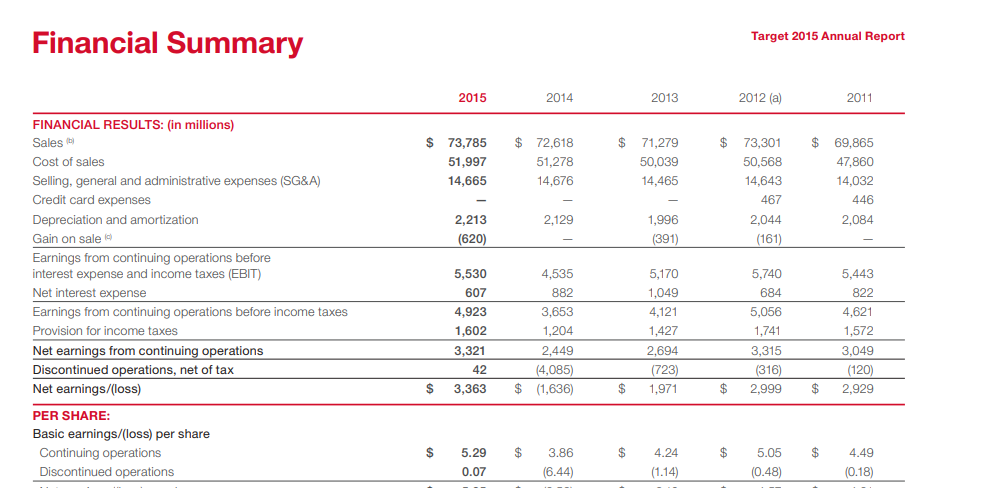
Target 2015 Annual Report financial summary table with year columns from 2015 to 2011.
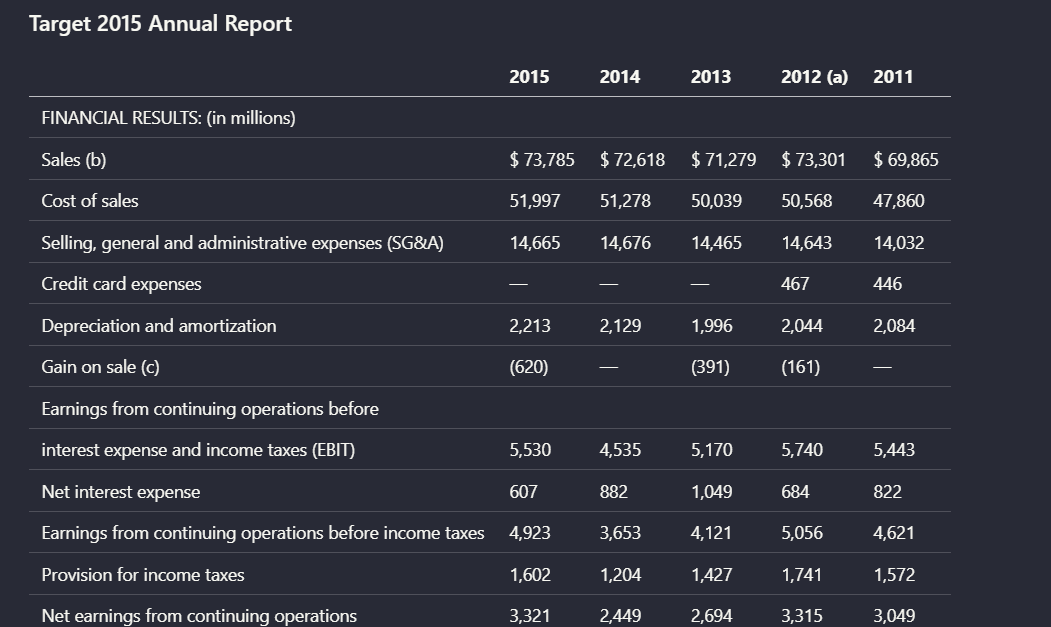
For the Target financial summary, Extend AI preserved the year columns, row labels, and most numeric values in a clean tabular layout. This is a strong example of the tool keeping a conventional financial table readable in markdown-oriented output.
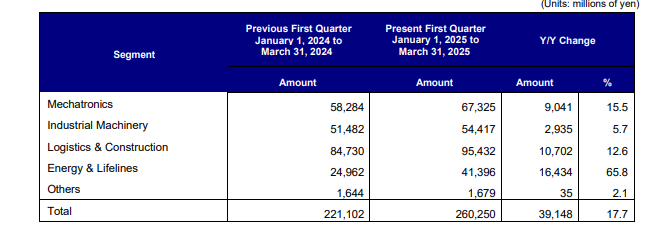
Orders Received table with grouped time-period headers and year-over-year change columns.
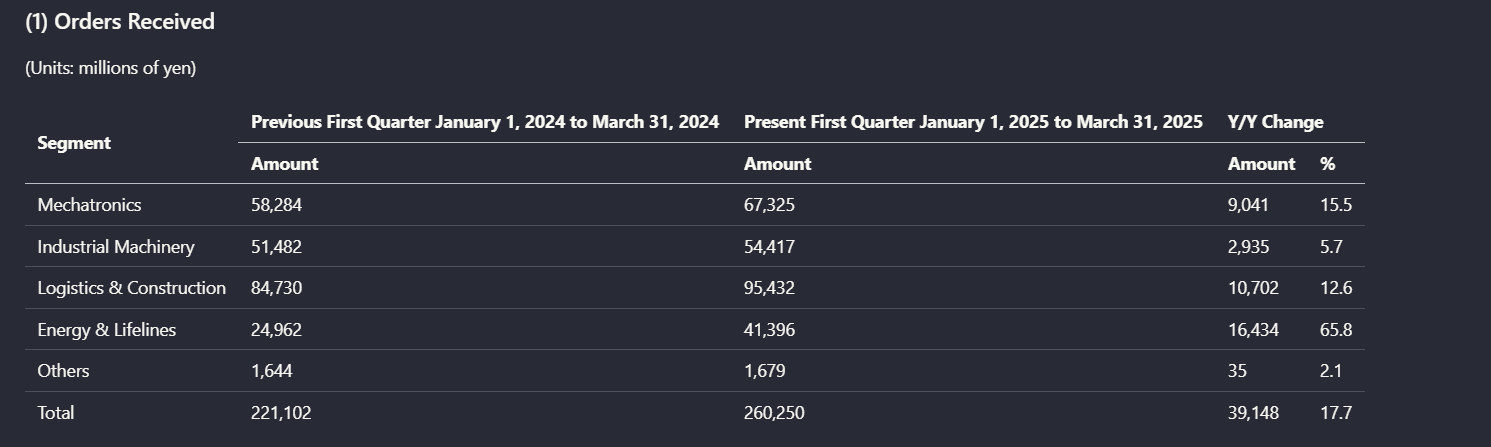
In the 'Orders Received' table, Extend AI retained the segment rows, the previous-versus-present quarter grouping, and the Y/Y change columns. The parsed result kept the relationship between major column groups and their values understandable.
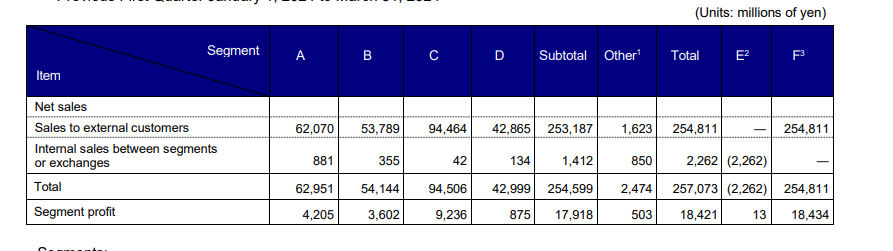
Segment results table with compound header cells across A, B, C, D, Subtotal, Other1, Total, E2, and F3.
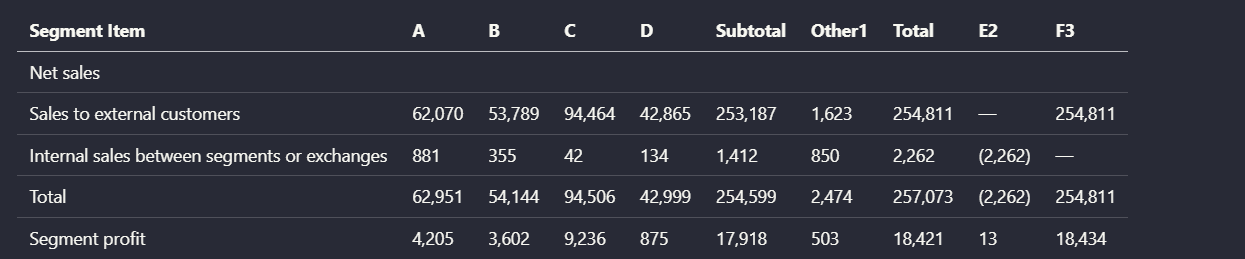
This harder segment table stayed broadly tabular, but Extend AI did not cleanly split compound header roles. The output preserved the numbers and row labels, yet the semantic meaning of some grouped headers was reduced because the header layers were flattened together.
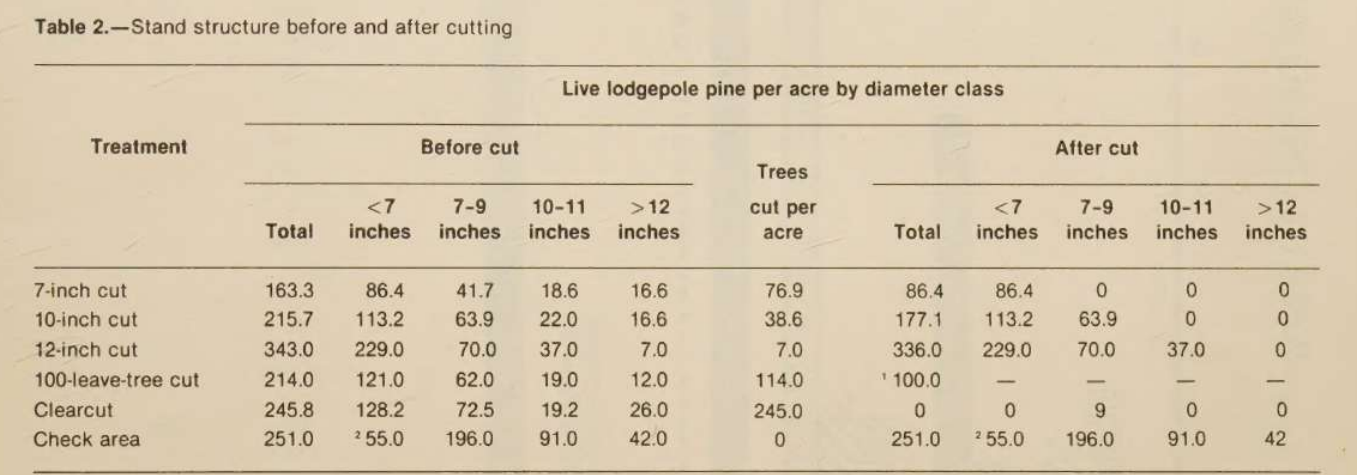
Scanned 'Stand structure before and after cutting' table with before-cut and after-cut column groups.
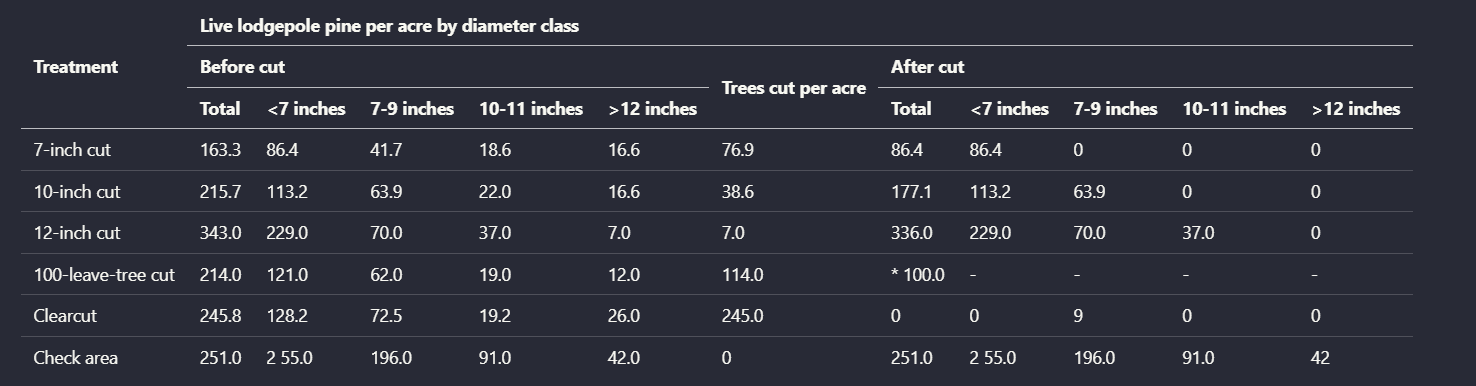
On the scanned stand-structure table, Extend AI preserved treatment rows, diameter-class columns, and before/after groupings well enough for the table to remain interpretable. This shows the parser could recover a substantial amount of table structure from a scanned source, not just a digital one.
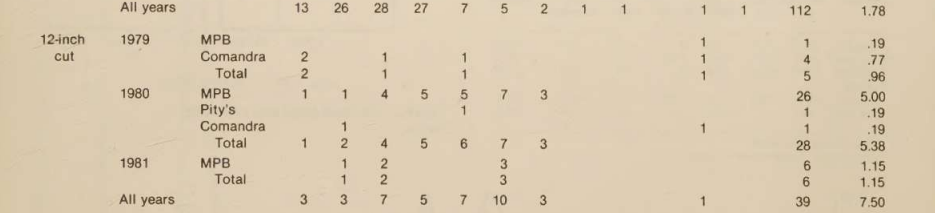
Scanned table with multirow year groupings and treatment rows for tree mortality.
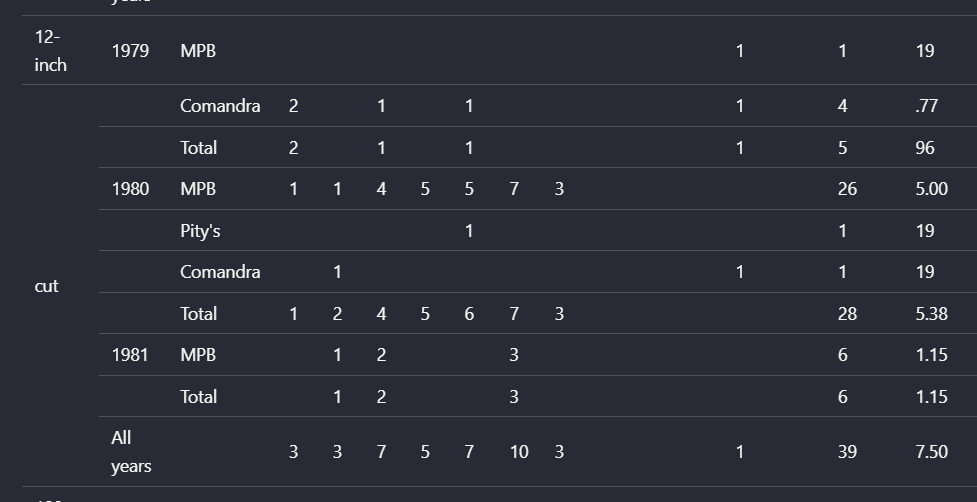
For the multirow scanned mortality table, header-level relationships were not fully preserved. The output split or displaced structural cues such as the '12-inch cut' grouping and introduced OCR artifacts like stray '19' values, which made the reconstructed layout less faithful than the simpler table cases.
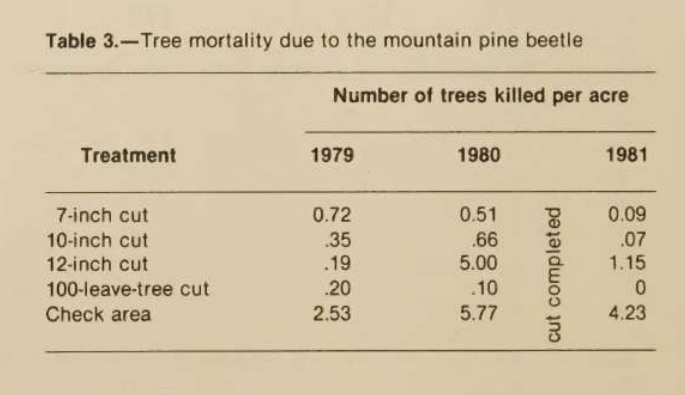
Scanned table with yearly columns and a vertically printed 'cut completed' note between the 1980 and 1981 columns.
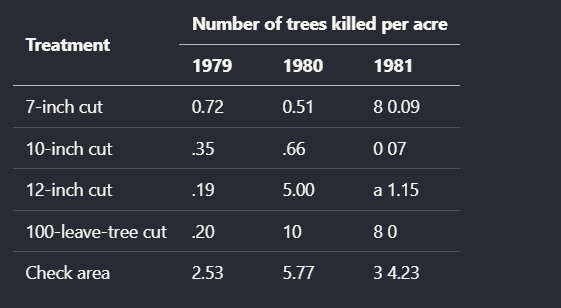
Extend AI rebuilt the main rows and year columns of this scanned table, but it failed on the vertical 'cut completed' annotation placed between columns. That note was absorbed into nearby values as stray characters such as '8', 'a', and '3', so the contextual annotation was lost and some cells became noisier.
Transaction Type Classification▾
Feature tested: Transaction Type Classification
Result: Passed
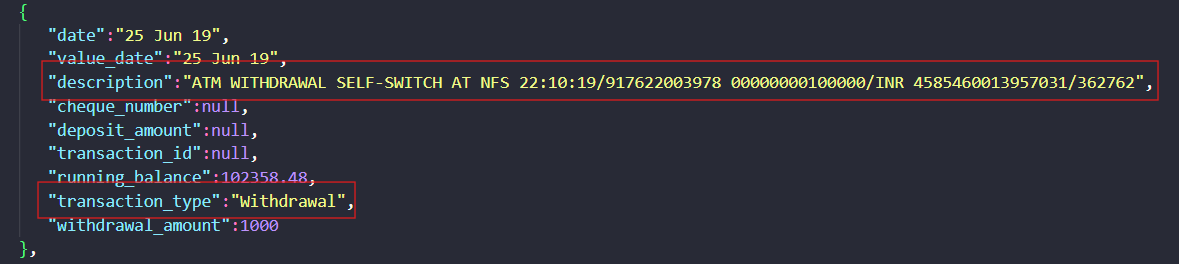
Expected behavior: Infers transaction labels from description text in bank-statement rows. In the sampled withdrawal-like entries, items such as ATM usage charges, self-switch ATM withdrawal, and UPI/BILLDESK activity were labeled as Withdrawal.
Test case: Text prompt → Image
Input type: Text prompt
Input used: Input artifact (Text prompt): Transaction description
Observed output: Output artifact (Image): This row was labeled `transaction_type = Withdrawal` from its description text. — extend-ai-transaction-type.png
Input artifact: Input artifact (Text prompt): Transaction description
Output artifact: Output artifact (Image): This row was labeled `transaction_type = Withdrawal` from its description text. — extend-ai-transaction-type.png
What changed: Text prompt transformed into Image
Test case: Text prompt → Image
Input type: Text prompt
Input used: Input artifact (Text prompt): Transaction description
Observed output: Output artifact (Image): The row was also labeled `Withdrawal`, but `transaction_id` remained null in the extracted JSON. — extend-ai-extracted-transaction-id.png
Input artifact: Input artifact (Text prompt): Transaction description
Output artifact: Output artifact (Image): The row was also labeled `Withdrawal`, but `transaction_id` remained null in the extracted JSON. — extend-ai-extracted-transaction-id.png
What changed: Text prompt transformed into Image
Why it matters / Conclusion: The classifier worked on the sampled withdrawal rows, but the report does not show a deposit example and the row IDs were still missing.
Infers transaction labels from description text in bank-statement rows. In the sampled withdrawal-like entries, items such as ATM usage charges, self-switch ATM withdrawal, and UPI/BILLDESK activity were labeled as Withdrawal.
Financial Summary Extraction▾
Feature tested: Financial Summary Extraction
Result: Partial
Expected behavior: Produces document-level totals and balances from financial documents. The bank-statement output included total deposits, total withdrawals, transaction count, and opening/closing balances, while the invoice output included aired spots, gross total, agency commission, payment terms, and net amount due.
Test case: PDF document → Image
Input type: PDF document
Input used: Input artifact (PDF document): Bank statement PDF — Bank Statement PDF.pdf
Observed output: Output artifact (Image): The bank statement summary reported `total_deposits: 70986.83`, `total_withdrawals: 69291.02`, and `total_transactions: 49`; the report says the expected count was 40 after excluding balance-forward, tax, and charge entries. — extend-ai-bank-statement-summary.png
Input artifact: Input artifact (PDF document): Bank statement PDF — Bank Statement PDF.pdf
Output artifact: Output artifact (Image): The bank statement summary reported `total_deposits: 70986.83`, `total_withdrawals: 69291.02`, and `total_transactions: 49`; the report says the expected count was 40 after excluding balance-forward, tax, and charge entries. — extend-ai-bank-statement-summary.png
What changed: PDF document transformed into Image
Test case: PDF document → Image
Input type: PDF document
Input used: Input artifact (PDF document): Invoice PDF — Invoice PDF.pdf
Observed output: Output artifact (Image): The invoice summary reported `aired_spots: 8`, `gross_total: 29750`, `agency_commission: 4462.5`, `net_amount_due: 25287.5`, and `payment_terms: "Payment Terms 30 Days"` rather than the bare value `30 Days`. — extend-ai-invoice-summary-2.png
Input artifact: Input artifact (PDF document): Invoice PDF — Invoice PDF.pdf
Output artifact: Output artifact (Image): The invoice summary reported `aired_spots: 8`, `gross_total: 29750`, `agency_commission: 4462.5`, `net_amount_due: 25287.5`, and `payment_terms: "Payment Terms 30 Days"` rather than the bare value `30 Days`. — extend-ai-invoice-summary-2.png
What changed: PDF document transformed into Image
Why it matters / Conclusion: The invoice totals looked consistent, but the bank summary count and the invoice payment_terms value both show why a review pass is still needed.
Produces document-level totals and balances from financial documents. The bank-statement output included total deposits, total withdrawals, transaction count, and opening/closing balances, while the invoice output included aired spots, gross total, agency commission, payment terms, and net amount due.
Confidence-Annotated Review Interface▾
Feature tested: Confidence-Annotated Review Interface
Result: Passed
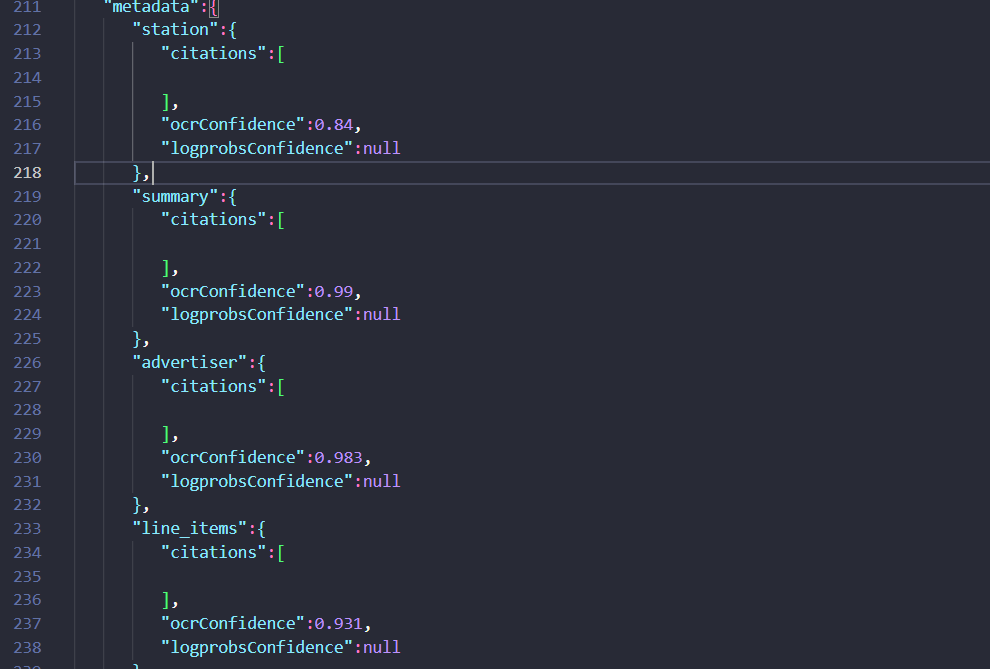
Expected behavior: Displays extracted values in a reviewable interface with confidence metadata so users can validate fields before export. The report showed OCR confidence values for grouped invoice sections rather than only raw extracted JSON.
Test case: PDF document → Image
Input type: PDF document
Input used: Input artifact (PDF document): Invoice PDF — Invoice PDF.pdf
Observed output: Output artifact (Image): The review view surfaced OCR confidence for station, summary, advertiser, and line_items, making the extraction easier to validate before export. — extend-ai-invoice-extracted-metadata.png
Input artifact: Input artifact (PDF document): Invoice PDF — Invoice PDF.pdf
Output artifact: Output artifact (Image): The review view surfaced OCR confidence for station, summary, advertiser, and line_items, making the extraction easier to validate before export. — extend-ai-invoice-extracted-metadata.png
What changed: PDF document transformed into Image
Why it matters / Conclusion: A useful validation aid, though the report only demonstrated confidence metadata on the invoice run.
Displays extracted values in a reviewable interface with confidence metadata so users can validate fields before export. The report showed OCR confidence values for grouped invoice sections rather than only raw extracted JSON.
Document Structure ReconstructionStrong across hybrid, table-heavy, and scanned PDFs.▾
Feature tested: Document Structure Reconstruction
Result: Passed
Verdict: Strong across hybrid, table-heavy, and scanned PDFs.
Expected behavior: Reflows mixed PDF pages into readable markdown-style text while preserving headings, section flow, bullets, and nearby body content. It was exercised on a Target annual report page, a Sumitomo financial notes page, and a scanned two-column research page.
Test case: Image → Image
Input type: Image
Input used: Input artifact (Image): Target annual report narrative page titled 'A Growth Story Again'. — landing-ai-target-annual-report-growth-story-page.png
Observed output: Output artifact (Image): On the Target 'A Growth Story Again' page, Extend AI kept the title, narrative paragraphs, and bullet-style highlights in readable order, and it even inserted a — extend-ai-target-annual-report-extracted-text-page.png
Input artifact: Input artifact (Image): Target annual report narrative page titled 'A Growth Story Again'. — landing-ai-target-annual-report-growth-story-page.png
Output artifact: Output artifact (Image): On the Target 'A Growth Story Again' page, Extend AI kept the title, narrative paragraphs, and bullet-style highlights in readable order, and it even inserted a — extend-ai-target-annual-report-extracted-text-page.png
What changed: Image transformed into Image
Test case: Image → Image
Input type: Image
Input used: Input artifact (Image): Sumitomo Heavy Industries 'Additional Notes' page. — extend-ai-sumitomo-heavy-industries-additional-notes-page-1.png
Observed output: Output artifact (Image): On the Sumitomo notes page, it preserved the main heading and numbered note structure with clean line breaks. The visible extracted output shown in the proof re — extend-ai-hierarchy-extracted-notes-page.png
Input artifact: Input artifact (Image): Sumitomo Heavy Industries 'Additional Notes' page. — extend-ai-sumitomo-heavy-industries-additional-notes-page-1.png
Output artifact: Output artifact (Image): On the Sumitomo notes page, it preserved the main heading and numbered note structure with clean line breaks. The visible extracted output shown in the proof re — extend-ai-hierarchy-extracted-notes-page.png
What changed: Image transformed into Image
Test case: Image → Image
Input type: Image
Input used: Input artifact (Image): Scanned two-column research-paper section headed 'STUDY AREA'. — landing-ai-scanned-two-column-text-study-area.png
Observed output: Output artifact (Image): On the scanned two-column page, Extend AI rebuilt the 'STUDY AREA' section into clean linear text, correcting scan-era hyphenation breaks such as 'between' and — extend-ai-parsed-study-area-section.png
Input artifact: Input artifact (Image): Scanned two-column research-paper section headed 'STUDY AREA'. — landing-ai-scanned-two-column-text-study-area.png
Output artifact: Output artifact (Image): On the scanned two-column page, Extend AI rebuilt the 'STUDY AREA' section into clean linear text, correcting scan-era hyphenation breaks such as 'between' and — extend-ai-parsed-study-area-section.png
What changed: Image transformed into Image
Why it matters / Conclusion: If your top priority is getting readable markdown with section hierarchy preserved across mixed PDFs, this was one of Extend AI's strongest behaviors in the test.
Reflows mixed PDF pages into readable markdown-style text while preserving headings, section flow, bullets, and nearby body content. It was exercised on a Target annual report page, a Sumitomo financial notes page, and a scanned two-column research page.
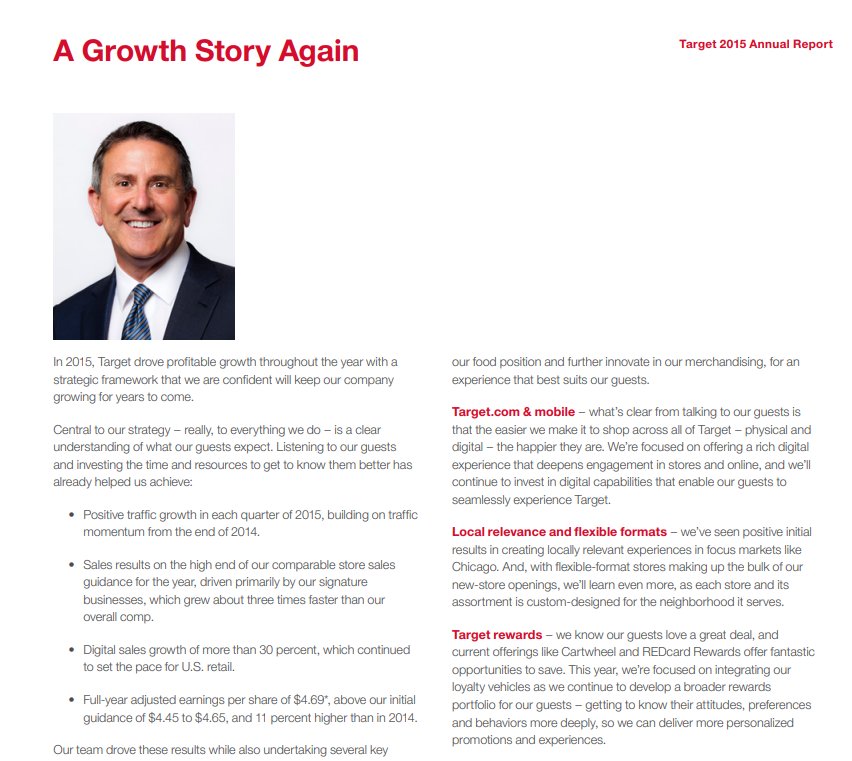
Target annual report narrative page titled 'A Growth Story Again'.
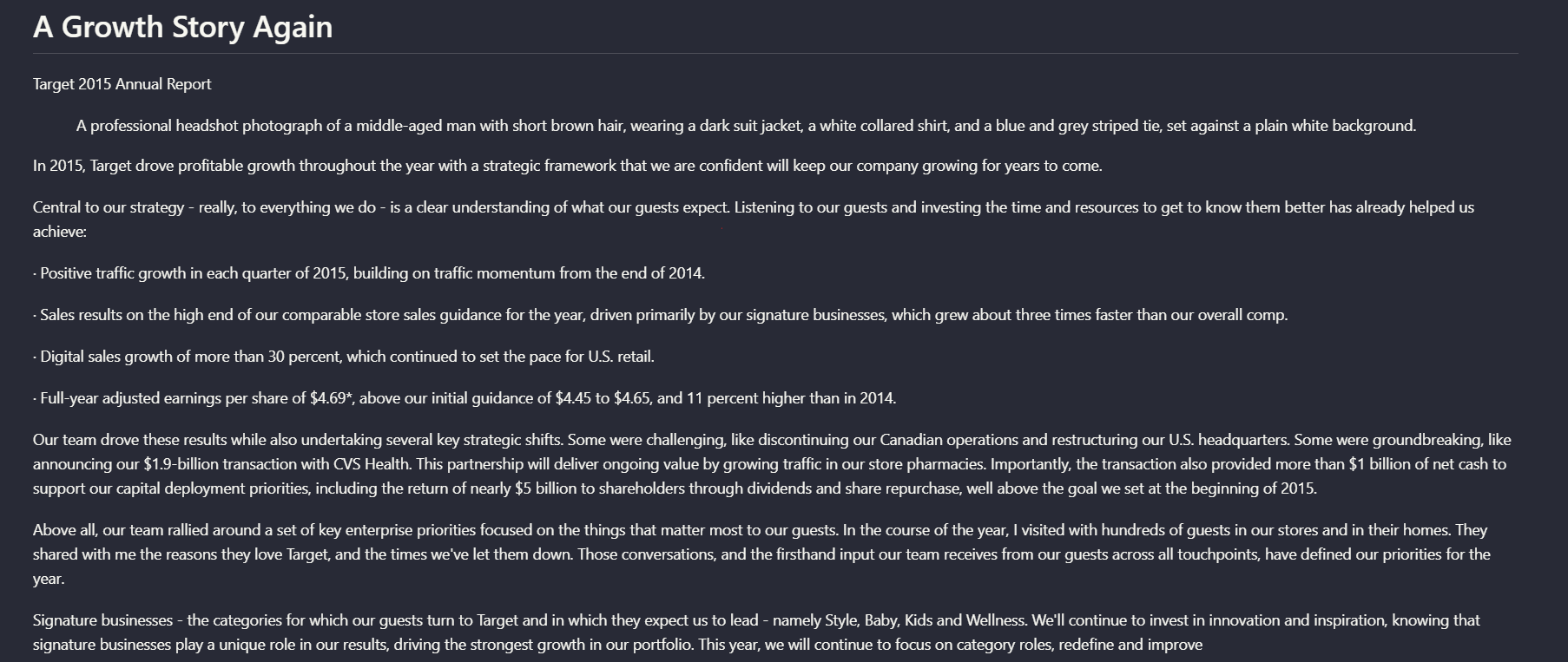
On the Target 'A Growth Story Again' page, Extend AI kept the title, narrative paragraphs, and bullet-style highlights in readable order, and it even inserted a description of the headshot image. The result reads like a reconstructed report page rather than a flat OCR dump.
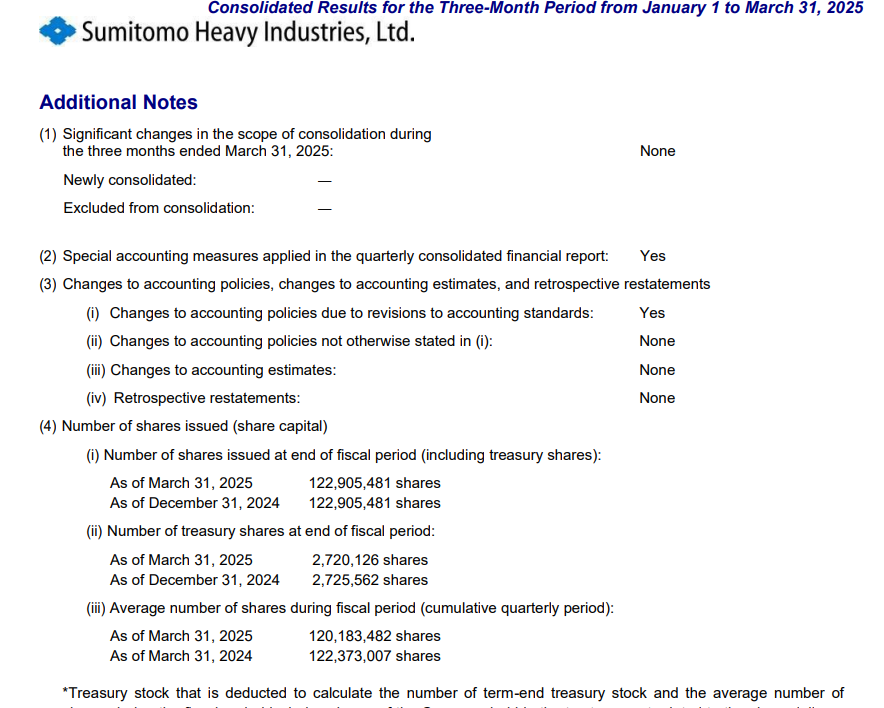
Sumitomo Heavy Industries 'Additional Notes' page.
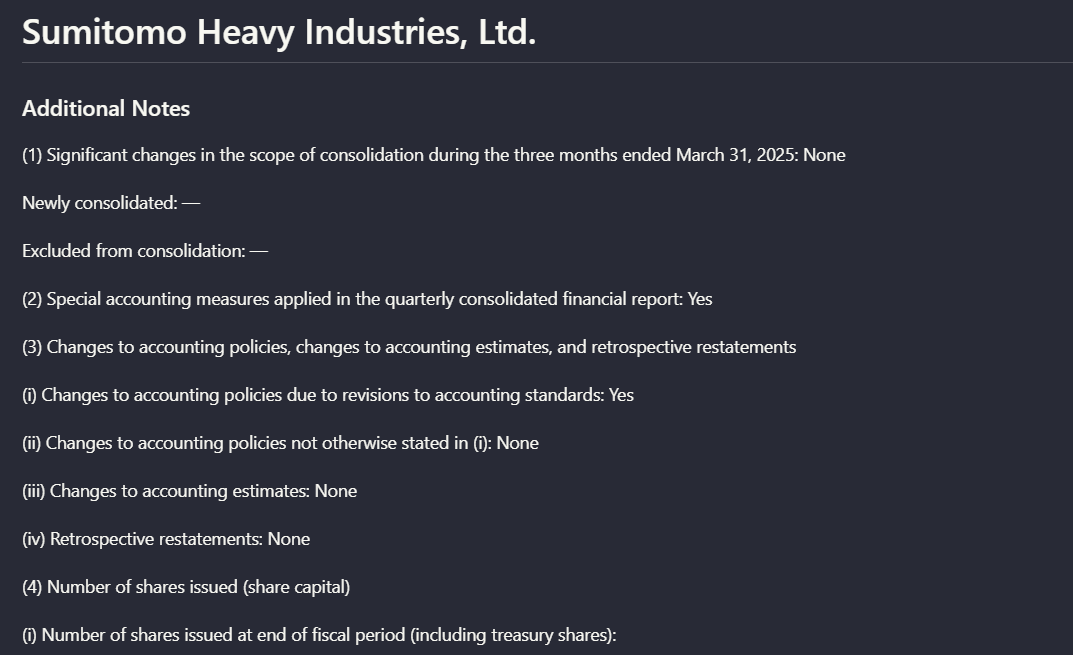
On the Sumitomo notes page, it preserved the main heading and numbered note structure with clean line breaks. The visible extracted output shown in the proof reaches the start of item (4) 'Number of shares issued (share capital),' so this proof supports structural retention more clearly than full-page completeness.
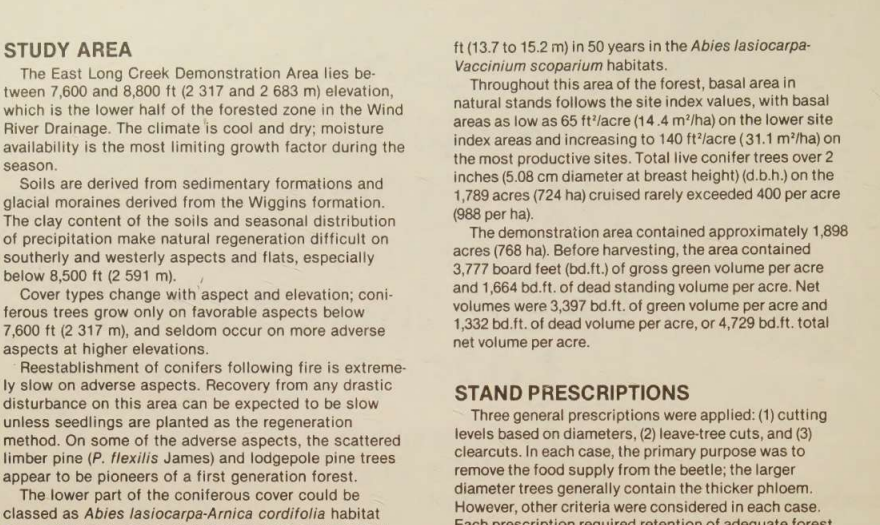
Scanned two-column research-paper section headed 'STUDY AREA'.
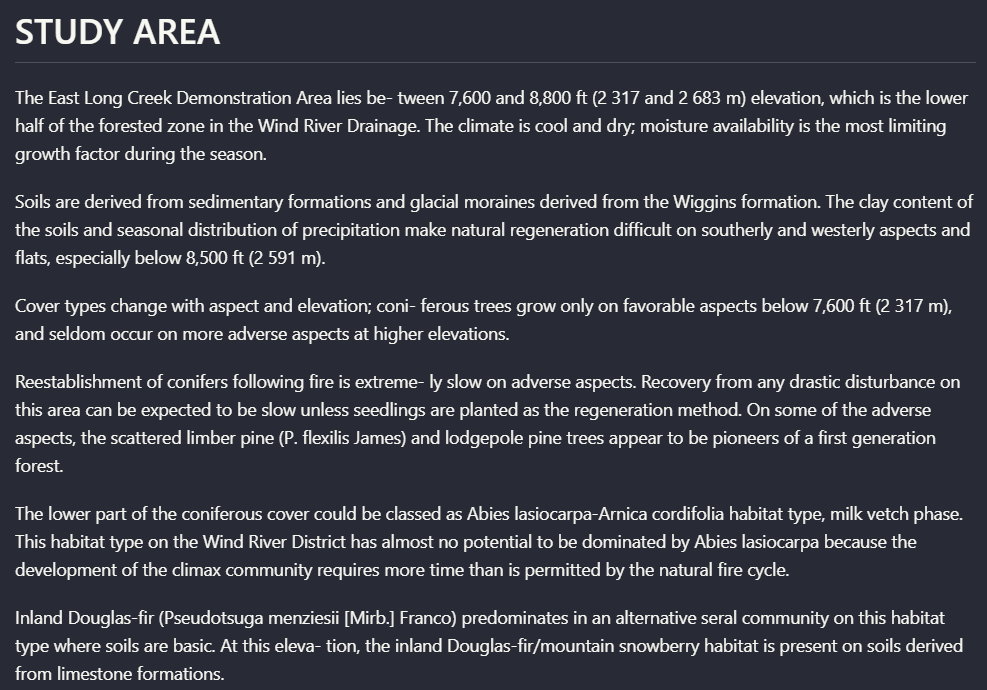
On the scanned two-column page, Extend AI rebuilt the 'STUDY AREA' section into clean linear text, correcting scan-era hyphenation breaks such as 'between' and 'extremely' and preserving the heading-to-paragraph relationship despite paper texture and skew.
Visual Element Retention and CaptioningExtend AI preserved charts and logos as structured figure blocks with descriptions, but usually translated visuals into text instead of keeping the original visual form inline.▾
Feature tested: Visual Element Retention and Captioning
Result: Partial
Verdict: Extend AI preserved charts and logos as structured figure blocks with descriptions, but usually translated visuals into text instead of keeping the original visual form inline.
Expected behavior: Retains charts and other non-text visuals by converting them into figure-style elements with extracted labels, values, and generated captions. This was tested on a waterfall chart, a scanned bar chart, annual-report charts, a research chart, and a logo element.
Test case: Image → Image
Input type: Image
Input used: Input artifact (Image): Waterfall chart showing SG&A rate changes from 2013 to 2015. — extend-ai-sg-and-a-rate-waterfall-chart.png
Observed output: Output artifact (Image): For the SG&A waterfall chart, Extend AI emitted a figure block that preserved the chart labels, percentage values, and a generated caption explaining the moveme — extend-ai-sg-and-a-waterfall-extracted-text.png
Input artifact: Input artifact (Image): Waterfall chart showing SG&A rate changes from 2013 to 2015. — extend-ai-sg-and-a-rate-waterfall-chart.png
Output artifact: Output artifact (Image): For the SG&A waterfall chart, Extend AI emitted a figure block that preserved the chart labels, percentage values, and a generated caption explaining the moveme — extend-ai-sg-and-a-waterfall-extracted-text.png
What changed: Image transformed into Image
Test case: Image → Image
Input type: Image
Input used: Input artifact (Image): Scanned grouped bar chart of tree mortality by year and cut treatment. — landing-ai-tree-mortality-by-year-and-cut-bar-chart-1.png
Observed output: Output artifact (Image): On the scanned mortality chart, Extend AI captured the chart title, cut-method labels, years, and a generated caption summarizing the trend. However, it did not — extend-ai-parsed-chart-tree-cutting-methods.png
Input artifact: Input artifact (Image): Scanned grouped bar chart of tree mortality by year and cut treatment. — landing-ai-tree-mortality-by-year-and-cut-bar-chart-1.png
Output artifact: Output artifact (Image): On the scanned mortality chart, Extend AI captured the chart title, cut-method labels, years, and a generated caption summarizing the trend. However, it did not — extend-ai-parsed-chart-tree-cutting-methods.png
What changed: Image transformed into Image
Test case: Image → Image
Input type: Image
Input used: Input artifact (Image): A logo element embedded in the hybrid earnings report. — hybrid_earningspdf_target_logo.png
Observed output: Output artifact (Image): Instead of keeping the logo visually in document context, Extend AI emitted a logo figure block whose caption identifies it as the Target bullseye symbol. The e — hybrid_earningspdf_parsed_logo.png
Input artifact: Input artifact (Image): A logo element embedded in the hybrid earnings report. — hybrid_earningspdf_target_logo.png
Output artifact: Output artifact (Image): Instead of keeping the logo visually in document context, Extend AI emitted a logo figure block whose caption identifies it as the Target bullseye symbol. The e — hybrid_earningspdf_parsed_logo.png
What changed: Image transformed into Image
Why it matters / Conclusion: Good if you want charts and logos retained in markdown as descriptive elements; weaker if you need the original visual presentation preserved inline.
Retains charts and other non-text visuals by converting them into figure-style elements with extracted labels, values, and generated captions. This was tested on a waterfall chart, a scanned bar chart, annual-report charts, a research chart, and a logo element.
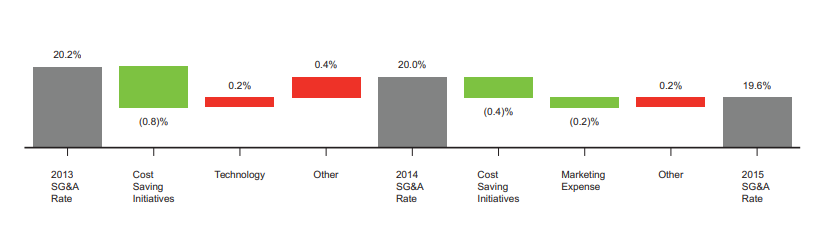
Waterfall chart showing SG&A rate changes from 2013 to 2015.
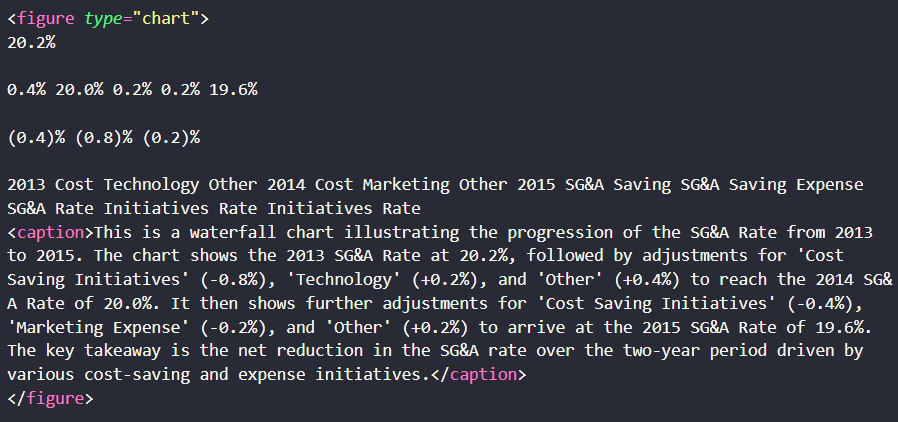
For the SG&A waterfall chart, Extend AI emitted a figure block that preserved the chart labels, percentage values, and a generated caption explaining the movement from 20.2% in 2013 to 19.6% in 2015. The semantic content survived, but the output became a text description of the chart rather than the original chart graphic.
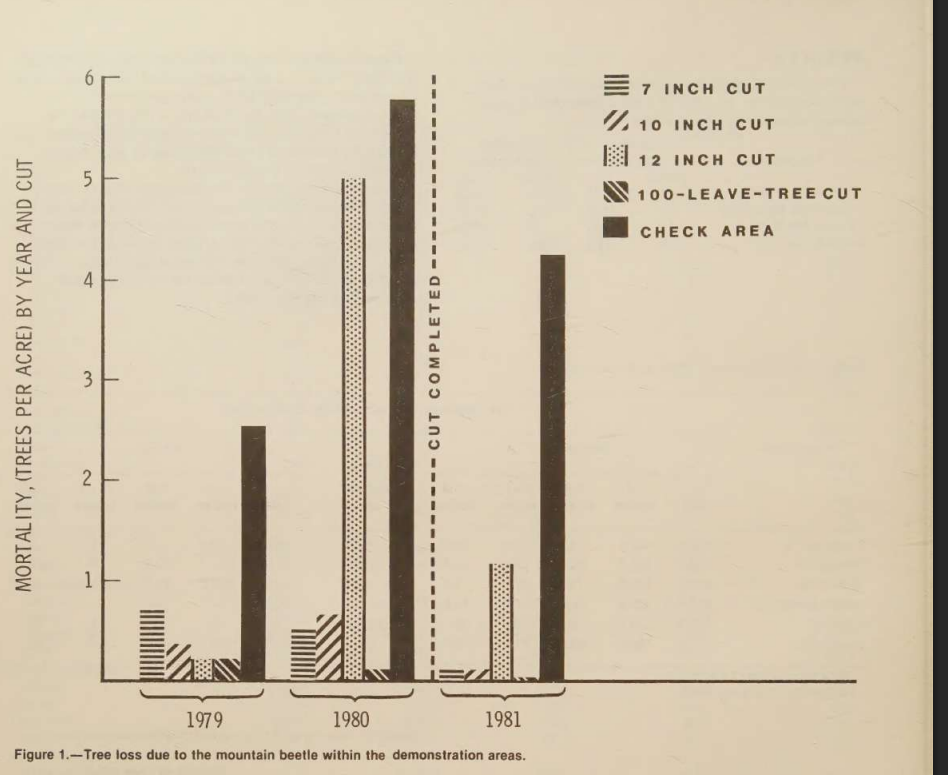
Scanned grouped bar chart of tree mortality by year and cut treatment.
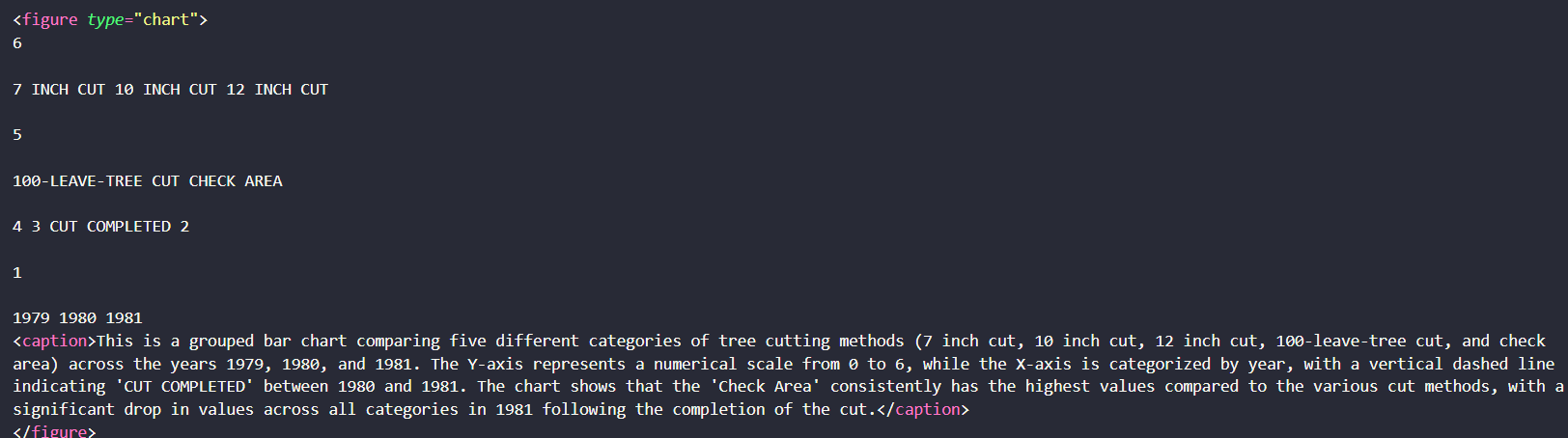
On the scanned mortality chart, Extend AI captured the chart title, cut-method labels, years, and a generated caption summarizing the trend. However, it did not preserve the bar shapes or full visual encoding, so the output was useful for meaning retention but weaker for chart fidelity.

A logo element embedded in the hybrid earnings report.

Instead of keeping the logo visually in document context, Extend AI emitted a logo figure block whose caption identifies it as the Target bullseye symbol. The element is preserved semantically, but not as an in-place image.
OCR for Signatures, Stamps, and Faint MarkingsExtend AI successfully captured low-visibility non-body-text elements that many parsers skip.▾
Feature tested: OCR for Signatures, Stamps, and Faint Markings
Result: Passed
Verdict: Extend AI successfully captured low-visibility non-body-text elements that many parsers skip.
Expected behavior: Extracts non-body scanned markings beyond standard text, including signature blocks, a blurry audit-firm stamp, and faint handwritten marks from a research paper title page.
Test case: Image → Image
Input type: Image
Input used: Input artifact (Image): Printed signature block from the Target annual report. — extend-ai-target-annual-report-signature-block.png
Observed output: Output artifact (Image): From the Target sign-off block, Extend AI captured 'Brian C. Cornell,' the title 'Chairman and Chief Executive Officer,' and the date 'March 11, 2016.' It also — extend-ai-parsed-signature-block-brian-c-cornell.png
Input artifact: Input artifact (Image): Printed signature block from the Target annual report. — extend-ai-target-annual-report-signature-block.png
Output artifact: Output artifact (Image): From the Target sign-off block, Extend AI captured 'Brian C. Cornell,' the title 'Chairman and Chief Executive Officer,' and the date 'March 11, 2016.' It also — extend-ai-parsed-signature-block-brian-c-cornell.png
What changed: Image transformed into Image
Test case: Image → Image
Input type: Image
Input used: Input artifact (Image): Blurred Ernst & Young LLP stamp. — extend-ai-blurred-ernst-young-stamp.png
Observed output: Output artifact (Image): From a blurred Ernst & Young LLP stamp, the output still recovered the firm name and added a page-number tag. That shows Extend AI can pull useful text from low — extend-ai-parsed-ernst-young-stamp-page-number.png
Input artifact: Input artifact (Image): Blurred Ernst & Young LLP stamp. — extend-ai-blurred-ernst-young-stamp.png
Output artifact: Output artifact (Image): From a blurred Ernst & Young LLP stamp, the output still recovered the firm name and added a page-number tag. That shows Extend AI can pull useful text from low — extend-ai-parsed-ernst-young-stamp-page-number.png
What changed: Image transformed into Image
Test case: Image → Image
Input type: Image
Input used: Input artifact (Image): USDA cover page with faint handwritten marginal notes. — extend-ai-usda-forest-service-research-note-cover-handwritten.png
Observed output: Output artifact (Image): On faint handwritten markings, Extend AI did not truly transcribe the cursive. It output 'USDA Semaine' and a caption stating that the remaining handwriting app — extend-ai-parsed-handwriting-ocr-output.png
Input artifact: Input artifact (Image): USDA cover page with faint handwritten marginal notes. — extend-ai-usda-forest-service-research-note-cover-handwritten.png
Output artifact: Output artifact (Image): On faint handwritten markings, Extend AI did not truly transcribe the cursive. It output 'USDA Semaine' and a caption stating that the remaining handwriting app — extend-ai-parsed-handwriting-ocr-output.png
What changed: Image transformed into Image
Why it matters / Conclusion: A notable strength: Extend AI kept signatures, stamps, and faint markings in the extracted output instead of silently omitting them.
Extracts non-body scanned markings beyond standard text, including signature blocks, a blurry audit-firm stamp, and faint handwritten marks from a research paper title page.

Printed signature block from the Target annual report.
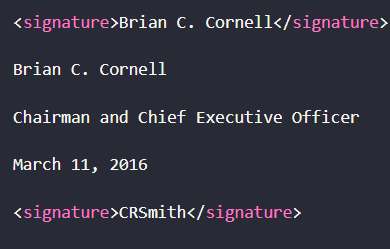
From the Target sign-off block, Extend AI captured 'Brian C. Cornell,' the title 'Chairman and Chief Executive Officer,' and the date 'March 11, 2016.' It also added signature tags, including an extra parsed signature tag beyond the printed block, which suggests some over-reading around signature content.
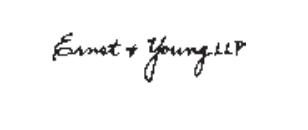
Blurred Ernst & Young LLP stamp.
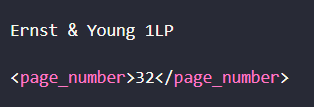
From a blurred Ernst & Young LLP stamp, the output still recovered the firm name and added a page-number tag. That shows Extend AI can pull useful text from low-clarity printed markings.
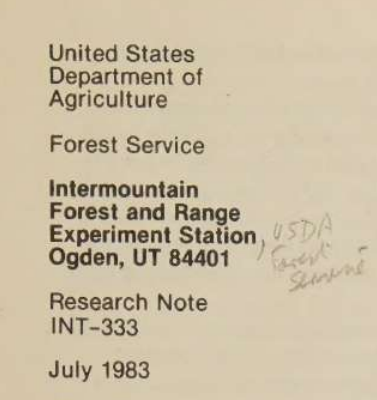
USDA cover page with faint handwritten marginal notes.

On faint handwritten markings, Extend AI did not truly transcribe the cursive. It output 'USDA Semaine' and a caption stating that the remaining handwriting appears to be illegible cursive, which preserves the presence of the note but not its exact content.
API-Based Markdown ExportThe tested workflow was fully automated and ended in downloadable markdown output.▾
Feature tested: API-Based Markdown Export
Result: Passed
Verdict: The tested workflow was fully automated and ended in downloadable markdown output.
Expected behavior: Accepts PDF uploads, processes them automatically, and returns markdown files through a hosted API workflow. The report also shows a Developers area with API key creation, supporting programmatic use.
Test case: PDF document → Text/code file
Input type: PDF document
Input used: Input artifact (PDF document): 84-page hybrid earnings report used as the main mixed-content stress test. — llamaparse-hybrid-earnings-pdf-1.pdf
Observed output: Output artifact (Text/code file): For the hybrid report, Extend AI returned a markdown file as a downloadable artifact after a fully automated API flow. The researcher did not report any manual — extend-ai-extendai-hybrid-earnings-pdf-output-6.md
Input artifact: Input artifact (PDF document): 84-page hybrid earnings report used as the main mixed-content stress test. — llamaparse-hybrid-earnings-pdf-1.pdf
Output artifact: Output artifact (Text/code file): For the hybrid report, Extend AI returned a markdown file as a downloadable artifact after a fully automated API flow. The researcher did not report any manual — extend-ai-extendai-hybrid-earnings-pdf-output-6.md
What changed: PDF document transformed into Text/code file
Test case: PDF document → Text/code file
Input type: PDF document
Input used: Input artifact (PDF document): 18-page table-heavy financial report used to test complex tables. — llamaparse-sumitomo-financial-pdf-1.pdf
Observed output: Output artifact (Text/code file): The table-heavy financial report was also returned as markdown, showing the same export pattern on a different document type. This supports the claim that markd — extend-ai-extendai-financialpdf-output-5.md
Input artifact: Input artifact (PDF document): 18-page table-heavy financial report used to test complex tables. — llamaparse-sumitomo-financial-pdf-1.pdf
Output artifact: Output artifact (Text/code file): The table-heavy financial report was also returned as markdown, showing the same export pattern on a different document type. This supports the claim that markd — extend-ai-extendai-financialpdf-output-5.md
What changed: PDF document transformed into Text/code file
Test case: Text prompt → Image
Input type: Text prompt
Input used: Input artifact (Text prompt): INPUT
Observed output: Output artifact (Image): The Developers section shows an API Keys page with a 'Create new key' button, API documentation references, and request-log sections. That confirms the product — extend-ai-extendai-developers-api-keys-empty-state.png
Input artifact: Input artifact (Text prompt): INPUT
Output artifact: Output artifact (Image): The Developers section shows an API Keys page with a 'Create new key' button, API documentation references, and request-log sections. That confirms the product — extend-ai-extendai-developers-api-keys-empty-state.png
What changed: Text prompt transformed into Image
Why it matters / Conclusion: The report supports Extend AI as a real hosted API workflow: upload PDF, process automatically, and retrieve markdown output.
Accepts PDF uploads, processes them automatically, and returns markdown files through a hosted API workflow. The report also shows a Developers area with API key creation, supporting programmatic use.
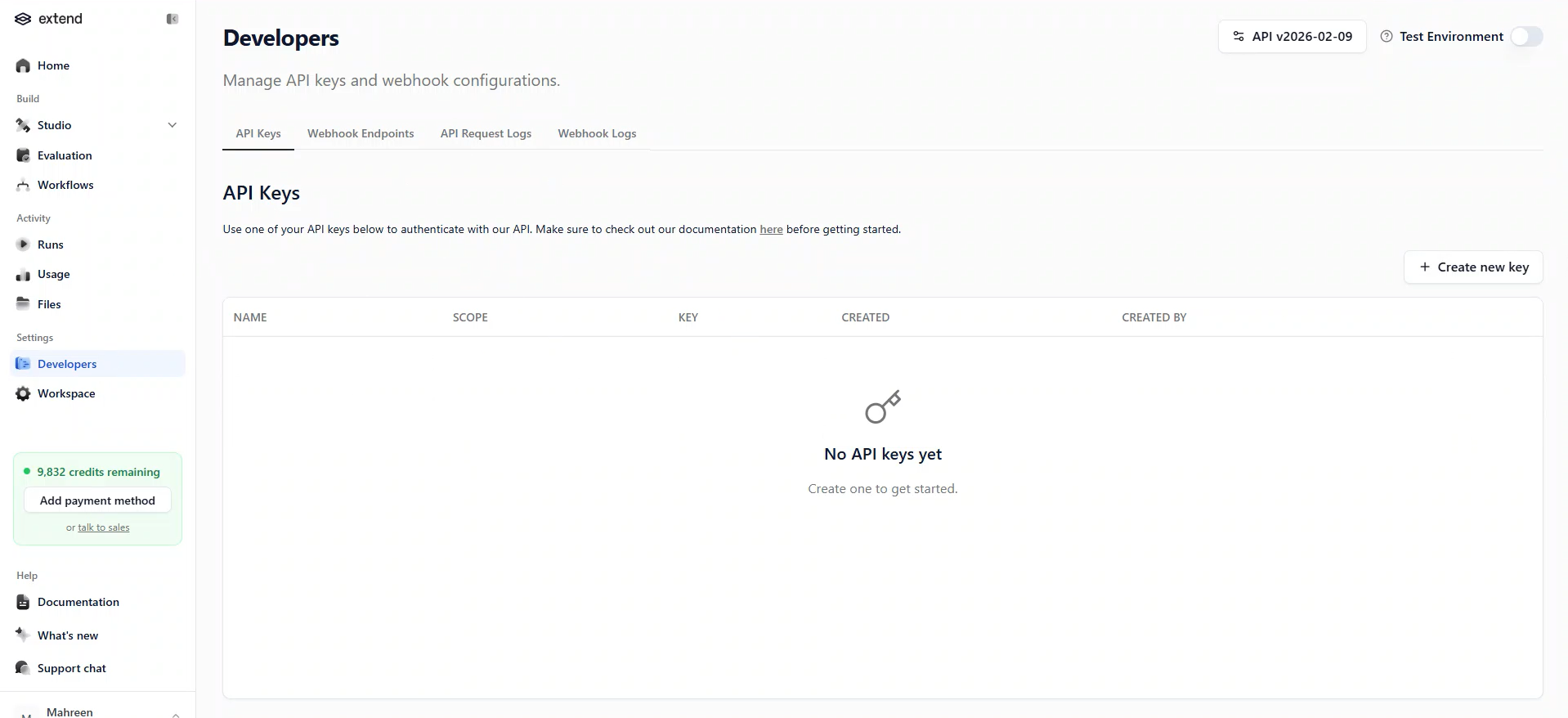
The Developers section shows an API Keys page with a 'Create new key' button, API documentation references, and request-log sections. That confirms the product exposes an API-oriented workflow rather than being only a manual UI tool.
How it scored on the research's own criteria
The 5 evaluation dimensions from our hands-on research on Extend AI, each judged from recorded runs on 2 test inputs — the same verdicts the ranking page ranks on.
held up partial failed not exercised by this input
| Criterion | Verdict | What the runs showed | Per input | Proof |
|---|---|---|---|---|
| Extraction Accuracy | Strong4/5 | Most key values were correct, including identifiers and invoice totals, but each scenario had one meaningful numeric or text-value error. That makes it stronger than mixed overall, yet not clean enough for a top score. | open proof ↗ | |
| Schema Adherence | Strong5/5 | It consistently kept both documents inside the requested object hierarchy, so the main schema shape was preserved on both tests. The output was nested and sectioned correctly rather than flattened, which is the core of schema adherence. | open proof ↗ | |
| Semantic Field Enrichment | Mixed3/5 | It did derive some useful fields, but the bank statement missed an important identifier field while the invoice side handled its derived line-item fields well. Because the enrichment was strong in one place and incomplete in another, this lands in the middle. | open proof ↗ | |
| Structural Clean Output | Weak2/5 | The JSON is usable, but both runs drifted from the requested section order, which is a real problem for systems that expect the original layout to pass through unchanged. Since this affects both inputs, the output is only partially clean for downstream use. | open proof ↗ | |
| Table & Record Completeness | Strong5/5 | Both inputs kept their row-level records intact, with no obvious merging or missing blocks in the tabular parts. The bank statement preserved its transaction list, and the invoice preserved all eight line items. | open proof ↗ |
Verdicts come verbatim from the study's recorded observations, never re-derived at render; a criterion with no recorded run shows Not exercised — this section cannot invent a score.
Pricing
Featured in Rankings
Independent rankings where Extend AI was tested and rated.

Banner Preview
How the embed badge will look on your site

Embed HTML
Copy this code to your website source
Quick Integration Guide
- 1Copy the HTML code block above.
- 2Paste it into your site's HTML or CMS editor.
- 3Banner appears instantly on your page.
- 4Links back to your tool profile here.
Similar Tools
Discover more AI tools like Extend AI to enhance your workflow.
Comments (0)
Need a custom AI solution for this use case?
If you are looking to build a custom PDF extraction, schema-driven data extraction, or financial document parsing system for your business or internal workflow, email us at contact@futuresmart.ai.
Found something inaccurate or missing? We try to keep our AI research accurate and useful. If you found outdated information, an issue, or have a suggestion, email us at collaborate@aidemos.com.