
Nanonets Review: Schema-Driven Document Extraction (2026)
Schema-first PDF extraction that produces usable exports, but dense table rows still need review.
Strong schema extraction, weaker row fidelity
- You need direct PDF uploads with custom JSON schema extraction for bank statements or invoices.
- You need downloadable CSV/JSON exports and a review UI for inspecting extracted rows.
- You can tolerate some row-level cleanup in exchange for strong document-level structure.
- You need bank-statement transaction rows to be lossless on the first pass.
Our take
Nanonets handled direct PDF uploads, custom schemas, and downloadable exports well, and the earlier page positioned it for plain-English questions over extracted data. In this report, the weak spot is record-level fidelity: bank-statement transactions were often merged or incomplete, and one invoice line item came through partially, so it works best with human review before downstream use.
In-Depth Review
Our detailed analysis of Nanonets — features, performance, and real-world testing.
Feature-by-Feature Breakdown
Schema-Driven Document ExtractionStrong for known schemas and top-level fields.▾
Feature tested: Schema-Driven Document Extraction
Result: Partial
Verdict: Strong for known schemas and top-level fields.
Expected behavior: Nanonets accepts direct PDF uploads plus a custom JSON schema and populates nested document objects rather than flattening everything into generic OCR text. In the tested bank-statement and invoice runs, it reconstructed metadata, account details, balances, summary fields, and invoice metadata.
Test case: PDF document → Text/code file
Input type: PDF document
Input used: Input artifact (PDF document): INPUT — Bank Statement PDF.pdf
Observed output: Output artifact (Text/code file): The bank-statement output follows the requested schema closely, with top-level metadata, account details, statement period, balances, and summary objects populated in structured JSON rather than returned as flat OCR text. — docstrange-nanonets-bank-statement-output.json
Input artifact: Input artifact (PDF document): INPUT — Bank Statement PDF.pdf
Output artifact: Output artifact (Text/code file): The bank-statement output follows the requested schema closely, with top-level metadata, account details, statement period, balances, and summary objects populated in structured JSON rather than returned as flat OCR text. — docstrange-nanonets-bank-statement-output.json
What changed: PDF document transformed into Text/code file
Test case: PDF document → Text/code file
Input type: PDF document
Input used: Input artifact (PDF document): INPUT — Invoice PDF.pdf
Observed output: Output artifact (Text/code file): The invoice output also follows the supplied schema, filling invoice metadata, advertiser, station, account, billing, remit, line_items, and summary sections as structured JSON. — docstrange_nanonets-invoice-output.json
Input artifact: Input artifact (PDF document): INPUT — Invoice PDF.pdf
Output artifact: Output artifact (Text/code file): The invoice output also follows the supplied schema, filling invoice metadata, advertiser, station, account, billing, remit, line_items, and summary sections as structured JSON. — docstrange_nanonets-invoice-output.json
What changed: PDF document transformed into Text/code file
Why it matters / Conclusion: Best when the schema is known ahead of time; document-level structure came through reliably.
Nanonets accepts direct PDF uploads plus a custom JSON schema and populates nested document objects rather than flattening everything into generic OCR text. In the tested bank-statement and invoice runs, it reconstructed metadata, account details, balances, summary fields, and invoice metadata.
Row-Level Table ExtractionMixed: invoice rows were mostly clean, but bank-statement transactions were noisy.▾
Feature tested: Row-Level Table Extraction
Result: Partial
Verdict: Mixed: invoice rows were mostly clean, but bank-statement transactions were noisy.
Expected behavior: The tool extracts tabular data as records from documents such as the bank statement and invoice. In the tested runs, transaction rows and invoice line items were produced, though some dense rows needed cleanup.
Test case: Image → Text/code file
Input type: Image
Input used: Input artifact (Image): INPUT — bank-statement-18-jun-transactions.png
Observed output: Output artifact (Text/code file): The bank-statement extraction preserved row structure but not row fidelity: some transaction descriptions merged neighboring content, several rows were missing dates, and transaction_type remained null across the dataset. — docstrange-nanonets-bank-statement-output.json
Input artifact: Input artifact (Image): INPUT — bank-statement-18-jun-transactions.png
Output artifact: Output artifact (Text/code file): The bank-statement extraction preserved row structure but not row fidelity: some transaction descriptions merged neighboring content, several rows were missing dates, and transaction_type remained null across the dataset. — docstrange-nanonets-bank-statement-output.json
What changed: Image transformed into Text/code file
Test case: Image → Image
Input type: Image
Input used: Input artifact (Image): INPUT — invoice-line-item-8.png
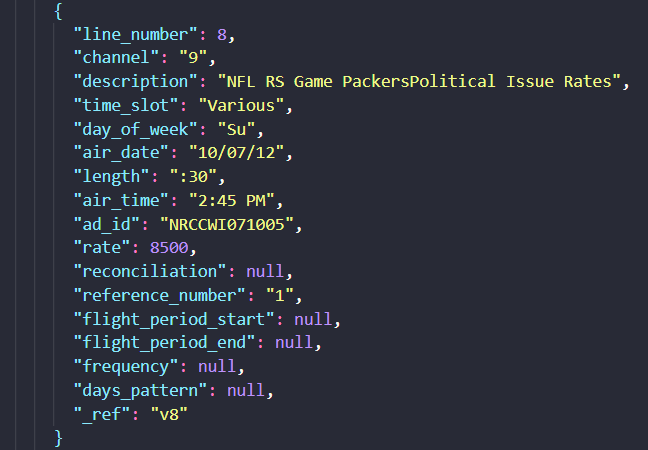
Observed output: Output artifact (Image): Line item 8 was extracted as a separate record, but it came through partially: the description merged adjacent text, and flight-period / frequency fields were missing even though similar records were populated. — docstrange-nanonets-line-item-8.png
Input artifact: Input artifact (Image): INPUT — invoice-line-item-8.png
Output artifact: Output artifact (Image): Line item 8 was extracted as a separate record, but it came through partially: the description merged adjacent text, and flight-period / frequency fields were missing even though similar records were populated. — docstrange-nanonets-line-item-8.png
What changed: Image transformed into Image
Why it matters / Conclusion: Good enough for cleaner invoice tables, but bank-statement transactions needed the most cleanup.
The tool extracts tabular data as records from documents such as the bank statement and invoice. In the tested runs, transaction rows and invoice line items were produced, though some dense rows needed cleanup.


Multi-Format ExportStrong export support across common handoff formats.▾
Feature tested: Multi-Format Export
Result: Passed
Verdict: Strong export support across common handoff formats.
Expected behavior: The tool can download or copy extracted data in multiple downstream formats, including JSON, CSV, HTML, and Markdown. The tested report confirms handoff files in CSV and JSON for extracted bank and invoice data.
Test case: PDF document → Text/code file
Input type: PDF document
Input used: Input artifact (PDF document): INPUT — Bank Statement PDF.pdf
Observed output: Output artifact (Text/code file): The bank-statement extraction was exported as CSV, and the report says the same run also supported JSON, HTML, Markdown, and copy-to-clipboard output with consistent data across formats. — docstrange-nanonets-bank statement-output.csv
Input artifact: Input artifact (PDF document): INPUT — Bank Statement PDF.pdf
Output artifact: Output artifact (Text/code file): The bank-statement extraction was exported as CSV, and the report says the same run also supported JSON, HTML, Markdown, and copy-to-clipboard output with consistent data across formats. — docstrange-nanonets-bank statement-output.csv
What changed: PDF document transformed into Text/code file
Test case: PDF document → Text/code file
Input type: PDF document
Input used: Input artifact (PDF document): INPUT — Invoice PDF.pdf
Observed output: Output artifact (Text/code file): The invoice extraction was exported as CSV, matching the report's claim that JSON, CSV, HTML, and Markdown exports were available and stayed consistent with the structured extraction. — docstrange-nanonets-invoice-output.csv
Input artifact: Input artifact (PDF document): INPUT — Invoice PDF.pdf
Output artifact: Output artifact (Text/code file): The invoice extraction was exported as CSV, matching the report's claim that JSON, CSV, HTML, and Markdown exports were available and stayed consistent with the structured extraction. — docstrange-nanonets-invoice-output.csv
What changed: PDF document transformed into Text/code file
Why it matters / Conclusion: A practical downstream handoff layer, assuming the upstream extraction quality is acceptable.
The tool can download or copy extracted data in multiple downstream formats, including JSON, CSV, HTML, and Markdown. The tested report confirms handoff files in CSV and JSON for extracted bank and invoice data.
Featured in Rankings
Independent rankings where Nanonets was tested and rated.
Banner Preview
How the embed badge will look on your site

Embed HTML
Copy this code to your website source
Quick Integration Guide
- 1Copy the HTML code block above.
- 2Paste it into your site's HTML or CMS editor.
- 3Banner appears instantly on your page.
- 4Links back to your tool profile here.
Similar Tools
Discover more AI tools like Nanonets to enhance your workflow.
Comments (0)
Need a custom AI solution for this use case?
If you are looking to build a custom document extraction, PDF parsing, or structured data extraction system for your business or internal workflow, email us at contact@futuresmart.ai.
Found something inaccurate or missing? We try to keep our AI research accurate and useful. If you found outdated information, an issue, or have a suggestion, email us at collaborate@aidemos.com.