
Landing AI
Schema-guided PDF extraction for bank statements and invoices, with strong row capture and a few identifier QA caveats.
Strong structured extraction, with QA caveats
- You need bank statements or invoices turned into nested JSON with minimal setup.
- You need row-level reconstruction for transactions or invoice line items.
- You can QA a few identifiers or null fields after extraction.
- You need source-faithful transaction or ad IDs on every row.
Our take
Landing AI handled the core document-extraction workflow well on both the bank statement and invoice tests: it accepted the PDFs, followed the supplied schema, and returned nested JSON with complete transaction and line-item reconstruction. The main tradeoffs were identifier fidelity and field mapping consistency, since the bank-statement transaction IDs were regenerated sequentially, one invoice station block came back null, and some ad IDs drifted from the source text.
In-Depth Review
Our detailed analysis of Landing AI — features, performance, and real-world testing.
Feature-by-Feature Breakdown
Schema-Guided Structured Document Extraction▾
Feature tested: Schema-Guided Structured Document Extraction
Result: Passed
Expected behavior: Takes a document plus a supplied schema and returns nested structured output such as account blocks, repeated rows, line items, and identifier fields instead of flat OCR text. The member cards exercised it on bank-statement and invoice-style documents that included statement metadata, account/branch details, balances, transactions, rewards, and line items.
Test case: PDF document → Text/code file
Input type: PDF document
Input used: Input artifact (PDF document): Invoice source document used to test line-item and totals extraction. — Invoice PDF.pdf
Observed output: Output artifact (Text/code file): The invoice output captured all eight line items and the financial summary in nested JSON. — landingai-invoice-output.json
Input artifact: Input artifact (PDF document): Invoice source document used to test line-item and totals extraction. — Invoice PDF.pdf
Output artifact: Output artifact (Text/code file): The invoice output captured all eight line items and the financial summary in nested JSON. — landingai-invoice-output.json
What changed: PDF document transformed into Text/code file
Test case: PDF document → Text/code file
Input type: PDF document
Input used: Input artifact (PDF document): Bank-statement source document used for schema-guided extraction. — Bank Statement PDF.pdf
Observed output: Output artifact (Text/code file): Structured JSON matched the supplied bank-statement schema and populated statement metadata, account-holder fields, account and branch details, balances, transactions, rewards, and disclaimers. — landingai-bank-statement-output.json
Input artifact: Input artifact (PDF document): Bank-statement source document used for schema-guided extraction. — Bank Statement PDF.pdf
Output artifact: Output artifact (Text/code file): Structured JSON matched the supplied bank-statement schema and populated statement metadata, account-holder fields, account and branch details, balances, transactions, rewards, and disclaimers. — landingai-bank-statement-output.json
What changed: PDF document transformed into Text/code file
Test case: Image → Image
Input type: Image
Input used: Input artifact (Image): 18 Jun bank-statement transaction table crop used to verify row-level extraction. — bank-statement-18-jun-transactions.png
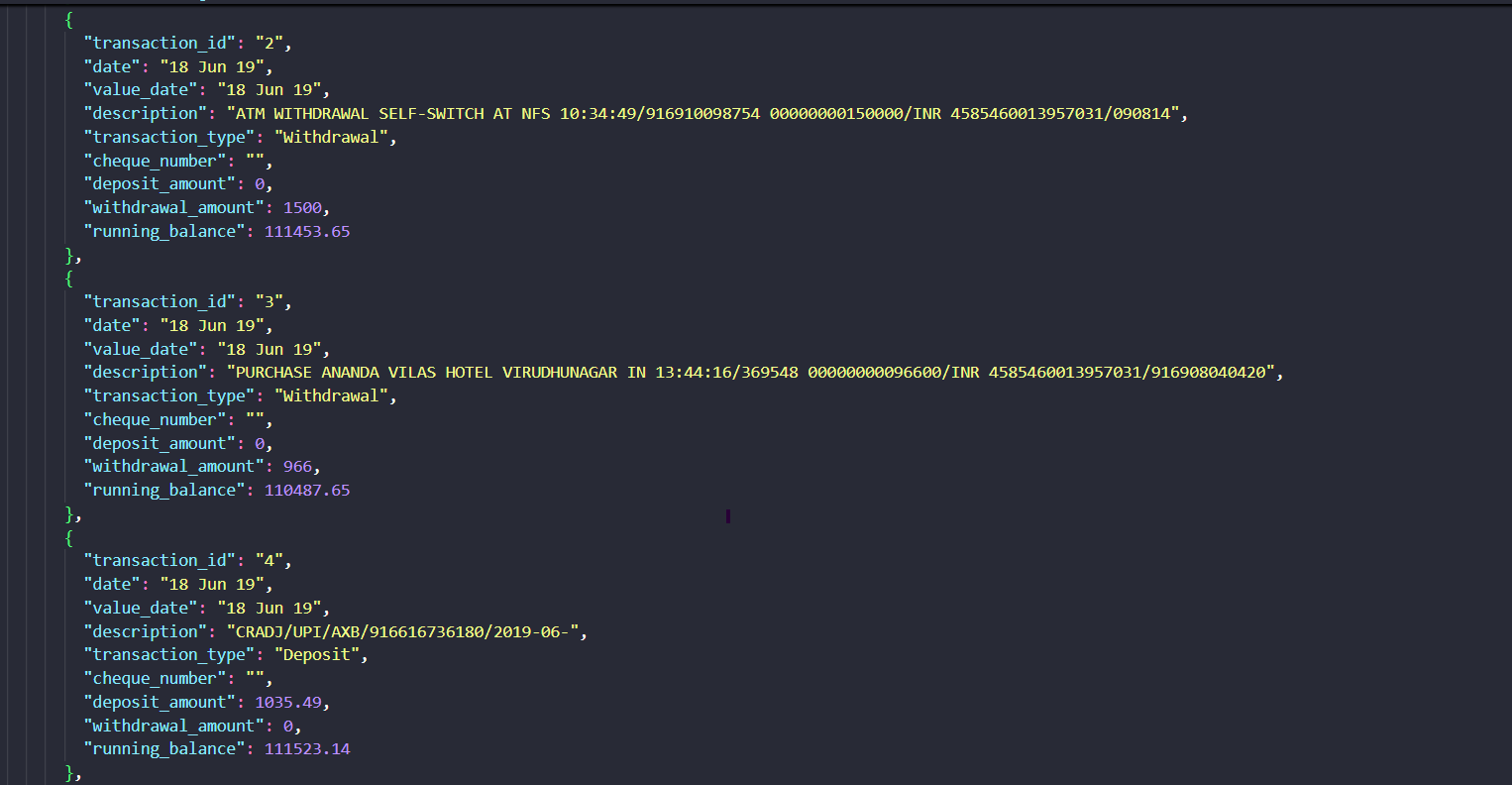
Observed output: Output artifact (Image): The 18 Jun rows were extracted as structured records with transaction_type, amounts, and running_balance fields preserved. — landing-ai-bank-statement-18-jun-extractions.png
Input artifact: Input artifact (Image): 18 Jun bank-statement transaction table crop used to verify row-level extraction. — bank-statement-18-jun-transactions.png
Output artifact: Output artifact (Image): The 18 Jun rows were extracted as structured records with transaction_type, amounts, and running_balance fields preserved. — landing-ai-bank-statement-18-jun-extractions.png
What changed: Image transformed into Image
Test case: Image → Image
Input type: Image
Input used: Input artifact (Image): Transaction identifiers visible in the source rows for fidelity checking. — bank-statement-18-jun-transaction-id.png
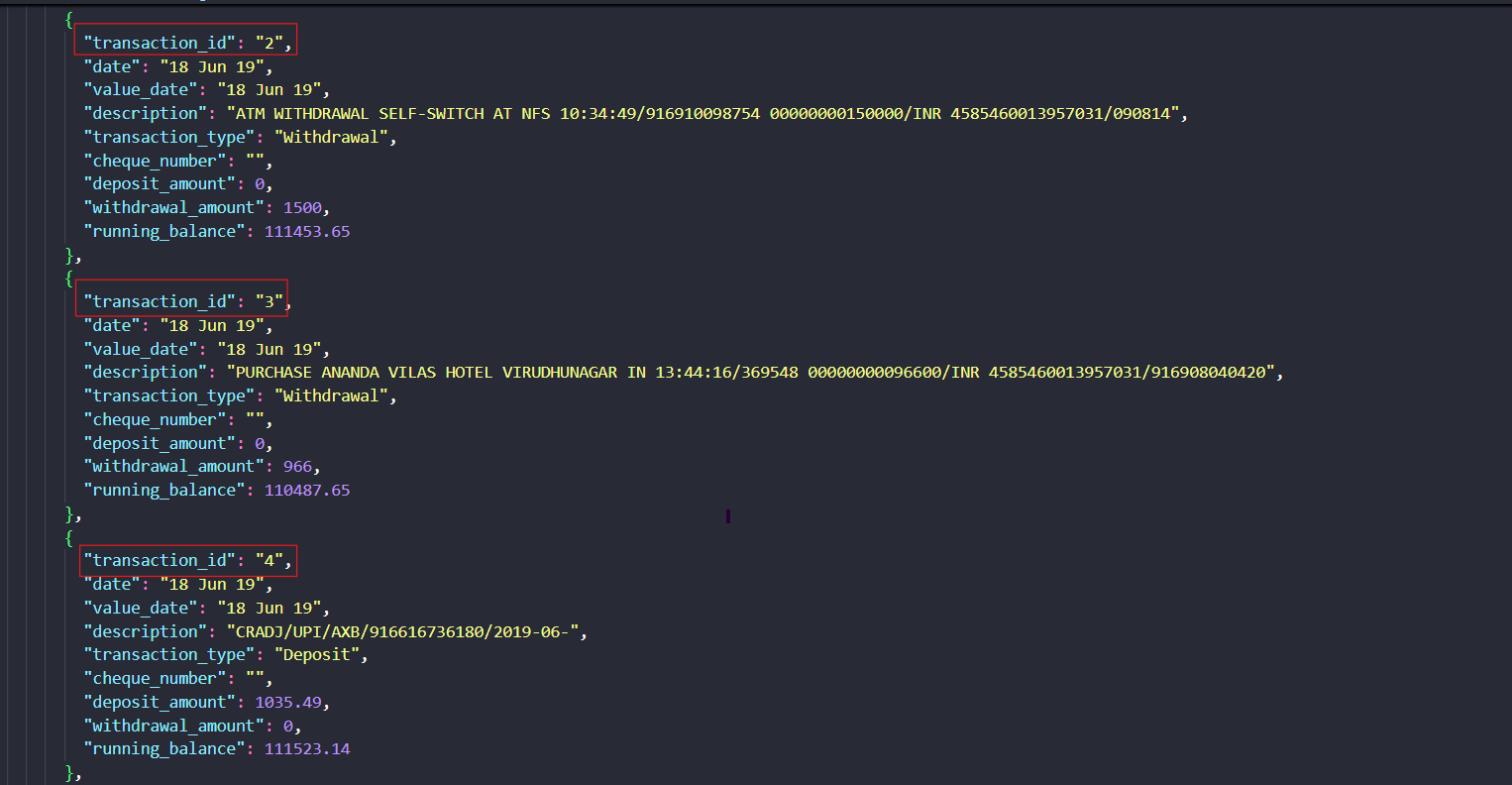
Observed output: Output artifact (Image): The extracted records expose sequential transaction_id values instead of the source identifiers, confirming that identifier fidelity is weaker than row reconstruction. — landing-ai-landing-ai-bank-statement-18-jun-extract-1b244e286ca1.png
Input artifact: Input artifact (Image): Transaction identifiers visible in the source rows for fidelity checking. — bank-statement-18-jun-transaction-id.png
Output artifact: Output artifact (Image): The extracted records expose sequential transaction_id values instead of the source identifiers, confirming that identifier fidelity is weaker than row reconstruction. — landing-ai-landing-ai-bank-statement-18-jun-extract-1b244e286ca1.png
What changed: Image transformed into Image
Test case: Image → Image
Input type: Image
Input used: Input artifact (Image): Invoice row crop used to check row-level field fidelity, especially the Ad-ID cell. — invoice-ad-id-line-item-1.png
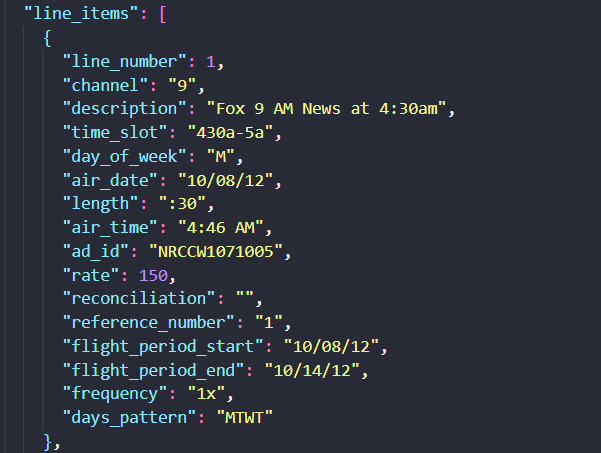
Observed output: Output artifact (Image): The extracted first line-item record populated ad_id and the broader row fields, but the report flags ad-ID OCR/parsing drift on some rows. — landing-ai-extracted-line-item-1.png
Input artifact: Input artifact (Image): Invoice row crop used to check row-level field fidelity, especially the Ad-ID cell. — invoice-ad-id-line-item-1.png
Output artifact: Output artifact (Image): The extracted first line-item record populated ad_id and the broader row fields, but the report flags ad-ID OCR/parsing drift on some rows. — landing-ai-extracted-line-item-1.png
What changed: Image transformed into Image
Why it matters / Conclusion: Strong for schema-shaped extraction when you need nested objects and structured document sections rather than raw OCR text.
Takes a document plus a supplied schema and returns nested structured output such as account blocks, repeated rows, line items, and identifier fields instead of flat OCR text. The member cards exercised it on bank-statement and invoice-style documents that included statement metadata, account/branch details, balances, transactions, rewards, and line items.



Document Hierarchy and Reading-Order ReconstructionUsually preserves section flow and OCR reading order, but heading semantics are inconsistent.▾
Feature tested: Document Hierarchy and Reading-Order Reconstruction
Result: Partial
Verdict: Usually preserves section flow and OCR reading order, but heading semantics are inconsistent.
Expected behavior: Rebuilds page-level structure into readable markdown-like text while preserving headings, subsections, and reading order across native and scanned PDFs. It was exercised on the Target annual report section, a Sumitomo financial report page with section/subsection headings, and a scanned two-column research page.
Test case: Image → Image
Input type: Image
Input used: Input artifact (Image): Target annual report section titled '19. Commitments and Contingencies' with the 'Data Breach' subsection. — landing-ai-target-annual-report-commitments-contingencies-data-breach.png
Observed output: Output artifact (Image): Landing AI preserved the section heading, subsection title, and the full body paragraphs from the Target annual report section. In this example, the reading flo — landing-ai-parsed-commitments-contingencies-data-breach.png
Input artifact: Input artifact (Image): Target annual report section titled '19. Commitments and Contingencies' with the 'Data Breach' subsection. — landing-ai-target-annual-report-commitments-contingencies-data-breach.png
Output artifact: Output artifact (Image): Landing AI preserved the section heading, subsection title, and the full body paragraphs from the Target annual report section. In this example, the reading flo — landing-ai-parsed-commitments-contingencies-data-breach.png
What changed: Image transformed into Image
Test case: Image → Image
Input type: Image
Input used: Input artifact (Image): Sumitomo financial report page titled 'I. Summary of Operating Performance'. — landing-ai-financial-report-operating-performance-page.png
Observed output: Output artifact (Image): On the table-heavy financial report, Landing AI kept the main section title, the subsection title, and the body paragraphs in readable order. The extracted outp — landing-ai-financial-report-operating-performance-parsed-hierarchy.png
Input artifact: Input artifact (Image): Sumitomo financial report page titled 'I. Summary of Operating Performance'. — landing-ai-financial-report-operating-performance-page.png
Output artifact: Output artifact (Image): On the table-heavy financial report, Landing AI kept the main section title, the subsection title, and the body paragraphs in readable order. The extracted outp — landing-ai-financial-report-operating-performance-parsed-hierarchy.png
What changed: Image transformed into Image
Test case: Image → Image
Input type: Image
Input used: Input artifact (Image): Scanned two-column research page with 'STUDY AREA' and 'STAND PRESCRIPTIONS' sections. — landing-ai-scanned-two-column-text-study-area.png
Observed output: Output artifact (Image): On the scanned multi-column page, Landing AI OCR'd the 'STUDY AREA' section into a coherent block of text and kept related paragraphs grouped under that heading — landing-ai-hierarchy-preserved-forest-study-area-text.png
Input artifact: Input artifact (Image): Scanned two-column research page with 'STUDY AREA' and 'STAND PRESCRIPTIONS' sections. — landing-ai-scanned-two-column-text-study-area.png
Output artifact: Output artifact (Image): On the scanned multi-column page, Landing AI OCR'd the 'STUDY AREA' section into a coherent block of text and kept related paragraphs grouped under that heading — landing-ai-hierarchy-preserved-forest-study-area-text.png
What changed: Image transformed into Image
Test case: Image → Image
Input type: Image
Input used: Input artifact (Image): Target annual report page titled 'A Growth Story Again' with a portrait and bullet points. — landing-ai-target-annual-report-growth-story-page.png
Observed output: Output artifact (Image): Landing AI preserved the page title, the main paragraph, the bullet list, and even added a description of the portrait image. The failure is semantic rather tha — landing-ai-target-annual-report-growth-story-parsed-hierarchy.png
Input artifact: Input artifact (Image): Target annual report page titled 'A Growth Story Again' with a portrait and bullet points. — landing-ai-target-annual-report-growth-story-page.png
Output artifact: Output artifact (Image): Landing AI preserved the page title, the main paragraph, the bullet list, and even added a description of the portrait image. The failure is semantic rather tha — landing-ai-target-annual-report-growth-story-parsed-hierarchy.png
What changed: Image transformed into Image
Why it matters / Conclusion: Good at keeping pages readable and in order across mixed PDFs, but not dependable if your downstream pipeline relies on exact heading levels.
Rebuilds page-level structure into readable markdown-like text while preserving headings, subsections, and reading order across native and scanned PDFs. It was exercised on the Target annual report section, a Sumitomo financial report page with section/subsection headings, and a scanned two-column research page.
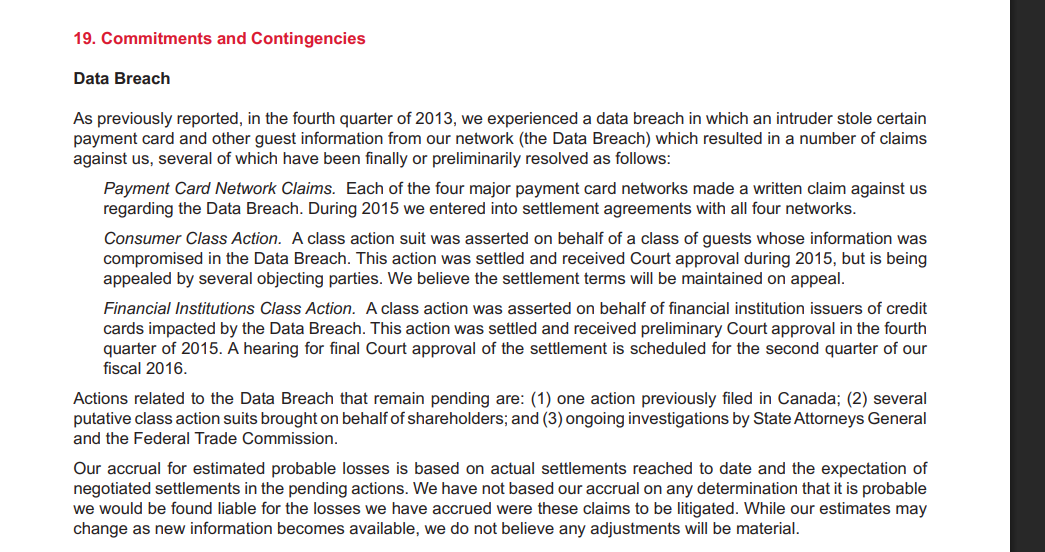
Target annual report section titled '19. Commitments and Contingencies' with the 'Data Breach' subsection.
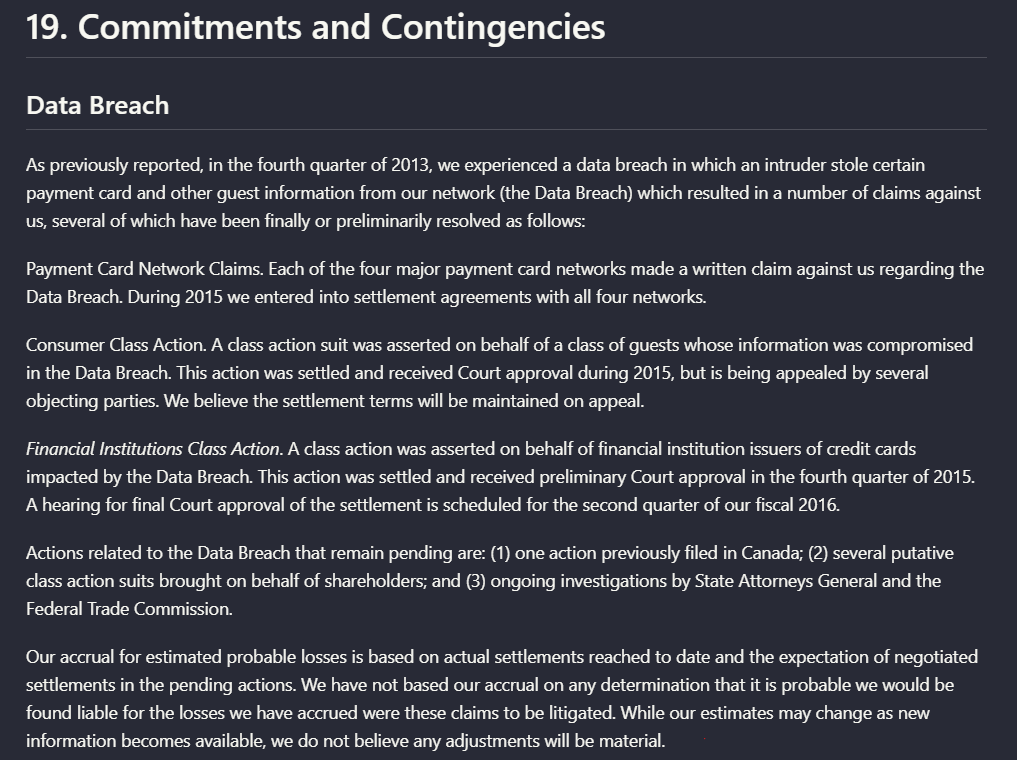
Landing AI preserved the section heading, subsection title, and the full body paragraphs from the Target annual report section. In this example, the reading flow stayed intact: the 'Data Breach' heading remained attached to the surrounding narrative, including the payment-card, consumer class action, and financial institutions class action paragraphs.
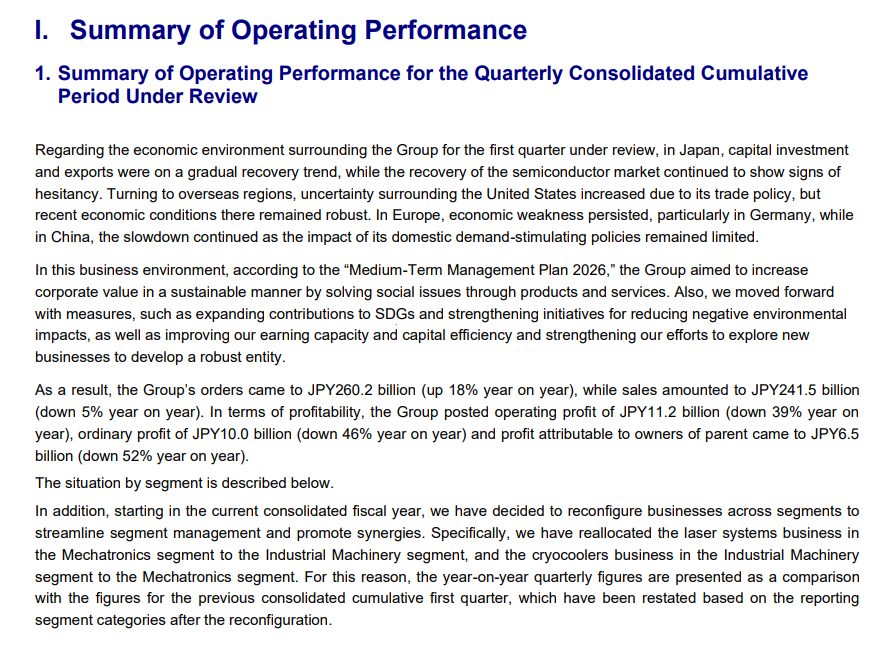
Sumitomo financial report page titled 'I. Summary of Operating Performance'.
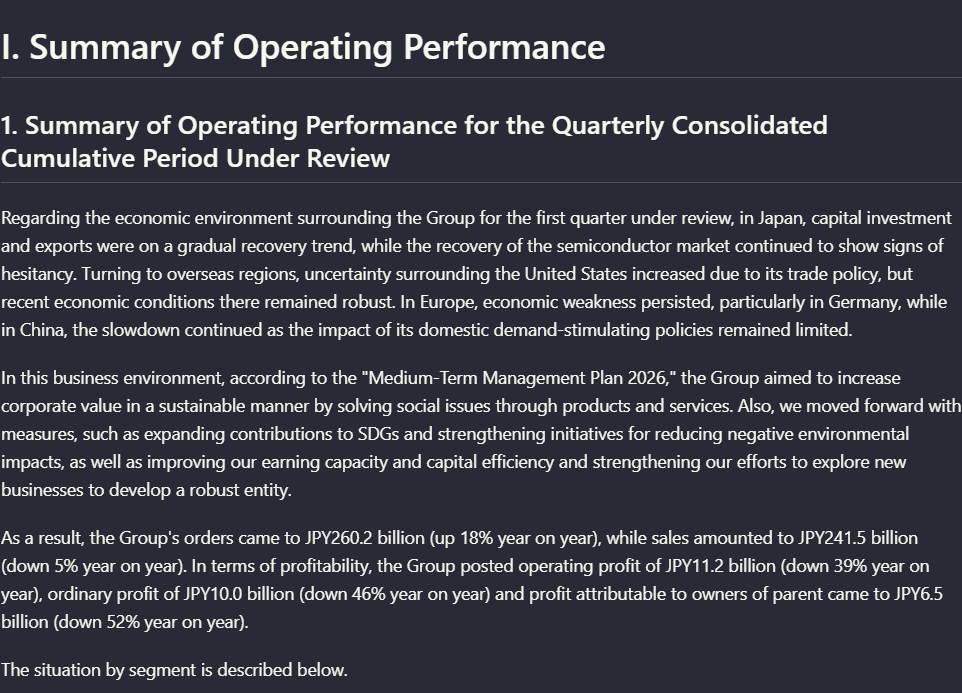
On the table-heavy financial report, Landing AI kept the main section title, the subsection title, and the body paragraphs in readable order. The extracted output separates the summary heading from the paragraph text clearly enough to follow the original section organization.
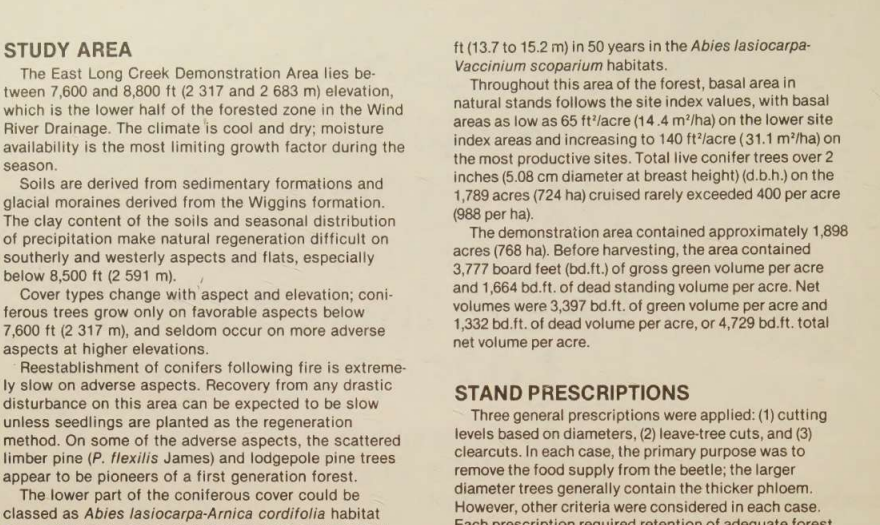
Scanned two-column research page with 'STUDY AREA' and 'STAND PRESCRIPTIONS' sections.
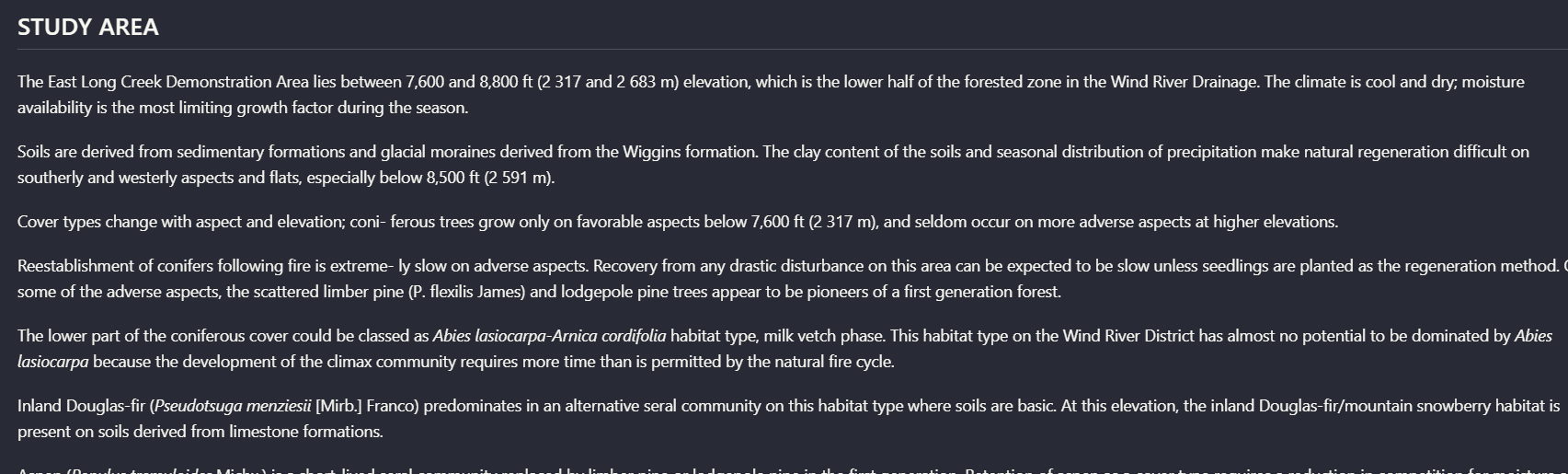
On the scanned multi-column page, Landing AI OCR'd the 'STUDY AREA' section into a coherent block of text and kept related paragraphs grouped under that heading rather than interleaving the columns. The extraction is readable, though not letter-perfect: for example, one sentence shifts from 'growth factor during the season' to 'growth factor for the season,' and some punctuation/hyphenation is normalized.
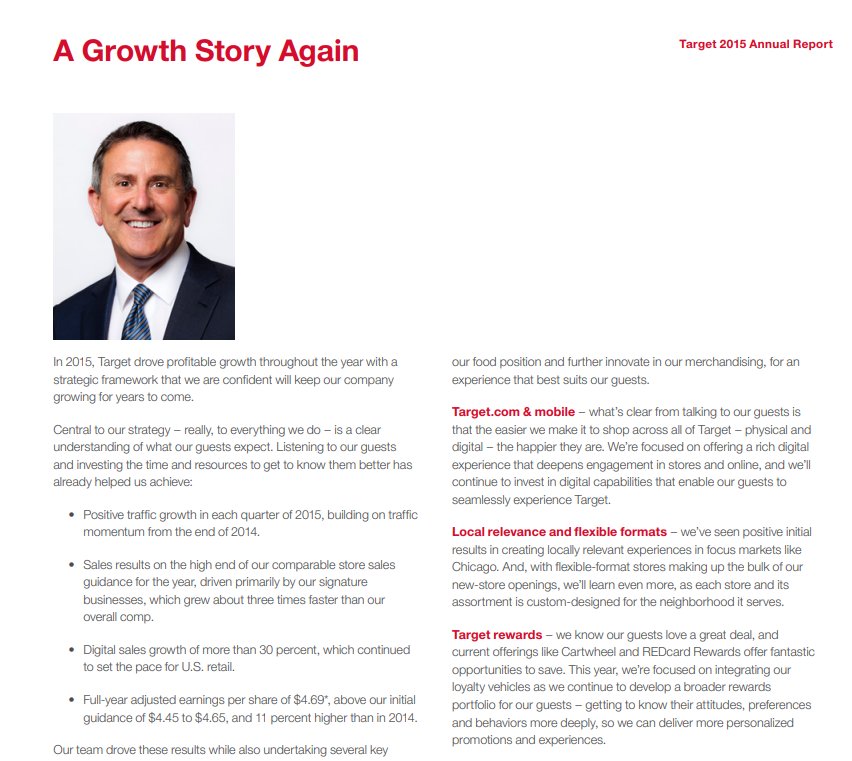
Target annual report page titled 'A Growth Story Again' with a portrait and bullet points.
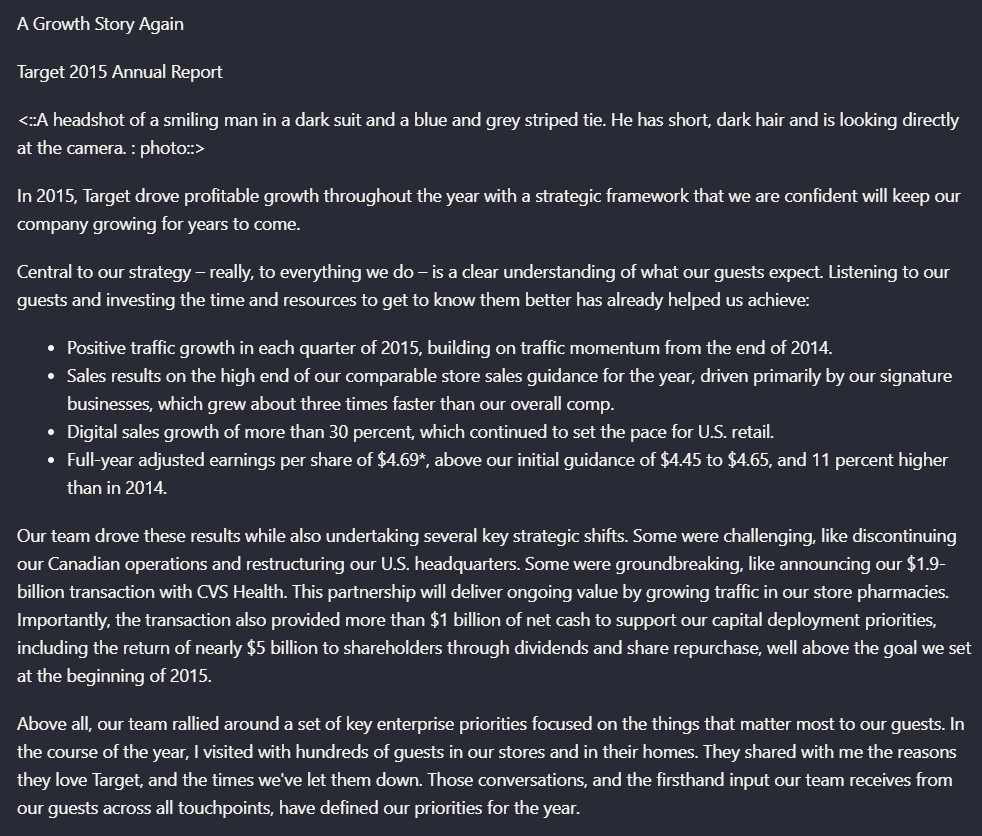
Landing AI preserved the page title, the main paragraph, the bullet list, and even added a description of the portrait image. The failure is semantic rather than textual: the top-level heading is rendered as plain text instead of a true H1-style markdown heading, so the content survives but the hierarchy is weaker than the source.
Table ReconstructionStrong on clean financial tables, weaker on nested header semantics and noisier scanned tables.▾
Feature tested: Table Reconstruction
Result: Partial
Verdict: Strong on clean financial tables, weaker on nested header semantics and noisier scanned tables.
Expected behavior: Extracts tables into structured markdown-like layouts that preserve rows, columns, and cell values. It was tested on the Target financial summary table, Sumitomo segment comparison tables, a multi-level segment table, and a photographed stand-structure table from a scanned report.
Test case: Image → Image
Input type: Image
Input used: Input artifact (Image): Target annual report 'Financial Summary' table for 2015 through 2011. — landing-ai-target-annual-report-financial-summary-table-2.png
Observed output: Output artifact (Image): Landing AI reconstructed the Target financial summary with the year columns, row labels, and corresponding values still aligned. In this clean digital table, th — landing-ai-landingai-hybrid-earnings-pdf-parsed-table.png
Input artifact: Input artifact (Image): Target annual report 'Financial Summary' table for 2015 through 2011. — landing-ai-target-annual-report-financial-summary-table-2.png
Output artifact: Output artifact (Image): Landing AI reconstructed the Target financial summary with the year columns, row labels, and corresponding values still aligned. In this clean digital table, th — landing-ai-landingai-hybrid-earnings-pdf-parsed-table.png
What changed: Image transformed into Image
Test case: Image → Image
Input type: Image
Input used: Input artifact (Image): Segment results table comparing previous first quarter, present first quarter, and Y/Y change. — landing-ai-segment-results-table-2025-first-quarter.png
Observed output: Output artifact (Image): Landing AI preserved the segment table's core structure and values: business-segment rows such as Mechatronics, Industrial Machinery, Logistics & Construction, — landing-ai-segment-quarter-yoy-change-table.png
Input artifact: Input artifact (Image): Segment results table comparing previous first quarter, present first quarter, and Y/Y change. — landing-ai-segment-results-table-2025-first-quarter.png
Output artifact: Output artifact (Image): Landing AI preserved the segment table's core structure and values: business-segment rows such as Mechatronics, Industrial Machinery, Logistics & Construction, — landing-ai-segment-quarter-yoy-change-table.png
What changed: Image transformed into Image
Test case: Image → Image
Input type: Image
Input used: Input artifact (Image): Multi-level financial table with segment columns A through F3 and nested headers. — landing-ai-complex-financial-segment-table.png
Observed output: Output artifact (Image): Landing AI kept the values and the broad tabular shape of the complex segment table, but it flattened nested header relationships. The source distinguishes mult — landing-ai-parsed-multilevel-segment-table.png
Input artifact: Input artifact (Image): Multi-level financial table with segment columns A through F3 and nested headers. — landing-ai-complex-financial-segment-table.png
Output artifact: Output artifact (Image): Landing AI kept the values and the broad tabular shape of the complex segment table, but it flattened nested header relationships. The source distinguishes mult — landing-ai-parsed-multilevel-segment-table.png
What changed: Image transformed into Image
Test case: Image → Image
Input type: Image
Input used: Input artifact (Image): Photographed table titled 'Table 2.—Stand structure before and after cutting'. — landing-ai-stand-structure-before-after-cutting-table-2.png
Observed output: Output artifact (Image): On the scanned photographed table, Landing AI preserved the wide table layout and most row/column labels, but OCR introduced real numeric mistakes. Compared wit — landing-ai-lodgepole-pine-diameter-class-table.png
Input artifact: Input artifact (Image): Photographed table titled 'Table 2.—Stand structure before and after cutting'. — landing-ai-stand-structure-before-after-cutting-table-2.png
Output artifact: Output artifact (Image): On the scanned photographed table, Landing AI preserved the wide table layout and most row/column labels, but OCR introduced real numeric mistakes. Compared wit — landing-ai-lodgepole-pine-diameter-class-table.png
What changed: Image transformed into Image
Why it matters / Conclusion: A strong choice for born-digital financial tables, but scanned or photographed tables still need QA, especially when numeric accuracy matters.
Extracts tables into structured markdown-like layouts that preserve rows, columns, and cell values. It was tested on the Target financial summary table, Sumitomo segment comparison tables, a multi-level segment table, and a photographed stand-structure table from a scanned report.
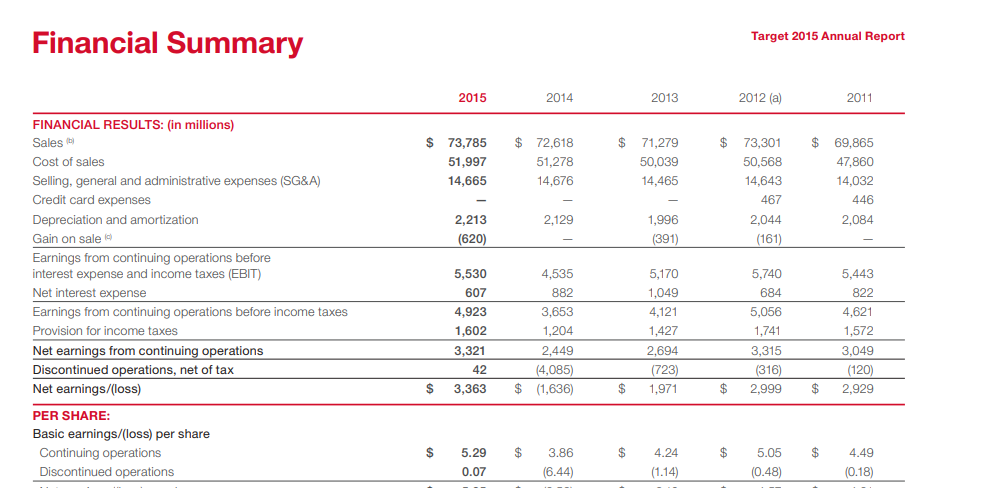
Target annual report 'Financial Summary' table for 2015 through 2011.
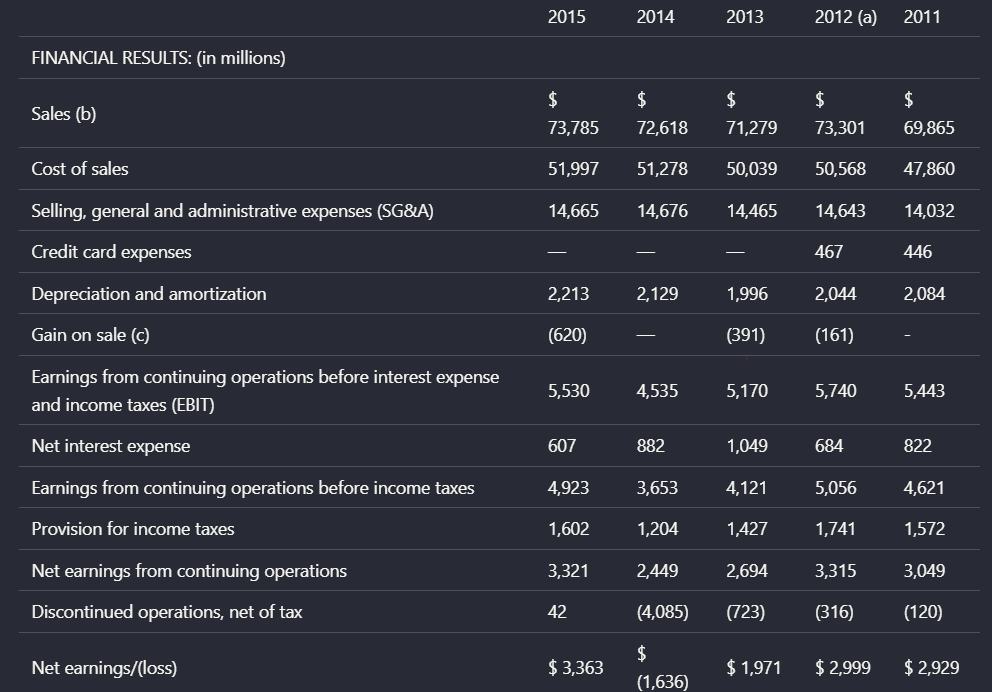
Landing AI reconstructed the Target financial summary with the year columns, row labels, and corresponding values still aligned. In this clean digital table, the extracted layout remained easy to read, including rows like Sales, Cost of sales, SG&A, EBIT, and Net earnings/(loss).
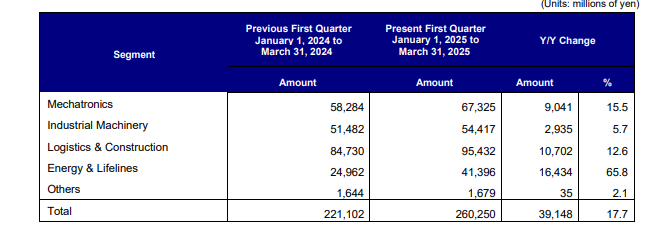
Segment results table comparing previous first quarter, present first quarter, and Y/Y change.
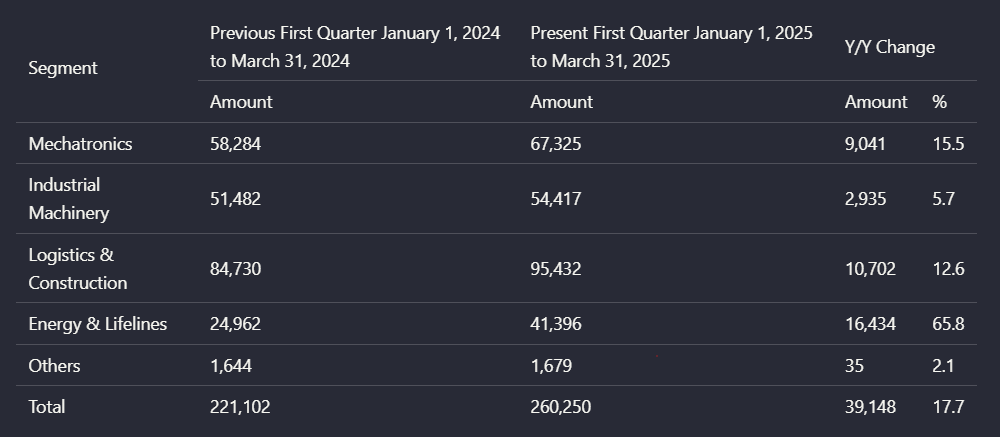
Landing AI preserved the segment table's core structure and values: business-segment rows such as Mechatronics, Industrial Machinery, Logistics & Construction, Energy & Lifelines, Others, and Total stayed aligned with prior-quarter, present-quarter, and Y/Y change columns. For this table, the output closely mirrors the original layout.
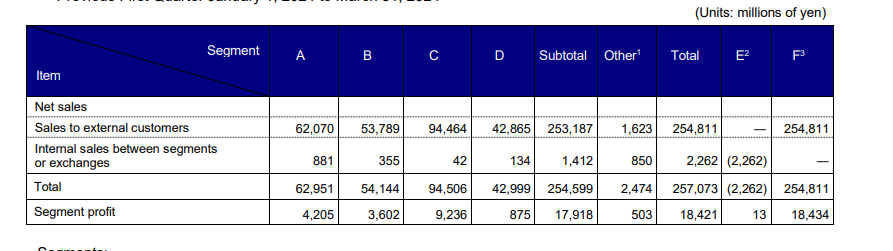
Multi-level financial table with segment columns A through F3 and nested headers.
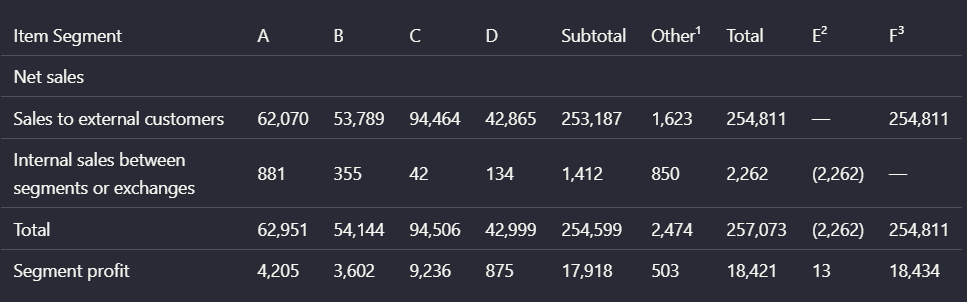
Landing AI kept the values and the broad tabular shape of the complex segment table, but it flattened nested header relationships. The source distinguishes multiple header levels such as Item, Segment, A-D, Subtotal, Other, Total, and adjustment columns; the parsed version compresses these into a simpler linear header row, which makes the data readable but weakens the semantic relationships between header levels.
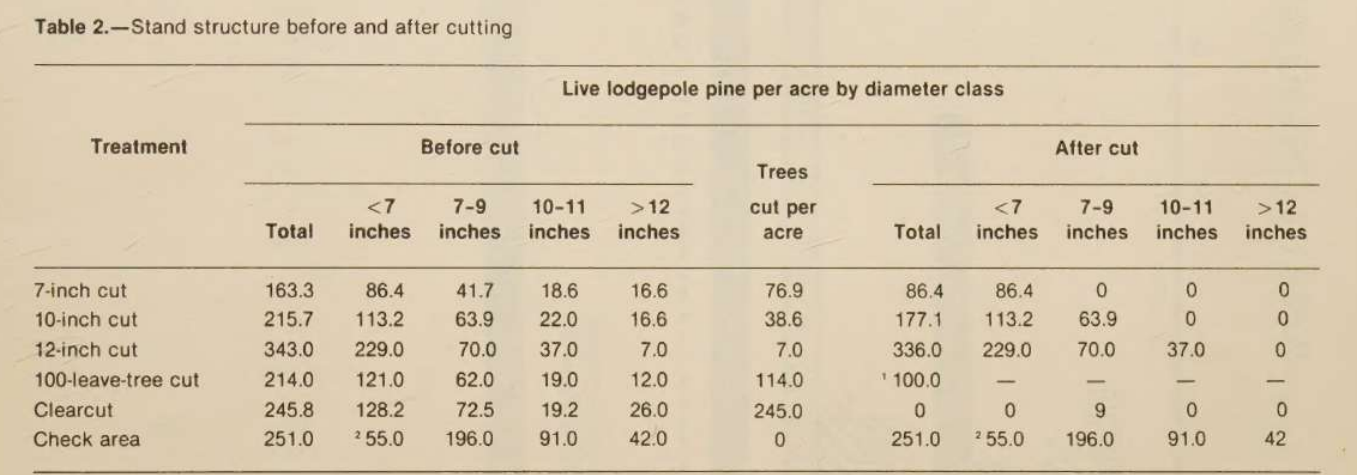
Photographed table titled 'Table 2.—Stand structure before and after cutting'.
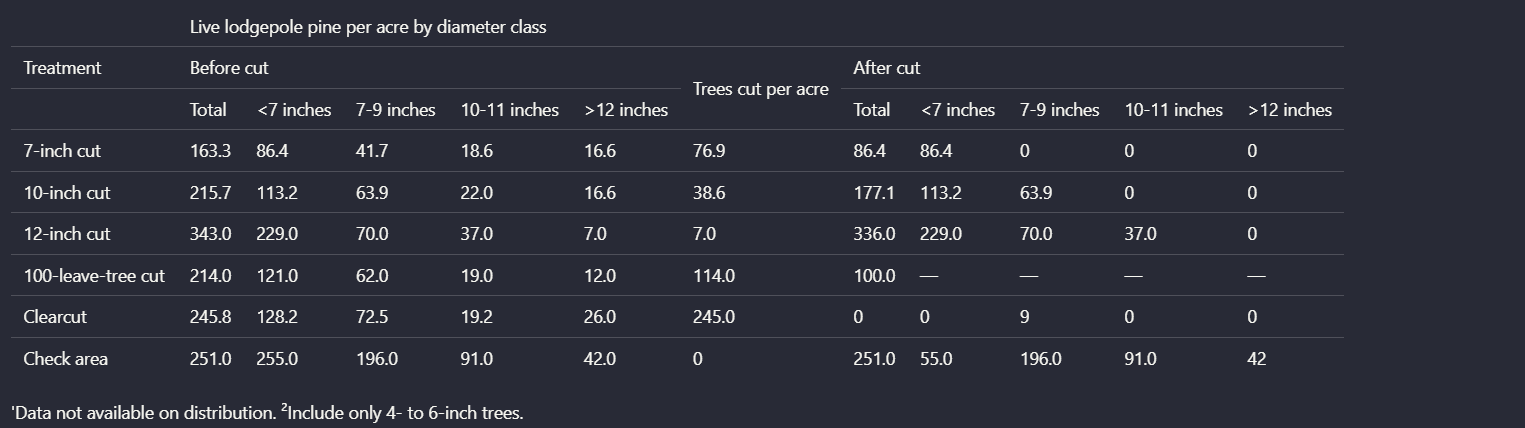
On the scanned photographed table, Landing AI preserved the wide table layout and most row/column labels, but OCR introduced real numeric mistakes. Compared with the source, the '12-inch cut' row shows 'Trees cut per acre' as 7.0 instead of 114.0, the 'Clearcut' after-cut row shows a stray 9 where the source shows 0, and the 'Check area' before-cut values are distorted, with 255.0 appearing where the source shows 55.0 in that position. This makes the table inspectable, but not trustworthy without verification.
Chart-to-Text ConversionConsistently converts charts into detailed textual representations instead of dropping them.▾
Feature tested: Chart-to-Text Conversion
Result: Passed
Verdict: Consistently converts charts into detailed textual representations instead of dropping them.
Expected behavior: Transforms charts into descriptive text blocks that retain titles, labels, approximate values, and trend direction. This was exercised on an SG&A waterfall chart and a scanned bar chart showing tree mortality by year and cut treatment.
Test case: Image → Image
Input type: Image
Input used: Input artifact (Image): Waterfall chart titled 'Selling, General and Administrative Expense Rate'. — landing-ai-sg-and-a-expense-rate-waterfall-chart-1.png
Observed output: Output artifact (Image): Instead of keeping the original waterfall image, Landing AI translated it into a text summary that retained the chart title, year anchors, category labels, and — landing-ai-parsed-sg-and-a-expense-rate-summary.png
Input artifact: Input artifact (Image): Waterfall chart titled 'Selling, General and Administrative Expense Rate'. — landing-ai-sg-and-a-expense-rate-waterfall-chart-1.png
Output artifact: Output artifact (Image): Instead of keeping the original waterfall image, Landing AI translated it into a text summary that retained the chart title, year anchors, category labels, and — landing-ai-parsed-sg-and-a-expense-rate-summary.png
What changed: Image transformed into Image
Test case: Image → Image
Input type: Image
Input used: Input artifact (Image): Scanned bar chart of tree mortality by year and cut treatment. — landing-ai-tree-mortality-by-year-and-cut-bar-chart-1.png
Observed output: Output artifact (Image): Landing AI converted the scanned bar chart into a structured text description with the legend, year groupings, approximate per-series values, and the vertical d — landing-ai-parsed-tree-mortality-by-year-and-cut-chart.png
Input artifact: Input artifact (Image): Scanned bar chart of tree mortality by year and cut treatment. — landing-ai-tree-mortality-by-year-and-cut-bar-chart-1.png
Output artifact: Output artifact (Image): Landing AI converted the scanned bar chart into a structured text description with the legend, year groupings, approximate per-series values, and the vertical d — landing-ai-parsed-tree-mortality-by-year-and-cut-chart.png
What changed: Image transformed into Image
Why it matters / Conclusion: If your priority is keeping chart information in the markdown rather than preserving the original visual, this is one of Landing AI's clearest strengths in the report.
Transforms charts into descriptive text blocks that retain titles, labels, approximate values, and trend direction. This was exercised on an SG&A waterfall chart and a scanned bar chart showing tree mortality by year and cut treatment.
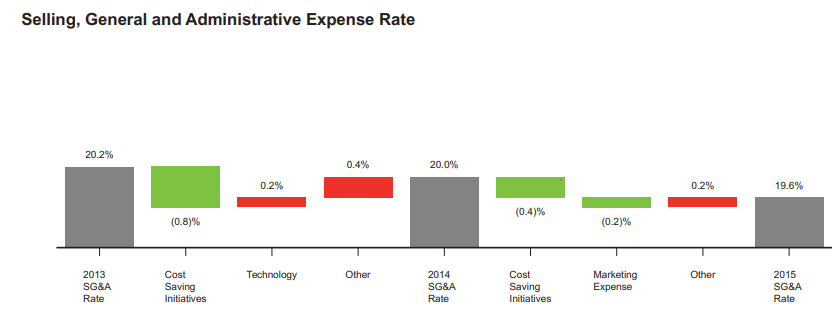
Waterfall chart titled 'Selling, General and Administrative Expense Rate'.
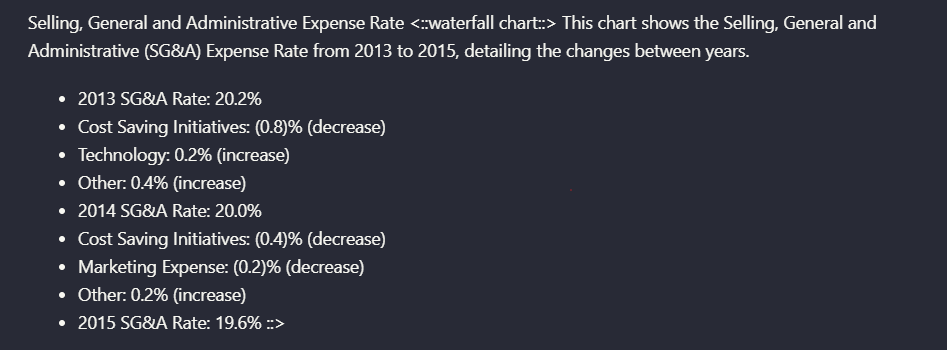
Instead of keeping the original waterfall image, Landing AI translated it into a text summary that retained the chart title, year anchors, category labels, and the increase/decrease direction for each step. The output captures specific values such as 2013 SG&A Rate 20.2%, Cost Saving Initiatives (0.8)%, Technology 0.2%, Other 0.4%, 2014 SG&A Rate 20.0%, and 2015 SG&A Rate 19.6%.
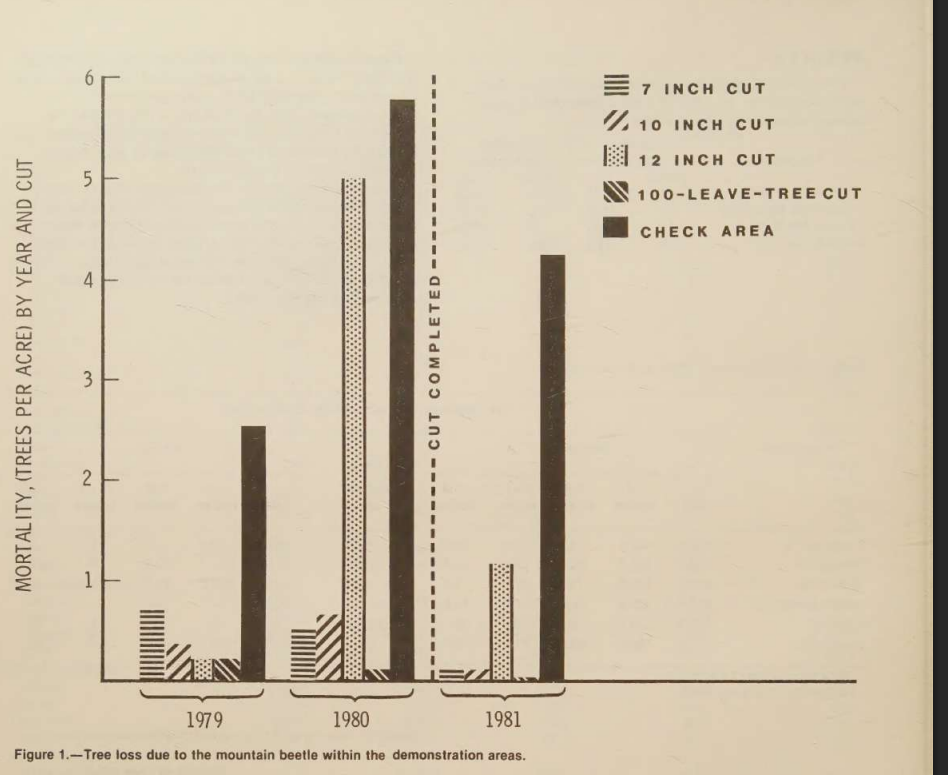
Scanned bar chart of tree mortality by year and cut treatment.
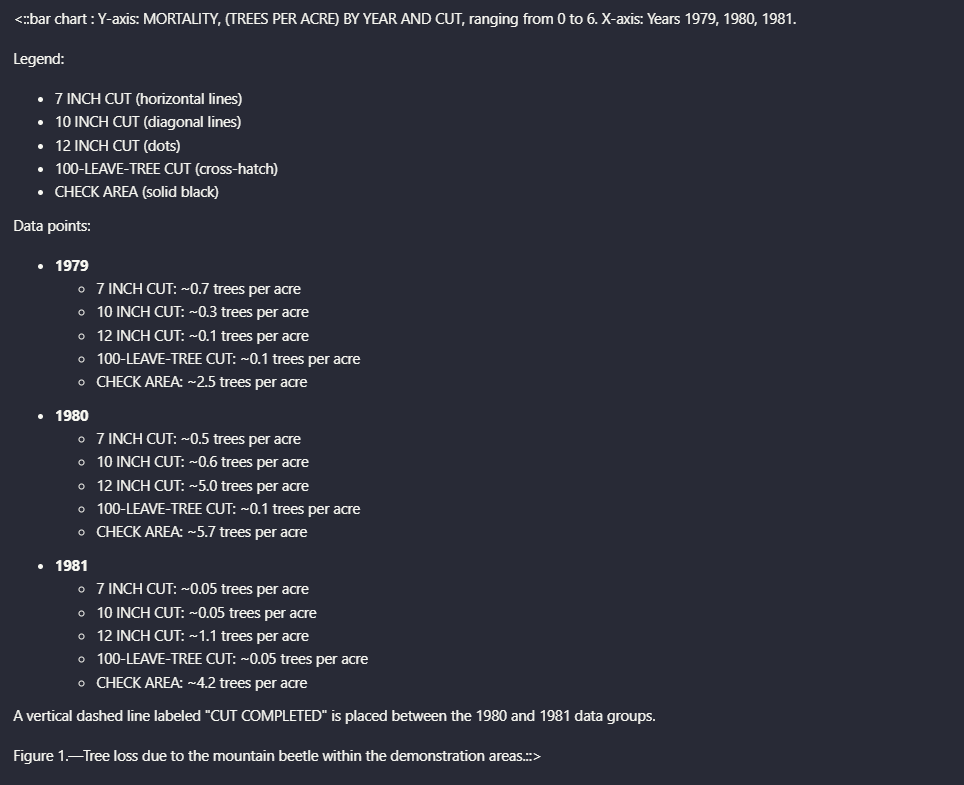
Landing AI converted the scanned bar chart into a structured text description with the legend, year groupings, approximate per-series values, and the vertical dashed 'CUT COMPLETED' marker. The output preserves the key analytical content, such as the high 1980 value for the check area and the treatment-by-treatment comparisons across 1979, 1980, and 1981.
Signature and Attestation Region ExtractionCaptures signature regions as semantic attestations rather than dropping them.▾
Feature tested: Signature and Attestation Region Extraction
Result: Passed
Verdict: Captures signature regions as semantic attestations rather than dropping them.
Expected behavior: Represents signature-heavy document regions as attestation-style elements that preserve the presence, role, and apparent legibility of signatures. It was exercised on the signatures page from the Target annual report.
Test case: Image → Image
Input type: Image
Input used: Input artifact (Image): Target annual report signatures page. — landing-ai-target-annual-report-signatures-page-2.png
Observed output: Output artifact (Image): Landing AI did more than extract nearby text from the signature page: it emitted attestation blocks describing the signature regions themselves. In this example — landing-ai-target-earnings-signatures-parsed-text.png
Input artifact: Input artifact (Image): Target annual report signatures page. — landing-ai-target-annual-report-signatures-page-2.png
Output artifact: Output artifact (Image): Landing AI did more than extract nearby text from the signature page: it emitted attestation blocks describing the signature regions themselves. In this example — landing-ai-target-earnings-signatures-parsed-text.png
What changed: Image transformed into Image
Why it matters / Conclusion: Useful for compliance-style documents where the existence of a signature block matters, even if you do not need handwriting recognition.
Represents signature-heavy document regions as attestation-style elements that preserve the presence, role, and apparent legibility of signatures. It was exercised on the signatures page from the Target annual report.
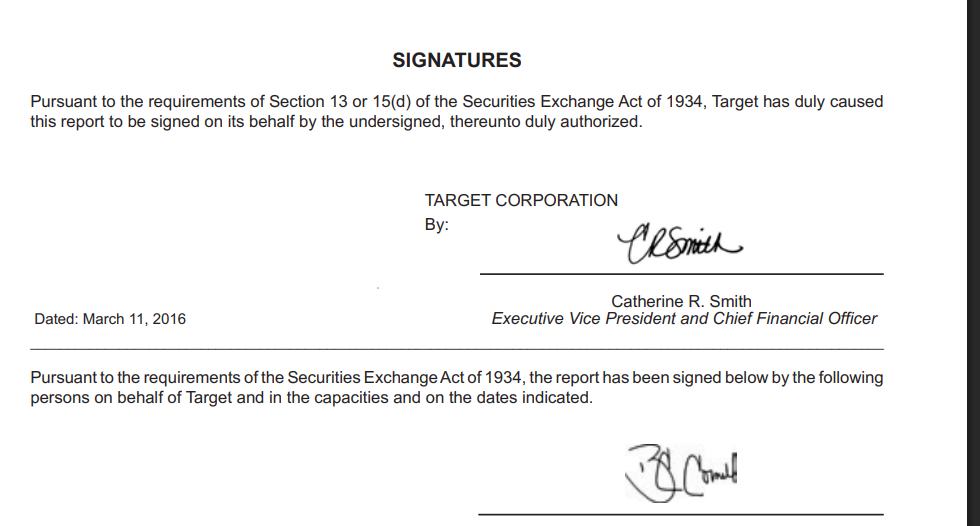
Target annual report signatures page.
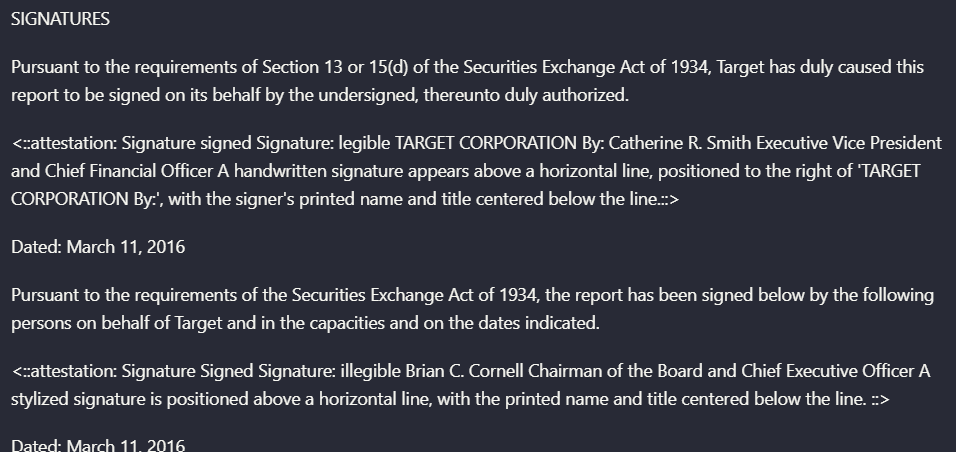
Landing AI did more than extract nearby text from the signature page: it emitted attestation blocks describing the signature regions themselves. In this example, it preserved the Target Corporation attestation for Catherine R. Smith and a second attestation for Brian C. Cornell, including whether the signature appeared legible or illegible and where it sat relative to the signature line and printed title.
How it scored on the research's own criteria
The 5 evaluation dimensions from our hands-on research on Landing AI, each judged from recorded runs on 2 test inputs — the same verdicts the ranking page ranks on.
held up partial failed not exercised by this input
| Criterion | Verdict | What the runs showed | Per input | Proof |
|---|---|---|---|---|
| Extraction Accuracy | Strong5/5Reviewer flagged — not independently verified | The values called out in both runs are precise and consistent, including financial amounts and key identifiers. The evidence shows accuracy on the fields that matter most, with no sign of rounding drift or obvious parsing errors in the tested items.UNSUPPORTED_OBSERVATION — The observation claims a source/output mismatch for line 1 Ad-ID, stating the source reads "NRCCWI071005" and the extracted value is "NRCCW1071005." However, the inspected source crop and the extracted JSON snippet both show "NRCCW1071005," so the alleged OCR/parsing error is not supported by the preserved evidence. | open proof ↗ | |
| Schema Adherence | Strong5/5 | It consistently respected the requested hierarchy on both documents, so this is a top score rather than merely a pass. The outputs were built as the expected nested objects instead of being flattened or rearranged. | open proof ↗ | |
| Semantic Field Enrichment | Mixed3/5 | It does enrich the raw text with useful derived fields, but the quality is uneven because each scenario also shows a key semantic identifier problem. The result is better than a weak pass, but not strong enough for a 4 since the derived IDs are not consistently trustworthy. | open proof ↗ | |
| Table & Record Completeness | Strong5/5 | Both document types kept their repeated records intact instead of collapsing or inventing rows. That makes this a full-strength result for completeness, because the extracted sets match the expected record structure on both inputs. | open proof ↗ | |
| Structural Clean Output | Strong5/5 | The output is already in a downstream-ready JSON form, so no cleanup or reshaping step is needed after extraction. Because the evidence explicitly says the result is directly downloadable and usable as-is, this earns a top score. | — |
Verdicts come verbatim from the study's recorded observations, never re-derived at render; a criterion with no recorded run shows Not exercised — this section cannot invent a score.
Credit-based plans
Pricing captured in the report
Featured in Rankings
Independent rankings where Landing AI was tested and rated.

Banner Preview
How the embed badge will look on your site

Embed HTML
Copy this code to your website source
Quick Integration Guide
- 1Copy the HTML code block above.
- 2Paste it into your site's HTML or CMS editor.
- 3Banner appears instantly on your page.
- 4Links back to your tool profile here.
Similar Tools
Discover more AI tools like Landing AI to enhance your workflow.
Comments (0)
Need a custom AI solution for this use case?
If you are looking to build a custom document extraction, invoice parsing, or bank statement extraction system for your business or internal workflow, email us at contact@futuresmart.ai.
Found something inaccurate or missing? We try to keep our AI research accurate and useful. If you found outdated information, an issue, or have a suggestion, email us at collaborate@aidemos.com.