
MeetGeek
Reliable standup capture with strong summaries, search, API, and MCP — but speaker attribution and chat need review.
Strong for capture, notes, and retrieval; mixed on attribution and open sharing.
- You need an AI notetaker that joins live Google Meet calls and turns a real meeting into a transcript, summary, action items, and searchable notes.
- You want programmatic access to meeting data via API or Claude MCP.
- You work in a multilingual environment and value automatic language detection.
- You need frictionless public sharing for clients or guests who should not have to sign in.
Our take
MeetGeek handled the core meeting-assistant workflow well on the tested standup: it joined the call reliably, produced a clear summary, extracted real action items, supported search, and exposed both API and MCP access. The main cautions are speaker diarization/name errors, mixed results on chat questions that depend on speaker context, and a free tier that is too small for most team meeting volumes.
In-Depth Review
Our detailed analysis of MeetGeek — features, performance, and real-world testing.
Feature-by-Feature Breakdown
Live Meeting Capture and Speaker-Labeled TranscriptionMostly accurate, but speaker attribution needs review.▾
Feature tested: Live Meeting Capture and Speaker-Labeled Transcription
Result: Partial
Verdict: Mostly accurate, but speaker attribution needs review.
Expected behavior: Joins live meetings, records the full call, and produces a speaker-labeled transcript from the meeting itself. Card 0 exercised this on a Google Meet standup, including full-call capture and attribution behavior.
Test case: Image → Image
Input type: Image
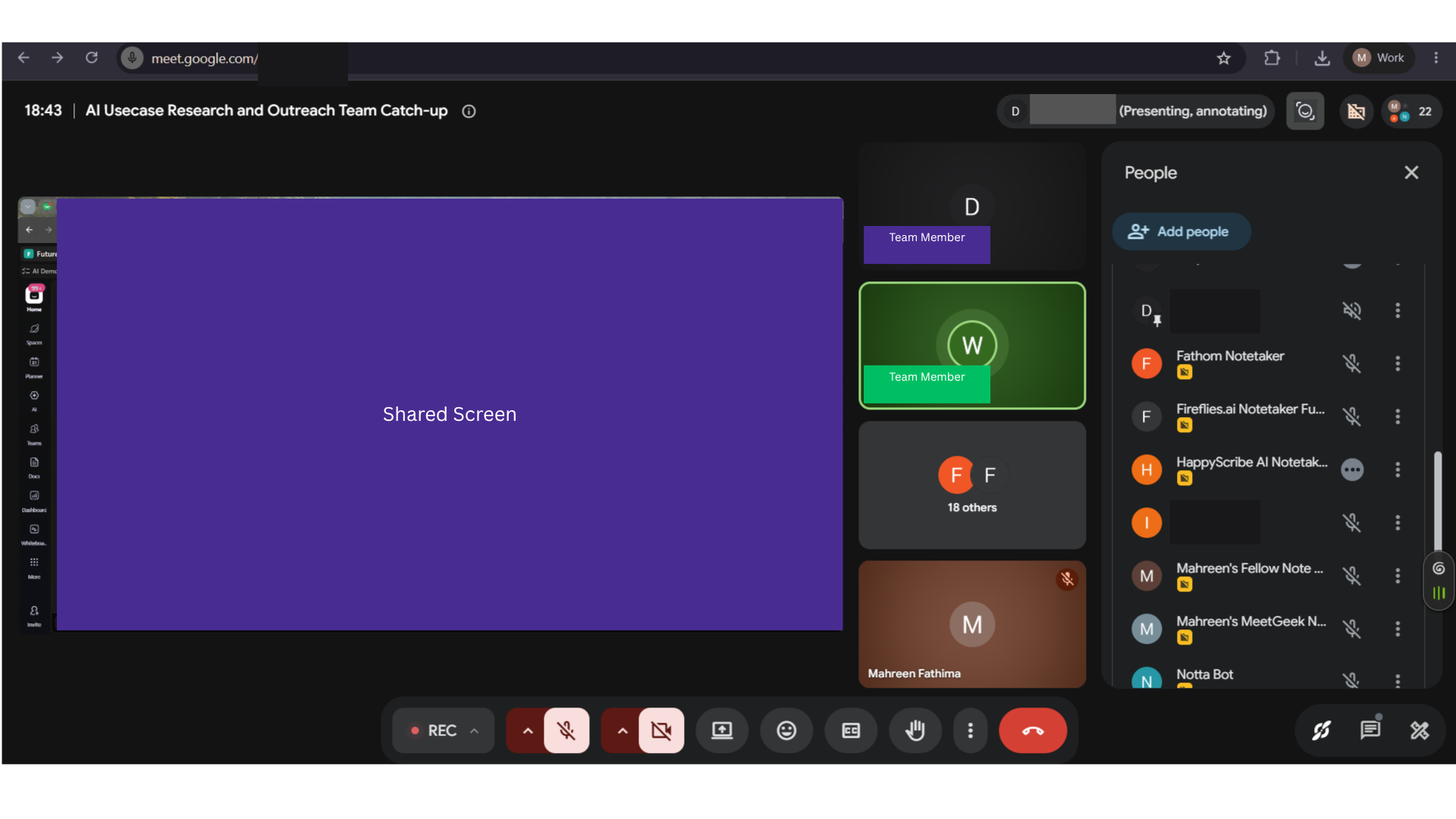
Input used: Input artifact (Image): Same real AI Demos daily standup on 31 Jul 2026 (~25 min, ~10 active speakers, Google Meet, normal audio). — 31-july-meeting-screenshot.png
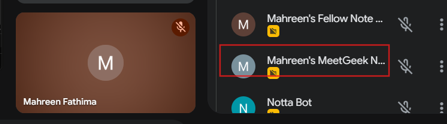
Observed output: Output artifact (Image): Participant list confirming the MeetGeek bot successfully joined the call. — meetgeek-bot-in-meeting-joined-success.png
Input artifact: Input artifact (Image): Same real AI Demos daily standup on 31 Jul 2026 (~25 min, ~10 active speakers, Google Meet, normal audio). — 31-july-meeting-screenshot.png
Output artifact: Output artifact (Image): Participant list confirming the MeetGeek bot successfully joined the call. — meetgeek-bot-in-meeting-joined-success.png
What changed: Image transformed into Image
Test case: Image → Image
Input type: Image
Input used: Input artifact (Image): Same real AI Demos daily standup on 31 Jul 2026 (~25 min, ~10 active speakers, Google Meet, normal audio). — 31-july-meeting-screenshot.png
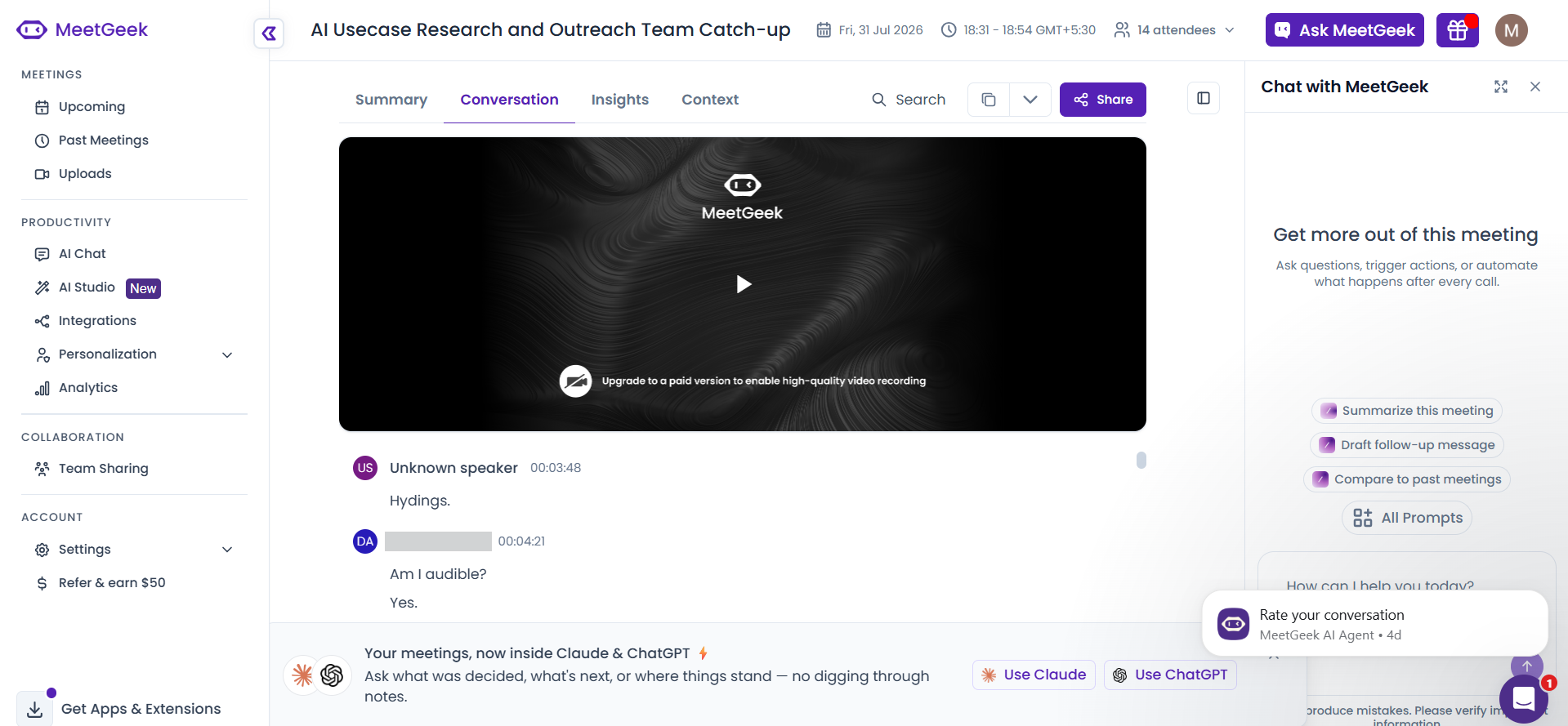
Observed output: Output artifact (Image): Conversation tab showing the meeting transcript in MeetGeek. — meetgeek-meeting-transcript.png
Input artifact: Input artifact (Image): Same real AI Demos daily standup on 31 Jul 2026 (~25 min, ~10 active speakers, Google Meet, normal audio). — 31-july-meeting-screenshot.png
Output artifact: Output artifact (Image): Conversation tab showing the meeting transcript in MeetGeek. — meetgeek-meeting-transcript.png
What changed: Image transformed into Image
Test case: Image → Image
Input type: Image
Input used: Input artifact (Image): Same real AI Demos daily standup on 31 Jul 2026 (~25 min, ~10 active speakers, Google Meet, normal audio). — 31-july-meeting-screenshot.png
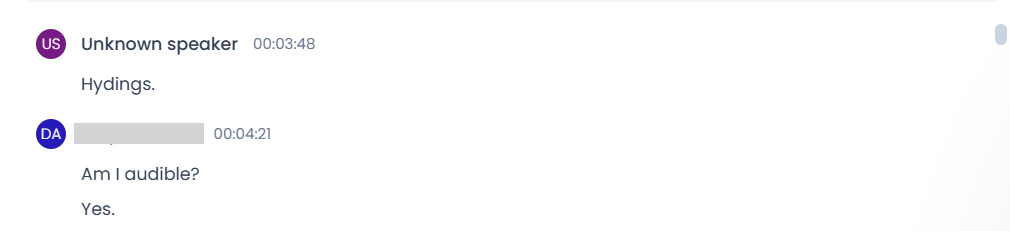
Observed output: Output artifact (Image): Transcript excerpt showing one 'Unknown speaker' label and another partially identified speaker, indicating mixed diarization. — meetgeek-speaker-diarization-partial-success.png
Input artifact: Input artifact (Image): Same real AI Demos daily standup on 31 Jul 2026 (~25 min, ~10 active speakers, Google Meet, normal audio). — 31-july-meeting-screenshot.png
Output artifact: Output artifact (Image): Transcript excerpt showing one 'Unknown speaker' label and another partially identified speaker, indicating mixed diarization. — meetgeek-speaker-diarization-partial-success.png
What changed: Image transformed into Image
Why it matters / Conclusion: Good capture reliability and mostly usable transcription, but the attribution gaps mean a manual check is still wise for accountability-sensitive notes.
Joins live meetings, records the full call, and produces a speaker-labeled transcript from the meeting itself. Card 0 exercised this on a Google Meet standup, including full-call capture and attribution behavior.
Structured Meeting Notes GenerationExcellent▾
Feature tested: Structured Meeting Notes Generation
Result: Passed
Verdict: Excellent
Expected behavior: Turns a meeting into structured notes with a summary, topic sections, action items, and insights.
Test case: Video file → Image
Input type: Video file
Input used: Input artifact (Video file): Input — 31-july-meeting-artifact.webm
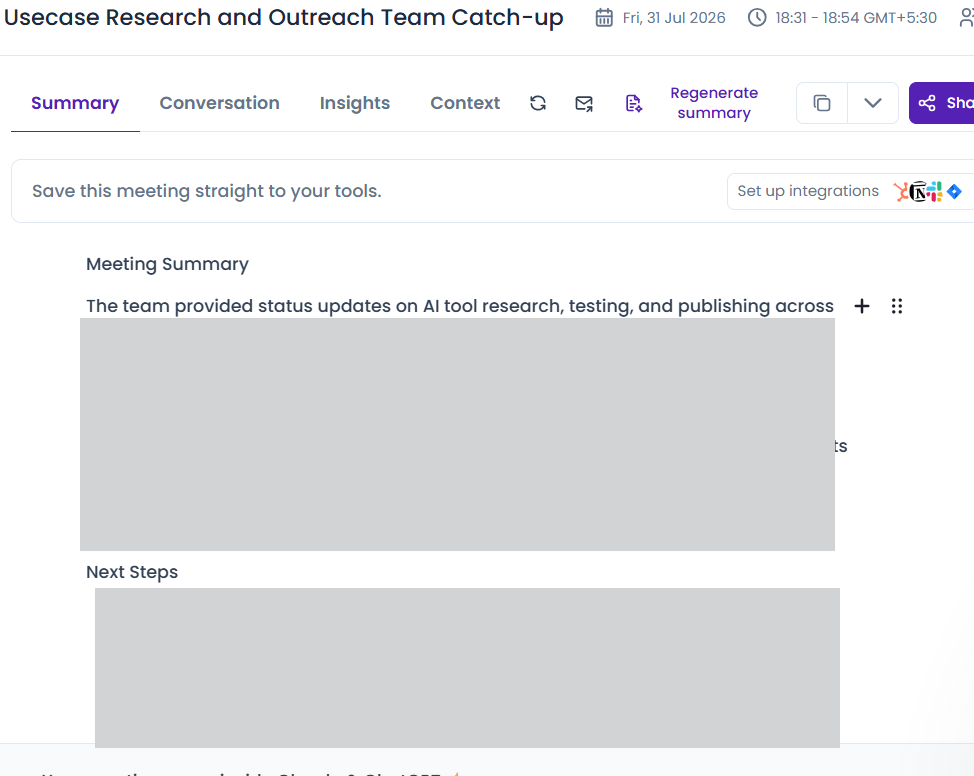
Observed output: Output artifact (Image): The Summary tab generated a structured meeting summary and included a Next Steps section. — meetgeek-meeting-summary-success.png
Input artifact: Input artifact (Video file): Input — 31-july-meeting-artifact.webm
Output artifact: Output artifact (Image): The Summary tab generated a structured meeting summary and included a Next Steps section. — meetgeek-meeting-summary-success.png
What changed: Video file transformed into Image
Test case: Video file → Image
Input type: Video file
Input used: Input artifact (Video file): Input — 31-july-meeting-artifact.webm
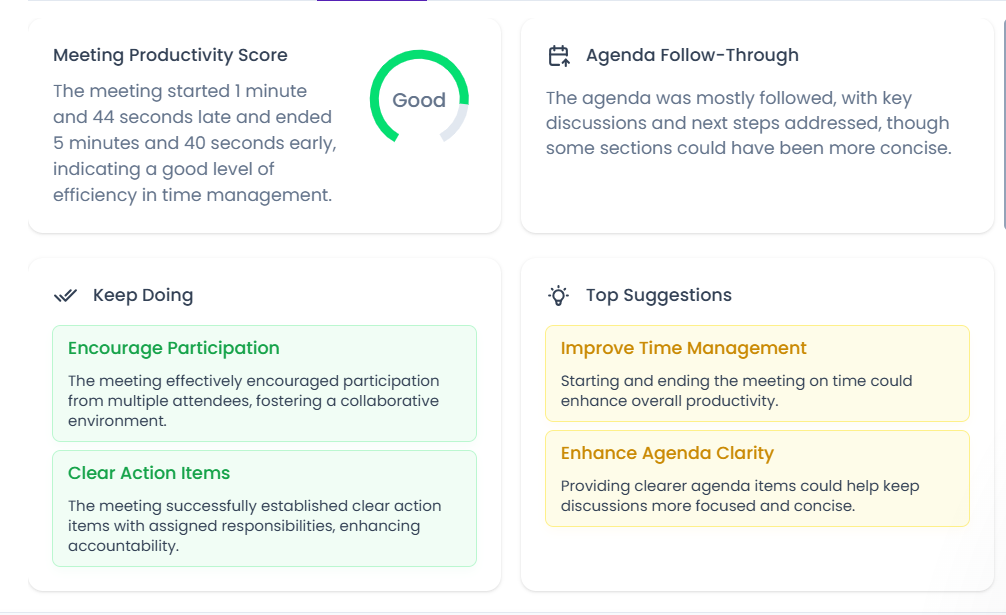
Observed output: Output artifact (Image): The Insights dashboard showed a productivity score, agenda follow-through, keep-doing items, and top suggestions for improvement. — meetgeek-meeting-insights-representation-evidence.png
Input artifact: Input artifact (Video file): Input — 31-july-meeting-artifact.webm
Output artifact: Output artifact (Image): The Insights dashboard showed a productivity score, agenda follow-through, keep-doing items, and top suggestions for improvement. — meetgeek-meeting-insights-representation-evidence.png
What changed: Video file transformed into Image
Test case: Video file → Image
Input type: Video file
Input used: Input artifact (Video file): Input — 31-july-meeting-artifact.webm
Observed output: Output artifact (Image): The meeting was broken into numbered topic sections instead of being left as one undifferentiated block. — meetgeek-topic-segmentation-success.png
Input artifact: Input artifact (Video file): Input — 31-july-meeting-artifact.webm
Output artifact: Output artifact (Image): The meeting was broken into numbered topic sections instead of being left as one undifferentiated block. — meetgeek-topic-segmentation-success.png
What changed: Video file transformed into Image
Test case: Video file → Image
Input type: Video file
Input used: Input artifact (Video file): Input — 31-july-meeting-artifact.webm
Observed output: Output artifact (Image): MeetGeek extracted a real next-step item from the meeting and attached a timestamp to it. — meetgeek-extracted-action-item-success.png
Input artifact: Input artifact (Video file): Input — 31-july-meeting-artifact.webm
Output artifact: Output artifact (Image): MeetGeek extracted a real next-step item from the meeting and attached a timestamp to it. — meetgeek-extracted-action-item-success.png
What changed: Video file transformed into Image
Why it matters / Conclusion: Strong summary structure and useful segmentation; this was one of MeetGeek’s clearest strengths in the test.
Turns a meeting into structured notes with a summary, topic sections, action items, and insights.


Search Within Meeting Notes and TranscriptsExcellent▾
Feature tested: Search Within Meeting Notes and Transcripts
Result: Passed
Verdict: Excellent
Expected behavior: Lets users search meeting content by keyword and jump to matching moments with context. Cards 3 and 14 both showed retrieval from the notes/transcript surface using a short query.
Test case: Text prompt → Image
Input type: Text prompt
Input used: Input artifact (Text prompt): INPUT
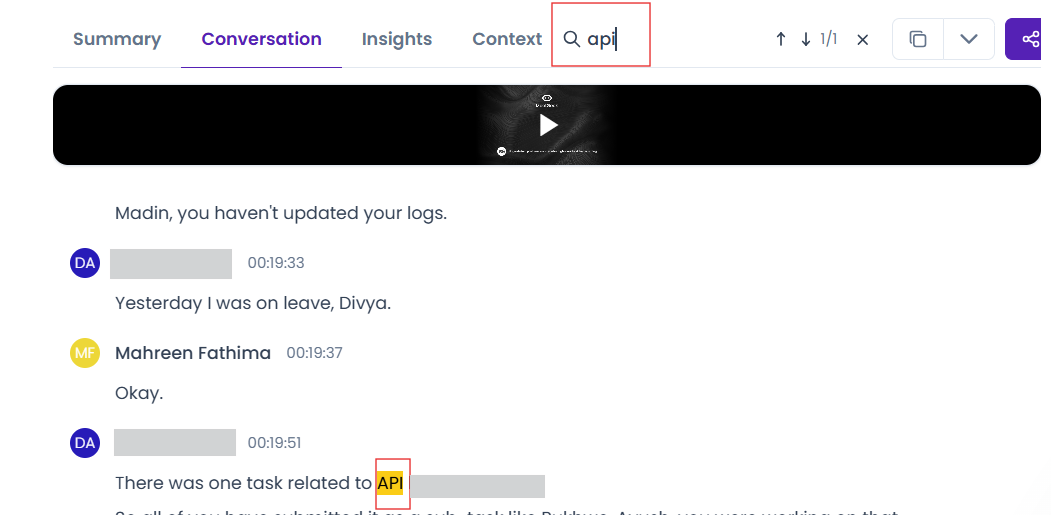
Observed output: Output artifact (Image): Transcript search results with the query 'api' highlighted in context. — meetgeek-transcript-searchability-success.png
Input artifact: Input artifact (Text prompt): INPUT
Output artifact: Output artifact (Image): Transcript search results with the query 'api' highlighted in context. — meetgeek-transcript-searchability-success.png
What changed: Text prompt transformed into Image
Why it matters / Conclusion: Fast, precise transcript search with timestamp-level retrieval.
Lets users search meeting content by keyword and jump to matching moments with context. Cards 3 and 14 both showed retrieval from the notes/transcript surface using a short query.
Chat With Meeting NotesMixed▾
Feature tested: Chat With Meeting Notes
Result: Partial
Verdict: Mixed
Expected behavior: Answers natural-language questions about meeting content and returns grounded context when available.
Test case: Artifact → Image
Input type: Artifact
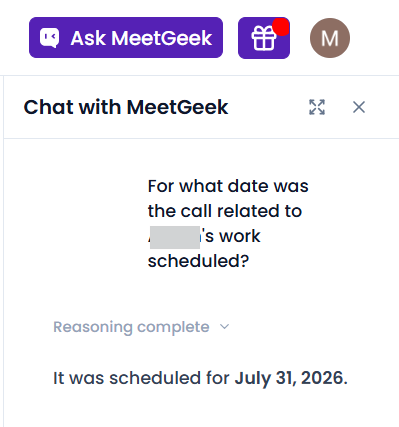
Input used: Input artifact (Artifact): Question : For what date was the call related to [team-member]'s work scheduled?
Observed output: Output artifact (Image): Chat response incorrectly answering the scheduling question as July 31, 2026. — meetgeek-chat-qna.png
Input artifact: Input artifact (Artifact): Question : For what date was the call related to [team-member]'s work scheduled?
Output artifact: Output artifact (Image): Chat response incorrectly answering the scheduling question as July 31, 2026. — meetgeek-chat-qna.png
What changed: Artifact transformed into Image
Why it matters / Conclusion: Good for direct, well-grounded questions; less dependable when the answer depends on speaker context or ambiguous phrasing.
Answers natural-language questions about meeting content and returns grounded context when available.
Edit Meeting Notes and Transcripts In PlaceFully editable▾
Feature tested: Edit Meeting Notes and Transcripts In Place
Result: Passed
Verdict: Fully editable
Expected behavior: Allows users to edit generated summaries, action items, and transcript text directly inside the app before sharing. Cards 5 and 13 both exercised in-app correction of the generated meeting outputs.
Test case: Image → Image
Input type: Image
Input used: Input artifact (Image): Open the generated meeting notes and edit the outputs before sharing. — 31-july-meeting-screenshot.png
Observed output: Output artifact (Image): Summary text showing inline editability in the MeetGeek interface. — meetgeek-summary-editability-success.png
Input artifact: Input artifact (Image): Open the generated meeting notes and edit the outputs before sharing. — 31-july-meeting-screenshot.png
Output artifact: Output artifact (Image): Summary text showing inline editability in the MeetGeek interface. — meetgeek-summary-editability-success.png
What changed: Image transformed into Image
Why it matters / Conclusion: A strong practical plus: the generated notes are editable in place before they are shared.
Allows users to edit generated summaries, action items, and transcript text directly inside the app before sharing. Cards 5 and 13 both exercised in-app correction of the generated meeting outputs.

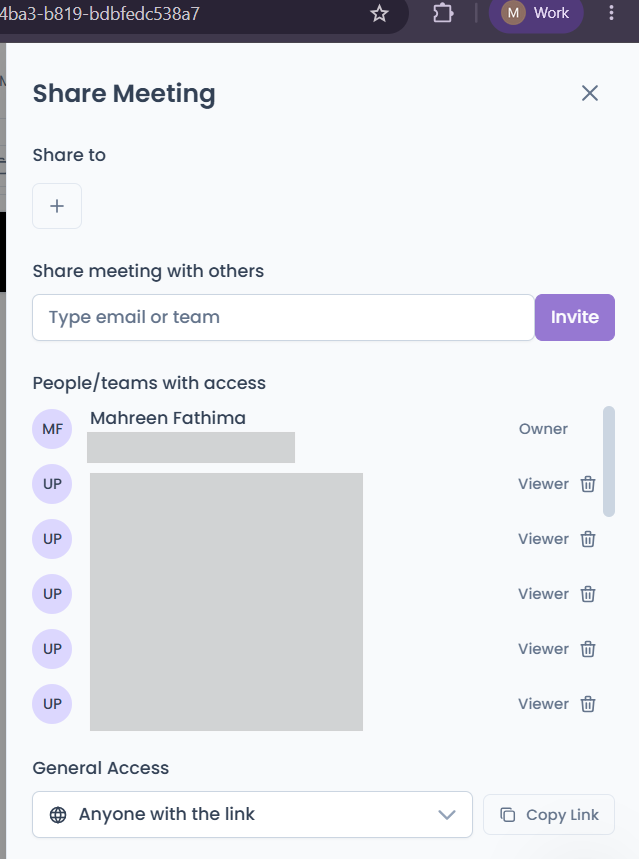
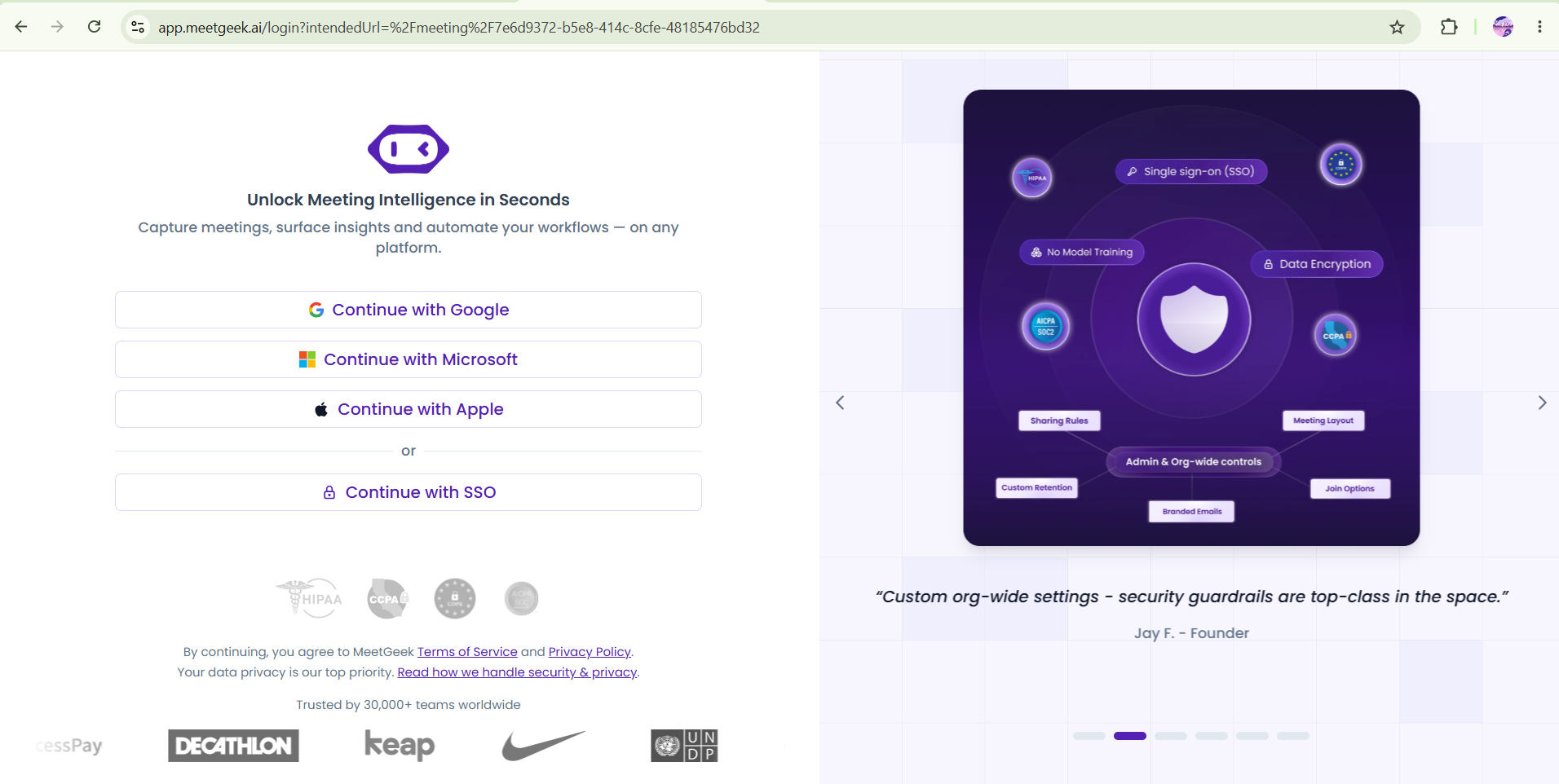
Share Meeting Notes with Access ControlMeetGeek supports sharing, but shared links still require login, which blocks open external viewing.▾
Feature tested: Share Meeting Notes with Access Control
Result: Failed
Verdict: MeetGeek supports sharing, but shared links still require login, which blocks open external viewing.
Expected behavior: Creates shareable meeting links and controls who can access them, including viewer restrictions that may require sign-in. Cards 6 and 7 both tested the sharing flow and its guest-access friction.
Test case: Text prompt → Image
Input type: Text prompt
Input used: Input artifact (Text prompt): INPUT
Observed output: Output artifact (Image): Share Meeting modal showing link sharing and access controls. — meetgeek-sharing-options.png
Input artifact: Input artifact (Text prompt): INPUT
Output artifact: Output artifact (Image): Share Meeting modal showing link sharing and access controls. — meetgeek-sharing-options.png
What changed: Text prompt transformed into Image
Test case: Text prompt → Image
Input type: Text prompt
Input used: Input artifact (Text prompt): INPUT
Observed output: Output artifact (Image): Shared meeting link landing on a login gate, confirming account sign-in is required. — meetgeek-shared-meeting-link-requires-login.png
Input artifact: Input artifact (Text prompt): INPUT
Output artifact: Output artifact (Image): Shared meeting link landing on a login gate, confirming account sign-in is required. — meetgeek-shared-meeting-link-requires-login.png
What changed: Text prompt transformed into Image
Why it matters / Conclusion: Sharing exists, but it is not frictionless for guests or clients.
Creates shareable meeting links and controls who can access them, including viewer restrictions that may require sign-in. Cards 6 and 7 both tested the sharing flow and its guest-access friction.
Programmatic Meeting Data AccessLive and working▾
Feature tested: Programmatic Meeting Data Access
Result: Passed
Verdict: Live and working
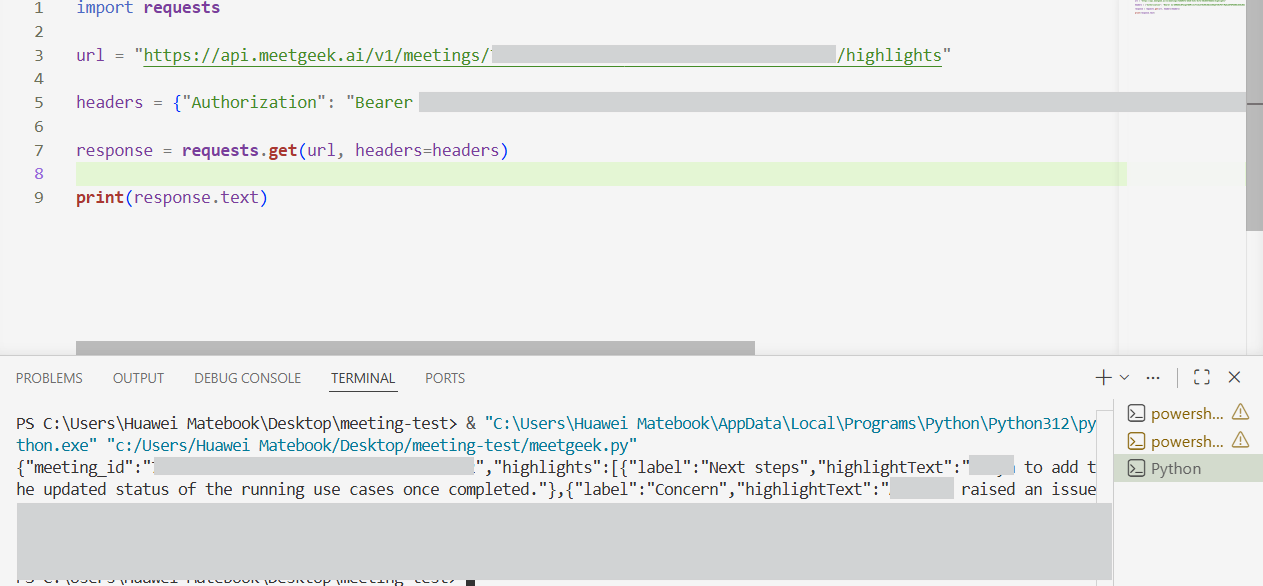
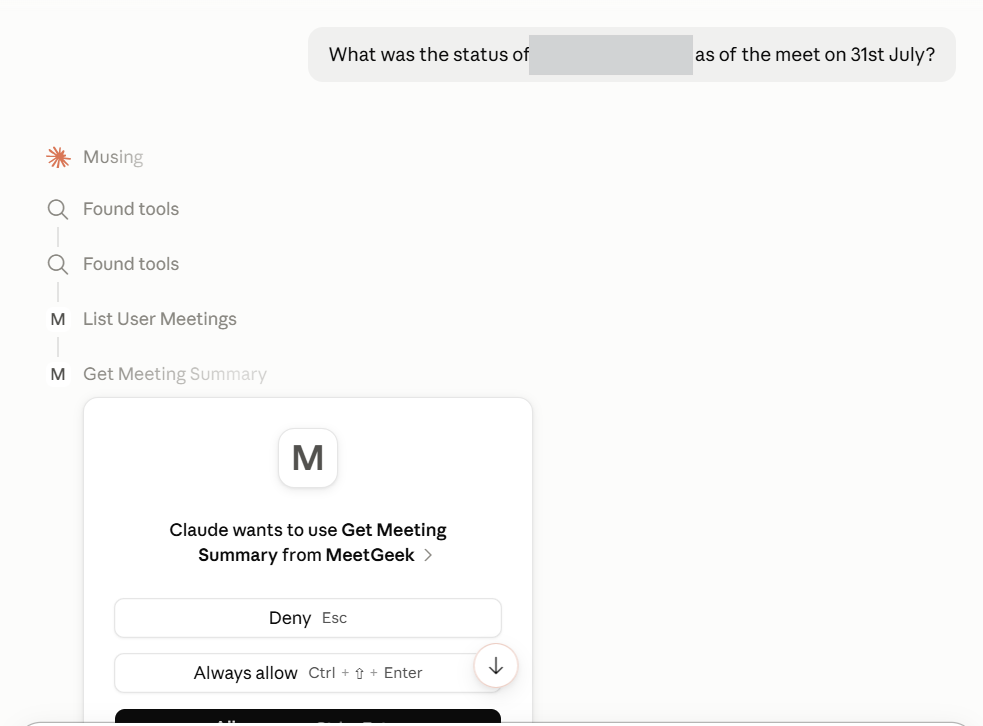
Expected behavior: Exposes meeting data outside the UI through a REST API and an MCP connector so other tools can retrieve meetings, summaries, and related context. Cards 8, 9, and 16 all exercised programmatic access, including direct API calls and Claude/MCP use.
Test case: Text prompt → Image
Input type: Text prompt
Input used: Input artifact (Text prompt): INPUT
Observed output: Output artifact (Image): API request returning structured JSON from the highlights endpoint. — meetgeek-api-request-success.png
Input artifact: Input artifact (Text prompt): INPUT
Output artifact: Output artifact (Image): API request returning structured JSON from the highlights endpoint. — meetgeek-api-request-success.png
What changed: Text prompt transformed into Image
Test case: Text prompt → Image
Input type: Text prompt
Input used: Input artifact (Text prompt): INPUT
Observed output: Output artifact (Image): Claude interface showing the MeetGeek MCP connector and permission prompt. — meetgeek-mcp-claude-connector.png
Input artifact: Input artifact (Text prompt): INPUT
Output artifact: Output artifact (Image): Claude interface showing the MeetGeek MCP connector and permission prompt. — meetgeek-mcp-claude-connector.png
What changed: Text prompt transformed into Image
Why it matters / Conclusion: The API is real and working, which makes MeetGeek much more automation-friendly.
Exposes meeting data outside the UI through a REST API and an MCP connector so other tools can retrieve meetings, summaries, and related context. Cards 8, 9, and 16 all exercised programmatic access, including direct API calls and Claude/MCP use.
Multilingual Transcription and AI FeaturesExtensive▾
Feature tested: Multilingual Transcription and AI Features
Result: Passed
Verdict: Extensive
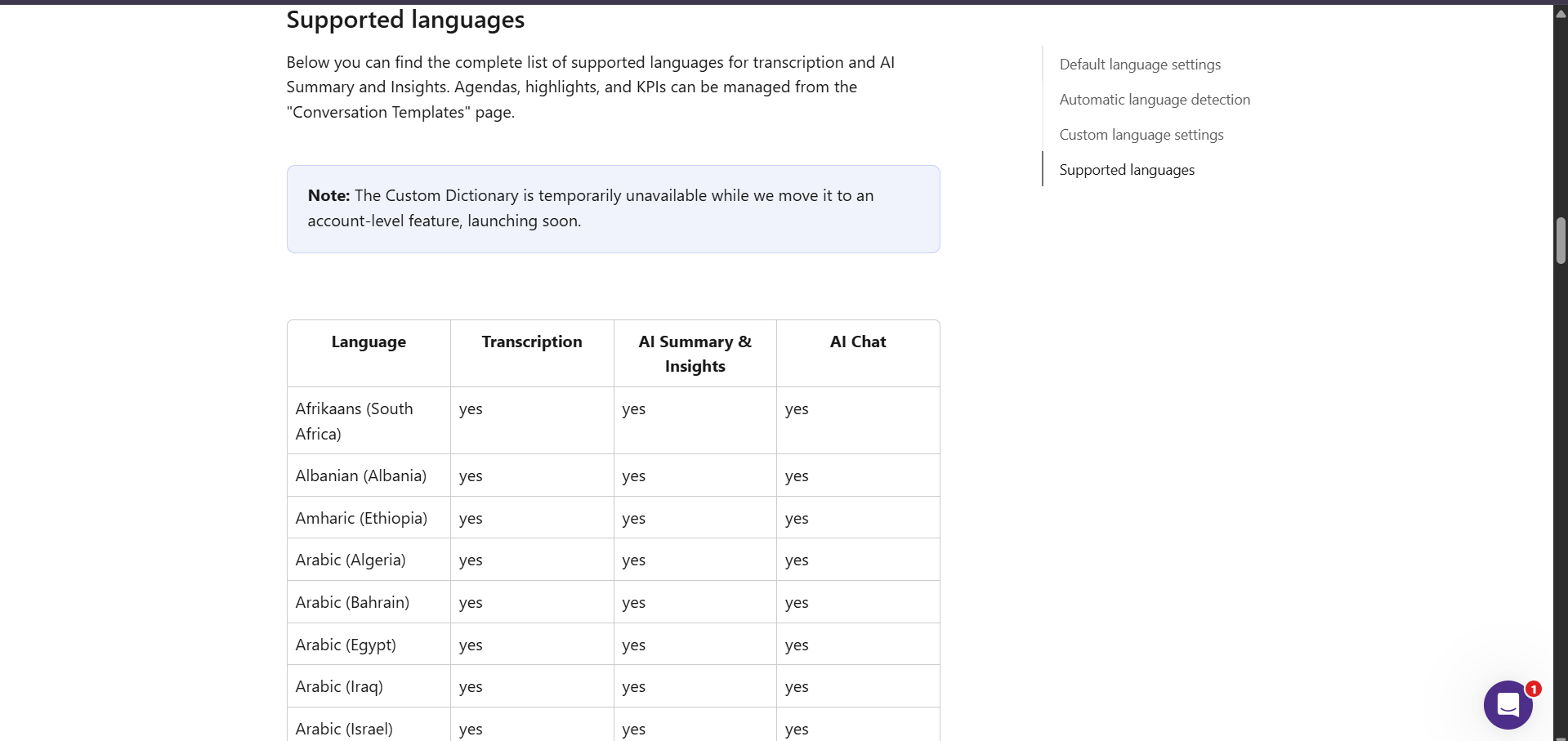
Expected behavior: Supports 100+ languages across transcription, summaries, insights, and AI chat, with automatic language detection and custom language settings. Card 10 exercised that multilingual behavior rather than a separate one-off task.
Test case: Text prompt → Image
Input type: Text prompt
Input used: Input artifact (Text prompt): INPUT
Observed output: Output artifact (Image): Supported languages table showing transcription, AI Summary & Insights, and AI Chat coverage. — meetgeek-language-support.png
Input artifact: Input artifact (Text prompt): INPUT
Output artifact: Output artifact (Image): Supported languages table showing transcription, AI Summary & Insights, and AI Chat coverage. — meetgeek-language-support.png
What changed: Text prompt transformed into Image
Why it matters / Conclusion: Strong multilingual coverage for global teams, with automatic detection to reduce setup friction.
Supports 100+ languages across transcription, summaries, insights, and AI chat, with automatic language detection and custom language settings. Card 10 exercised that multilingual behavior rather than a separate one-off task.
Third-Party IntegrationsBroad ecosystem support▾
Feature tested: Third-Party Integrations
Result: Passed
Verdict: Broad ecosystem support
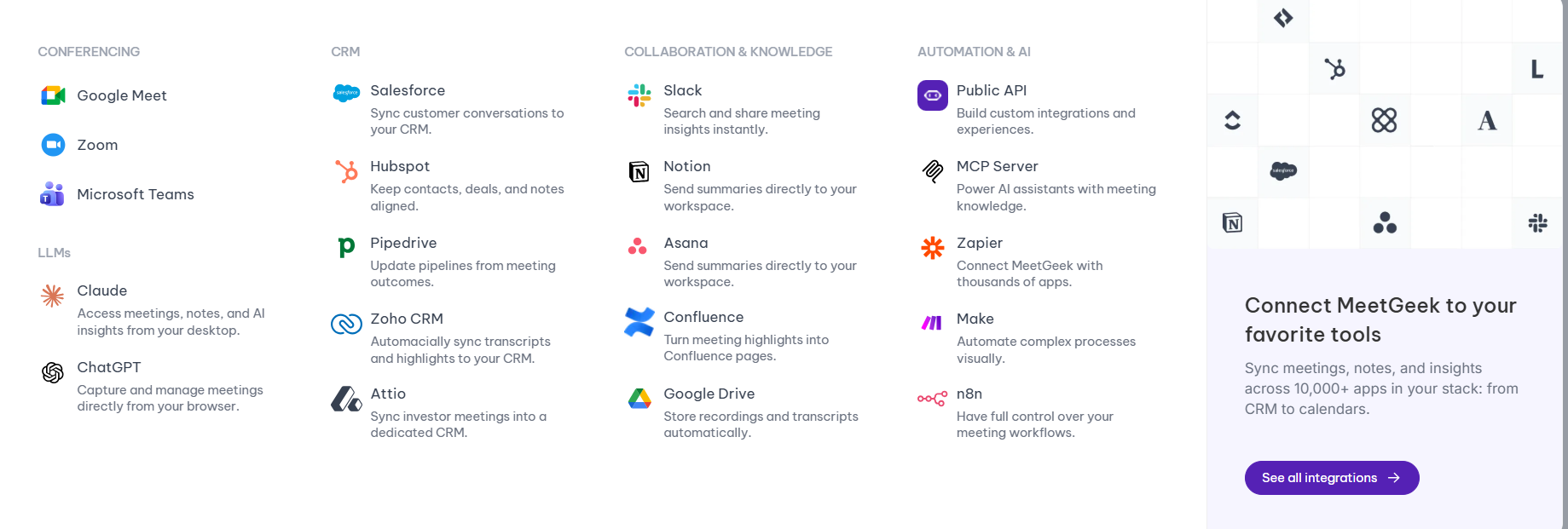
Expected behavior: Connects MeetGeek to conferencing, CRM, collaboration, and automation tools such as Google Meet, Zoom, Teams, Salesforce, Slack, Notion, Zapier, and Make. Card 11 exercised the integration directory and ecosystem connectivity.
Test case: Text prompt → Image
Input type: Text prompt
Input used: Input artifact (Text prompt): INPUT
Observed output: Output artifact (Image): Integrations page listing conferencing, CRM, collaboration, and automation categories. — meetgeek-integrations.png
Input artifact: Input artifact (Text prompt): INPUT
Output artifact: Output artifact (Image): Integrations page listing conferencing, CRM, collaboration, and automation categories. — meetgeek-integrations.png
What changed: Text prompt transformed into Image
Why it matters / Conclusion: Good integration coverage for teams that want notes and action items pushed into their existing stack.
Connects MeetGeek to conferencing, CRM, collaboration, and automation tools such as Google Meet, Zoom, Teams, Salesforce, Slack, Notion, Zapier, and Make. Card 11 exercised the integration directory and ecosystem connectivity.
Plans and limits
Free Basic is limited to 3 hours per month; paid plans add automation, team features, and governance.
Monthly and annual billing are shown. The pricing page also mentions 30% off for startups, non-profits, and education.
Banner Preview
How the embed badge will look on your site

Embed HTML
Copy this code to your website source
Quick Integration Guide
- 1Copy the HTML code block above.
- 2Paste it into your site's HTML or CMS editor.
- 3Banner appears instantly on your page.
- 4Links back to your tool profile here.
Similar Tools
Discover more AI tools like MeetGeek to enhance your workflow.
Comments (0)
Need a custom AI solution for this use case?
If you are looking to build a custom meeting transcription, meeting summarization, or standup capture system for your business or internal workflow, email us at contact@futuresmart.ai.
Found something inaccurate or missing? We try to keep our AI research accurate and useful. If you found outdated information, an issue, or have a suggestion, email us at collaborate@aidemos.com.