
Adobe API
Hosted PDF-to-Markdown extraction for complex documents, with strong tables, charts, and OCR but some structure gaps.
Strong at mixed PDF extraction, but not lossless on every structure type.
- You need a hosted API that returns Markdown from complex PDFs.
- Your documents mix tables, charts, and scanned pages.
- You want most regular financial tables to stay readable without manual cleanup.
- You need handwritten signature recognition.
Our take
Adobe API is a solid hosted PDF-to-Markdown extractor for hybrid financial and scanned documents: it keeps many tables, charts, and scanned pages usable in output. The main caveats in this research were lost handwritten signatures, flattened TOC hierarchy, and weaker handling of dual-header tables or tables with intervening text.
In-Depth Review
Our detailed analysis of Adobe API — features, performance, and real-world testing.
Feature-by-Feature Breakdown
PDF-to-Markdown Extraction▾
Feature tested: PDF-to-Markdown Extraction
Result: Passed
Expected behavior: Converts uploaded PDFs into downloadable markdown, including complex reports and scanned pages. The hybrid earnings report, the table-heavy financial report, and both halves of the split scanned research paper all produced markdown outputs, with reading order preserved well enough to keep narrative text usable.
Test case: PDF document → Text/code file
Input type: PDF document
Input used: Input artifact (PDF document): Input — Hybrid-Earnings-PDF.pdf
Observed output: Output artifact (Text/code file): Markdown output for the 84-page hybrid earnings report, showing the API returns a downloadable .md file for a mixed digital/scanned document. — Adobe_hybrid_earningspdf_output.md
Input artifact: Input artifact (PDF document): Input — Hybrid-Earnings-PDF.pdf
Output artifact: Output artifact (Text/code file): Markdown output for the 84-page hybrid earnings report, showing the API returns a downloadable .md file for a mixed digital/scanned document. — Adobe_hybrid_earningspdf_output.md
What changed: PDF document transformed into Text/code file
Test case: PDF document → Text/code file
Input type: PDF document
Input used: Input artifact (PDF document): Input — Sumitomo Financial PDF.pdf
Observed output: Output artifact (Text/code file): Markdown output for the table-heavy 18-page financial report, also returned as a downloadable .md file. — adobe_financialpdf_output.md
Input artifact: Input artifact (PDF document): Input — Sumitomo Financial PDF.pdf
Output artifact: Output artifact (Text/code file): Markdown output for the table-heavy 18-page financial report, also returned as a downloadable .md file. — adobe_financialpdf_output.md
What changed: PDF document transformed into Text/code file
Test case: PDF document → Text/code file
Input type: PDF document
Input used: Input artifact (PDF document): Input — Scanned PDF 1-6.pdf
Observed output: Output artifact (Text/code file): The scanned research paper is converted into usable markdown text rather than being skipped or left blank. — scanned_research_pdf_pages_1_to_6_output.md
Input artifact: Input artifact (PDF document): Input — Scanned PDF 1-6.pdf
Output artifact: Output artifact (Text/code file): The scanned research paper is converted into usable markdown text rather than being skipped or left blank. — scanned_research_pdf_pages_1_to_6_output.md
What changed: PDF document transformed into Text/code file
Test case: PDF document → Text/code file
Input type: PDF document
Input used: Input artifact (PDF document): Input — Scanned PDF 7-12.pdf
Observed output: Output artifact (Text/code file): The second half of the scanned research paper also converts into usable markdown text. — scanned_research_pdf_pages_7_to_12_output.md
Input artifact: Input artifact (PDF document): Input — Scanned PDF 7-12.pdf
Output artifact: Output artifact (Text/code file): The second half of the scanned research paper also converts into usable markdown text. — scanned_research_pdf_pages_7_to_12_output.md
What changed: PDF document transformed into Text/code file
Test case: Image → Image
Input type: Image
Input used: Input artifact (Image): Input — financial_pdf_document_page_6.png
Observed output: Output artifact (Image): The operating-performance narrative keeps its section flow and readable page-level structure in the extracted output. — adobe_financialpdf_hierarchy.png
Input artifact: Input artifact (Image): Input — financial_pdf_document_page_6.png
Output artifact: Output artifact (Image): The operating-performance narrative keeps its section flow and readable page-level structure in the extracted output. — adobe_financialpdf_hierarchy.png
What changed: Image transformed into Image
Test case: PDF document → Image
Input type: PDF document
Input used: Input artifact (PDF document): INPUT: Supplementary Materials – Table of Contents page from Sumitomo Financial PDF — Sumitomo Financial PDF.pdf
Observed output: Output artifact (Image): The parsed table of contents flattens nested entries into a simple list instead of preserving indentation-based hierarchy. — adobe_financialpdf_toc_parsed.png
Input artifact: Input artifact (PDF document): INPUT: Supplementary Materials – Table of Contents page from Sumitomo Financial PDF — Sumitomo Financial PDF.pdf
Output artifact: Output artifact (Image): The parsed table of contents flattens nested entries into a simple list instead of preserving indentation-based hierarchy. — adobe_financialpdf_toc_parsed.png
What changed: PDF document transformed into Image
Test case: Image → Image
Input type: Image
Input used: Input artifact (Image): Input — hybrid_earningspdf_signatures.png
Observed output: Output artifact (Image): The printed signature-page text remains, but the handwritten signatures are not recovered. — adobe_hybrid_earningspdf_parsed_signs.png
Input artifact: Input artifact (Image): Input — hybrid_earningspdf_signatures.png
Output artifact: Output artifact (Image): The printed signature-page text remains, but the handwritten signatures are not recovered. — adobe_hybrid_earningspdf_parsed_signs.png
What changed: Image transformed into Image
Why it matters / Conclusion: A clean end-to-end export path for complex PDFs; the only workflow wrinkle was the web-demo size limit that forced the scanned paper to be split into two uploads.
Converts uploaded PDFs into downloadable markdown, including complex reports and scanned pages. The hybrid earnings report, the table-heavy financial report, and both halves of the split scanned research paper all produced markdown outputs, with reading order preserved well enough to keep narrative text usable.
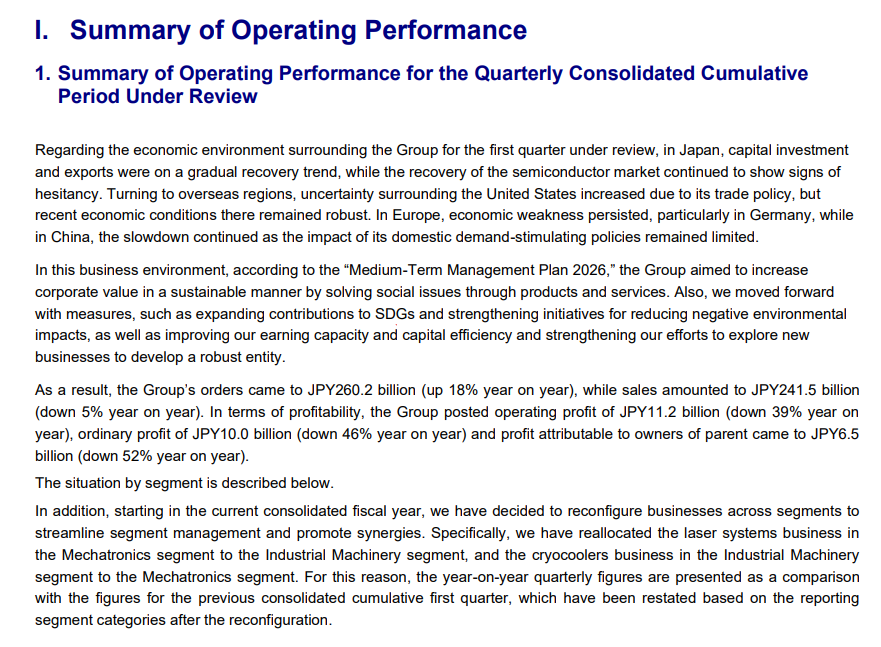
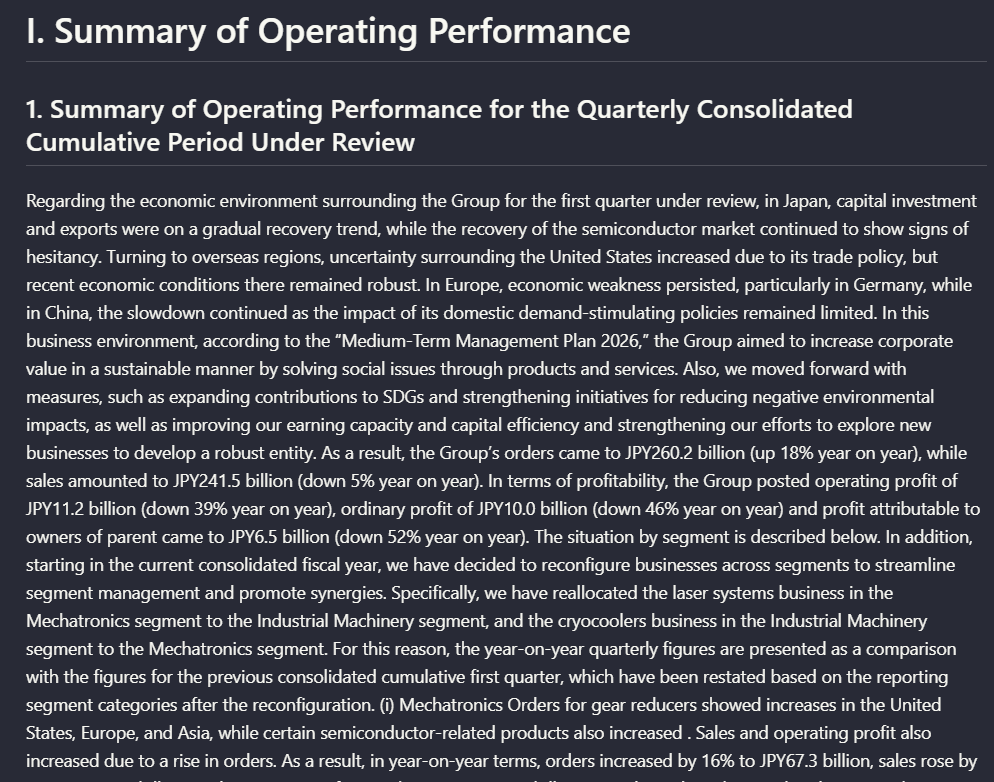
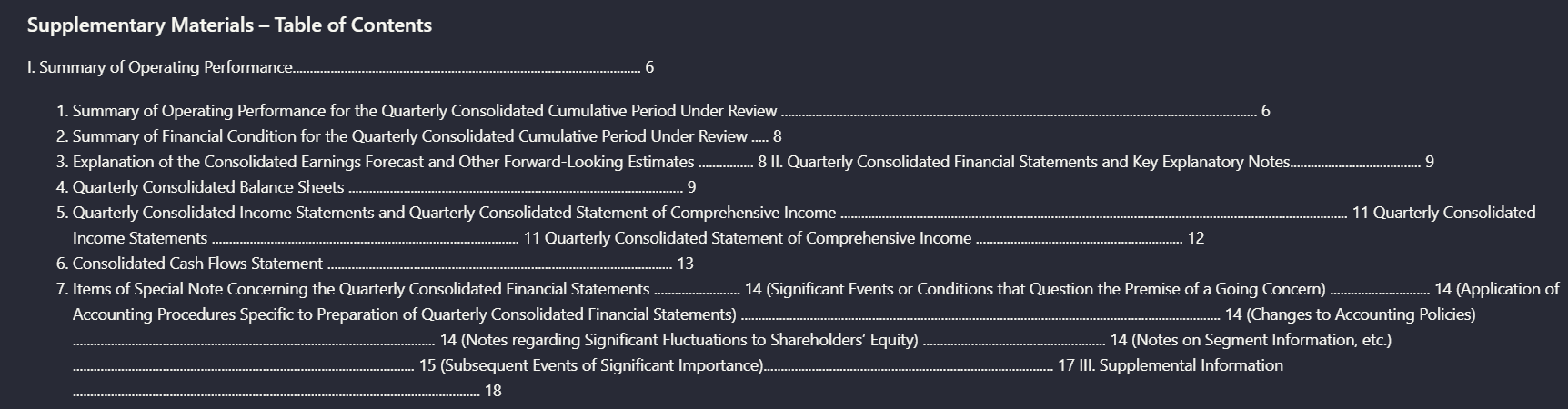
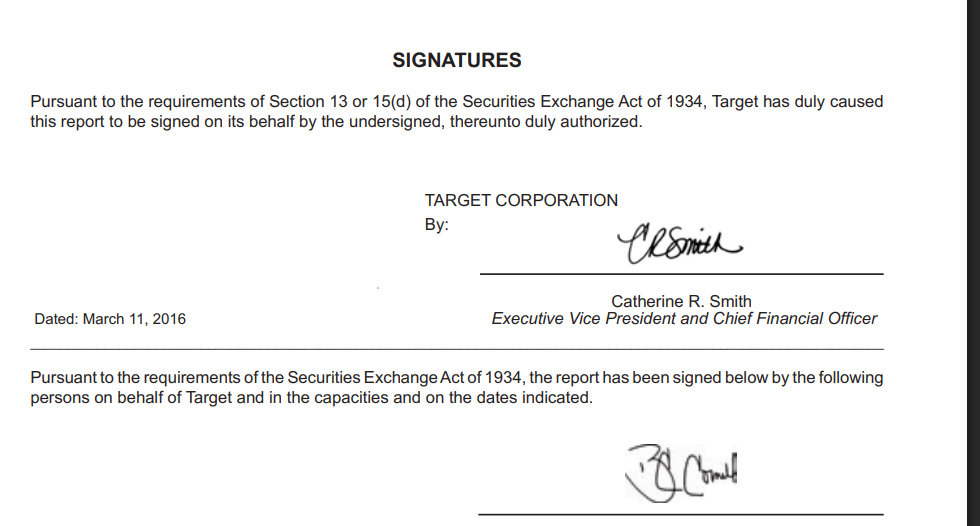
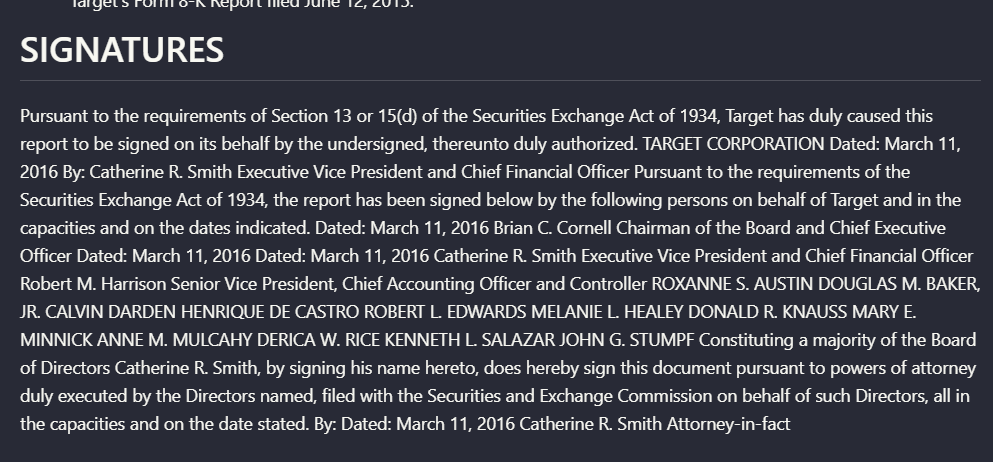
Table Reconstruction from PDFs▾
Feature tested: Table Reconstruction from PDFs
Result: Passed
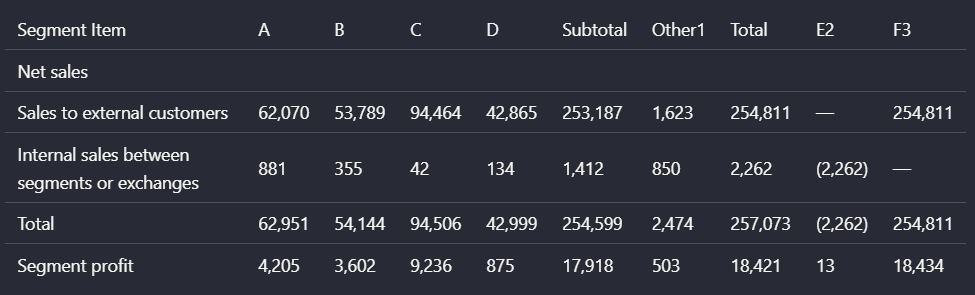
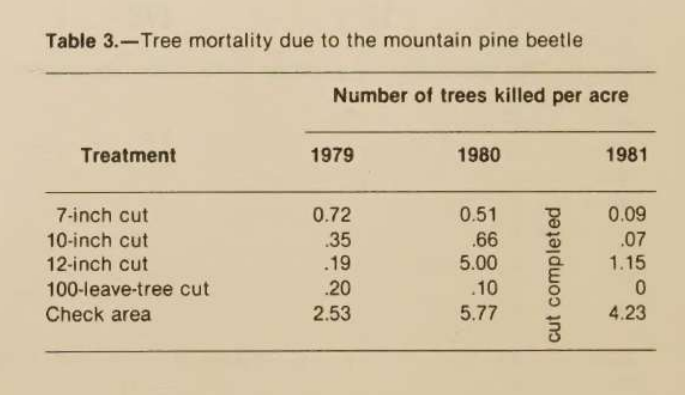
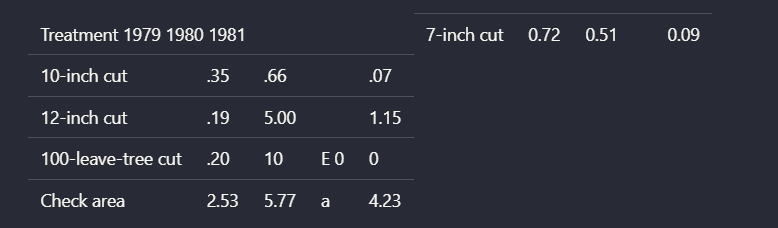
Expected behavior: Rebuilds table structure into readable markdown, preserving rows, columns, values, and grouped financial summaries. It worked on the financial summary, quarterly balance sheet, and multilevel segment table, while also being tested on dual-header and vertically interrupted tables where alignment became less reliable.
Test case: Image → Image
Input type: Image
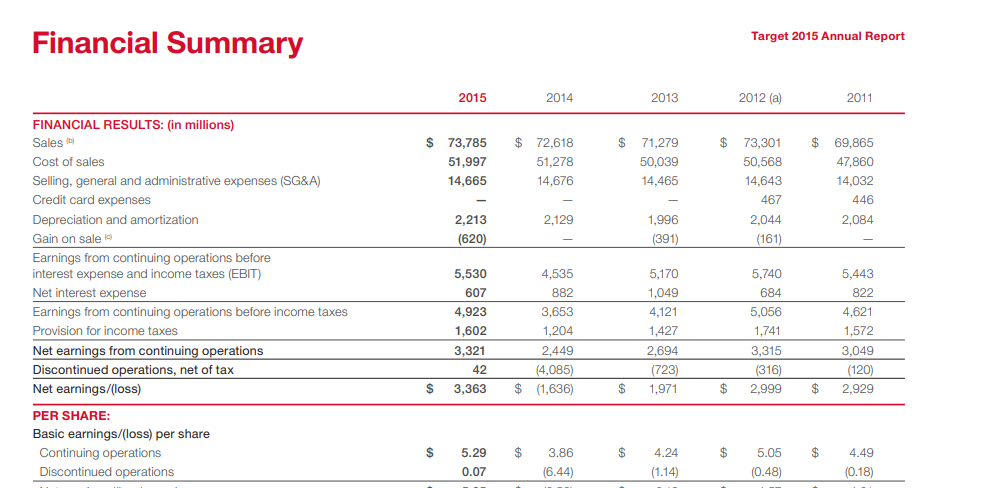
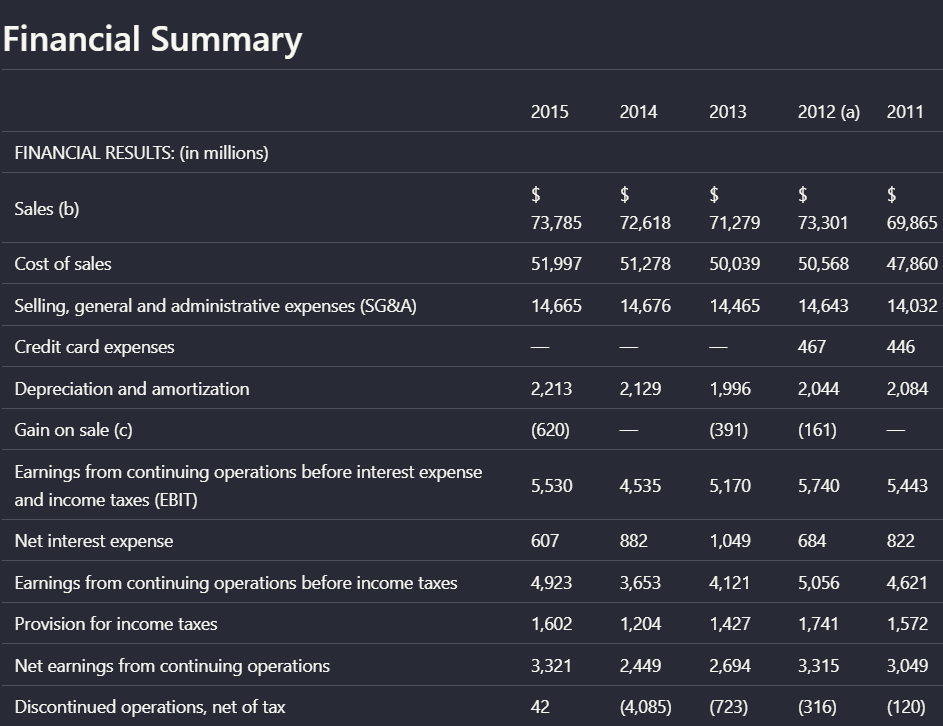
Input used: Input artifact (Image): Input — earnings_hybridInput_table.png
Observed output: Output artifact (Image): The financial summary table keeps the row and column structure intact in the extracted output. — adobe_hybrid_earningspdf_parsed_table.png
Input artifact: Input artifact (Image): Input — earnings_hybridInput_table.png
Output artifact: Output artifact (Image): The financial summary table keeps the row and column structure intact in the extracted output. — adobe_hybrid_earningspdf_parsed_table.png
What changed: Image transformed into Image
Test case: Image → Image
Input type: Image
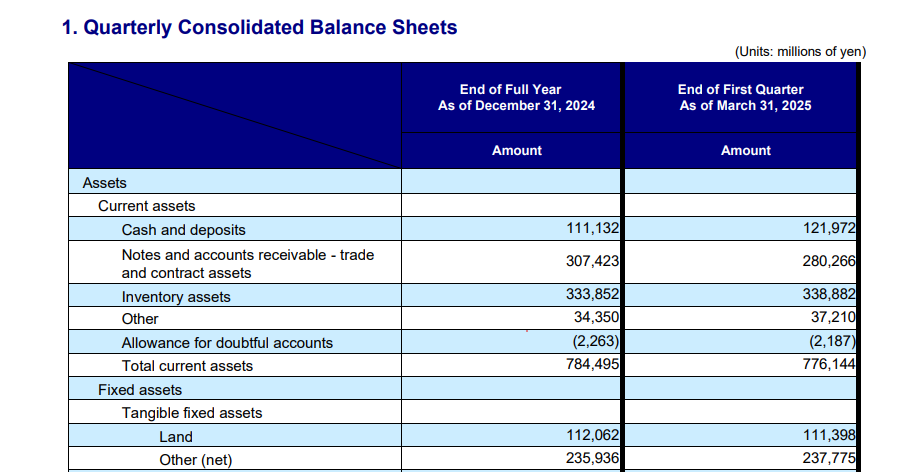
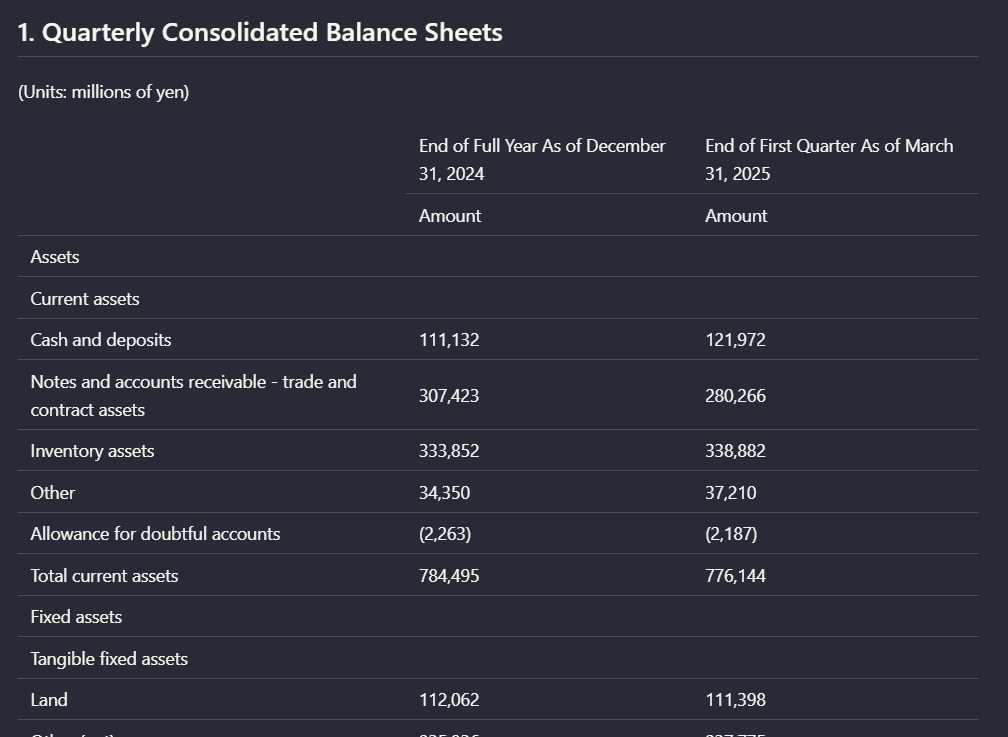
Input used: Input artifact (Image): Input — financial_pdf_balance_sheet.png
Observed output: Output artifact (Image): The quarterly consolidated balance sheet remains readable, with asset rows and the two date columns preserved. — adobe_financialpdf_parsed_balancesheet_table.png
Input artifact: Input artifact (Image): Input — financial_pdf_balance_sheet.png
Output artifact: Output artifact (Image): The quarterly consolidated balance sheet remains readable, with asset rows and the two date columns preserved. — adobe_financialpdf_parsed_balancesheet_table.png
What changed: Image transformed into Image
Test case: Image → Image
Input type: Image
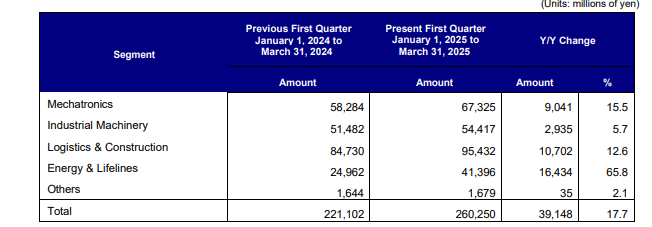
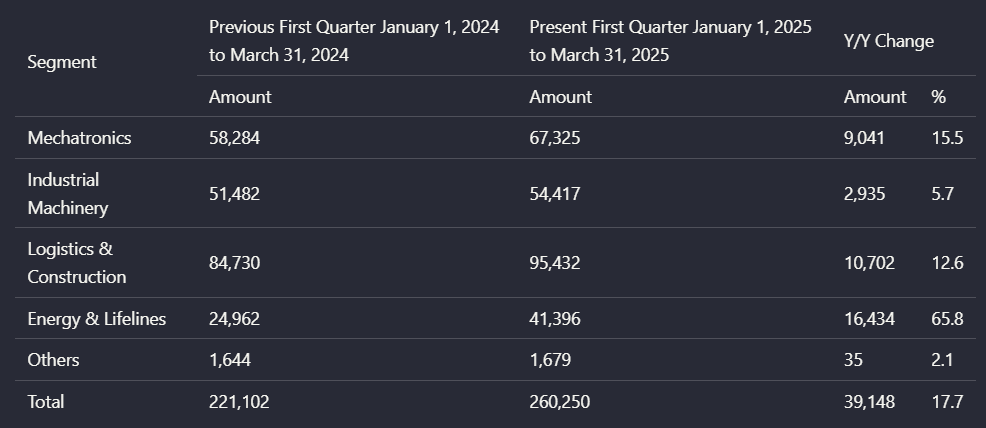
Input used: Input artifact (Image): Input — financial_pdf_multilevel_table.png
Observed output: Output artifact (Image): The multilevel segment table keeps grouped headers and year-over-year values together in the extracted output. — adobe_financialpdf_parsed_multicolumn_table.png
Input artifact: Input artifact (Image): Input — financial_pdf_multilevel_table.png
Output artifact: Output artifact (Image): The multilevel segment table keeps grouped headers and year-over-year values together in the extracted output. — adobe_financialpdf_parsed_multicolumn_table.png
What changed: Image transformed into Image
Test case: Image → Image
Input type: Image
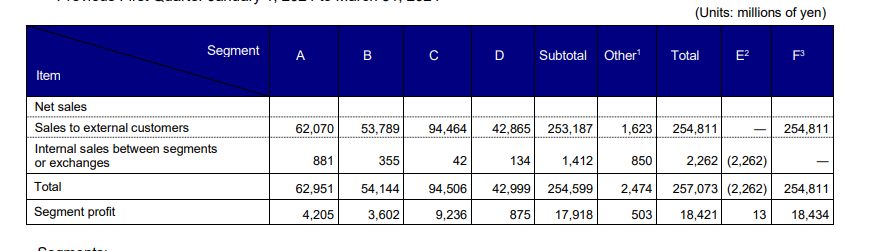
Input used: Input artifact (Image): Input — financial_pdf_complex_table.png
Observed output: Output artifact (Image): The dual-header table is flattened in the extracted version, with row and column header roles no longer cleanly separated. — adobe_financialpsd_parsed_multiheader_table.png
Input artifact: Input artifact (Image): Input — financial_pdf_complex_table.png
Output artifact: Output artifact (Image): The dual-header table is flattened in the extracted version, with row and column header roles no longer cleanly separated. — adobe_financialpsd_parsed_multiheader_table.png
What changed: Image transformed into Image
Test case: Image → Image
Input type: Image
Input used: Input artifact (Image): Input — scanned_pdf_multicolmn-table_with_intervening_text.png
Observed output: Output artifact (Image): The scanned grouped-column table breaks apart when intervening text splits the grid, disrupting alignment between columns. — adobe_scannedpdf_parsed_mutlicolumn_table_with_intervening_text.png
Input artifact: Input artifact (Image): Input — scanned_pdf_multicolmn-table_with_intervening_text.png
Output artifact: Output artifact (Image): The scanned grouped-column table breaks apart when intervening text splits the grid, disrupting alignment between columns. — adobe_scannedpdf_parsed_mutlicolumn_table_with_intervening_text.png
What changed: Image transformed into Image
Why it matters / Conclusion: Good on conventional financial tables and grouped columns.
Rebuilds table structure into readable markdown, preserving rows, columns, values, and grouped financial summaries. It worked on the financial summary, quarterly balance sheet, and multilevel segment table, while also being tested on dual-header and vertically interrupted tables where alignment became less reliable.
Embedded Visual Preservation▾
Feature tested: Embedded Visual Preservation
Result: Passed
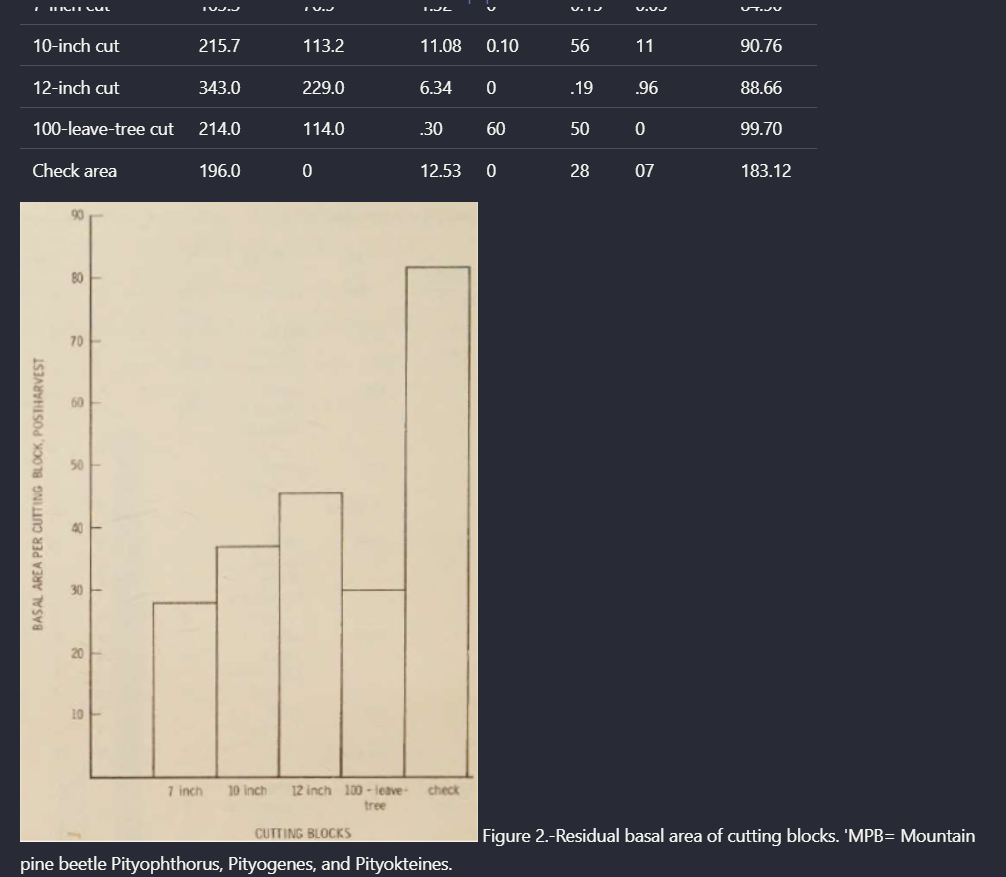
Expected behavior: Keeps charts and embedded images in the exported document instead of dropping them. In the hybrid earnings report, the financial highlights chart and segment-share graphics stayed embedded, and the scanned report output also preserved figure content.
Test case: PDF document → Image
Input type: PDF document
Input used: Input artifact (PDF document): Input — Hybrid-Earnings-PDF.pdf
Observed output: Output artifact (Image): The output keeps the financial highlights chart and segment-share graphics embedded in the document flow rather than dropping them. — adobe_hybrid_earningspdf_parsed_embedded_assets.png
Input artifact: Input artifact (PDF document): Input — Hybrid-Earnings-PDF.pdf
Output artifact: Output artifact (Image): The output keeps the financial highlights chart and segment-share graphics embedded in the document flow rather than dropping them. — adobe_hybrid_earningspdf_parsed_embedded_assets.png
What changed: PDF document transformed into Image
Test case: PDF document → Image
Input type: PDF document
Input used: Input artifact (PDF document): Input — Scanned PDF 1-6.pdf
Observed output: Output artifact (Image): The scanned report output preserves a chart/figure element alongside extracted text instead of dropping the visual asset. — adobe_scannedpdf_parsed_embedded_assets.png
Input artifact: Input artifact (PDF document): Input — Scanned PDF 1-6.pdf
Output artifact: Output artifact (Image): The scanned report output preserves a chart/figure element alongside extracted text instead of dropping the visual asset. — adobe_scannedpdf_parsed_embedded_assets.png
What changed: PDF document transformed into Image
Why it matters / Conclusion: A clear strength: visuals stay with the document and are not silently lost.
Keeps charts and embedded images in the exported document instead of dropping them. In the hybrid earnings report, the financial highlights chart and segment-share graphics stayed embedded, and the scanned report output also preserved figure content.

How it scored on the research's own criteria
The 7 evaluation dimensions from our hands-on research on Adobe API, each judged from recorded runs on 3 test inputs — the same verdicts the ranking page ranks on.
held up partial failed not exercised by this input
| Criterion | Verdict | What the runs showed | Per input | Proof |
|---|---|---|---|---|
| Advanced Features (Bonus) | Mixed | I don’t have a run that shows separate table/chart extraction or any low-confidence OCR or ambiguous-region flags, so there isn’t enough to score this feature honestly. | — | |
| Complex Document Handling | Strong4/5 | It handles long, mixed-content reports well and finishes them automatically, which is a strong sign for endurance on real documents. The only real penalty is the scanned-paper size limit in the web flow, so it’s strong overall but not flawless. | open proof ↗ | |
| Markdown Quality | Strong4/5 | It produces markdown that is usable enough to inspect and download, rather than just dumping plain text. I’m not giving it a 5 because I only saw proof of the markdown mode and output files, not a deeper test of how clean or consistently well-formed the markdown stays across harder pages. | open proof ↗ | |
| Reading Order & Structure | Weak2/5 | It can keep a clean section structure in some narrative pages, but that breaks down in the table of contents and in scanned pages where the organization disappears. Because the failures hit the core of reading order and hierarchy, this lands low despite one good example. | open proof ↗ | |
| Table Preservation | Mixed3/5 | It handles straightforward and moderately complex tables well, including balance sheets and grouped financial columns, but it loses ground when the table structure gets trickier or a second header layer appears. That mix of several strong recoveries and several clear breakages lands it in the middle of the scale. | open proof ↗ | |
| Text & OCR Completeness | Strong4/5 | It reads the scanned paper well enough to recover the main front-matter and opening text in one piece, which is strong OCR behavior. I’m stopping at 4 rather than 5 because I only saw one representative scanned-document run, so I can’t confirm that it stays equally complete on longer or messier pages. | open proof ↗ | |
| Visual Content Retention | Strong4/5 | It does a good job keeping charts and embedded figures in the right place, which is the core of this criterion. The main drag is that it completely misses handwritten signature content, so this is strong but not perfect. | open proof ↗ |
Verdicts come verbatim from the study's recorded observations, never re-derived at render; a criterion with no recorded run shows Not exercised — this section cannot invent a score.
Featured in Rankings
Independent rankings where Adobe API was tested and rated.

Banner Preview
How the embed badge will look on your site

Embed HTML
Copy this code to your website source
Quick Integration Guide
- 1Copy the HTML code block above.
- 2Paste it into your site's HTML or CMS editor.
- 3Banner appears instantly on your page.
- 4Links back to your tool profile here.
Similar Tools
Discover more AI tools like Adobe API to enhance your workflow.
Comments (0)
Need a custom AI solution for this use case?
If you are looking to build a custom PDF extraction, document parsing, or structured data extraction system for your business or internal workflow, email us at contact@futuresmart.ai.
Found something inaccurate or missing? We try to keep our AI research accurate and useful. If you found outdated information, an issue, or have a suggestion, email us at collaborate@aidemos.com.