developer-tools · tested June 2026

Best AI APIs to Convert Complex PDFs to Clean Markdown

We tested hosted PDF-to-markdown APIs on the same three hard documents: a long hybrid annual report, a table-heavy financial report, and an image-only scanned research paper. The goal was usable markdown with OCR, tables, charts, and reading order preserved well enough for downstream RAG, search, and reuse.

0
8 tools7 things we checked3 tests241 findings309 screenshots54 output files14 min read
Our verdictTested June 2026 · 8/8 tools tested hands-on
#1 pick
Extend AIBest3.8/5 · 7 checks

Most consistent across all document types; production-ready default choice.

The rest of the field

#2 LlamaParse· #3 Landing AI· #4 Mistral AI· #5 Tensorlake· #6 Adobe API

The ranking

Scores are the average across every check we scored for that tool. Not every tool was scored on every check — the count is shown.

ToolScorePriceWhere it lands
#1Extend AIBest3.8/5
7 checks
Free · $500/monthStrong hybrid-document parsing, but visuals often stay out of flow
#2LlamaParseBest3.3/5
7 checks
Free · $3/moStrong on reading order and OCR for mixed PDFs, but weaker on visual retention and complex table semantics.
#3Landing AIBest3.0/5
7 checks
Pay-as-you-goStrong at table-heavy document reconstruction, but weaker on visual fidelity and heading semantics.
#4Mistral AIUsable3.4/5
7 checks
Free · $2 / 1,000 pagesStrong OCR and export automation, with good table recovery but inconsistent hierarchy on longer documents.
#5TensorlakeUsable3.6/5
7 checks
Strong document structure and table parser, but weak on hierarchical scanned tables
#6Adobe APIUsable3.4/5
7 checks
Best at keeping visual assets and financial tables in place; weaker on signatures and hierarchy.
#7Upstage AINeeds work2.7/5
7 checks
FreeStrong at native financial table reconstruction, but weak on scanned multicolumn structure and visual preservation.
#8Nutrient.ioNeeds work2.0/5
7 checks
Free · $59/monthGood at basic OCR and section hierarchy, but weak on tables, charts, and other visual content in complex documents.

What we checked

Every finding below is tied to one of these checks, and to the test that produced it. The number is how many of the 8 tools we recorded findings for.

Complex Document Handling 8 toolsReading Order & Structure 8 toolsTable Preservation 8 toolsVisual Content Retention 8 toolsText & OCR Completeness 6 toolsAdvanced Features (Bonus) 5 toolsMarkdown Quality 5 tools

What we tried

The same 3 tests were run on every tool.

Scanned Research PaperSumitomo Heavy Industries Consolidated Financial ReportTarget 2015 Annual Report
Read it

Extend AI

Best#1 of 8

Strong hybrid-document parsing, but visuals often stay out of flow

Complex Document Handling4/54 findings

Handles long mixed-content PDFs well, though quality drops somewhat on the most complex multilevel table layouts.

Worked wellacross all testslink to this finding

Handles 84-page mixed-content reports end to end in a single automated markdown export, keeping them usable and structured across narrative text, tables, charts, and scanned signatures/marks without obvious degradation or manual correction.

Worked wellwhen we tried: Target 2015 Annual Reportlink to this finding

Can convert an 84-page hybrid annual report with native text, tables, charts, and scanned signatures into a usable downloadable markdown output without manual correction.

Tool input

llamaparse-hybrid-earnings-pdf-1.pdf
Hybrid earnings pdf.pdf

Tool output

extend-ai-extendai-hybrid-earnings-pdf-output-6.md
Loading file...
Extend AI — extendai_hybrid_earnings_pdf_output.md
Reading Order & Structure4.5/58 findings

Keeps section hierarchy and reading flow clear across long reports and scanned papers, with only limited structural drift around complex tables.

Worked wellacross all testslink to this finding

Consistently preserved section hierarchy, heading-to-content relationships, and narrative flow, keeping reports and scanned multi-column papers readable rather than flattening them.

Worked wellwhen we tried: Target 2015 Annual Reportlink to this finding

Maintains report hierarchy and narrative flow so a section title, paragraph text, and a four-item bullet list stay in readable order instead of collapsing into a flat text dump.

Table Preservation3.5/58 findings

Preserves row/column alignment and grouped headers well overall, but multirow and compound headers break in some cases.

Worked wellwhen we tried: Scanned Research Paperlink to this finding

Preserves row-column relationships and grouping cues in a complex table, producing a structured reconstruction rather than a flat transcription.

Tool input

Tool output

Worked wellwhen we tried: Sumitomo Heavy Industries Consolidated Financial Reportlink to this finding

Reconstructs complex financial tables with aligned rows and columns, preserving the table's original structure in markdown.

Tool input

Tool output

Visual Content Retention3/55 findings

Charts and logos are retained as captions or references, but they are not consistently kept inline with the document flow.

Worked wellwhen we tried: Scanned Research Paperlink to this finding

Detects lightly visible handwritten markings and carries them into the output, showing retention of subtle low-contrast content from the scan.

Tool input

Tool output

Mixedwhen we tried: Sumitomo Heavy Industries Consolidated Financial Reportlink to this finding

Preserves visual assets through detached references and annotations, but does not keep them inline at their original reading position.

Text & OCR Completeness4.5/54 findings

Covers native text, scanned pages, signatures, handwriting, and low-clarity stamps with only minor OCR slips and a few missing contextual bits.

Mixedacross all testslink to this finding

It captured faint handwritten, signature, and stamp text, but missed text between table columns and introduced a one-character OCR error, so completeness was uneven.

Worked wellwhen we tried: Scanned Research Paperlink to this finding

Captures lightly visible handwritten markings and carries them into the parsed output, showing usable OCR on faint annotations.

Tool input

Tool output

Advanced Features (Bonus)Capability check2/54 findings

Shows structured table/chart extraction, but there is no clear evidence of explicit low-confidence OCR or ambiguity flagging.

This is a capability we checked per tool — whether (and how well) it supports this — so it shows a support verdict and what we found, rather than media or an input→output pair.

Worked wellacross all testslink to this finding

Exposes API-key generation in the developer area alongside documentation support, enabling programmatic use without manual post-processing.

Worked wellwhen we tried: Target 2015 Annual Reportlink to this finding

Produces a separate captioned chart extraction and carries the waterfall progression into text, including the 2013 SG&A rate at 20.2%, the 2014 rate at 20.0%, and the 2015 rate at 19.6%.

Markdown Quality5/5scored, no findings

LlamaParse

Best#2 of 8

Strong on reading order and OCR for mixed PDFs, but weaker on visual retention and complex table semantics.

Complex Document Handling4/54 findings

Handled long hybrid and table-heavy documents consistently, with only limited degradation in the more complex table regions.

Worked wellacross all testslink to this finding

It consistently handled the 84-page mixed-content/hybrid annual report end-to-end, keeping the output usable and the document hierarchy intact without manual correction or post-processing.

Worked wellwhen we tried: Target 2015 Annual Reportlink to this finding

Handles a full 84-page hybrid report while keeping the extracted output usable and the document hierarchy intact, rather than degrading into a flattened long-text dump.

Tool input

llamaparse-hybrid-earnings-pdf-1.pdf
Hybrid earnings pdf.pdf

Tool output

llamaparse-llamaparse-target-earnings-output-1.md
Loading file...
LlamaParse — llamaparse_target_earnings_output.md
Reading Order & Structure4/59 findings

Kept headings, section flow, and multi-column reading order recognizable across the test documents, with some loss in structured sublayouts.

Mixedacross all testslink to this finding

It generally preserves reading order and section hierarchy across reports and scanned pages, but the table of contents is only recovered as sequential text and loses hierarchical relationships.

Worked wellwhen we tried: Target 2015 Annual Reportlink to this finding

Keeps an 84-page hybrid annual report in readable section order, preserving heading hierarchy and content flow instead of flattening it into disconnected text blocks.

Tool input

Tool output

llamaparse-llamaparse-target-earnings-output-1.md
Loading file...
LlamaParse — llamaparse_target_earnings_output.md
Table Preservation3/59 findings

Preserved standard tables and much of the visible data, but multi-level headers, grouped relationships, and TOC structure were only partially retained.

Mixedacross all testslink to this finding

It often preserves row alignment, column organization, and grouped-header relationships, but complex grouped-header tables can become less explicit and the table of contents is only extracted as sequential text.

Worked wellwhen we tried: Scanned Research Paperlink to this finding

Preserves a scanned research table’s multi-level column organization and grouped-header relationships in the extracted output.

Tool input

Tool output

Visual Content Retention2/510 findings

Did not truly retain visuals inline; charts and assets were mostly converted into text or tables rather than preserved as images in place.

Mixedacross all testslink to this finding

It preserves the underlying content of some visuals by turning charts into structured tables with readable legend-to-value mapping, but it generally does not keep non-text visuals as visual assets: logos, signatures, stamps, portraits, and other images are surfaced as descriptive text or omitted inline.

Failedwhen we tried: Target 2015 Annual Reportlink to this finding

A page that includes a left-side portrait image is returned as text-only blocks: the title, author line, paragraph text, and bullets are preserved, but the image itself is not retained inline.

Tool input

Tool output

Text & OCR Completeness4/51 finding

Recovered the readable content well across scanned and hybrid PDFs, with only some structure-related losses in complex areas.

Worked wellwhen we tried: Target 2015 Annual Reportlink to this finding

Extracts embedded signature text from an image-based signature block, recovering the readable 'Ernst & Young LLP' text from the visual asset.

Advanced Features (Bonus)Capability check2/56 findings

Showed some extra handling for charts and assets, but there was no clear evidence of low-confidence OCR or ambiguous-region flagging.

This is a capability we checked per tool — whether (and how well) it supports this — so it shows a support verdict and what we found, rather than media or an input→output pair.

Worked wellacross all testslink to this finding

The settings UI includes API key administration with a 'Generate New Key' control and 2 listed project API keys, showing built-in key management for authenticated use.

Worked wellacross all testslink to this finding

Provides API-key creation together with documentation support.

Markdown Quality4/51 finding

Produced usable downloadable markdown rather than a flat dump, though some extracted structures were simplified or flattened.

Struggledwhen we tried: Sumitomo Heavy Industries Consolidated Financial Reportlink to this finding

Extracts a table of contents as sequential text rather than a structured markdown block, so the entries and page numbers are recovered but the layout hierarchy is lost.

Landing AI

Best#3 of 8

Strong at table-heavy document reconstruction, but weaker on visual fidelity and heading semantics.

Complex Document Handling4/51 finding

Handled long, mixed-content financial and scanned documents well overall, with some hierarchy degradation on harder sections.

Worked wellwhen we tried: Sumitomo Heavy Industries Consolidated Financial Reportlink to this finding

Processes an 84-page hybrid financial report end-to-end and returns a downloadable markdown file through a fully automated API call, with no manual correction or post-processing required.

Tool input

llamaparse-hybrid-earnings-pdf-1.pdf
Hybrid-Earnings-PDF.pdf

Tool output

landing-ai-landingai-hybrid-earningspdf-output.md
Loading file...
Landing AI — landingai_hybrid_earningspdf_output.md
Reading Order & Structure3/59 findings

Section flow and local hierarchy often held up, but top-level headings and opening-page structure were inconsistently preserved.

Mixedacross all testslink to this finding

It usually preserved reading order and section hierarchy, keeping headings, paragraphs, bullets, and multi-column content in sequence, but it was weaker on opening-page/title-page structure and sometimes flattened or misordered heading semantics.

Struggledwhen we tried: Sumitomo Heavy Industries Consolidated Financial Reportlink to this finding

Flattens the top-level heading semantics on the same page: the main title is recovered as plain text rather than an H1-style heading, reducing hierarchy fidelity.

Tool input

Tool output

Table Preservation4/57 findings

Rebuilt tables well with rows, columns, and headers mostly intact, though nested header distinctions were sometimes collapsed.

Worked wellwhen we tried: Sumitomo Heavy Industries Consolidated Financial Reportlink to this finding

Reconstructs the segment-results table with previous and present first-quarter columns and year-over-year change, covering six segment rows plus the total row.

Tool input

Tool output

Worked wellwhen we tried: Scanned Research Paperlink to this finding

Preserves nested table structure and values in a scanned document, including multi-level layouts.

Tool input

Tool output

Visual Content Retention1/55 findings

Charts, signatures, and stamps were not retained as visual assets; they were mostly converted into textual or semantic descriptions.

Mixedacross all testslink to this finding

It preserves some visual content as semantic or textual detail, including a signature region and chart values and labels, but it does not keep charts as visual objects and instead turns them into prose or text summaries.

Mixedwhen we tried: Sumitomo Heavy Industries Consolidated Financial Reportlink to this finding

Converts a waterfall chart into text that retains nine rate/change values and their increase/decrease directions, but does not keep the chart as a visual object.

Tool input

Tool output

Text & OCR Completeness4/51 finding

Captured essentially all readable text, including scanned pages, but some structure and heading semantics were flattened.

Struggledwhen we tried: Scanned Research Paperlink to this finding

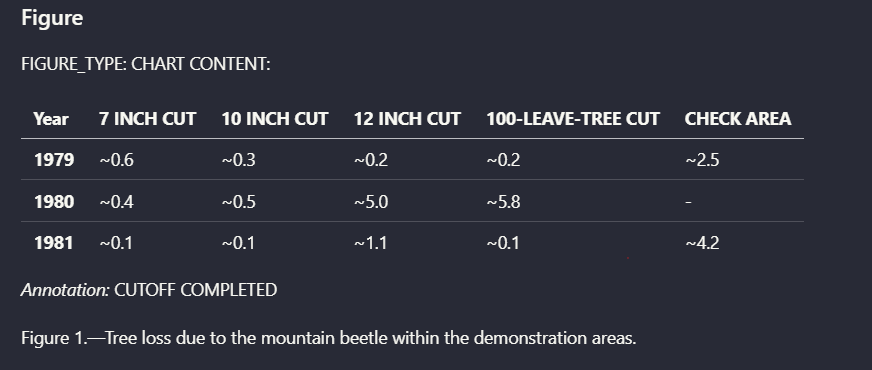
Fragments the vertically oriented 'cut completed' note in the table into five OCR pieces ('ed', 'et', 'np', 'cut con', and 'cut'), and the final check-area line is truncated in the extracted text.

Advanced Features (Bonus)Capability check1/55 findings

No clear separate table/chart extraction or explicit low-confidence OCR flagging, despite some semantic descriptions of signatures and stamps.

This is a capability we checked per tool — whether (and how well) it supports this — so it shows a support verdict and what we found, rather than media or an input→output pair.

Worked wellacross all testslink to this finding

Provides a documented API key and multiple functions for integration, and the report says extraction can be run as a fully automated API call with no manual correction, UI interaction, or post-processing required to produce usable output.

Worked wellwhen we tried: Target 2015 Annual Reportlink to this finding

Preserves a low-visibility marking through a generated descriptive attestation instead of dropping the region, so a blurred stamp remains represented in the extracted output.

Markdown Quality4/51 finding

Returned usable markdown with headings and tables rather than a flat dump, though some structure was simplified.

Worked wellacross all testslink to this finding

Returns parsed markdown as a downloadable output through a fully automated API workflow, with no manual correction or post-processing required.

landing-ai-landingai-hybrid-earningspdf-output.md
Loading file...
Landing AI — landingai_hybrid_earningspdf_output.md
landing-ai-landingai-financialpdf-output.md
Loading file...
Landing AI — landingai_financialpdf_output.md
landing-ai-landingai-scannedpdf-output.md
Loading file...
Landing AI — landingai_scannedpdf_output.md

Mistral AI

Usable#4 of 8

Strong OCR and export automation, with good table recovery but inconsistent hierarchy on longer documents.

Complex Document Handling3/56 findings

Processed long mixed-content PDFs end-to-end, but quality degraded on hierarchy and complex table reconstruction in larger documents.

Mixedacross all testslink to this finding

It handled long mixed-content reports end to end, preserving reading flow and producing both page-wise and consolidated markdown outputs, but hierarchy flattened in some places so long-document consistency was only partial.

Worked wellwhen we tried: Sumitomo Heavy Industries Consolidated Financial Reportlink to this finding

The parser produces both page-level files and a consolidated markdown document in the same export, supporting localized inspection and full-document consumption for a long report.

Reading Order & Structure3/510 findings

Reading flow was often preserved, but hierarchy was inconsistent, with flattened TOCs and missed section levels.

Mixedacross all testslink to this finding

Generally preserves document hierarchy and reading flow, with headings and supporting text staying aligned in most reports and scanned pages, but it can flatten the heading tree or table-of-contents structure and can lose distinctions such as title vs abstract.

Mixedwhen we tried: Target 2015 Annual Reportlink to this finding

Preserves section-level reading order through most of a long mixed-content annual report, but the reconstructed heading tree becomes flattened in some areas instead of staying fully hierarchical.

Table Preservation3/510 findings

Handled some layered financial tables well, but multilevel headers and complex scanned tables lost structural fidelity.

Mixedacross all testslink to this finding

It preserved several layered financial and multicolumn tables with headers and row-to-value relationships intact, but broke complex scanned tables and flattened hierarchical structure when the layout was more demanding.

Worked wellwhen we tried: Target 2015 Annual Reportlink to this finding

Reconstructs a layered financial table into a usable structured table while keeping the relationships between headers, rows, and corresponding values intact.

Tool input

Tool output

Visual Content Retention4/54 findings

Charts, signatures, and other visuals were retained as page-linked assets in the output folders rather than being dropped.

Worked wellacross all testslink to this finding

Retains non-text visual content as separate, source-linked assets, including charts, signatures, and a scanned stamp region, rather than burying them in a text-only extract.

Worked wellwhen we tried: Scanned Research Paperlink to this finding

Charts are exposed through page-wise markdown files and visual assets, keeping the extracted visual content linked to its original document location.

Text & OCR Completeness4/5scored, no findings
Advanced Features (Bonus)3/5scored, no findings
Markdown Quality4/54 findings

Exported usable overall and page-wise Markdown files in downloadable ZIPs, though structure could flatten in places.

Worked wellacross all testslink to this finding

Exports a usable markdown package with both consolidated and page-wise files inside a downloadable ZIP, supporting end-to-end consumption and page-level validation without manual post-processing.

mistral-ai-mistral-ai-hybrid-earnings-pdf-output-zip-3.zip

ZIP
Mistral AI — Mistral AI Hybrid Earnings PDF Output ZIP.zip

mistral-ai-mistral-ai-financial-pdf-output-zip-file-2.zip

ZIP
Mistral AI — Mistral AI Financial PDF Output ZIP File.zip

mistral-ai-mistral-ai-scanned-pdf-output-zip-2.zip

ZIP
Mistral AI — Mistral AI Scanned PDF Output ZIP.zip
Worked wellwhen we tried: Sumitomo Heavy Industries Consolidated Financial Reportlink to this finding

Produces clean, usable markdown exports in both consolidated and page-level form within a single ZIP package, supporting both whole-document reading and local inspection.

Tensorlake

Usable#5 of 8

Strong document structure and table parser, but weak on hierarchical scanned tables

Complex Document Handling4/56 findings

Holds up across long mixed-content reports, but quality drops on the most complex scanned tables.

Worked wellacross all testslink to this finding

Completes conversion on all three long PDFs tested here—an 84-page hybrid report, an 18-page table-heavy report, and a scanned research paper—and returns markdown exports for each.

tensorlake-tensorlake-financialpdf-output.md
Loading file...
Tensorlake — tensorlake_financialpdf_output.md
tensorlake-tensorlake-scannedpdf-output.md
Loading file...
Tensorlake — tensorlake_scannedpdf_output.md
Worked wellwhen we tried: Target 2015 Annual Reportlink to this finding

Handles an 84-page mixed-content report while keeping heading order and section relationships aligned across tables, charts, and scanned signatures.

Tool input

llamaparse-hybrid-earnings-pdf-1.pdf
Hybrid-Earnings-PDF.pdf

Tool output

Reading Order & Structure4/56 findings

Preserves section order and document hierarchy well across long hybrid and scanned documents.

Worked wellacross all testslink to this finding

It consistently preserved reading order and document structure, keeping headings, hierarchy, and narrative flow aligned even in table-heavy, multi-column, scanned, and long hybrid reports.

Worked wellwhen we tried: Target 2015 Annual Reportlink to this finding

Keeps the top-down reading order intact across a report section by placing the title, subtitle, figure block, narrative paragraph, and bullet list in one coherent flow instead of flattening them into unordered text.

Table Preservation3/56 findings

Keeps ordinary and multi-section tables mostly intact, but multi-header and hierarchical tables lose headers and relationships.

Mixedacross all testslink to this finding

Generally preserves financial tables with row/column relationships and aligned headers in markdown, but it is only partially successful on complex multilevel tables and struggles with hierarchical tables in scanned pages.

Failedwhen we tried: Scanned Research Paperlink to this finding

Struggles with hierarchical tables in scanned pages, producing misplaced column headers and unreliable reconstruction across at least two table examples.

Tool input

Tool output

Visual Content Retention3/54 findings

Extracts chart data and signature content, but visuals are represented as parsed data rather than faithfully retained images in place.

Mixedacross all testslink to this finding

It preserves some scanned-page visual content like handwritten signatures and degraded stamp text, but embedded figures are not retained as visual objects and the stamp text can pick up symbol-level OCR errors.

Mixedwhen we tried: Sumitomo Heavy Industries Consolidated Financial Reportlink to this finding

Captures degraded stamp text well enough to preserve the Ernst & Young reference, but introduces a symbol-level OCR error by rendering an ampersand as a plus sign.

Tool input

Tool output

Text & OCR Completeness4/56 findings

Covers scanned signatures and blurry text with few omissions, but complex scanned tables still break down.

Mixedacross all testslink to this finding

It generally recovers readable scanned signature-page and stamp text, including signatory names, dates, and signature-related annotations, but the handwritten autograph itself can be only loosely transcribed and symbol-level OCR errors like rendering the ampersand as a plus sign still show up.

Worked wellwhen we tried: Sumitomo Heavy Industries Consolidated Financial Reportlink to this finding

Detects handwritten-signature content from a scanned page and returns it as readable text, including signer names and signature-related annotations.

Tool input

Tool output

Advanced Features (Bonus)Capability check3/55 findings

Adds separate chart extraction and signature parsing, but no explicit low-confidence OCR flags are described.

This is a capability we checked per tool — whether (and how well) it supports this — so it shows a support verdict and what we found, rather than media or an input→output pair.

Worked wellacross all testslink to this finding

Exposes API-key access and documentation from the home page, giving the tool a built-in API entry point alongside the UI workflow.

Worked wellwhen we tried: Target 2015 Annual Reportlink to this finding

Exports chart content as separate structured data, including a bbox, chart description, title, axes, categories, and numeric series values, instead of only embedding the chart as prose.

Markdown Quality4/53 findings

Outputs usable copyable markdown with clear structure, though it is not a downloadable export.

Worked wellacross all testslink to this finding

Produces usable markdown rather than a flat text dump, with clear section headings, a figure block, and bullet lists when present.

Worked wellwhen we tried: Sumitomo Heavy Industries Consolidated Financial Reportlink to this finding

Produces a copyable markdown preview as the primary export format, rather than a flat text dump.

Tool input

llamaparse-hybrid-earnings-pdf-1.pdf
Hybrid earnings pdf.pdf

Tool output

tensorlake-tensorlake-hybrid-earningspdf-output.md
Loading file...
Tensorlake — tensorlake_hybrid_earningspdf_output.md

Adobe API

Usable#6 of 8

Best at keeping visual assets and financial tables in place; weaker on signatures and hierarchy.

Complex Document Handling3/53 findings

Handles long mixed-content PDFs, but quality drops on split scanned inputs and some structural fidelity degrades in harder documents.

Struggledacross all testslink to this finding

It struggled with complex scanned documents, because long scanned papers had to be split into separate PDF inputs before processing, breaking continuity across the original file.

Struggledwhen we tried: Scanned Research Paperlink to this finding

Requires scanned PDFs above 1 MB to be split into separate files before processing, which breaks continuity across the original long document.

Reading Order & Structure3/55 findings

Document-level structure is often preserved, but TOC hierarchy, section boundaries, and some scanned-document ordering degrade.

Struggledacross all testslink to this finding

It preserved document-level hierarchy in one case, but generally flattened structure by losing nested section relationships, document hierarchy, and block separation.

Failedwhen we tried: Sumitomo Heavy Industries Consolidated Financial Reportlink to this finding

Converts a hierarchical table of contents into a flat list, removing the nested section relationships and indentation cues.

Table Preservation4/59 findings

Preserves most financial table structure היט including grouped columns and balance-sheet layouts, but breaks down on dual headers and tables interrupted by text.

Mixedacross all testslink to this finding

It usually preserved table structure, including row-and-column relationships, hierarchical grids, grouped-column layouts, and scanned table relationships, but it sometimes flattened dual-header tables, misplaced currency symbols, and broke grouped-column continuity when intervening text appeared.

Failedwhen we tried: Scanned Research Paperlink to this finding

Breaks grouped-column table continuity when intervening text appears, fragmenting the table and disrupting column alignment.

Tool input

Tool output

Visual Content Retention5/54 findings

Charts, figures, and images are kept in place and remain visually integrated in the markdown output.

Mixedacross all testslink to this finding

It generally kept embedded charts and images in the parsed layout, but it dropped handwritten signatures entirely.

Worked wellwhen we tried: Sumitomo Heavy Industries Consolidated Financial Reportlink to this finding

Keeps embedded charts and images integrated into the parsed document layout for the 84-page hybrid earnings report, rather than separating or dropping them.

Text & OCR Completeness4/53 findings

Generally recovers readable text well, but misses handwritten signatures and shows some OCR/structure gaps on scanned content.

Mixedacross all testslink to this finding

It recovered dense OCR text from a scanned research page, including the report header, abstract, keywords, and opening paragraphs, but did not recover handwritten signatures, which disappeared from the parsed output while the surrounding printed text remained.

Failedwhen we tried: Target 2015 Annual Reportlink to this finding

It does not recover handwritten signatures at all; the surrounding printed text remains, but the signature marks disappear from the parsed output.

Tool input

Tool output

Advanced Features (Bonus)1/5scored, no findings
Markdown Quality4/5scored, no findings

Upstage AI

Needs work#7 of 8

Strong at native financial table reconstruction, but weak on scanned multicolumn structure and visual preservation.

Complex Document Handling3/51 finding

Handles long hybrid reports end-to-end, but quality drops on mixed-content layouts such as signatures, multicolumn text, and scanned pages.

Worked wellwhen we tried: Target 2015 Annual Reportlink to this finding

Accepts an 84-page hybrid annual report and returns a downloadable markdown file through a fully automated API call, with no manual correction or post-processing required.

Tool input

llamaparse-hybrid-earnings-pdf-1.pdf
Hybrid earnings pdf.pdf

Tool output

upstage-ai-upstage-hybrid-earningspdf-output-1.md
Loading file...
Upstage AI — upstage_hybrid_earningspdf_output.md
Reading Order & Structure2/56 findings

Hierarchy works in parts, but multicolumn and scanned documents lose paragraph order and section structure.

Struggledacross all testslink to this finding

It preserved source order in at least one bullet-heavy narrative section, but repeatedly flattened headings, signatures, and multi-column layouts so reading order and hierarchy often broke down.

Failedwhen we tried: Sumitomo Heavy Industries Consolidated Financial Reportlink to this finding

Flattens section-level headings into body text in the extracted filing, so the heading is no longer visually or structurally distinct.

Tool input

Tool output

Table Preservation3/56 findings

Reconstructs native financial tables well, but complex headers and some table layouts become misaligned in other documents.

Mixedacross all testslink to this finding

It usually preserved row/value alignment and structural fidelity in financial tables, but in more complex tables the headers drifted or were reconstructed incorrectly, leaving an inconsistent layout.

Struggledwhen we tried: Sumitomo Heavy Industries Consolidated Financial Reportlink to this finding

Keeps the first balance-sheet row values for a 2-period comparison table, but misaligns the multi-level headers, producing a structurally inconsistent table layout.

Visual Content Retention2/55 findings

Charts and figures are converted into text/value extraction rather than preserved as visual assets in the right position.

Failedacross all testslink to this finding

It consistently failed to retain visual content, replacing waterfall charts, a scanned chart, and handwritten signatures with text-first or raw delimiter-separated output instead of preserving the original visual form.

Failedwhen we tried: Target 2015 Annual Reportlink to this finding

Does not retain handwritten signatures as visual content; the signature block collapses into text-like output and the signatures become hard to identify.

Tool input

Tool output

Text & OCR Completeness4/53 findings

Covers most readable content and handles scanned pages, but some currency symbols and structural details are missed.

Mixedacross all testslink to this finding

It usually preserved the table values, but it repeatedly missed currency symbols, so the OCR was not fully complete.

Struggledwhen we tried: Sumitomo Heavy Industries Consolidated Financial Reportlink to this finding

Preserves the numeric amounts in the same 11-row table, but drops the currency symbols on most extracted values, so the OCR is not fully complete.

Tool input

Tool output

Advanced Features (Bonus)Capability check2/53 findings

Provides chart/table extraction and API automation, but does not clearly flag low-confidence OCR or ambiguous regions.

This is a capability we checked per tool — whether (and how well) it supports this — so it shows a support verdict and what we found, rather than media or an input→output pair.

Worked wellacross all testslink to this finding

Provides documented API-key access for endpoint use.

Worked wellwhen we tried: Sumitomo Heavy Industries Consolidated Financial Reportlink to this finding

Converts a chart into a readable analytical summary with extracted values and explanatory text, rather than leaving it as a bare image-only chart object.

Markdown Quality3/5scored, no findings

Nutrient.io

Needs work#8 of 8

Good at basic OCR and section hierarchy, but weak on tables, charts, and other visual content in complex documents.

Complex Document Handling2/53 findings

The tool processed long, mixed-content PDFs, but quality degraded on complex tables, chart pages, and scanned layouts.

Mixedacross all testslink to this finding

Handles some section/body hierarchy in isolated parts, but loses structural boundaries in more complex table layouts, with cells misaligned, merged incorrectly, or lost entirely.

Failedwhen we tried: Scanned Research Paperlink to this finding

As table complexity increases to multi-level grouped rows and column hierarchies, the parser loses the ability to preserve structural boundaries, with cells misaligned, merged incorrectly, or lost entirely.

Tool input

Tool output

Reading Order & Structure3/57 findings

Section hierarchy was preserved in some places, but paragraph flow and page-level order broke in scanned and dense documents.

Mixedacross all testslink to this finding

It preserved local reading order and hierarchy in some native and scanned layouts, but misordered top-of-page content in scanned papers and fragmented table-heavy reports.

Struggledwhen we tried: Sumitomo Heavy Industries Consolidated Financial Reportlink to this finding

Does not consistently preserve paragraph boundaries in a table-heavy report, fragmenting narrative flow and placing content out of source order.

Tool input

Tool output

Table Preservation2/55 findings

Simple and grouped tables were sometimes usable, but multi-level headers and complex row/column relationships were often misaligned or lost.

Struggledacross all testslink to this finding

It preserved grouped-column table organization in the scanned paper example, but misaligned rows, columns, and values on the financial table and broke multi-level header and grouped-table structure as complexity increased.

Worked wellwhen we tried: Scanned Research Paperlink to this finding

Preserves grouped-column table organization in a scanned paper, keeping the internal table structure largely intact in the shown example.

Tool input

Tool output

Visual Content Retention1/55 findings

Chart values were extracted in linear form, but figures, chart semantics, and handwritten signatures were not retained as visual content.

Failedacross all testslink to this finding

It consistently preserved surrounding text and some extracted numbers, but repeatedly dropped the visual content itself—images, the handwritten signature, and chart layout/semantics—so the output was not visually faithful.

Failedwhen we tried: Target 2015 Annual Reportlink to this finding

Recovers chart numbers but strips chart semantics, rendering the waterfall graphic as linear text without preserved axes, legend relationships, or chart type structure.

Tool input

Tool output

Text & OCR Completeness3/5scored, no findings
Advanced Features (Bonus)0/5scored, no findings
Markdown Quality3/51 finding

Outputs were delivered as usable markdown, but structural issues and fragmented content reduced overall markdown cleanliness.

Worked wellwhen we tried: Sumitomo Heavy Industries Consolidated Financial Reportlink to this finding

Returns the extraction as a downloadable Markdown file, providing a usable markdown output format for the parsed report.

nutrient-io-nutrient-hybrid-earningspdf-output-2.md
Loading file...
Nutrient.io — nutrient_hybrid_earningspdf_output.md

Final Take

Overall, Extend AI is the best balanced pick from these scorecards. It has the strongest markdown quality (5/5), very strong reading-order structure (4.5/5), strong OCR (4.5/5), and solid complex-document handling (4/5). The main trade-off is that visual-content-retention is only mid-pack (3/5), so it is not the best option when preserving page layout and visual assets is the priority. If layout fidelity matters most, Adobe API wins that lane: it has the best visual-content-retention (5/5) and strong table preservation (4/5), with good OCR (4/5) and markdown quality (4/5). Its weaker point is hierarchy/signature handling, so it is better for visually faithful extraction than for clean semantic structure. For table-heavy documents, Landing AI is one of the top choices with table-preservation at 4/5 and solid OCR/markdown (4/5 each), but its visual retention is very weak (1/5) and reading order is only moderate (3/5). LlamaParse and Tensorlake are better if you care more about structure and reading order in mixed PDFs: both reach 4/5 on reading order, and LlamaParse is specifically strong on mixed PDFs, though it loses more on visual retention. Tensorlake is the more structured of the two, but it is still weaker on hierarchical scanned tables. Mistral AI is the best compromise when you want good OCR, better visual retention than most competitors, and export automation, but its hierarchy gets less consistent on longer documents. Upstage AI is a niche pick for native financial table reconstruction, while PDF Vector and PDF.ai are not competitive here, with PDF.ai failing outright.

Similar Tools

The tools we tested for this use case — each card opens its full tested review.

Comments (0)

Please Log in to join the discussion.