
Nutrient.io Review: PDF-to-Markdown API Tested (2026)
A developer-first PDF-to-markdown API that preserves readable hierarchy on straightforward pages, but degrades on complex tables, charts, and signatures.
Good at extraction, not at faithful reconstruction
- You want a hosted API that turns mixed PDFs into markdown and you are comfortable automating it with an API key or code.
- Your documents are mostly report-style pages where readable OCR and section hierarchy matter more than perfect chart or table reconstruction.
- You can manually review complex tables, charts, and signature pages before sending the markdown downstream.
- You need reliable multi-level table headers and exact row-to-value alignment.
Our take
Nutrient.io is solid when the job is to turn a mixed PDF into markdown and keep the text readable, especially on straightforward hierarchy and OCR. The hard cases are where it slips: multi-level tables lose structure, chart semantics collapse into text-like output, handwritten signatures disappear, and the task notes point to an API-key/code path as the dependable route rather than a proven browser-only workflow.
In-Depth Review
Our detailed analysis of Nutrient — features, performance, and real-world testing.
Feature-by-Feature Breakdown
Programmatic PDF-to-Markdown ExportWorks as a hosted API for turning PDFs into markdown files.▾
Feature tested: Programmatic PDF-to-Markdown Export
Result: Passed
Verdict: Works as a hosted API for turning PDFs into markdown files.
Expected behavior: Nutrient can process multi-page PDFs through its extraction API and return downloadable markdown for downstream code to save or ingest. In the evaluation, this worked on the hybrid earnings report, the table-heavy financial report, and the scanned research paper; the code-first API path was the successful route when the web UI timed out.
Test case: PDF document → Text/code file
Input type: PDF document
Input used: Input artifact (PDF document): Hybrid earnings report — Hybrid-Earnings-PDF.pdf
Observed output: Output artifact (Text/code file): The hybrid earnings PDF was accepted and returned as markdown output. — nutrient_hybrid_earningspdf_output.md
Input artifact: Input artifact (PDF document): Hybrid earnings report — Hybrid-Earnings-PDF.pdf
Output artifact: Output artifact (Text/code file): The hybrid earnings PDF was accepted and returned as markdown output. — nutrient_hybrid_earningspdf_output.md
What changed: PDF document transformed into Text/code file
Test case: PDF document → Text/code file
Input type: PDF document
Input used: Input artifact (PDF document): Table-heavy financial report — Sumitomo Financial PDF.pdf
Observed output: Output artifact (Text/code file): The table-heavy financial PDF was also exported to markdown. — nutrient_financialpdf_output.md
Input artifact: Input artifact (PDF document): Table-heavy financial report — Sumitomo Financial PDF.pdf
Output artifact: Output artifact (Text/code file): The table-heavy financial PDF was also exported to markdown. — nutrient_financialpdf_output.md
What changed: PDF document transformed into Text/code file
Test case: PDF document → Text/code file
Input type: PDF document
Input used: Input artifact (PDF document): Scanned research PDF — Scanned Research PDF.pdf
Observed output: Output artifact (Text/code file): The scanned research PDF was accepted and returned as markdown output. — nutrient_scannedpdf_output.md
Input artifact: Input artifact (PDF document): Scanned research PDF — Scanned Research PDF.pdf
Output artifact: Output artifact (Text/code file): The scanned research PDF was accepted and returned as markdown output. — nutrient_scannedpdf_output.md
What changed: PDF document transformed into Text/code file
Why it matters / Conclusion: This is the strongest part of the product in the research: the code-first API path produced markdown across all three document types.
Nutrient can process multi-page PDFs through its extraction API and return downloadable markdown for downstream code to save or ingest. In the evaluation, this worked on the hybrid earnings report, the table-heavy financial report, and the scanned research paper; the code-first API path was the successful route when the web UI timed out.
Layout-Aware OCR and Reading-Order RecoveryGood on straightforward pages, but not fully reliable on complex scanned layouts.▾
Feature tested: Layout-Aware OCR and Reading-Order Recovery
Result: Partial
Verdict: Good on straightforward pages, but not fully reliable on complex scanned layouts.
Expected behavior: Nutrient can recover readable text while preserving section hierarchy on straightforward digital and scanned pages. The cards cover heading-to-body relationships on a native-digital annual-report page, dense prose and numeric details in a financial report, and a scanned two-column research section.
Test case: Image → Image
Input type: Image
Input used: Input artifact (Image): Target 2015 Annual Report page titled 'A Growth Story Again' with heading, paragraph text, and bullets. — landing-ai-target-annual-report-growth-story-page.png
Observed output: Output artifact (Image): On the annual-report page titled 'A Growth Story Again,' Nutrient preserved the page heading, introductory paragraph, and bullet hierarchy in readable order, so — nutrient-io-target-annual-report-parsed-document-hierarchy.png
Input artifact: Input artifact (Image): Target 2015 Annual Report page titled 'A Growth Story Again' with heading, paragraph text, and bullets. — landing-ai-target-annual-report-growth-story-page.png
Output artifact: Output artifact (Image): On the annual-report page titled 'A Growth Story Again,' Nutrient preserved the page heading, introductory paragraph, and bullet hierarchy in readable order, so — nutrient-io-target-annual-report-parsed-document-hierarchy.png
What changed: Image transformed into Image
Test case: Image → Image
Input type: Image
Input used: Input artifact (Image): Financial-report prose page covering assets, liabilities, net assets, and cash flow. — nutrient-io-financial-summary-condition-page-9.png
Observed output: Output artifact (Image): On the financial-report page about assets, liabilities, net assets, and cash flow, Nutrient recovered the numbered sections and key JPY amounts as readable text — nutrient-io-financial-summary-ocr-hierarchy-page-8.png
Input artifact: Input artifact (Image): Financial-report prose page covering assets, liabilities, net assets, and cash flow. — nutrient-io-financial-summary-condition-page-9.png
Output artifact: Output artifact (Image): On the financial-report page about assets, liabilities, net assets, and cash flow, Nutrient recovered the numbered sections and key JPY amounts as readable text — nutrient-io-financial-summary-ocr-hierarchy-page-8.png
What changed: Image transformed into Image
Test case: Image → Image
Input type: Image
Input used: Input artifact (Image): Scanned two-column page headed 'STUDY AREA'. — landing-ai-scanned-two-column-text-study-area.png
Observed output: Output artifact (Image): On the scanned two-column 'STUDY AREA' page, Nutrient kept the section heading attached to its content and converted the visible column text into coherent parag — nutrient-io-study-area-parsed-section-hierarchy.png
Input artifact: Input artifact (Image): Scanned two-column page headed 'STUDY AREA'. — landing-ai-scanned-two-column-text-study-area.png
Output artifact: Output artifact (Image): On the scanned two-column 'STUDY AREA' page, Nutrient kept the section heading attached to its content and converted the visible column text into coherent parag — nutrient-io-study-area-parsed-section-hierarchy.png
What changed: Image transformed into Image
Test case: Image → Image
Input type: Image
Input used: Input artifact (Image): Scanned research-note first page with title, authors, abstract start, and margin notes. — nutrient-io-usda-research-note-title-page.png
Observed output: Output artifact (Image): On the scanned research-note first page, Nutrient placed the ABSTRACT and keywords before the title and author block. That makes the text readable, but it is a — nutrient-io-ocr-first-page-abstract-text.png
Input artifact: Input artifact (Image): Scanned research-note first page with title, authors, abstract start, and margin notes. — nutrient-io-usda-research-note-title-page.png
Output artifact: Output artifact (Image): On the scanned research-note first page, Nutrient placed the ABSTRACT and keywords before the title and author block. That makes the text readable, but it is a — nutrient-io-ocr-first-page-abstract-text.png
What changed: Image transformed into Image
Test case: Image → Image
Input type: Image
Input used: Input artifact (Image): Hybrid earnings report page with narrative hierarchy — earnings_hybrid_pdf_input_page_3.png
Observed output: Output artifact (Image): The section heading, paragraphs, and bullets are preserved in reading order for this page. — nutrient_hybrid_earningspdf_parsed_doc_hierarchy.png
Input artifact: Input artifact (Image): Hybrid earnings report page with narrative hierarchy — earnings_hybrid_pdf_input_page_3.png
Output artifact: Output artifact (Image): The section heading, paragraphs, and bullets are preserved in reading order for this page. — nutrient_hybrid_earningspdf_parsed_doc_hierarchy.png
What changed: Image transformed into Image
Test case: Image → Image
Input type: Image
Input used: Input artifact (Image): Financial report title-page abstract — financialpdf_title_page_abstract.png
Observed output: Output artifact (Image): The disclaimer text was extracted, but the line wrapping shows that clean reading order is still imperfect on scanned title-page content. — nutrient_financialpdf_parsed_title_page_abstract.png
Input artifact: Input artifact (Image): Financial report title-page abstract — financialpdf_title_page_abstract.png
Output artifact: Output artifact (Image): The disclaimer text was extracted, but the line wrapping shows that clean reading order is still imperfect on scanned title-page content. — nutrient_financialpdf_parsed_title_page_abstract.png
What changed: Image transformed into Image
Test case: Image → Image
Input type: Image
Input used: Input artifact (Image): Scanned research paper first page — scannedpdf_first_page.png
Observed output: Output artifact (Image): The page text is recovered, but the report notes that the abstract/title order is not always faithful on this scanned layout. — nutrient_scannedpdf_parsed_page_hierarchy.png
Input artifact: Input artifact (Image): Scanned research paper first page — scannedpdf_first_page.png
Output artifact: Output artifact (Image): The page text is recovered, but the report notes that the abstract/title order is not always faithful on this scanned layout. — nutrient_scannedpdf_parsed_page_hierarchy.png
What changed: Image transformed into Image
Test case: Image → Image
Input type: Image
Input used: Input artifact (Image): Scanned research paper multicolumn section — scanned_pdf_multicolumn_section.png
Observed output: Output artifact (Image): The multi-column section is recovered with headings and body text aligned into a readable hierarchy. — nutrient_scannedpdf_parsed_section_hierarchy.png
Input artifact: Input artifact (Image): Scanned research paper multicolumn section — scanned_pdf_multicolumn_section.png
Output artifact: Output artifact (Image): The multi-column section is recovered with headings and body text aligned into a readable hierarchy. — nutrient_scannedpdf_parsed_section_hierarchy.png
What changed: Image transformed into Image
Why it matters / Conclusion: Nutrient can produce clean, usable text from both digital and scanned pages when the layout is straightforward. But the title-page ordering miss means you should still spot-check complex scanned layouts before trusting downstream ingestion.
Nutrient can recover readable text while preserving section hierarchy on straightforward digital and scanned pages. The cards cover heading-to-body relationships on a native-digital annual-report page, dense prose and numeric details in a financial report, and a scanned two-column research section.
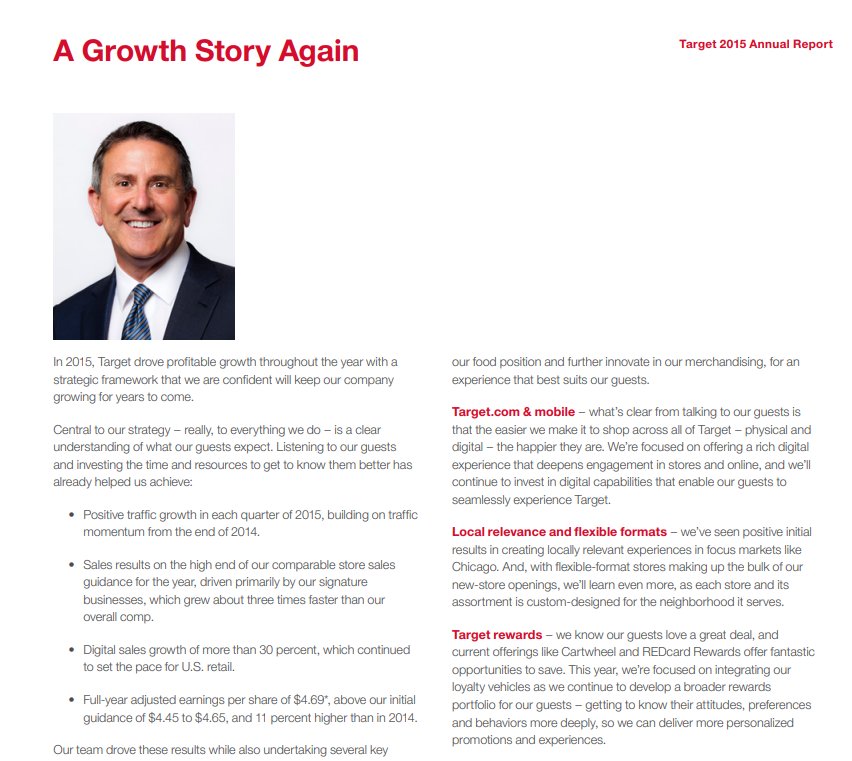
Target 2015 Annual Report page titled 'A Growth Story Again' with heading, paragraph text, and bullets.
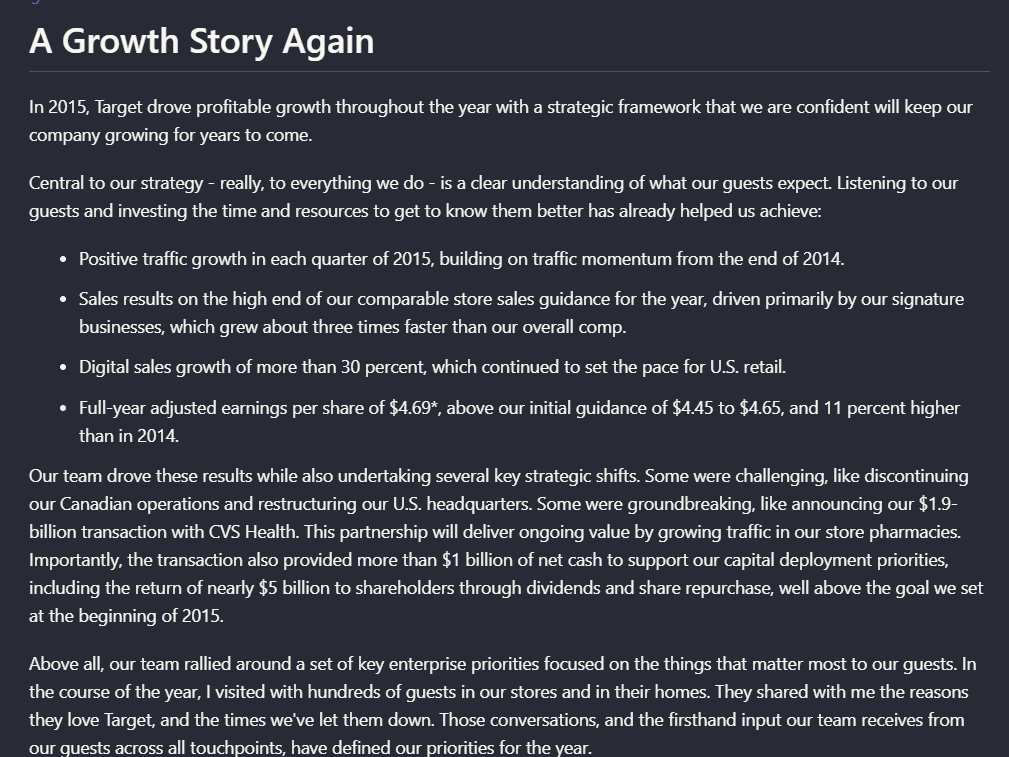
On the annual-report page titled 'A Growth Story Again,' Nutrient preserved the page heading, introductory paragraph, and bullet hierarchy in readable order, so the section stayed structurally coherent in the extracted output.
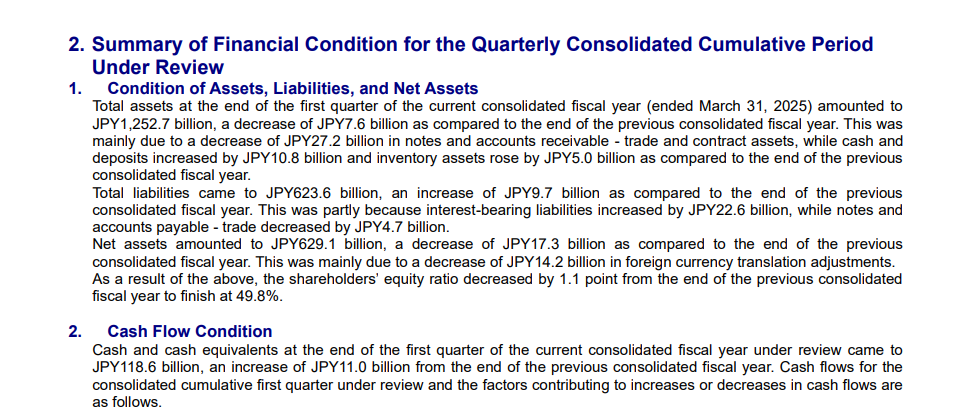
Financial-report prose page covering assets, liabilities, net assets, and cash flow.
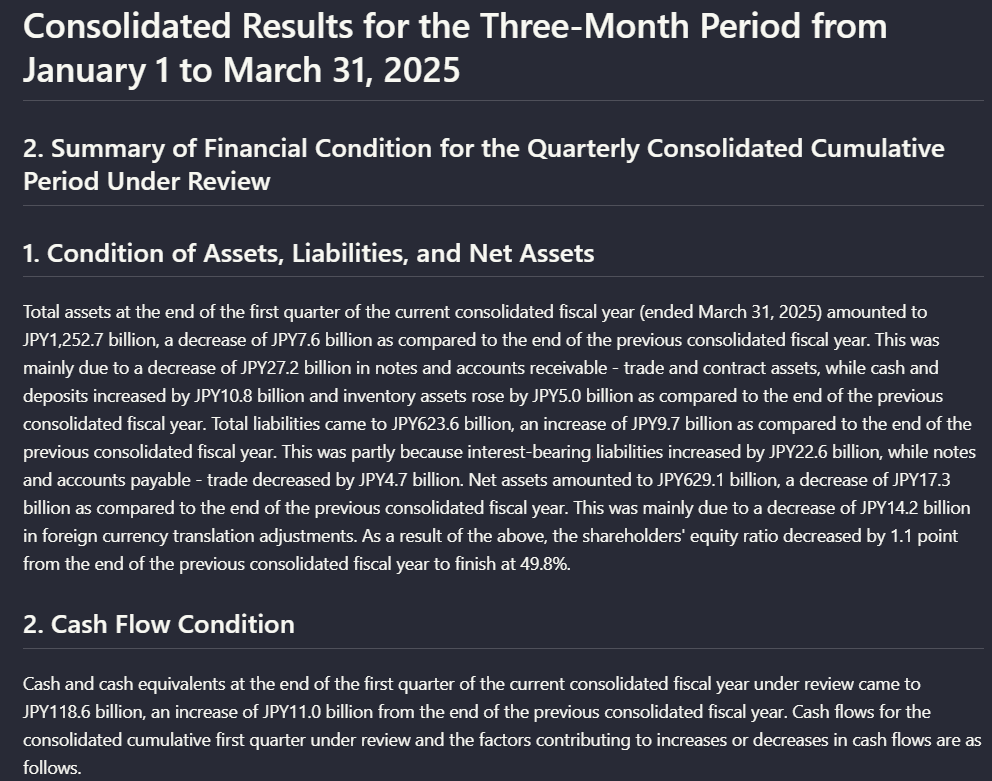
On the financial-report page about assets, liabilities, net assets, and cash flow, Nutrient recovered the numbered sections and key JPY amounts as readable text blocks, showing that it can preserve dense report prose and section boundaries.
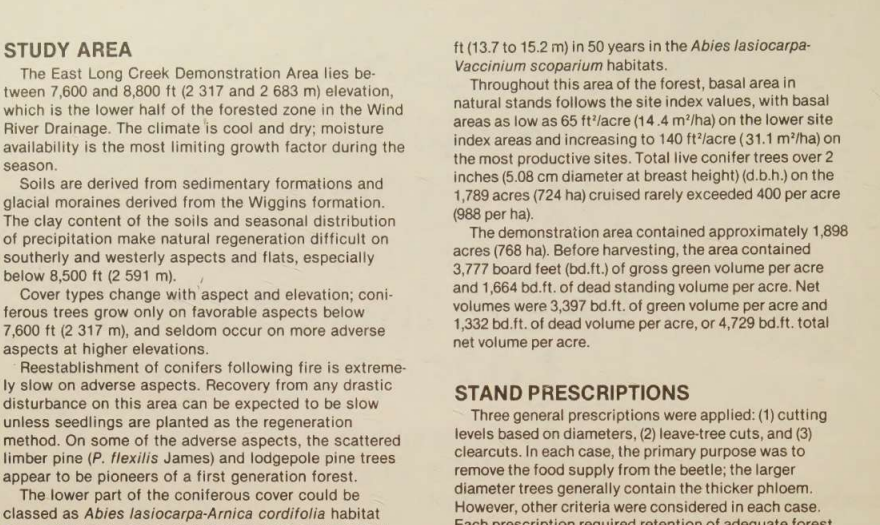
Scanned two-column page headed 'STUDY AREA'.
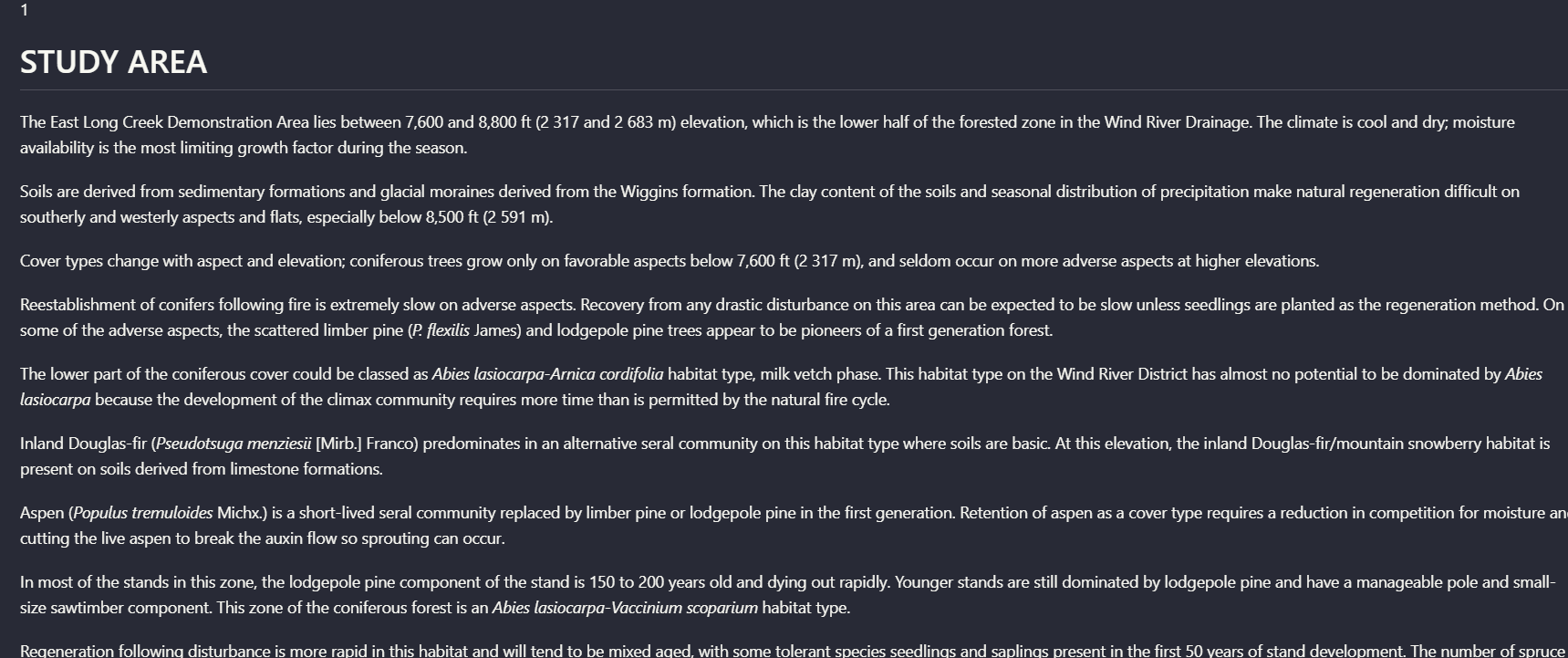
On the scanned two-column 'STUDY AREA' page, Nutrient kept the section heading attached to its content and converted the visible column text into coherent paragraphs instead of interleaving both columns.
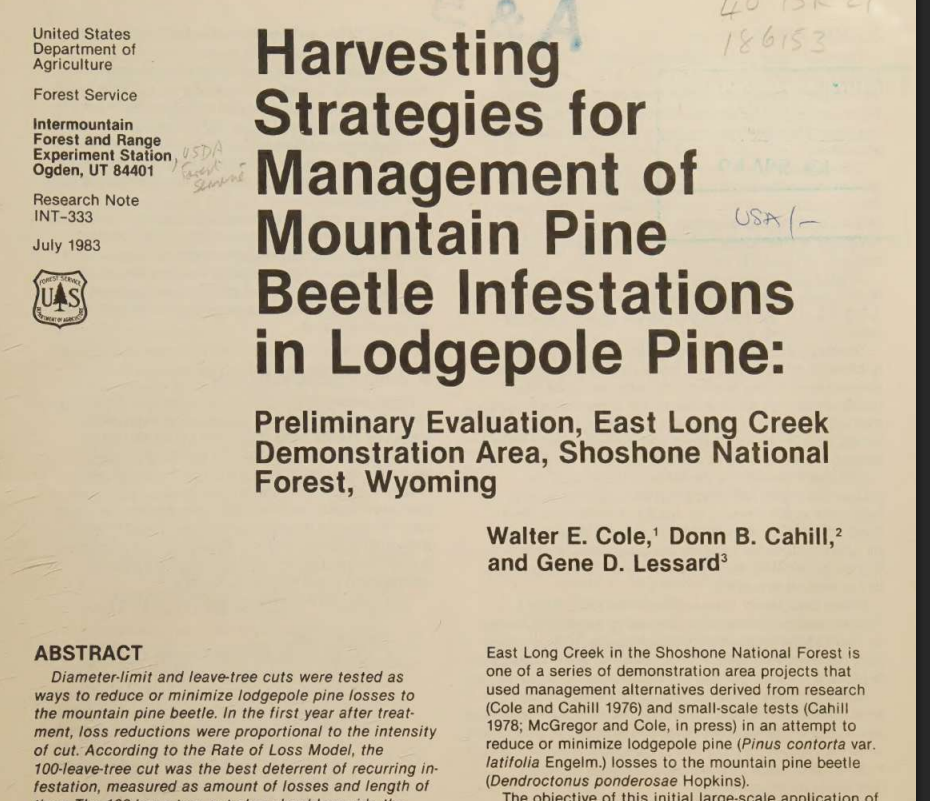
Scanned research-note first page with title, authors, abstract start, and margin notes.
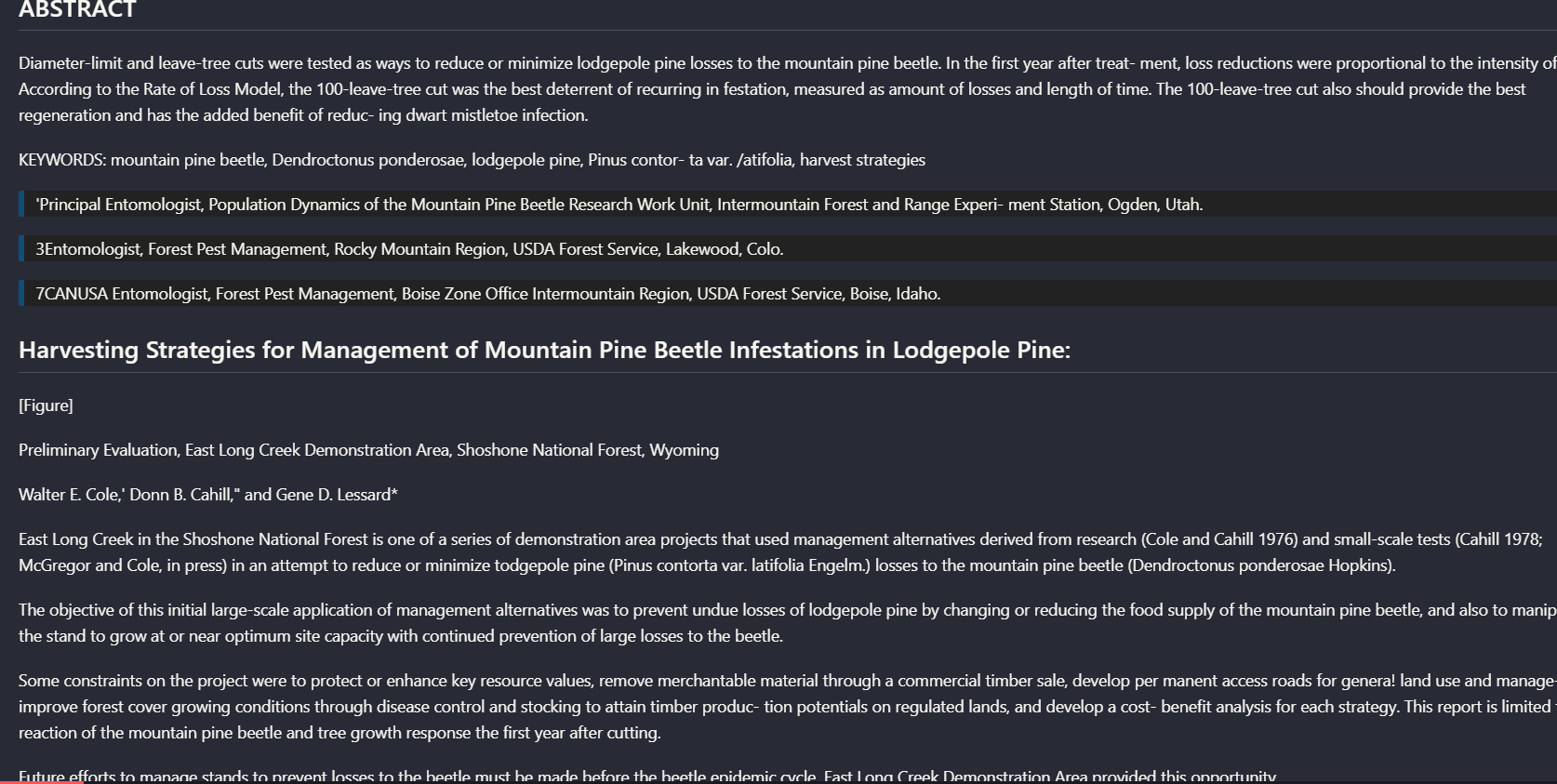
On the scanned research-note first page, Nutrient placed the ABSTRACT and keywords before the title and author block. That makes the text readable, but it is a real reading-order error for a page that mixes title matter, abstract, and body content.
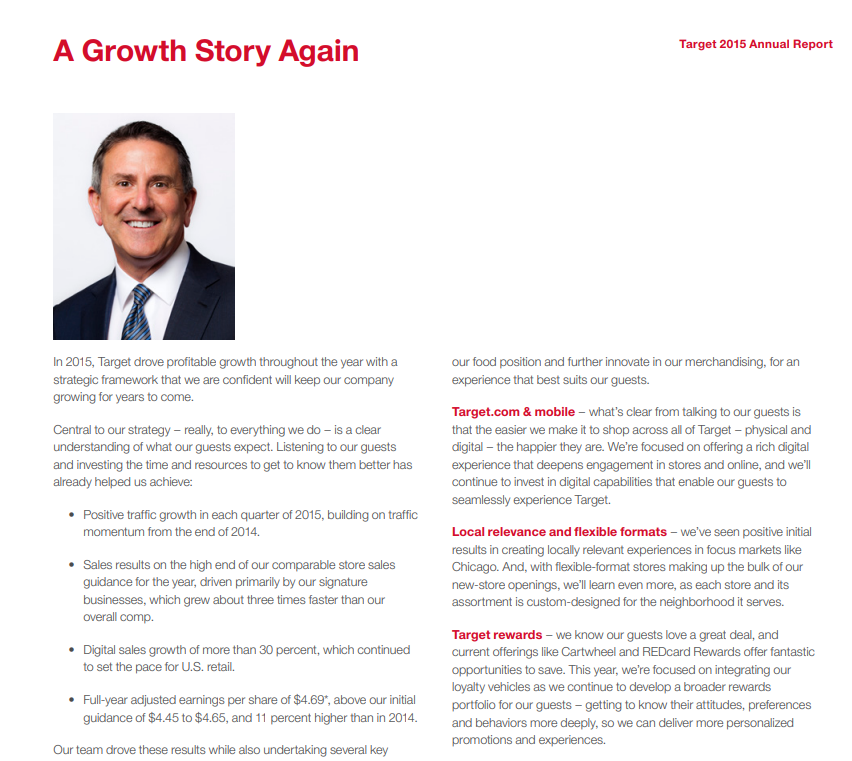
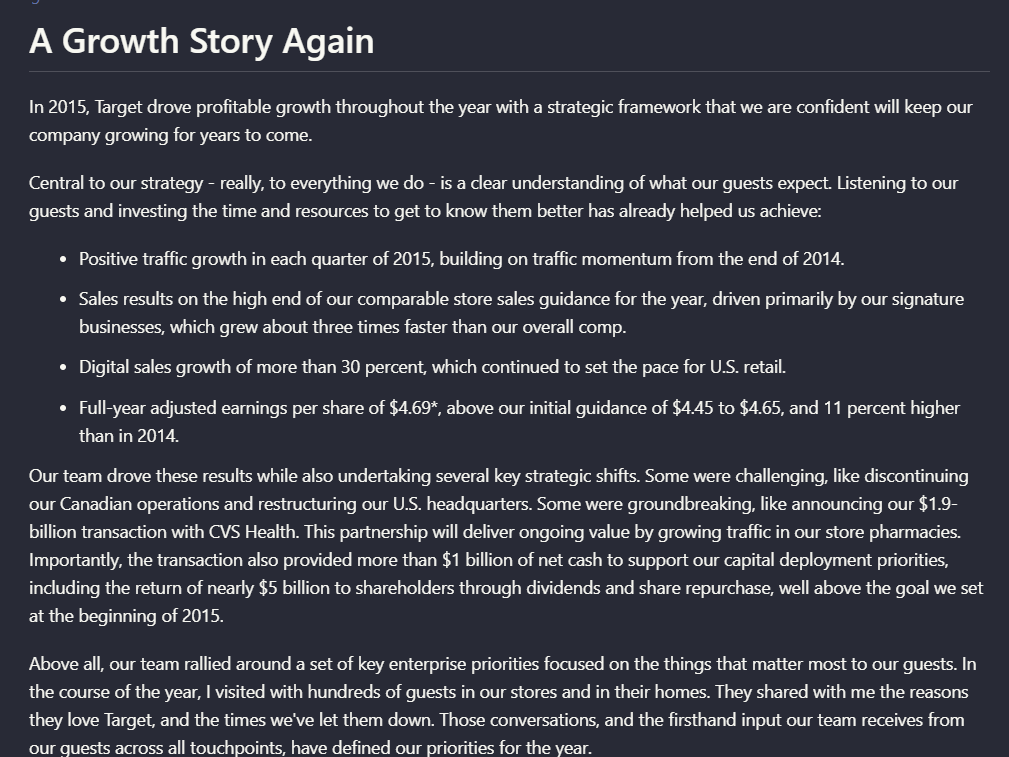
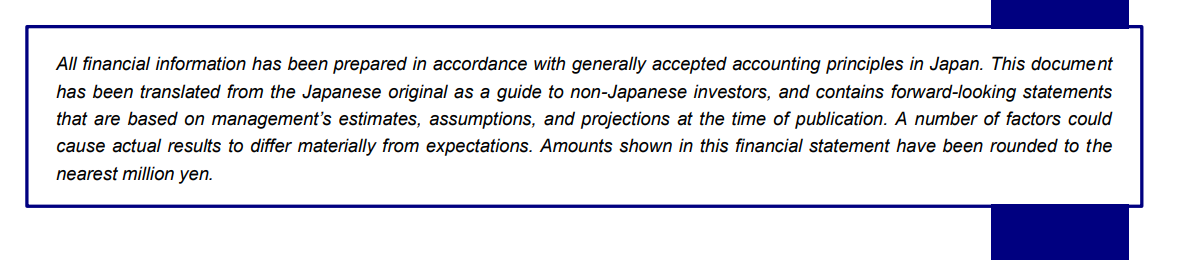

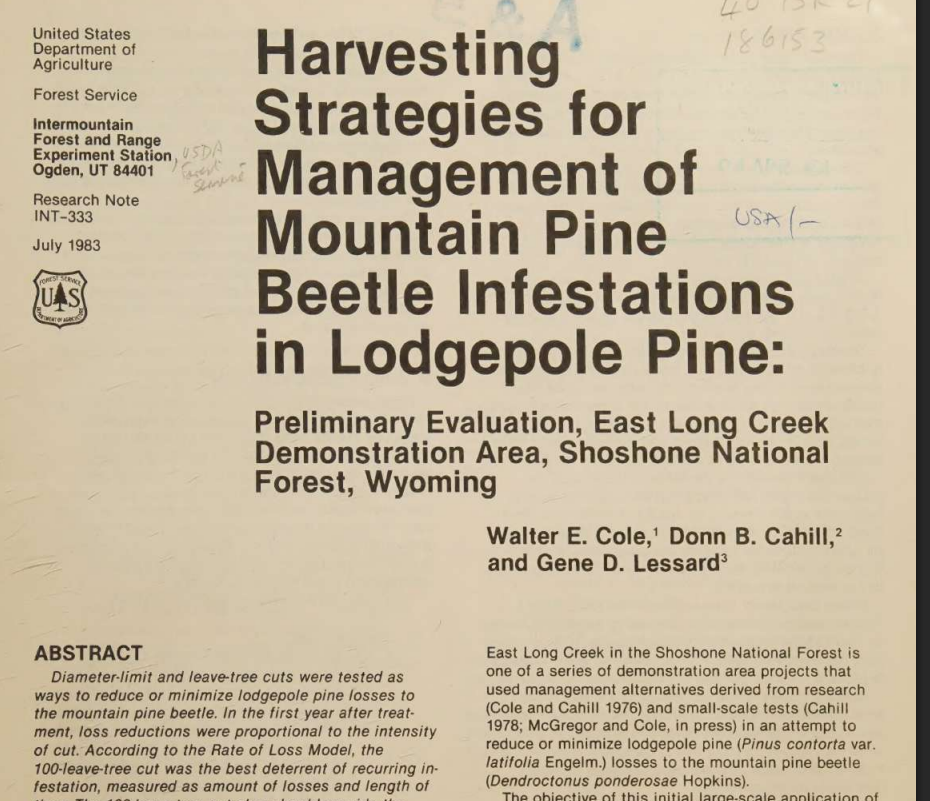
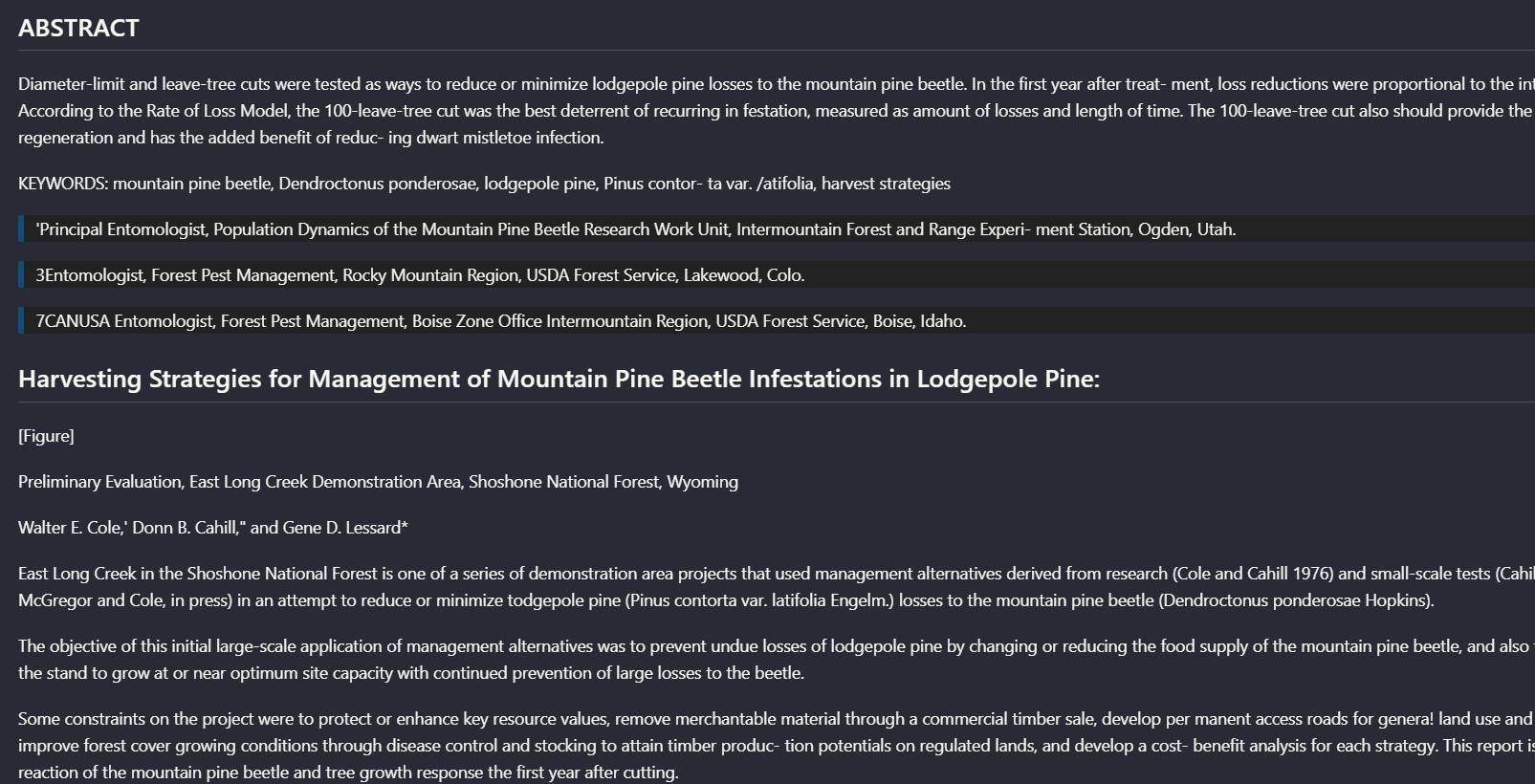
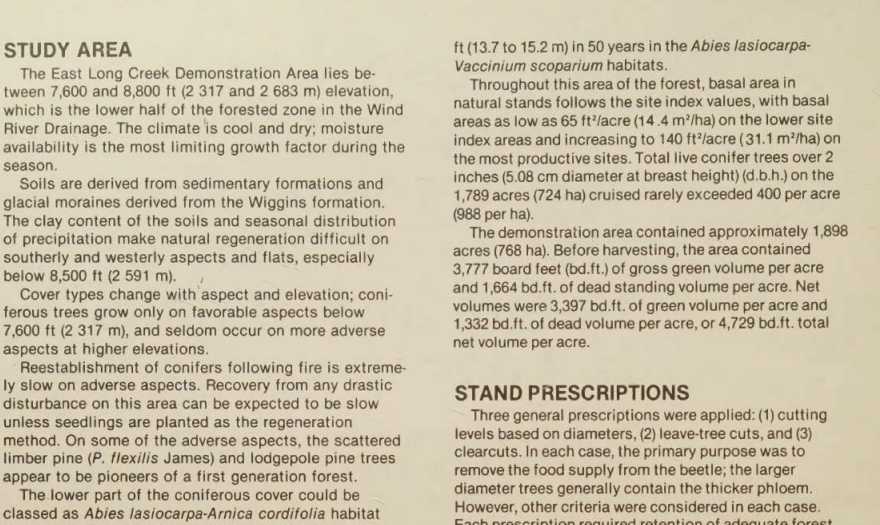
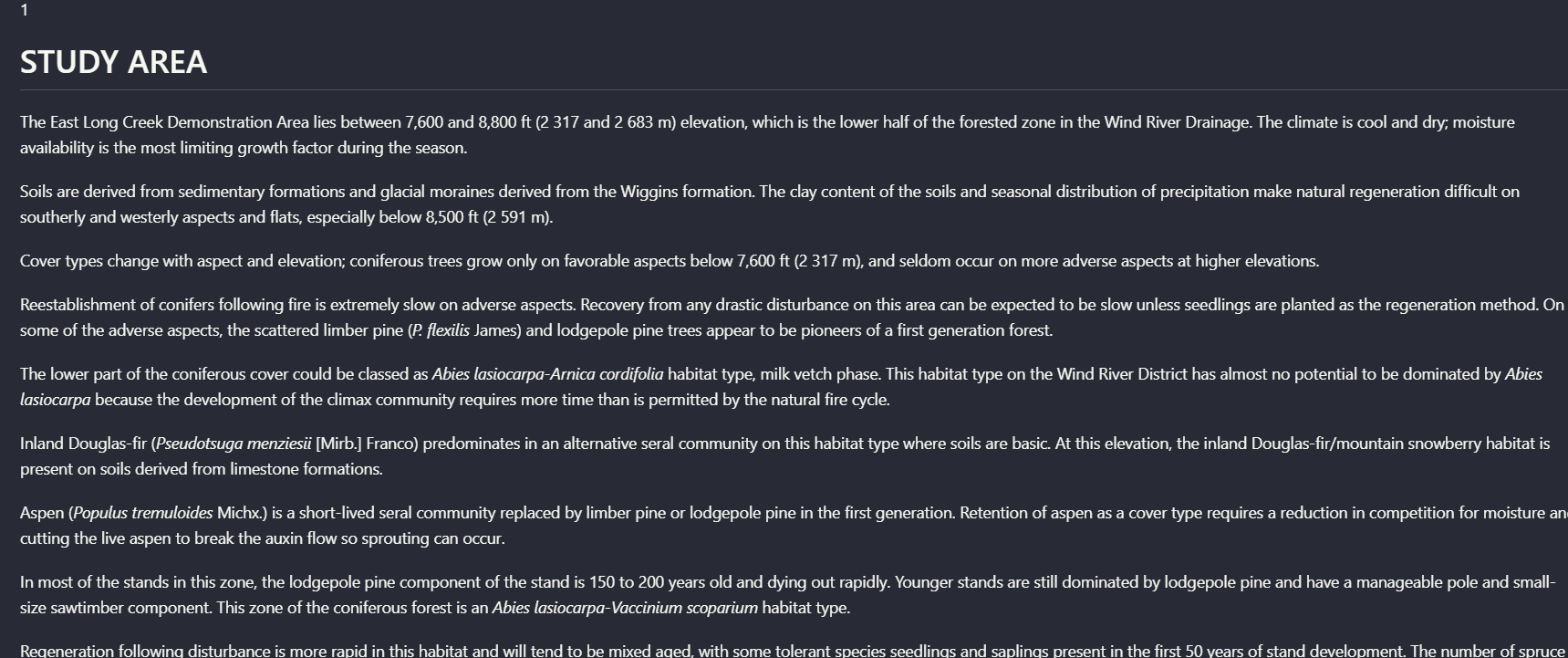
Table Extraction to MarkdownMixed to weak: simpler tables survive, but complex financial and scanned tables lose important structure.▾
Feature tested: Table Extraction to Markdown
Result: Partial
Verdict: Mixed to weak: simpler tables survive, but complex financial and scanned tables lose important structure.
Expected behavior: Nutrient can extract table content into markdown and preserve the rough table shape on simpler cases, including grouped columns and report-style financial tables. The examples also show that structure degrades on multi-level headers, dense financial tables, and scanned complex tables.
Test case: Image → Image
Input type: Image
Input used: Input artifact (Image): Scanned table showing original and post-harvest diameters across four treatments. — mistral-ai-scanned-treatment-diameter-table.png
Observed output: Output artifact (Image): For the scanned treatment table, Nutrient preserved the basic grouped columns and row labels well enough for the table to remain mostly readable. It still intro — nutrient-io-parsed-table-stand-structure-before-after-cutting.png
Input artifact: Input artifact (Image): Scanned table showing original and post-harvest diameters across four treatments. — mistral-ai-scanned-treatment-diameter-table.png
Output artifact: Output artifact (Image): For the scanned treatment table, Nutrient preserved the basic grouped columns and row labels well enough for the table to remain mostly readable. It still intro — nutrient-io-parsed-table-stand-structure-before-after-cutting.png
What changed: Image transformed into Image
Test case: Image → Image
Input type: Image
Input used: Input artifact (Image): Target annual-report financial summary table with year columns and multiple financial line items. — landing-ai-target-annual-report-financial-summary-table-2.png
Observed output: Output artifact (Image): On the Target financial summary, Nutrient recovered many row labels and values, but the table was not faithfully reconstructed. Currency markers and columns bec — nutrient-io-target-annual-report-parsed-complex-table.png
Input artifact: Input artifact (Image): Target annual-report financial summary table with year columns and multiple financial line items. — landing-ai-target-annual-report-financial-summary-table-2.png
Output artifact: Output artifact (Image): On the Target financial summary, Nutrient recovered many row labels and values, but the table was not faithfully reconstructed. Currency markers and columns bec — nutrient-io-target-annual-report-parsed-complex-table.png
What changed: Image transformed into Image
Test case: Image → Image
Input type: Image
Input used: Input artifact (Image): Segment-performance table with multi-level headers and adjustment columns. — nutrient-io-financial-segment-table-cropped.png
Observed output: Output artifact (Image): On the segment table, Nutrient preserved some cell values but lost the source table's multi-level header organization. Parent-child column relationships were no — nutrient-io-segment-financial-table-by-business-unit.png
Input artifact: Input artifact (Image): Segment-performance table with multi-level headers and adjustment columns. — nutrient-io-financial-segment-table-cropped.png
Output artifact: Output artifact (Image): On the segment table, Nutrient preserved some cell values but lost the source table's multi-level header organization. Parent-child column relationships were no — nutrient-io-segment-financial-table-by-business-unit.png
What changed: Image transformed into Image
Test case: Image → Image
Input type: Image
Input used: Input artifact (Image): Scanned table titled 'Trees killed per acre by cutting block, year, cause, and diameter.' — nutrient-io-table-trees-killed-per-acre.png
Observed output: Output artifact (Image): On the complex scanned table, Nutrient lost structural boundaries as table complexity increased. Rows were clipped, some labels were misread, and the relationsh — nutrient-io-parsed-table-trees-killed-per-acre-1.png
Input artifact: Input artifact (Image): Scanned table titled 'Trees killed per acre by cutting block, year, cause, and diameter.' — nutrient-io-table-trees-killed-per-acre.png
Output artifact: Output artifact (Image): On the complex scanned table, Nutrient lost structural boundaries as table complexity increased. Rows were clipped, some labels were misread, and the relationsh — nutrient-io-parsed-table-trees-killed-per-acre-1.png
What changed: Image transformed into Image
Test case: Image → Image
Input type: Image
Input used: Input artifact (Image): Hybrid earnings financial summary table — earnings_hybridInput_table.png
Observed output: Output artifact (Image): The table values are recovered, but the row/column relationships are visibly misaligned. — nutrient_hybrid_earningspdf_parsed_complex_table.png
Input artifact: Input artifact (Image): Hybrid earnings financial summary table — earnings_hybridInput_table.png
Output artifact: Output artifact (Image): The table values are recovered, but the row/column relationships are visibly misaligned. — nutrient_hybrid_earningspdf_parsed_complex_table.png
What changed: Image transformed into Image
Test case: Image → Image
Input type: Image
Input used: Input artifact (Image): Quarterly consolidated income statements table — financialpdf_quarterly_statements_table.png
Observed output: Output artifact (Image): The table is partially flattened, so the structure is less readable than the source table. — nutrient_financialpdf_parsed_table.png
Input artifact: Input artifact (Image): Quarterly consolidated income statements table — financialpdf_quarterly_statements_table.png
Output artifact: Output artifact (Image): The table is partially flattened, so the structure is less readable than the source table. — nutrient_financialpdf_parsed_table.png
What changed: Image transformed into Image
Test case: Image → Image
Input type: Image
Input used: Input artifact (Image): Segment table with grouped columns — image.png
Observed output: Output artifact (Image): Grouped columns are recovered to a degree, but the parent-child header structure is not fully preserved. — nutrient_financialpdf_parsed_multilevel_table.png
Input artifact: Input artifact (Image): Segment table with grouped columns — image.png
Output artifact: Output artifact (Image): Grouped columns are recovered to a degree, but the parent-child header structure is not fully preserved. — nutrient_financialpdf_parsed_multilevel_table.png
What changed: Image transformed into Image
Test case: Image → Image
Input type: Image
Input used: Input artifact (Image): Scanned complex table — scannedpdf_complex_table.png
Observed output: Output artifact (Image): The dense scanned table contains truncation and recognition errors, so the result is not trustworthy for precise row-to-value reconstruction. — nutrient_scannedpdf_parsed_complex_table.png
Input artifact: Input artifact (Image): Scanned complex table — scannedpdf_complex_table.png
Output artifact: Output artifact (Image): The dense scanned table contains truncation and recognition errors, so the result is not trustworthy for precise row-to-value reconstruction. — nutrient_scannedpdf_parsed_complex_table.png
What changed: Image transformed into Image
Why it matters / Conclusion: Nutrient is acceptable for simpler tables, but it was not dependable on the exact table-heavy cases this use case cares about most: financial summaries, multi-level headers, and dense scanned matrices.
Nutrient can extract table content into markdown and preserve the rough table shape on simpler cases, including grouped columns and report-style financial tables. The examples also show that structure degrades on multi-level headers, dense financial tables, and scanned complex tables.
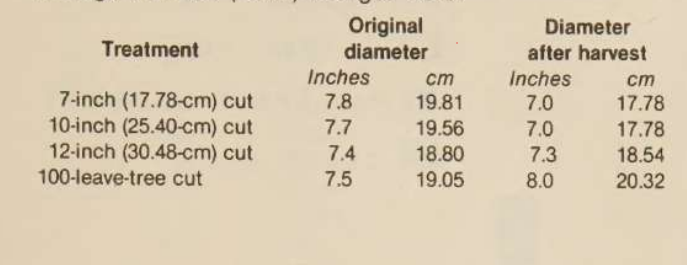
Scanned table showing original and post-harvest diameters across four treatments.
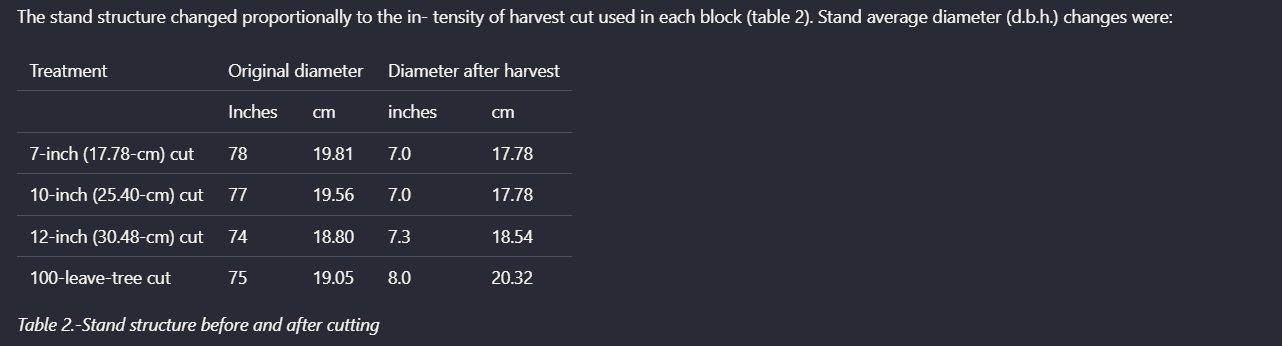
For the scanned treatment table, Nutrient preserved the basic grouped columns and row labels well enough for the table to remain mostly readable. It still introduced OCR mistakes in the first numeric column, turning 7.8, 7.7, 7.4, and 7.5 into 78, 77, 74, and 75.
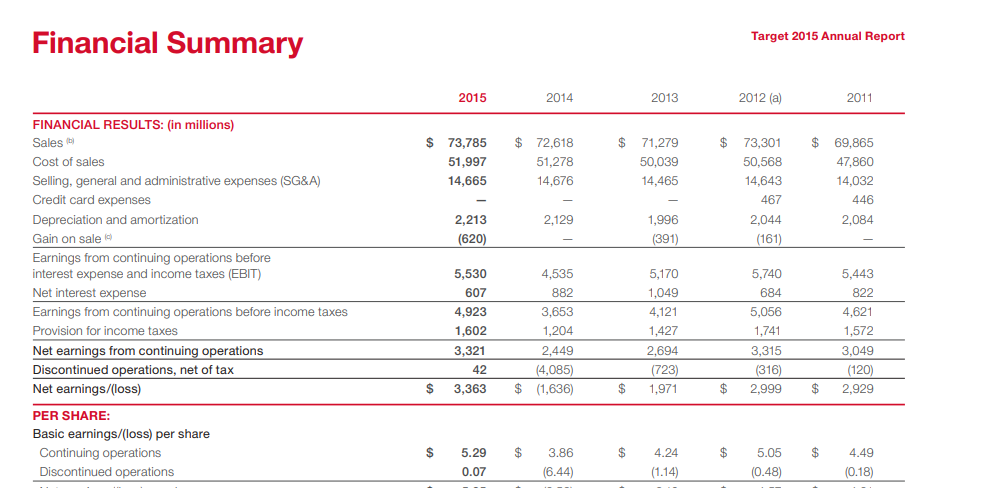
Target annual-report financial summary table with year columns and multiple financial line items.
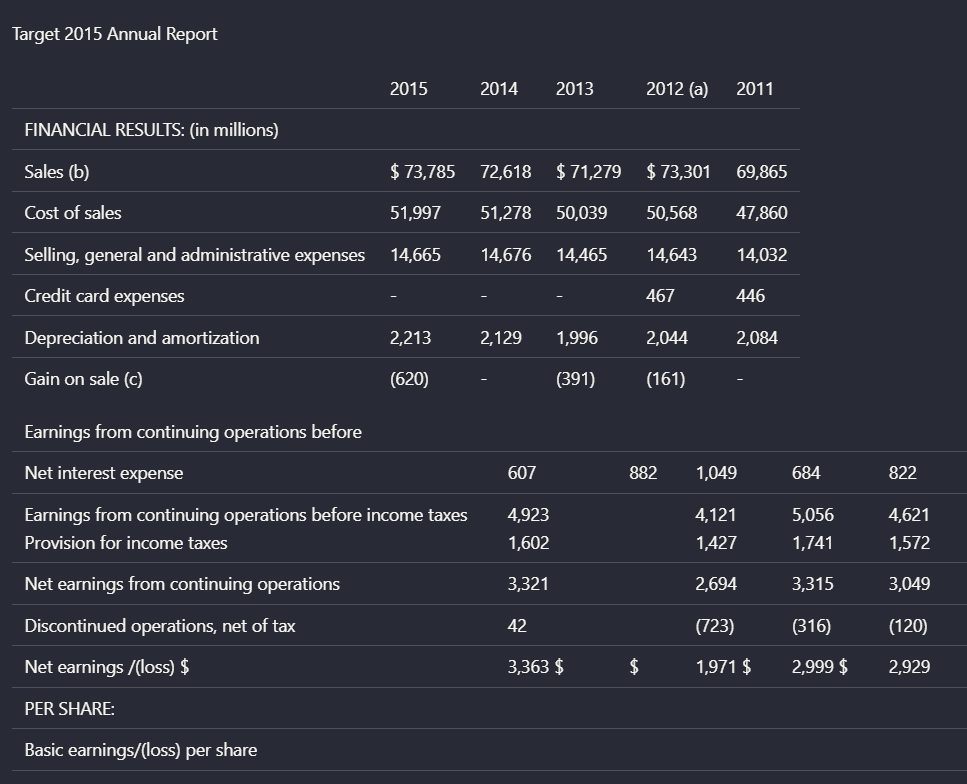
On the Target financial summary, Nutrient recovered many row labels and values, but the table was not faithfully reconstructed. Currency markers and columns became uneven, and the relationship between rows and values weakened enough that the output read more like a flattened grid than a clean financial table.
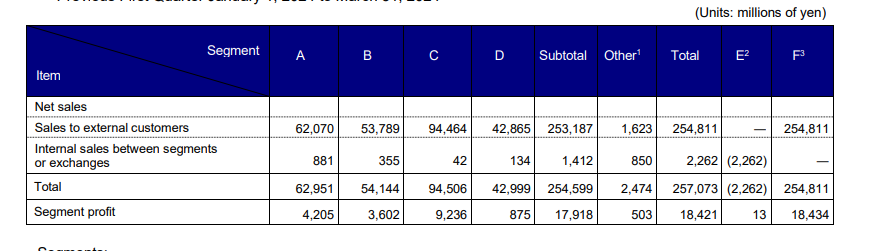
Segment-performance table with multi-level headers and adjustment columns.
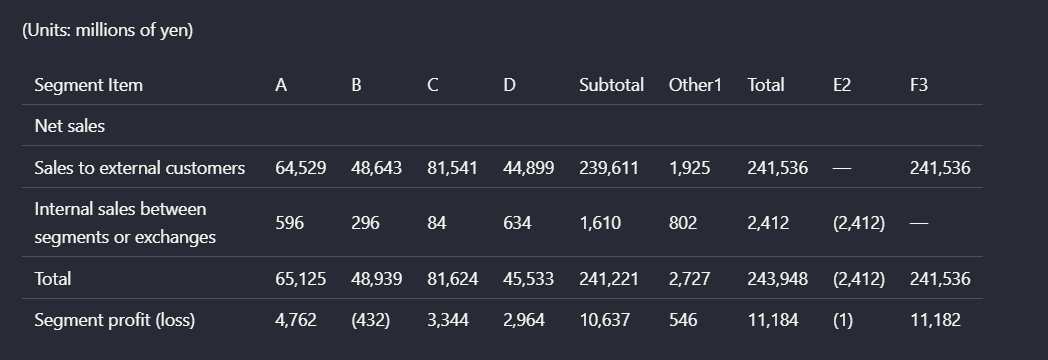
On the segment table, Nutrient preserved some cell values but lost the source table's multi-level header organization. Parent-child column relationships were no longer explicit, which makes the extracted structure harder to trust for analysis.
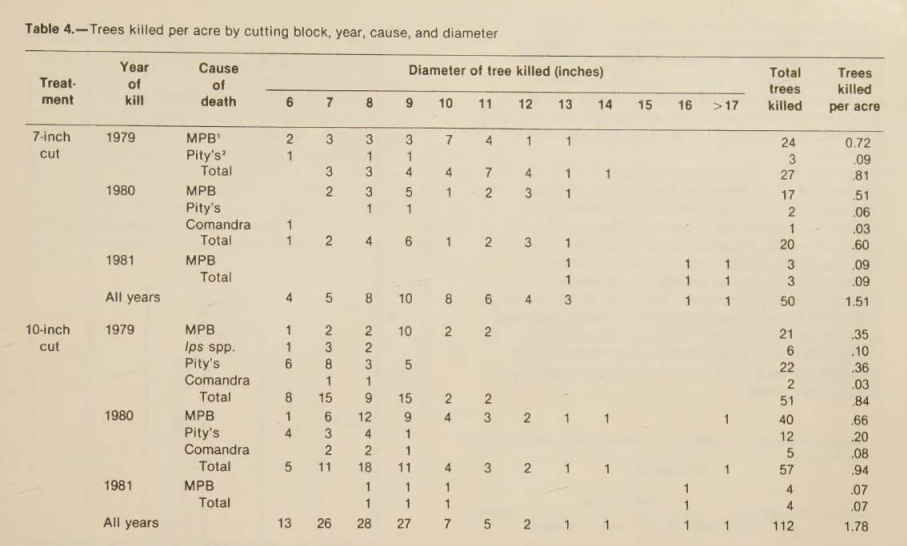
Scanned table titled 'Trees killed per acre by cutting block, year, cause, and diameter.'
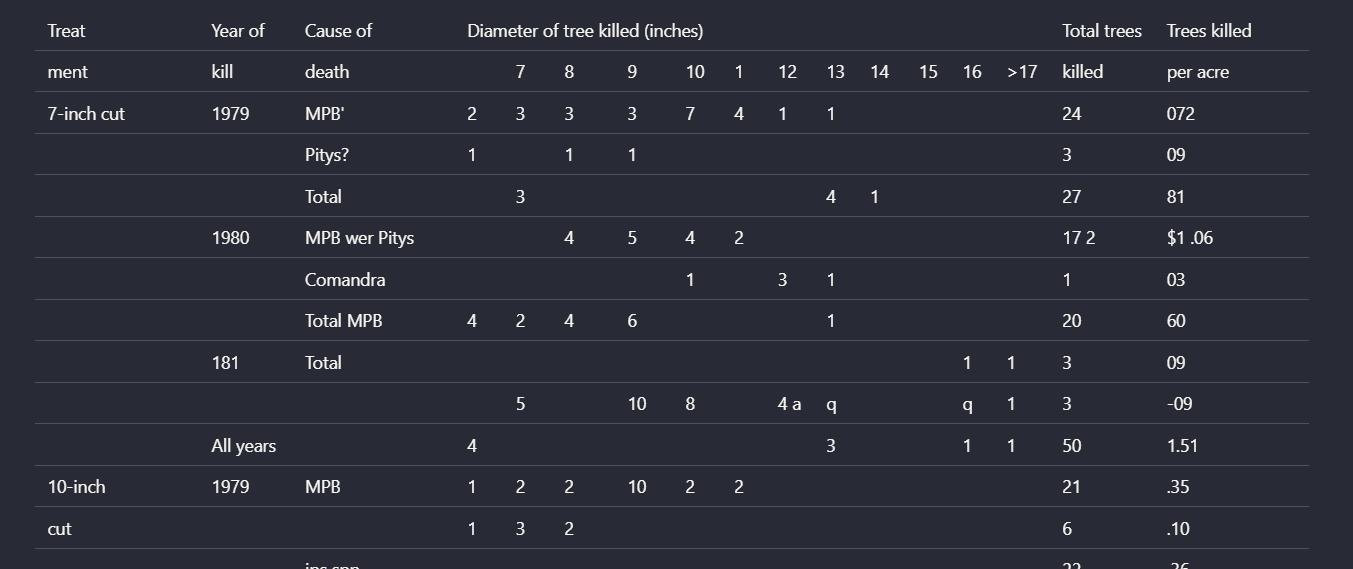
On the complex scanned table, Nutrient lost structural boundaries as table complexity increased. Rows were clipped, some labels were misread, and the relationships between treatment, year, cause, diameter classes, and totals no longer held together.
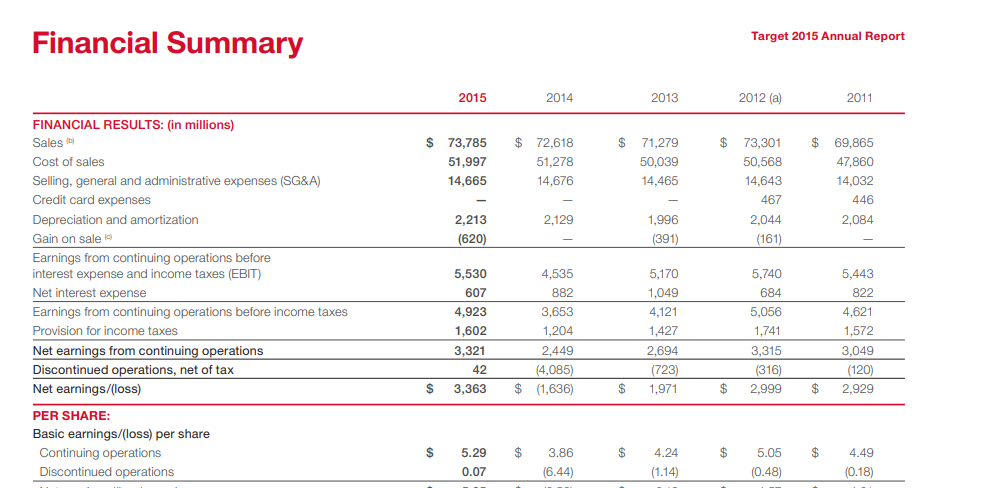
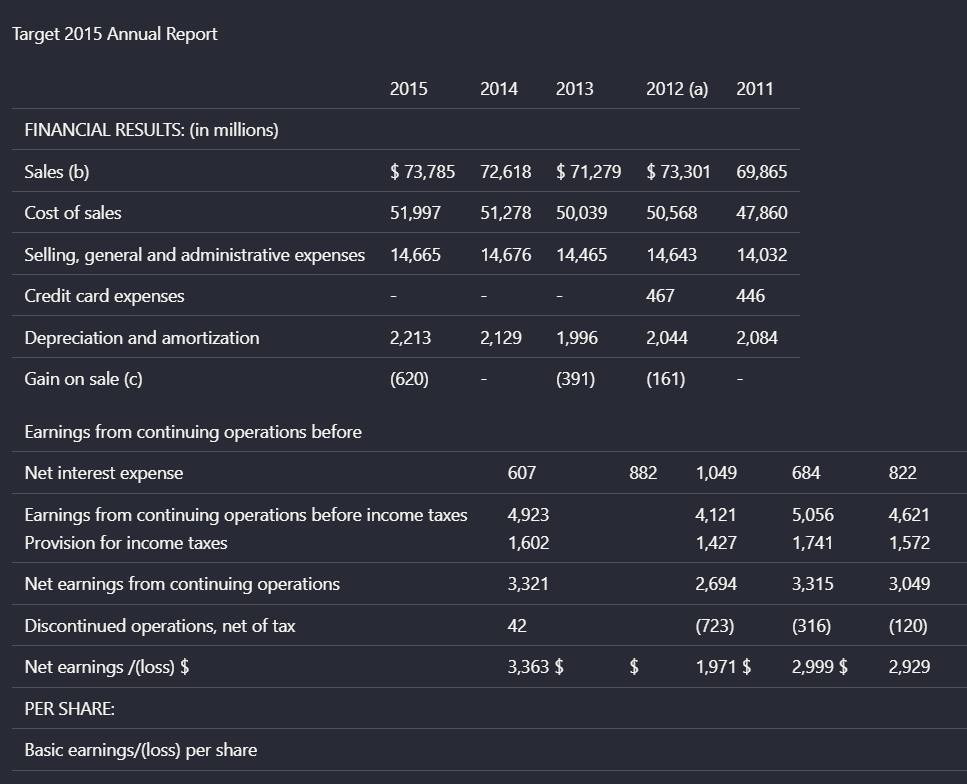
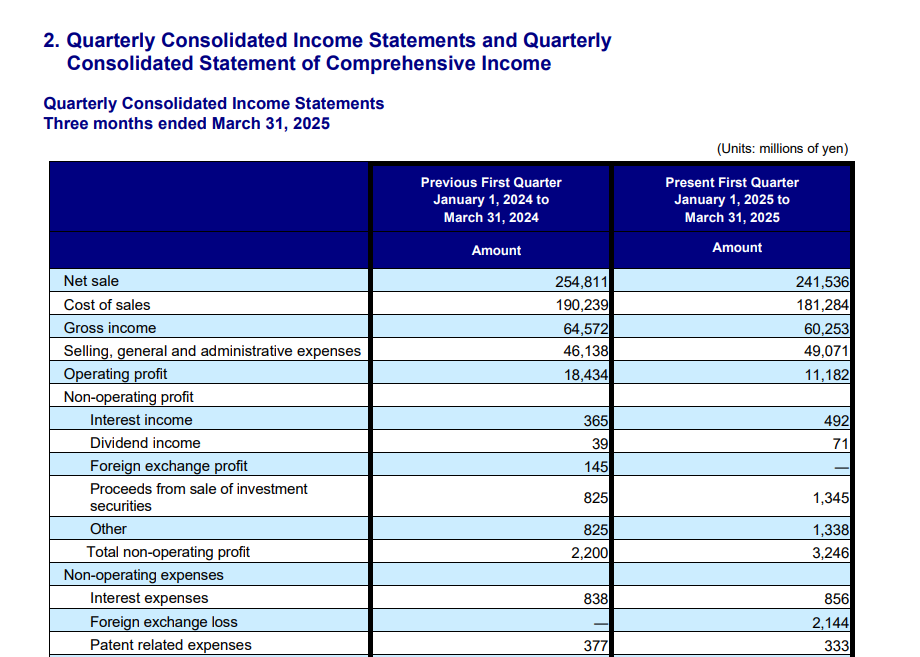
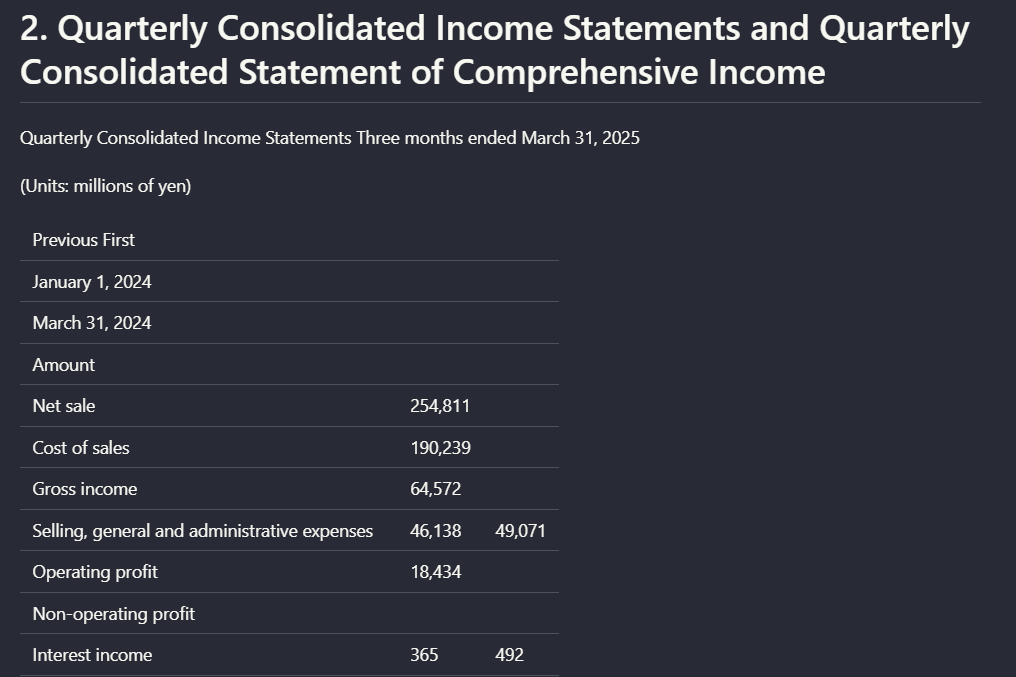
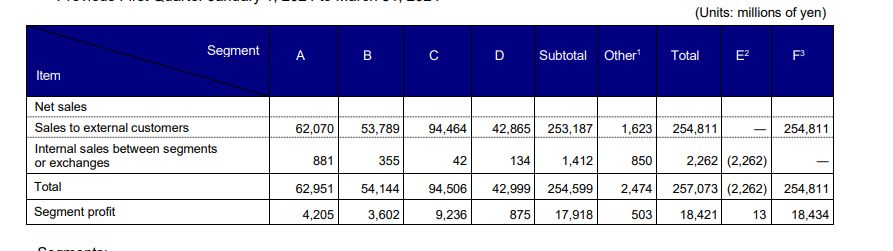
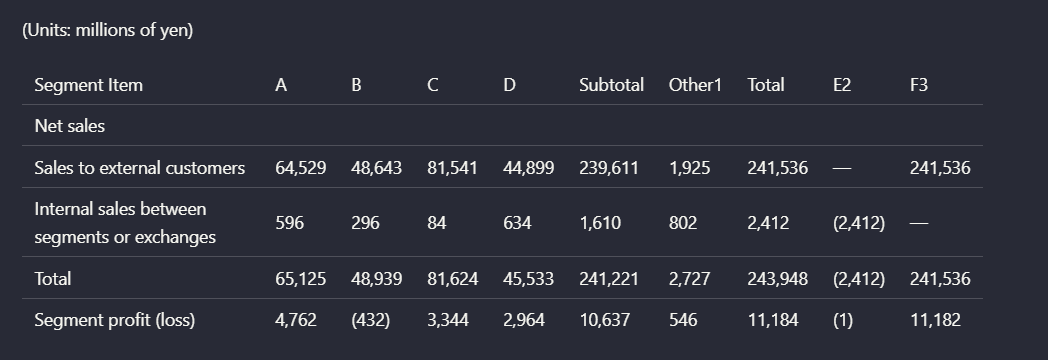
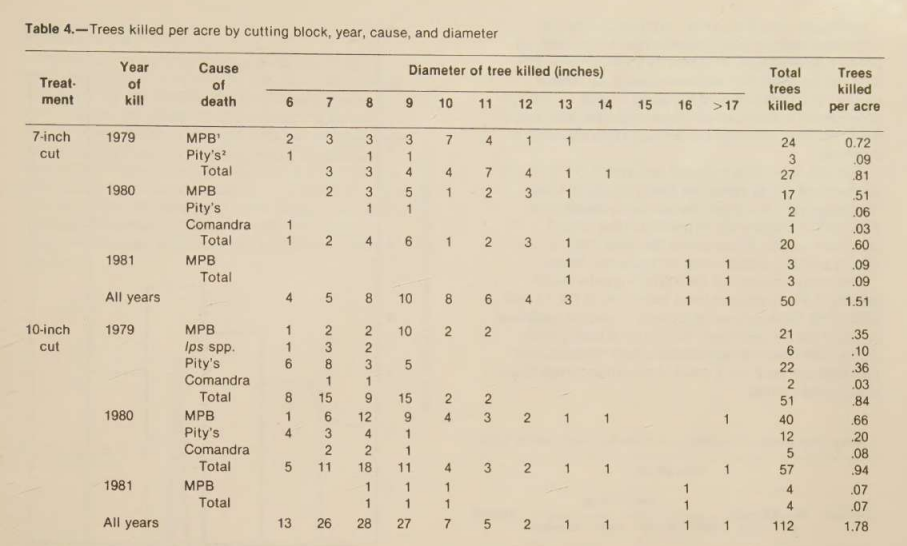
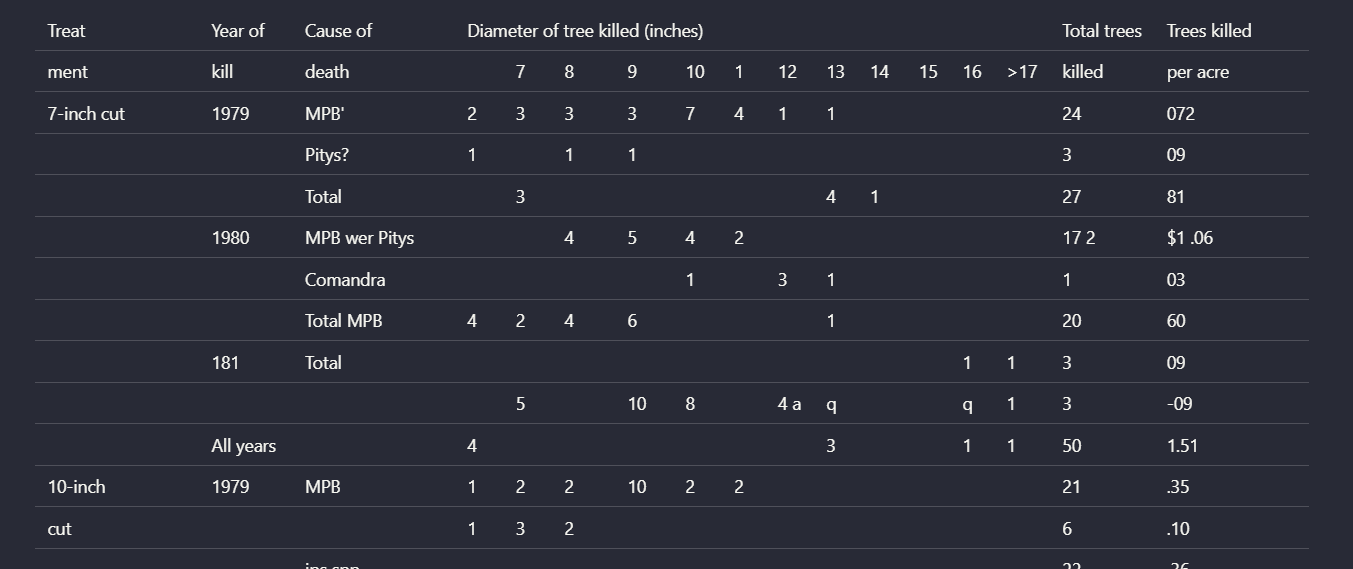
Chart and Signature Visual Content HandlingCaptures surrounding text and some labels, but not the visual meaning of charts or handwritten signatures.▾
Feature tested: Chart and Signature Visual Content Handling
Result: Failed
Verdict: Captures surrounding text and some labels, but not the visual meaning of charts or handwritten signatures.
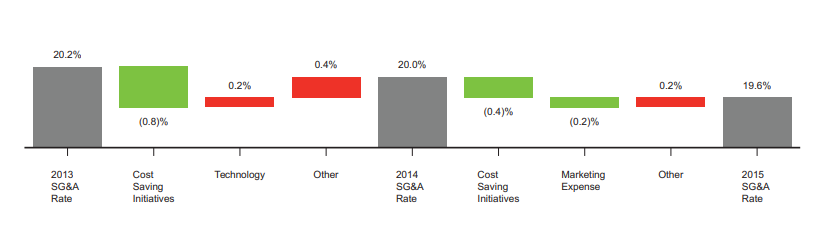
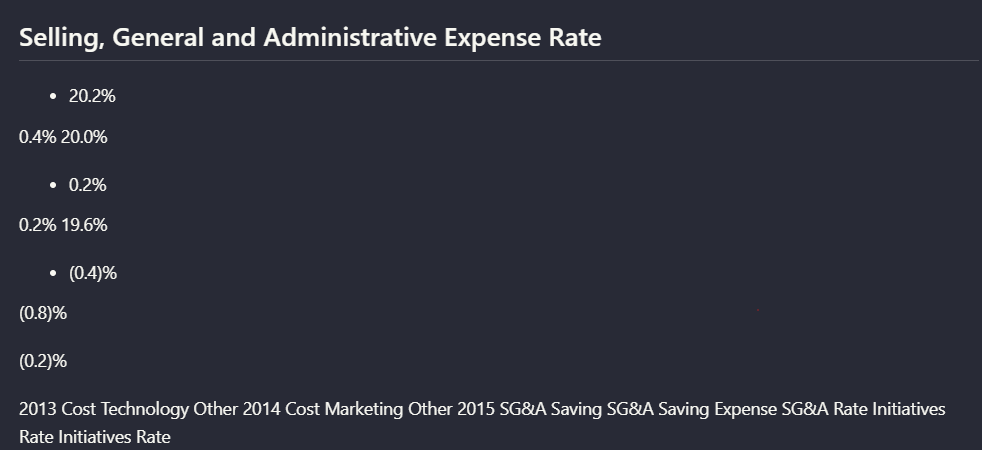
Expected behavior: Nutrient can extract some surrounding text or labels from charts and other visuals, but it does not preserve the full visual semantics. In the evaluation, a waterfall chart became text-like output, chart OCR was garbled on a scanned paper, and handwritten signatures were omitted.
Test case: Image → Image
Input type: Image
Input used: Input artifact (Image): Hybrid earnings waterfall chart — hybridearnings_pdf_waterfall_chart.png
Observed output: Output artifact (Image): The values and labels are present, but the chart is no longer preserved as a meaningful visual chart. — nutirent_hybrid_earningspdf_parsed_waterfall_chart.png
Input artifact: Input artifact (Image): Hybrid earnings waterfall chart — hybridearnings_pdf_waterfall_chart.png
Output artifact: Output artifact (Image): The values and labels are present, but the chart is no longer preserved as a meaningful visual chart. — nutirent_hybrid_earningspdf_parsed_waterfall_chart.png
What changed: Image transformed into Image
Test case: Image → Image
Input type: Image
Input used: Input artifact (Image): Scanned research paper figure 3 — scannedpdf_figure_3.png
Observed output: Output artifact (Image): The chart values are extracted in a garbled, flattened form rather than as a faithful chart representation. — nutrient_scannedpdf_parsed_chart.png
Input artifact: Input artifact (Image): Scanned research paper figure 3 — scannedpdf_figure_3.png
Output artifact: Output artifact (Image): The chart values are extracted in a garbled, flattened form rather than as a faithful chart representation. — nutrient_scannedpdf_parsed_chart.png
What changed: Image transformed into Image
Test case: Image → Image
Input type: Image
Input used: Input artifact (Image): Scanned signatures page — hybrid_earningspdf_signatures.png
Observed output: Output artifact (Image): The signer names and surrounding legal text remain, but the handwritten signature itself is not preserved. — nutrient_hybrid_earningspdf_parsed_signs.png
Input artifact: Input artifact (Image): Scanned signatures page — hybrid_earningspdf_signatures.png
Output artifact: Output artifact (Image): The signer names and surrounding legal text remain, but the handwritten signature itself is not preserved. — nutrient_hybrid_earningspdf_parsed_signs.png
What changed: Image transformed into Image
Test case: Image → Image
Input type: Image
Input used: Input artifact (Image): Scanned line graph of average radial growth by cutting-block treatment from 1972 to 1981. — nutrient-io-figure-3-average-radial-growth-by-treatment.png
Observed output: Output artifact (Image): For the scanned line graph, Nutrient produced mostly garbled OCR text. The figure caption remained partly recognizable, but the plotted relationships and chart — nutrient-io-parsed-chart-forest-growth-cutting-blocks.png
Input artifact: Input artifact (Image): Scanned line graph of average radial growth by cutting-block treatment from 1972 to 1981. — nutrient-io-figure-3-average-radial-growth-by-treatment.png
Output artifact: Output artifact (Image): For the scanned line graph, Nutrient produced mostly garbled OCR text. The figure caption remained partly recognizable, but the plotted relationships and chart — nutrient-io-parsed-chart-forest-growth-cutting-blocks.png
What changed: Image transformed into Image
Test case: Image → Image
Input type: Image
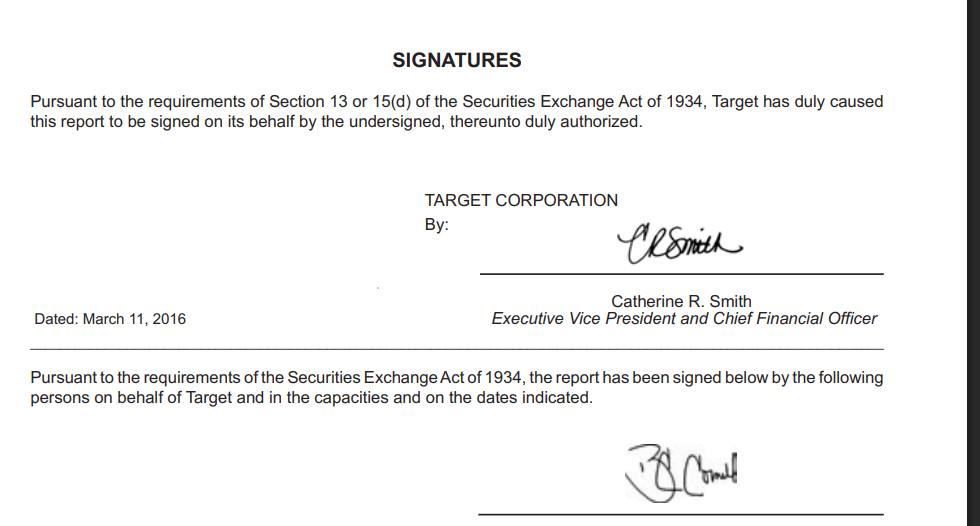
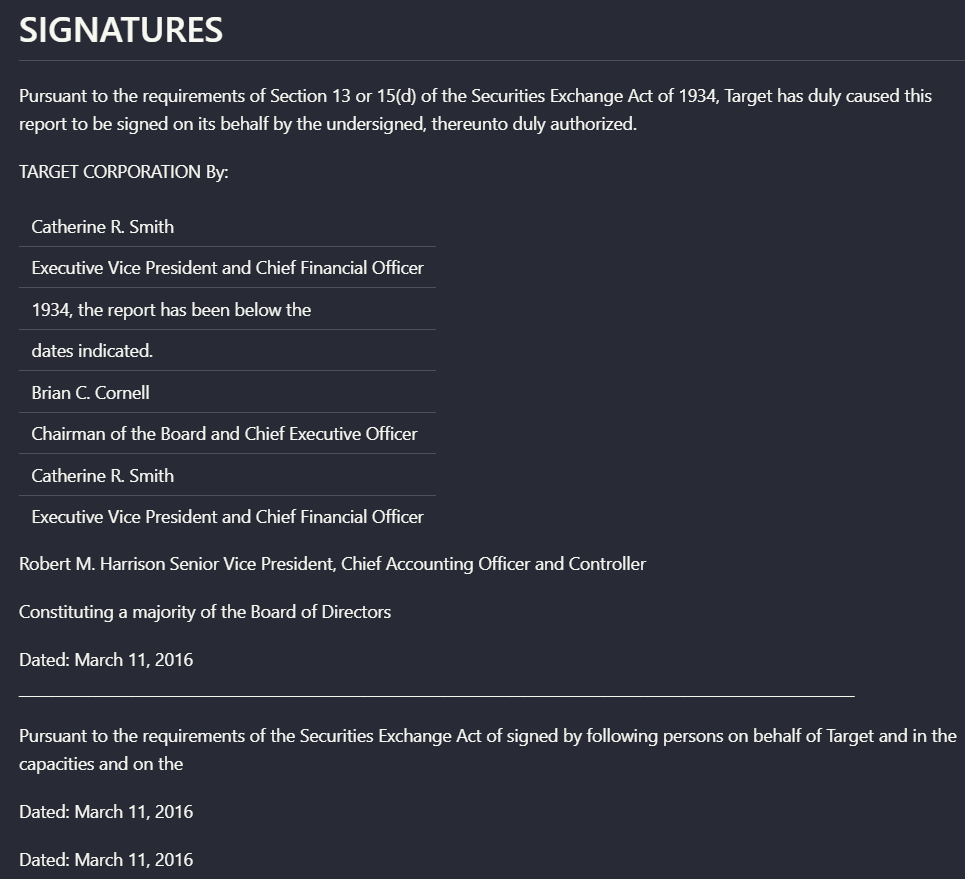
Input used: Input artifact (Image): Scanned signatures page with handwritten signatures plus printed names and titles. — landing-ai-target-annual-report-signatures-page-2.png
Observed output: Output artifact (Image): On the scanned signatures page, Nutrient captured the heading, signer names, titles, and dates, but not the handwritten signature marks themselves. The output a — nutrient-io-target-signatures-ocr-extraction.png
Input artifact: Input artifact (Image): Scanned signatures page with handwritten signatures plus printed names and titles. — landing-ai-target-annual-report-signatures-page-2.png
Output artifact: Output artifact (Image): On the scanned signatures page, Nutrient captured the heading, signer names, titles, and dates, but not the handwritten signature marks themselves. The output a — nutrient-io-target-signatures-ocr-extraction.png
What changed: Image transformed into Image
Why it matters / Conclusion: This is not a fidelity-preserving visual extractor; it is mostly text recovery around the visuals.
Nutrient can extract some surrounding text or labels from charts and other visuals, but it does not preserve the full visual semantics. In the evaluation, a waterfall chart became text-like output, chart OCR was garbled on a scanned paper, and handwritten signatures were omitted.
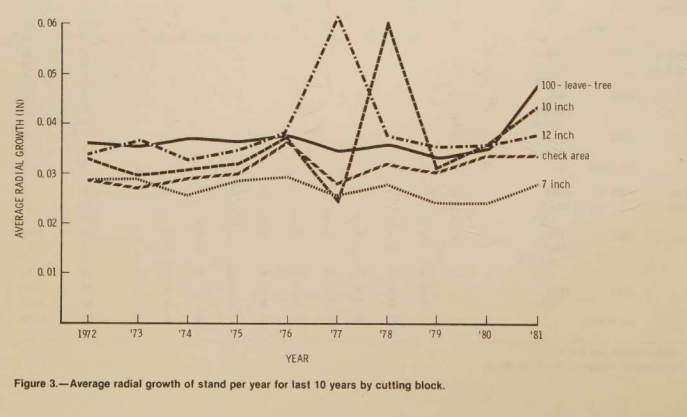

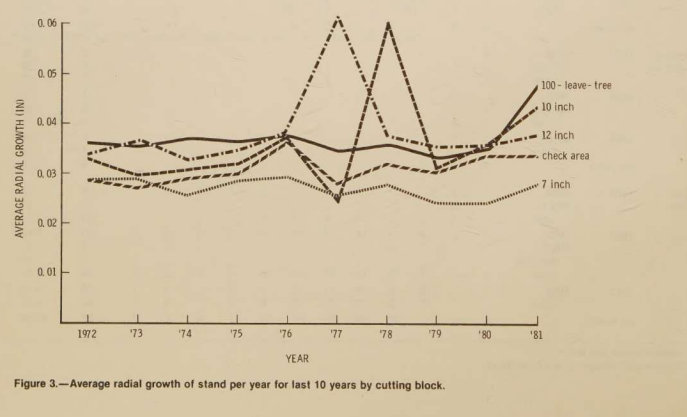
Scanned line graph of average radial growth by cutting-block treatment from 1972 to 1981.

For the scanned line graph, Nutrient produced mostly garbled OCR text. The figure caption remained partly recognizable, but the plotted relationships and chart layout were not preserved in usable form.
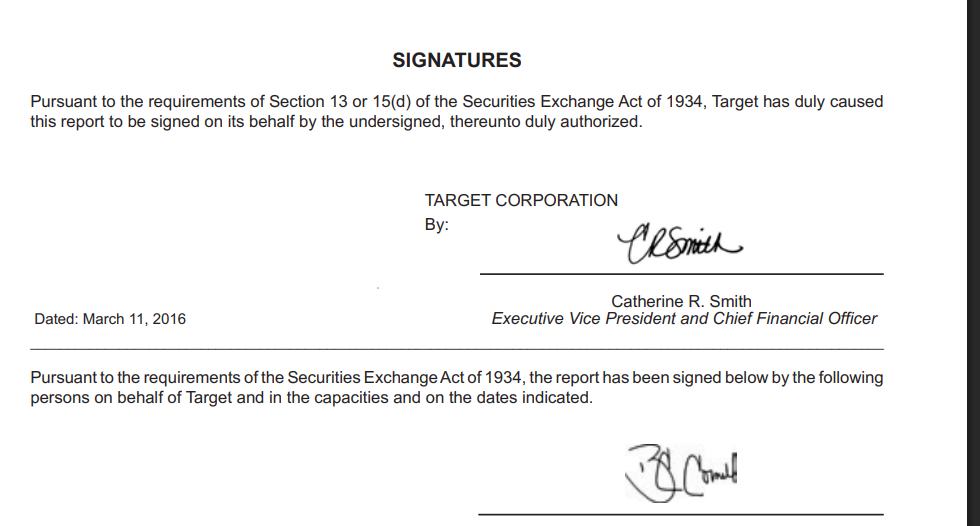
Scanned signatures page with handwritten signatures plus printed names and titles.
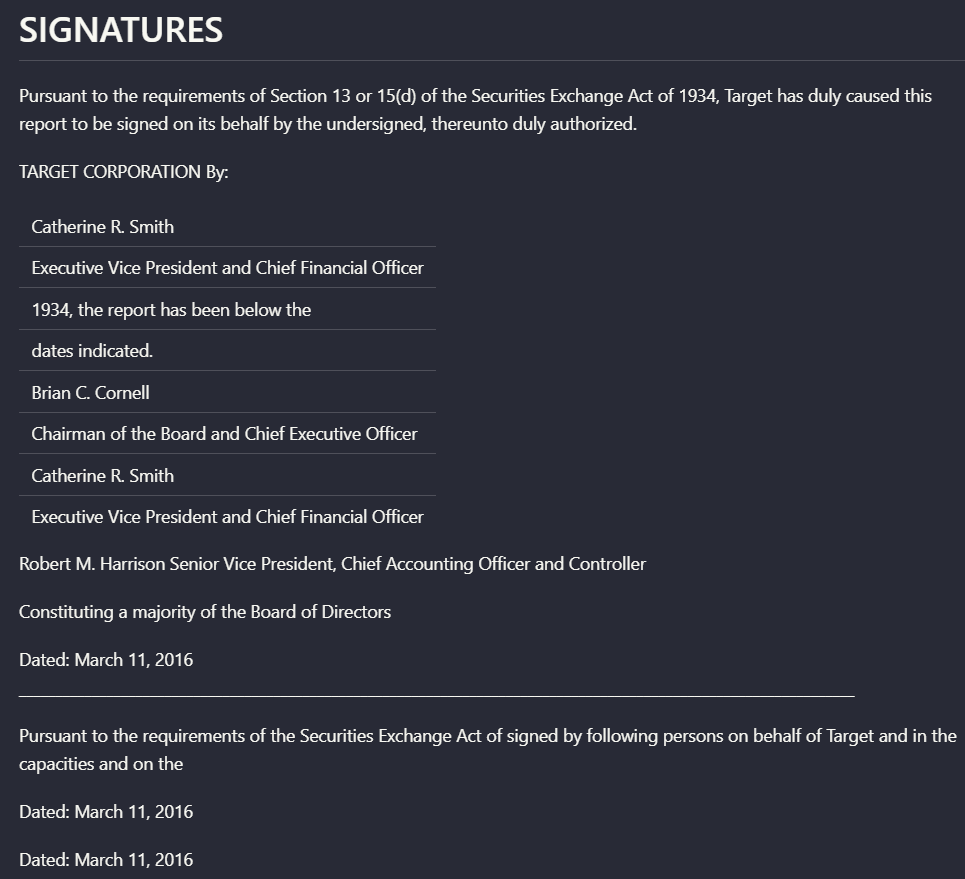
On the scanned signatures page, Nutrient captured the heading, signer names, titles, and dates, but not the handwritten signature marks themselves. The output also repeated some structured lines, reducing completeness and cleanliness.
How it scored on the research's own criteria
The 7 evaluation dimensions from our hands-on research on Nutrient, each judged from recorded runs on 3 test inputs — the same verdicts the ranking page ranks on.
held up partial failed not exercised by this input
| Criterion | Verdict | What the runs showed | Per input | Proof |
|---|---|---|---|---|
| Advanced Features (Bonus) | Mixed3/5Reviewer flagged — not independently verified | It does provide a useful API-key workflow, but I could not verify the richer bonus behaviors like separate table or chart extraction, or low-confidence region flags. So this looks like partial extra capability rather than a standout bonus feature set.UNSUPPORTED_OBSERVATION — The evidence shows the Nutrient API keys dashboard and a Python parse example, but it does not show the criterion's claimed advanced features: separate table/chart extraction or low-confidence OCR / ambiguous-region flags. The 'worked' verdict for this bonus criterion is therefore not verifiable from the artifacts provided. | open proof ↗ | |
| Complex Document Handling | Mixed3/5 | It can finish long, mixed-content documents, but not always through the main interface. Needing a fallback path keeps it from being a strong, seamless performer on bigger files. | open proof ↗ | |
| Markdown Quality | Strong5/5 | The output is clearly usable markdown, not a messy text dump. It can be saved directly to a file and previewed alongside the rendered document, which is exactly what good markdown output should do. | open proof ↗ | |
| Reading Order & Structure | Mixed3/5 | It does a good job on normal section flow and multi-column reading order, but it can stumble on front matter and scanned page sequencing. So the structure is often right, but not consistently enough to call it strong. | open proof ↗ | |
| Table Preservation | Mixed3/5 | It can rebuild simple and moderately structured tables, but it breaks once the headers or groupings get more complex. That lands it in the middle: useful on easier tables, unreliable on dense financial ones. | open proof ↗ | |
| Text & OCR Completeness | Strong4/5 | It usually gets the readable text, including scanned front matter, but it can mangle some dense disclaimer text. That looks like strong OCR coverage with a few partial losses rather than a full failure. | open proof ↗ | |
| Visual Content Retention | Weak2/5 | It occasionally keeps infographic-style material in place, but charts and signatures usually lose their visual form. Because the important visual elements mostly collapse into text, this is a weak area overall. | open proof ↗ |
Verdicts come verbatim from the study's recorded observations, never re-derived at render; a criterion with no recorded run shows Not exercised — this section cannot invent a score.
Pricing & Access
Featured in Rankings
Independent rankings where Nutrient was tested and rated.

Banner Preview
How the embed badge will look on your site

Embed HTML
Copy this code to your website source
Quick Integration Guide
- 1Copy the HTML code block above.
- 2Paste it into your site's HTML or CMS editor.
- 3Banner appears instantly on your page.
- 4Links back to your tool profile here.
Similar Tools
Discover more AI tools like Nutrient to enhance your workflow.
Comments (0)
Need a custom AI solution for this use case?
If you are looking to build a custom PDF to markdown, document parsing, or structured text extraction system for your business or internal workflow, email us at contact@futuresmart.ai.
Found something inaccurate or missing? We try to keep our AI research accurate and useful. If you found outdated information, an issue, or have a suggestion, email us at collaborate@aidemos.com.