productivity · ranking

Best AI Tools for Extracting Structured Data from Business Documents

If you need to turn invoices and bank statements into clean, reviewable JSON, we tested nine AI document tools on a 4-page bank statement and a 2-page invoice. The best tools were the ones that preserved row counts, nested fields, amounts, and line-item or transaction structure without inventing or dropping records.

Tested June 20268 tools4 decisive checks123 findings13 min read
Our pick

Retab

Free · $300/month
4.54 of 4 checks

The only tool that correctly extracted transaction IDs and transaction types across the full bank statement while also preserving all invoice line items and totals.

Catch

Most values were read back cleanly and normalized into usable numbers, dates, and strings. The one recurring snag was a field that kept its source label instead of being trimmed to the requested value, so the result is strong but not perfect.

Pick something else if…

The scoreboard

We rank on the 4 checks that decide whether a tool does this job: Extraction Accuracy, Schema Adherence, Semantic Field Enrichment, Table & Record Completeness. A check only carries a score when we recorded a finding for it, and a tool has to be measured on all of them to take the top spot. We also checked Structural Clean Output — compared for you, but not part of the ranking.

Tool4 decisive checksScoreWhere it lands

Columns, left to right: Extraction Accuracy · Schema Adherence · Semantic Field Enrichment · Table & Record Completeness

Compare

Pick the tools you care about, then compare what they returned or how they scored.

Tools
8 of 8 selected
The output#1

Retab

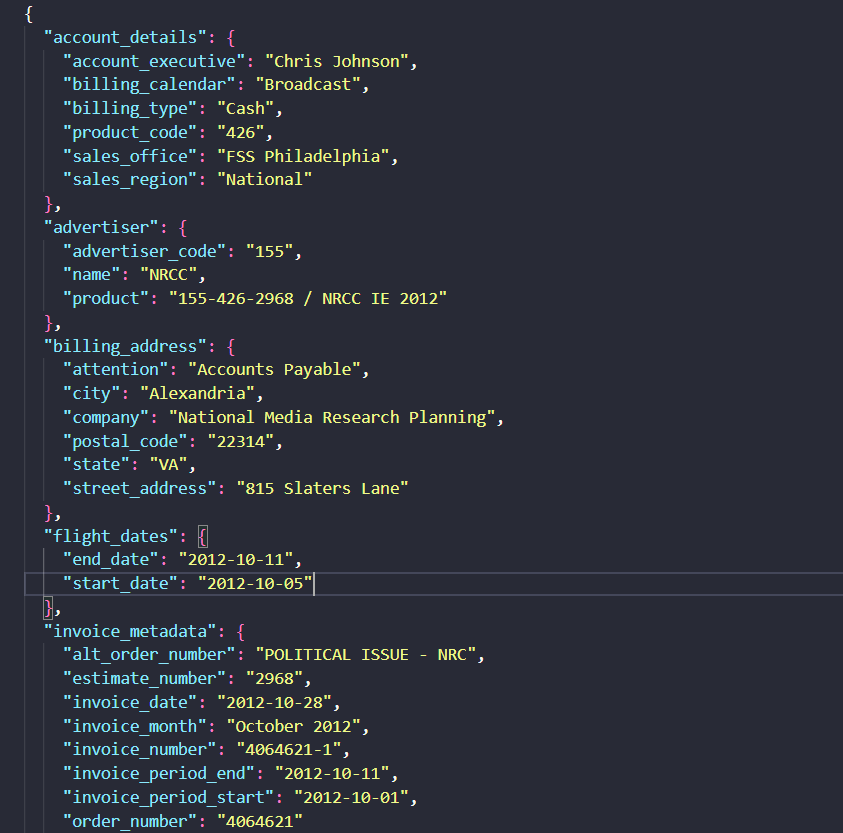
It extracted the invoice into well-formed nested JSON with the metadata, summary totals, and all eight line items intact. A couple of polish issues remained: the payment terms kept their label text, and the key order did not match the requested schema exactly.

research-media-retab-extracted-invoice-metadata-2b6610b8f928.png

The output#2
JSONresearch-media-unstract-invoice-output-e53f3477db06.jsonopen raw ↗

Unstract

It handled the invoice well, kept the line-item row intact across the page break, and got the totals right, but the weekday mask was unreliable and a few IDs had minor spacing issues.

research-media-unstract-invoice-output-e53f3477db06.json

The output#3
Landing AI

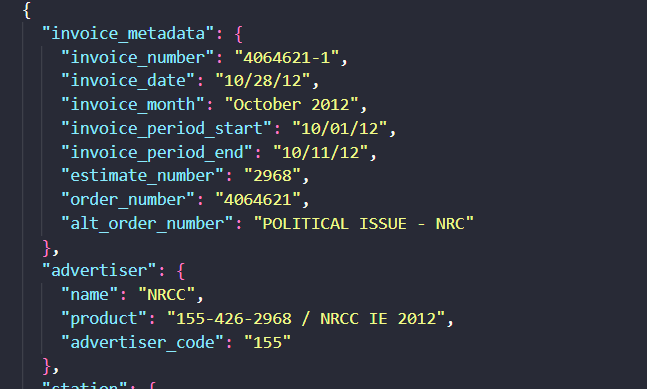
The invoice run produced the requested nested JSON and kept all 8 line items separate, but it left several station fields empty and misread one Ad-ID, so it was strong overall with a few accuracy gaps.

research-media-landing-ai-extracted-invoice-metadata-57a291c39e3d.png

The output#4
Nanonets

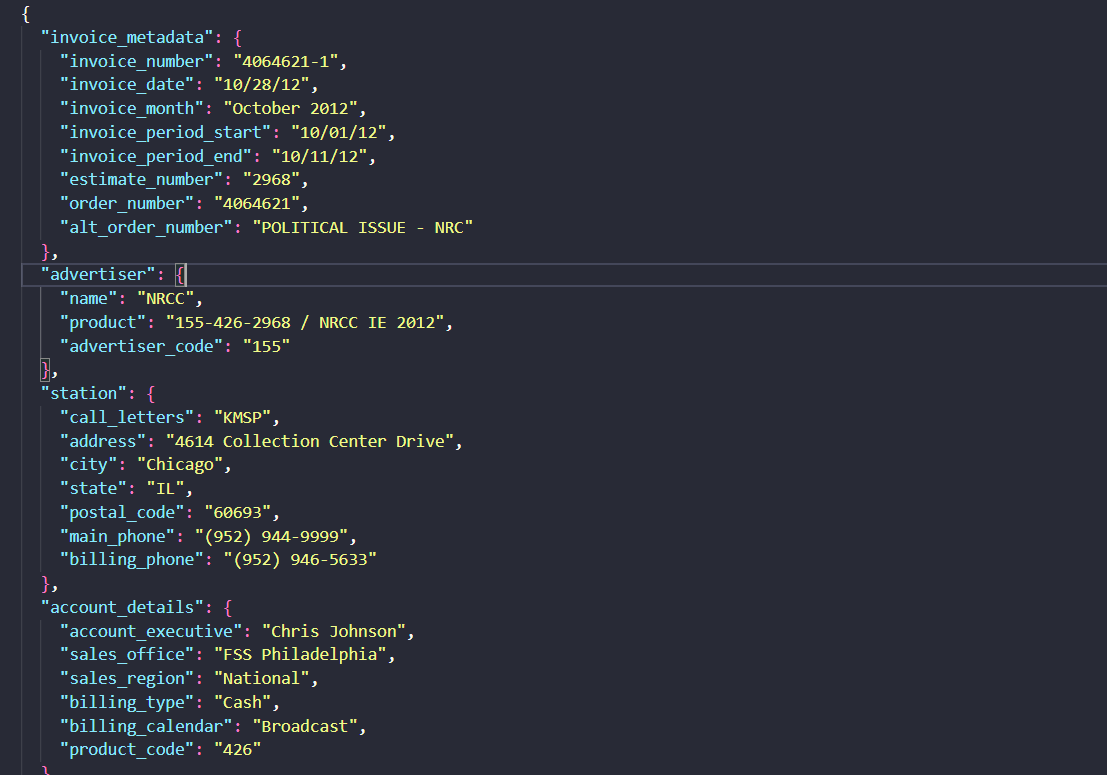
It returned a clean structured invoice export with the metadata and all eight line items in place, but one description was merged with the rate label and line 8 was missing several schedule fields.

017e977e41264794a303ae4a89b68adc.png

The output#5
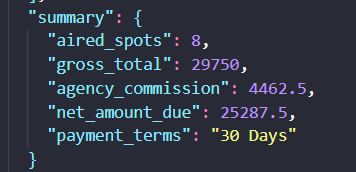
LlamaParse

It returned clean nested invoice metadata, line items, and totals with good field coverage, but it introduced an incorrect extra line item, so the table reconstruction was not fully faithful.

research-media-llamaparse-invoice-summary-9c05de684d8a.png

The output#6
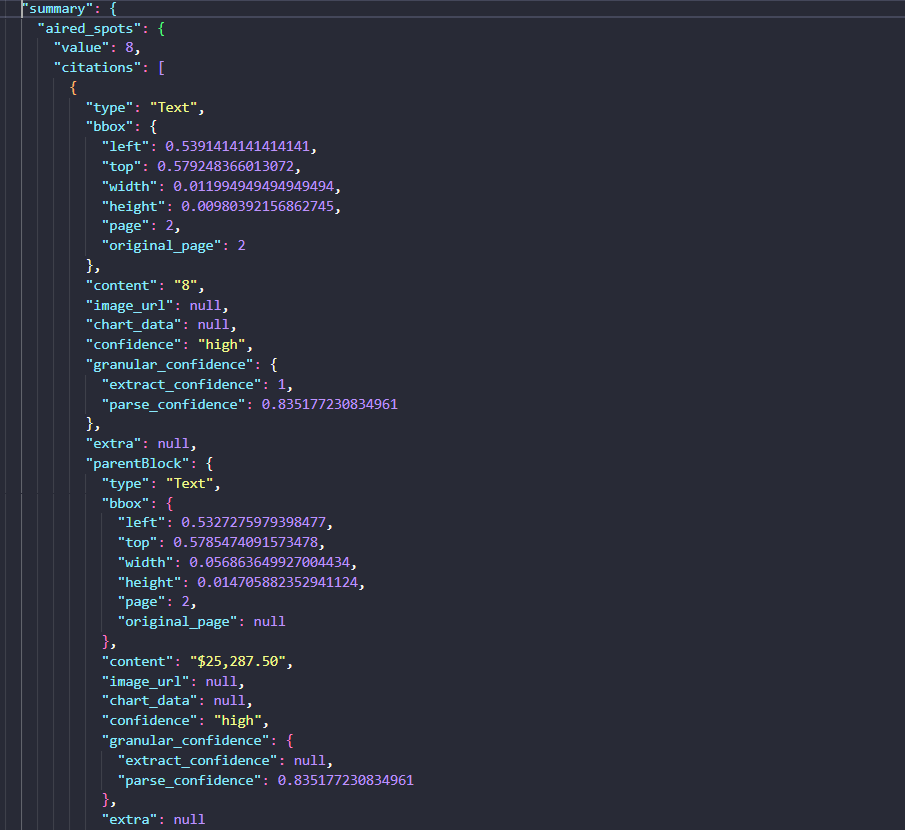
Reducto

It produced a well-structured invoice JSON with all eight line items, correct financial values, and extra metadata fields filled without inventing blank data.

research-media-reducto-invoice-summary-915cda528c4b.png

The output#7
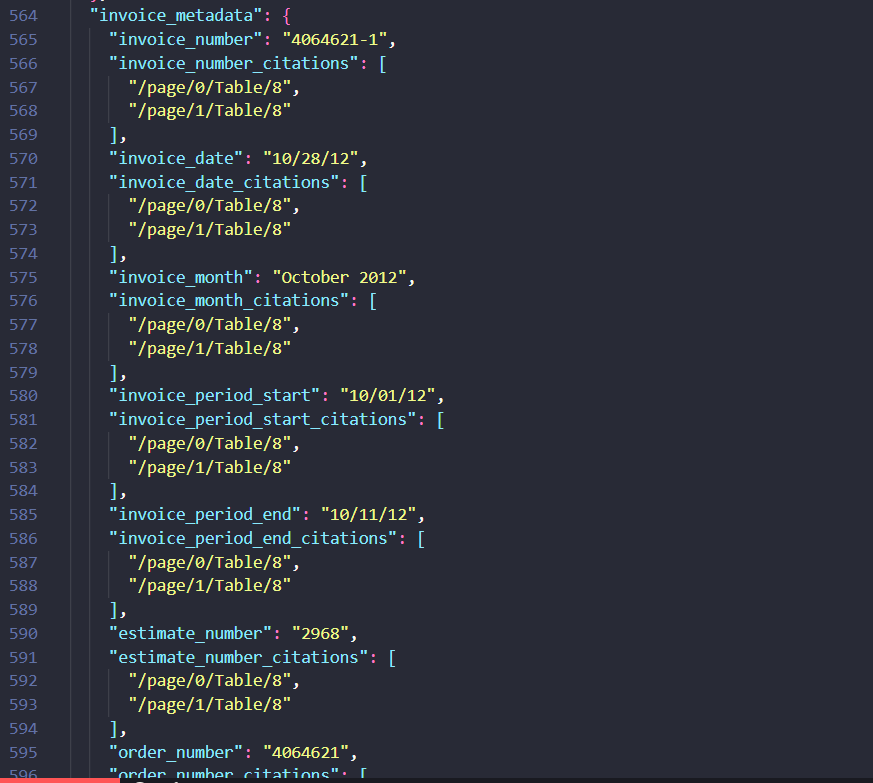
Datalab

It produced a clean, nested invoice extraction that was accurate and complete for the document and line items, with the main flaw being shuffled top-level key order in the JSON.

research-media-datalab-invoice-metadat-1c39e0c1c45e.png

The output#8
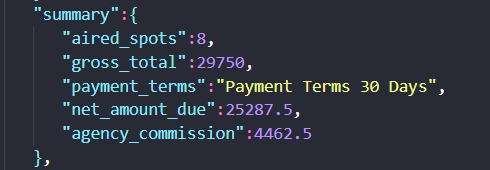
Extend AI

It produced a strong invoice JSON with all eight line items and the main totals, but it carried label text into payment terms and did not keep the schema order exactly as given.

6f879e7a7b8049c2b0491fbb731a0cfa.png
The evidence

All 5 recorded checks per tool. Open a tool to inspect every finding.

Why this score

Most values were read back cleanly and normalized into usable numbers, dates, and strings. The one recurring snag was a field that kept its source label instead of being trimmed to the requested value, so the result is strong but not perfect.

When we tried: Invoice PDF

Extracts invoice metadata with machine-readable values such as invoice_number 4064621-1, invoice_date 2012-10-28, invoice_period_start 2012-10-01, and advertiser_code 155.

permalink to this finding →
In the input
PDFe0e9f678bcde4e29a492a11927fc38f7.pdfopen raw ↗
What came backOutput evidence
e0e9f678bcde4e29a492a11927fc38f7.pdf?v=1
When we tried: Invoice PDF

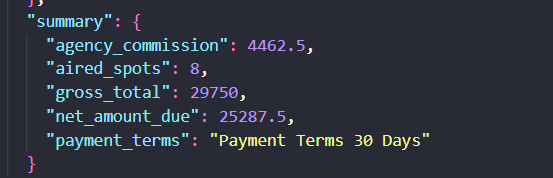
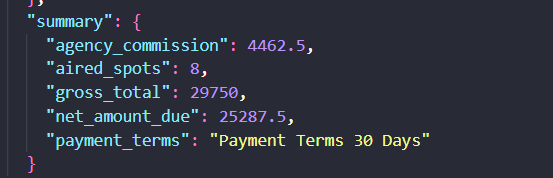
Extracts the invoice summary totals correctly, including agency_commission 4462.5, aired_spots 8, gross_total 29750, and net_amount_due 25287.5.

permalink to this finding →
In the input
PDFe0e9f678bcde4e29a492a11927fc38f7.pdfopen raw ↗
What came backOutput evidence
e0e9f678bcde4e29a492a11927fc38f7.pdf?v=1
When we tried: Bank Statement PDF

Extracts bank-statement account and balance fields into correctly typed values, including account holder 'MR SEENIVASAN', account number '42710540422', opening_balance 114453.65, and closing_balance 116149.46.

permalink to this finding →
When we tried: Bank Statement PDF

Docsumo extracts the bank statement into structured customer, branch, and summary fields, including the account holder name, address, totals, and closing balance, and also supports QA over the document.

permalink to this finding →
When we tried: Invoice PDF

Retains the source label in payment_terms, returning 'Payment Terms 30 Days' instead of only the requested value, so the field is not fully normalized.

permalink to this finding →
In the input
PDFe0e9f678bcde4e29a492a11927fc38f7.pdfopen raw ↗
What came backOutput evidence
e0e9f678bcde4e29a492a11927fc38f7.pdf?v=1
When we tried: Bank Statement PDF

Captures both long bank-statement disclaimer strings as dedicated fields, preserving the insurance_coverage and reporting_period text instead of dropping or flattening it.

permalink to this finding →
In the inputResearch media bank statement 2 jul.png
What came backOutput evidence
Research media bank statement 2 jul.png
Across all tests

It generally extracts bank-statement and invoice fields correctly, including customer, branch, summary, account, balance, and invoice totals/metadata, but one invoice payment_terms field kept the source label instead of only the requested value.

permalink to this finding →

Final Take

Retab is the page’s overall winner, and the scores support that: it’s fully measured on all four decisive checks and lands near the top across the board, with 4.0/5.0 Extraction Accuracy, 5.0/5.0 Schema Adherence, 5.0/5.0 Semantic Field Enrichment, and 4.0/5.0 Table & Record Completeness. The trade-off is that it isn’t perfect, and the card calls out a couple of summary and formatting quirks, so it looks strongest as a balanced end-to-end extractor rather than a flawless one. Landing AI and Unstract are the closest alternatives in the published order, with strong schema-faithful extraction and complete tables, plus clean output, but both trail Retab on Semantic Field Enrichment (3.0/5.0 vs 5.0/5.0). If you care most about machine-readable output and table reconstruction, they remain credible options, but the lower derived-field quality is the main reason they sit behind Retab. Nanonets is the sharpest pick for raw Extraction Accuracy and Schema Adherence, but its weaker Semantic Field Enrichment and Table & Record Completeness keep it below the top tier for this job. Extend AI and Docsumo have useful strengths in structured output, but their lower extraction and/or schema scores make them less balanced for the full workflow. LlamaParse, Reducto, and Datalab are more clearly specialized or incomplete on the decisive checks, especially around completeness and transaction-line fidelity. In short: Retab wins overall; Landing AI or Unstract are the safer backups for clean structured output; Nanonets is best when extraction precision matters more than enrichment and completeness.

Tested as of June 2026 · Will be re-verified monthly
Built by FutureSmart AI — the team behind AI Demos

Need a custom AI solution for this use case?

If you are looking to build a custom document extraction, PDF parsing, or structured data extraction system for your business or internal workflow, email us at contact@futuresmart.ai.

Get a custom build

Found something inaccurate or missing? We try to keep our AI research accurate and useful. If you found outdated information, an issue, or have a suggestion, email us at collaborate@aidemos.com.

Comments (0)

Please Log in to join the discussion.