Quiz Generation
Version 11 published Result

Strong for short PDFs and handwritten notes when you want inferential MCQs, timed practice, and explanation-rich review.
Strong quiz engine, but not yet a complete study system
PDF TO QUIZ is a strong choice for short PDFs and scanned notes when you want inferential MCQs, timer-based practice, and source-grounded explanations. It is less complete as a long-term study system: the free tier only exposed 5 pages of a PDF in this run, YouTube URLs failed, and no spaced-repetition, export, or history workflow was visible.
Explore PDF TO QUIZ in our public benchmarks.
1 published Result
Our detailed analysis of PDF TO QUIZ — features, performance, and real-world testing.
Feature tested: PDF Import and Page Selection
Result: Partial
Verdict: Mixed
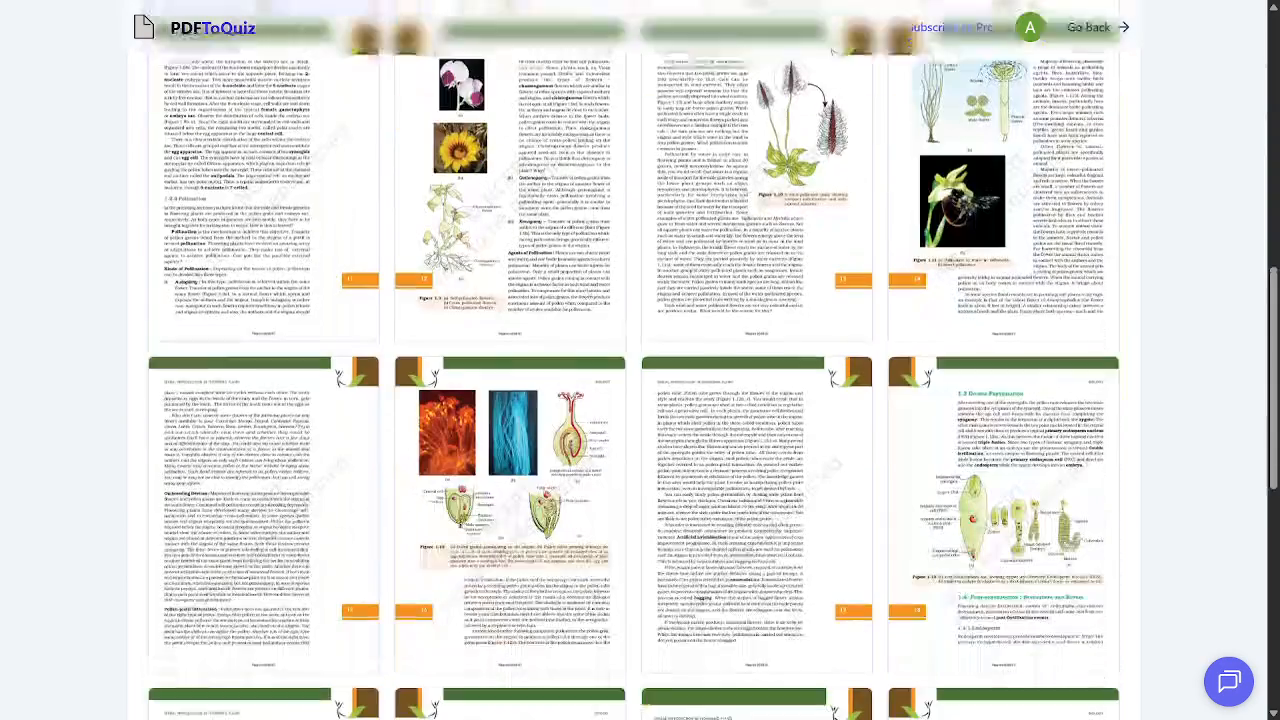
Expected behavior: Imports study PDFs into a thumbnail grid so the user can browse and select pages before generation; one variant also accepts pasted URLs for hosted PDFs. The tested runs showed a visible 5-page free-tier limit and page-browsing behavior on a biology chapter.
Test case: PDF document → Image
Input type: PDF document
Input used: Input artifact (PDF document): Input — input1_primary.pdf
Observed output: Output artifact (Image): The upload/library page shows page thumbnails from the biology PDF and makes the 5-page free-tier limit visible, confirming PDF import and page selection. — Generate-Quizzes-and-Practice-Tests-from-Study-Material-Using-AI__PDF-to-Quiz__01__pdf-upload-5-page-free-limit.png
Input artifact: Input artifact (PDF document): Input — input1_primary.pdf
Output artifact: Output artifact (Image): The upload/library page shows page thumbnails from the biology PDF and makes the 5-page free-tier limit visible, confirming PDF import and page selection. — Generate-Quizzes-and-Practice-Tests-from-Study-Material-Using-AI__PDF-to-Quiz__01__pdf-upload-5-page-free-limit.png
What changed: PDF document transformed into Image
Test case: YouTube video → Image
Input type: YouTube video
Input used: Input artifact (YouTube video): Input
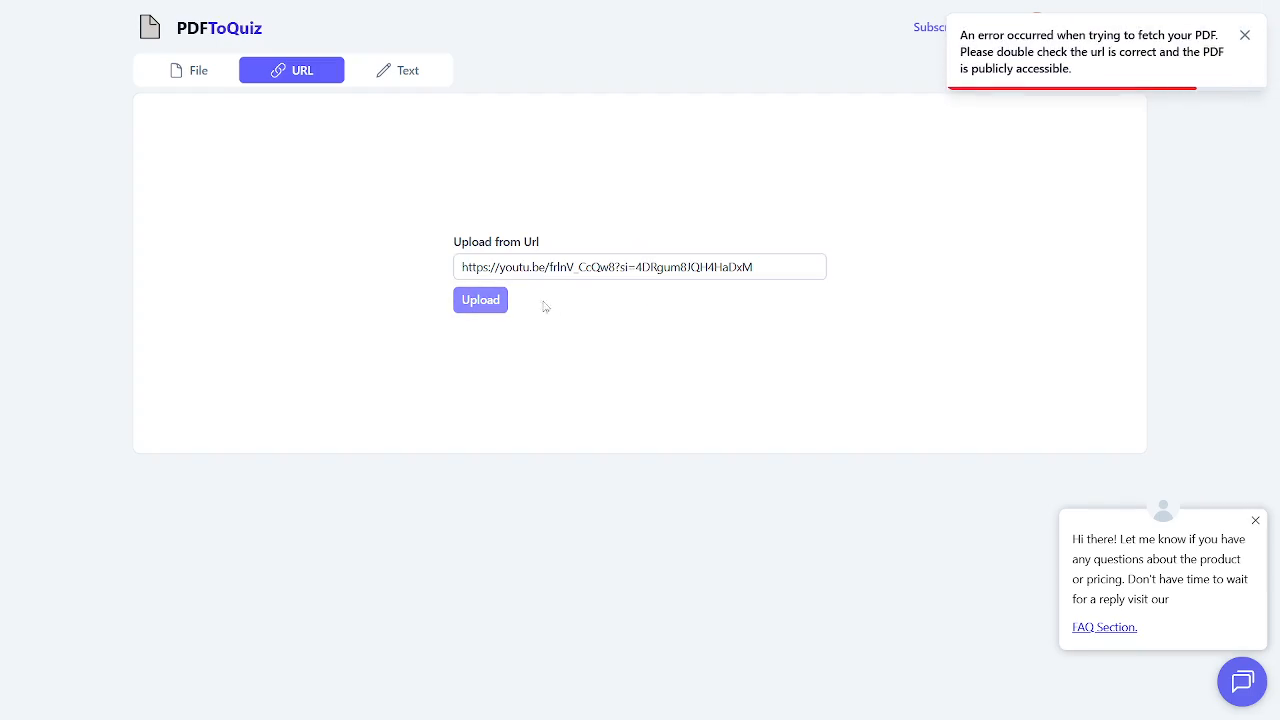
Observed output: Output artifact (Image): The URL upload tab shows an error saying the PDF fetch failed and the URL should be correct and publicly accessible, confirming that the pasted YouTube link was rejected. — Generate-Quizzes-and-Practice-Tests-from-Study-Material-Using-AI__PDF-to-Quiz__06__youtube-url-upload-error.png
Input artifact: Input artifact (YouTube video): Input
Output artifact: Output artifact (Image): The URL upload tab shows an error saying the PDF fetch failed and the URL should be correct and publicly accessible, confirming that the pasted YouTube link was rejected. — Generate-Quizzes-and-Practice-Tests-from-Study-Material-Using-AI__PDF-to-Quiz__06__youtube-url-upload-error.png
What changed: YouTube video transformed into Image
Why it matters / Conclusion: Good for short excerpts; the page cap is a real constraint for longer chapters.
Imports study PDFs into a thumbnail grid so the user can browse and select pages before generation; one variant also accepts pasted URLs for hosted PDFs. The tested runs showed a visible 5-page free-tier limit and page-browsing behavior on a biology chapter.
Feature tested: Document-Based Quiz Generation
Result: Passed
Expected behavior: Turns uploaded study documents into interactive quizzes from both typed PDFs and scanned handwritten notes. In the tested runs, a handwritten biology notes PDF and a typed NCERT biology excerpt both produced reviewable MCQ sets, with questions leaning more toward inference than recall.
Test case: PDF document → Video file
Input type: PDF document
Input used: Input artifact (PDF document): Input — input2_secondary.pdf
Observed output: Output artifact (Video file): Review clip from the handwritten-notes run, showing a generated quiz set with answer review and multiple biology questions sourced from the scanned notes. — out2_handwritten_review.mp4
Input artifact: Input artifact (PDF document): Input — input2_secondary.pdf
Output artifact: Output artifact (Video file): Review clip from the handwritten-notes run, showing a generated quiz set with answer review and multiple biology questions sourced from the scanned notes. — out2_handwritten_review.mp4
What changed: PDF document transformed into Video file
Test case: PDF document → PDF document
Input type: PDF document
Input used: Input artifact (PDF document): Typed NCERT biology source used for the quiz run. — input1_primary.pdf
Observed output: Output artifact (PDF document): Generated 16-question review from the typed PDF, with inferential MCQs, correct answers, and explanations shown in the review flow. — chatgpt_input1_pdf_output.pdf
Input artifact: Input artifact (PDF document): Typed NCERT biology source used for the quiz run. — input1_primary.pdf
Output artifact: Output artifact (PDF document): Generated 16-question review from the typed PDF, with inferential MCQs, correct answers, and explanations shown in the review flow. — chatgpt_input1_pdf_output.pdf
What changed: PDF document transformed into PDF document
Test case: PDF document → PDF document
Input type: PDF document
Input used: Input artifact (PDF document): Scanned handwritten biology notes used to test OCR-based quiz generation. — input2_secondary.pdf
Observed output: Output artifact (PDF document): Generated 10-question review from the handwritten notes, showing that the tool could turn scanned notes into a full quiz session. — chatgpt_input2_handwritten_output.pdf
Input artifact: Input artifact (PDF document): Scanned handwritten biology notes used to test OCR-based quiz generation. — input2_secondary.pdf
Output artifact: Output artifact (PDF document): Generated 10-question review from the handwritten notes, showing that the tool could turn scanned notes into a full quiz session. — chatgpt_input2_handwritten_output.pdf
What changed: PDF document transformed into PDF document
Why it matters / Conclusion: Handwritten OCR worked in practice and produced a usable quiz, not just an upload preview.
Turns uploaded study documents into interactive quizzes from both typed PDFs and scanned handwritten notes. In the tested runs, a handwritten biology notes PDF and a typed NCERT biology excerpt both produced reviewable MCQ sets, with questions leaning more toward inference than recall.
Feature tested: Quiz Setup and Question-Type Controls
Result: Partial
Verdict: Mixed
Expected behavior: Lets the user configure quiz metadata and generation settings such as title, language, difficulty, timed mode, Study Mode, and question count, while also exposing format controls like Multiple Choice, True/False, Fill in the Blank, Long Form, and an AI Supplement Questions toggle.
Test case: Text prompt → Image
Input type: Text prompt
Input used: Input artifact (Text prompt): Input
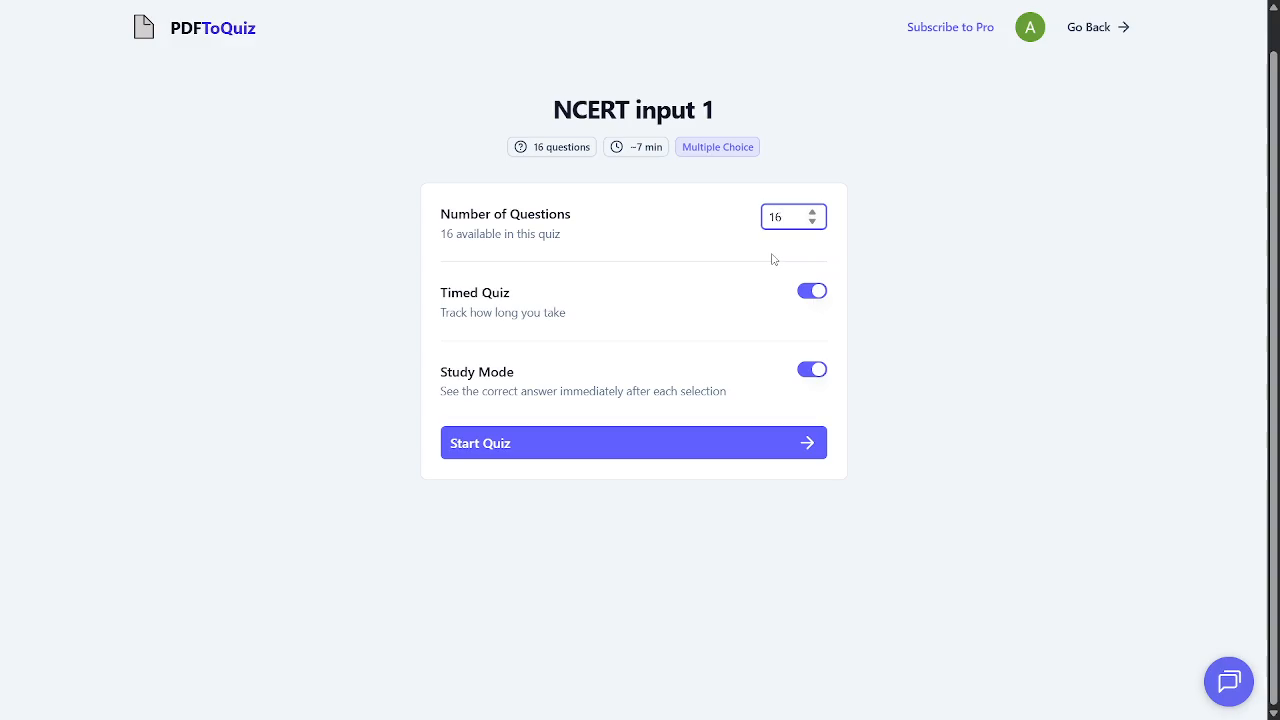
Observed output: Output artifact (Image): The quiz configuration screen shows a 16-question cap for the selected PDF slice and exposes timed quiz and Study Mode controls. — Generate-Quizzes-and-Practice-Tests-from-Study-Material-Using-AI__PDF-to-Quiz__02__quiz-config-16-question-cap.png
Input artifact: Input artifact (Text prompt): Input
Output artifact: Output artifact (Image): The quiz configuration screen shows a 16-question cap for the selected PDF slice and exposes timed quiz and Study Mode controls. — Generate-Quizzes-and-Practice-Tests-from-Study-Material-Using-AI__PDF-to-Quiz__02__quiz-config-16-question-cap.png
What changed: Text prompt transformed into Image
Test case: Text prompt → Image
Input type: Text prompt
Input used: Input artifact (Text prompt): Input
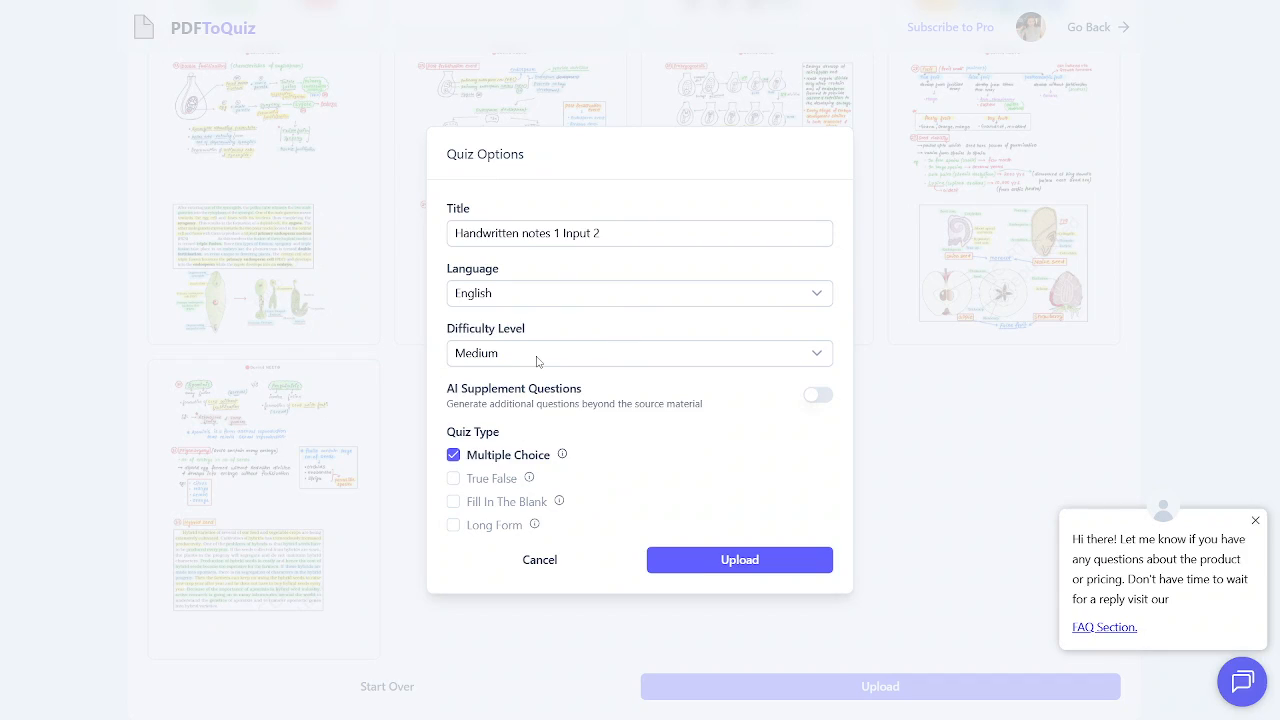
Observed output: Output artifact (Image): The Quiz Options modal shows Multiple Choice, True/False, Fill in the Blank, and Long Form checkboxes, plus an AI Supplement Questions toggle. — Generate-Quizzes-and-Practice-Tests-from-Study-Material-Using-AI__PDF-to-Quiz__08__quiz-options-question-types-and-ai-supplement-toggle.png
Input artifact: Input artifact (Text prompt): Input
Output artifact: Output artifact (Image): The Quiz Options modal shows Multiple Choice, True/False, Fill in the Blank, and Long Form checkboxes, plus an AI Supplement Questions toggle. — Generate-Quizzes-and-Practice-Tests-from-Study-Material-Using-AI__PDF-to-Quiz__08__quiz-options-question-types-and-ai-supplement-toggle.png
What changed: Text prompt transformed into Image
Why it matters / Conclusion: The setup is flexible, but only MCQ was actually exercised in this session.
Lets the user configure quiz metadata and generation settings such as title, language, difficulty, timed mode, Study Mode, and question count, while also exposing format controls like Multiple Choice, True/False, Fill in the Blank, Long Form, and an AI Supplement Questions toggle.
Feature tested: Interactive Quiz Taking and Review
Result: Passed
Verdict: Strong
Expected behavior: Provides a one-question-at-a-time quiz flow with timer, live score counters, Back/Next navigation, restart, and post-submit review tabs for All, Correct, and Incorrect answers.
Test case: PDF document → Image
Input type: PDF document
Input used: Input artifact (PDF document): INPUT: Start the generated MCQ quiz from the typed PDF and answer questions in the live quiz interface. — input1_primary.pdf
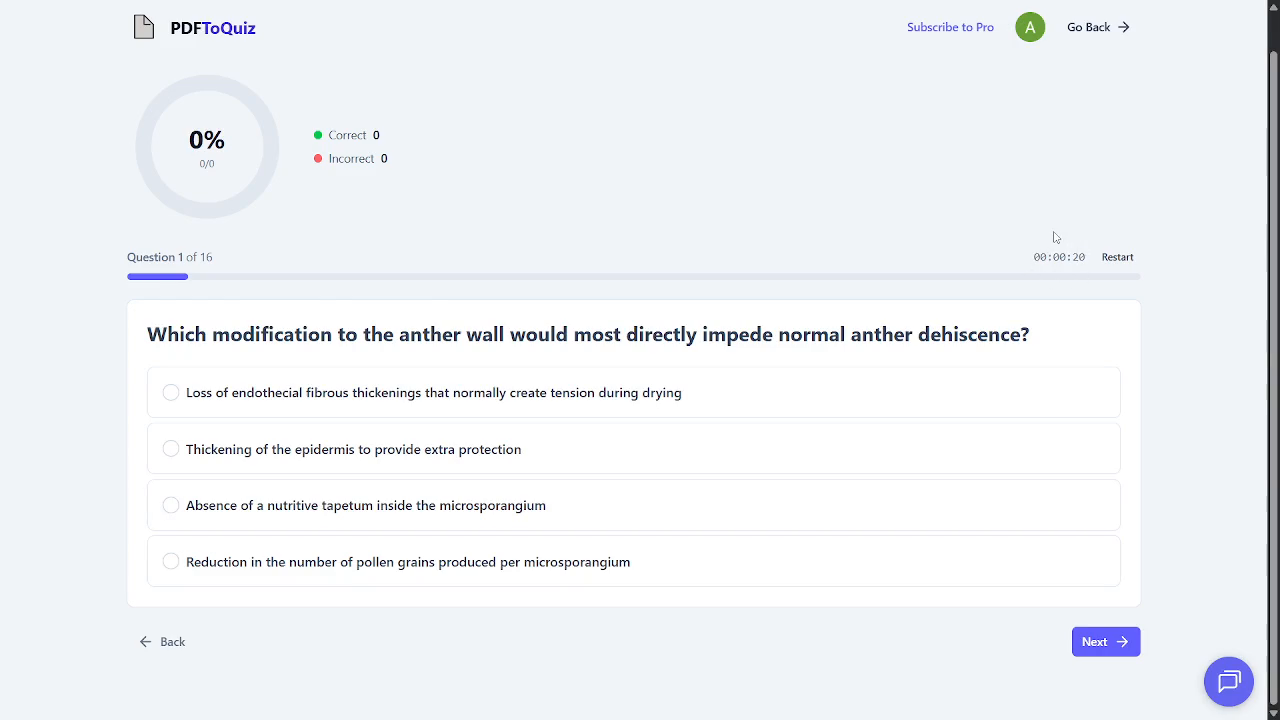
Observed output: Output artifact (Image): The live quiz screen shows a timer, progress, score counters, four answer choices, and Back/Next navigation, confirming a real interactive quiz flow. — Generate-Quizzes-and-Practice-Tests-from-Study-Material-Using-AI__PDF-to-Quiz__03__quiz-question-interface-mcq.png
Input artifact: Input artifact (PDF document): INPUT: Start the generated MCQ quiz from the typed PDF and answer questions in the live quiz interface. — input1_primary.pdf
Output artifact: Output artifact (Image): The live quiz screen shows a timer, progress, score counters, four answer choices, and Back/Next navigation, confirming a real interactive quiz flow. — Generate-Quizzes-and-Practice-Tests-from-Study-Material-Using-AI__PDF-to-Quiz__03__quiz-question-interface-mcq.png
What changed: PDF document transformed into Image
Test case: PDF document → Image
Input type: PDF document
Input used: Input artifact (PDF document): Reviewing the completed quiz after submission. — input1_primary.pdf
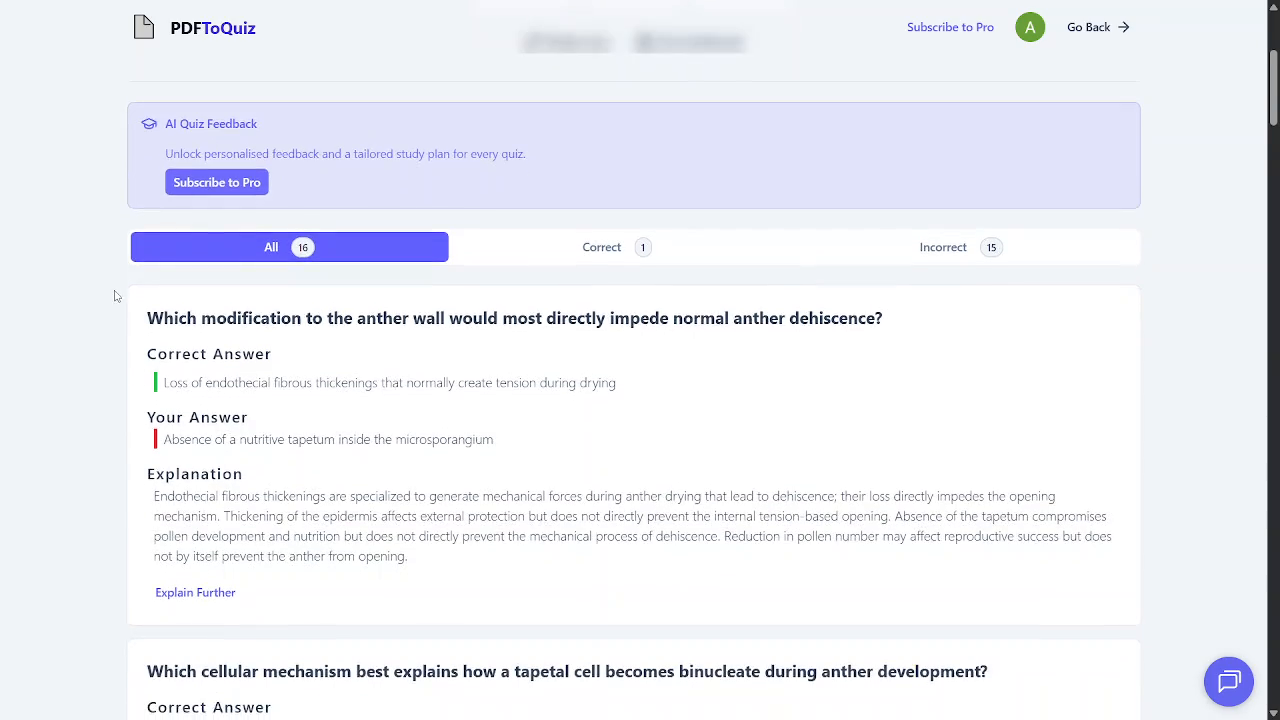
Observed output: Output artifact (Image): Review screen shows the AI feedback banner, All/Correct/Incorrect tabs, the correct answer, the user's answer, and an explanation for the missed question. — Generate-Quizzes-and-Practice-Tests-from-Study-Material-Using-AI__PDF-to-Quiz__04__review-explanation-depth-and-ai-feedback-paywall.png
Input artifact: Input artifact (PDF document): Reviewing the completed quiz after submission. — input1_primary.pdf
Output artifact: Output artifact (Image): Review screen shows the AI feedback banner, All/Correct/Incorrect tabs, the correct answer, the user's answer, and an explanation for the missed question. — Generate-Quizzes-and-Practice-Tests-from-Study-Material-Using-AI__PDF-to-Quiz__04__review-explanation-depth-and-ai-feedback-paywall.png
What changed: PDF document transformed into Image
Test case: PDF document → Video file
Input type: PDF document
Input used: Input artifact (PDF document): INPUT: Review the completed typed-PDF quiz after submission. — input1_primary.pdf
Observed output: Output artifact (Video file): Scrolling review of the typed-PDF quiz showing question cards with Correct Answer, Your Answer, Explanation, and Explain Further links. — out1_pdf_review.mp4
Input artifact: Input artifact (PDF document): INPUT: Review the completed typed-PDF quiz after submission. — input1_primary.pdf
Output artifact: Output artifact (Video file): Scrolling review of the typed-PDF quiz showing question cards with Correct Answer, Your Answer, Explanation, and Explain Further links. — out1_pdf_review.mp4
What changed: PDF document transformed into Video file
Test case: PDF document → Video file
Input type: PDF document
Input used: Input artifact (PDF document): INPUT: Review the completed handwritten-notes quiz after submission. — input2_secondary.pdf
Observed output: Output artifact (Video file): Scrolling review of the handwritten-notes quiz showing multiple generated question cards and the review interface with correct answers and explanations. — out2_handwritten_review.mp4
Input artifact: Input artifact (PDF document): INPUT: Review the completed handwritten-notes quiz after submission. — input2_secondary.pdf
Output artifact: Output artifact (Video file): Scrolling review of the handwritten-notes quiz showing multiple generated question cards and the review interface with correct answers and explanations. — out2_handwritten_review.mp4
What changed: PDF document transformed into Video file
Why it matters / Conclusion: It behaves like a genuine study app rather than a static question list.
Provides a one-question-at-a-time quiz flow with timer, live score counters, Back/Next navigation, restart, and post-submit review tabs for All, Correct, and Incorrect answers.
Feature tested: Answer Explanations and Follow-Up Chat
Result: Passed
Verdict: Strong
Expected behavior: Shows the correct answer, the user’s answer, and written explanations during review, and offers an Explain Further action that opens a separate AI chat for deeper source-grounded follow-up explanation.
Test case: PDF document → Image
Input type: PDF document
Input used: Input artifact (PDF document): INPUT: Review a typed-PDF question about anther wall dehiscence and read the explanation that distinguishes each distractor. — input1_primary.pdf
Observed output: Output artifact (Image): The review screen shows the correct answer, the user's answer, and a multi-part explanation that breaks down why each wrong option fails individually; the AI Quiz Feedback upsell is visible above it. — Generate-Quizzes-and-Practice-Tests-from-Study-Material-Using-AI__PDF-to-Quiz__04__review-explanation-depth-and-ai-feedback-paywall.png
Input artifact: Input artifact (PDF document): INPUT: Review a typed-PDF question about anther wall dehiscence and read the explanation that distinguishes each distractor. — input1_primary.pdf
Output artifact: Output artifact (Image): The review screen shows the correct answer, the user's answer, and a multi-part explanation that breaks down why each wrong option fails individually; the AI Quiz Feedback upsell is visible above it. — Generate-Quizzes-and-Practice-Tests-from-Study-Material-Using-AI__PDF-to-Quiz__04__review-explanation-depth-and-ai-feedback-paywall.png
What changed: PDF document transformed into Image
Test case: PDF document → Image
Input type: PDF document
Input used: Input artifact (PDF document): INPUT: Open Explain Further on a question about why pollen exine is hard. — input1_primary.pdf
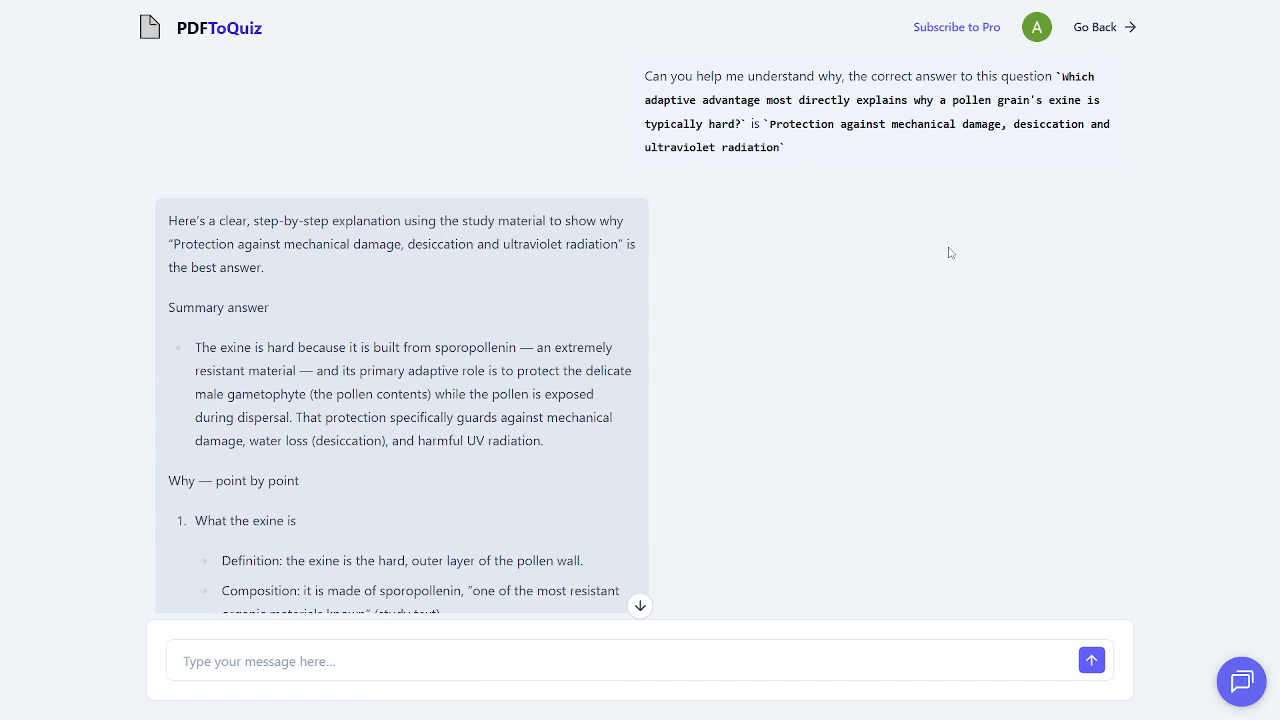
Observed output: Output artifact (Image): The in-app AI chat gives a structured, step-by-step follow-up explanation tied to the study material, with a message box for continuing the conversation. — Generate-Quizzes-and-Practice-Tests-from-Study-Material-Using-AI__PDF-to-Quiz__05__ai-chat-explain-further.png
Input artifact: Input artifact (PDF document): INPUT: Open Explain Further on a question about why pollen exine is hard. — input1_primary.pdf
Output artifact: Output artifact (Image): The in-app AI chat gives a structured, step-by-step follow-up explanation tied to the study material, with a message box for continuing the conversation. — Generate-Quizzes-and-Practice-Tests-from-Study-Material-Using-AI__PDF-to-Quiz__05__ai-chat-explain-further.png
What changed: PDF document transformed into Image
Why it matters / Conclusion: Explanation depth is unusually strong, but the personalized AI feedback layer is paywalled.
Shows the correct answer, the user’s answer, and written explanations during review, and offers an Explain Further action that opens a separate AI chat for deeper source-grounded follow-up explanation.
Independent rankings where PDF TO QUIZ was tested and rated.
How the embed badge will look on your site

Copy this code to your website source
Discover more AI tools like PDF TO QUIZ to enhance your workflow.
If you are looking to build a custom PDF quiz generation, practice question creation, or study review system for your business or internal workflow, email us at contact@futuresmart.ai.
Found something inaccurate or missing? We try to keep our AI research accurate and useful. If you found outdated information, an issue, or have a suggestion, email us at collaborate@aidemos.com.