
StudyX AI
Turns PDFs, handwritten notes, and YouTube lectures into strong MCQ practice with hidden answers and chat-based upgrades.
Strongest on MCQ quality and live study flow
- You want quizzes from typed PDFs, scanned handwritten notes, or YouTube lectures.
- You care most about MCQ distractor quality and immediate explanations.
- You want hidden-answer practice and a live score count during a study session.
- You need export/share, flashcards, or LMS integration confirmed.
Our take
StudyX AI was the strongest performer in this research on native MCQ quality and active-recall flow. It handled typed PDFs, scanned handwritten notes, and YouTube input, hid answers by default, and added explanations plus a live score count; the main tradeoffs are that non-MCQ formats rely on chat prompts and credits, and the longer-term study loop features were not demonstrated.
In-Depth Review
Our detailed analysis of StudyX AI — features, performance, and real-world testing.
Feature-by-Feature Breakdown
Quiz Generation from Study MaterialsWorked well across typed PDF, scanned handwritten notes, and YouTube input.▾
Feature tested: Quiz Generation from Study Materials
Result: Passed
Verdict: Worked well across typed PDF, scanned handwritten notes, and YouTube input.
Expected behavior: StudyX AI can turn study materials into quizzes from multiple source formats, including a typed NCERT PDF, a scanned handwritten-notes PDF, and a YouTube lecture URL.
Test case: PDF document → Image
Input type: PDF document
Input used: Input artifact (PDF document): INPUT — input1_primary.pdf
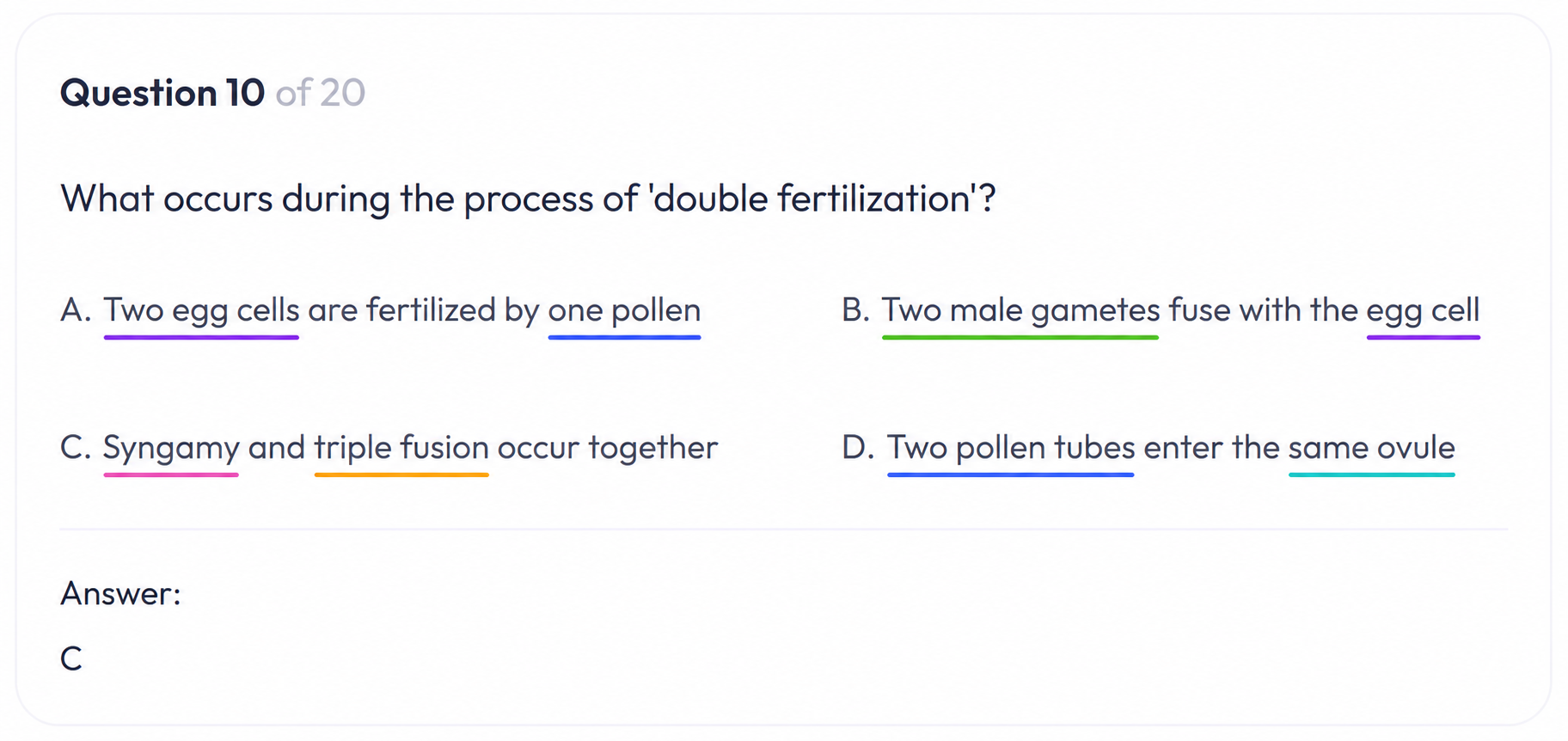
Observed output: Output artifact (Image): The native MCQ options on the double-fertilization question were closely related, with option C marked correct. — out1_pdf_mcq_options.png
Input artifact: Input artifact (PDF document): INPUT — input1_primary.pdf
Output artifact: Output artifact (Image): The native MCQ options on the double-fertilization question were closely related, with option C marked correct. — out1_pdf_mcq_options.png
What changed: PDF document transformed into Image
Test case: PDF document → Video file
Input type: PDF document
Input used: Input artifact (PDF document): INPUT — input2_secondary.pdf
Observed output: Output artifact (Video file): The scanned handwritten notes were read successfully and turned into a quiz covering water for fertilization, mature embryo sac structure, tapetum, and filiform apparatus. — out2_handwritten_output.mp4
Input artifact: Input artifact (PDF document): INPUT — input2_secondary.pdf
Output artifact: Output artifact (Video file): The scanned handwritten notes were read successfully and turned into a quiz covering water for fertilization, mature embryo sac structure, tapetum, and filiform apparatus. — out2_handwritten_output.mp4
What changed: PDF document transformed into Video file
Test case: YouTube video → Image
Input type: YouTube video
Input used: Input artifact (YouTube video): YouTube lecture input
Observed output: Output artifact (Image): The YouTube lecture was ingested directly, and the resulting quiz questions were relevant enough to go beyond basic recall. — out3_youtube_good_questions.png
Input artifact: Input artifact (YouTube video): YouTube lecture input
Output artifact: Output artifact (Image): The YouTube lecture was ingested directly, and the resulting quiz questions were relevant enough to go beyond basic recall. — out3_youtube_good_questions.png
What changed: YouTube video transformed into Image
Test case: PDF document → Video file
Input type: PDF document
Input used: Input artifact (PDF document): INPUT — input1_primary.pdf
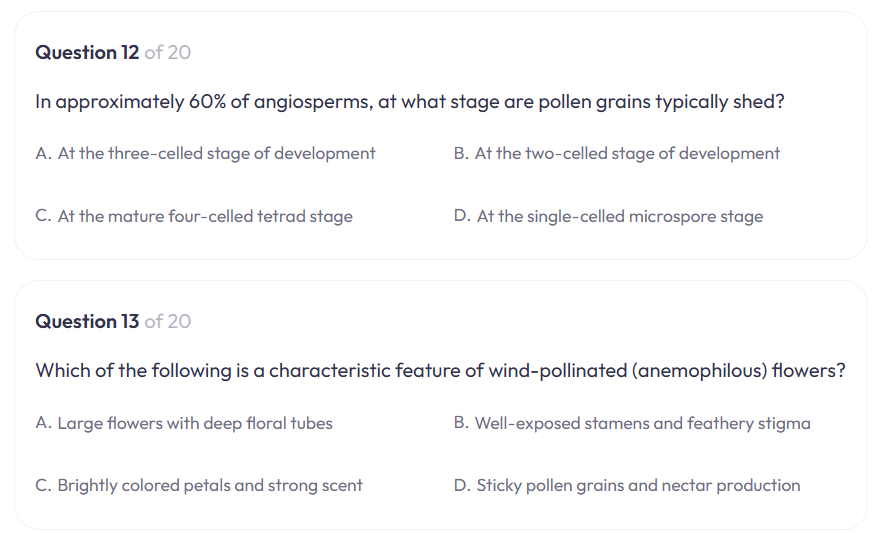
Observed output: Output artifact (Video file): The typed NCERT chapter produced a 20-question quiz with conceptually relevant options and explanations on botany topics such as pollination, embryo sac structure, and seed development. — out1_ncert_output.mp4
Input artifact: Input artifact (PDF document): INPUT — input1_primary.pdf
Output artifact: Output artifact (Video file): The typed NCERT chapter produced a 20-question quiz with conceptually relevant options and explanations on botany topics such as pollination, embryo sac structure, and seed development. — out1_ncert_output.mp4
What changed: PDF document transformed into Video file
Test case: YouTube video → Video file
Input type: YouTube video
Input used: Input artifact (YouTube video): INPUT
Observed output: Output artifact (Video file): The direct YouTube URL was accepted without a pasted transcript and produced a quiz output page for the same chapter. — out3_youtube_output.mp4
Input artifact: Input artifact (YouTube video): INPUT
Output artifact: Output artifact (Video file): The direct YouTube URL was accepted without a pasted transcript and produced a quiz output page for the same chapter. — out3_youtube_output.mp4
What changed: YouTube video transformed into Video file
Why it matters / Conclusion: Strongest on typed PDFs, but handwritten OCR and direct YouTube ingestion also worked.
StudyX AI can turn study materials into quizzes from multiple source formats, including a typed NCERT PDF, a scanned handwritten-notes PDF, and a YouTube lecture URL.
Active Recall Quiz InterfaceGood for self-directed recall, but the reveal is user-controlled rather than locked.▾
Feature tested: Active Recall Quiz Interface
Result: Partial
Verdict: Good for self-directed recall, but the reveal is user-controlled rather than locked.
Expected behavior: StudyX AI runs quizzes with answers hidden by default and lets learners reveal answers and explanations after attempting each question, supporting manual self-testing during a practice session.
Test case: Text prompt → Image
Input type: Text prompt
Input used: Input artifact (Text prompt): INPUT
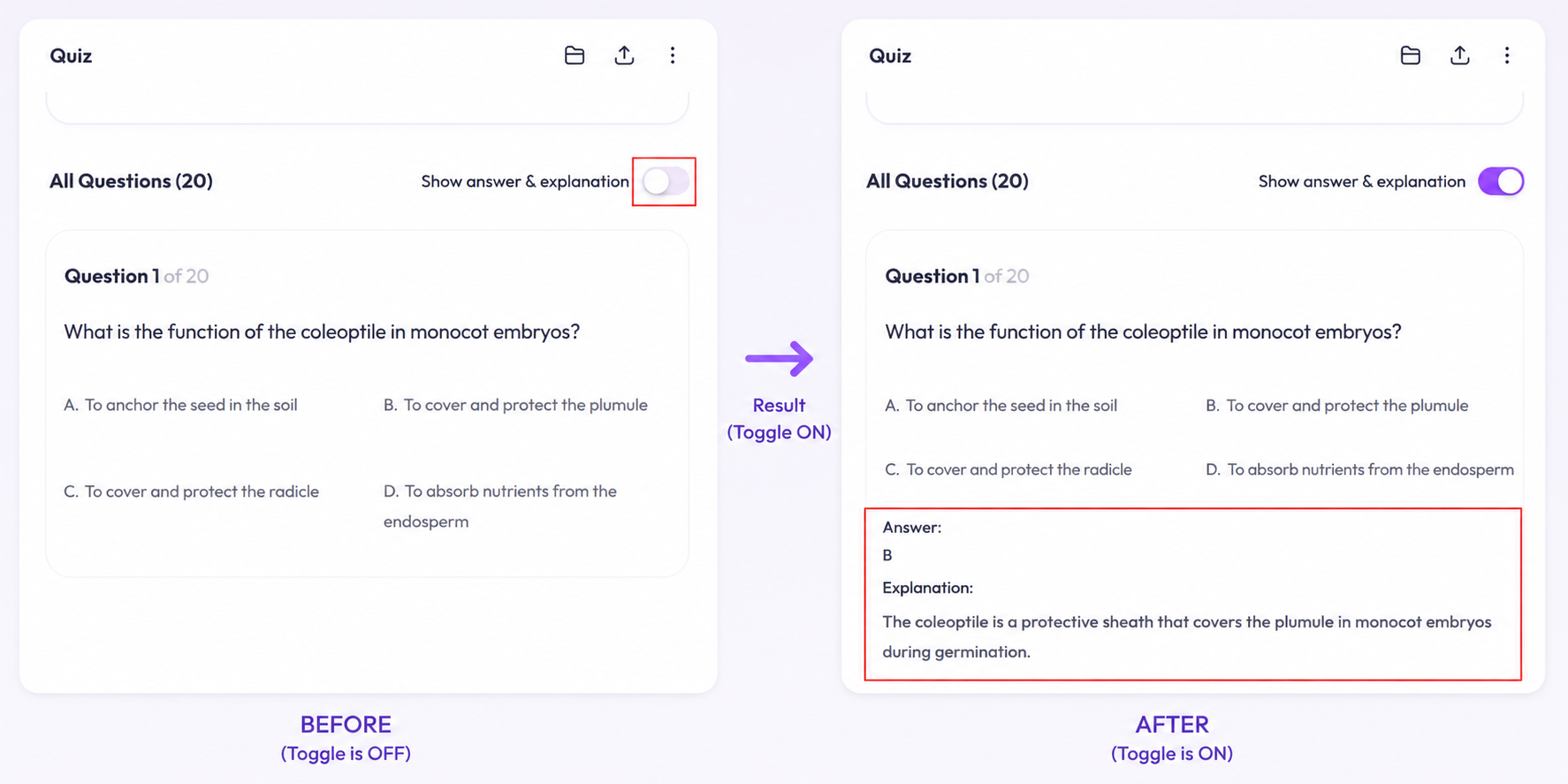
Observed output: Output artifact (Image): The quiz keeps the answer behind a 'Show answer & explanation' toggle, so the learner can attempt first and then reveal the explanation. — out1_answer_hidden.png
Input artifact: Input artifact (Text prompt): INPUT
Output artifact: Output artifact (Image): The quiz keeps the answer behind a 'Show answer & explanation' toggle, so the learner can attempt first and then reveal the explanation. — out1_answer_hidden.png
What changed: Text prompt transformed into Image
Why it matters / Conclusion: Good for active recall practice, but the tool does not prevent answer-peeking.
StudyX AI runs quizzes with answers hidden by default and lets learners reveal answers and explanations after attempting each question, supporting manual self-testing during a practice session.
Question Type Conversion and RewritingUseful add-on for non-MCQ practice and question restyling, but it depends on chat prompts and credits.▾
Feature tested: Question Type Conversion and Rewriting
Result: Partial
Verdict: Useful add-on for non-MCQ practice and question restyling, but it depends on chat prompts and credits.
Expected behavior: StudyX AI can transform chapter content into other question formats and restyle questions, including true/false, fill-in-the-blanks, short-answer, and more application-style prompts.
Test case: Text prompt → Video file
Input type: Text prompt
Input used: Input artifact (Text prompt): INPUT
Observed output: Output artifact (Video file): The chat pane generated fill-in-the-blanks and short-answer prompts from the same chapter, showing that non-MCQ formats are possible through chat. — out1_chat_truefalse_fillinblanks.mp4
Input artifact: Input artifact (Text prompt): INPUT
Output artifact: Output artifact (Video file): The chat pane generated fill-in-the-blanks and short-answer prompts from the same chapter, showing that non-MCQ formats are possible through chat. — out1_chat_truefalse_fillinblanks.mp4
What changed: Text prompt transformed into Video file
Test case: Text prompt → Image
Input type: Text prompt
Input used: Input artifact (Text prompt): INPUT
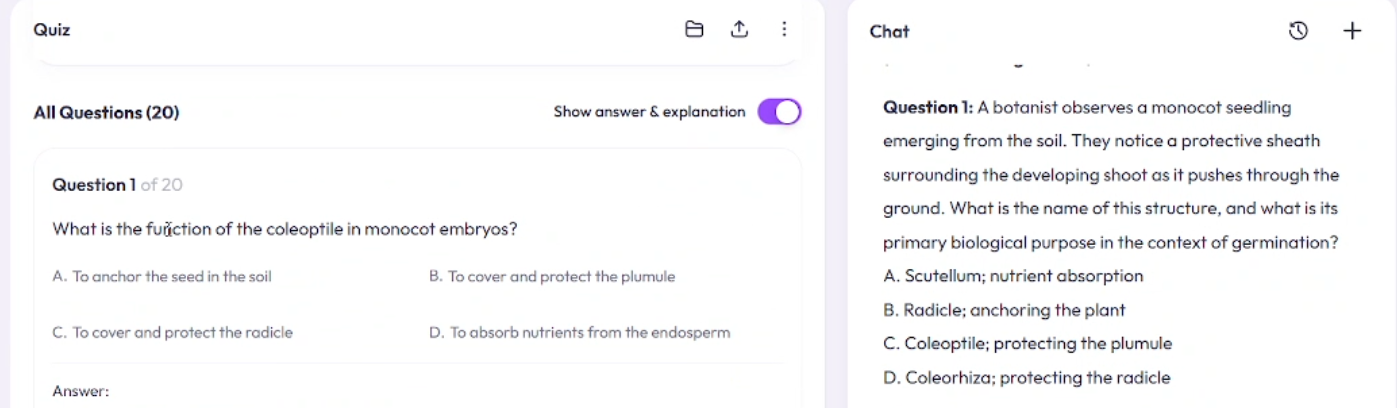
Observed output: Output artifact (Image): The original coleoptile question was rewritten into a scenario-style MCQ while keeping the same underlying concept. — out_reframed_question.png
Input artifact: Input artifact (Text prompt): INPUT
Output artifact: Output artifact (Image): The original coleoptile question was rewritten into a scenario-style MCQ while keeping the same underlying concept. — out_reframed_question.png
What changed: Text prompt transformed into Image
Why it matters / Conclusion: Works well for format expansion and question restyling, but the extra chat step and credit cost make it a secondary workflow.
StudyX AI can transform chapter content into other question formats and restyle questions, including true/false, fill-in-the-blanks, short-answer, and more application-style prompts.
In-Session Score TrackingShows a live correct/incorrect count during the session.▾
Feature tested: In-Session Score Tracking
Result: Partial
Verdict: Shows a live correct/incorrect count during the session.
Expected behavior: StudyX AI tracks correct and incorrect answers during an active quiz and shows a live score card for immediate feedback within the session.
Test case: Text prompt → Image
Input type: Text prompt
Input used: Input artifact (Text prompt): INPUT
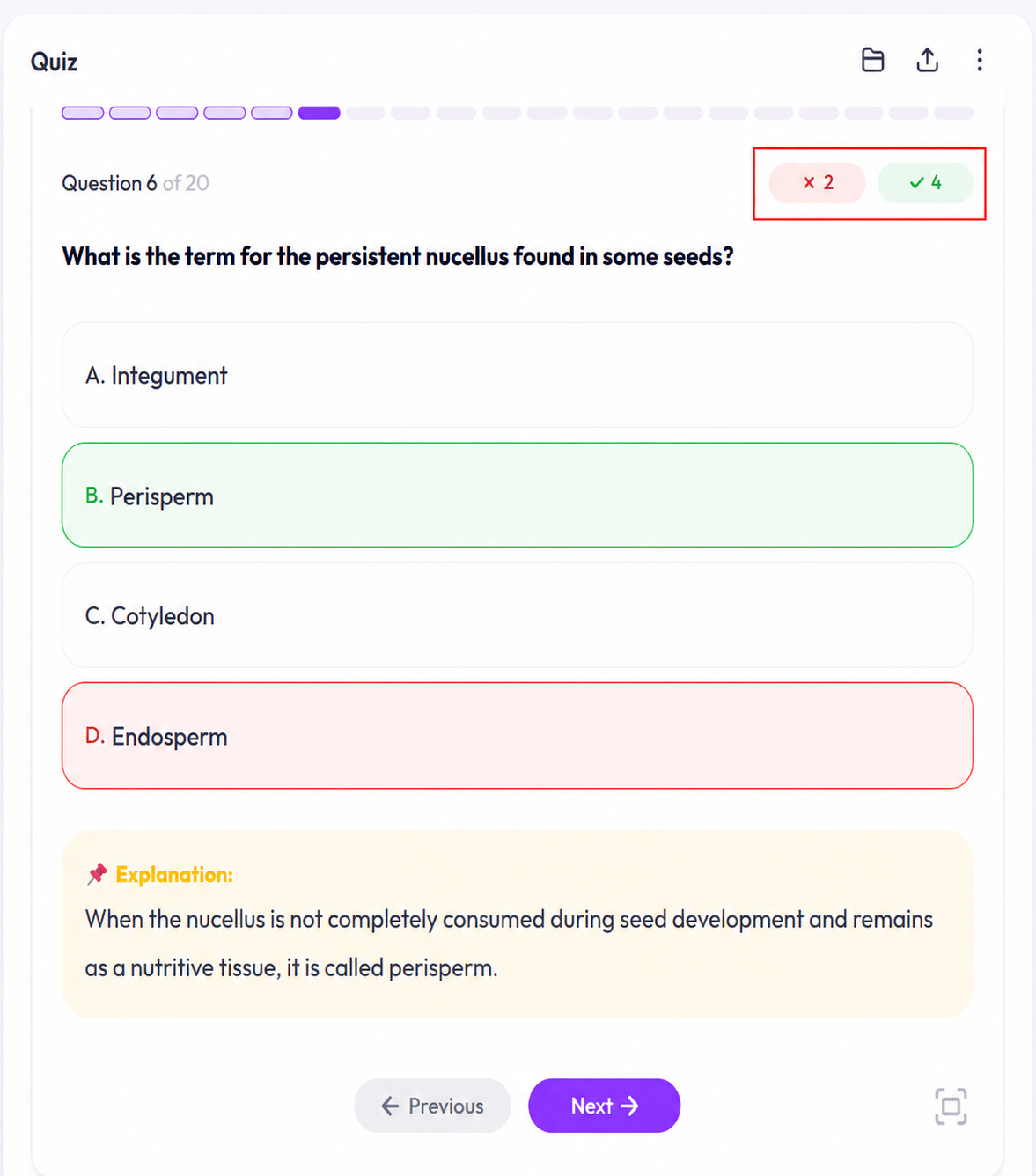
Observed output: Output artifact (Image): The score card shows correct and incorrect counts updating within the quiz session. — out1_score_tracker.png
Input artifact: Input artifact (Text prompt): INPUT
Output artifact: Output artifact (Image): The score card shows correct and incorrect counts updating within the quiz session. — out1_score_tracker.png
What changed: Text prompt transformed into Image
Why it matters / Conclusion: Useful for immediate feedback in a single sitting, but no persistent progress history was demonstrated.
StudyX AI tracks correct and incorrect answers during an active quiz and shows a live score card for immediate feedback within the session.
Free tier tested
Credits-based usage was observed during the test session.
Paid tiers were not tested.
Featured in Rankings
Independent rankings where StudyX AI was tested and rated.
Banner Preview
How the embed badge will look on your site

Embed HTML
Copy this code to your website source
Quick Integration Guide
- 1Copy the HTML code block above.
- 2Paste it into your site's HTML or CMS editor.
- 3Banner appears instantly on your page.
- 4Links back to your tool profile here.
Similar Tools
Discover more AI tools like StudyX AI to enhance your workflow.
Comments (0)
Need a custom AI solution for this use case?
If you are looking to build a custom study material conversion, MCQ generation, or exam prep assistant for your business or internal workflow, email us at contact@futuresmart.ai.
Found something inaccurate or missing? We try to keep our AI research accurate and useful. If you found outdated information, an issue, or have a suggestion, email us at collaborate@aidemos.com.